Jan 8, 2016
amund7 Hi,
I've recently upgraded to windows 10. Not sure if related, but the map (location tab) is acting up. It seems that the map is showing correctly at startup, sometimes I have to zoom a bit to wake it up. But when the car starts moving, the map edges scrolling in are just gray, no map.
Anyone have a solution?�
Jan 8, 2016
MarcG I'm having the same issue on my Mac, but even worse: I get no maps to load at all, in either normal map or satellite view. I'm guessing it's a Java update that broke it since it's happening across platforms.�
Jan 11, 2016
rtandon87 Can't launch App on iMac.
Downloaded the VisibleTesla App on my iMac, both the latest and experimental version. Unzipped and can't launch the program. A window pops up and then closes. Going to JavaAppLauncher to be able to see on Terminal, I get:
View attachment Error.txt�
Jan 14, 2016
AWDtsla Lacking a better place to post this:
Anyone seeing that the car seems to "wake up" often, and then it reports internal/external temperature along with front defrost mode being on? Has -0.3/-0.4 battery current when this happens too, for long arbitrary periods of time.
The Tesla app doesn't show anything different except for report interior temp during this period.�
Jan 14, 2016
Duma Well, those error messages are a symptom, likely not the real problem. I am not primarily a Mac person, so I am not sure of the typical way to launch this App on a Mac.
My first hunch is that you may be running Java8. Unfortunately VisibleTesla uses some features from Java7 that don't work with version 8.
Did you already have Java installed on the Mac, and do you know the version? The zip file should include a copy of Java7 and you need to make sure that you use that copy rather than the Java installed on your Mac. I'll have to defer to a Mac person on how to make that happen.�
Jan 14, 2016
araxara The Mac version contains a bundled version of the correct Java runtime and is standalone and does not depend on the Java installed in the system. The latest Version is 0.50.08 and can be downloaded here: 0.50.08 It's a single executable program and requires nothing else.�
Jan 16, 2016
rtandon87 Thank you. That worked! Can the trips data be viewed using the app anytime? Or does the app have to be running on my mac at all times for it to gather the trips data?�
Jan 16, 2016
araxara The app has to run all the time for logging to occur.�
Jan 16, 2016
Duma And while it may be obvious, once the data is logged, it is stored permanently on your local computer and can be reviewed at any time.
Also, while it is unknown what data Tesla retains on its servers, or for what length of time, the Tesla API available to VisibleTesla only provides current data in real time. In addition to having VisibleTesla running to log data, the car needs to have a 3G/LTE connection. Data is not buffered and can be lost if the car does not have network connectivity. So it is not perfect but it is still amazingly more than any other car even offers.
Insurance companies now have gadgets that seem to collect similar information but you aren't given access to the data. (And why I won't play even to get a lower rate.)�
Jan 20, 2016
cstromme So I haven't used VisibleTesla in quite some time, but with the recent crazy snowfall and cold temperatures I decided to set it up again so that I could have the car warm and frost-free in the mornings. However when I try to login with my email and password I just get told that login failed and to check my credentials. However the same email address and password work just fine in the app and on my.teslamotors.com.
Anybody have any idea what might be wrong here?�
Jan 20, 2016
Andyw2100 Yes.
�
Jan 20, 2016
cstromme Thank you! �
�
Jan 21, 2016
cstromme If I need more than 30 minutes of pre-heating, can I just set up 2 different scheduler tasks for the same day but > 30 minutes apart?�
Jan 22, 2016
S85D I am having the same problem of not being able to log onto Visible Tesla on my MacBook Pro. I have downloaded version 28.00 and 29.00 and continue to get the message that the login failed and to check my credentials.�
Jan 22, 2016
SteveS0353 You needed to read the rest of Andyw2100's reply. You actually need the latest version of VT, which is 0.50.08. Since the original version of VisibleTesla, Tesla made some major changes to the authentication process, which required a major change to VisibleTesla. Joe (VisibleTesla author) explains the background in this post -> VisibleTesla - Page 154
You need the version of the software available in this post -> VisibleTesla - Page 174�
Jan 22, 2016
S85D Thanks for getting me to the .050.08 version of the software. Stupid me was going to the VisibleTesla.com website and clicking on the download links there. The latest version there is 29.00.
This is a great program and I appreciate all of Joe's efforts.�
Jan 22, 2016
Andyw2100 Thanks for getting him to actually read the information I had provided, SteveS0353, and for giving me credit for having provided it.
I include the link to the post whenever anyone has the issue you were having, instead of a version number, as the version number could be out of date. I just assume Joe will always have the most current version available at that link.�
Jan 28, 2016
Tazmanian Anyone already managed to have this running on a Synology NAS?�
Jan 29, 2016
O-G Can't Access jarfile
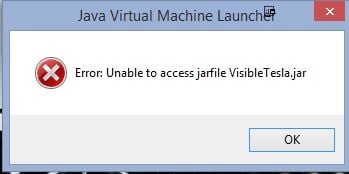
I'm trying to get this set up for the first time. Running windws 8.1. Working with version 50.08 but I keep getting this error when I try to run it. Any ideas?
Update: I finally got something to work. I see a disclaimer though that says Tesla may restrict the use of the corporate app if you use this program. Is that really true? Anyone had that happen?�
Jan 29, 2016
Andyw2100 I believe that's a reference to the possible throttling that Tesla could implement. If they were to do that, based on your VT usage, your use of their app would also be affected. I don't believe this has been an issue for anyone in quite some time. Just be reasonable with how you set up VT, and don't have it report back every second or something.�
Jan 29, 2016
MarcG Yeah I've been running VT for over a year now and have never been throttled by Tesla. I do have it set to allow the car to "sleep" at night, which means VT only polls the API every 30 minutes or so. When the car is idle but not sleeping, the polling interval is around 4 minutes. Neither of these are editable from the user interface (you'd have to change the code and recompile).
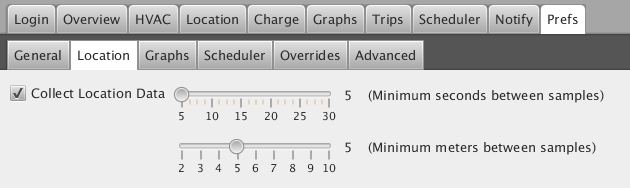
Also, you can't set the polling interval to less than 5 seconds when the car is driving, but Tesla is collecting that data anyway so it's not like you're adding excess strain on their servers:
 �
�
Feb 3, 2016
ianBlackburn This software looks interesting but my model S is not detected properly? It stats a 70D when it is actually a 90D, and the pano has also not been detected.
Is this a known issue? Running v 0.50.08�
Feb 3, 2016
Andyw2100 You can change some of the settings that are read incorrectly from the car under preferences / overrides. It looks like there may not yet be an option for a 90D. You can definitely set the pano roof, though.�
Feb 3, 2016
Andyw2100 Wrong thread, Bert.
Allen supports RemoteS. Joe wrote VT, though I'm not sure he's been doing much work on it lately.�
Feb 3, 2016
BertL Yes, yes. Sorry.�
Feb 3, 2016
ianBlackburn Thanks Andy - I'll give that a try.�
Feb 8, 2016
mspohr Battery voltage?
The Charge page shows lots of charging data but does not seem to show the battery voltage. When Supercharging it shows battery voltage inside the car. It would be useful if it was shown on the VisibleTesla Charge screen when charging.
When charging, I'd like to monitor input voltage * current = power and batter voltage * current to get an estimate of the charging overhead of the system (inverter losses, coolant pumps, etc.).
For instance, right now I show 40 amps at 239 volts = 9560 watts going into the car and a battery current of 25.1 but no battery voltage. The state of charge is 33% and Charge Rate is 29.8mph. Could either of these be used to derive the power going into the battery?
Is the battery voltage available in the API?�
Feb 13, 2016
simonog Surely the voltage is the same: the current going into the battery times the supply voltage is the power going in.�
Feb 13, 2016
mspohr The inverter steps up line voltage to battery voltage to charge the battery. This increases as the battery takes on charge.�
Feb 13, 2016
scaesare Actually, it's the charger that does that. It rectifies the AC to DC, and also ramps voltage (and thus current) as need be.
The inverter is part of the drive unit, and it.. well... "inverts" DC back to 3-phase AC for the motor.
(Note that the original Roadster, I believe, used some of the AC Propulsion technology that actually did user the inverter as part of the charging system, but they moved away from that for subsequent revisions of the Roadster, and that has never been the case for the Model S)�
Feb 13, 2016
simonog I was thinking about a supercharger which of course provides DC at 400 V.
@scaesare is right: the inverter turns DC to and from 3-phase AC for the motor or recaptures for regen.
The charger produces 400V DC for the battery, and as energy is conserved scales down current in proportion to scaling up voltage. I do not think the API provides data both sides of the charger to allow us to calculate the charger efficiency however.
i expect it's in the service menu if anyone has cracked the code!�
Feb 17, 2016
CygnusX1 Hi,
I'm not a java specialist nor do I know too much about java-on-android issues, but is it (in theory) possible to run VT on an Android phone or tablet? Did anyone try and manage to do that?
Thx�
Feb 17, 2016
scaesare So, I'm running the latest (I can find, anyway... 50.0.8 I believe) version of VT, and recently it' started complaining that it can't tell if my car is plugged in or not when I have it scheduled to check and my car is NOT plugged in.
It doesn't do this if the car IS plugged in, so I don't think it's a matter of not being able to talk to the car. I also can see the cable status graphic on the overview page accurately depict if the cable is plugged in or not.
It's previously worked with the power settings I have the car set to: displays sleep; always connected enabled. I'll disable sleep on the car to see if that makes a difference.
I've already rebooted the center console to no avail...
Anybody else?
I've rebooted the�
Feb 22, 2016
Scottd I am trying this app out for the first time and keep getting a "wrong username/password" error when logging in. Anyone else running into this problem? I am using the mac client.�
Feb 22, 2016
Andyw2100 This keeps popping up.
There were major changes made by Tesla, requiring major changes to Visible Tesla.
You probably need the version of the software available in this post:
VisibleTesla - Page 174
This post explains the background: VisibleTesla - Page 154�
Feb 23, 2016
Whitmarsh VT does not show me any trips; can anyone help? I'm on 0.50.08
I expect this has been asked before but I can't find useful reference (I think the search facility in these forums is pretty poor).�
Feb 25, 2016
O-G Same question. I can't see any trips. I ran into an issue with a tesla valet driver today. He got a ticket for no front license plate after picking up my car for service. I can't believe that would ever happen on the highway. Pretty sure he sidetracked into town and spent some time there for no known reason. I would like to see the trips for that day. Any way to get or recover that data?�
Feb 26, 2016
Whitmarsh The evmote web application (Home - evMote - Get the most out of your Tesla) lets you see the date, time and route of trips and do some of the things that the app does. You should be able to see where the valet went.�
Feb 26, 2016
O-G Thanks, I did not know about evMote. Looks like it has some good features. I signed up, just the basic to start with, but still no trips are shown. For either application, does it need to be a "trip" in the trip planner or does it show wherever the car went? I wonder if the MX is different somehow since neither app seems to work.
Tesla service manager said he was going to try to get the info so I may have the answer to this incident but I would like to find something that works long term.�
Feb 26, 2016
Whitmarsh Yes, I didn't get any immediately - perhaps it takes a while to find your car. Try clicking Trips again once you're in the Trips page. I find the map is not easy to read but Ryan, the developer, is going to think about themes (and 24-hour clock.) By the way, evmote does not have to be running the whole time - it collects info when you ask it to.�
Feb 26, 2016
araxara For both VisibleTesla and evMote, they both need to be running/active for trip logging. If VisibleTesla was not actively running on your computer during the Valet Trip, then there will be no data collected. Tesla does not provide a user accessible method for retrieving past trip data.�
Feb 26, 2016
Andyw2100 Another option for the future would be TeslaLog, but of course that also wouldn't help you with trips taken before you signed up.
TeslaLog.com - Your hosted Tesla Data Logger - Announcement / Support threads�
Feb 26, 2016
O-G Oh. I did not know that. So... do you just leave it open on your desktop all the time? (Or minimized of course.)�
Feb 26, 2016
paulkva Same here, actually, including the version number (0.50.08). It doesn't bother me much because I'm at least getting the email reminder and thinking about whether it's plugged in each night, but something definitely changed in the past few weeks. I dunno if it was one of my recent firmware updates (it actually feels like I've been getting more of those lately) or some change Tesla made to their servers.�
Feb 26, 2016
scaesare I just got another FW update today, so I'll see if the behavior changes ...�
Feb 26, 2016
paulkva For what it's worth, I just got 2.12.126 in the past day or so and still got the "can't determine" message tonight. And my car *is* plugged in.�
Feb 26, 2016
araxara Yes, leave it open and/or minimized. It needs to be running to get the data stream of the car location.�
Feb 27, 2016
Whitmarsh Sorry but that is not true of Evmote; I wondered about this and asked Ryan, the developer. It gets the trip information when you click the Trips heading.�
Feb 27, 2016
O-G It doesn't work for me. Shows 0 trips. It shows the car name and charge status so I know it's connected but no trips. Maybe you could check with Ryan and see if the MX works the same as the MS.�
Feb 27, 2016
scaesare I now also have that behavior. Installed the update yesterday, and last night got the "can't determine" message. I checked VT on my computer and it did not show a plugged in cable graphic. Refreshing the didn't help, nor did a re-start of VT.
Went out to the car, and checked and indeed cable was plgged on. Unlocked car with fob thus waking it up, and center console confirmed the car believed it was plugged in. Once I did all that, I came back in and VT correctly displayed the cable plugged-in graphic.
This leads me to believe there are some sleep algorithm changes. Oddly, both scheduled start and scheduled HVAC events in VT seem to work without issue. Just the cable-check.
My next step will be to disable sleep altogether and see what happens.�
Feb 27, 2016
tburneymac I can never log on. Any help?
- - - Updated - - -
I can never log on despite using my valid Tesla log on credentials. Any help?�
Feb 27, 2016
Whitmarsh Well, I could but why don't you do it yourself and ask any other questions at the same time? Just click the Contact tab and send him an email. I'd be surprised if it were different for the X.�
Feb 27, 2016
Duma Discussions of EVmote should move to that thread: http://www.teslamotorsclub.com/showthread.php/51633-EVmote-App
That said, EVmote will only start retaining trip information from the time when you create an account.�
Feb 27, 2016
Andyw2100
This keeps popping up.
There were major changes made by Tesla, requiring major changes to Visible Tesla.
You probably need the version of the software available in this post:
VisibleTesla - Page 174
This post explains the background: VisibleTesla - Page 154�
Mar 2, 2016
scaesare Disabling sleep did not help.
VT now reports that it can't determine if my car is plugged in regardless of if it is or isn't (whereas before I only got that when not plugged in) during a scheduled status event.
Given that the display graphic does accurately reflect the status of the cable, I don't believe the REST API response has changed.
Thus I suspect this is a communications/wake from sleep issue, but I'm at a bit of a loss to explain why that would be the case with sleep on the car disabled.
�
Mar 2, 2016
S85D I just loaded Windows 10 on my new MacBook Pro. I downloaded the 0.50.08 Visible Tesla software and installed it. When I double-click on the icon the program loads but the login screen is very small and located in the top left part of the application screen. After I log in, all of the screens in the other tabs also as so small that you cannot read all of the information.
I have Visible Tesla loaded on my Mac OS and I have also run it using Windows 7 and have never seen this issue. Is anyone else having this problem?�
Mar 2, 2016
msnow No issue but I'm running the native VT app for Mac.�
Mar 2, 2016
simonog I think you'll find it is a screen resolution issue. In Windows set the screen resolution to say 1280 X 960 and I think you'll get a readable VT.
if so it's a case of how much you can edge up the resolution and still read the program!�
Mar 4, 2016
univ First, I'd like to thank the author for VisibleTesla!
I've been using 0.50.08 for a few weeks now and noticed that, for about 2 or 3 days now, the "Location" functionality doesn't work properly anymore:
1. The red marker which shows the current location of the car is gone.
2. Live tracking doesn't work anymore. Even if you hit "Refresh", the map never adjusts to the actual location.
3. Clicking on "Browse", which opens up a browser tab with a static HTML page, still works however and will show the marker and the current location.
Would be awesome if this could get fixed.
Thank you!
Markus�
Mar 4, 2016
S85D I changed the resolution to 1280x1024, 1280x800, and 1280x768, 1024x768 and it still puts the car and all text around it in the top left corner. Her is a screen shot of what I see on my screen http://prntscr.com/abdolb.
I am running Windows 10 in BootCamp on a MacBook Pro but Windows is running just like it would run on a PC Laptop.�
Mar 6, 2016
Solarguy I am running 0.50.08 on my Mac and all functions work except for "location". If I select the location tab the program exits and needs to be restarted. Everything was working fine until a few days ago. Any ideas on what the problem is?�
Mar 6, 2016
mrElbe I am using 0.50.07 on Windows 10 and all is OK but suddenly the location arrow is missing since firmware 2.13.77
Hitting the Browse button shows the red arrow on the map.�
Mar 6, 2016
Klaus Same here. Just noticed it today. Click on location tab, crash after about 1/2 sec. It's independent of me selecting my own Google API key or using the default one.
Joe, would you like a crash log?�
Mar 7, 2016
baileywang hey there, im getting problems with attempting to login with 0.28.01 OSX. The login process seems to timeout with no message, only the constant spinning cog�
Mar 7, 2016
S85D Click on this link and download the software.
http://www.teslamotorsclub.com/showthread.php/19975-VisibleTesla/page174?p=939004&viewfull=1#post939004
The latest version that works is 0.58.08. It looks like you will download 0.50.06 but you will get the .08 version. This should fix your problem.�
Mar 7, 2016
CuriousG I think you mean 0.50.08. I am already running that version and having the same problem where it never logs in. I logged into teslamotors.com just fine and my Android app works too.�
Mar 7, 2016
Duma Many of us are logging in successfully with 0.50.08. As a test I just stopped and restarted VT and logged in successfully.
You appear to be the first report of login failure using the latest version of VT. Assuming you have carefully confirmed that you haven't made a typo in either your user name or password, the failure to log in is puzzling. Any chance that you are using a special character in your password? There is a remote chance that Java could be converting a character incorrectly in the process of passing it along to the Tesla server. Hard to imagine what else could be wrong. Paranoid local firewall blocking VT?�
Mar 7, 2016
CuriousG Weird. I reset my password just to make sure I had the right password. What I did notice is that it said to enter in my e-mail address as username even though it was already filled. As soon as I retyped in my e-mail address it worked. I recently updated my Java to latest version but hadn't used VT for about a week.�
Mar 7, 2016
Klaus Just as a data point, my VT didn't successfully connect to my car for most of today, and when I checked, neither did the iPhone Tesla app nor RemoteS. VT connected to Tesla but said that remote access in the car was off (which it wasn't, I made a point to check).
Bottom line, at least for some cars there was a temporary communications issue today, which is what @CuriousG may have run into as opposed to VT not functioning properly.�
Mar 8, 2016
univ Where do I have to send money and how much to get the Location feature fixed? :smile:�
Mar 8, 2016
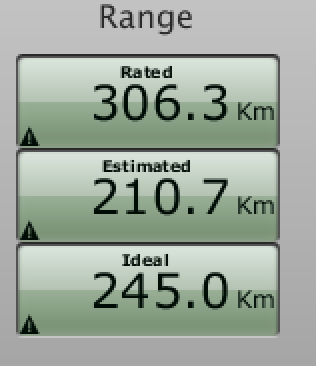
hanstor Can anybody tell me what the triangles mean in the Charge view?
? �
�
Mar 8, 2016
scaesare Not in front of my installation at the moment, but if memory serves, Joe added some display magnification/scaling options to VT some time back to address some folks have issues... perhaps dig in the options a bit and see if they are still there and/or help?�
Mar 8, 2016
mspohr I had trouble connecting with the Android app yesterday and my wife said the center screen was blank. Rebooted when she got home.�
Mar 10, 2016
univ Thanks for fixing the Location thingie. It works again!�
Mar 10, 2016
araxara Yes, my location now works too. But if you haven't updated your software (and there hasn't been an update, actually), then no one involved with VisibleTesla has fixed anything. Maybe Tesla changed some data format that masked the location problem.�
Mar 11, 2016
invisik Hi!
Wondering if there's a way for VisibleTesla to e-mail me when the car reaches a mileage milestone (like say, every 10,000 miles)? Also it would be nice to have it e-mail me on Jan 1 to help my records know how many miles I had at that time.
I just noticed the notice if odometer passes X miles.... That's the bulk of it.... just need a checkbox for "Every 10,000 miles" or something like that....
Thanks for any info!!
-m�
Mar 11, 2016
Andyw2100 Why not just create two reminders--one at 10,000 miles and one at 20,000 miles. Once the car has passed 10,000 miles, you'll have the time it will take you to drive almost 20,000 miles to remember to modify the 10,000 to 30,000. Rinse and repeat.
If you're really afraid you won't remember, just set up 15 or 20 reminders now--one at each 10,000 mile increment.
Edit: Scratch the above. I thought you could set up more than one reminder, like you can do in the scheduler, but when I actually went to check I realized what I suggested above is not possible. You could set a reminder at 10,000 miles, and then just hope you can remember to change it to 20,000 miles before you get there, and keep doing that...�
Mar 18, 2016
Scottd Just tried to login (Mac) using the 0.50.08 build which was working a few hours ago and now it's saying my login is wrong. Did Tesla update? I haven't received a notification on my car.�
Mar 18, 2016
Scottd Scratch that....quit the app and it's working again�
Mar 20, 2016
Solarguy Selecting the "location" tab crashes the app again. Running 0.50.08.�
Mar 23, 2016
Gizmotoy I wonder if we're sometimes hitting a daily/weekly/monthly API call limit for the Google mapping service. I noticed the location tab crashing the app yesterday as well.�
Mar 23, 2016
JPP Mine crashes too with a call to Location....�
Mar 26, 2016
dweeks VT mas been running great for me for a long time.
Yesterday, I acquired a new 90D with pano roof, and the 85D will very soon be sold.
VT sees that I have two Tesla's, but it show the new car as a 70, not a 90. Everything else is correct (shows pano roof, color, etc)
Has anyone seen incorrect battery IDs before? Any ideas on how to fix it?�
Mar 26, 2016
murphyS85 Yes, my 90D shows up as a 70D. I checked the override section and 90D is not an option.�
Apr 2, 2016
AWDtsla I have independant visibiletesla installations that both crash in location tab. The program badly needs an update. It's missing a bunch of stuff at this point too. Is anyone still actively working on it?�
Apr 2, 2016
Andyw2100 I haven't seen a post from jpasqua, the author, in quite some time--several months at least. I fear the answer, at least for now, may be no.�
Apr 5, 2016
jmsurpri I'm going to start poking around at the source. First on list- try to figure out why it's got some of my 85D features wrong.�
Apr 6, 2016
noobey Hi guys,
I've tried to search the thread for this info but failed
I have 2 questions;
1-I'm throwing my request for native Synology support in there. It would be great to have it run on mine. Is it on the roadmap at all?
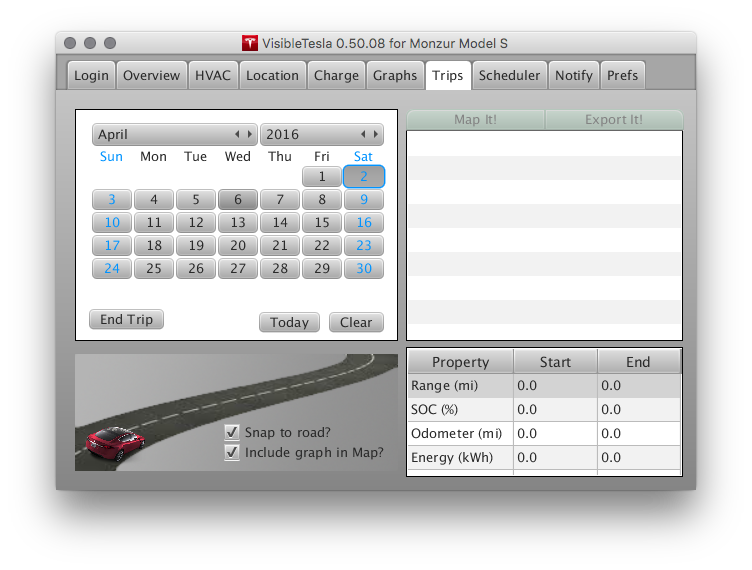
2-Whilst I've got everything else working, all of my trip history is completely empty, for every single day. I drive every day, so am not sure why this might be. Can anyone tell me what I'm doing wrong please?
 �
�
Apr 6, 2016
Andyw2100 Please see my post just a couple of posts up. It's not clear that jpasqua, the author, is still working on VT at all.
Are you running VT 24 X 7, or at least leaving it running when you are driving? It can only record things while it is actively running on a computer somewhere.�
Apr 6, 2016
Benjamin Brooks While you're at it please fix the crash on location tab bug�
Apr 6, 2016
jmsurpri I'll take a look, although the Location tab seemed to work for me.�
Apr 6, 2016
Benjamin Brooks Thanks. There are many reports recently (in this thread) about the app crashing when clicking on the Location tab.
It seems more likely now that this is probably tied to a Java runtime environment bug though.
I usually use VisibleTesla on my Mac (running latest OS X + Java 8), but I tried installing it on a Linux VM and using Java 7 the Location tab worked just fine (but on Linux with Java 8 the app wouldn't even launch).�
Apr 6, 2016
jmsurpri Yeah I noticed the Java8 problem as well on Windows. I guess a future goal would be update the source to support Java8.�
Apr 7, 2016
noobey Thanks for the reply.
Yep been running it 24x7 with sleep turned off on my computer.
It shows the driving in the energy graph but not the trip in the trip tab.�
Apr 8, 2016
univ Could this be related to the fact that the Location tracking isn't working sometimes (Possibly API limit reached like another user suggested?)? Did you click on Location and does it show you the red marker? If it doesn't, Location tracking doesn't work properly at this moment.�
Apr 10, 2016
mark80908 Anybody still using this? Is there an alternative that doesn't require a smart phone? I just got it, and enjoy the data it provides. But I can't get any data except when the application (and computer) is running. Is it possible for the program to get data that happened before it started running?�
Apr 10, 2016
mark80908 Oops, was reading the wrong end of this thread, I see my answer. Another problem, it doesn't show a map on the Location tab. Anyone have a fix for this?�
Apr 10, 2016
mark80908 My 70 shows as a 60.�
Apr 11, 2016
jgs It's not, and AFAIK it's not possible with any of the alternatives either. There's no API for fetching historical data and I don't know that there's any reason to believe it gets stored anywhere at all, including by Tesla. I for one would prefer it not be without my explicit consent, for obvious (?) privacy-related reasons.�
Apr 12, 2016
jmsurpri I have the code building and have started to make some updates. One issue is the pano roof not showing for my 85D. That's now fixed. I'd like to add in support for the 90 models. If anyone wants to send PNGs with the various 90 models emblems, that would be great. Height of the PNG should be ~23 pixels and it should be on a white background.
Also does anyone have any documentation on the various feature codes? There are quite a few that the app has incorrect for my 85D.�
Apr 12, 2016
Winston I made up some PNGs to your specs from the SVGs on the Model S webpage. If you need anything changed with these or any more badges, I'm happy to do more.
Google Drive link�
Apr 12, 2016
scaesare Excellent... I appreciate the willingness to take the mantle with this great little app.
Anything I can do to help I'm happy to do. I currently experience some anomalous behavior with detecting status when the cable is plugged in. This used to work correctly, but broke a few months back.
Thanks again. Please let me know how I can help.�
Apr 12, 2016
jmsurpri Thanks! If you have a 90 are you willing to test it out when I've made the changes?�
Apr 13, 2016
mark80908 Thanks for the reply. Yes, while one side of my brain is eager to grab any data possible, the other agrees with you that I don't want my data "out there" for unknown characters to peruse.�
Apr 14, 2016
jgs This makes you smarter than the average member of Congress. (Sorry for the faintness of the compliment.)�
Apr 14, 2016
jmsurpri I've been getting my hands dirty with the VisibleTesla source. So far I've been able to make the following changes:
- Support multiple panoramic roof codes, looks like there are 3 different pano generations
- Support 90 models and 70 non-D (untested)
- Verify there's a bug somewhere in the Location code or the use of the google map API. The current location is displayed correctly, however the marker overlay and dials aren't rendering. Working on a fix.�
Apr 14, 2016
scaesare Excellent news, jmsurpri...�
Apr 14, 2016
Eslee Having problems using this version 0.50.08. Can't login with my tesla username and password.
Anyone else having this problem?�
Apr 14, 2016
univ Yep. Cannot log in anymore, too.�
Apr 14, 2016
jmsurpri Did you try your email address as your username?�
Apr 14, 2016
Eslee Yes. Tried several times with no success. Running on Windows 10.�
Apr 15, 2016
MichaelS Had the same problem also yesterday. Works fine again this morning.�
Apr 15, 2016
Lightmatrix Mine loaded up saying my S85 was an S85P... darn!�
Apr 16, 2016
univ +1
Seems like it was temporary problem somewhere.�
Apr 19, 2016
Winston Sorry, didn't see your reply earlier. Would love to help you with that, but unfortunately I don't own a Model S. At the moment I'm just an avid fan. Maybe one day�
Apr 23, 2016
Duma Feature codes are an arcane subject with no formal documentation. I vaguely recall discussion a year or more back that it ties back to feature codes that are used in the design studio on the Tesla web site. Over a year ago, I think the codes even got embedded in the URL, and could be copied and taken to another web site, which I can no longer find, to be interpreted. A subsequent design has moved the codes out of the URL.
That said, I poked around the javascript on the Model S design studio page. Found a reference to a configuration json file. While not very clearly documented, it provides some hints that could be reverse engineered. Here is the link to the json file:
https://www.teslamotors.com/sites/all/modules/custom/tesla_configurator/js/config/config_web.json
This appears to be universal in that it includes the X as well as the S. The option codes grouped into categories are towards the end of the file. Interestingly, it appears to include older versions of the site. Multiple versions of the site configuration makes sense since previously specified orders need to still be viewable unchanged when the site is updated. Just surprised at how many old versions appear to be retained.�
May 12, 2016
invisik Hi,
I'm on .50.08 on Windows 10... when pulling up the Location map, it knows where the car is but the red arrow representing the car is not there, or are the Google Maps controls (zooming tool, etc). Any idea why that might be? I haven't looked on the location map in quite a while.. (I did also try it on two Windows 10 PC's with same results).
Thanks....
-m�
May 13, 2016
jmsurpri I've seen this as well. I have looked at the source and it looks correct. I can load the html and javascript directly into chrome and it displays correctly there, so there must be an issue with the web engine used by the app. Has this ever worked ? I've just had my S for a couple months and so don't know the history of this app.�
May 15, 2016
GlmnAlyAirCar I am trying to build the code because I am hoping to implement a few new features as well. I am a long-time (20+ year) C++ developer but have limited experience with Java. I have the source tree and 3rd party tools set up per the readme file. I have ant installed and working (windows host). However, during the compile many classes are not being found. I have been poking around with build.xml but before digging too deep I am hoping for some suggestions.
Right now, I am building with the command line ("ant compile"). However, it appears that the project may have been created with an IDE (eclipse???). If so, I will go ahead and setup eclipse but I would like to confirm first.
Thanks�
May 15, 2016
Lump I'd be a happy camper if the location tab wouldn't cause a crash (0.50.08 on a Mac)
Appreciate the efforts!�

Không có nhận xét nào:
Đăng nhận xét