Aug 24, 2015
Duma I experienced this problem last Friday and Saturday, where VT (0.50.09) would stop getting data about 30 minutes after each restart. Also worth noting is that VT is not reporting any errors. The main symptom I see is that the graphs screen is not getting data points. The overview page did seem to refresh, but I may have fooled myself.
A quick check of the VT log showed the following unusual combination of warnings (these occur multiple times separated by anywhere from 1 to 20 minutes):
Aug 21, 2015 4:27:03 PM org.noroomattheinn.tesla.Streamer refreshAuthentication
WARNING: Error: couldn't retreive auth tokens
Aug 21, 2015 4:27:03 PM org.noroomattheinn.tesla.Streamer establishStreamingConnection
WARNING: Can't authenticate for streaming!
(I can provide more details on request)
As of Sunday, everything is working normally again for me.
To minimize the load on Tesla servers, I leave VT in sleep mode except when I want to actively track charging or driving data. Sleep mode is sufficient to track vampire losses.
That said, I was not logging much data on Friday and Saturday, when I experienced VT's difficulty retrieving data, so I don't think it is the pattern of access which is provoking the problem. More likely, Tesla is tweaking something in their authentication infrastructure and VT may more trouble handling the reauthentication errors than the phone apps.�
Aug 24, 2015
Bugeater In the Android phone app this morning it wouldn't connect. Instead it just would put up a message that I had no cars in my account. When I clicked OK it would cycle through the login and throw up the same error again. Exiting the app and restarting would just do the same. I finally gave up. That was at about 10:00am PDT.�
Aug 25, 2015
Duma And the connection with this thread on VisibleTesla is? This sounds like a configuration error with your account on the Tesla servers -- call Tesla service.�
Aug 26, 2015
Bugeater The connection should be obvious. During the stated time my phone app couldn't connect successfully to the servers. This may have affected VisibleTesla users. I was providing a useful data point. Also, no I don't plan to contact Tesla service because that evening it was working again. Seems Tesla finally got my referral onto my app!
Not really sure why you would even ask this because others do it here all the time.�
Aug 27, 2015
Moiz Ali Hi guys
Waiting on my 70
hopefully getting it next week
Had a question about firmware update 7.0
I did not get the Autopilot feature, but will I still
be able to get the update? Also heard that the interface will change in 7.0
anybody tested or seen the new 7.0.. how does it look�
Aug 27, 2015
MichaelS I sent the graph from VT of the current spikes to Tesla Software Engineering and their response was that it was not the car that was sending anything to cause the spikes.
"After investigating, we found that there are no such spikes occurring and this is a problem with the app you are using. "
Well, something changed when Tesla released 2.5.36 because it didn't do it before that. I'm still on the old servers by the way.
If someone wants to look at my data files, I'd be happy to send them.�
Aug 27, 2015
hingisfan Can't connect today on VT....downloaded newest version and same thing....help?�
Aug 27, 2015
S85D Moiz, you will be able to download all of the updates after you get your MS 70. We will all have the same software but since you did not order the Autopilot option, the that part of the software will not work for you. You can order the Autopilot option after you get your car if you want to and the software is there to support the new AP option.�
Aug 29, 2015
skialpine I am not able to login either. I get a please check your credentials message. I am using the Mac version. Any suggestions? I have no issues with any of the iPhone apps.�
Aug 29, 2015
SteveS0353 Refer to this post by Joe Pasqua (VT author) in this thread for the details. The Mac version linked there (0.50.08) works well for me on a Mac.�
Aug 29, 2015
skialpine Steve, thanks for the pointer. Missed it in the very long thread. Everything is working now.
Joe, many thanks for a really great tool!�
Sep 1, 2015
hingisfan Same here!�
Sep 2, 2015
martinwinlow Currently charging my MS at Abington Services off the M74 in Scotland, 400 miles from home. Tesla iOS app says 'Can't connect' but I can connect via VT running on my home PC (always on) using TeamViewer. Odd - but thanks VT!�
Sep 3, 2015
mspohr Anybody have some good instructions for running VisibleTesla on Ubuntu Linux.
I have a low power dedicated machine which I can leave running all the time.
First, Oracle really doesn't want you to use Java 7... they make it very hard to find and install.
I've installed openjre 7 but still can't run VisibleTesla... just get a message that can't find or load main class VisibleTesla.jar (permissions set to execute) when I am in the VisibleTesla 0.50.08 folder.�
Sep 4, 2015
robatbeach I've been running vt from ubuntu for quite a while. Currently, my server is on 14.04 lts.
Java: I use openjdk version 7 (1.7) and not the oracle version
Launching;
from cli; java -jar "<path>/VisibleTesla 0.50.07/VisibleTesla.jar" &
can put same command minus & in the startup applications to auto launch on start
I would get a similar error that you described when double clicking the icon versus running via cli command.
Hope that helps.�
Sep 5, 2015
Duma This error is normally emitted by the java interpreter runtime when it is expecting the name of a Java class (.class file) as the argument. As pointed out by @robatbeach you need to prefix the name of the jar file with the -jar option.�
Sep 6, 2015
mspohr Thanks very much. I think I'm making progress.
However, now get Exception "AWT-EventQue-0" java.awt.HeadlessException
at java.awt.GraphicsEnvironment.checkHeadless(GraphicsEnvironment.java:207)
I'm running Xubuntu 14.04 LTS with java -version 1.7.0_79
OpenJDK Runtime Environment (IcedTea 2.5.6) 7u79-2.5.6-0ubuntu1.14.04.1)
OpenJDK 64-bit Server VM (build 24.79.-b02, mixed mode)
I was wondering if the problem could the the 64 bit version of Java?�
Sep 6, 2015
mspohr I reinstalled OpenJRE from the software library and it must have also installed a proper launcher this time sine I at least get to JavaFx launcher which informs me that In need a newer version of Java (ugh!). I think this message if from VisibleTesla itself which somehow doesn't recognize OpenJRE as valid.
I'm trying to run VisibleTesla 0.50.08�
Sep 8, 2015
amalinovich Has anyone else had problems with the Trips tab not showing data at all? I've got a brand new 90D so I'm sure there are some differences, but everything else seems to work fine (climate control, charging, etc) but trips doesn't show any data at all. (This is using the latest release: 0.50.8)�
Sep 9, 2015
spark32a Is this program still working? I am not able to log in (Windows Package ) and I am sure i have the right credentials.�
Sep 9, 2015
Kutu I can't get in either. The iPhone/iPad Tesla app works fine.�
Sep 9, 2015
Veggen Getting the exact same thing on Linux Mint 17.2
Any progress?�
Sep 9, 2015
patrick40363 Mine doesn't show any trip data too.
�
Sep 9, 2015
Wander This usually means that it could not connect to X11, i.e. it tried to create the GUI but failed to do so.
Are you running X11? and are you running VisibleTesla as the same user that is running X11?
My advise would be to steer well clear of anything but the Oracle version of Java.
OpenJDK, IcedTea, etc. have been giving me nothing but troubles
"Trust me, I'm a professional" (Java Software Engineer)
- - - Updated - - -
Behold! The power of Google!:
Java SE Development Kit 7 - Downloads | Oracle Technology Network | Oracle�
Sep 9, 2015
MarcG Trip data still works for me. On a Mac running OS X 10.10.5, VT version 0.50.07.�
Sep 9, 2015
Duma There are a couple of subtleties to this tab.
I hope this helps.
- You need to click on a specific date (or range of dates) on the calendar and it will then show the trips for that date range. Until you pick some dates, nothing is shown.
- If you have recently (like within a few minutes) completed the trip, VT may not have identified the trip as completed. In that case, click on the end trip button to force trip completion of the most recent trip and add it to the list of completed trips.
�
Sep 10, 2015
amalinovich While the trip tab is a bit confusing at first, I can confirm that, in my case at least, the data is actually not there. Any date that has a trip turns a green color, but on mine none of them show up as having any trips at all. I can manually click into individual dates or select the entire month of September, and it still shows 0 trips. The data is just not there.
I'm wondering if maybe something changed with the new models (mine is a brand-new 90D) that prevents the trip data from being downloaded.�
Sep 10, 2015
MichaelS You do have to keep VT running continuously to be able to collect trip data.
�
Sep 10, 2015
Andyw2100 This hasn't happened to me much lately, but the following was happening every few days for a while a couple of months ago. At some point even though VT would still appear to be running, it would stop sending notifications, and stop collecting data, including trip data. If I quit the program and restarted it, everything would function fine for a day or two or three, and then the process would repeat. This still happens occasionally, but much more rarely, and it's not uncommon for me to go a few weeks straight without incident.
I don't know if this could be related to what you are seeing, but I'd suggest quitting and restarting, to see if at least temporarily you get trip data recorded.�
Sep 11, 2015
Ingineer Is it possible to determine if there is a pending SW update in VT?�
Sep 11, 2015
Andyw2100 I do not believe so. If there is, I haven't figured out how to do it.�
Sep 12, 2015
SteveS0353 In the Mac version (0.50.08), there is a "Check for Updates" at the bottom of the Help menu.�
Sep 12, 2015
ZBB That is for checking for updates to VT, not for updates to the car...�
Sep 12, 2015
SteveS0353 Whoops, sorry, I misunderstood the question :redface:. There is no method in VT to check for a pending update to the car software.�
Sep 12, 2015
Ingineer Is this even possible? How does the iPhone app know of a pending update when it notifies the user?�
Sep 12, 2015
ZBB Keep in mind that Tesla hasn't published their API. Everything that VT does was reverse engineering the API. The update avail notification either hasn't been reverse engineered, or if it has, hasn't been incorporated into VT yet...�
Sep 12, 2015
Andyw2100 Does Remote S also push this notification? If so, perhaps Allen would share the required API information with Joe.�
Sep 12, 2015
felixtb Not as far as I have noticed...... But do ask Allen. Then I could stop using TESLAs own app altogether.�
Sep 15, 2015
zdre My VT periodically freezes and keeps the car awake. It also often fails to wake the car for scheduled preconditioning. A restart of VT fixes these issues temporarily. Does anyone know of a fix for this?�
Sep 16, 2015
Ingineer Yeah mine fails after a long uptime, probably a Java issue. I have mine set up on a cronjob to terminate and restart once a week. Seems to solve the problems.�
Sep 16, 2015
Gizmotoy Same. On my Mac after awhile it just locks up. I usually notice when I don't get a text notification about charging starting/stopping. I kill and restart the app and all is fine again for another week or so.�
Sep 16, 2015
davidc18 I've only been using VT (mac) for two weeks now but it is a neat program and I really appreciate the work that has gone into it.�
Sep 17, 2015
phlex ive been using VT since May and its worked fine. but for th last week i get incorrect credentials when i try to log in. should i down load and start all over?�
Sep 17, 2015
wayner Try logging out and logging back in. It seems like you have to totally re-authenticate every few months.�
Sep 17, 2015
phlex it wont let me log back in..says my credentials are not valid. but they are. there doesnt seem to be a "lost my password option". i didnt lose my email address nor my password, but if that option existed i could use it as a fix...�
Sep 17, 2015
Andyw2100 Are you running an older version? If so, scroll back a few pages to find the posts that link to the reason for the new, experimental versions. (I'll try to find one of them and come back and edit this post with a link.)
Edit: Here's one:
VisibleTesla - Page 183
�
Sep 23, 2015
breser I'm back to having my locally built copy of newish code not accept my password. It probably isn't exactly up to date with GitHub but it's reasonably close. I'd guess Tesla is making some more changes, but I haven't had time to look into it.�
Sep 29, 2015
Sound's Good Joe, I've been waiting seems like years since I made the order, read a great lot of pages here, downloaded your fab app, and tonight fired it up following yesterday's delivery.
Whoa! Whoa! Whoa! Yee-haw.
Have put a drink for / with you including a toast on my bucket list.
Thank you for a great presentation of and interface with the machine's data and control systems.
Too late to play tonight but will tomorrow.
In the meantime, Bravo!�
Oct 10, 2015
mda @jpasqua Would it be possible to add a REST call to turn on the HVAC? (so I could have my automation system turn on the car's HVAC based on my calendar). Thanks !�
Oct 11, 2015
faughtz I have a P85D with an (of course) 85kWh battery, but I'm seeing a 70kWh in "details" in VT.
Also, parking sensors are shown as "false".
Security package is also shown as "false".
Everything else look correct.
Is this something strange with the VIN?
What a great addition to the car; thanks!�
Oct 12, 2015
DillyBop i just downloaded and installed for the first time tonight.
kept getting error message that my login credentials were wrong (even tho they were right).
had to go searching for the new software on Page 176 or whatever. wasted a lot of time. might want to put the new version on Page 1 of this thread.�
Oct 16, 2015
reuted Joe, now that the autopilot is out: Can VT record the state of the AP? It would be even better if there is accelerometer data some exposed? Then not only tesla but we could also tell if AP operation reduces or increases accident rates and how these rates develop over time. Fascinating stuff one can do with real data. Best & tks.�
Oct 16, 2015
hans I think Tesla is going to be very careful about letting any external systems get to see AP data for fear of the security holes it might inadvertently open up for remotely controlling the car.�
Oct 20, 2015
breser
Yeah the battery size is a known bug. I tracked down the cause but don't remember if I fixed it and sent a pull request in or just haven't bothered to fix it. Tesla stuff just hasn't been on my radar much the last few months.
VisibleTesla doesn't get knowledge of what's on your car form the VIN but from the option codes that Tesla gives us. But our understanding of what the option codes mean aren't 100% acurate. To boot Tesla keeps changing things. You can't have the security package unless you're in Europe so I don't think you actually have it. Tesla may have removed the parking sensors option code from cars given that all cars have them now.�
Oct 20, 2015
mda @jpasqua Using VT .05.08 app on my mac with Mac OS El Capitan 10.11 and (i have Java 8 Update 65 build 17 installed but I am using the mac app so i do not know if that matters) the maps are not displaying properly for me. When configuring a geofence, if i zoom out the radius disappears so i can not see the extent of the the geofence anymore or set it accurately.
Also on the Location tab, if i select Satellite, the screen turns white.
Is there something I need to tweak on my end? Thanks!�
Oct 22, 2015
mda Never mind, it's working now... I don't know why.�
Oct 24, 2015
scronce Since installing the last OSX update (El Capitan 10.11.1) Visual Tesla no longer launches for me. from launching. It just bobs in the task bar then exits. Anyone else see this?�
Oct 26, 2015
lese Visible Tesla works fine on one of my computers, but will not run on a different one. When I try to run it on the other computer I get this error message:
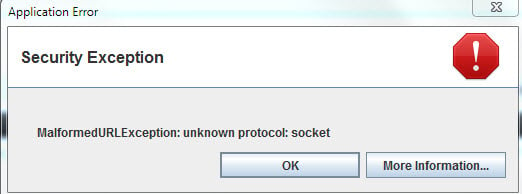
if I click on More Information, I get this:
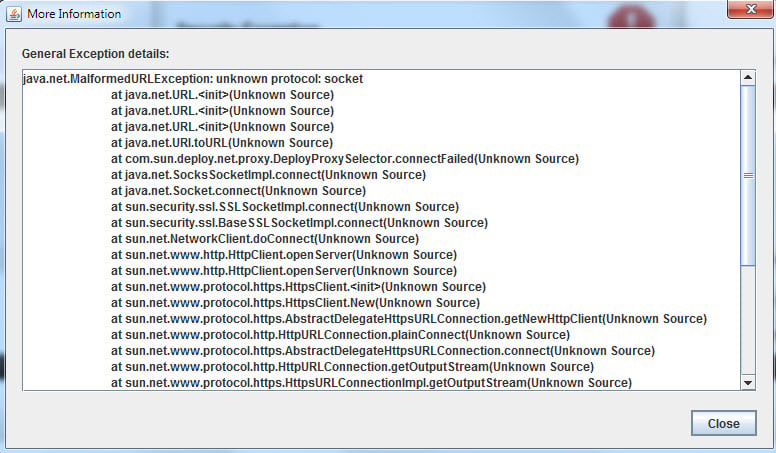
and here's the rest:
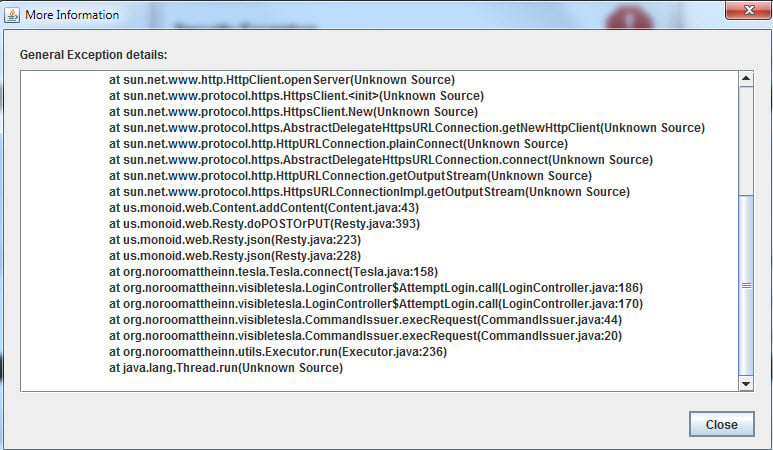
Does anyone have an idea of why this is happening? Thanks.�
Oct 26, 2015
Duma Need more information in order to diagnose. What operating system and version is on each computer? Which version of VT? Are you running it with the Java version that is supplied with VT or the Java that is on the computer? Have you tried uninstalling/completely removing VT and reinstalling on the computer that is failing?
The symptom suggests a corrupted installation/configuration or an installation that is trying to use an old version of Java that does not support the features needed by VT.�
Oct 27, 2015
tliving @jpasqua - VT is a great app. Ive been working with the API for my own silly education and purposes and you seem to have solved something inside VT that I don't see how to do via the APIs:
The inside/outside temperature only seem to be reported when the HVAC system is on. So I turn on HVAC, wait a few seconds for it to come online, then get the values. Thats fine, but I don't want to leave my HVAC running when I'm just collecting state in the middle of the night so I turn HVAC off. Problem is next time I go to the car the system is off inside the car and I have to manually turn it on there.
When I use VT to get the current temperature inside the car it doesn't leave my car in that state. What trick did you use?
Thanks!�
Oct 27, 2015
lese Thanks for the reply Duma. Both computers are running Windows 7 Home Premium. The VT version that works is 0.50.07. I had installed the same version on the computer where it didn't work, so found and installed version 0.50.08 and that still didn't work. I didn't realize you could select the version of Java that it used. I thought it automatically used the version that comes with the installation package. I have completely removed and reinstalled it on the non working machine many times, without success.�
Oct 28, 2015
tliving Im running VT on El Capitan fine. Make sure you download Java again as apple doesnt include it in their operating systems. Most Java apps break after a major OS update until you download java again.�
Oct 28, 2015
Duma Thanks. That information helps. Next I want to confirm that you are starting VT by using the vtrunner.bat file, either clicking on it directly or, if you installed the short cut, by clicking on the short cut. In either case, it should be using the Java version that comes with the installation package. However, if you double click on the VisibleTesla.jar file itself, Windows will pick some other Java version that may be installed on the system.
I am running VT on Windows 7 Home Premium as well and my experience is like your machine that works. So I have not personally experienced your failure mode and making some guesses as what could be wrong. First step is to confirm that you are getting the Java that came with VT.�
Oct 29, 2015
lese Thanks again, Duma. Yes, I am running it by clicking on the shortcut, which does run vtrunner.bat and should use the correct Java. That's why I've been stumped. I've also tried double clicking on VisibleTesla.jar but that does nothing. I've looked at the files that come with the distribution package and it does appear to contain its own version of Java, and the shortcut does point to that package. There must be something going on with that particular machine that is causing it not to run. I was hoping that the whole list of error messages would help point to the culprit.�
Nov 3, 2015
TechGuy I haven't been able to log in to VisibleTesla for a few months. Finally sat down to try to correct the issue and was surprised to find that no newer version was available -- and that there doesn't seem to have been a new version in a year (at least for Windows). Am I missing something? Are folks using a different program now?�
Nov 3, 2015
Andyw2100 This keeps popping up.
There were major changes made by Tesla, requiring major changes to Visible Tesla.
You probably need the version of the software available in this post:
VisibleTesla - Page 174
This post explains the background: VisibleTesla - Page 154�
Nov 3, 2015
wayner Can't post 1 be updated to reflect this? Is it realistic to expect someone to find a post in the middle of a 211 page thread that explains the issue, especially if some people only occasionally browse this thread/forum.�
Nov 3, 2015
Andyw2100 Updating the first post in the thread could help, but I expect more times than not someone familiar with Visible Tesla is unlikely to go back to that first post to check anyway.
There are a few of us who regularly answer those who pose a question like the one above pretty quickly. It may not be the perfect solution, but I think it is working reasonably well.�
Nov 3, 2015
Gizmotoy I know I check the first post with some regularity and wish it was up to date. I'm around pretty often, but this thread is hard for even me to keep up on. I wonder if we could get the mods to enable the Wiki for this thread. I believe that makes a post between the first and second that anyone can modify. Might be a nice place to keep the current status of things.�
Nov 3, 2015
TXjak I have been using VT 0.50.08 for many months and recently it stopped displaying the map on the Location tab. Anybody else have this problem?
The Location tab shows the various icons and labels but doesn't render the satellite image or the street map. When the car is in motion, it looks like the normal display and the little car "arrowhead" moves and turns, but there is nothing to show where it is.
Any ideas?
John�
Nov 3, 2015
Ingineer Mine shows the standard maps fine, but Satellite hasn't worked in a long time.�
Nov 4, 2015
TechGuy
For reference, I didn't check the first post... but I did check VisibleTesla -- is it not possible to update the download links there?�
Nov 4, 2015
Andyw2100 I may be mistaken, but perhaps jpasqua hasn't done that because he considers the releases we're discussing "experimental."�
Nov 4, 2015
TechGuy If the "official" version isn't able to login, I'd consider it to be less helpful than the experimental. �
�
Nov 4, 2015
Andyw2100 Again, I'm only guessing, but I think for many people the "official" version still works fine.
If you feel strongly about this, you may want to PM jpasqua, and make some suggestions.�
Nov 4, 2015
TechGuy Thanks, I'll do that!
Just as a data point, the version linked to earlier in this thread (0.50.08) works fine for me. The version linked at VisibleTesla (0.29.00) would not log in.�
Nov 4, 2015
liuping I have not used VT for a while now, but fired Version 0.50.08 up today to use in on my 90D. It seem quite confused by the configuration: it calls it a 70D, it can't figure out it has a sunroof and the wheels show standard 19" instead of cyclones.
I used to render my original S85 correctly. Is there any thing I can do to update the data so the 90D looks right?�
Nov 4, 2015
Andyw2100 You can set at least some of those things under Prefs/Overrides. Instead of the default value "From Car" switch the values for any of the items that are wrong to what you actually have. You should be able to change the roof and the wheels. I don't think the model (90D) is available yet as a selection.�
Nov 4, 2015
Duma Sorry for the delay in responding. I've been busy with the election that was held yesterday.
Unfortunately, by this point we have eliminated most of the easy stuff. By any chance, does the machine with the problem have an application based on Java installed? I don't mean the Java runtime itself, but an application which just happens to be implemented in Java. At the risk of getting a bit technical, such an application might be setting some Windows environment variables that is causing Java to load libraries that conflict with the ones supplied with VT.
Another approach would be to look at the VT log files. This may provide some additional clues beyond error message that you provided. You should see a folder named VisibleTesla in your Documents folder. Inside this folder you should see some files like visibletesla-00.log or visibletesla-00 with a type of text document. Rather than cluttering this thread, PM with the contents, if you are willing, so I can compare it with what I see in the log files on my machine.�
Nov 5, 2015
MikeBur I have been playing with a version over the last couple of days
There is no 90d models supported yet, though your option codes shouldn't be that different.
can you send the option codes and list your config? No need for Vin. If Joe or Ben doesn't get to it I will try and send a pull request in the code. I have images in for p and 90d, though not the same style (pulled from vehicle configuration on TM site)
TM continues to update the option codes and most are reverse-engineered based on model into. Not sure you all know how much tenacity Joe has had here, though we all owe him at least one frosty beverage of his choice ;-)�
Nov 8, 2015
lese Thanks again for the follow-up Duma. After much research, I finally found a clue from someone with the same problem but with a completely different program. It had to do with a proxy setting buried deep in Firefox's options. All I had to do was change it from "Auto-detect proxy settings for this network" to "No proxy" and that did the trick. It now works perfectly. Thanks again for the help.�
Nov 8, 2015
Duma @lese Glad to hear that you solved your problem. Interesting to learn that Java was being affected by Firefox's proxy setting. Sure enough, there was a clue in the Java stack trace you posted that there was a proxy error, but I would never have suspected Firefox as the root cause.�
Nov 20, 2015
Barry C Hi
Just installed on Mac. Can not log in with my Tesla login
Barry in Australia�
Nov 21, 2015
Andyw2100 Here you go:
�
Nov 23, 2015
scronce Is there a specific version of Java that needs to be installed for Visual Tesla. On OSX El Capitian my Java Console is showing the latest Version 8 Update 66. Visual Tesla won't launch with this on my system.�
Nov 23, 2015
mspohr Visible Resla requires v 7 of Java.
From the web site:
Dependencies: When using the generic package you must ensure that you Java 7 installed on your system. If you already have Java installed, you may be able to skip this step. However, VisibleTesla requires a recent version of Java (at least 1.7u25) so you may have to update your Java installation if it is old. You can download Java for Linux here. Note that there have been extensive changes to JavaFX in Java 8 and VisibleTesla will not work with it. At some point in the future the app will transition to Java 8 at which point it will no longer work with Java 7. For the time being, be sure to have Java 7 installed for use with VisibleTesla.
On OSX, the package comes bundled with Java 7 so it should run with the bundled Java 7 unless you've changed something.�
Nov 24, 2015
scronce Thanks for the detail response. This must be something other issue than my version of Java. I have not modified the package. For testing I first did an uninstall of Java 8 from the terminal.
sudo rm -fr /Library/Internet\ Plug-Ins/JavaAppletPlugin.plugin
sudo rm -fr /Library/PreferencePanes/JavaControlPanel.prefpane
I then tried installing the last version of Java 7, 7u79. No luck, I see the app logo bobs in the dock then disappear.
I uninstalled from terminal again and installed 7u25 to see if it was a specific version of 7. No luck, same problem.
I verified through the Java Control panel that 7u25 is the only version installed. Still, that should not matter because it should be using the version on 7 inside the visabletesla package.
There must be some other reason why the java app won't start.�
Nov 24, 2015
mspohr I have OSX v10.11.1 (El Capitan) and don't have any Java installed.
I downloaded VT 0.50.08 (https://dl.dropboxusercontent.com/u/7045813/VT2/MacApp/VisibleTesla.zip) and it runs with the Java which is included in the package.
It should use the packaged version but might be trying to use your installed version. I don't really know but you might try uninstalling Java from your machine completely which would force it to use the packaged version.�
Nov 24, 2015
Klaus FYI, I have Java 8 installed on El Capitan and VT runs just fine (using its bundled Java).�
Nov 25, 2015
wayner Is there a way to set up a charging schedule on VT so that your charging ends at a specific time? I would like my charging to end at 6:45 am as my electricity costs go up at 7 and, at least in the winter, I want the battery charged as near to my departure time as possible so that the battery is warm to minimize regen limitations.
I guess to do this you would need to know your average charge rate in terms of percentage charge/hour and assume that it is linear. Let's say that I can charge at about 15% per hour. If my car is at 75% and I want it to get to 90% then I want to start it charging at 5:45am - this will get it to 90% around 6:45 and leave my 15 minutes of buffer time in case the charging is a bit slower.
Is this possible with VT?�
Nov 25, 2015
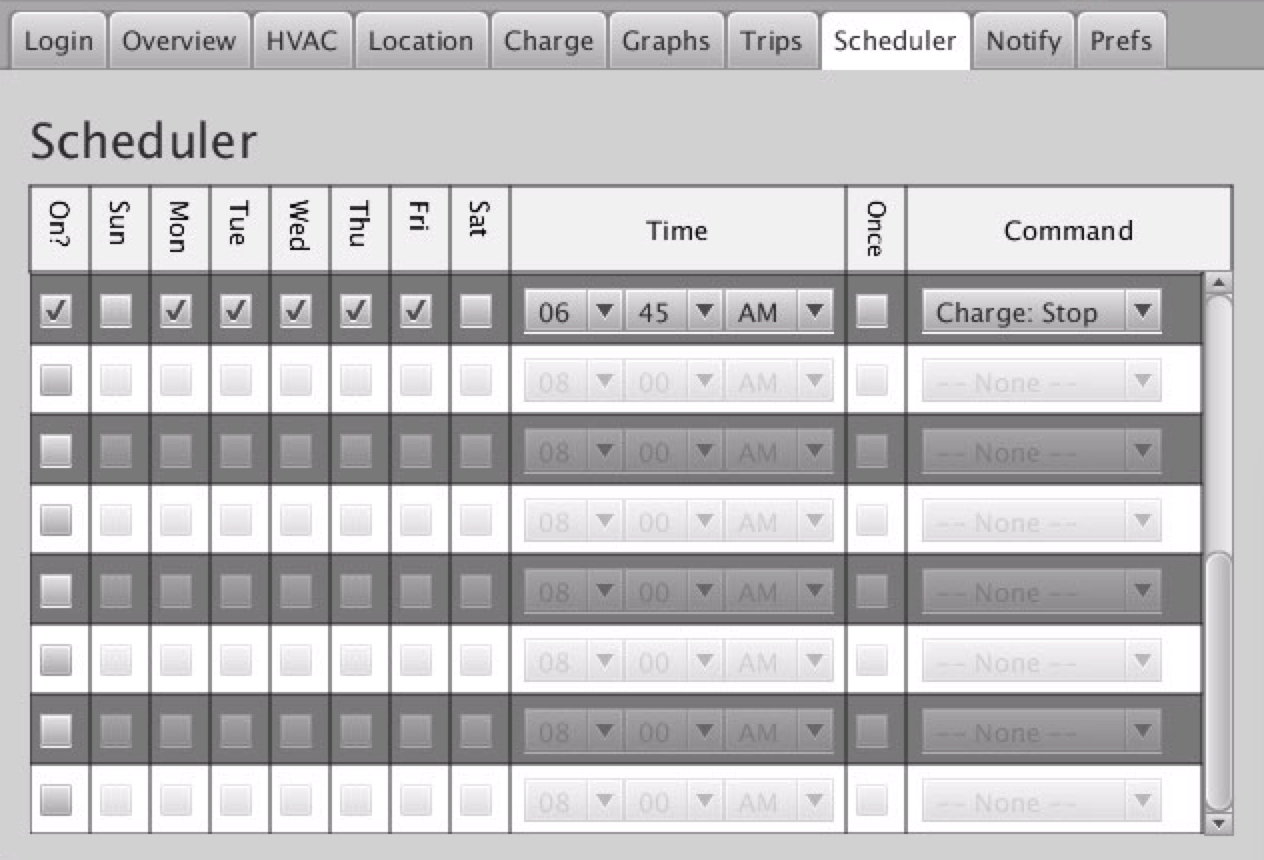
MarcG Yes, it is possible to setup VT so that it stop charging at a specific hours (and day of the week) using the Scheduler.
See attached screenshot below for how it would look for your example, assuming you want to do this every weekday.
 �
�
Nov 25, 2015
wayner Thanks Marc, that is useful. But it seems to me that this method isn't exactly what I was looking for as I am assuming that I have to also manually determine the Start Charging time.
I want VT to determine the Start Charging time based on being at a 90% SoC at the Stop Charging time. I don't think this does this since I don't see where it asks for your charging rate which would be required to figure this out.�
Nov 25, 2015
MarcG Correct, you need to do the math yourself to figure out when to start charging. VT doesn't know the possible charge rate until the car starts charging.
OR, always plug in as soon as you get home, and if you get to 90% before 6:45am, great. If not, charging will stop at 6:45am.
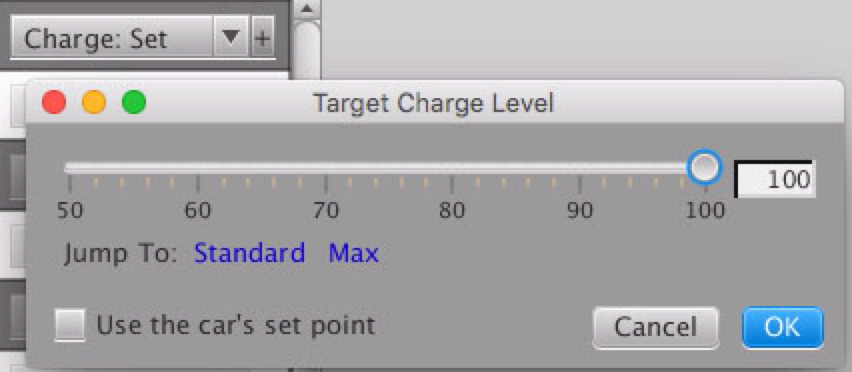
By the way, you can also change the target SoC in VT as well. In the same Scheduler tab, select the "Charge: Set" command and select the target SoC (50 to 100%). It looks something like this:
 �
�
Nov 25, 2015
wayner But I don't want to do the math myself as computers are better at math than humans. This is good motivation to figure out how to use the API myself and write my own code to do this.�
Nov 25, 2015
Andyw2100 This is something that many of us have been asking Tesla to give us for quite some time. This and the option to preheat the battery pack.
One issue you will run into if you try to program this is also an issue when you try to compute an accurate charge start time to reach a precise charge end time in your head. And that is when it is extremely cold, the battery will need to heat up some before it will be charging at the normal rate. The rate that it charges as it heats and the length of time before it reaches the normal charge rate is pretty variable, depending on how cold the battery is, and on the air temperature. The bottom line is that I find I have to just guesstimate, leaving some wiggle room if I want to make sure the car reaches my target of 90% when it's cold. This isn't an issue at all in the summer, when I can estimate pretty accurately how long the car will take to charge.�
Nov 25, 2015
wayner Presumably you could also make an adjustment from the outside temperature variable as I believe you can read that from the API. It may not be totally linear buy you could approximate it with a linear function, or a step function that kicks in when the temperature is below 0C or whatever threshold. My car is in a garage so it stays a bit warmer than the outdoor air temperature�
Nov 25, 2015
TXjak What I usually do is leave the car set to start charging at 4am. When I plug the car in, VT will tell me how much time the car thinks is needed to reach the SOC that I have set (usually 80%). If the time needed is more than 2 hours (my TOU rates go up at 6am), I will set the scheduler to start at 6am minus the "Time Left" value shown on the charging page. I have set several start times in the scheduler, so I just click one that is close to the time charging should start on that day.�
Nov 25, 2015
MDK One way to achieve that is to do the charging in two stages.
First tell VT to charge to 80% starting at the time your electricity costs go down (eg midnight)
Then tell VT to start charging to 90% at 5:45am (or whatever start time would allow it to finish at 6:45am)
I use a variation of this when I am about to go on a long trip. Charge to 90% the night before, then start charging to 100% two hours before I need to leave.
That way the battery isn't sitting at 100% any longer than it needs to.
I then use a third scheduled entry to set the charge limit back to 90% the following night so I don't accidentally charge to 100% again.�
Nov 26, 2015
Canuck I just got a new computer (Windows 10) and I downloaded and extracted the program, made the icon on the desktop, click on it, put in my user name and password and I get: "Login Failed - Please check your credentials." I even logged out of the Tesla app on my phone and back in to make sure my email and password were correct. I get in fine on my phone but I can't get into VT on my new computer. Any help would be appreciated. Thanks.�
Nov 26, 2015
Andyw2100 Guessing this might help:
�
Nov 26, 2015
Canuck Thanks Andy!!! You saved the day! I can't tell you how frustrated I was trying to get it to work. I used the link in the first post -- I would have never found that one on page 174!
Even though I am not American, I am really thankful for you today.
(PS. I tried to give you rep points but it said I have to spread some more around first before I can give them to you again.)�
Nov 27, 2015
Andyw2100 Glad I was able to help, and that the other version solved your problem!
I've been reading this thread from before I had my car, and then for a long time afterwards there was no version that would work for me, because of the changes Tesla had made. I was very thankful when Joe released the experimental version, and I could run VT for the first time. I figure posting the info quickly whenever I see someone who may benefit from it is the least I can do to give a little back.�
Nov 27, 2015
beeeerock I've just started looking more closely at what Visible Tesla is able to do and am really impressed. I see potential to be able to keep solid data of charge and discharge cycles that would otherwise require discipline to record before disconnecting the cord. That alone may prove to be useful to me, but it's only just the beginning of what VT does! :biggrin:
The mapping has me a little confused though. I'm finding that I drive a km or more before data points begin to be recorded... so the map output has a long straight 'as the crow flies' line from my departure to somewhere in route. I assumed it was an issue with sleep... either the car or the app running on the desktop. That took me to the software manual. I learned two things... one, you have to be careful in some areas about inferring the notes refer to car sleep when they might actually refer to app sleep. And two, I don't think sleep is my issue.
I can drive for a few minutes, stop to drop something off, then get back in and drive away... perhaps a minute, two at the most with the car in 'P' and me away from it. The track doesn't show data points when I leave... not until a km or two away.
Is there a setting I'm missing that would correct this?�
Nov 27, 2015
Duma Short answer is no. When not in sleep mode, VisibleTesla polls the Tesla server about once every 4 minutes (in sleep mode it is once every 30 minutes). This limitation is a throttling restriction imposed by Tesla on server access, discussed a length further back in this thread. VisibleTesla only starts streaming data, about once every 2 seconds, once it notices your car is moving. So it is normal to drive for up to 4 minutes before trip streaming starts. Note that turning off the car (put in park and get out) disables streaming, so briefly leaving the car puts you back in the 4 minute polling regime. That appears to explain your experience with gaps in the streaming data.
Note that you can easily check this by exporting the streaming data (File/Export streaming data). You will see all the data records with time stamps that VisibleTesla has received from the Tesla server.�
Nov 28, 2015
beeeerock The four minute delay would definitely explain this... thanks!�
Nov 28, 2015
pdxgibby New Tesla owner here as of yesterday. I downloaded VisibleTesla for Mac (version 0.29.00) and installed it. I am unable to login and am getting a 'remember to use your email address', to login.
I am able to use the Tesla app from my iPhone to monitor status. I'm suspecting that maybe Tesla's servers aren't updated to reflect that I'm available to login via the API yet or something? I've read the FAQ and possible causes and I've probably missed something -- but it's just not working.
Any ideas for me?�
Nov 28, 2015
SteveS0353 Congratulations and welcome!
Since the original version of VisibleTesla, Tesla made some major changes to the authentication process, which required a major change to VisibleTesla. Joe (VisibleTesla author) explains the background in this post -> VisibleTesla - Page 154
You probably need the version of the software available in this post -> VisibleTesla - Page 174�
Dec 1, 2015
jeffro01 I had to move my VT from one machine to another and I figured out how to export the data, but how do you import it into the new install? Am I missing something?
Thanks,
Jeff�
Dec 3, 2015
Duma As far as I know, there is no way to import the data. However, it may be possible to move the data.
Caution: I am not the author of this program nor have I looked at the source code. I am only responding because the program author has not been active on this forum recently.
VisibleTesla stores the data on the disk. Your first task is to find the data. On Windows, it is in a folder named "VisibleTesla" that is in the My Documents folder. In this folder you will see three files that start with your VIN, eg 5YJSA1H20FF081441. On Windows, for this VIN, the file names would be
- 5YJSA1H20FF081441.charge.json
- 5YJSA1H20FF081441.rest.json
- 5YJSA1H20FF081441.pts.data
Make sure VisibleTesla is not running on either machine at the time you are copying on that machine. Copy the files from the old machine to the new machine in the appropriate folder.
Warning: If you have been running VisibleTesla on the new machine, this process will replace the new data with the old data from the other machine. However, from that point forward any additional data will be saved with your old data. In theory, the files can be merged, but I have not done the tinkering needed describe the process.
The simplest (and safest choice) would be to merge the exported data outside VisibleTesla and proceed with your analysis with the exported data.�
Dec 6, 2015
jeffro01 Yeah I tried a few things but ended up with no dice, so I moved on from the two days of data I lost and all is well...
Jeff�
Dec 9, 2015
scronce I found and fixed the problem. During my OSX install, some of the fonts needed by the jar file were disabled on my system. I discovered this by looking at the contents of the package and running JavaAppLauncher. From the terminal I could see a NullPointerException as the jar file was trying to find and load fonts. Don't know what font was missing but I ran Font Book and enabled all the fonts that were shown as "off". That fixed it for me.�
Dec 13, 2015
ElectricSteve Hello,
My VisibleTesla died since upgrading my Mac from Yosemite to ElCapitan. It starts and crashes after two seconds or so.
I tried re-installing, deleting the data in my Library/Application Support folder etc. etc. all to to avail.
I downloaded the version that the link on VisibleTesla Release Notes points to (called "Mac App download") but i can' see which version that is.
I'm basically looking for a Mac version that works on ElCapitan (OS X v10.11.2)�
Dec 19, 2015
Africaholic Does anyone have any idea why the last two days Visible Tesla has not been recording my trips, though the application is open on my desktop, and I'm logged in. All other controls work - it just doesn't show the trips I've taken.�
Dec 19, 2015
Andyw2100 I'd try logging out, quitting the app, restarting the app, and logging back in. I've found that occasionally the VT winds up in that state, and when it does, taking the steps I suggested straightens things out.�
Dec 23, 2015
LeffeP Newbie also, and have the same problem, trying OSX version 0.28.01, wont login. did you find a way to login?�
Dec 23, 2015
Andyw2100 Welcome to the forums.
Did you read the answer someone posted to the question you just quoted? That answer almost certainly is the answer you are looking for.
Here is essentially the same one:
�
Dec 23, 2015
brec Small bug:
I don't keep the application open; rather I open it, look at or do something, then close it. When I want to turn on the HVAC, I open it, it logs me in, I click the HVAC tab, and then click the On button. The On button highlights and the Off button unhighlights; an animated white circular activity indicator appears briefly at the bottom left of the window; then after a short interval it appears briefly again; then the On button unhighlights and the Off button highlights -- i.e., HVAC turns off. I click On again and it stays on, with (at least in wintertime) right-pointing red arrows indicating that heat is on.
Summary: On must be clicked twice with an interval of two or three seconds between in order to turn heat on.
Both the Tesla and Remote S mobile apps operate as expected to turn HVAC on.�
Dec 26, 2015
yoyo NEVER MIND --- restarted the app and now it shows....
just installed the latest version on windows. everything seems fine exception the location does not show map at all. Anything special I have to do to see the google map?
thanks!�
Dec 29, 2015
freddie Visible Tesla shutting down Tesla App?
Excited to try the Visible Tesla app as per your link above for Mac.
On downloading, I am concerned about the multiple warnings about possible damage to the Tesla app and even battery charge capacity. I understand the liability reasons for the warnings but has anyone actually had any permanent problems to the vehicle software/hardware or Tesla app software after using Visible Tesla?
I have not seen anyone post any issues other than not being able to login on the app using the original version.
Would like to know before I login. My main reason for using Visible Tesla will be for the HVAC Scheduling.
Thanks.�
Dec 29, 2015
Duma I've been using VisibleTesla since June without any issues with the Tesla App or anything else. I normally keep the allow sleeping option enabled except when I want to monitor charging or some trip outside my routine. That puts a very low load on Tesla's servers and I also don't want to fill my disk data that I will never use. Note that you can enable/disable the sleeping option from the scheduler as well, so it is all pretty easy.�

Không có nhận xét nào:
Đăng nhận xét