Oct 11, 2013
teslasguy I also find the dead pedal way too far back, I'm only 5' 8".�
Oct 11, 2013
bareyb Would anyone happen to know if there a way to jump the car from the inside (like a "cigarette lighter" outlet) without having to remove the Nose Cone?�
Oct 11, 2013
Doug_G Yeah, I couldn't understand this either. And then I did it once (but only once!). All you need is a knobby knee and the bone on the outside left of your knee can press down on top of the armrest. I don't usually drive in that posture, which is why it has only happened once.�
Oct 11, 2013
roblab When seat is all the way back (I'm 6' 5"), and drive is longish, the left knee happens to hit on the rear passenger window switch precisely. Happens several times per drive. Thinking of adding a knee rest or some such that blocks the knee from the switch.�
Oct 12, 2013
digitaltim Ditto - this happens to me routinely - based on how I sit, I can actually hit the front or rear windows. I would love an option to disable it.�
Oct 12, 2013
jerry33 Me too. Although not all that often. I think it's because the seats don't support you on the sides so you just naturally put your foot flat on the floor.�
Oct 12, 2013
Eggplant I think this is all very interesting. Based on the proportions of my legs and where I have the seat I find it physically impossible to hit the buttons with my knee. I've tried!
The combinations the designers have to deal with must be staggering. �
�
Oct 12, 2013
Beavis I must be deformed.�
Oct 12, 2013
AmpedRealtor Short people don't have this problem lol�
Oct 12, 2013
digitaltim
6' here...
On long drives I go from extending my left leg to pulling my foot upright against the seat and dropping my knee to the left to rest against the door....and therein lies the problem...�
Oct 12, 2013
Beavis I picture drivers putting on the cruise control and sitting Indian style. So, is this thread about Technical/Mechanical issues with the car or Technical/Mechanical issues with the driver?�
Oct 12, 2013
teslasguy 5' 8" here and happens all the time. Most often when I pull my leg back and let my leg rest against the door as Tim mentioned.
It just seems to be a natural and unconscious move. My leg has a mind of its own!
For me I think the problem is that I'm shorter and it's very uncomfortable to stretch my leg out for very long to let my left foot rest on the dead pedal.
Wouldn't be a problem at all if the door weren't sloped downward where the buttons are.
I'd also like the option to temporarily disable the buttons.�
Oct 12, 2013
AmpedRealtor Why don't you guys just press the button on the door to disable the windows? Seems like a simple enough solution.�
Oct 12, 2013
JohnQ Doesn't disable the driver's controls, only the rear passenger controls.�
Oct 12, 2013
bareyb That seems like something they could easily change through a software update. I see no downside.�
Oct 12, 2013
EarlyAdopter Slow week for technical and mechanical issues with the car.
I have to say, I'm pretty heartened at just how dead this thread has become.�
Oct 13, 2013
AmpedRealtor Ditto. If all we have to complain about recently is positioning of the window buttons, that's great news!�
Oct 13, 2013
digitaltim Guilty...at least with my left leg.�
Oct 14, 2013
Bugeater I'm 5'10" with long legs. On my 5540 mile trip May - June I hit the window controls at least a dozen times. On the long trip with cruise control on, I would move all over all the time. Suddenly there would be a loud noise and my wife would shout, "Why did you open the window?" I figure all it would take to fix it is recessed control buttons or a ledge next to them to keep my knobby knees from hitting them.�
Oct 15, 2013
SUN-day Driver I suspect it happens to people who sit like I do: I have my left leg bent with my left foot flat on the floor, so my knee sticks up, then I tend to lean it on the door where the window controls are. In my case the front right window went down "by itself", and then I realized my knee was resting on the switch.�
Oct 15, 2013
Eggplant I must have unusually long tibias or something. I sit like that too, but my knee is quite a bit taller than the buttons and the edge of the door hits my shin before I hit the buttons.�
Oct 15, 2013
Bugeater Then try sliding your left foot under your right leg. Your knee will drop down and hit the window control.�
Oct 15, 2013
Eggplant Well, yeah, but that would uncomfortable stress on my ankle. Why would I do that?�
Oct 15, 2013
Bugeater On my 5540 mile trip my ankles were sore no matter what I did. Any change became welcome. It hasn't really been an issue but once or twice since.�
Oct 19, 2013
VolkerP rear liftgate lock won't engage
Just arrived at home after a little Saturday drive with my family. Car is now at 600km. When trying to close the rear liftgate, I missed the solid sound of the lock doing its job. I have manual rear liftgate, no tech package. And yes, the lock did not engage, and I could lift the gate again. Knowing that most problems of this car result from software glitches, I tried to reset the touch screen with liftgate open, then close it again. No success. Next will try to pull some fuses.
How do I make my lock work again?�
Oct 19, 2013
Morristhecat When my S was brand new, it didn't close well. The SC guys told me that the trunk seal just needed to be broken in and sure enough after a few weeks it was fixed all by itself.�
Oct 19, 2013
Blurry_Eyed It could be that the rubber stoppers on the side of the trunk have moved slightly. There are knobs at the corners of the liftgate itself and also some adjustable rubber knobs that are on the car itself about half way up where the liftgate meets the car. The hatch might not be closing enough to allow the lock mechanism to engage. Adjust those a bit to give the liftgate more room to close and see if that helps.
If it's not a spacer issue, then it may be some other part of the seal or the locking mechanism itself. The lock mechanism would probably need to be looked at by the service center.
Also the rubber spacer knobs are also related to helping solve the low frequency thumping sound some owners had issues with.�
Oct 29, 2013
mnx I left my car in a parking lot last week and when I came back to the car the front passenger window was open. It appears to have opened itself while we were away from the car. Has anyone else had an issue like that?�
Oct 29, 2013
Todd Burch I had some issues with door handles early on (turned out they were all software, because since 4.5 they've worked perfectly, and I still have the original handles)--but I've never seen any issues with windows rolling themselves down.�
Oct 29, 2013
mknox I had the exact same thing with the rear passenger side window. Folks on this forum "convinced" me it was user error and that it was likely my knee inadvertently hitting the switch on the door. I'm not so sure, but the forum members were adamant. It only happened once to me.�
Oct 29, 2013
teslasguy Happens all the time to me. My left knee ends up bumping the rear passenger window button. I return to the car to find the rear window down. Worst was when I was going thru a touchless car wash and suddenly found the car filling with soapy water from the high pressure sprayer!�
Oct 29, 2013
RoverS yea i occasionally open the sunroof when i'm making a sharp turn because my hand brushes up against the click-wheel on the steering wheel.�
Oct 29, 2013
Bugeater I had doors open by themselves. Noticed when the door handles didn't stay retracted. Replaced the early door handles and haven't had a problem since!�
Oct 29, 2013
bluetattoo1 My screen isn't coming on.
1. Went to charge our Model S and the touchscreen will not respond. At All.
2. Start tiny panic.
3. Run inside to the forum (This is what hubs [@pete8314] would do if he were here, but he's out)
4. Forum says to hold down scroll wheels for 10-15 seconds. Kid yells about being hungry.
Yell something back about dinner being later, Mommy having crisis.
5. Run outside to practice the scroll wheel thingy and save the day. It doesn't work.
6. Walk angrily back inside to re-read the forum instructions. Yep, I was right, but lets try again, just to be sure.
7. Nothing. Did I break it? I've not been in it, despite my desperate desire to drive it to the office.
8. Call Tesla. I hate using the phone. They have me try to power it down. NO response. They can't reach the car, nor can I (via phone app).
9. Waiting for call back from Tesla or a Ranger visit.
10. Panic attack in full swing.
Any ideas????? Even just a word of encouragement would be helpful. I've tried breathing into a bag. No help. I think I have some vodka. I know I have chocolate. I probably have to feed the child.�
Oct 29, 2013
steve841 Please clarify.
Car is parked and you ran out to charge. No response from touch screen. As in black, no screen?
Any idea of the firmware version? As in sleep mode.
Did you try sitting in the seat? Press the brake? Dash screen life?
Charge port respond to UMC to open port?
Are you certain you held both scroll wheels consistently for 15+ seconds?�
Oct 29, 2013
zeron I think thats also the failure mode for a broken/discharged 12V. You might try jumping the 12V battery using the port behind the nosecone.�
Oct 29, 2013
Doug_G Aside from mknox's comment, the only thing I can think of is that the car may roll down the windows if it detects that the 12V is failing - apparently so you don't get locked out of the car. (Personally I think this is massively dumb. I'd rather get locked out than my possessions stolen out of the car.)
- - - Updated - - -
Your 12V is probably dead. You may be able to boost it by prying off the nose cone and hooking to a 12V booster pack (or another car but DO NOT start the other car).�
Oct 29, 2013
bluetattoo1 Thanks to everyone who has responded. I'm not always this daft.
@steve841: Yes, black, no screen. The dash screen is fine, however. No issues...tells me I'm to wait until the Touchscreen powers on. I don't know the firmware version, but I think we're current. Doesn't appear to be a sleep mode issue.
Sat in the seat, pressed the brake. Tried to move to R to see if screen powered on. First, it told me I needed to wait for touchscreen. On second time and I think after the scroll wheels touch (yep, a full 15-30 seconds. a few times), it did let me go in reverse, but without the touch screen/back-up cam, I don't trust myself getting out of garage.
Tesla advised to hold down the buttons above the scroll wheels, on either side (the voice command and the FFWD buttons) for 15 seconds (went for a minute) WHILE pressing the brake. This didn't do anything. We waited for it all to reset, but nothing.
The little charger port thingy (I don't know what it's called) opened fine, flashed blue, but doesn't charge at all, goes dark after a couple minutes.
Good Times. Good Times. Probably is the dead 12V thing. Because hubs is in Germany, and I'm really quite new to the board until I get my Model X, I'm not in the know about everything techie. But, what a fun immersion.
Also, I thought I was starting my own thread, but I clearly hijacked someone elses. Sorry 'bout that. I blame the panic attack.
�
Oct 29, 2013
Musterion First of all, I've posted elsewhere I do have the knee problem rolling down the window. However I've also had one time a problem where I found the front passenger window down unexpectedly. After some experimentation I found that the window was going down a bit when I opened the door, as it normally does, but then not going back up when door was then closed. So after a few door open and closes, the window was halfway down already. I was worried there was a mechanical problem but activating the window switch brought it up, but the problem persisted if I opened the door. Finally rebooted and the problem disappeared. Software 4.5.�
Oct 30, 2013
mknox I had my first Gen 2 handle "quirk" this morning: I pulled on the back door handle to drop my briefcase in and the handle did nothing. Like all the new handles, it moved the 1/4 inch or so, but the door didn't unlatch. When I released the handle, it sprung immediately back in. It didn't "glide" in, it fell back into the door very quickly under the influence of what felt like a spring. The other handles remained extended. I did a lock/unlock cycle with the key fob and it worked normally. Weird.�
Oct 30, 2013
steve841
It's not your 12V!
I'd bet your MCU (17" screen) has failed. Definitely requires Tesla's SC to get involved.�
Oct 30, 2013
huntjo I bet steve841 is right unfortunately.
And it seems you inadvertently posted this issue on a very appropriate thread, so no need for apologies! :biggrin:
Let us know how Tesla helps resolve this for you. Wish I could offer more advice�
Oct 30, 2013
Todd Burch I don't think this is a handle thing. It's a software thing.
Every once in awhile I go back out to my car after work, the handles extend, I go to pull on them, and the door won't open. I wait 5-10 seconds, then they work. It's like the car is doing some background processing so it's not ready to process the "open door" event yet.�
Oct 30, 2013
Doug_G I saw an interesting "new handle" firmware glitch the other day. I went to open the front passenger door, but the handles didn't extend right away (I think my fob battery needs to be replaced). So I went to tap the handle, but just as I did the handles auto-extended. I must have tapped it at just the right moment to confuse it, because the handle I tapped extended to 100% instead of 90%, and I couldn't actually open the door. A few seconds later it retracted to 90% and then I could open it.
So they're not totally without their glitches, but I haven't seen anything egregious.�
Oct 30, 2013
Longhorn92 Yes, I have the same 100% instead of 90% on the front passenger door from time-to-time as well. Not enough of a problem to take it in, but the next time I do go to the service center, I'll have them take a look.�
Oct 30, 2013
Doug_G Okay, so maybe that's just a random firmware glitch then. Maybe it only affects that particular door for some reason. Those sorts of things can be really frustrating to debug, because you can't make them happen while you're watching. Fortunately it's a really minor thing.�
Oct 30, 2013
Bugeater I had something similar happen on my S. The door handle extended and I quickly pulled. Nothing happened. I let it go and it popped back to the normal extended position. When I pulled again, it was fine. I wrote it off as me being too quick. A common problem for me...�
Oct 31, 2013
loganss This problem has been around for a while on several versions. You're to quick with the draw. I've discovered that you have to wait a second or two after the handle extends before you attempt to open the door otherwise you have to do the trick you mentioned. Happens to me all the time. For those wanting to test this out just press the fob button to lock the door, unlock the door, then immediately try and open the door as the handle is fully extended. Sometimes you can get the door to open but a bunch of times you'll get the behavior mknox experienced.�
Oct 31, 2013
mknox I have seen that behavior as well. For me, it usually happens quickly... just as I'm about to grab the handle to open the door it will suck back in a bit. The first time it happened, I whipped my hand away in a big hurry, even though I later realized it wouldn't chop my fingers off :smile:
- - - Updated - - -
Yep. That too.
When working normally, I also notice a slight delay between pulling the handle and the door unlatching. I am used to this because that is exactly how my Cadillac used to be... momentary delay between the handle pull and the door unlatching.
- - - Updated - - -
I'll have to pay closer attention, but it seems to me that my handles usually do a little dance of going to 100% then back to 90 each time they extend.�
Nov 1, 2013
teslasguy Had my car in for service yesterday and they replaced the 12V battery, again. first time was last winter.�
Nov 1, 2013
Bugeater I must have been lucky with my 12V battery. I had warnings with my first FW update last Dec. But then no issues since. Especially none on my 5540 mile trip May - June! SC changed it in Sept.�
Nov 1, 2013
RoverS i must say i've been lucky. a 4,XXX vin and my only problems have been creaks/rattles. got the Pano roof fix and that's solved, though there are still various creaks around the cabin that i wish weren't there.
other than that, no battery, drivetrain, door handle, suspension, or anything else. THANKFUL. :love:�
Nov 1, 2013
Tacket Me too. I'm 13,XXX with lots of little creaks and rattles as well. Waiting for all of them to make their way to the surface and have service take care of them all at once. Of course, I haven't been able to replicate all of them, so who knows how many visits it'll take.�
Nov 2, 2013
cinergi They're replacing all 12V batteries that aren't the new deep-cycle ones via a service bulletin. They just did mine. I didn't technically need a new battery but they want everyone to have the more reliable version.�
Nov 2, 2013
Silenus136 Service message when charging
Having an unusual issue with my Model S vin 8,xxx. From time to time - maybe 1/10 times- when I am charging, it abruptly stops charging and I get the red exclamation point alert and the message is that the car needs service and I should pull over safely. Of course,I am parked and charging in my garage from a 14/50 outlet with the standard tesla charger or at my office which is 30A, I believe. If I unplug the charging cable and then plug it in again, the error message clears. Has anyone experienced this and have any info? Thanks in advance for assistance.�
Nov 3, 2013
Todd Burch I may be stating the obvious, but just call Tesla--they'll pull the logs of the error message and figure out the root cause.�
Nov 3, 2013
cwerdna ^^^
And, Tesla will want to know the make and model of EVSE being used at work.
We've found in Leaf-land, that there were some EVSE compatibility problems (e.g. GE Wattstations seemed to be the culprit in blowing a diode in the on-board charger of some '11 and '12 Leafs and Eaton EVSE compat problems: My Nissan Leaf Forum View topic - 2013 S Not Charging at Some Stations).�
Nov 4, 2013
paco3791 Coming up on 2500 miles of driving and I've come across a couple intermittent issues.
- First was the passenger side mirror for some reason about a week ago didn't want to adjust up and down, only left to right. Then magically after a road trip this weekend I tried it this morning to see if it was still having the problem before I called Service, and of course it's working perfectly again. Only thing I can think of is that during the last day of our trip yesterday my wife folded in that mirror in a tight parking place and then folded it back out once we got on the road, maybe that jarred something and got the mirror working again?
- Second while stopped picking up a few miles at a public charger on the road trip this weekend the car didn't want to recognize that the key fob was inside the car while I had a USB cord plugged into one of the ports in the center console. I was able to make this one a bit more repeatable as whenever the cord was plugged in (didn't have to be charging anything) the keyfob operation would get flaky. Opening the frunk wouldn't work or would take multiple attempts from different angles, or the car wouldn't "Turn On" until I put the key in the sweet spot under the 12V DC port in the center console for example. Once I unplugged the USB cord or as long as I plugged it in once the car was "ON" and the fob had already done it's job, everything worked as normal. Anyone else had this issue? I get HOW adding an antenna in that spot might interfere with the fob operation but I just hadn't seen this issue from anyone else.�
Nov 4, 2013
jerry33 Often as not, rebooting the screens resolves issues like this (though I haven't had these particular ones). Hold the scroll wheels down until the T appears in the screen for the 17" and hold the top buttons down for the small display.�
Nov 4, 2013
paco3791 First thing I tried, didn't help with the Fob recognition, may have helped with the mirror issue as the screen reboot happened about the same time as the mirror folding discussed above. Does the Center console CPU control the mirror positioning motors? I wouldn't have thought so...�
Nov 4, 2013
jerry33 You can turn whether the mirrors tilt down in reverse from the display, so there is some connection.�
Nov 4, 2013
Bugeater Also, many folks have had their key fobs replaced shortly after delivery. Maybe yours needs to be replaced...�
Nov 5, 2013
nlc Seems to be an EMI (Electromagnetic Interference), maybe you USB cord has a bad shielding. But if you doesn't connected something at the other side of the cord, it mean it's the Tesla which generate EMI through its USB port.
Can be a FOB problem but anyway I guess it means there is some EMI coming from the USB port�
Nov 5, 2013
paco3791 Guess I'll have to do some testing with some other USB cords and see if I can reproduce the problem, but I agree it would appear to be some type of EMI issue.�
Nov 6, 2013
jackbowers This weekend I had a main drive unit failure at 44k miles while I was on the way to the Seattle Supercharger event. Mine is a P85 Signature car that developed an ICE-like hum at speeds over 65 a few months after delivery (the hum sometimes sounds like it's coming from the front of the car, but it is definitely the drive unit). Over the last few weeks the hum was noticeable even at speeds below 30 mph. The last few hundred miles brought an occasional new sound like tools rattling in the back (which didn't alert me because on this trip I actually had some tools in the back of the car). The Tigard service center had me back on the road in just 28 hours (evidently the drive unit is a relatively easy thing to swap out), and the car is now whisper quiet at all speeds. They even got me upgraded to 5.6 - I love the new navigation system improvements.�
Nov 6, 2013
Lloyd Nice report Jack,
Glad they got you back on the road quickly.
Lloyd�
Nov 6, 2013
Berkut Glad to hear that the repair was quick. What are these new improvements to navigation system with v5.6 firmware that you like so much?
S85 | Black | Dual Chargers + HPWC | Tech Pkg | Smart Air Suspension | Sub Zero
Reserved: 9/15, Confirmed 9/24, Signed 10/30, Delivery: 11/29 @ "High Noon"�
Nov 6, 2013
cwerdna By "failure", did it quit working or did it the noises become objectionable or to the point of scary/disconcerting? Or, was it just a point at which you figured you'd better get something done about it?
44K miles in quite a bit in such a short time. Is there a mileage record thread? I found 20,000 Miles but am not sure if there are others in 10K increments or just one for records.�
Nov 7, 2013
qwk This sounds like a mechanical gearbox or motor bearing failure. Did the SC say what the problem was?�
Nov 8, 2013
jackbowers I was driving on Northbound I-5 at freeway speeds with the cruise control on. I began getting some brief deceleration "lurches" that first made me think the traction control was reacting to something slippery on the road. But about 30 seconds later the dashed power limit line started flashing in snyc with the lurches. I hit the brake to slow down, but the cruise control didn't immediately disengage so I shifted into neutral. At that point I started getting "Pull Over Safely" and "Car Shutting Down" alerts, and the dashed power limit line moved to steady on at about the 2 kW level (just above zero). Knowing the Model S will coast a long way in neutral on level ground, I just rolled along for about a mile, not needing to turn on the emergency flashers until going up a small hill just before the exit. Even after getting off the freeway I still had plenty of momentum to go a few more blocks and find a tow-truck accessible parking spot.
The Tesla service center (Tigard) didn't try to isolate the cause of failure as their focus is getting you back on the road (only took 28 hours in my case). But since there were no new and unusual noises as the drama played out, I'm guessing that the mechanical problem responsible for the ICE-like hum got to the point where it overheated the control electronics, as symptoms seemed consistent with that of a CPU going "out to lunch."
What I like about the 5.6 navigation enhancements is the much faster refresh, zooming, and destination setting. Also, the map screen no longer disappears when you have no cell coverage (the new code must be doing some caching). And you can choose between direction of travel orientation, traditional north-at-top, or anything in between (like the iPhone you can now pinch rotate the map to any orientation you like). Even little things have been improved. It's easier to see the red, yellow and green traffic lines when a navigation course is locked in, and the Supercharger locations are now listed in order of closest first. I'm sure there are other enhancements; I just haven't stumbled onto them yet.�
Nov 8, 2013
Eggplant This isn't actually new. It did this in 4.5 too. Visited chargers are also sorted by distance. Though, it appears to be straight line distance. I guess routing each one is asking too much.�
Nov 8, 2013
Bugeater My S did a similar thing last May! We were driving through Kansas. It was quite hot and had been driving for quite a while when the car shifted into neutral by itself. It said it had 26 miles left, but no matter what we did it wouldn't budge. We ended up being towed the last 3.3 miles to our slightly uphill destination. An RV park. After it was charged all was OK again for the rest of our trip!�
Nov 15, 2013
paco3791 Took my car into the service center yesterday to have a windshield wiper rattle looked at. Got to drive a P85+ for the day :smile:. Turned out the "weld mount" to which the wiper motor is mounted was loose and would clatter every time the wipers were turned on. Working perfectly now. Also during the courtesy inspection the techs found a pair of stress fractures in the pair of clear lenses mounted in the long, "TESLA" Branded, silver, applique that sits on the rear hatch above the handle. Both lenses, which are surrounded by this piece of trim but sit in amongst the rear tail lights, had a stress fracture that hadn't yet traveled from the bottom to the top of that piece of plastic. I hadn't even noticed these, but they replaced that whole long silver piece of trim under warranty. All in all, great service experience.�
Nov 17, 2013
AudubonB I finally found the "whazzup with the window buttons" thread - right here - because for me, since Day 1 this has been an ongoing problem: several times on EVERY trip my wife will turn and ask me oh so nicely please to stop rolling her window down.
I find it funny that we owners appear to have some physiognomical dichotomy: some of us constantly are depressing the window buttons (I get the right rear as well as the front window), while others are utterly unable to do so even by trying.�
Nov 20, 2013
fluxemag New issue this morning after 5.8 update last night. My left turn signal no longer shows the green blinking arrow on the display, and it flashes at twice the speed of the right arrow, which is acting normally.�
Nov 20, 2013
Chipper Are all the turn signals actually blinking? This happens on some cars when a turn signal light burns out.�
Nov 20, 2013
bareyb Yep. Sounds like you have a burned out bulb. That's exactly what my Lexus would do.�
Nov 20, 2013
teslasguy I installed 5.8 last night and today my rear passenger door handle no longer works.
SC said to bring it in next week and that it might be related to the release.�
Nov 20, 2013
huntjo Might be as simple a resetting a fuse. I looked in the owners manual for the little fuse box diagram and pulled and replaced the fuse titled "door handle- right".
(You may want to reset the left).
Side note: I had to reprogram the auto tilt mirror on the ipsilateral side as apparently the fuse is related to mirror movement as well�
Nov 21, 2013
mknox But does Tesla even use "bulbs"? I thought the exterior lamps were all LED...�
Nov 21, 2013
bareyb Good point� I thought those never burned out�
- - - Updated - - -
Good point. Those aren't supposed to burn out...�
Nov 21, 2013
AudubonB I believe any time a circuit is broken, the associated relay will act thusly - so causing the flasher to act double-quick. So - just a guess now - if it is an LED bulb, perhaps it has unseated itself?�
Nov 21, 2013
teslasguy Well, this morning when I got in my car the rear door handle suddenly works again. I hate gremlins!�
Nov 22, 2013
stephenpace I show my car quite a bit (Coffee and Cars, etc.) and while I try to monitor what people do, occasionally they do stuff they shouldn't. One of those was attempting to shove in the door handle quite hard without waiting, and it became dislodged. I thought I was going to need a new handle as it didn't work the rest of the day, but apparently the car detects this condition and when I got into the car the next the morning, it had reseated itself and has worked fine to this day. Perhaps your issue was something similar. I'd really like to know if this is the car telling Fremont "hey, my door handle is broken" and someone there logging in to reset it, or if the car itself runs some housecleaning overnight, notices issues, and runs some resolution protocols itself. If I ever get access to a Tesla firmware guy, this will be one of my first questions.�
Nov 22, 2013
mknox Had the exact same situation once when showing my car to a bunch of people. One guy was pressing with all his might to get the handle back into the door when I saw it and asked him to stop.�
Nov 22, 2013
mnx Why on Earth would someone do that? (Did they pop the handle out then feel bad about it and then try to push it back in?????)
�
Nov 22, 2013
mknox I don't know. The only thing I could think of is that he was not aware it was power operated. Maybe he thought it was like those magnetic cabinet latches that you push in and it pops out. Who knows.�
Nov 22, 2013
jerry33 I've had people do that too, but never so hard that it's dislodged. Mostly they want to know how it goes back in. When you're standing by the car, the handle has to be pushed to open so if they see you push to open it's natural for them to think that pushing it again will close it.�
Nov 26, 2013
fluxemag Follow up on my left blinker issue (double speed flashing and no green dash arrow or sound). They replaced the "body control module" and now it works fine on 5.8. They also replaced the 12V battery and inflated my tires while they were at it.�
Nov 28, 2013
eightbitreaper Had my tesla for 2 whole days and enjoying every minute <3 - few minor issues to report
1. passenger door has a delay and is slightly awkward to open - other doors don't have this issue
2. Favorites always appear blank in the browser - but tapping the top of the list opens the favorite (favs are invisible!)
3. Drivers side auto-folding mirror sometimes does not fold out when approaching the vehicle
4. Sleep mode is annoying for remote apps - I feel as tho it shouldn't sleep when plugged in - manually doing this for now.
Otherwise, an amazing vehicle and grinning every day�
Nov 28, 2013
jerry33 1. passenger door has a delay and is slightly awkward to open - other doors don't have this issue
The passenger side has always responded slower than the driver's side. I don't know why this is, however, I haven't found it awkward to open.
2. Favorites always appear blank in the browser - but tapping the top of the list opens the favorite (favs are invisible!)
Try a reboot (press and hold both scroll wheels).
3. Drivers side auto-folding mirror sometimes does not fold out when approaching the vehicle
Don't have that, but the reboot might help there as well.
4. Sleep mode is annoying for remote apps - I feel as tho it shouldn't sleep when plugged in - manually doing this for now.
The big complaint previous to sleep mode was the amount of power used whether plugged in or not. I don't find that it takes that long to wake up.
If rebooting doesn't help, contact ownership.�
Nov 28, 2013
mknox I had all 4 handles replaced on my car with the newer style... probably the same as on your new car. My driver's door now has a slight delay compared to the others and sometimes I have to release and re-pull the handle to activate the solenoid and open the door.�
Dec 4, 2013
doctrewho Mine is pretty minor. The factory forgot to connect the wiring to the back of my 12v plug. Quick trip to the SC got that fixed though.�
Dec 4, 2013
gg_got_a_tesla A minor issue with Maps this morning: I couldn't pan around at all although I could pinch and zoom in or out. A touchscreen reboot fixed it.�
Dec 4, 2013
znino After doing some work on my car and replacing my charge port a new problem was introduced. When i now close the charge port door, I hear the magnetic latch but somehow the car thinks that the door is still open (at least it does so most of the time, not consistently). I am able to operate the car but the dash shows the error message. The door is clearly closed and latched. The only way to get rid of the message is to apply some pressure with my hand on the charge port door and that usually fixes it but then, when driving or perhaps later in the day I get into the car and the message will pop back up (and again, the only way to get rid of it is to get out of the car and push on the charge port door). Tesla seem a little puzzled as to why this is happening and are looking into it but has anyone else had this behavior? A close charge port door that "thinks" it is open?�
Dec 4, 2013
scaesare I had a related issue that may help:
The round magentic disk in the charge-port door is attached to the plastic interior of the door via a little foam adhesive pad. It allows the metal disk to "float" a little bit, thus when the door is closed, the magnetism pulls the disk tight against the "latch" on the port.
I believe this is important because the disk not only holds the spring-loaded port door closed, but it also completes the circuit in the port latch (you'll notice two concentric circles on the round port latch, I believe those are the circuit contacts.)
In my case, the adhesive on foam pad failed, and the magnetic disc fell out of the port door. As a temp solution I glued it back in, but when the glue hardened, it prevented the disk from sitting squarely against the latch, and although the door held closed, that car thought the port was still open.
I'd suspect you have some alignment issues with your recent replacement that are causing a similar situation...�
Dec 4, 2013
znino Thanks I will have a look�
Dec 4, 2013
mknox Odd Re-Boot Experience
I was on my way from Toronto to Niagara Falls for a conference when my 3G connection started to flake out again. For some reason, I'll still have lots of bars, but the 3G symbol goes away and maps, Slacker etc. stop working. This seems to be about a monthly occurrence.
My usual fix is to re-boot the 17' screen, so I go ahead and press the two scroll wheel buttons. The screen goes dark as expected but... nothing. It just stays dark. After about 10 minutes or so, I'm thinking "this can't be good" and suddenly the dash goes dark too. So now I'm driving along in a totally dark cabin. I think the ambient lights went out too. The car was still driving normally. After another 5 minutes or so, the dash suddenly comes back on. It doesn't "re-boot" and I don't see the Tesla "T"... it just comes back on. A minute or so later, I get the Tesla "T" on the 17" and it re-boots and comes back to life. Finally, after 15 or 20 minutes, everything is back to normal. Never had anything like that before!�
Dec 5, 2013
TomV As a brand new Tesla owner, hoped to share a better experience.
I had my model S delivered on 25th of november in Brussels. After exactly one kilometer of slow motion driving, I pushed the accelerator pedal to feel the 600 Nm torque. The cardan (connecting bar between wheel and power train) came out of the power train. A metal ring was moulded in the gearbox of the powertrain. Until now I'm still waiting for a repaired/new car with a complete new motor and powertrain.
so far for the first impression!�
Dec 5, 2013
gg_got_a_tesla Sorry for you, TomV. Is that mating of the powertrain with the wheels done in Tilburg?!�
Dec 5, 2013
TomV I don't think so, since they're waiting now for over a week for some synthetic oil, just to fill the gearbox.�
Dec 5, 2013
JRP3 It may have been a faulty CV joint.
Did the CV joint, (constant velocity joint, also known as a double cardan joint), on the axle shaft break? Trying to understand how it could come out since the axle shaft is basically sandwiched in place between the gear box and the wheel hub.
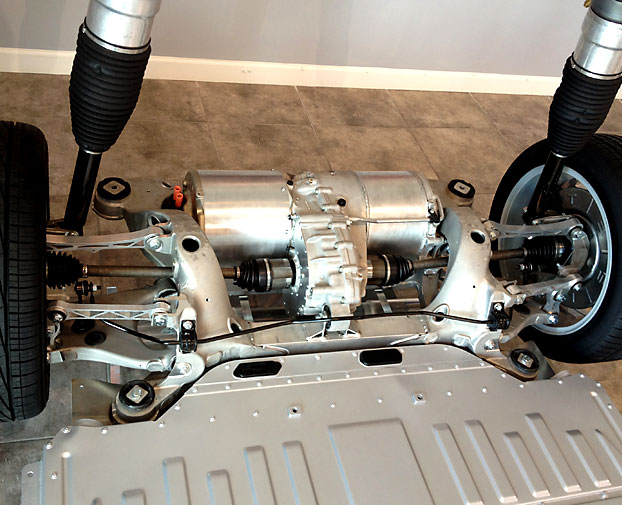 �
�
Dec 5, 2013
qwk Yeah, I'm not understanding it either. Waiting for gearbox oil? Tesla uses ATF in the gearboxes, so it's not like some special hard to find oil.�
Dec 5, 2013
AudubonB Had a glitch develop on my screen this afternoon: there is a strong black line running vertically down the entire 17", whether I have one display up or two.
I'll perform a re-boot tomorrow; if it doesn't go away I'll report back in.... to here and the SC.
Has anyone else reported this one?�
Dec 6, 2013
umuhk I had exactly this issue -- the driver's mirror would only operate about 2 out of 3 times it was triggered (both folding and unfolding). SC talked to Tesla Engineering, and they traced it to bad firmware...I had the .24 version of 5.8, and after they installed the .25 version, they say it's not failed to operate. I haven't picked up the car yet, so we'll see how well it's fixed this.
If you're on 5.8...24, you might be seeing the same problem.�
Dec 7, 2013
AudubonB UPDATE:
Re-boot did not make the line disappear. So I went to the Scottsdale SC today, where they also both performed a re-boot, then a fuse-out-and-wait: no change. They said they've never seen this before.
So it's to the appointment-scheduling on Monday for a 3 1/2 hour screen replacement surgery.�
Dec 8, 2013
nlc It's a lcd screen defect, nothing to do, they will need to change it�
Dec 8, 2013
JohnQ If you have lifetime energy usage data you want to retain be sure to write it down. They replace the whole unit (mine was done in July for a different issue) and all your preferences/settings/history will be lost.�
Dec 8, 2013
dlmorgan999 For what it's worth, mine was replaced a few months ago (bluetooth stopped working) and I didn't lose any of my settings or data.�
Dec 8, 2013
JohnQ Thanks, I must have misunderstood. They replaced my MCU and I assumed that it and the screen was an integrated unit.�
Dec 15, 2013
inottawa The left side door handles have stopped working for me. I've attempted to do a relatively thorough search of the forums for similar experiences.
Initially, I thought the windows were just frozen and made sure that they were clear if ice, but I realized they seemed dead (no typical sound of the door mechanics working). I went in the passenger side of the car and could easily open the door from the inside.
I've called tesla customer service as the Montreal service centre is closed today. It's a huge pain as I'm attempting the majority of my Christmas shopping today and have to get into the passenger seat to open the drivers side at every stop. If there are people around when I attempt this maneuver, I sit in the passenger seat and pretend I'm fishing something out of the glove box. Haha.
The tesla rep on the phone said it may be a fuse issue. I asked him if the new door handles were more 'mechanical' and less likely to have this situation occur, and he said he though they were, but seemed unsure.�
Dec 15, 2013
jerry33 The difference with the new door handles is that they don't go out as far (before you pull them) so that the switch can be adjusted to be less sensitive. There is no mechanical change.�
Dec 15, 2013
Jeeps17 One thing you should try, which is relatively easy, is to pull the fuses for the doors in your vehicle.
You need to expose the fuse boxes by removing the plastic cover under the hood (closest to your windshield, where the orange sticker for first responders is). If you look in the user manual you will find which box to access. There are three fuses that you can pull (I believe they are #40, 41 and 32, but you should double-check). Pull the fuses, wait 10 minutes, put them back in (make sure they are firmly pushed in), wait another 10 minutes, and try the handles again. This has worked for many owners with unresponsive handles, including myself.
Good luck!�
Dec 15, 2013
inottawa Fantastic. This is what I was searching for. I'll give it a try and report back. Thanks for the response.�
Dec 15, 2013
inottawa No go on the fuse reset trick. Checked the fuses while I was in there and they were all intact.
One thing I did notice when I popped the panels of was a surprising amount of snow. The fuse box cover was nice and tight so none got in. Though still a surprising amount.
Will wait till I get a call tomorrow to see what's up.�
Dec 15, 2013
scaesare The thought may be to pull the fuses to reset the system, not necessarily just check to see if they are blown.�
Dec 15, 2013
Bugeater Both sun visors had broken mirror cover hinges. Haven't see this on the forum but SC told my wife it was very common and they were working on a fix. They replaced them both. The tire pressure warning was alerting too. They found a nail! At 15,675 miles after one year, the 21" tires are still in good condition! Considering all the talk about tires wearing out very quickly, we seem to be doing quite well. The nail did cost $35 to repair, but that seems very fair!�
Dec 15, 2013
inottawa That was why I performed the action.. I checked the physical status of the fuses as a byproduct of the reset.
I may try it again for > 10 minutes. Maybe I didn't do it long enough? Another thing I've noticed (now that it's night time) is that the lights are not shining from the handles.�
Dec 15, 2013
huntjo If your handle won't open from the outside, hold down the key fob for a few seconds to roll the windows down. Then reach in and open your door using the inside handle�
Dec 15, 2013
Bugeater Hey, this is a great trick to know! Thanks.�

Không có nhận xét nào:
Đăng nhận xét