May 23, 2015
mike-415 FWIW, this is release 6.2.4.236. We also just installed it.�
May 23, 2015
gg_got_a_tesla Very neat! Having the destination charging options show up is very useful.�
May 23, 2015
Andyw2100 Thanks for posting the pics with the release notes, jallum.�
May 23, 2015
Benjamin Brooks Hope they keep this destination charging database relatively up to date. I stopped by one in Santa Rosa, CA and both destination charger HPWCs advertised by the Nav were out of service (one completely removed, the other not working)�
May 23, 2015
Andyw2100 Did you report that to Tesla? Reports like that from people like you who find conditions to be other than what is reported are likely to be the only way the database is kept up to date.�
May 23, 2015
GaryREM What is more exciting is the fact that there were release notes associated with an incremental release!�
May 23, 2015
Benjamin Brooks Email report and response, yes.�
May 23, 2015
scaesare This.�
May 23, 2015
Andyw2100 Excellent! Glad to hear it!�
May 23, 2015
MarcG This may actually make blind spot warnings finally useful enough to warrant trying them again.
Now, it Tesla would just push .236 to me so I could actually test it... (I'm still on .188)�
May 24, 2015
ThirdMartini Well I just experienced the blind sensor changes in very heavy rain. Completely unusable and IMHO a bit dangerous now in heavy rain. The rear sensors were going off constantly, no other cars on the road, And you get a nasty alarming beep when changing lanes when the sensor is going off with a false positive. It was alarming enough to make me take double takes every-time I changed lanes or needed to turn, pretty disconcerting. ( Makes me wonder if sonar sensors are anywhere near reliable for the level of autonomy Tesla wants to do with these cars. Seems a 360deg radar/lidar s really the only way to go for reliability in any sort of adverse conditions )�
May 24, 2015
dirkhh Can I ask the people who got .236 to please add an entry to the Firmware Tracker? We so far have only two people who have added entries so it seems that quite a few more have received it...�
May 24, 2015
Bet TSLA Just got my car back from service yesterday. As of then they were still installing 213.�
May 25, 2015
tomas What does a Model S have in common with a Chrsler 200?
OK, just got back from a week away where I rented Chrysler 200... WORST POS CAR I'VE EVER DRIVEN... no pickup, huge lag in gearshifts, cheap looking inside and out. Totally non-intuitive controls. And, one stupid bug that was REALLY annoying: regardless of whether I left audio on or off, each time I started the car, the radio would come on.
SO glad to come home to my MS, reminded me how great it is... Tesla would not screw up the audio control like that, would they? Would they? WELL, yes they would! Ever since 6.2 update, the darned radio comes on each time I get in the car. Regardless of whether I left it on or off. I sure hope this is fixed SOON, because I don't want my Tesla to have ANYTHING in common with that Chrysler except 4 wheels!�
May 25, 2015
wk057 Weird because mine never comes on by itself upon entry.�
May 25, 2015
tomas Mine never did before 6.2. Quite a number of others have mentioned same issue commencing with 6.2 on Audio threads, so it's not just my imagination. I'm on a pretty early 6.2 version, maybe it has been fixed since.�
May 25, 2015
wk057 I'm on .188.... however, I never actually stop the music (how exactly do you turn the radio off? I've never seen an option for this...). I always just turn it down. It's always still turned down when I come back.�
May 25, 2015
tomas I pause it. Before 6.2, it used to remember it was left paused. Not any more! Yes, I can turn it down to zero each time I leave the car, and that DOES work - except that it keeps advancing tracks while I'm gone, and I come back to something completely different, which is aggravating.�
May 25, 2015
wk057 Ah... yeah, I usually just use Slacker and one of their random stations... so I don't particularly care what song is playing.�
May 25, 2015
breser I'm with wk057, never had this issue. Have had some weird issues with playing Slacker or Tune In breaking up. Rebooting sometimes fixes it. I've noticed that it tends to happen when I go into the tunnel between buildings at work.�
May 25, 2015
neroden Yep, I'm getting this bug too, and it's new with firmware 6.2. I'm only getting it half the time though. It's a bit weird.
I think if I leave the car for just a few minutes , it stays paused/muted. But if the car goes fully to sleep and I come back after many hours, the radio spontaneously comes on. It's obviously a bug. (FWIW, I'm always listening to music on USB stick.)
I haven't reported it to Tesla yet, because software bug reports seem to go into a black hole. (Why don't they have gapless playback yet?!?) It seems like it's easier to get them to pay attention by posting here.�
May 25, 2015
dirkhh I had rather weird behavior with Slacker on .153 - it got somewhat better with .188 but I had it switch from mute when parking to playing when I got back in just yesterday...
Just received .236 (and updated the tracker... who would have thought?) a couple of hours ago. Let's see if that fixes it.
I definitely like the fact that we now get a lot better incremental release notes.
Dear Tesla employee reading along here who made sure that our pleas were heard: THANK YOU.�
May 25, 2015
LetsGoFast Also just got 236 tonight and updated the tracker when I got home. The change to the blind spot detection is pretty clear -- it seems to poll the sensors more often. The problem you used to have where the sensor still thought a car was in your blind spot when you were accelerating quickly for a few moments after you had actually passed it seems to be eliminated now -- it reacts much more quickly. I'll reserve comment on the TACC changes until my morning commute.�
May 25, 2015
MarcG Glad to hear! I turned off blind spot detection shortly after it was made available because of this very issue. I'll try again tomorrow morning, assuming .236 is indeed what I'm currently updating to.
EDIT: yep, got .236 so I'll be playing with the new improvements tomorrow.�
May 25, 2015
Gra55h0pper Trying to understand. I thought Range Assurance only took superchargers into account. Do I now understand it will also consider destination chargers?�
May 25, 2015
MarcG I believe range assurance has been taking both SpCs and destination chargers from the onset.�
May 25, 2015
Gra55h0pper Thanks. Not sure I like that too much as I understand destination chargers can be very unreliable. I think I'd prefer it to only consider Superchargers besides any visited chargers (e.g. "Home").
This makes me wonder though. The Trip Planner only seems to consider Superchargers, where Range Assurance also considers Destination Chargers? That would mean it is possible during navigation to go out of reach of the next planned Supercharger visit, without triggering a Range Assurance warning? Not sure whether I'd like that. I've built a lot of trust in Superchargers but Destination Chargers still make me "anxious"... :crying:�
May 26, 2015
0Q991 After using TACC for a 100 mile daily commute last week, I noticed a difference in the smoothness of the system this morning. Almost as if it begins to engage regen more smoothly when anticipating a slowdown--so less of a jerky brake when needed to slow to 10mph or less.
Also so it's great how the TACC system is able to modulate more smoothly than I can, resulting in a lower energy usage rate than I was able to do on my own.�
May 26, 2015
LetsGoFast I think the changes to TACC are more subtle than the first set of improvements. It appears to me that it reacts more quickly to cars entering or departing your lane -- previously, I usually used the accelerator pedal because it waited too long to react to a car leaving my lane. It seems to react more quickly to that situation now, although its still a bit slower than I might prefer, it isn't nearly as bad as it used to be. I'm not yet completely convinced it brakes much more gently -- I thought it might be doing so, but if the release notes didn't say that it did, I'm not sure I would have been confident of that. I think it must just be in certain specific situations that I haven't quite defined yet. I've yet to see the emergency braking in action since the first release and I'm hoping that continues.�
May 26, 2015
dirkhh To me the TACC behavior in .236 is unchanged. My commute is only 20 miles so I'll need to observe this a bit longer, but I cannot point my finger at anything that would have changed. It still slows down way too late (and then way too harshly) when traffic slows down ahead of me, and is very very sluggish and relucatant to accelerate if the slow-poke in front of me gets out of my lane.�
May 26, 2015
MarcG From my brief experience with .236 so far, it seems that blind spot warnings are throwing a lot less false positives than they used to. I'll need to test it more thoroughly for at least another 100 miles to positively conclude this, but so far I'm calling this an improvement.
Haven't had a chance to test TACC in traffic yet, but will most likely this afternoon.
And I did find one bug so far in .236: my walk-away door locks stopped working. Good thing I have VisibleTesla running with unlock warnings set at 5 minutes, otherwise I would have left the car unlocked all day! After getting the notification, I went out to test it and sure enough, the doors wouldn't lock themselves after the usual 20-ish seconds (I walked more than 50 feet away from the car).
After disabling the option in the Settings screen and re-enabling it, walk-away door locks now functions again as per its intended purpose. Beware of this potential issue in your car if you've just upgraded to .236!
EDIT: corrected drive-away door locks to properly indicate walk-away. Thanks Dirk for catching that!�
May 26, 2015
Andyw2100 That's a great find, Marc!
It's your call, of course, but that may be worthy of a thread of its own, so fewer people miss it.�
May 26, 2015
Kalud This is reported from time to time when a new software update is applied. I've see report of this as far a 18 months ago... Same goes for regen setting and other options, like sometimes during an update the options are modified and the setting does not reflect it... Changing the setting back and forth always cure the issue. Strange that its still happening...�
May 26, 2015
dirkhh You mean walk-away door locks, right? And they appear to be working on my car (but your post made me pull out my phone to make sure the car is locked...)�
May 26, 2015
MikeBur just did approximately 300 miles. The adaptive cruise control does not seem improved. On the freeway it seems about the same. And surface streets, it appears to be exactly the same, with the same issues.
for the first time, my radio no longer turns itself on after I paused it. Yay!
- - - Updated - - -
+1 to the Tesla SE and FW groups. Thank you for the incremental notes on a minor release �
�
May 26, 2015
brianman Can anyone else that was experiencing the issue in < 236 also confirm the issue is addressed in 236? I'd love to swing by the service center to request they address the bug with my car (by installing newer firmware).�
May 26, 2015
MarcG
Oops sorry, yes you're totally right - fixed the post accordingly.�
May 26, 2015
mknox I wish I had the option to turn on a horn chirp when the car auto locks. My last car had walk away locking and I could selectively turn on or off a parking light flash and/or a horn chirp. The sound of the horn chirp as I walked away with my back to the car always gave me confidence that it locked itself. If I didn't hear the chirp, I'd turn around and usually find that I'd left a door ajar. I never trust my Model S and always use the key fob to lock it.�
May 26, 2015
jgs Sadly, it doesn't seem to be. I just got it installed last night, so maybe I'm mistaken. I'll double-check and follow up if I'm hallucinating, but I did set up a test of it this exact thing � started audio playing from USB, paused it and left the car. Came back An hour or two later and it was playing again, a different track. I do have energy-saving enabled.
(Update: Confirmed, still broken.)�
May 26, 2015
0Q991 I got home and the Homelink didn't recognize that I was home. Then when I plugged in the charger, it did not recognize that I have delayed charging for my home location. Then I looked at the Nav and noticed it thought was in a different city?!?
Rebooted the screen and no difference.
Advice?�
May 26, 2015
Andyw2100 Try deleting your home location and re-entering it. I believe some people have had success deleting stored locations and re-entering them when the nav system messes up in the way it sounds like yours may be messing up.�
May 26, 2015
dirkhh Sounds like your GPS calibraryion went to heck.
I think Tesla told others to drive around for a day or two and it'll figure it out by itself. Or just give Tesla a call and complain...�
May 26, 2015
Andyw2100 When you call, be sure to tell them that Dirk thought it might be the calibraryion. Those calibraryions can get downright tricky if you're not careful.�
May 26, 2015
dirkhh Hey, thanks iPhone / autocorrect. a) what where you thinking and b)you helped Andyw2100 poke fun at me.
/me makes a note NOT to give Andyw2100 positive repuation the next time he posts to the tracker... and the time after that... and after that, too...�
May 26, 2015
brianman It wasn't me this time, dirkhh.�
May 27, 2015
ElectrkSam Got .236 this morning for my 85D. Installed and updated the firmware tracker site with the info.�
May 27, 2015
dyoreo Also got the update this AM for my 85D.�
May 27, 2015
dirkhh quick reminder - instead of posting "got it" here and filling up the thread, please post your data to the Firmware Tracker. That way everyone interested can see who got what when and how. We also get extremely useful statistics. And this thread isn't cluttered with all those "got it" messages.
And to create at least some value in my post... .236 seems to be a 'D'-only release with no RWD cars reporting so far. 22 cars reported so far, which is roughly in line with the releases that we consider "testing something new" and far fewer than what we see when Tesla thinks they have a good one and push it out to "most everyone"...�
May 27, 2015
Tourman got update this AM for my 85D. Added to tracker�
May 27, 2015
0Q991 Called my local service center. They took down my VIN and are checking the logs on their end. Will bring it later today if they can't find a way to fix it remotely.�
May 27, 2015
Andyw2100 Just for kicks, did you try my suggestion, which was to delete your home address and re-enter it?�
May 27, 2015
0Q991 Yep--no difference.�
May 27, 2015
wk057 Installing whatever version they pushed to me now since I have some time to kill.�
May 27, 2015
mrElbe Got completion message that my install was incomplete and I will be notified later. Version shows to be .236 BUT I also have message displayed that "Parking Assist is disabled". same for blind spot detection. Now that is a bummer. So, hope the re-install attempt will come soon.�
May 27, 2015
brickfrenzy I got the update pushed out to me this morning and installed it after lunch, and it seemed like the android app connected a lot faster than it usually does when I fired it up to pre-cool the car prior to leaving work. Has anyone else noticed that?�
May 27, 2015
mrElbe Yes, I noticed that too despite my install completion failure.�
May 27, 2015
MikeBur ugh - you cursed me... ;-) Just got back into car and it came back on automatically after being paused... Sigh- still broken. The worst is I was listening to explicit comedy via Slacker and kids got in car first. D'Oh!�
May 27, 2015
tomas That is the BEST channel, I listen until I've heard all the bits, take a break for a couple of months, then listen again. My "kid" is 28 and living 1000 miles away, so no risk, though there are some bits that offend my wife.�
May 27, 2015
Andyw2100 I can confirm this bug, though not the solution for it. Before being able to test the solution, I had to perform a scroll-wheel reset, as I also had no bluetooth connection between my phone and the car, and it may have been that reset that solved the walk-away door locking issue. The other thing that may have resolved it (though I doubt it--I'm only mentioning it for completeness' sake) is that I also disabled and re-enabled my tilting mirrors when in reverse.
I have written to Tesla to notify them of this bug.�
May 27, 2015
MikeBur Same thing here.
It's my own fault though. I shouldn't have expected different behavior as it wasn't listed in the minor build release notes (yay, thanks again TM for listening). Still I have to wonder what else was "fixed" that makes this roll out occur only on D models to date...? ;-)�
May 27, 2015
MarcG Did anyone else notice that the blind spot warning now mutes (or at least lowers) the music/radio volume?
It happened once this morning and thought it was a fluke until it happened again a couple of times this afternoon.
It seems to be similar to the way the collision warning lowers/mutes the volume, most likely to make sure you hear it.
Good thing the frequency of blind spot warnings has been greatly reduced...�
May 27, 2015
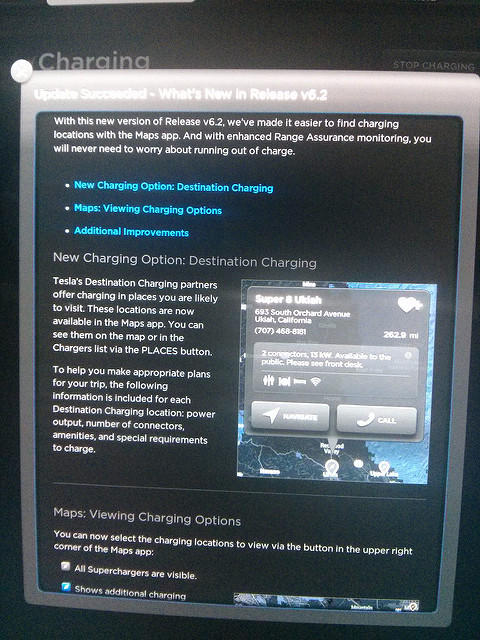
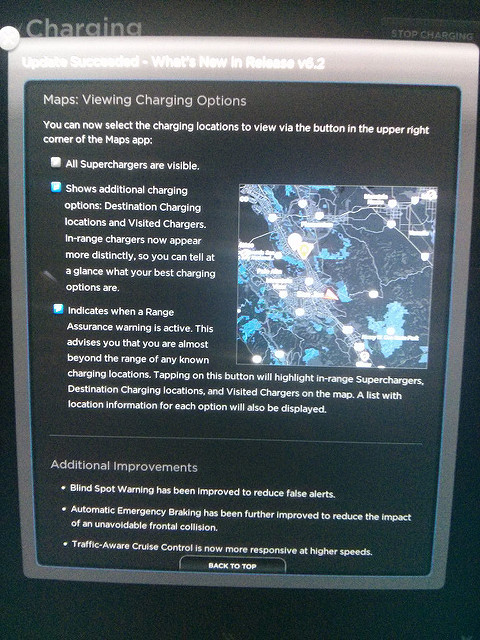
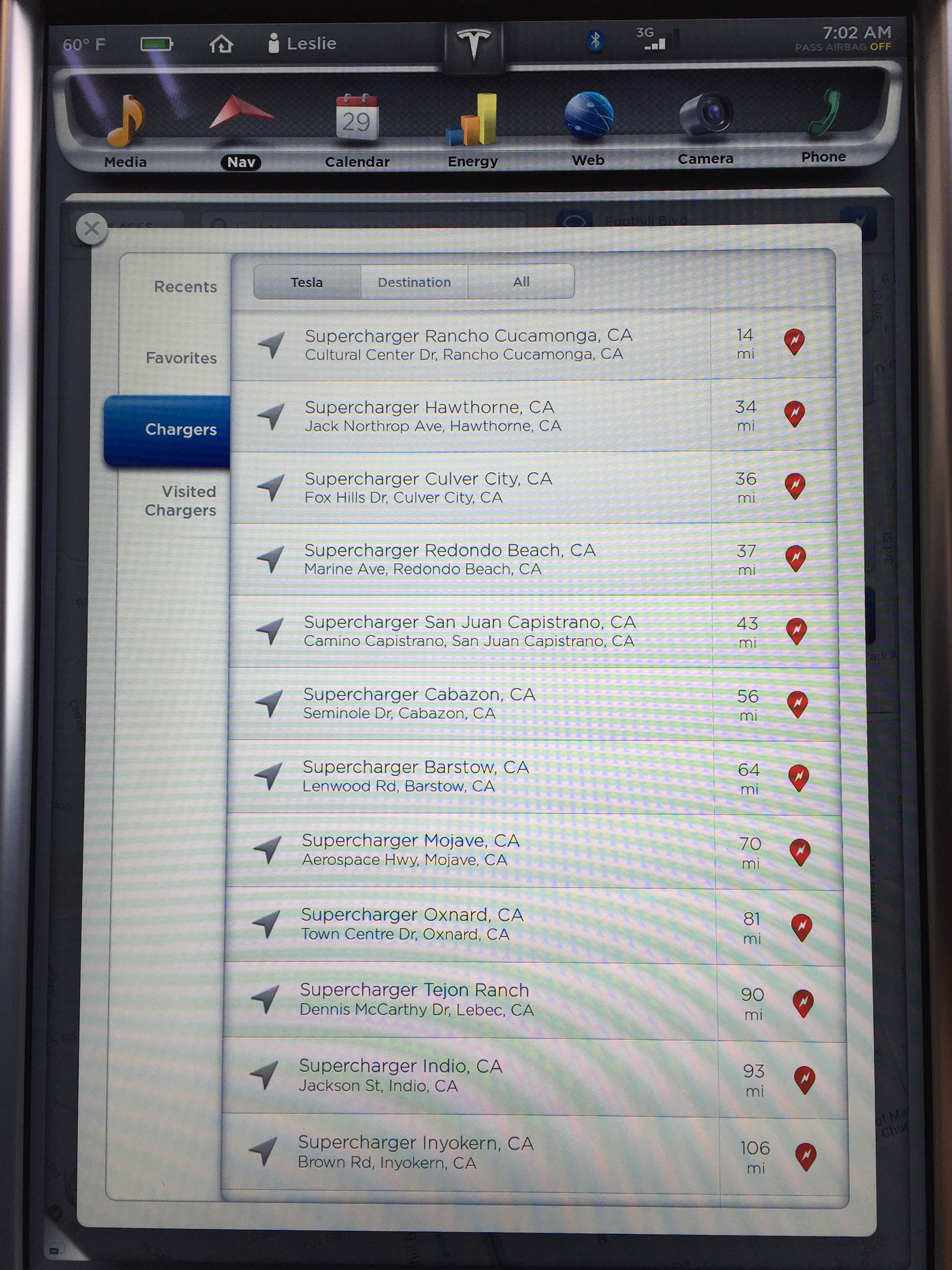
LJordan Can someone post pictures of the Trip Planner changes?�
May 27, 2015
vvanders New destination info and updates to charge listing.
 �
�
May 27, 2015
msteinbeck So I updated the software last night and now whenever I drive I keep getting an alert that reads "Blind Spot Warning Disabled. Drive with Caution". The only way to fix this is to turn Blind Spot Warning on and off and it works again.
Is this a bug in the software? Anyone else seeing this?�
May 27, 2015
breser Contact Tesla sometimes weird stuff like this happens if the software update didn't complete properly.
Incidentally I got .236 this morning and let it install while sitting in the garage at work. I do think TACC is slightly improved. Seems to be quicker to detect people cutting in front of you and quicker to speed up when someone moves out from in front of you. But that could just be in my head a production of the placebo effect of the release notes. One commute is probably not a definitive sample though.�
May 27, 2015
msteinbeck Thank you for the reply. I've only had the car since Friday and this was my first Software Update so I wasn't sure if it was just me or it happened to everyone that downloaded it. My car is currently getting Opti-Coat Pro installed so when I pick it up Friday morning, if it happens again I'll call Tesla. Thanks!�
May 27, 2015
xy46 Had the notice that new software was available this morning and subsequently installed .236 (tracker has been updated). A number of observations that I think are new as I don't recall them being present previously? I apologize if these are not new and I have just been that clueless :frown:
Also noticed that blind spot warning doesn't seem to give me any audible sound now when it goes from white to red in the instrument panel. I have booted both screens, but it doesn't seem to make a difference. Do you actually have to put on your turn signal or begin to cross the line for it give you an audible alert?
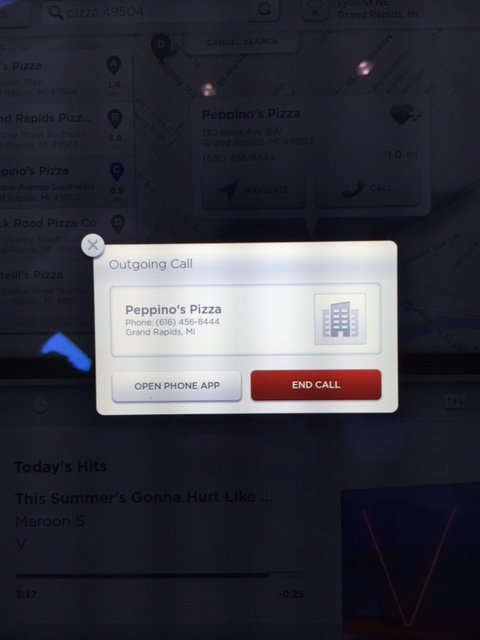
1) when choosing to dial a phone number from within the navigation screen, a small pop-up comes up now that lets you choose to go to the phone app, end the call, or you can x-out of the window and go back to the previous screens.
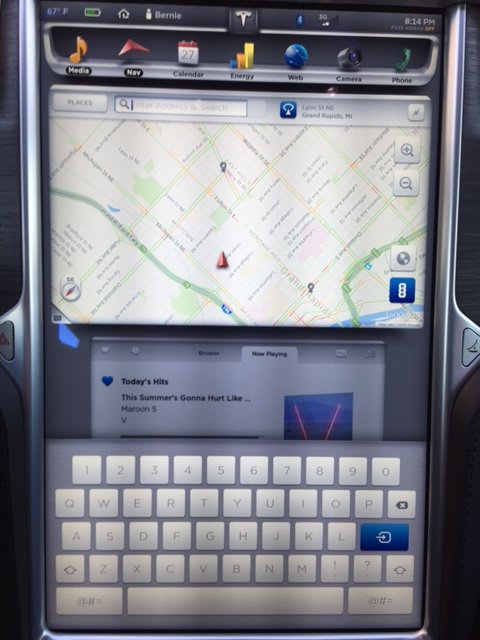
2) Pop up keyboard makes underlying window shrink into the background.
3) Scheduled charging now shows a clock on top of the battery symbol.
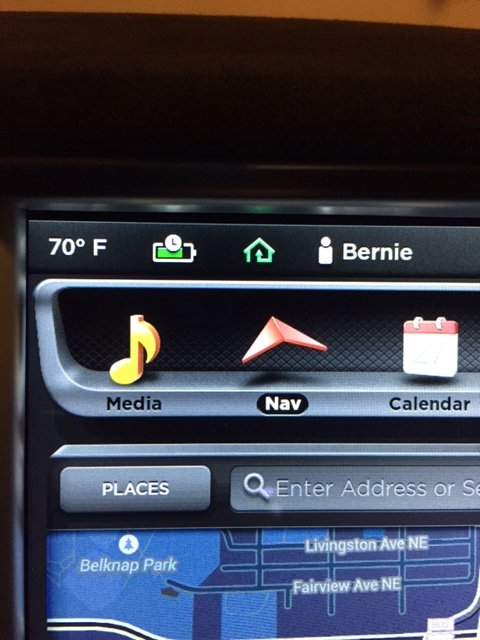
4) Changing the radio volume causes the album art to fade into the background on the instrument panel
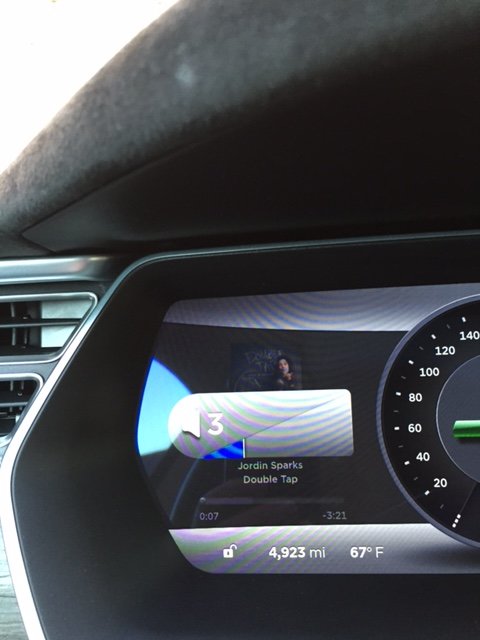
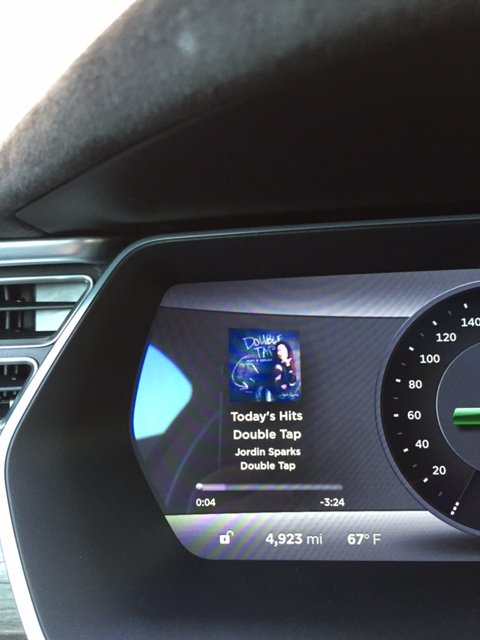
PS - not sure why all my photos are sideways, as they are right side up on my laptop?�
May 28, 2015
electrish That has been there before. It happened for me on prior builds when I changed lanes at higher speeds with the blindspot warning turning red. It almost seemed like the car was expecting a side impact.
After a while the system reset itself.�
May 28, 2015
caps04 I have noticed this behavior on my previous build (.188). Not sure about the rest.�
May 28, 2015
meltoots The latest .236 build for me the blind spot warning is useless. It was better previously.
My gray bar shows up waaaaaayyyy too late and sometimes not at all.
Here's an idea TM, I will pay for new mirrors, but I want the light up warning light in there.
Since that may never happen, I would like the actual blind spot warning to work.
If I actually changed lanes without physically checking, depending solely on the blind spot warning,
I would have been in 10 accidents already. The warning is just nowhere near as good other cars that have
these. Maybe I am crazy, but are these actually useful to anyone?
1. It shows up way too late when someone is coming up from behind you. Mine warning only shows
up when the car is way out of my blind spot.
2. It does not show at all if I am overtaking someone and they end up in my blind spot.
3. With Semi trucks, it shows up only when the wheels are in your blind spot. Strangely
says nothing is in your blind spot when a huge truck is next to you.
4. I really think it should be less of a blind spot warning and more of a don't change lane warning.
If someone is next to me or coming up fast, and I decide to move over lanes, it should warn me.
5. It does not work at slower speeds.
Really, its truly not good. Time to rethink this one TM. IMHO.�
May 28, 2015
mrElbe Second attempt at .236 update happened this morning and this time completed successfully. Parking Assist and Blind Spot detection are back in operation.�
May 28, 2015
Todd Burch Please don't ever do this.�
May 28, 2015
Stoneymonster I'm seeing something weird on .236 on my 85D. I just got the update night before last. What's happening is that the traction control light is firing sometimes when doing low-speed turns (into parking lots, at left turn lights, etc.). When this happens, the car seems to be overriding my braking or accelerator and seems to move on its own. The TC has *never* fired on this car in 2000 miles before, even in the wet. This is on dry pavement.
What email would you all report this to?
Edit: Never mind, went ahead and called support on the phone. They are looking into it.�
May 28, 2015
MarcG I noticed that traction control also came one for me a couple of times when I wouldn't expect to, also on dry pavement. Once was out of a tight turn, the other after passing a train track.
But in my case the car was just not accelerating until I stopped pressing the accelerator pedal completely. After doing so, the TC light turned off and I was able to accelerate again.�
May 28, 2015
Stoneymonster Interesting. Had you ever had it go off before .236? In my case I definitely could have hit a car in front of me had I been following too closely.�
May 28, 2015
Chasedrgc1223 .236 has brought MUCH smoother TACC on the highway... When cars cut in to my lane, braking is significantly smoother, and more of what I expect for autopilot.�
May 28, 2015
MarcG Definitely not in these conditions before. There could be something up with TC in .236 - more testing needed for me to confirm either way.�
May 28, 2015
Bet TSLA You know all these posts that say "release x caused something to change for me" are rather useless when you don't say what release you had before. Almost everybody does this.�
May 28, 2015
Andyw2100 First of all, why? Take the most recently discussed issues concerning the traction control, for example. What difference does it make what version the posters came from? They are talking about an issue that now exists in .236. Similarly if someone says that the "improved" blind spot detection that .236 advertises in the release notes is actually worse than it was in previous versions, it's really not all that relevant what version they came from.
And finally, if you really want to know the version the poster had before, there is a decent chance that the information is in the update tracker. So you can always check there.�
May 28, 2015
apacheguy Scratching my head here. Car was in for service today and it had 2.4.188 when it went in. Got a notification on my phone that a software update was available. Ok, fine, to be expected. Got the car back tonight and it still has .188! Odd, no? Did they stop pushing the 200 builds?�
May 28, 2015
andrewket Is the update still pending? I've seen SCs stage it but not install it if they run out of time.�
May 28, 2015
thecloud Knowing the prior version is useful (for Tesla, in theory) to be able to pinpoint where the regression occurred. If you know that an issue was NOT present in a relatively recent release (say, .188), and is now present after updating to the current release (say, .236), then you can more definitively say ".236 broke this," or at least, "something between .188 and .236 caused this change in behavior." The smaller the increment between the previous known-good version and the bad version, the easier it is to narrow down the change that caused the issue.�
May 28, 2015
Andyw2100 The poster I was responding to wasn't talking about helping Tesla debug a new issue. He was saying that it was useless for our discussion purposes. This is what he wrote:
This is a discussion forum that Tesla does not openly participate in. If they choose to read some threads and act on the information in them, that's great, but the poster, when calling the posts "rather useless" had to mean for the main audience of the post. The main audience is not Tesla.�
May 29, 2015
dlt Now there is also 2.4.238 (on p85d)�
May 29, 2015
ThirdMartini I've had the TC activate on dry pavement in the past before ( dry pavement, light acceleration, TC kicked in). There was also another poster a few weeks back with the same symptom. My code rev at the time was .162 (I think). Saw it once, never seen it since.�
May 29, 2015
Andyw2100 How does traction control kicking in negatively impact braking? It sounds like you're saying that while traction control is active, you have no braking power. If that's true, it's something I had not been aware of.�
May 29, 2015
apacheguy Indeed. I had just checked via the API as the car was being driven back and the possibility did not occur to me. Have .213 now�
May 29, 2015
Stoneymonster You know when ABS kicks in over a bump (erroneously) and sometimes it feels like braking forces reduces out from under you you? Felt like that.�
May 29, 2015
Andyw2100 I'm not sure I've ever experienced that either.
In retrospect, I guess I did experience something like one of those things once. I guess I should have reported it, but at the time I just figured that it was a one-off oddity.
I was driving reasonably slowly, having slowed with regen from perhaps 40 MPH to 10 MPH, as I was approaching an intersection with a red light and cars stopped in front of me. I'm not sure this matters, but the stopped cars were on a curve, and a slight downhill. As I applied the friction brake to attempt to come to a complete stop, it seemed the friction brake had little or no effect. I pressed it harder, and then may have, in a slight panic, completely taken my foot off of it and attempted to stomp it again, and it's possible that in so-doing I also grazed the go-pedal, because while the car did come to a stop, I also had the warning light about using the brake and the accelerator at the same time.
It was definitely a little scary.
Like the others that have mentioned something like this, it happened that one time, and never again. I will certainly report it to Tesla if it does happen again.�
May 29, 2015
tomas Andy, Behavior very much like this has been widely reported, forget the thread, on older cars up to maybe late 2013. It is likely this is NOT a traction control, but a brake/accelerator issue. In early cars, especially after brake fluid got broken in, brake travel went well beyond the height of accelerator. This made/makes it EXTREMELY easy to catch a bit of accelerator while braking. If you brake while accelerating, the MS cuts acceleration and brakes. If you hit accelerator while braking, it does not. Both happen, and you get this really weird coasting sensation at a speed of a few MPH. Can't stop. Only solution is lift foot and rebrake. Newer cars (forget the date) have initial brake height further from go pedal, so brake travel stays above plane of accelerator. Thus solving most of the time. But what you reported here sounds as if you clipped go pedal while braking.�
May 29, 2015
Andyw2100 Thanks for the detailed response.
It is entirely possible that I had clipped the go pedal on my initial attempt to brake, and not, as I had thought and written above, when I removed my foot from the brake and then hit the brake again. Based on what you wrote, that would make sense.�
May 29, 2015
andrewket +1. This happened to me in my 2013 MS.�
May 29, 2015
lg_golfs For the person who requested screen shots of the destination charging... Here you go. Update was waiting for me when I got home from a trip. My car is a week old with me being gone most of that time, so, I am not sure if this is different with the new update, etc.
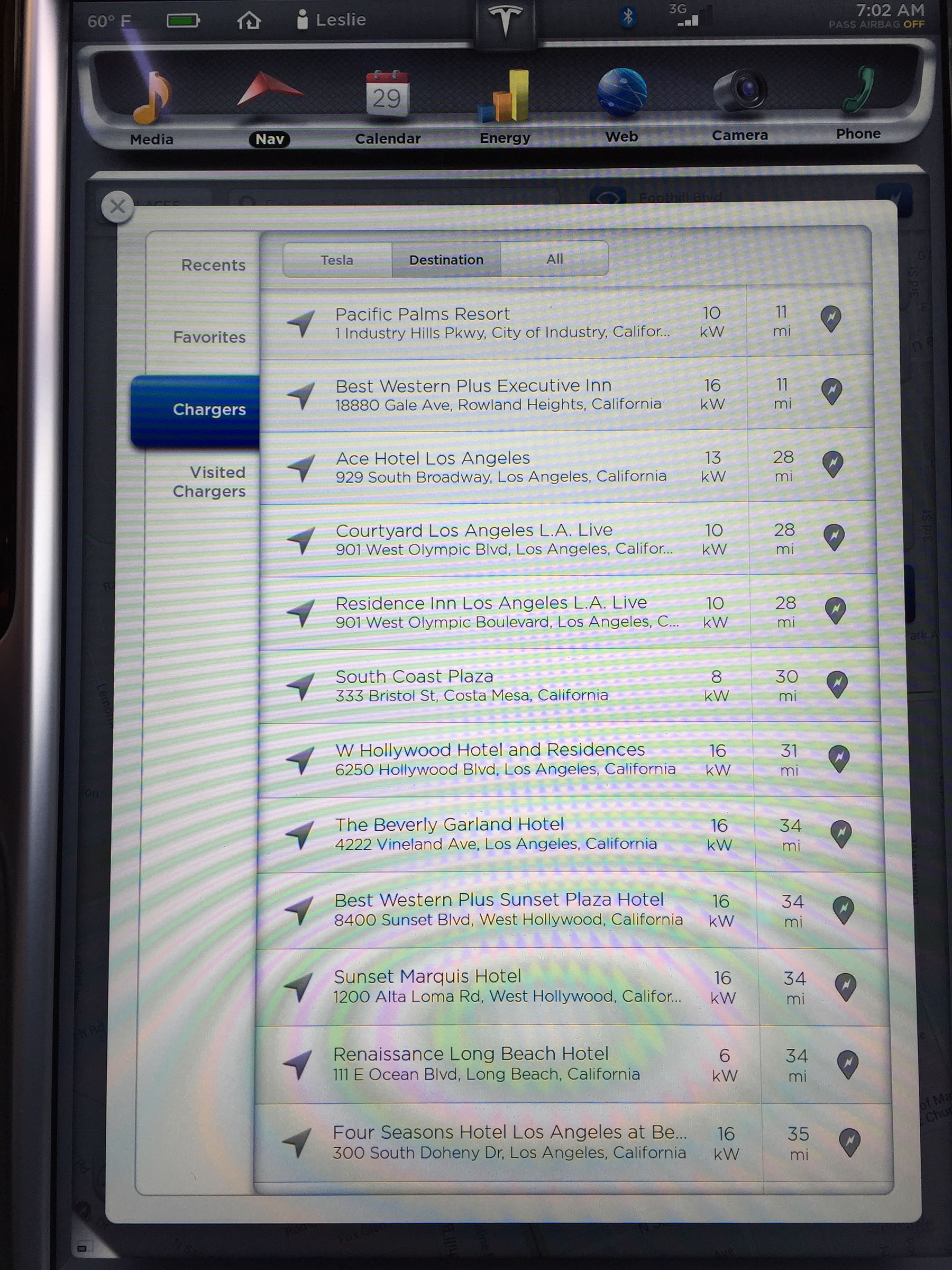
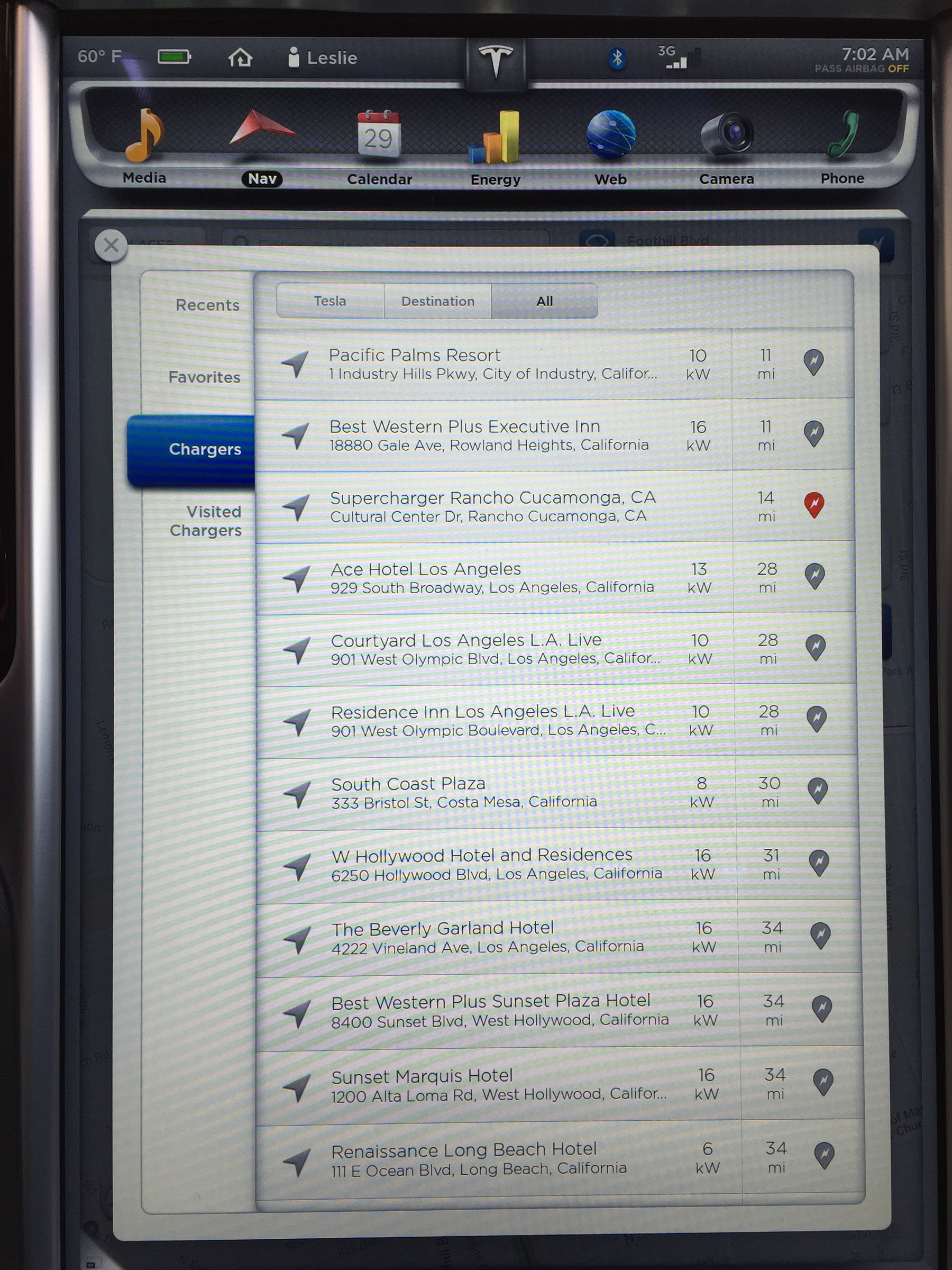
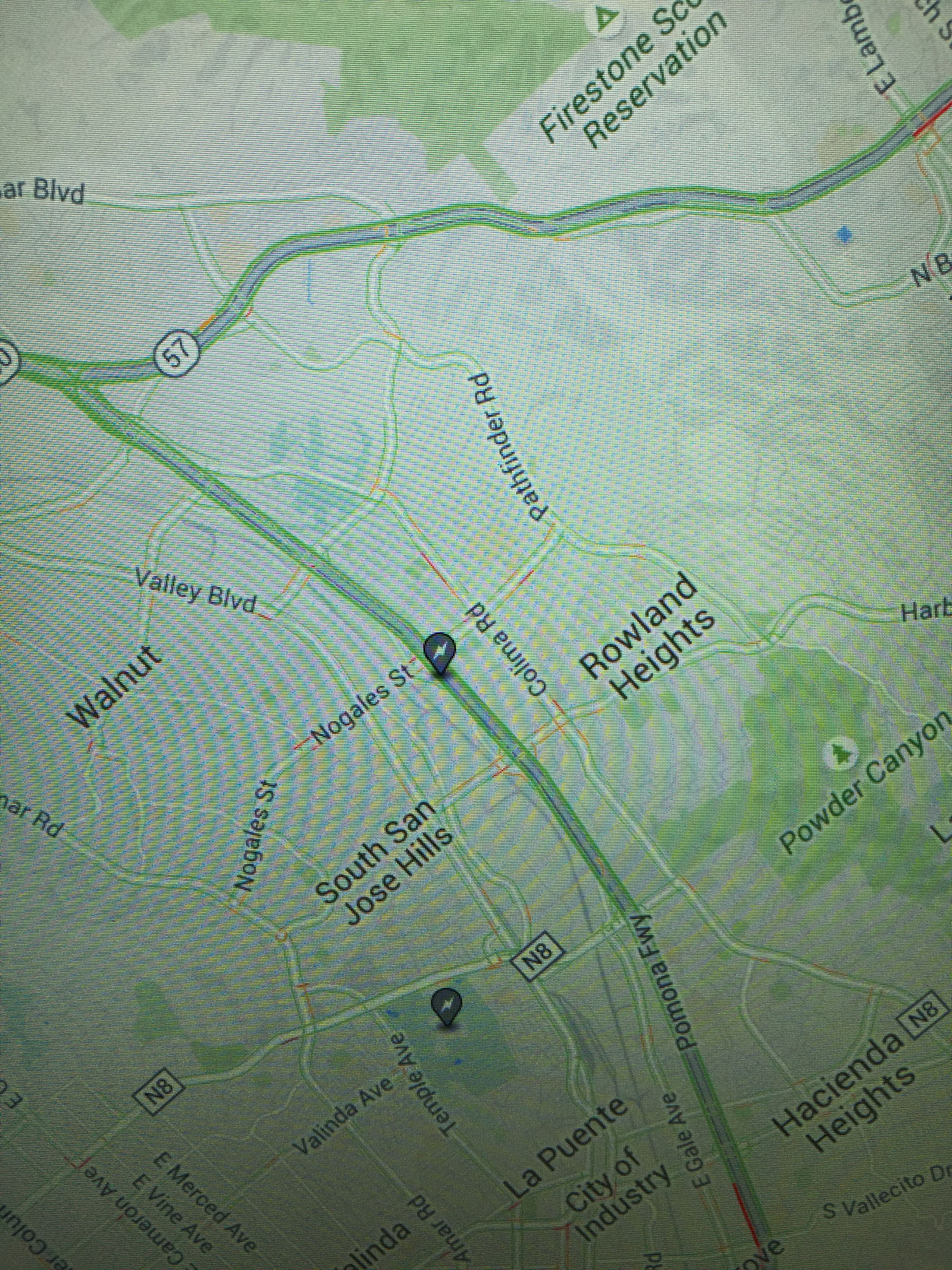 �
�
May 29, 2015
scaesare Was it wet at all?�
May 29, 2015
Andyw2100 I don't think so. At least I don't remember now that it was. But I don't think it matters. I'm pretty certain after reading tomas' post that he nailed what happened.�
May 29, 2015
S4WRXTTCS When I get my MS I plan on testing this because part of me finds this hard to believe, but another part of me is aware of that Tesla doesn't always do things in the manner one would think they would.
There is a problem when a car tries to do too much thinking when it comes to something as simple as stopping. Whether or not someone hits the accelerator or not the brakes should brake when they're hit. There is no "oh, sorry I was confused so I didn't do anything" or "But, you hit the gas first so obviously you consented to being thrown into the back of the truck".
This is a car. You don't have time to go "hmmm.. Let's try this again"
it's like Tesla can't quite figure out that it's an electric car, and you don't have the same feedback mechanism that you do in a normal ICE car.
On an ICE car you have the engine noise letting you know you hit the accelerator
On an ICE car you have the gear shift feeling letting you know you shifted from Reverse/Drive/etc.
An ICE car doesn't have the same instantaneous response.
On an ICE car the manufacture can decide whether they want the accelerator to be ignored or obeyed when both pedals are pressed. Some choose for it to be obeyed because of their target demographic demands it. Some people want a car to just do what it's told even if it's being told two different conflicting things.
The Toyota fiasco taught manufactures a valuable lesson in that sometimes with highly automated cars you have to keep things simple.
Why can't Tesla keeps things simple?
Both this behavior and the behavior with the Reverse/Forward is truly bizarre to me.
This car almost invites itself into running into things, and goes a long ways into explaining why so many people have such trivial accidents with them. Drivers backing into things because the car ignored the shift. It couldn't shift because it was going over some speed threshold, but it also didn't shift in neutral to be safe. Going into neutral at least gives the user the few hundred of milliseconds of panic (when it doesn't go) to hit the brakes.�
May 29, 2015
andrewket So this is a new one for me. I was traveling this week. While I was gone, I received a notice on my phone that an update was available. A few days later I get back to my car and the clock isn't there. There is no update available. Did Tesla rescind a version?�
May 29, 2015
Andyw2100 I have no first-hand knowledge of this, and don't even know that it's possible, but it wouldn't surprise me if they did rescind .236 because of the bug MarcG identified with the walk-away door locks. A few minutes after I reported that bug to [email�protected], I received a phone call, asking for more details about when it occurred, etc. My take was that they wanted to pull my logs, and confirm it really happened. If Tesla confirmed the bug, but couldn't push a fix quickly, it would make sense that they might stop updates, and rescind any uninstalled ones if possible, as opposed to letting people potenitally leave their cars unsecured. We know from past experience they wouldn't just send an email saying, essentially "This is what you need to do to correct the bug in this version of the software."
Edit: And looking at the update tracker, there were no installations of .236 today, and only three yesterday, after 24 the day before, and 16 the day before that. The three could have been a lag in the time it took Tesla to pull the update, or people reporting late, etc. I think there is a decent chance Tesla stopped pushing .236, and that the walk-away door locking issue will be fixed in whatever version they start pushing to the Ds next.�
May 29, 2015
andrewket I'm not surprised Tesla has this ability. Apple does. Each installation package is signed. All they have to do is revoke the cert and you can no longer install it. Doesn't matter if you've already downloaded it.
I'll await the next release�
May 29, 2015
lg_golfs Took a quick drive tonight on the freeway and found some of the same differences others have reported.
Never seen the double red lines show up (granted I drove the car only 4 days) I saw it three times today and I was not changing lanes. Maybe just getting close to the line.
Also, found TACC to be a little bit smoother.�
May 29, 2015
breser Your comment has the behavior backwards. You hit the accelerator first and then apply the brake (with the accelerator still depressed) you get braking. You the brake first and you apply the accelerator (while the brake is still depressed) you get both. There is a perfectly valid reason for this. When sitting on a steep hill you may need to hold the brake until you are already applying forward force with the accelerator.
You may say "Ohh but the car has hill hold." Hill hold has very particular conditions that it works in. It's not perfect for every situation, sometimes you're still going to use the two pedal technique.
You may say "Ohh but why not use creep mode." Well some of us don't like it. Personally I don't think I like the way it makes the car drive.
Also both of these behaviors weren't available on the car when it was first put out.
I'm not sure why you think putting the car into neutral would be any better. You're just replacing one unexpected behavior with another. I'm guessing you think that the car won't move much then because just like above you're only really thinking about level ground.
Give Tesla a little bit of credit here. They have put a lot more thought into the user interface than you think they have.
- - - Updated - - -
I seriously doubt that Tesla would revoke the certificate to pull back an update.
It's my understanding from various things I've heard is that the car has to be able to use the 3G connection in order to apply an update. I'd bet that the car contacts Tesla and asks permission to install the update it's already downloaded. It's my understanding that this verification can't happen over WiFi.
So stopping an update being installed is just a matter of stopping to give that permission.�
May 29, 2015
Andyw2100 Looks like this may have happened to someone else too:Work on lighting lift gate appliqu� begins - Page 56�
May 29, 2015
Bugeater Bresser, where did you hear that updates require 3g and WiFi won't work! I've not heard anything like that!�
May 30, 2015
anxman I also got the notification on my phone that an update was available but when I got to the car the following day, it was gone. I think it was pulled.�
May 30, 2015
S4WRXTTCS The person I quoted said if "If you brake while accelerating, the MS cuts acceleration and brake" which I found to be rather disturbing. This is the first thing I'll test because I find it hard to believe that it would cut braking in any situation.
I can understand their being debate between how the accelerator is handled. The situation you described is a great example of where a driver will want to start accelerating before fully letting go of the brake. Electronically you can have some pretty fine control of the throttle while the brakes are applied (assuming you can measure braking power). So I think you can still have the behavior you want (both brakes and acceleration for help with hills) while at the same time allowing the brakes to overpower the accelerator (what I want).
I can't for the life of me think of any situations where you'd want brake booster to cut power while driving.
For the Forward/Reverse what I actually want is for them to increase the MPH that it will allow you to switch. My understanding is their just trying to prevent accidental shifts at high speeds. You obviously don't want the car to switch from Forward to Reverse at 50mph. I agree with their logic at 50mph, but I'm not sure about low speed. I can understand your point if someone is switching on a hill. Where they'd be sliding back with my behavior, but I still think it's better than a rapid acceleration the wrong way.�
May 30, 2015
NielsHP > Breser, where did you hear that updates require 3g and WiFi won't work! I've not heard anything like that!
It may depend on the local rates for 3G, Tesla has to pay.
My car had not been on WiFi until I moved the access point physically (so car could see it) 2 hours ago. Within half an hour, I had the "Update is ready" message on the iPhone app (we have very good 3G coverage in the area and tecnically it should be no problem to download even a larger patch). So it is likely Tesla waited pushing the update until they saw WiFi connected (making it likely they pay for actual bandwidth usage here (Copenhagen, Denmark)).�
May 30, 2015
R�B Installing a new update now. Not sure what it is.
UPDATE - Just finished downloading.
Looks like I got some improvements to the Map App. It now clearly shows destination chargers (power output, number of outlets etc). There's a new button at the top of the Map application that toggles destination chargers ON/OFF.
It also improved Blind Spot warnings (less false alarms), improved emergency braking and improved TACC response at high speed.�
May 30, 2015
MarcG This is what .236 included. What version did you end up with?�
May 30, 2015
R�B .238�
May 30, 2015
MarcG Ok thanks for the quick response. So it looks like .238 is a bug fix to .236, wonder what was fixed...
It would be great if Tesla got onboard with the software industry's standards of dot versions and release notes.
That is, only increment the last dot-something (2.4.238 in this case) when there are bug fixes, and include those fixes in the release notes.
But when new features are released, as was the case in 2.4.236, increment the second-to-last dot version (2.5 instead of 2.4).
And finally, when a major version with UI changes is released, increment the first number before the dot (3.0 for example). I know they plan on going from 6.2 to 7.0 but this whole sub-version is confusing and inconsistent.
You can still have general release notes for the major versions available to read, but I really want to know what was fixed in dot-dot releases (e.g. from 2.4.236 to 2.4.238).
Oh and while I'm at it, show the release notes BEFORE the upgrade takes place�
May 30, 2015
HankLloydRight That would be a PR and press nightmare for Tesla to release what bugs were fixed in dot release versions. Even the smallest, inconsequential bug would be quickly spun out of control in the press (like Seeking Alpha loves to do) with headlines proclaiming how unsafe the cars have been until this xx bug was fixed... and how many other hidden bugs exist in 100,000 cars on the road today?
Dot release notes are never going to happen!�
May 30, 2015
techmaven Release notes for the software industry professionals is very different than release notes for consumers.
The vast majority of detailed release notes for the software industry is aimed at other professionals in order for them to better handle their jobs in deploying and supporting software. As you move over to the consumer side of things, release notes get less detailed. Very detailed release notes will likely serve to confuse and scare consumers more than convey useful information.
Similarly, Tesla release notes are much closer to Apple's release notes given to consumers. More detailed Apple notes are available to developers, those that have filed bug reports, or in specific tech notes. For Tesla, since there are no authorized 3rd party service centers, such communications does not need to be in the open.
As for version numbers, well, that's also confusing for consumers. It's not like there are 3rd party dependencies to deal with in the Tesla Model S ecosystem. Therefore, whether we get FireFox/Chrome like version numbers (major version number changes fast) these days for Java like version numbers (major, minor, subminor all rarely change with a patch # that changes often), it really doesn't matter. Tesla could go with a major number and a single minor number. I find Citrix Xenserver version numbers to be hilarious. They have a major, minor, and sub-minor number and still find the need to do service pack numbering. That's mainly to support out of order hot fix patch bundles, so there's a reason, but still... why bother with the sub minor number then?
Again, for Tesla, since they are managing all the hot fixes and there is no reason or capability for a consumer to pick and choose hot fixes, all builds are monotonically increasing. So really, it's a feature number plus a build number. 2.4.238 might as well be feature release version 24, build number 238. What is really inside of that... is likely extremely complex considering all the various embedded processors with their firmware and the variances between Model S hardware releases. It would be interesting to see the actual internal mapping of Model S hardware revisions.�
May 30, 2015
Andyw2100 I'd be willing to bet they fixed the walk away door locking bug that you first identified and I reported to them. (I don't know if you also reported it to them, but when I did I didn't take credit for finding it.) As I posted previously, they took a real interest in that report, for good reason.�
May 30, 2015
caps04 My first drive out with 236 was a little weird. Turned on Cruise and within seconds the car braked semi-hard even though there was no car infront me at all, on either side. I overrode it quickly by pressing the accelerator pedal without even realizing what had happened.. just instinctively. Then I saw the blue locked-on cruise icon and scanned around to see why there was a false lock.
The weather was clear. There were a couple of pedestrians walking towards my direction on my side of the lane (but safely off the road) and the road led to those small tunnel under an overpass though that was a considerable distance away. After reaching home, I double checked and the front radar was clean and clear. Hoping it's a one-off thing but going to keep an eye out whenever I'm in cruise. This has never happened since getting the TACC feature.�
May 30, 2015
MarcG I disagree with that statement. With Apple software updates, the release notes indicate what was fixed in dot-dot versions. In the Tesla updates, we mostly learn about new features and rarely get any info about what was changed in dot-dot releases (.236 being the exception, but even that one should have been a dot release, not a dot-dot release, since new features were introduced).
However, I do agree with the point Hank made about not wanting to alarm consumers (and the media at large) regarding safety issues, so there's a fine balance in what to reveal in release notes. I still maintain that there are inconsistencies in versioning and a general lack of information, which is why we're usually left wondering what was fixed in dot-dot releases.
I would be surprised if they were able to fix it and release it that quickly, but it would be nice if that were the case. Also, I would be happy if the traction control issues reported were also fixed in .238, but I also doubt it as that one probably requires more investigation and much more testing IMHO.�
May 30, 2015
breser You're misunderstanding them. They mean the car cuts acceleration and then applies the brake.
The only way you get rapid acceleration the wrong way is if you rapidly accelerate after changing gears. Don't do that. It's bad practice in any car.
- - - Updated - - -
I'm not saying the download can only happen via 3G. I'm saying that the car has to contact Tesla for permission to apply an update it has downloaded (via WiFi or 3G or from a tech's laptop). The car always does this via 3G. I don't think bandwidth concerns come into play here because we're talking about a very tiny amount of data.�
May 30, 2015
clx Just finished installing this morning and here is what I see for the release note, not sure if it's the same as .236:
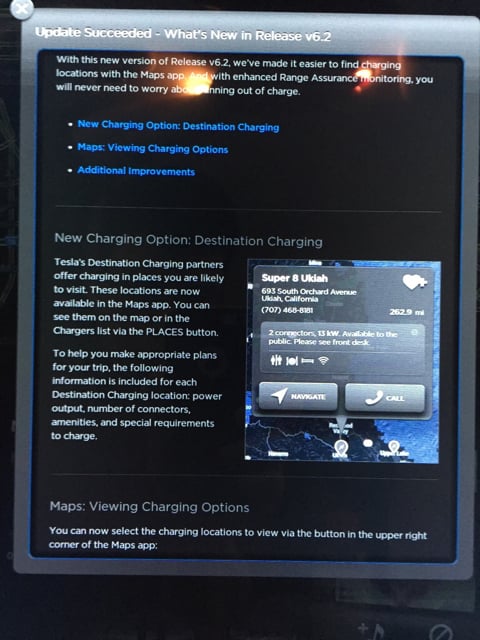
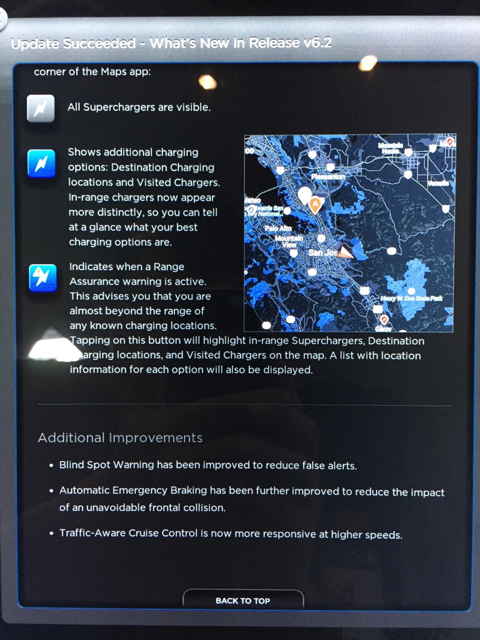
=====Edit=====
Never mind, saw someone already posted this a couple days ago...�
May 30, 2015
Andyw2100 Did you have walk away door locking enabled? If so, please test it to see if Tesla has fixed the bug in this version. Don't change any settings, don't do a reboot, and see if the walk away door locking actually works or not. (If you didn't have it set before you updated, you won't be able to test this bug.) Thanks!�
May 30, 2015
gg_got_a_tesla I got and installed .236 late on Tuesday, 05/26 and I haven't had any issues with walk-away door locking. Didn't reboot; didn't change any settings.�
May 30, 2015
eye.surgeon I installed .239 this morning. 63xxx S85 in California.
One bug I noticed fixed is the range assurance navigation mapping...2 months ago it appeared to be calculating routes via "as the crow flies" distances rather than driving distances. It was routing me to a SC that was 60 miles away straight line on a map but 150 miles away by road, as there is a mountain range in between. That is now fixed.�

Không có nhận xét nào:
Đăng nhận xét