Apr 6, 2015
dirkhh Mine present when I go into park. So I don't think this is a "feature" in 6.2...�
Apr 6, 2015
MarcG I noticed that last night too. Pre-6.2, I just needed to select Park once to get the handles to pop out. Now, I need to select P twice.�
Apr 6, 2015
Rheazombi That would be awesome if true. I'll have to try it out later. Always hated how they pop out like that. I've actually been in a situation in my ICE car where the second I parked, a creepy guy popped out of nowhere and yanked my door handles and tried getting in my car! Because I always have my doors locked, he couldn't get in and I quickly drove away.
The car should stay locked until I purposely unlock it.�
Apr 6, 2015
Todd Burch I thought the handles presenting on 2nd press of the park button was a 6.0 or 6.1 change (undocumented in release notes) and that continuing to press park toggles between extended and retracted. Come to think of it though, I haven't remembered to try it out. Guess that's my task for tomorrow morning.�
Apr 6, 2015
jerry33 It certainly toggles on 6.1�
Apr 6, 2015
wk057 Yep, definitely some saved places nav bugs. Some of my visited chargers and favorites display correctly but route to the wrong place. :-\�
Apr 6, 2015
gpetti I've reported this bug, hopefully others have too.�
Apr 6, 2015
Andyw2100 I believe it has been widely reported. In fact there's conjecture in the firmware tracking thread that the release is being held because of this bug, as no forum members recorded receiving the new firmware yesterday.�
Apr 7, 2015
cgiGuy Interesting. You're saying every time you hit the park button on the stalk the handles go in or out? I'm on 6.1 and mine only present. Additional presses of the button do nothing.�
Apr 7, 2015
3s-a-charm Does this have anything to do with having the setting on for "Lock doors after driving" in the settings menu?�
Apr 7, 2015
commasign Weird thing this morning. When I entered the car, it was showing the 6.2 release notes update screen even though I didn't see any update notification last night. I checked the firmware version, and it says 2.4.136. Now, this could be related to my service visit yesterday, but those notes clearly state 2.4.124. So either they actually installed 2.4.136 yesterday and the release notes just randomly appeared this morning, or .136 was installed automatically without user intervention. Anyone else notice .136 miraculously appear this morning?
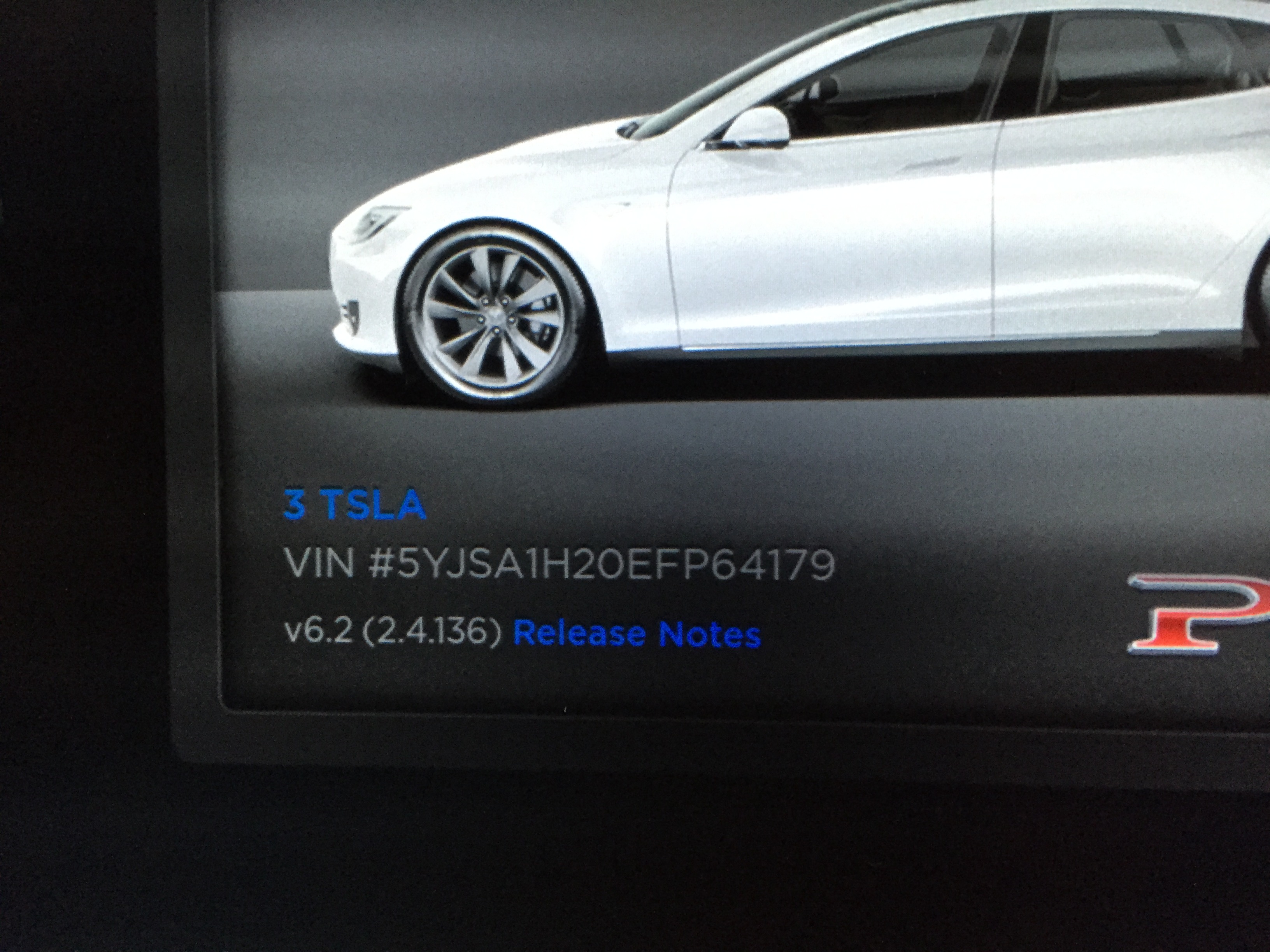
And from yesterday...
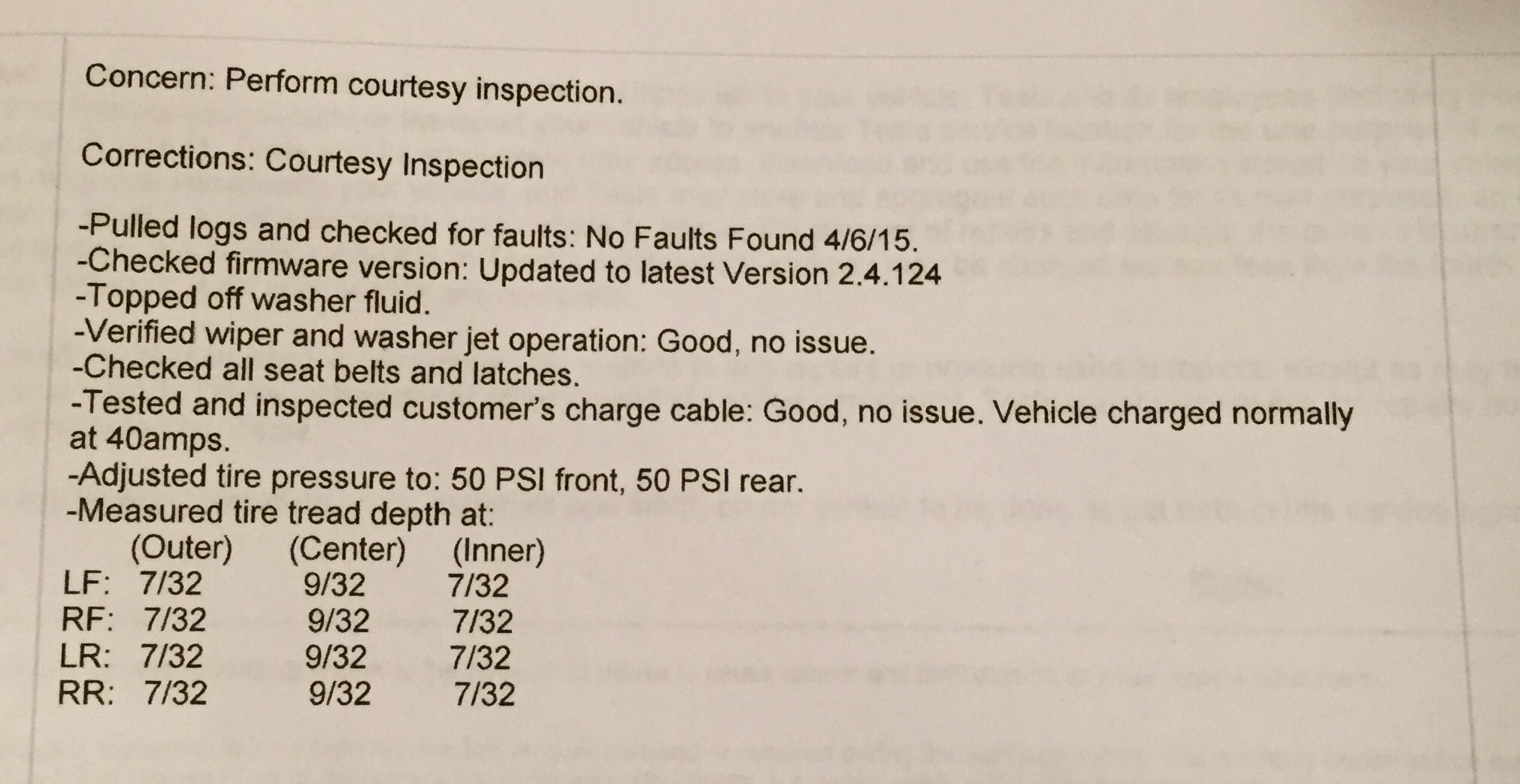 �
�
Apr 7, 2015
wk057 If they did anything with firmware it would be the latest version. When the tech went to install 6.2 he couldn't install the 2.4.124 version he already had on his laptop because 2.4.136 was available.�
Apr 7, 2015
dirkhh Not sure that's entirely true as until commasign we had no indication of AP cars like his P85D receiving .136 - so they must have been able to still install .124... but checking the tracker again, now sataponw also appears to have received .136 for his P85D... and also at a service center.�
Apr 7, 2015
commasign Both theories make sense. But still doesn't explain why release notes appeared this morning. Whatever they installed yesterday at noon, I took several trips after without any notifications. Only this morning did it show there had been an update.�
Apr 7, 2015
wk057 I was told they could have put it in my P85D while I was in getting a tire, but that "I would be receiving it OTA soon anyway." *shrugs*�
Apr 7, 2015
dirkhh I believe that the service center can setup an install and it then runs over night. They do that if they run out of time before you pick the car up. This has been reported before (but usually the customers were told about this).�
Apr 7, 2015
commasign Ah. Yes that makes sense. Was just there for tire rotation. Less than an hour.�
Apr 7, 2015
MarcG I doubt it, as my Drive-Away Door Lock is set to OFF.
Doesn't work for me on 6.2 - Jerry, what are all your Vehicle settings?
Not here, still on 2.4.124. Side note - your remaining center tread is higher than inner or outer treads. I noticed the same on mine (but not quite as pronounced) when I went in for NG seats installation, then noticed the 50 PSI pressure (I thought it used to be 45).
When I asked the service manager about it, he confirmed that the new recommendation for 19" tires on the P95D is 50 psi. Could explain the uneven wear while we were running at 45 psi (under inflated).
If you don't mind me asking, why the tire rotation so early especially given that all your tires have the same remaining tread depths?�
Apr 7, 2015
wk057 Definitely going to have to look into this...�
Apr 7, 2015
commasign Isn't it supposed to be every 5000 miles? Or does that not apply to the D's? It was just based on my experience with the previous P85 which I took in about every 5000 miles.
- - - Updated - - -
Yep. Makes sense. Sagging tire would wear out the outer and inner faster than the center. Definitely going with 50psi for now. My guess is lots of P85D's are passing the 5000 mile mark now and Tesla is seeing enough of a trend in tire wear to change the psi recommendation.�
Apr 7, 2015
MarcG Yep I was surprised too. My inner treads were less worn than the inner/outer ones, then I noticed 50 psi and thought I was wrong this whole time with 45 psi - turns out they changed their recommended pressures. I believe the door jam placard also states 45 psi IIRC. If you find out why they changed it, please do let us know!
I'm not sure what the recommended rotation schedule is, as it differs between staggered or non-staggered setup, but with the D it seems that it would be less frequent since the rears are no longer the only tires doing all the traction work.�
Apr 7, 2015
dirkhh No one else noticed that MarcG inadvertently leaked the news on the battery upgrade that is coming?
(yeah, I know, I should have resisted...)�
Apr 7, 2015
MarcG Oops my bad (now I'm going to get sued for breaking the NDA... :biggrin
Not the first time I fat finger the model number BTW. Should just call it PD from now on!�
Apr 7, 2015
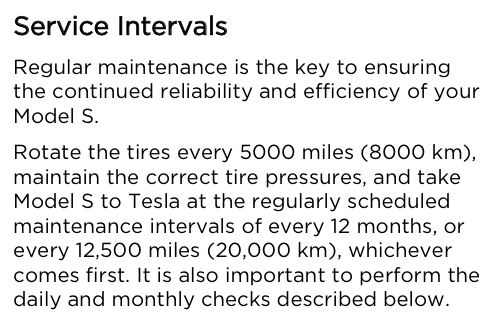
MarcG Ok I just checked the manual and tire rotation is indeed recommended every 5,000 miles:
 �
�
Apr 7, 2015
jerry33 What I was referring to was that after the handles retract, pressing the park button the handles present. (a semiautomatic toggle). This is a new feature in 6.1. And they will present every time. But no you can't press and have them go in and out with each press (my guess is that the kids might wear them out pretty quick if that's what they did).�
Apr 8, 2015
matbl what tyres is that? Would it also apply to the standard 19" tyres?�
Apr 8, 2015
jerry33 Yes, it applies to the 19" tires.�
Apr 8, 2015
Mayhemm Anyone know if they've also changed their recommended PSI for the 21" tires?�
Apr 8, 2015
DirectAndCurrent Thread search isn't working for me, so sorry if others have already reported:
After updating my Classic P85+ to 6.2 today I noticed the park assist safety chime was turned off. I always have this on and find it very valuable given a tricky home parking space. I found it odd that this update seemed to default it back to OFF.�
Apr 8, 2015
dirkhh That's a new one, I don't think anyone has reported this.
And BTW: the best way to search on TMC (thank you, bonnie):
https : //www.google.com/#q=park+assist+chime+upgrade+6.2+site:teslamotorsclub.com
Or for the less hard core people, in the search bar enter "park assist chime upgrade 6.2 site:teslamotorsclub.com"�
Apr 8, 2015
gpetti Seems to depend who you talk to. Our SC is still suggesting 42 psi as of today but I have sent an email looking for more clarification, quoting feedback from here. They must love TMC �
�
Apr 9, 2015
Andyw2100 That's probably just because of the conversion from US to Canadian.�
Apr 9, 2015
santana338 I noticed this (I will call it a bug) the other day. This is the only place I have seen this documented after searching for it.
I kept thinking I had somehow hit the mute when getting into the car. This morning I was listening for it. What I heard was: Open door and start getting into the car. The FM radio was playing, then as I pressed on the brake, the car started powering up and the radio muted. WTF? Why? It was playing before. When I tried to unmute it wouldn't unmute until I changed the station. I rebooted a few times but I am still seeing the same behavior. This is very annoying to me. I hope they revert this soon!�
Apr 9, 2015
efusco There's another "6.2 bugs" thread and I posted there as a bug, only to be told it is allegedly a "feature". NO idea why they would have changed the prior behavior of attenuating upon entry and exit, but then returning the volume to the prior level. It worked great, nobody complained. Now this is a pain in the but requiring readjusting the volume every single time you enter the car.�
Apr 9, 2015
santana338 Thanks. I posted there in case anyone at Tesla is listening and counting the dissenting voices on that one.�
Apr 9, 2015
Rheazombi they should make it a configurable option. One of my pet peeves in sitting down in a quiet car and then suddenly the stereo starts BLASTING me in the face.�
Apr 9, 2015
tomas Depends on the tune, doesn't it? Julie, can you illustrate this one? I think would be good add to your tesla book!�
Apr 9, 2015
santana338 Of course it didn't do it this afternoon. It worked the same way it always has. Maybe it is because I opened and closed the passenger door before getting in the driver's seat...�
Apr 9, 2015
Rheazombi well in the case of my SO having used the car last... it's usually gangsta rap, LOL.
I am working on another tesla comic soon (involving batteries). But that would be a fun idea too�
Apr 10, 2015
andrewket I just received a software update alert. P85D already on 6.2.�
Apr 10, 2015
wk057 Also have an update ready to install... installing now. Probably won't check back in here until later tomorrow though.�
Apr 10, 2015
darthy001 Hmm.. same here, and first time I've gotten one so quickly..
Heres hoping for a combined performance and efficiency push for P85Ds in order to reflect the new design studio pages�
Apr 10, 2015
Rice390 Just finished the installation. Had 6.2 before, still shows 6.2 after install with the same release notes as before. No new features that I can see.�
Apr 10, 2015
AndreS no sentence above the relase notes either? I have seen a picture where it stated the P85D have 250 km/h top speed after latest update.�
Apr 10, 2015
sandpiper Sounds like bug fixes. Or maybe tuning of the range prediction algorithm? I only used it a couple of times in 6.2 but found it to be inaccurate.�
Apr 10, 2015
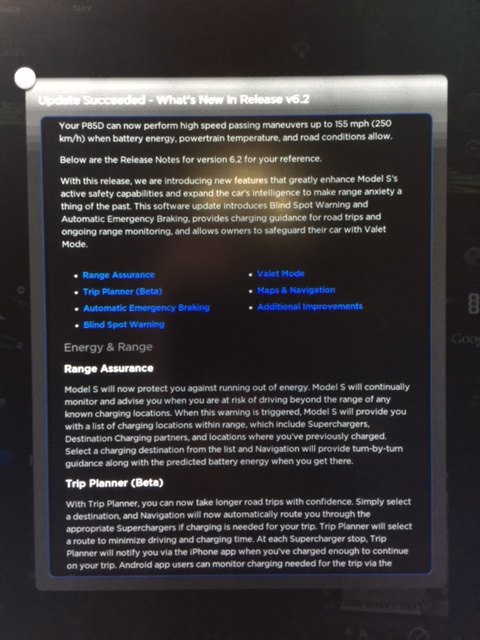
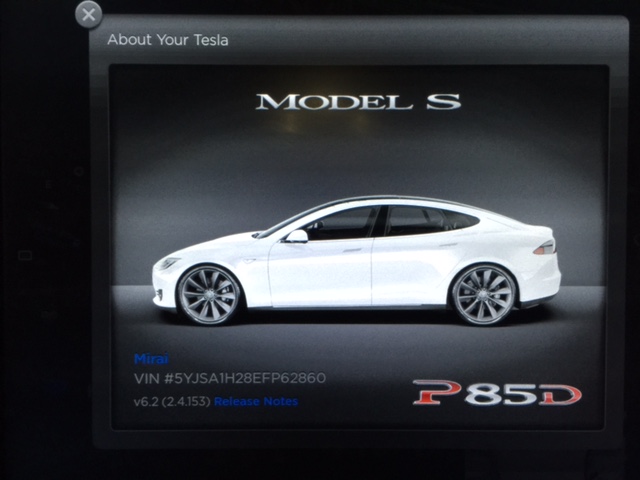
NOLA_Mike 2.4.153 received last night and installed this morning.
Speed limiter increase to 155 MPH showing in Release Notes.�
Apr 10, 2015
Adrian From a norwegian forum:
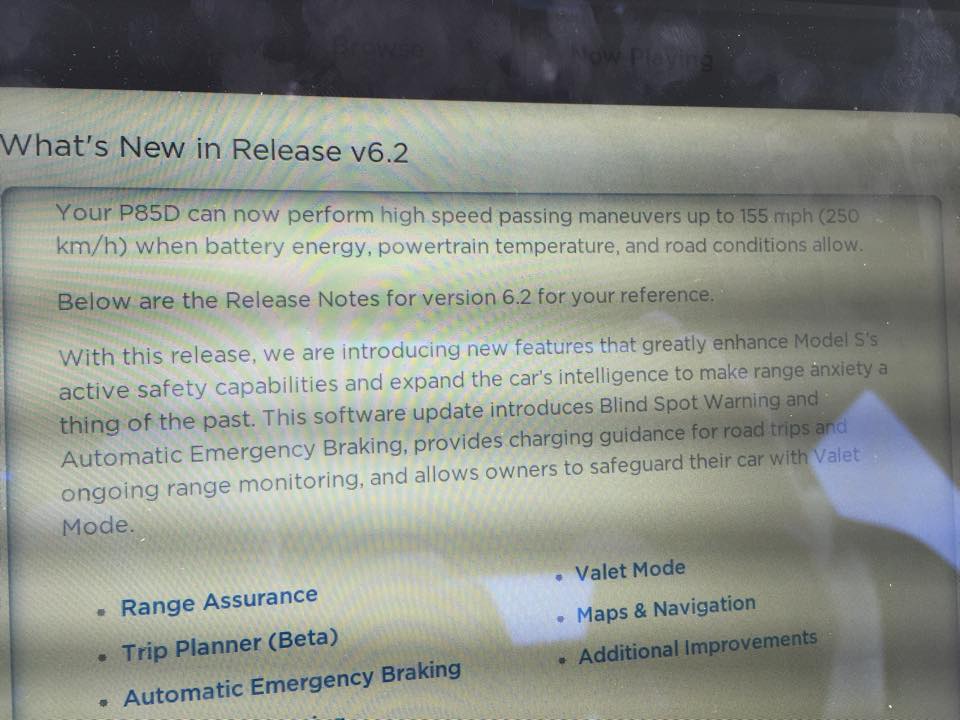
Speed limiter increased to 155 mph�
Apr 10, 2015
J1mbo Interesting wording. "High speed passing maneuvers" /= cruise on the autobahn.�
Apr 10, 2015
KyP85D My release notes have the same language.�
Apr 10, 2015
Chasedrgc1223 New Update
I just began a new software update on my 85D and I'm hoping it's the improved 0-60 update I've been told about. Won't be able to test it for 6 hours, so can someone verify this??�
Apr 10, 2015
cgiGuy Firmware 6.2 - Page 45�
Apr 10, 2015
dirkhh Those high speed passing maneuvers will come in handy on Oregon highways
I have an update alert as well but actually need to be driving the car this morning... and given the last upgrade took 2.5h I'm not risking to start it right now.
PS: if you get the upgrade, please update the Firmware Upgrade Tracker so we can get an idea how quickly it gets rolled out, and to which cars (so far there's one entry with .153 on a P85D - thanks NOLA_Mike)�
Apr 10, 2015
tomas Clever lawyers. We are not advocating you exceed the speed limit, BUT if you have to make a high speed maneuver, the car can go 155!�
Apr 10, 2015
spentan Driving from SoCal to Vegas today. Just started the update. Let's see what the high speed passing maneuvers are like ?�
Apr 10, 2015
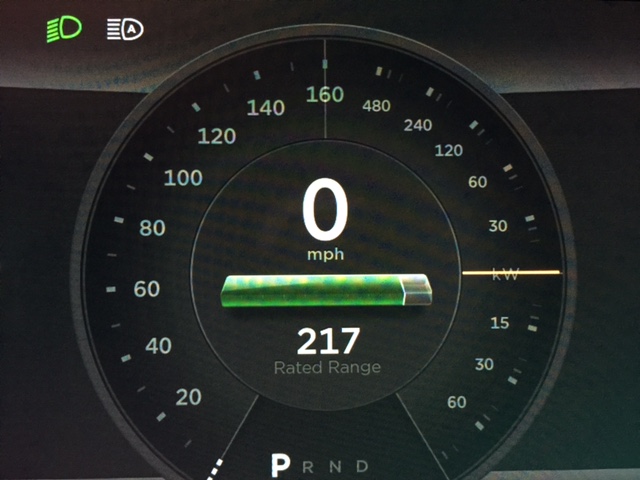
benjiejr Received the 6.2 2.4.153 update and notes do specify increase of top speed to 155 mph. I also took a picture of the speedometer which has changed respectively.
 �
�
Apr 10, 2015
cynix I think they're just trying to say (without actually spelling it out) that the car will not be able to maintain 155 mph for an extended period of time, hence it's only a "passing manoeuvre".�
Apr 10, 2015
MarkS22 P85D finished updating to .153 and added to the Firmware Upgrade Tracker. Same "passing maneuvers up to 155mph" message as reported above.�
Apr 10, 2015
Danal Has anyone driven a trip on the original 6.2 trip planner? The people I've talked who've actually driven long trips say it was very, very, very bad. It would let you leave a supercharger with just barely enough, or "real world", not enough, range. It would estimate 1.5 hours charging at an SC where you were going to arrive with 35%. Things like that.
I believe the poor quality of the trip planner has something to do with this update. Maybe more... I have the notice, but need to drive the car. As soon as I update, I'll take another look at the trip planner.�
Apr 10, 2015
stevezzzz Ditto.�
Apr 10, 2015
Cyclone Weren't there complaints recently that TACC only operated up to 90 MPH? That would means that even at 140 MPH, there was not to be any cruise control available.�
Apr 10, 2015
NOLA_Mike BTW, this one took 1 hour to update from start to finish on my P85D.�
Apr 10, 2015
caps04 Build 153 gives 85D owners a Sport mode. Maybe .154 will bring us Insane mode too :tongue:�
Apr 10, 2015
shadowinstallz Just updated to .153
shows sport mode for acceleration. Can someone confirm that was not there before. S85D�
Apr 10, 2015
CraigS Update installed. Didn't try the TACC, but at about 85MPH it tells you that blind spot monitoring is disabled. Can't feel any difference at all in 0-60, but I wouldn't expect to be able to tell. Also, probably all in my head, but feels a tiny bit faster from 70-ish. Perhaps someone can validate that with the right testing equipment.�
Apr 10, 2015
Charles85D I can confirm there was no sport mode for acceleration for the 85D previously.�
Apr 10, 2015
shadowinstallz 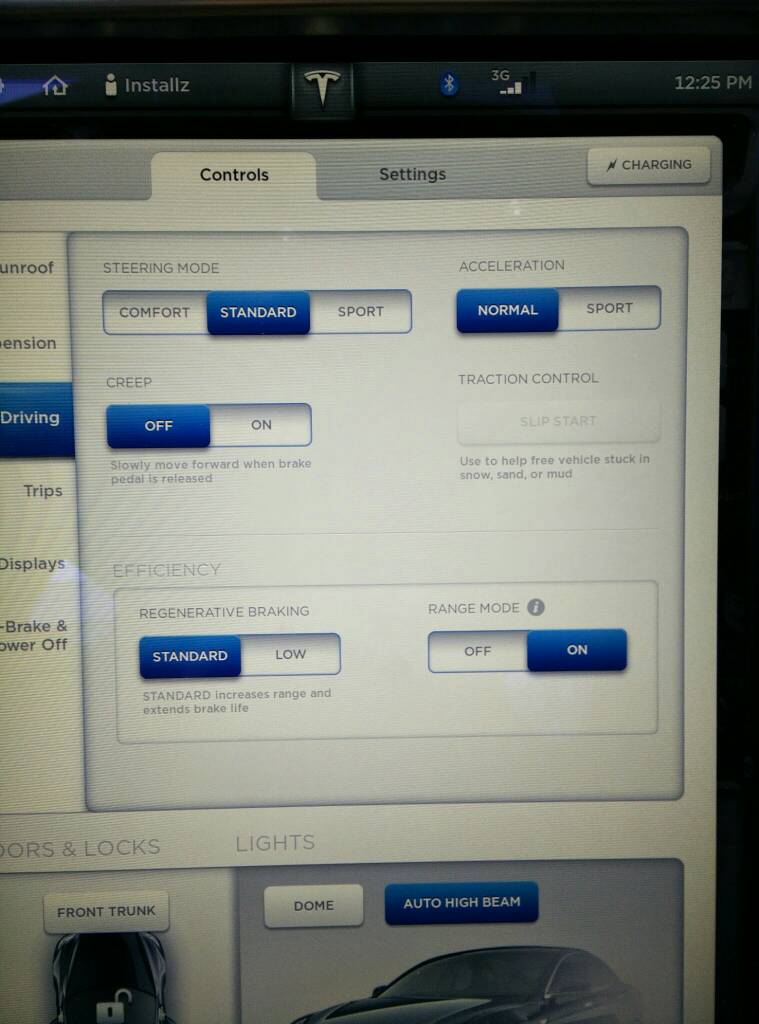 �
�
Apr 10, 2015
Chasedrgc1223 This is awesome! Can't wait to try it out, have you tried it yet?�
Apr 10, 2015
guywithkeyboard Sweet! Just got the update notice this morning. Can't wait to install it tonight!�
Apr 10, 2015
shadowinstallz Not yet....still at work....I probably won't feel a difference since the d was fast already�
Apr 10, 2015
SherSlick Blind spot monitoring disabled at 85 prior to this (.153) update.�
Apr 10, 2015
berryja Yep, just got mine, 155!�
Apr 10, 2015
spentan Are you suggesting that it doesn't anymore?�
Apr 10, 2015
CraigS i think he's just saying that re: blind spot behavior, nothing has changed with this release�
Apr 10, 2015
caps04 I tested it and it goes 0-60 in 4.4 seconds in Sport mode.
85D 0-60 MPH 4.4s Sport Acceleration confirmed
The feeling is very uncomfortable... not insane or nausea inducing but felt dangerous. I don't hope to fully punch it or use it in Sport mode in day to day driving. Even taking the video took me a few tries because my hands would move away. It's like P85D but with one missing option.�
Apr 10, 2015
brad.md.us I did a short test and I can't wait to get it out on the highway later on today or this weekend. WOW! I felt a very similar feeling in my stomach just like when I launched a P85D in Insane Mode. I can't believe how fast the S85D is now. Holy Shiiit! I would not be surprised if the S85D with the Sport Mode acceleration setting "on" is really just 1 and 2/10ths of a second slower to 60 than the P85D in Insane Mode.�
Apr 10, 2015
AMP85D Valet Mode
The release notes say you can also use the Model S mobile app to start and cancel Valet Mode. Has anyone been able to do this? I don't see this option on my mobile app.�
Apr 10, 2015
dirkhh So far it looks like Tesla is continuing the pattern of separate release trains.
.124 was mostly for autopilot equipped cars - a few non-AP cars received it, but mostly at SC.
.136 was mostly for non-AP cars - a few AP cars received it, but again mostly at SC
.153 is so far only for dual motor cars (which are all AP).�
Apr 10, 2015
benjiejr Nope. I don't see that option either.�
Apr 10, 2015
chuckd You probably 'can' when they get around to updating the app itself.�
Apr 10, 2015
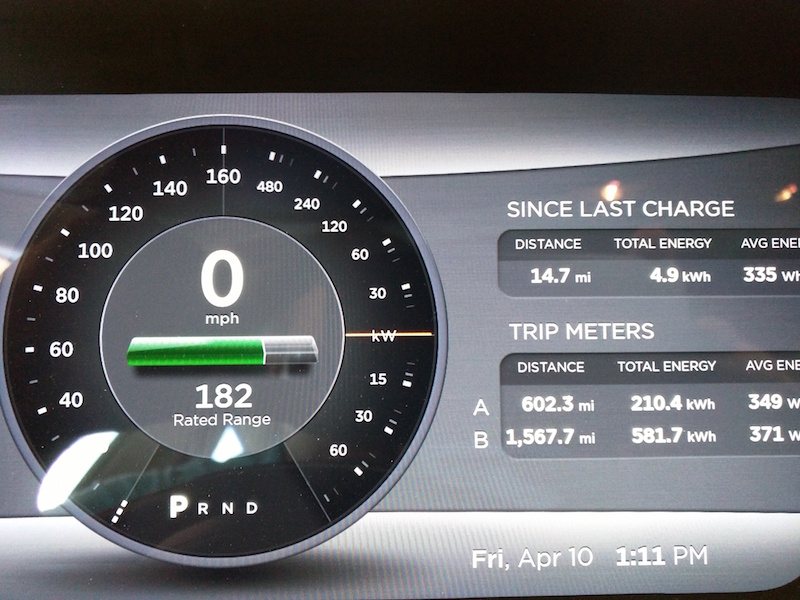
ThirdMartini Is it just me or did they adjust the fonts/layout on the speedo display in 153? Fonts for the power output look smaller...as well as small adjustment to scale.
 �
�
Apr 10, 2015
cgiGuy App was just updated on 7 April, yet I don't see anything about valet mode. Also tried looking in there after enabling valet mode in the car.�
Apr 10, 2015
Benjamin Brooks The 6.2 manual says you need iOS app rev 2.5. The version of the iOS app released this week was 2.3. So we all have to wait�
Apr 10, 2015
brianman The .153-or-higher has the left (speed) changed on P85D (to accommodate 160). The right (power) looks the same to my eye as in my 6.1 firmware.�
Apr 10, 2015
wk057 kW numbers are definitely smaller now.�
Apr 10, 2015
LVSP85D 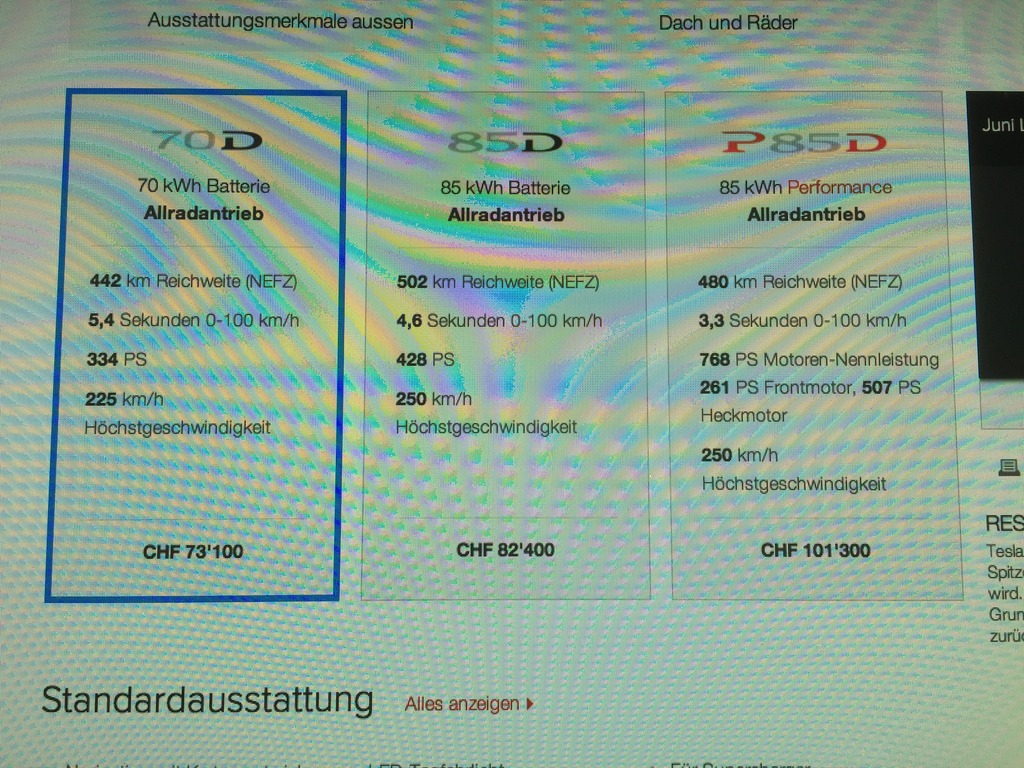 �
�

Apr 10, 2015
gpetti I haven't been keeping up lately but I just noticed that the specs are now showing a .1 second faster 0-60 time. Is this just to reflect motortrends measurements or is this to reflect an improvement. The 100 Kmh time has also bumped up by .1. Not sure if they would have extrapolated the motor trend numbers to Kms or not.�
Apr 10, 2015
jweinstein In metric, they go back to a larger font.�
Apr 10, 2015
KyP85D Well I've tried twice with the new update and can't get above 131. That's same as always. Did reset on both systems. I wonder what road conditions it takes into account? Was on isolated 6 lane with no traffic for miles. Shouldn't have been a problem with heat as had been set on 75 cruise for 15 miles or so. Was showing 185 rated miles.�
Apr 11, 2015
CraigS Has anyone else noticed that the TACC stops/slows much more aggressively? I did a 35 mile trip up I95 to Boca last night in pretty heavy traffic. I do this on my daily commute on 95 (been on vacation for the last week) and was very comfortable with the way the TACC slowed or stopped. Last night there were several instances Where the pucker factor was pretty high. Felt like there was a lot more brakes being applied (as opposed to regen) and applied later than it was before. I actually changed the following distance setting from 1 to 3. This helped a little, but still felt to me like it was waiting much longer to slow than before on 1.�
Apr 11, 2015
Fezzik Yeah I noticed this right away with the speedo and kq numbers. I do like the bigger numbers but not a big deal.�
Apr 11, 2015
ra-san It's been tweaked, was actually mentioned in the notes as, "Traffic-Aware Cruise Control has been improved to provide a smoother ride when following another
vehicle. Also, the following distance at higher speeds has been reduced."
I noticed that the following distance had been reduced enough that I changed the distance setting to a higher number. Once that was done, it was smoother in terms of not applying as much force as fast either speeding up or slowing down - of course the counter to that is that if distance was changing quickly because the car in front started going a lot slower, then the S would have to transition from being "casual" with it to being more aggressive. All in all, it feels like an improvement to me. The elastic controlling how tightly to stick to the set following distance is stretchier now, but it'll still react as needed progressively more as it reaches the limits.�
Apr 11, 2015
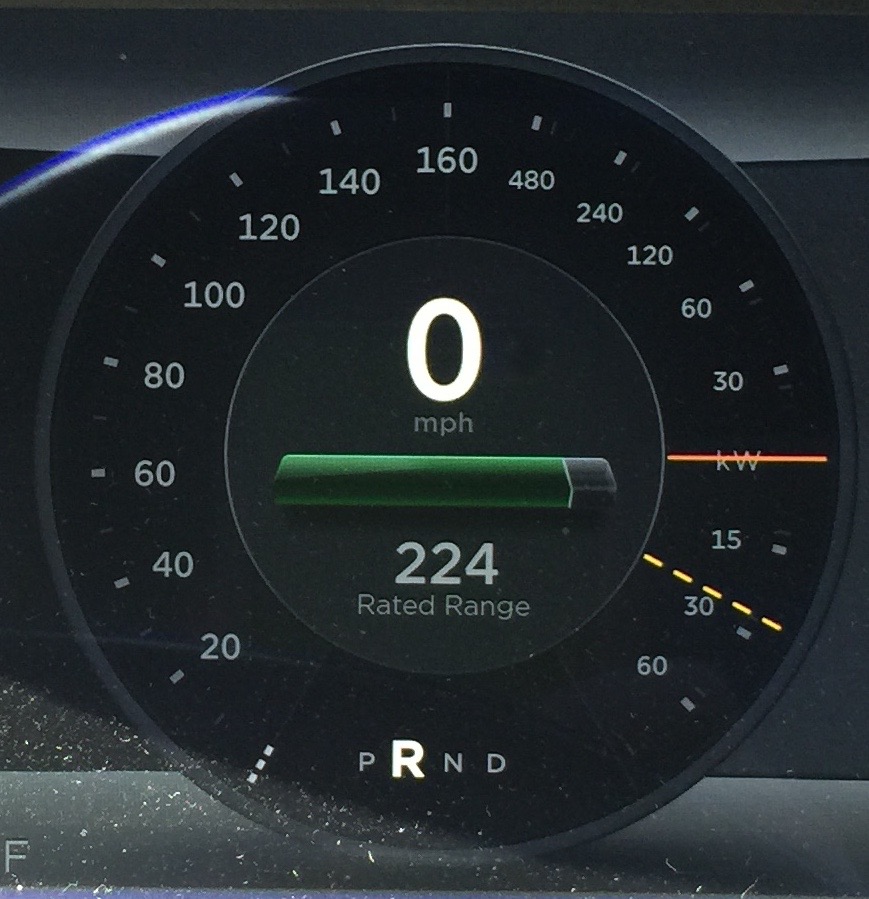
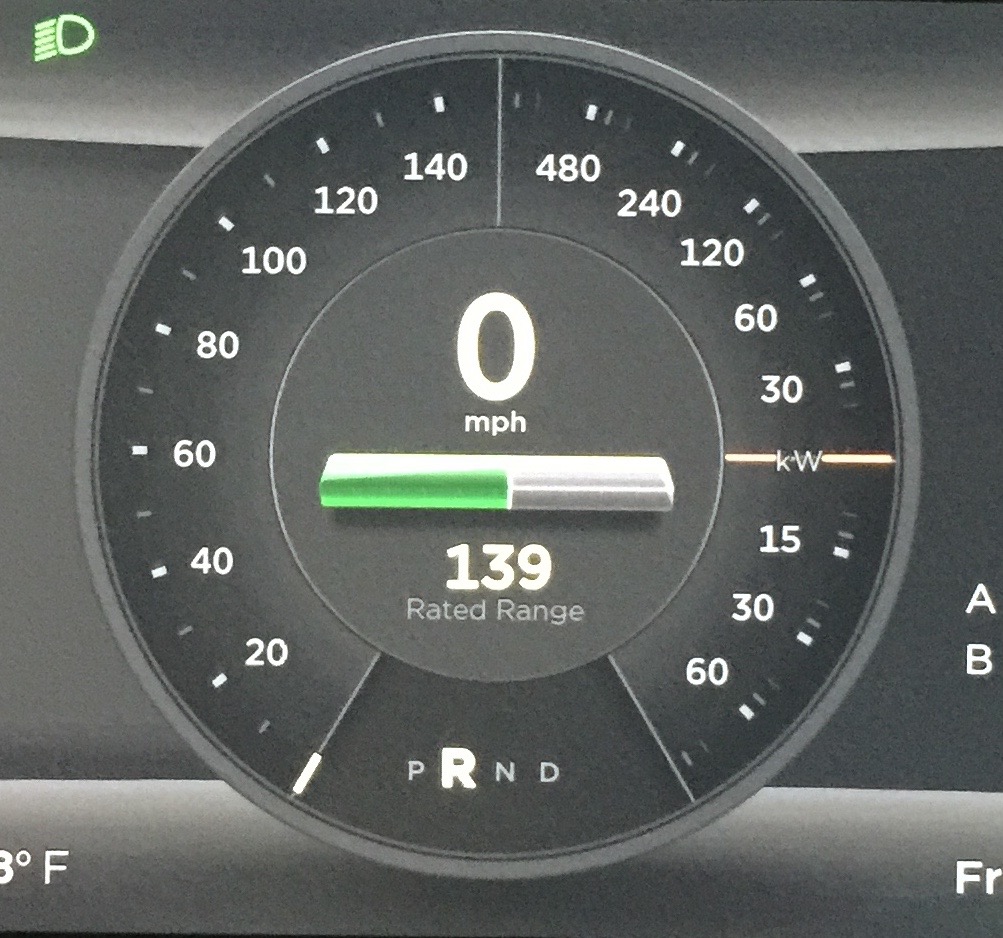
meltoots Here are some before and after photos of the new speedometer. As an FYI.
 �
�
Apr 11, 2015
Rheazombi I like the new look. They're really moving away from skeuomorphic designs and thus the subtle vestigial connection to gas cars.�
Apr 11, 2015
MrClown I noticed something like this with 2.4.124 where there was a bit of a shudder right as you come to a stop using the brake pedal. I tried different modulations of the brake pedal to try to work around it with no consistent results. With 2.4.153 I haven't had it happen at all in the last couple days.�
Apr 13, 2015
NigelM Two weeks further in the roll-out...same thing happening to me right now. I clicked on 'install' about 1/2 hr ago and was just in the kitchen and heard loud music coming from the garage, checked an it's coming from Model S.�
Apr 13, 2015
dirkhh I think it's so cute that the Model S wants to listen to loud music while upgrading.
You will update the firmware tracker when your upgrade is finished, right NigelM?�
Apr 13, 2015
HankLloydRight Is your car named "Christine" by any chance?�
Apr 13, 2015
NigelM Done. 2.4.153�
Apr 13, 2015
gg_got_a_tesla Don't know if I should read much into it but, a 23-mile commute roundtrip - 90% highway, no A/C, range mode On, breezing through in the carpool lane - today came in at a miserly 286 Wh/mile with 6.2, 2.4.153 when compared to 306+ Wh/mile before with earlier revs of 6.2.�
Apr 13, 2015
ken830 My S85 (vin P08xxx) just got its first v6.2 update and got 2.4.153. Not much seems new for me except for the trip planner. The biggest change is that the powered liftgate now slows down as it approaches the set position when opening. And the closing latch sounds a bit different too, but that's not as obvious.
Media player still has all of the same annoying issues (no repeat or shuffle when listening to favorites).�
Apr 14, 2015
mknox Got 6.2 last night (forgot to note which flavor) but note that Valet Mode does lock out the ability to disable Remote Access. Yay! I'm pretty sure earlier release notes indicated that this was not a feature.�
Apr 14, 2015
tomas No. Has been reported in 6.2 since first reports. There was speculation it might not be back before release push started.�
Apr 14, 2015
ohaq 2.4.153
Got mine today and waiting for the tracker page to load. Oh it loaded, now waiting for it to log me in
after the update the version on the tracker shows 2.4.15 instead of 2.4.153, missing the last character. I open the add entry popup again to see if the it was missing the '3' there but that seemed ok.
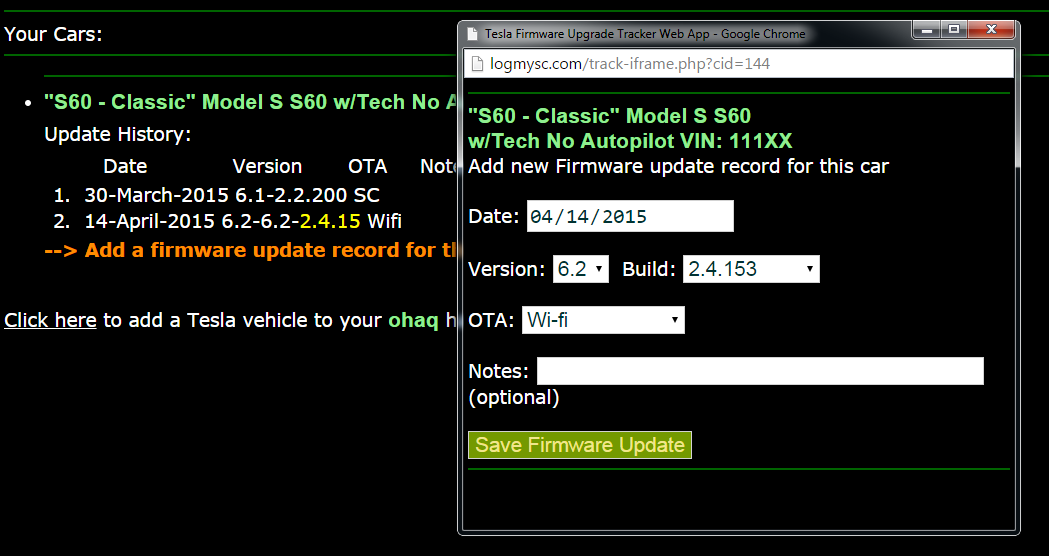
Updated: Just looked at the screen again now it looks good.�
Apr 14, 2015
Jeffgtx Ever since 6.2, when the radio volume decreases to level 3 when the driver door is opened, it never comes back up to the previous volume after the door is shut. i always have to turn it back up manually.
is there a new setting for auto volume or something?�
Apr 14, 2015
GoBlue88 This happened to mine while upgrading last night as well. I walked out into the garage during the update and music was playing inside the car and all the screens were blank. Pressing the left scroll wheel failed to mute it. Strange.�
Apr 14, 2015
HankLloydRight Yes,there's an odd glitch that causes that to appear sometimes, but I watch for it and correct it when it happens. I think some peoples' browsers are submitting the fields wrong or don't support jQuery well enough.�
Apr 14, 2015
Danal
I've seen a couple of people say this. Just for the data point: My volume works perfectly on 6.2. Both flavors.�
Apr 14, 2015
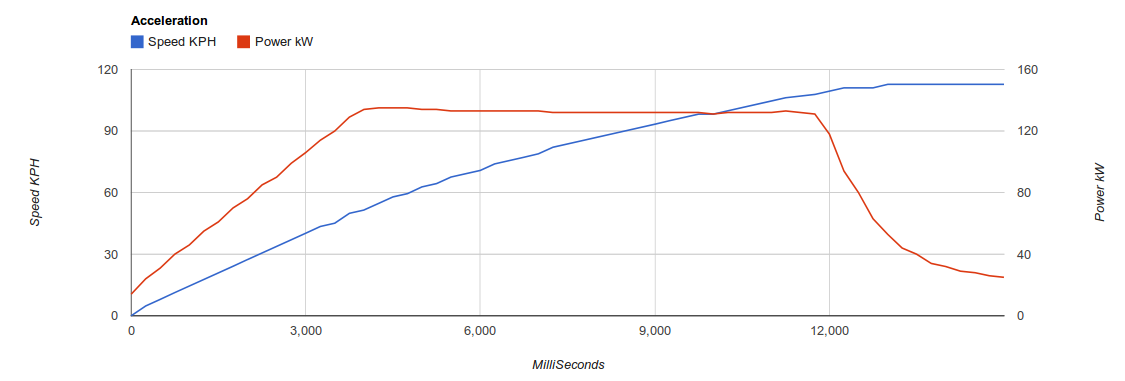
mochouinard Here is a 0-113kph (Max speed) of a Model S 85 (2014) with the Valet mode on. Top speed is 112.7kph, and top power is 135kW (but go down a little and stay at 133kW). 0-100kph in ~10.3 second. 0-60mph is 9.5second.
 �
�
Apr 14, 2015
gmontem I haven't tried valet mode yet, but does valet mode also further reduce top speed the farther you drive from the starting point where valet mode was enabled?
I'm thinking this might be a nice feature to have if we can also have an "enable auto-valet mode" setting. That way if a thief robs me at gun point, taking me keys, too, he/she won't be able to go far with my car with auto-valet mode enabled.�
Apr 14, 2015
MarcG How should the car know the difference between a thief driving away with your keys, or you driving it with your own keys?
And if you're thinking "let's have a way to enable it through the app", well, the thief may have stolen your mobile device as well...�
Apr 14, 2015
gmontem The "auto" in auto-valet mode means the car automatically switches to the Valet Mode driver profile a few seconds after the car doors have been locked with no driver detected on the seat. Sure some will find it inconvenient to re-enter their valet pin, but the auto mode should be an optional feature disabled by default.�
Apr 14, 2015
mknox Ahhh, okay. I remember reading and commenting on some posts when it was speculated that it wouldn't lock out Remote Access. I'm glad it does lock that down.
- - - Updated - - -
Not as far as I can tell, but while we're dreaming, I'd like to see the Valet Mode top speed user configurable just like we can for Auto Lowering. Not sure why a valet (or tire shop etc.) would need to be driving 70 MPH from the front of the restaurant to the parking lot anyway.�
Apr 14, 2015
Doug_G Got mine this morning, the day before a road trip. Time to try out the trip planner. Looks useful but a little whacky...
First, it routed me through Cornwall instead of Utica. I never even considered that possibility, because (a) the second leg is really long compared to the car's range, (b) the route on the map looks really squiggly, which means a twisty road, and (c) it will take an extra hour. Not to mention I've been doing this trip annually for years, and never once did I even consider taking my ICE that way - nor did any GPS ever suggest it.
The planner also added a Supercharger 20 minutes south of my destination. Apparently I'm supposed to go charge first, then go to the hotel. How about I go to the hotel, and drop by the Supercharger later in the week when I have a moment??? Or maybe charge locally???
I found a button to remove all charging stations from the route (not just one?), it offered me stations to add back in. Aha! Maybe I can add Utica and get my preferred route. Nope. The only ones it offered were very near the original route. Utica wasn't on the list.
Then when I told it to go directly to Utica, it wanted me to go to Kingston first. That's a fair bit out of my way. I can do Utica directly, and it's far shorter than the Cornwall-Albany leg it originally wanted me to do.
Looks potentially useful, but it really needs some work! It should allow any charging station you want to be added to the route (from the map if not the list). It should offer alternative routes. It should let you drop a waypoint pin.
I'm sure others have found similar issues...�
Apr 14, 2015
HankLloydRight Same here -- I plotted a route to Orlando.. and it wanted me to stop first at Edison, NJ.. but that's a really inconvenient stop compared to Hamilton Marketplace just a short bit further south.. but no, I couldn't remove Edison and redirect it to Hamilton. It would be really nice to click on any SC stop and remove/add it back to the route, to find the most "human compatible" route.. the computer isn't always right.�
Apr 14, 2015
apacheguy Sounds like TM has their work cut out for them with 6.3. All before mine has received 6.2.�
Apr 14, 2015
Doug_G Oh I see... part of the problem is that it's trying to stick to the Interstates. So it's routing me to Utica along a longer route, and then saying it's too far for one charge (it isn't but I'd have to be very careful).
Silliness though because it's routing on a much worse highway going the other way.�
Apr 14, 2015
dirkhh The beta quality trip planner is quite a let down after the hype. But I think by 6.3 or 6.4 it will be fine...�
Apr 14, 2015
HankLloydRight It just needs humans to suggest better, or get this -- preferred -- routes.�
Apr 14, 2015
PaulusdB Or, in case you can't get this stuff up to par, integrate Waze.�
Apr 14, 2015
Doug_G My ideal would be to plan it on a PC in Google Maps, then push a button to send it to the car.�

Không có nhận xét nào:
Đăng nhận xét