Oct 3, 2013
Thorbjorn Some Norwegian users have gotten firmware 5.6.
ref thread on norwegian EV forum:
Software update v5.6
Still waiting on complete change log.�
Oct 3, 2013
texex91 Huh, I wonder if this has the GPS fix in it. When release notes come out, will you let us know what they say?�
Oct 3, 2013
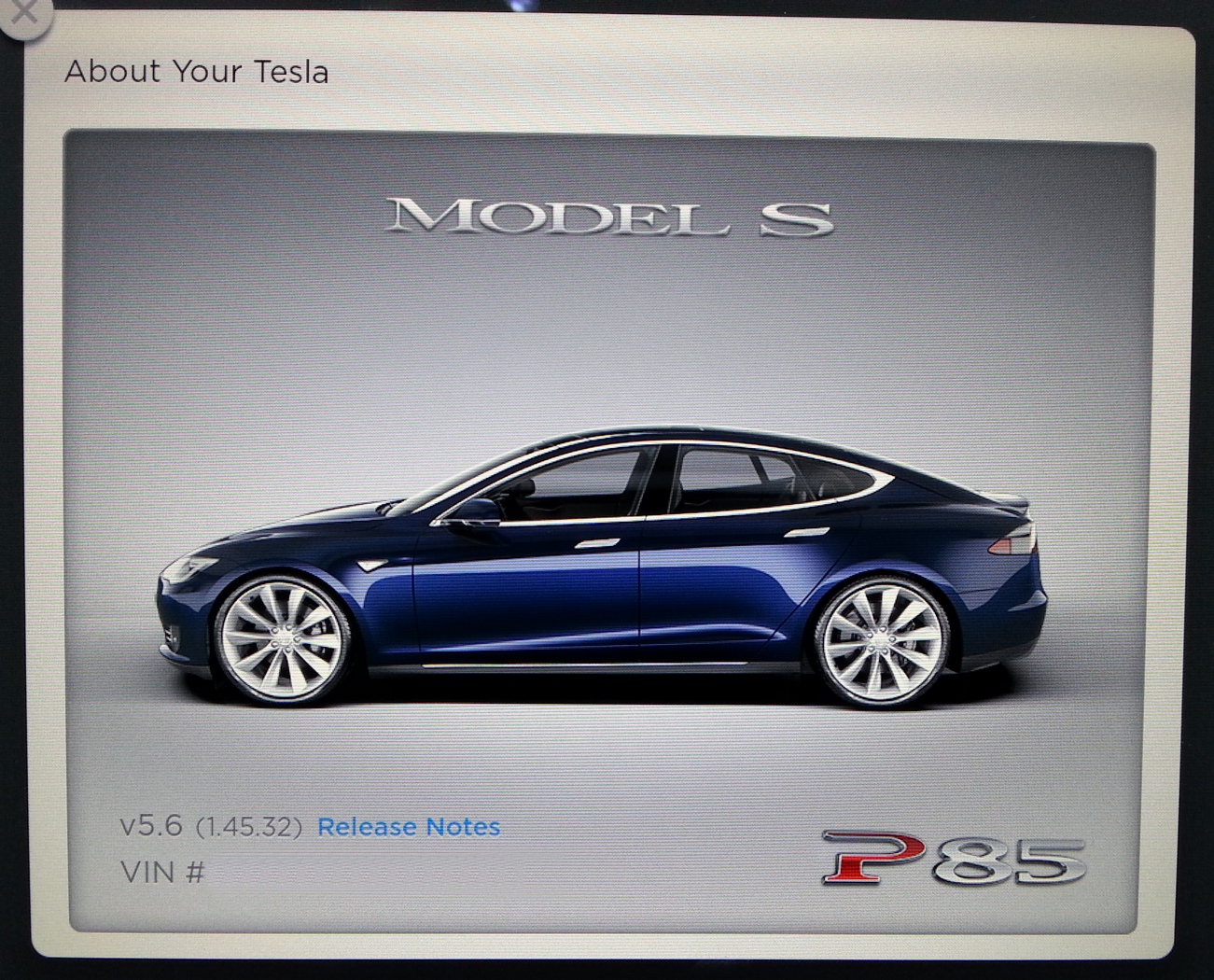
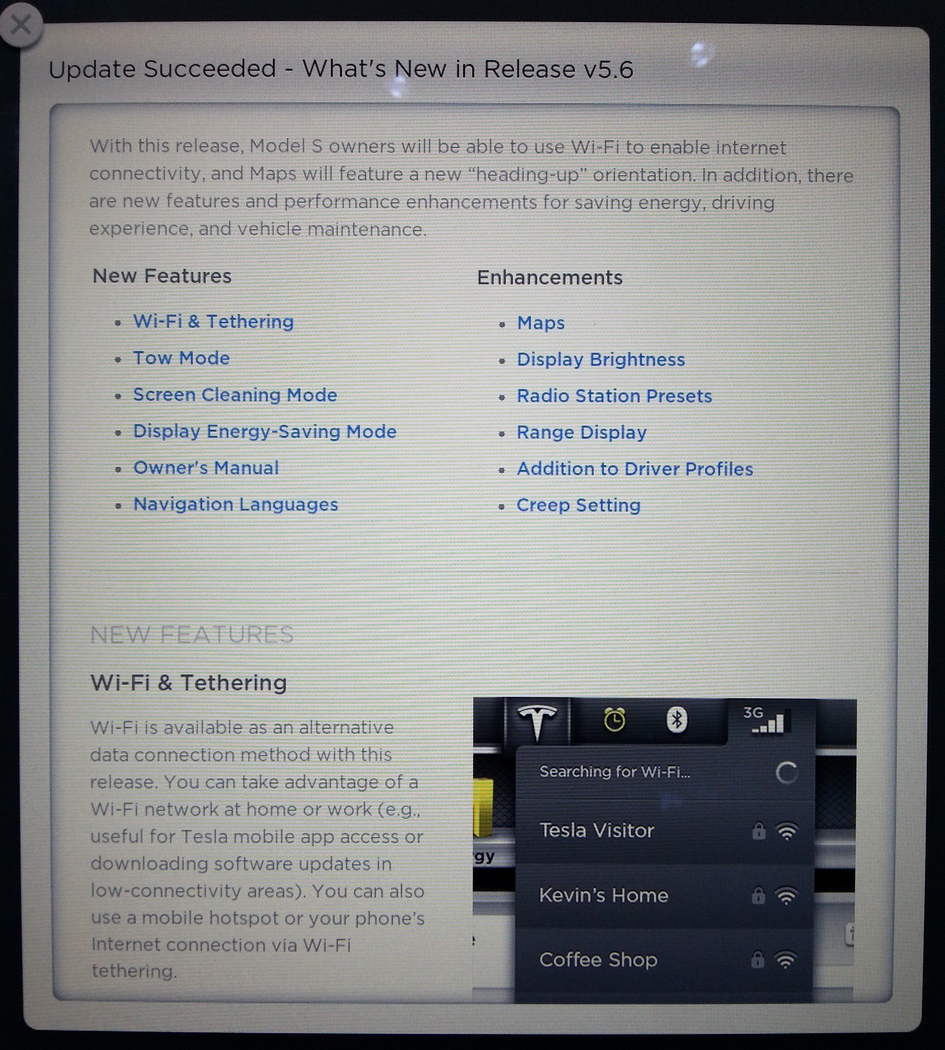
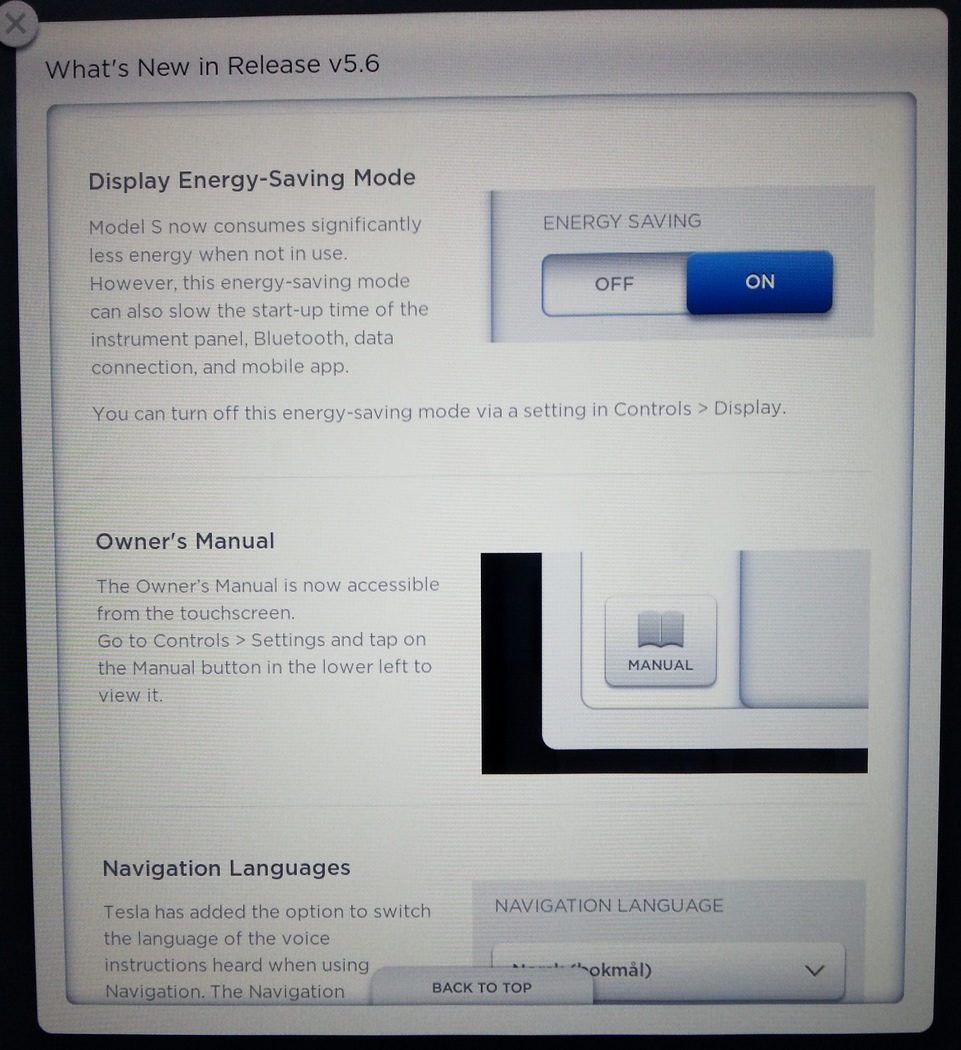
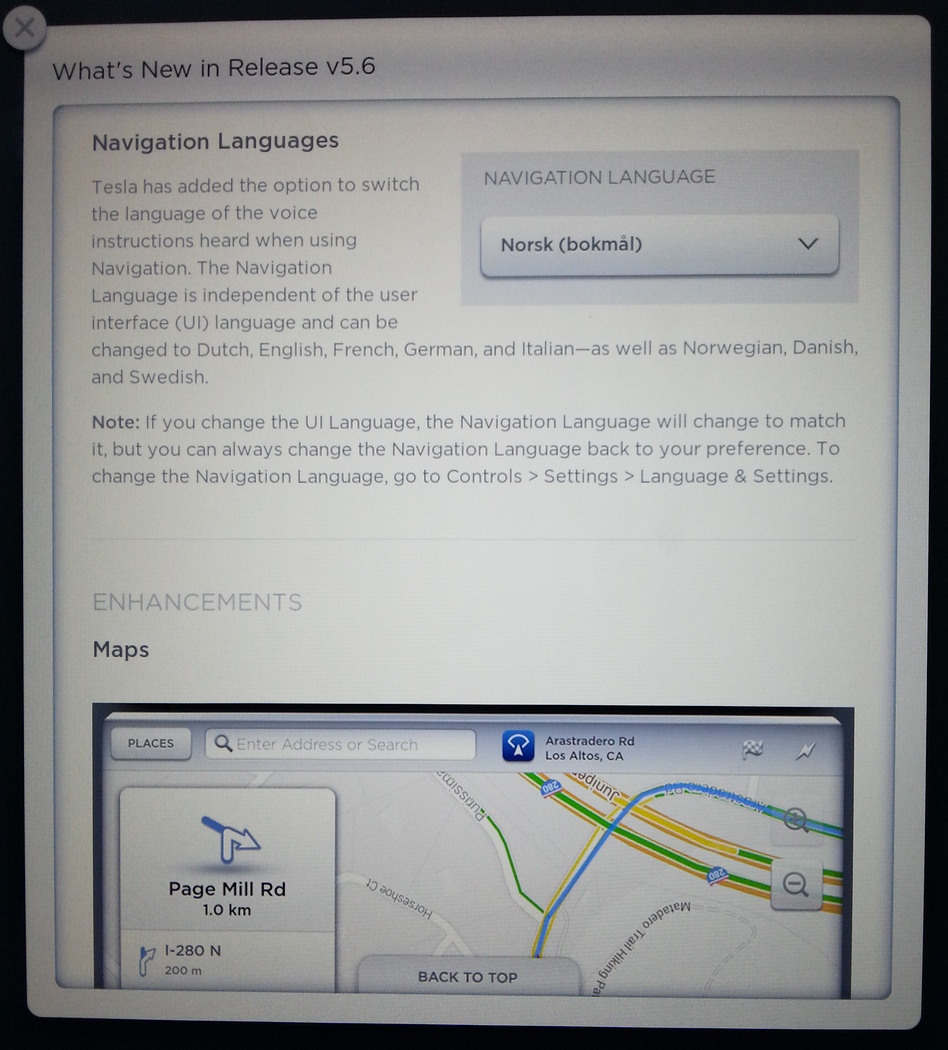
Veggen Got an OTA upgrade to 5.6 today.
There is a new option in the settings to disable energy saving mode for those who prefers a quick startup.
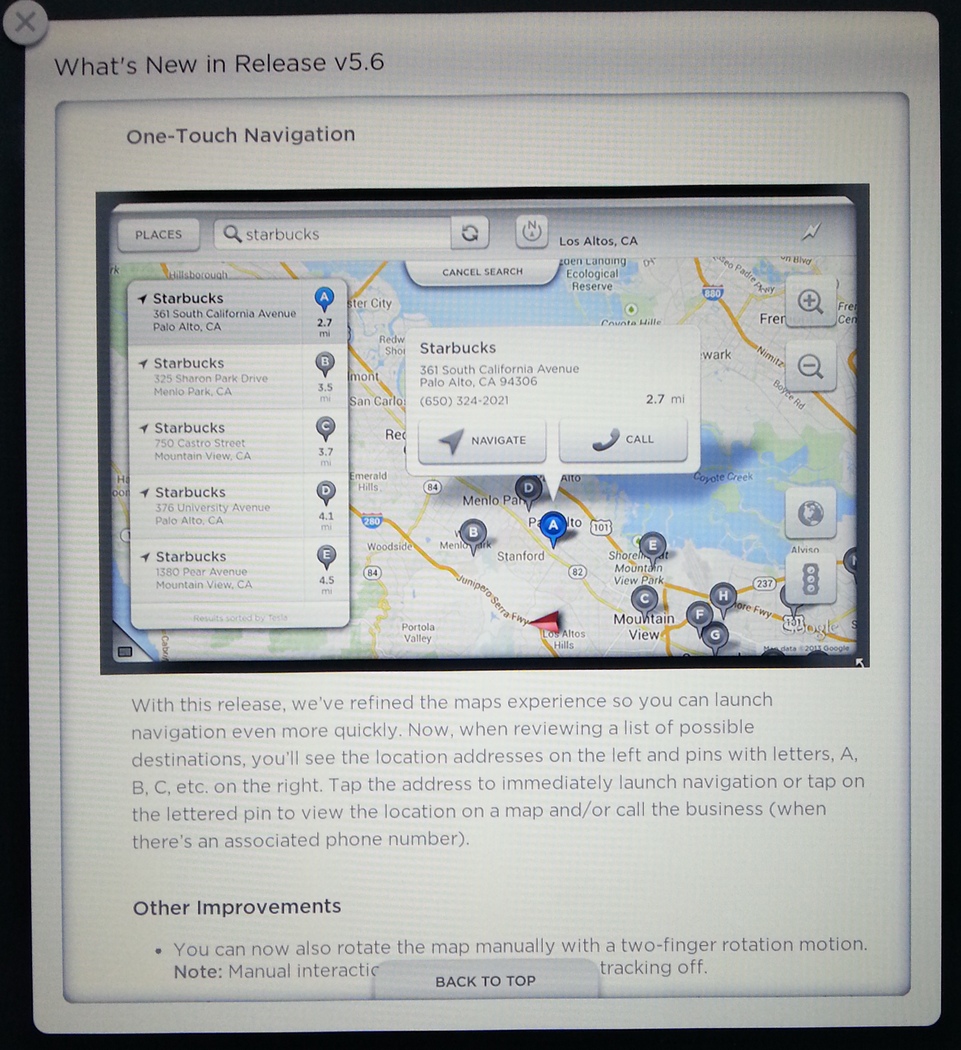
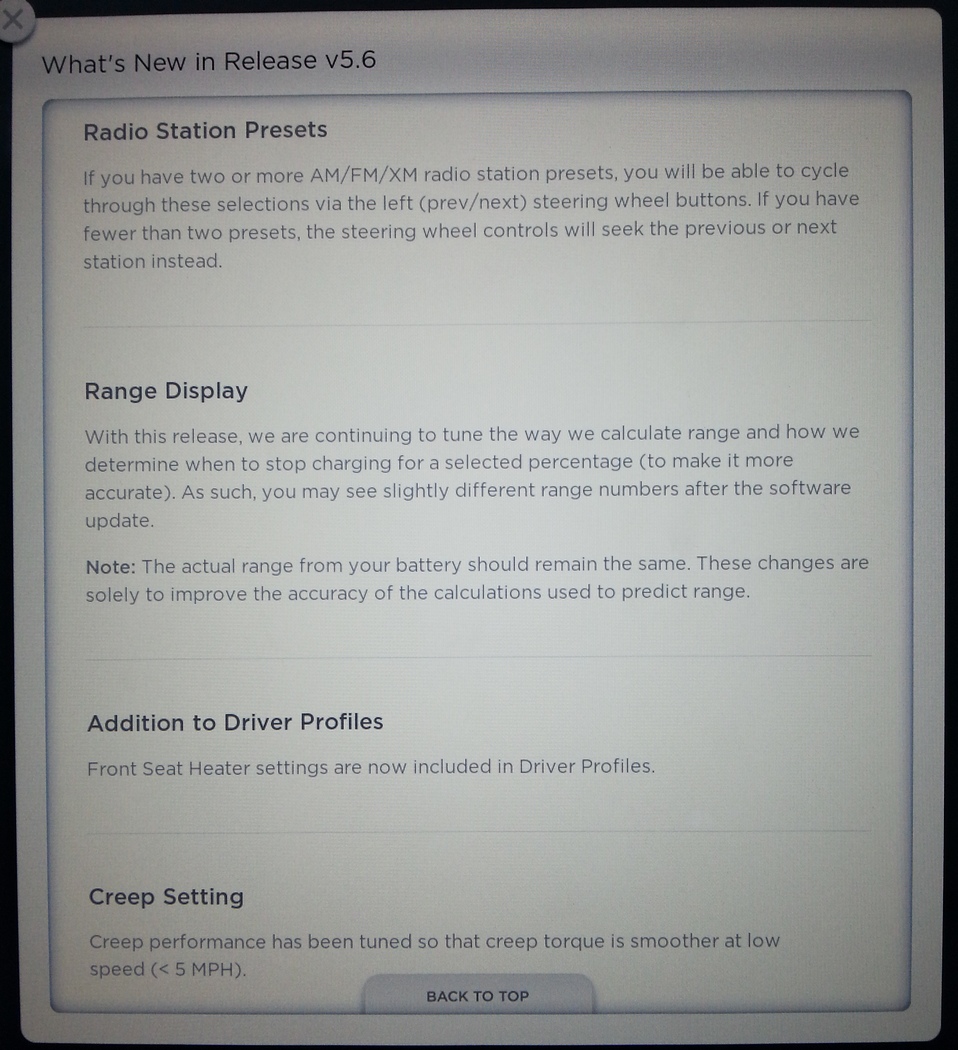
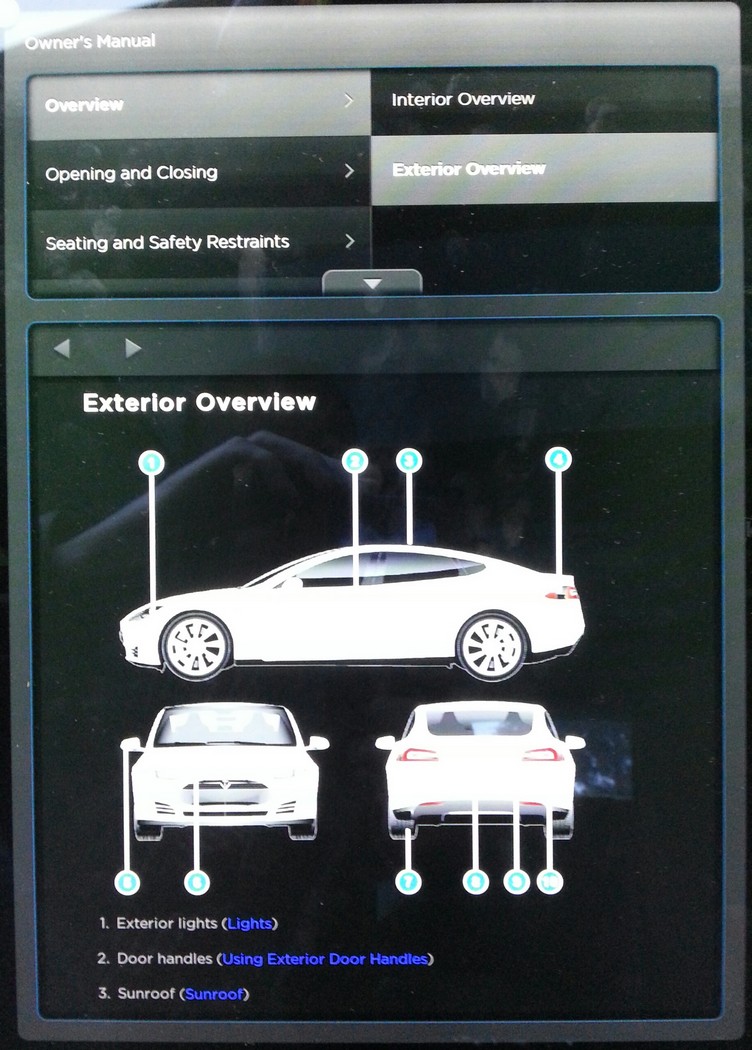 �
�
Oct 3, 2013
Veggen Posted screenshots here:
Firmware 5.0 - Page 53�
Oct 3, 2013
brianman Thanks for sharing, Veggen!�
Oct 3, 2013
AnOutsider Perfect IMO. If I know I'm gonna be away from the car and it isn't plugged in, turn this on -- otherwise, leave it off. A timed mode would be cool too.
Also glad to see the user manual finally pop up considering I took video of it on the betas more than a year ago.�
Oct 3, 2013
dirkhh Very interesting. This is the first 1.45.xx build that we have seen. Do you happen to remember which version / build you had before?
Thanks for sharing!�
Oct 3, 2013
Benjamin Brooks The comment about the range display is also interesting... I expect the disclaimers they put in there make it sound that your predicted range numbers will be lower on a standard charge now.�
Oct 3, 2013
Denarius I wonder if 5.6 will bring all cars to the same version or if US automobiles will stay on the 5.0 line.�
Oct 3, 2013
Veggen I was on v5.0 (1.35.102) before the update.�
Oct 3, 2013
dirkhh That's what I was hoping you would say.
5.5 apparently was mostly (only?) on the pre-production demo cars in Europe. And I had heard from a service technician in the US that he saw the first of the beta testers come in with a 5.6 version number a couple of weeks ago.
So hopefully this is where they are planning to put all of us!
- - - Updated - - -
I thought this was in the 5.0 release notes already... I need to go back and look through what had been posted earlier...�
Oct 3, 2013
Doug_G Why would I want the seat heater settings in the profile? That's a decision made based on the ambient temperature of the day. �
�
Oct 3, 2013
NigelM I'd guess that in Norway they use the seat heaters the majority of the year.�
Oct 3, 2013
clea not any more than we do here in Montreal/Ottawa ... looking at the average temps posted on this site we have colder average temps than Oslo in the winter and the rest of the year does not seem to warrant the use of seat heaters.�
Oct 3, 2013
zax123 If you have the seat heater on in v5.0 and you leave the car and come back, does it come back on? Maybe that's why it needs to be stored in the profile? I'm speculating here...�
Oct 3, 2013
Benjamin Brooks Not that I can see from the 5.0 FW thread�
Oct 3, 2013
Doug_G I'd just like the seat heater to stay where I left it. I certainly don't want the profile thingie popping up every time I hit the seat heater.�
Oct 3, 2013
brianman How did I miss this (the big letters) the first time? That's the most exciting part for me.
That gives me hope I might see new firmware in my car before 2014.�
Oct 3, 2013
ZBB With all those MPH references in the screenhots, I'm guessing yes -- all on same version...�
Oct 3, 2013
Veggen I clearly remember reading those statements regarding range calculations in the previous SW version release notes as well.�
Oct 30, 2013
Dukecat That'd be great. Thanks for the heads up.�
Oct 30, 2013
Benjamin Brooks That makes no sense. They won't do battery range calculations / estimations based on future yet-to-be-done "possible-but-not-guaranteed" charging options. If anything their new firmware algorithms may better take into account previous performance and/or more realtime battery discharge & capacity variables.�
Oct 30, 2013
Cottonwood I got 5.6 (1.45.45) today! :biggrin: I am VIN 37, so maybe there is some priority for low VIN numbers.
Also, there was an item in the release notes that said priority in future pushes would be given to MS's connected to a WiFi network.
This is just in time for my trip home to Pagosa tomorrow, where I have to do close to a range charge on the Silverthorne Supercharger to make it to Pagosa. I hope to see my 1:30 time to charge those last 110 rated miles with 4.5 drop to 0:45 with 5.6.
 �
�
Oct 30, 2013
tdiggity I wish they did what Sony did for the PS3 and let us download onto USB stick and side load the damn thing. I complained pretty hard to Tesla a few weeks ago. Probably won't get this update till end of November when I go in for service. Glad it's finally out, though!�
Oct 30, 2013
Benjamin Brooks Nope, I don't think the updated 120kW charge curve is going to cut that time in half for you, once you get into higher SoC you're probably going to see the same rated mph added to your battery.�
Oct 30, 2013
Cottonwood The 120 kW curve goes from nothing to full in 1:15. It has to be faster in the end game, also. 110/265 is 42%. Take a look at the curve below from the Tesla page. Maybe it will be 50 or 55 minutes with the 5.6 for those last 110 miles, but still, it should be much faster than the 90 minutes I've waited the last few times.�
Oct 30, 2013
tdiggity My service center said they wouldn't do it. Even after hearing how bad my charging situation is. Pretty lame that the Palo Alto service center said they can't do it.�
Oct 30, 2013
Benjamin Brooks Look forward to hearing your results; would be pleasantly surprised if you are right, but also quite surprised if it get close to cutting your time in half for a 100% charge.�
Oct 30, 2013
strider We are regular-joe 4.5 users and have the alarm clock for an update. Will update this evening after driving home. Don't want to be stuck at work just in case something goes sideways. Am I the only one looking forward to the creep-surge fix? Sleep mode will be nice too but the surging has been driving me crazy.
-update-
Installed 1.45.45 tonight. Haven't driven yet but all seems to be well. I connected it to my home WiFi and then switched it off. I figured I'd wait until someone here on TMC talked about the next update and then I'd switch it on. But when I switched it off it said that it would restart next time I drove. Found that odd.�
Oct 30, 2013
jiaotong I got 5.6 (.45) today. I was in for other unrelated items at the Service Center. What a cool surprise! Of course, everyone is different but for me the biggest thing is having the maps point in the direction I am travelling!�
Oct 30, 2013
deonb Ditto. At the Bellevue, WA Service Center.
LOVE the new maps! Both direction-of-travel & the fact that the tiles are cached. MUCH better than before.�
Oct 30, 2013
apacheguy Do you still get stale traffic when you first start the car? This has been a big issue for me on 4.5. Toggling traffic doesn't seem to solve the issue either.�
Oct 30, 2013
AnOutsider I do. I was checking out the new UI on the way home and there were traffic areas reported where there were no cars whatsoever (but in a spot where there typically IS traffic)�
Oct 30, 2013
Jeeps17 My quick way to refresh the stale traffic indicators when I start the car is to switch between satellite and map tiles.
Always works (unlike trying to turn traffic off and on), without having to move or resize the map.
I am still on 4.5.�
Oct 30, 2013
apacheguy For some reason that doesn't seem to work all the time for me. I wish they would cache everything but the traffic and send a request immediately for updated traffic when the car boots up. Seems like a pretty simple software fix.�
Oct 30, 2013
SFOTurtle Were you wanting to bring the car in just to update the software, or did you have another issue that needed to be fixed?�
Oct 30, 2013
loganss This doesn't work for me either all the time on 4.5. sometimes I'll have two different stale traffic data from one switch to next. Zooming into particular areas updates but zoom out reverts to old data.�
Oct 30, 2013
Super Gizmo My car was in for 12K service and some other issues at the San Rafael SC for several days and I specifically requested the update. It is even on my work order but they refused to do it. It seems like the Bay area SCs are not installing the update whereas other places are. Very frustrating to say the least. They are unnecessarily annoying loyal Tesla owners. On top of that I took delivery in Nov 2012 so its not like I just got the car a few months ago.�
Oct 30, 2013
SFOTurtle Annoying, but if that's the worst Tesla service experience you ever have, you are going to have one great run with the car. Others in the Bay Area have reported getting the alarm bell today, so hopefully we'll get it very soon.�
Oct 30, 2013
Super Gizmo Turtle, I have had many issues with the car some of which are still not resolved but I don't want to get into that in this thread. However I still love my car. I was relating my frustration regarding this update procedure that Tesla has.�
Oct 30, 2013
dirkhh I just got a note from my service center (Portland). I have scheduled my 5k miles tire rotation for tomorrow and they told me that "as of today" they are installing 5.6 on all cars that are coming in for service.
Very strange that San Rafael refused to do this...�
Oct 30, 2013
brianman My psychic powers tell me that Tesla "released the hounds" sometime yesterday (or perhaps the day before) but word of this takes some time to reach the various service centers. I bet if you call San Rafael back today (well, tomorrow by now) they'll say yes.
@SuperGizmo - Prove me wrong; give them a call!�
Oct 30, 2013
apacheguy That may be true, but if San Rafael is anything like Costa Mesa down in So Cal, he wouldn't be able to get an appointment for several weeks. By that time it ought to arrive OTA.
However, if I'm wrong and it's as easy as giving our local SC a call, please let me know because that's what I'd be doing first thing tomorrow.�
Oct 31, 2013
FlasherZ Local service center manager told me they've been inundated with car owners requesting the upgrade to 5.6. I can't imagine what it's like in California service centers, but I'd imagine it's on the order of 10-50x worse. I'd imagine requests to get cars upgraded falls pretty low on the service centers' priority lists and the OTA updates will come soon enough. At some point - if it hasn't already - it's going to affect their ability to fix other customers' priority issues. They can do the upgrades when the gates are opened by engineering & release management.
My suggestion is to be patient and it will arrive soon.�
Oct 31, 2013
dirkhh The service center in Portland doesn't appear to have a lot of requests. Give them a call and just drive up here
I just had my tires rotated and got 1.45.45 while the car was there...�
Oct 31, 2013
vevans I called prior and just went in to the St. Louis center and they updated the car to 5.6�
Oct 31, 2013
carrerascott My car is in for service so I asked about getting the update done while there (I haven't heard back). Where I park I have little to no cell service, so would probably miss the update when it's sent. I'd probably get it eventually, but figured I'd ask them to do it while there...�
Oct 31, 2013
strider Well, the good news is that once you have 5.6 the car will automatically connect to any Service Center's WiFi. So when 5.7 or whatever comes out you can just sit in the SC parking lot for a couple hours and get the update without having to bug them.
Yes I know you can do WiFi at home too but just had a funny vision of a bunch of TMC members parked in front of SC's in the middle of the night.�
Oct 31, 2013
brianman That kind of sounds awesome actually.
Might add some more "spice" to supercharger gatherings also. (For locations that have wi-fi.)�
Oct 31, 2013
simplesolar Car is updating itself to 5.6 today, Excited to finally have the map facing the same direction as travel�
Oct 31, 2013
Jeeps17 I had a problem with my charge port this morning (would not release, no matter what I did). Had to use my wife's Sienna to get to work.
A ranger came to my house while I was at work, and replaced the whole unit.
While here, he updated my car from 4.5 to 5.6.
As mentioned above, he noted that Tesla HQ had authorized wide distribution of 5.6 less than 48 hours ago.�
Oct 31, 2013
brianman Called it.�
Oct 31, 2013
DriverOne The map sure looks different with 5.6! I like it. (The car needn't be centered though, show me more map where I'm heading.)
The vampire claimed 5 miles of range last night. Is that about right for the new "energy saving" mode?�
Oct 31, 2013
Discoducky What was the average ambient temp? That sounds right if it was really cold.
But if Austin last night, then that sounds high as the temp looks to be in the mid 50's. I'd expect the drain to be more like 3 miles. But it is still way better than it used to be.�
Oct 31, 2013
jerry33 Here in DFW the traffic map seems to be rather useless. I think it may be done by the time of day and the known problem spots.�
Oct 31, 2013
SFOTurtle Boy, I sure hope my vampire is less than that when I get 5.6. That's what it was here over the summer.�
Oct 31, 2013
Benjamin Brooks Agreed, not so good... 5 miles ~= 1.5kWh... into a 8 hour "night" makes an average of almost 200W... doesn't sound like sleeping to me�
Oct 31, 2013
DriverOne It went from 135 to 130 over about 10 hours. Ambient temp, garaged in Austin, so likely in the 70s. Need more data points, mine could have been 134.5 to 130.4, rounding ecould change things.
I was wondering if it takes some time to fall into deep sleep, or if it happens when the doors are locked. I've not noticed any lag with the dashboard, so i am a tad confused. I have verified that the energy switch is set to on (it's now the default).�
Oct 31, 2013
teslasguy I had my car into Philly SC today and they updated my car to 5.6. I was hoping to see less "vampire" loss. A few days ago I charged my car to 200 miles. I then drove 97 miles over next couple days without recharging and last night I had 37 rated miles left. Ouch. Last night I charged again to 200 miles, and as of this evening I've driven 67 miles today and have 102 rated miles left. Still not good.�
Oct 31, 2013
Discoducky 70's should be close to optimal so more data points would be great!�
Oct 31, 2013
cinergi It sleeps pretty quickly (15-30 minutes). It wakes up on occasion to take care of the 12v battery so it's not abnormal to approach your car and it's already awake. I've had that happen several times now.�
Oct 31, 2013
Cottonwood And the caching of map data is much better in areas of poor cell coverage. I drove from Boulder, CO to Pagosa Springs, CO today giving it a good test. :biggrin:
Also, the end game on the Supercharger is more aggressive. Adding the last 110 to 120 miles in Silverthorne so that I can make it to Pagosa took at least 1:30 with 4.5. With 5.6, it was down to 0:55 or so. I will have the analyze the charge data in detail later comparing 4.5 to 5.6.
My next trip back the other way when I get to see the nearly empty charge rate should be interesting. I'm looking forward to seeing 120 kW, but that will be several weeks in the future.�
Oct 31, 2013
apacheguy @cinergi - Didn't your car have a problem where it was not fully entering sleep mode? Perhaps this is the issue here although we would need more data to know for sure. What actions did Tesla take to get your car into sleep mode?�
Oct 31, 2013
cinergi I did ... it's possible that's what's going on here, but if it's *ever* sleeping (check via the app 30 minutes after charging completes to see if it takes a while to contact the car) then that's not the issue. Mine *never* slept in that condition.
Tesla had to remotely log into my car and tweak something but that was while I was still on 5.0 -- before the on/off switch that's present in 5.6.�
Oct 31, 2013
neroden I hope this is an option which can be turned off. It would drive me absolutely nuts.�
Oct 31, 2013
tomas Todays experience post update is all that is relevant, and it seems there are dozens of reasons besides vampire load you could have underperformed 200 mile range you woke up with, including temp, driving style, the fact that update probably used some kW hours and many more. Would be great to hear rated loss from time put to bed until woken up, without plugging in. That will tell how much is vampire load vs other factors.�
Oct 31, 2013
brianman I wasn't really interested in the "up is the direction of travel" for the 17" that many really want. I knew that Tesla would keep a setting for the existing north up, so I wasn't worried about it. I can confirm that my expectation was correct -- you can easily toggle between the two choices.
Hopefully the below isn't a spoiler. I'll obfuscate it somewhat in case people want to see the map experience in 5.6 for themselves rather than reading about it.
What I wasn't expecting or ready for is how they would implement the two settings.
So let's start with how it was in 4.5 (to my recollection). There's a "target" / "crosshairs" icon that can be used to snap to map such that the vehicle indicator (the triangle) is in the center. If you pan the map, the icon goes to its inactive color (gray?). If you want to re-center again, you tap the icon and you're back and it lights up (blue).
In 5.6, it's a variation on the theme but it didn't "get" it at first. The icon is gone and there's a new one that, to me at least, obviously indicated that I was in "north up" mode. I then tapped it a few times seeing how it would work and indeed could see that it would toggle between the two flavors of directional preference. But then my next thought was .. but what about the re-centering button? So I played with it some more and it became obvious. The old model was "pan disables auto-center", and the new model is too. Tapping the new button snaps and establishes the directional preference and lights it up. Tapping it again keeps the centering but toggles the directional preference. Simple, clean, intuitive.
The interesting part, that I wasn't aware they had included, is the enhancement from "pinch to zoom" to "pinch to zoom, and rotate" gesture. It's very much what I expect from previous implementations (in various browsers and apps) and I like it. Much.
For those of you that don't have a white background, hopefully the shrunk text size will obfuscate it enough that you can bypass reading it if you want. For those that do have a white background, select the area before the smilie to see the text.�
Oct 31, 2013
araxara Good try, but I got an email notification that had no obfuscation.�
Oct 31, 2013
tdiggity My car just lost 7 miles of rated range in 2 hours while parked in my garage. Thought it was downloading the update but no such luck. Really odd that I lost 7 miles so quickly.�
Oct 31, 2013
brianman Maybe next time I should encode it like in the old days.�
Nov 1, 2013
AnOutsider RTFM�
Nov 1, 2013
brianman Haven't had time yet.�
Nov 1, 2013
AnOutsider RTFRN
In all seriousness though, the behavior is outlined in the release notes.�
Nov 1, 2013
huntjo cool invisible ink trick!�
Nov 1, 2013
hans It could be the cold last night in the Bay Area. It was cold enough to trigger the dotted yellow regen limiter line on my car this morning. Perhaps you haven't lost any charge, it's just making what it thinks is a more accurate range estimation.�
Nov 1, 2013
tdiggity No, this was from 6pm-8pm, i wouldn't expect such a drastic drop that quickly and our garage is pretty well insulated from the weather. It was quite warm yesterday in the south bay.
6pm range: 130
8pm range: 123 (i only noticed because i forgot a jacket in the car and went out to get it)
Next day 10am range: 119�
Nov 1, 2013
strider I haven't done any scientific tests but I think if the fobs are too close to the car it won't sleep. I don't think our car is sleeping and I verified the saving mode is on - our fobs are in a bucket ~20ft from the car on the other side of the garage wall. This morning the car showed 250 miles (Ideal - we're Roadster owners and are used to that measurement vs rated) which is actually worse than on 4.5. Though I recall the release notes saying they are tweaking the way the car car measures miles so not sure what that means. I'm not awake in the middle of the night when it finishes charging.�
Nov 1, 2013
fiksegts just got my 5.6 update from 4.5.... all is good!�
Nov 1, 2013
AmpedRealtor Are cars updated in VIN # order? I have not received any updates, I have a VIN # in the 16,000+ range.�
Nov 1, 2013
SFOTurtle If it was sleeping, your car must have sleep apnia. For the sake of my expectations of 5.6, I hope there's some good explanation for these numbers.�
Nov 1, 2013
Eggplant It doesn't seem to be in VIN order. I've seen folks in the 13k range, and then folks in the three digit range.�
Nov 1, 2013
roblab OK, how about two digit range. Got my 5.6 yesterday. VIN 00064�
Nov 1, 2013
Discoducky What about two pair VIN's? 3737! Sleepless in Seattle�
Nov 1, 2013
dirkhh I've had 5.6 since yesterday morning and have yet to see it go to sleep. Definitely didn't go to sleep last night or while parked at work either yesterday or today.
I am running the teslams streaming tools in '-z' mode that shouldn't stop it from going to sleep. I will turn them off completely tonight to see if that changes things (always possible that there's a bug in the software).
And yes, I have sleep enabled in the settings (it's on by default).�
Nov 1, 2013
swegman Anyone have problems with the center screen blanking out under 5.6? Was on the phone with Tesla about something else and asked about the 5.6 rollout. He said some people had the 17 inch screen blank out after the update, requiring the fuse to be pulled out.�
Nov 1, 2013
JohnEC Yeah, My vin is 00443 and yet I always seem to get updates very late in the sequence. No sign of an update yet for me.�
Nov 1, 2013
steve841 Dang Hypertesla Updatosis�
Nov 1, 2013
DrComputer I like it that the maps are now facing the correct direction, but I am not happy that they made the font on the street names and the traffic lines very small. It is difficult to read while driving. I hope they fix this in a future release.�
Nov 1, 2013
gg_got_a_tesla Is the 2X map magnification setting still available in 5.6? You could try that, maybe.
 �
�
Nov 1, 2013
dirkhh Yes it is still available. Without this the lines are too thin for my liking. With it I really like the new maps, especially the new traffic visualization.�
Nov 1, 2013
doctrewho I have to ask since no one is saying.�
Nov 1, 2013
dirkhh Yes. Works perfectly.�
Nov 1, 2013
DrComputer Even with the 2x setting the street names and traffic lines are still much smaller than with the 4.5 maps. They need to either fix this or add a 3x and 4x option in the settings screen. I have perfect vision and it is too small to glance over and read while driving.�
Nov 2, 2013
AnOutsider Release notes say the WONT rotate and will be fixed in a future version.�
Nov 2, 2013
bsd Though I can confirm dirkhh's observation that they do.
I've noticed that the iPhone app connects much more quickly with 5.6 than with 5.0. I'm almost suspicious that the car's not sleeping!�
Nov 2, 2013
swegman Received notification of FW update this morning. Currently downloading it. VIN 8XXX.�
Nov 2, 2013
tomas No VIN feeding frenzy please. It's been completely clear over the last year that VINs have nothing to do with sequencing of updates.
- - - Updated - - -
Which is why RTFRN may not be as good as Brian's invisible text!!!�
Nov 2, 2013
dirkhh Mine is definitely not sleeping. Vampire losses seem higher than with 4.5. It has been cooler outside but the garage is very well insulated... I don't think that's the issue...�
Nov 2, 2013
apacheguy
I appreciate people continuing to post the status of their updates. While it's true there is no correlation between VIN and priority number, it confirms that the update is still being rolled out and has not been put on hold.
Hmm, that's odd. After months of beta testing I would've thought sleep mode would have been pretty rock solid. Are you sure your key fob isn't within range?�
Nov 2, 2013
Cottonwood My MS with 5.6 is definitely a little groggy many times. This has included a delay to release the UMC, a delay in the speedo display booting up, and a much increased delay to respond to the App. The delay to the App happened with the interior temperature at 27?F. this morning. BTW, to get the interior temp, I often have to turn the Climate Control on then off.�
Nov 2, 2013
hughconn How long will it take for the updates to process? I have a wifi connection at home and will set-up the iPhone app.�
Nov 2, 2013
howardc64 Just got 5.6 yesterday and eagerly tried out the new map that rotates. Here is is a quick summary
- It rotates pointing at your heading which is much more natural than always pointing north as everyone have noted. However, the map seems like always drift rotationally here and there even while driving on straight roads. The drift rotation can be as much as 20 degrees or so. Quite annoying having the maps go these these rotations while driving perfectly straight. Clearly, the map rotation is just reacting to the compass's directional feed.
- Looking at the car's position mark that comes from the GPS, it pretty clear the marker just gets overlayed onto the map and there is no correlation between the marker and the streets. One can see the marker drafting off the street quite often. If the software does what most navigation gps does which is to place the GPS position marker on the "nearest" road, then there would be a lot more hints to reduce the drift rotation mentioned above.
Anyway, would be nice to find a way to get rid of this erroneous rotational drift. Maybe some hysteresis and a bit of speed/rotational momentum would be good enough if correlation with googlemap's street locations are too difficult.�
Nov 2, 2013
dirkhh Very odd. This morning when I tested the car was definitely awake. But then I left it alone for a while (still plugged in) and when I just checked it finally went to sleep. Maybe the car noticed how nervous I was about all this and couldn't sleep :sheepishgrin:
Anyway, no idea what changed, but now for the first time see my car sleeping happily. Hopefully that will deal with the vampire drain. I should have better data on that in about 24h�
Nov 2, 2013
SFOTurtle Out of curiosity, how can you tell she's sleeping now?�
Nov 2, 2013
hans It must be one or more of the REST calls in the streaming data collection you are running. Once I get 5.6 I plan to do a full audit of which requests do and don't keep the car awake. It might be possible to use a limited set if the mobile app functions without delaying the sleep mode but we will have to test.�
Nov 2, 2013
Benjamin Brooks Tesla's firmware update push process (something like a single thread probably
while (1)
{
VIN = rand() * get_num_of_model_s_made(); // Let's be super random about it
if (!is_online(VIN)) // SOL if you're out of coverage area
continue;
if (get_firmware_rev(VIN) == get_latest_release_firmware_rev()) // Hey maybe they already have the latest
continue;
if (download_firmware(VIN) == FAIL) // No retry on fail
continue;
post_to_TMC_forum("Hey I'm lucky VIN number " << VIN << ", why haven't you gotten the update yet???", get_random_user_login());
}�
Nov 2, 2013
SFOTurtle That's why I love having "trailblazers" like you, and others who have generously posted their experiences, test this out before I get the alarm bell.�
Nov 2, 2013
Brit4864 I got the 5.6 update last night and the sleep mode is definitely working on mine. I just checked via the app and it took longer than normal to connect.�
Nov 2, 2013
loganss Went to service center this morning and got 5.6 installed. :biggrin:�
Nov 2, 2013
Jeeps17 FWIW this has been happening to me since at least 4.5 (but I am reasonably sure it also occurred with 4.4).�
Nov 2, 2013
Mark Petersen Any one know what the difference is between 1.45.36 and 1.45.45
Is it just EU and US ore are there other changes
As I started on 5.0 and upgraded to 5.6 shortly after I have no real reference point
Has any in outside North America gotten 1.45.45 ?�
Nov 2, 2013
dirkhh I have heard... let's say I read somewhere on the internet... that Tesla is not rolling out 1.45.45 in Europe as they first want to fix the three phase charging current limitation that's in 5.6...�
Nov 2, 2013
loganss +1 The bolding of the traffic lines also see thinner than before. The colors of the traffic lines seem duller than before. In 4.5 they were a brighter green yellow and red. Is it just me? Overall I like the update though. Looking forward to checking how well sleep works.�
Nov 2, 2013
DrComputer Ok, I've figured out a few things. If you zoom in to a level where you can see every street, the font for the names and the traffic lines are very small and hard to read. If you zoom out slowly until you get to the point where it only shows major streets show then the font and traffic lines are much larger and easier to read.
Tonight I had a strange problem where the media player crashed. It disappeared from the binnacle screen and on the center screen it would keep flipping through songs but not play anything. A reboot of the center screen fixed the issue.�
Nov 2, 2013
kcveins VIN 4357; I still have 4.5. No sign of 5.6 yet.�
Nov 2, 2013
AlMc My experience with 5.6. The sleep mode works well and I lose only 1 mile over 8-10 hour period (garage kept, Temp 50-70). In the sleep mode the car occasionally wakes up to check the 12V battery. At those times the phone app connects in 10-15 seconds. While in the 'deep sleep' mode (usually after no contact within 15 minutes) it takes 45-60 seconds to connect. New awake' mode, the app connects consistently within 10-15 seconds.
I have not had any problems with screen freeze increase. WiFi works great and mapping and clean screen modes much appreciated.�
Nov 2, 2013
andrewket Upgraded to 5.6 yesterday. Charging for the first time with the new software. I have an HPWC and use scheduled charging. I set the car for 80A to test the "no longer have to override >60A each time" feature.
Problem: car is charging now. The app won't connect. It goes through the contacting car sequence as if the car is asleep but never connects. The car is charging; I have current meters on the circuit and I'm drawing 24kW in my garage (the volt is charging too.)
Anyone else have problems connecting while the car is charging? Come to think of it, I'm not sure I ever tested connecting to the car in the garage while it's using WiFi. I do have a firewall on my net connection. I'll have to see if I'm blocking packets..
A
Edit: Couldn't sleep so I checked. Sure enough, the firewall was blocking the MS. It appears Tesla communicates using UDP/1194. Opened that up and the app connected immediately. In fact, it's faster than before. My guess is the car registers it's IP address with Tesla. The app then connects to a well known name/address at Tesla on the Internet and discovered it could reach the car on a local (RFC 1918) address. The app then communicates directly with the car. The car is happily charging at 56mi/hr, [email�protected]�
Nov 3, 2013
araxara It would be great if it did that, but my guess is that it doesn't connect on the local network. The app communicates with the Tesla servers and obtains an authentication token. It's highly unlikely that it does that directly with the car.�
Nov 3, 2013
andrewket Yeah, I realized after my post that visualtesla etc are all using the Internet based API to get data. So you're right, it's not redirecting to the car and communicating directly. It's probably slightly faster because the car is on wifi and not 3G.�
Nov 3, 2013
bsd I just tried connecting and it took about 30-45s to wake up and connect. My previous fast connect must have coincided with the car's periodic wake ups.�

Không có nhận xét nào:
Đăng nhận xét