May 17, 2015
1NJ85D Joe. I can't get VT to work on the in-car browser. Works on any other browser (outside of the house, naturally). Any idea? Thanks much.�
May 17, 2015
jpasqua If you would send me the low level details from the Details dialog, I'll try to figure out what's happening. Thanks.�
May 18, 2015
epszp ...very frustrating that my earlier post from a week ago got lost/never appeared in this thread, so I will give it another try:
Living in the Netherlands we use the metric system. That is correctly shown in Visible Tesla, we even chose to override the �from car� setting and put METRIC here (to see if that would solve the problem described below):
in the Trips tab the entries below �Map it!� (the records) are shown in MILES, and in the little table to the bottom right corner the properties Range (km) and Odometer (km) are also shown in miles, not in km! The same when I click on Map It!: here the graph below the speed is shown in mph instead of km/h and the elevation is shown in feet instead of meters.
For all American users this bug is not visible, but we Europeans would love to have this bug fixed J
One more thing: In the Prefs tab we put the Overview Range Type on �Ideal� � just like we use in the car and see the range on the I-phone app. On the Overview tab this works correct, but in the graph the range is shown as RATED instead of (the chosen) IDEAL. Don�t know whether this is a bug, but we would love to see the chosen Range type on every spot where the information on the range is displayed.
Compliments to Joe and all who helped to develop this fine software !!!
Kind regards
Sabine
- - - Updated - - -
forgot to mention that we are using version 0.50.07 and that I had used "Go Advanced" for my 'lost post' instead of quick reply...�
May 19, 2015
MarcG Hi Joe & Ben,
Do you guys know if there's a way to include the estimated charge time remaining in an email notification?
When I get to work in the morning and plug in, I get a message that the car started charging with a certain SOC and range.
However, more useful to me would be to know the ETA to charge completion (to the given charge limit) so I know when to unplug and move my car to allow others to charge.
I know I can get that information in VT or using the official Tesla mobile app, but it would be nice to know as soon as I plug in without having to open other apps.
Thanks,
-Marc�
May 21, 2015
jpasqua - - - Reply to MarcG - - -
You can use the variable {{TIME_TO_FULL}} to see how much time remains. From the documentation:{{TIME_TO_FULL}}: The amount of time left until the current charge completes. If there is not a charge in progress, TIME_TO_FULL will be zero. This is formatted as HH:MM:SS (hours:minutes:seconds).?
This doesn't give you the time when the charge will be complete. It gives you the amount of time until the charge will be complete. You have to do the math yourself. It's easy for me to add a CHARGE_ETA if there is interest.
Joe
- - - Reply to epszp - - -
The fix for this is in github already for anyone who makes their own builds. It will be in the next version I release.
- - - Please read if your UUID is c4191e88b9a211849fecf0437b73982495042ca49bbad9557df483bb0fa2208e - - -
If your uuid is: c4191e88b9a211849fecf0437b73982495042ca49bbad9557df483bb0fa2208e, I would appreciate it if you would provide me some information.
You can do this anonymously using the web form here. You can also PM me or email me, but that will not preserve the anonymity of the UUID.
You have an extremely high rate of failed API calls. This is probably because your car is parked in a place without wifi or cellular service, but if that's not the case, I'd like to understand what's going on.
Thanks,
Joe�
May 22, 2015
wayner And we Canadians!�
May 22, 2015
scaesare I have interest... I assume that you can discern the current rate the car is charging at (either reported by the car or extrapolating form voltage/current?).
The real value to a boatload of folks here would be if that ETA could then become the target for a scheduled charge. I.e- calculate the anticipated charge rate based on current pilot current/voltage and, based on SOC, start charging so it COMPLETES by a specified time.
Apparently such capability is available on cars like the Leaf, and I've seen a number of folks here clamoring for Tesla to include such in their charge scheduling.
Thanks as always for listening and continuing to provide such a valuable app, Joe. Have a good weekend.�
May 22, 2015
jpasqua VisibleTesla has a built-in web server that exposes a few options to control the app and can generate simple web pages that represent some aspects of the car state. This has been around for a while and is documented here:
To access this web server outside of the network where VisibleTesla is running[FONT=Trebuchet MS, Helvetica, sans-serif], you must manually set up port forwarding or use other methods. This is for experienced network users only.[/FONT]
[FONT=Trebuchet MS, Helvetica, sans-serif]Some people who are successfully using this mechanism on remote networks have expressed difficulty accessing them from the web browser in their car. The Model S browser has a few "weaknesses". One of them is that it will not pop up a username/password dialog when a site requires credentials, and VisibleTesla does. The only way around this (that I've found) is to encode the username/password into the URL when requesting the page. For example:
[/FONT]
http://VT:[email�protected]:9090/custom/nc_Overview.html
[FONT=Trebuchet MS, Helvetica, sans-serif]NOTE that this is not the same username/password you use to log into [/FONT]VisibleTesla. It is a separate set of credentials for just this purpose.�
May 22, 2015
MarcG
Thanks Joe. Since there is only one message option for all charge notifications, if I customize it to include TIME_TO_FULL, will all the notification types use the same message?
I guess I'm a little confused on how to set it up such that only the Starting or Charging notification includes the custom TIME_TO_FULL parameter, not the other notifications (such as Disconnected, Complete, etc.) for which TIME_TO_FULL doesn't make sense.
Thanks again for your support!�
May 22, 2015
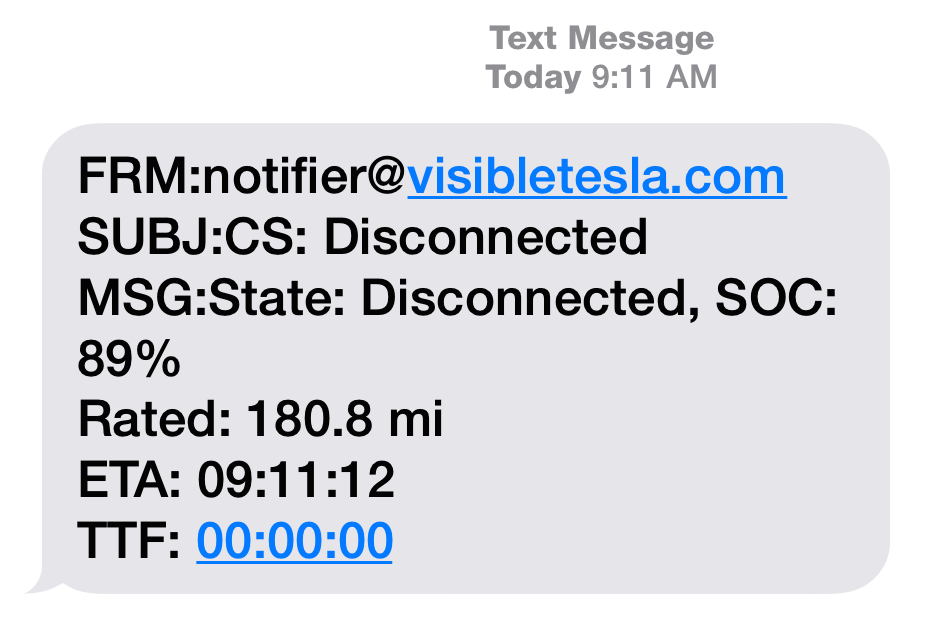
jpasqua It will be included in all charge notifications and will typically be the current time. I added the code and did a test today. Below is a text notification I received when the charge state became "Disconnected". Note that TTF (time to full) is 0 hours, 0 minutes, 0 seconds. ETA is just calculated as the current time + TTF, so in this case it just shows the current time.
 �
�
May 23, 2015
MarcG Thanks Joe. Yeah I played with it a bunch yesterday, and found that when that charge state is not "charging", the time-to-full is either 0:00:00 or some large amount. For example, I plugged in late afternoon with the charge timer set to midnight, and the time-to-full said 6:40:00 (it was 5:49pm).
Anyway, no worries I will just ignore it when the charge state is not "charging".
Is the ETA field new code or can I use it with the existing VT version I have (0.50.07)?
EDIT: oh I see, you can simply add TIME_TO_FULL to TIME, which is an existing variable that tells the current time, to get the ETA value. Is that what you mean?�
May 23, 2015
jpasqua The ETA field is new code.�
May 24, 2015
Andyw2100 So I don't know if this will help anyone or not, but I thought I'd share, to perhaps make things easier and/or clearer.
If you like the information you currently get in the default charge state notifications, but want to add the "Time To Full", you can just click the little "+" next to "Charge State Becomes", uncheck "use default values" at the bottom, and then copy and paste the following into the message body field:
Time: {{TIME}}
Time To Complete Charging: {{TIME_TO_FULL}}
Charge State: {{CHARGE_STATE}}
SOC: {{SOC}}
Range: {{RATED}}
Estimated Range: {{ESTIMATED}}
Ideal Range: {{IDEAL}}
You can change the language if you like, or leave out some of the above if you want to, but the ones above are what VT had as the defaults. I just added Time at the top, followed by Time To Full.
Also, if you leave the subject blank, the same subject that VT had been using by default will be used.
Below are the last two notification messages I received in the above format:
--
Subject: Charge State: Charging
Time: 01:03:55
Time To Complete Charging: 00:40:00
Charge State: Charging
SOC: 79
Range: 202.8
Estimated Range: 229.7
Ideal Range: 261.9
Subject: Charge State: Complete
Time: 01:43:55
Time To Complete Charging: 00:00:00
Charge State: Complete
SOC: 90
Range: 228.9
Estimated Range: 259.2
Ideal Range: 295.6�
May 25, 2015
Drucifer I'm a new user to Visible Tesla, but had a thought that I didn't see addressed in the documentation. Is there a way to do "Scheduler Calendar Exceptions"? Right now I have the car scheduled to turn on HVAC at 7 a.m., 11:50 a.m. and 4:50 p.m. on work days, MTuWThF. Calendar Exceptions would permit someone to come into the program and put specific dates for this to not happen.
In my case, Calendar Exceptions would be New Year's Day, Good Friday, Memorial Day, 7/3/15 (the 4th is on Saturday this year), Labor Day, Thanksgiving, Thanksgiving Friday, Christmas, Boxing Day.
Thanks.�
May 25, 2015
jpasqua Hi Drucifer,
Sorry, there isn't a way to set calendar exceptions in VisibleTesla.
Joe�
May 26, 2015
wayner Sorry if this is obvious, but I haven't played around with VT too much. Is it possible to send a reminder email or other notification if it is 10:00pm and my car is at home and it is not plugged in? Or even ignore the at home condition?�
May 26, 2015
scaesare Yes, my car sends me a note every night at 11pm if it isn't plugged in. You can also get emails on leaving geofenced areas, exceeding specific speeds, charge state changes, or SoC above/below thresholds...�
May 27, 2015
jpasqua As @scaesare mentioned, this is possible. Just use the Scheduler Tab to set a time you want this to happen. It's the "Unplugged?" scheduler event.
Joe�
May 27, 2015
wayner Thanks Joe. Is it possible to tie to a location as well, as in, if unplugged and at home?�
May 27, 2015
jpasqua No, not at the moment. Sorry.�
May 27, 2015
rickgt Sorry to revisit this after giving up for a while... have a mac version 28, and the latest version seems to be 50.something... how does one get a working copy for the mac?�
May 27, 2015
breser This post has the link to the version you are looking for: http://www.teslamotorsclub.com/showthread.php/19975-VisibleTesla/page186?p=980170#post980170
This post explains the background: VisibleTesla - Page 154�
May 29, 2015
andreasmj This might be a stupid question, but what is the ETA field code? Is it not available yet? I've tried CHARGE_ETA and ETA �
�
May 29, 2015
Andyw2100 TIME_TO_FULL
I had posted a template for email notifications a few posts back that included this that you may find useful.
http://www.teslamotorsclub.com/showthread.php/19975-VisibleTesla/page194?p=1018802&viewfull=1#post1018802�
May 29, 2015
andreasmj Yeah I read that but I thought you guys were discussing a way of showing the estimated time of completed charging (time + TTF). I guess I misunderstood
..�
May 29, 2015
MarcG I don't think you misunderstood. ETA should be TIME_TO_FULL + TIME, but it is new code (per Joe) so I don't believe it exists in 0.50.07, meaning we have to wait for a new build to be able to use ETA.�
May 30, 2015
wayner I have this working now with one slight wrinkle - it says "Your car is not plugged in. Range = 224" That range must be in miles - I have my system setup to use metric and when I look at the charge tab everything is in metric. How do I change the email to show kms rather than miles?�
May 30, 2015
jpasqua Which version of VT are you using? I'll check the code.�
May 30, 2015
wayner 0.50.06�
May 30, 2015
andreasmj Thanks�
May 31, 2015
wayner What's the best way to start VT upon bootup on a PC with Win7? Can it be run as a service? Should I just put it in the Startup group?�
May 31, 2015
rickgt wow, thanks for your help...
�
Jun 1, 2015
beeeerock A question from me... that perhaps is answered in one of the 196 pages in this thread(!), but I haven't seen it. In my case, I use a Macbook Pro. The laptop goes to sleep when not in use and the app then presumably goes dormant. When I wake up the laptop, there is a gap in the data starting when it went to sleep. From the FAQ page, I gather that VT simply polls for the latest data and that there is no polling done if your client goes to sleep. Logical enough. However, I set the notifier to email me when charging is done. I know from the time remaining that the charging would have been completed maybe an hour after I closed the lid on the laptop and went to bed. However, in the morning, I find an email saying it's finished charging with a time stamp of just before I wake up. Given that the laptop is asleep, I assumed the email would not be sent... but it was, and at a time that isn't doesn't make sense. Not sure why this would be?
I run a small Linux web server that I could use to run VT... presumably this would allow me to continually harvest data (something Tesla may or may not like...). Is there a way to use my Linux box as a server for the app or a web front end, so that I can review data whenever I want (not just data that was collected when the laptop was awake)?�
Jun 1, 2015
HankLloydRight Are you sure you're getting an email from VT, and not a notification from the Tesla mobile app?�
Jun 1, 2015
beeeerock Pretty sure... I have a BlackBerry and I can't do **** with it! :tongue:�
Jun 1, 2015
Andyw2100 I can't tell you how or why VT would be emailing you if your laptop is truly asleep (perhaps it's just the screen that is asleep) but when VT is getting information from the car could depend on when you have the car set to sleep, and how you have VT set to interact with a sleeping car. I'd suggest reading that portion of the VT manual. It sounds to me like VT may be sending you the notification the first time that it makes contact with your car after your car has come out of sleep mode.�
Jun 4, 2015
Benjamin Brooks Any way to use VT to monitor & send HVAC "auto-enable" thresholds at high & low range internal cabin temp readings? (i.e. if charger connected and internal temp > 100F, then enable HVAC @ 70F setting. or, if charger connected and internal temp < 50F, then enable HVAC @ 70F setting, etc...)�
Jun 6, 2015
jpasqua There is no way to do that with VT and unfortunately, Tesla does not reliably provide cabin/external temperature readings. They are present some times but not at others. From the docs on the HVAC Tab:This tab also displays the current interior and exterior temperature readings when they are available. The vehicle does not always supply this information. If no temperature readings are available, the tab will display "..." in place of the reading. It is not known when the vehicle decides to provide temperature readings and for how long. It is the case that if you activate the HVAC system, the readings will be made available and will remain available for an indeterminate period after the HVAC system is turned off.
?
You could implement the logic you want pretty easily using teslams, but you'll still run into the problem of unreliable temperature reporting.�
Jun 7, 2015
martinwinlow Hi,
I can't log in to VT on my Windows XP computer (VT V 0.28.01). I get the "Login failed - Please check your credentials" error.
I can log in fine on my Mac (VT V 0.50.07) and it all works fine.
Anyone got any ideas?
Answer: Install version 50 on the XP computer as well! I didn't realise that the installer file is the same for both OSs - I guess because the app actually runs under Java so is - to some extent - OS-independant... Links to V50 are here VisibleTesla - Page 186 . MW�
Jun 7, 2015
philgrocks Hi,
VisibleTesla won't login on one of my Mac computers.
Both are running the same version of Mac-OS.
When I type in the username / password I get the error
"Login failed - Please check your credentials"
"Remember to use your email as your username"
I deleted visibletesla from my mac and downloaded it again. I get the same error.
My Mac has all of the latest updates.
Any ideas?
Thanks�
Jun 7, 2015
scaesare Starting java programs as a service can be problematic.
I simply use the startup group method... which of course only runs when logged in, hence not quite fulfilling your goal...�
Jun 7, 2015
Andyw2100 I'm posting from my phone, so can't easily find you the link but look back a few messages for a post from breser that links to posts with the new version and the history. That will almost certainly explain your issue. The 28 version is using the old servers. Find that post, and I think you will be all set.�
Jun 7, 2015
jpasqua For those having trouble logging in...
Tesla is moving users to their new servers a little at a time. These servers are incompatible with VisibleTesla. There is a newer experimental version of VT you can try if you are willing to accept the caveats. You can read about the context here:
http://www.teslamotorsclub.com/showthread.php/19975-VisibleTesla/page154?p=848346&viewfull=1#post848346
And you can read about the new version here:
http://www.teslamotorsclub.com/showthread.php/19975-VisibleTesla/page174?p=939004&viewfull=1#post939004
Please read about the potential negative side effects of using the new version before deciding to try it.
Joe
- - - Reply to philgrocks - - -
Are you saying that the same version of VisibleTesla works on one mac but not another? Are they both on the same network? Is one behind a firewall?
Joe�
Jun 8, 2015
philgrocks They were both on the same network. But perhaps using different DNS servers.
So I downloaded the version pointed to here and it all worked!�
Jun 11, 2015
bigben New version works great.�
Jun 12, 2015
JPP Joe-
if one has 2 Model S, both under 1 TM login, does VT track data & issue alerts appropriate for each vehicle in parallel, or does it only handle 1 car at a time? Can one run 2 'instances' of the Java app?
Thx.�
Jun 14, 2015
jpasqua In theory you can have two instances running if they're pointed at different vehicles. I guarantee there are plenty of bugs in this since I don't have two cars to test with.
Joe�
Jun 15, 2015
JPP I'll let you know in a week or 2---picking up the S70D next week. Not sure if my MBP 13 under Yosemite will let me launch a 2nd instance of VT...�
Jun 15, 2015
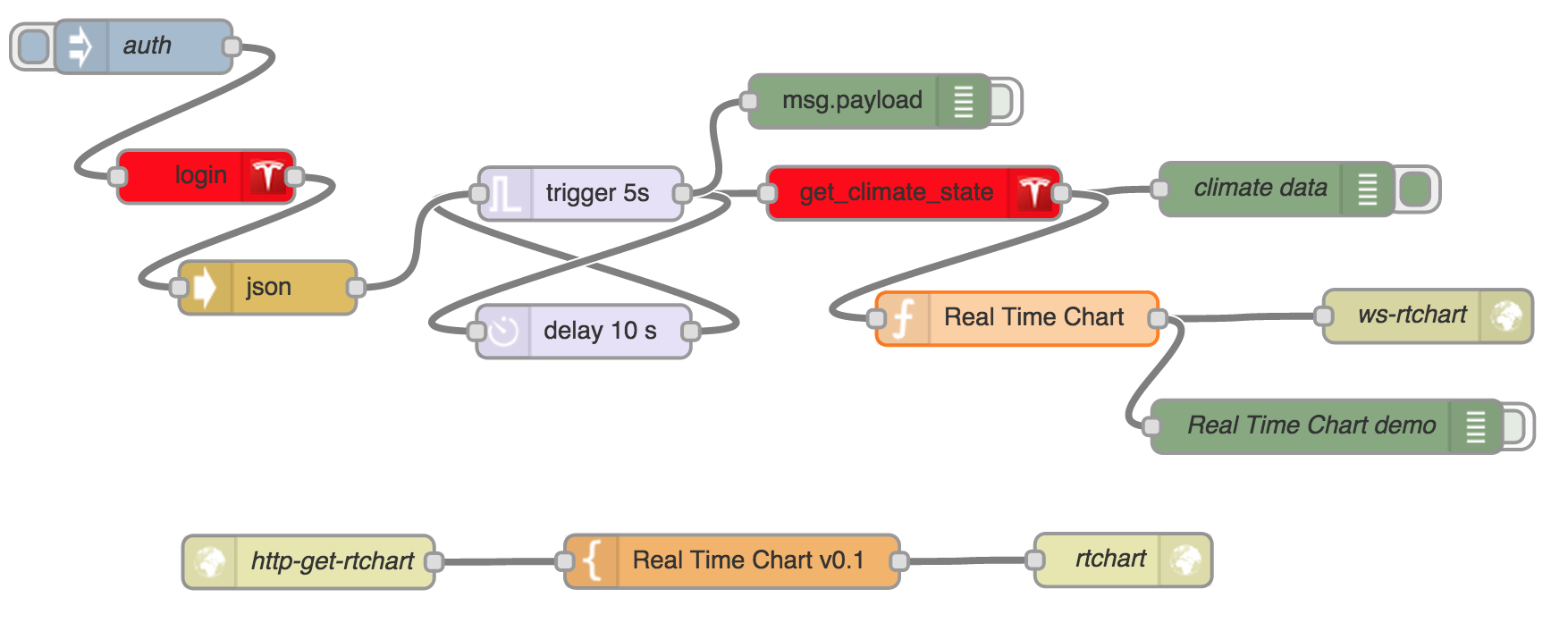
Ingineer Seems like you could implement a cheesy "polling" function by simply toggling the HVAC on and then immediately back off if you detect no temps returned. If you only do this every 30 mins or so, it shouldn't affect range much. In fact, adding a SOC threshold would be useful here too.�
Jun 15, 2015
hans I build these cheesy functions visually using the teslams plug-in for Node-Red.
 �
�
Jun 15, 2015
Ingineer Nice!�
Jun 18, 2015
jgs In the last few days, I've noticed VT no longer seems to be collecting speed data. The last time it collected speed was on the evening of 6/16. Exporting the data, it looks like L_LAT and L_LNG are being collected accurately, as is L_ODO. But L_SPD is persistently zero. The application is logged in and shows the car's state, location, and so on correctly. I've tried restarting it too, just for fun.
This is with VT 0.50.07 on Mac OS 10.10.3. Actually, now that I think of it I did download this version pretty recently; I wonder if the current version has ever reported L_SPD correctly for me. I may try rolling back.
[edit]
Yes, I looked through my backup and the problem appeared when I switched from 0.50.06 to 0.50.07. I've rolled back and will update when I've had a chance to see how .06 performs.
[edit #2]
Well, .06 logged speed for one drive. It missed my evening drive to a parking garage where I parked for a couple hours, though. It logged voltage/current/range/SoC when I was charging at the garage. I'm pretty sure I came home afterwards though
It's not clear to me at this point whether the failing is in VT, the way I have it running on my Mac, my car, or Tesla's servers. Anyone?�
Jun 19, 2015
jgs It appears the .06 vs. .07 thing was a red herring. Two short drives missed by .06 this morning (fell in between two samples). Curiously, the samples spaced from 32 minutes out to about double that during those two drives, neatly bracketing the first and second trip.
I guess I should RTFM for VT more carefully, because this sure feels like something that ought to be covered by a FAQ.�
Jun 19, 2015
wk057 You need two instances. I have two on my account (mine and wife's). Seems to work fine, but need two instances.�
Jun 19, 2015
JPP Will find out next week. Hope I can run 2 instances on my Mac.�
Jun 19, 2015
ZBB Looks like sometime this week I was moved over to the new server. Good old 0.28.01 will no longer log in (it looks like it crashed a couple days ago and I just noticed this morning when I restarted the app�)
Will give 0.50.07 a try...
Edit:
On 28.01, I was having a problem running reports. Still having the issue on .50.07. Anyone else on OS X Yosemite having issues running reports? Thoughts on how to fix? (i.e. File menu, Export, select any of the options and nothing happens -- no menu to select date ranges, etc). I believe this problem started happening in Yosemite� Was fine on Mavericks...�
Jun 20, 2015
Africaholic I've used the Windows version (0.28.01) successfully for several month now, but since Tuesday night or Wednesday morning, I can no longer log-in. I get a message "Log-in failed - Please check your credentials. Remember to use your email as your username." I have deleted and reinstalled Visible Tesla, but get the same error message. I verified my credentials (email address and password) on TeslaMotors.com and with the Tesla iPhone app. My credentials work fine there. I am NOT tech savvy, please HELP - I rely on Visible Tesla very heavily.�
Jun 20, 2015
Benjamin Brooks Upgrade to 0.50.7�
Jun 20, 2015
Africaholic @Benjamin Brooks, how do I do that? I downloaded the latest Windows version from Visible Tesla's website; and it is 0.28.01.�
Jun 20, 2015
Africaholic How do I do that? I downloaded the latest?? Windows version from Visible Tesla just now, and it is 0.28.01. I clicked on 'check for updates' but nothing happens, other than wanting me to log in, which I can't.�
Jun 20, 2015
Bugeater Follow the directions in this post by the author.�
Jun 20, 2015
Africaholic Many thanks! I am able to log-in, again, with this new version. I hope Tesla doesn't screw this up! - I only wish they paid Joe Pasqua big bucks, and integrated Visible Tesla into their app.
Joe, if you are reading this: THANK YOU SO MUCH FOR THE BEST TESLA APP, EVER!�
Jun 22, 2015
Ronny Fang I tried all the mac versions and all of them issue the same error "login failed: please make sure you are using your email as your username"
- - - Updated - - -
Got it, check http://www.teslamotorsclub.com/showthread.php/19975-VisibleTesla/page174 for the newest links.�
Jun 22, 2015
MarcG There seems to be a bug with this thread whereby I click on the last page, or page 199, but get redirected to page 198. Anyone else having this issue?
EDIT: never mind, my post seems to have fixed it as it's now the first post on page 199. Weird that page 199 even existed before I replied...�
Jun 22, 2015
Andyw2100 I saw this too.
I had seen this behavior before in another thread. The cause at that time was a post from a relatively new user, which would have been the new post on the next page, but which was somehow moderated away. (The poster was stating that his posts were not being allowed through.) Here's that thread, if you're interested. (I'm linking to about where the issues showed up.) Blackvue 650 - Are only options for rear camera drilling hole or showing cable? - Page 3�
Jun 22, 2015
Duma One way to experience this scenario is to write a long post (or step away from the computer in the middle of writing). Your session times out (site logs you out automatically due to timeout) but you still appear to be logged in. When you try to submit the post, site responds with an error saying you are not authorized to post. If nothing is done the post gets lost eventually, possibly existing as a phantom (invisible) post for a short period.
As I eventually learned from experience, the correct response is to immediately log in on the error page, and then the post will succeed.�
Jun 24, 2015
jgs After reading the documentation more carefully, it seems my problems (#1971 and #1972) were primarily or entirely a lack of RTFM. :-( In short, I had "allow sleeping" selected, and was making short trips, many of which fell in the fifteen minute sleep interval. I do have two concrete suggestions that might help others avoid similar problems.
The first is simply to add a FAQ item along the lines of "Q: Why are some of my drives not getting logged?" With an answer something like "A: You may have selected "allow sleeping". See Understanding Sleep Mode for an explanation."
The second is that it would be great to be able to remotely wake VT so that sleeping could be left enabled for those of us who don't live scheduled enough lives to make effective use of the VT scheduler feature, would like to log our trips, but still would prefer to minimize vampire losses. It might be possible for me to cobble something like this together on Mac OS using something like IFTTT -> Dropbox -> launchd -> UI scripting, but better still would be making it a first-class feature. Sadly, no, I don't have code to contribute, although I wouldn't rule it out in the indeterminate future. In the meantime, consider it a feature request.�
Jun 24, 2015
Andyw2100 I think I've come up with a pretty good solution that works for me.
I'm only allowing my car to sleep between 10:00 PM and 5:00 AM --the Tesla defined times for whatever they are calling that mode these days. So I simply set Visible Tesla, via the scheduler, to enter sleep mode at 10:05 PM and enter Awake mode at 5:05 AM. If I were to take trips in the middle of the night I guess I'd still have recording issues, but since I generally don't do that, this has been working pretty well.�
Jun 26, 2015
MDK Hi Joe
European spec cars (as seen in EU, Hong Kong, Australia) use a different "rated range" and have the alternative as "typical range" rather than "ideal range"
However the API still uses the terms "ideal_battery_range" and "charge_miles_added_ideal" which the official app then translates to "typical"
If you could check for "eu_vehicle: true" and rename ideal to typical in your app (and email templates) it would make things a little less confusing
Also, VisibleTesla correctly identifies my car as right-hand-drive but the wrong doors are shown as open in the Overview tab (because "df" and "dr" now refer to doors on the right side of the vehicle)
That's only a minor issue for me as my car is normally parked and locked when I'm at the computer looking at VT, and I didn't even realise it was wrong until I did some testing for regoapps
See here for some more detail�
Jun 29, 2015
kirkbauer I charged to 90% last night and this morning when I unplugged I got this from VisibleTesla:
Charge State: Disconnected
SOC: 53%
Range: 228.5 mi
Estimated Range: 180.0 mi
Ideal Range: 295.1 mi
P85D using the latest beta 5.x version of VisibleTesla.�
Jun 29, 2015
MarcG SOC looks off but Range looks normal, did you confirm this is what the car reported?�
Jul 1, 2015
tkizzy First off - finally got around to getting Visible Tesla working. GREAT JOB Joe! I only wish I had been running the telemetry for Refuel 2015 last week, would have been cool to analyze.
To add to the discussion about automating HVAC - here's some possible logic that could be used if you were to utilize a home address(not sure if the "home" address can be gotten through the API), this way you always have enough energy to get home and your car is cool.
if rated_range >= (distanceToHome + arbitrarySafetyBufferAmount) and cabin_temp >80 -:
turnOnHVAC()
elif currently_charging == True and cabin_temp >80:
turnOnHVAC()
else:
notifyUserThatCarIsHotButNotEnoughRangeToJustifyCooling()
There could be a toggle to turn this logic off for when on a Trip away from your normal commute, or it could only parse this logic once when outside your normal commute, and it would only run the checks again when your distanceToHome fell below your rated range. Alternatively, when your distanceToHome exceeds your range, the distanceToHome value could be replaced by distanceToNearestCharger.
So many possibilities - I LOVE THIS CAR!!!�
Jul 8, 2015
Solarguy I haven't been able to log in for the past three days. Keeps coming up with "Login Failed" error message. It's worked near flawlessly for the past eight months so I'm at a loss as to how to fix this.
I'm on a Mac, is there any way to reset my username (email address) and password so I can get it to work again?�
Jul 8, 2015
SabrToothSqrl I finally got around to installing VT on my new desktop, and also can't login. Says my name and PW are incorrect... but I know they are not.
Also, the site makes reference to version .50, but I can't seem to download anything higher than .30
I loved this app when I used it long ago...�
Jul 8, 2015
wycolo Login FAIL - clearly the unscheduled-enough life is not worth examining!! :biggrin:
--�
Jul 8, 2015
Andyw2100 Ive posted this before. I believe it probably applies, for both of you:
Edit: I believe the version in the post above is at least one update out of date, but you should be able to find the most recent version from that page, and the version from the page above works.�
Jul 8, 2015
SabrToothSqrl sweet! thank you, I'll give it a go when I get home. Sadly I can't seem to remote boot this desktop, even though I've set the BIOS for that, and windows for that, and the router forwards the packet. (it worked fine w/my last desktop).�
Jul 8, 2015
Solarguy Thank you very much for the pointers. I loaded the newer version and it's working perfectly now.�
Jul 8, 2015
Andyw2100 Happy to help!�
Jul 9, 2015
SabrToothSqrl Worked for me!�
Jul 12, 2015
invisik Hi,
My VT .28 stopped working a few months ago, but my other Windows-based unauthorized apps still worked. I tried VT v50 and it works. Not sure how some of my old Windows apps work if only the new VT works. As long as it works.......
-m�
Jul 12, 2015
stsanford Anyone else having difficulties?
I tried logging into VT tonight and noticed that I was being asked for my login information.
I have tried numerous times, but am still unable to login.
I can access the car via the Mobile app as well as the 3rd party Remote S app.
Could there be a problem with VT? (I'm using V. .29)
Thanks,
Scott�
Jul 13, 2015
MDK When an app such as VT first logs in it gets a "cookie" from the Tesla servers - it can use this cookie to authenticate until it expires (which can take several months) then it needs to log in again.
Your other apps may still be using old cookies that haven't expired yet, or they may already be using the new API
You need to update to VT 0.50, see this post for details�
Jul 13, 2015
stsanford I have updated and can now login. Thank you so much!
Great App�
Jul 14, 2015
Doug_G Hmm... my login timed out while I was at TMC Connect, and now I can't log in. I guess I'll have to try the experimental version now.
I really am disappointed in Tesla undermining this application. It is incredibly useful.�
Jul 14, 2015
scaesare Well, to be fair, it appears part of Tesla's move to new server infrastructure was to implement a more standardized/accepted authorization mechanism (OAuth), which is a good thing. By it's very nature, deprecating an existing security mechanism is going to orphan existing apps.
The throttling/threshold controls they implement are probably reasonable, and are across the board, not just aimed at VT.
That having been said, a pro-active app partnership program from Tesla would be nice.�
Jul 16, 2015
Doug_G Confirmed - they switched me over to the new servers while I was at TMC Connect. Also explains why I had to re-login on the phone app when I got home.�
Jul 21, 2015
Go4IT Since 2 weeks now, I can't log in using v0.28.01 which has been working like a charm until now (along with all earlier versions).
I installed v0.50.08 and can log into it but all tabs are greyed out and all I can do is a honk or a flash from the option menu...
Has anyone experienced this?
Help!�
Jul 23, 2015
SteveS0353 My v0.28.01 stopped working last night on my Mac, and I've downloaded and am running v0.50.08 now. It seems just fine, except that it's got the wheel colors wrong. I checked the VT details page, and it's reporting the wrong wheel color. Every other record in the details list appears to be correct. The official iPhone app gets the wheel color right, as did VT v0.28.01, so I suspect that the data coming from the mothership is correct. I've scanned this forum but can't find anything related. Is this a known bug with VT interpreting the response from the mothership?
I know I can override the wheel color in VT, but wanted to figure out if there is something else wrong.�
Jul 23, 2015
Duma I concur with SteveS0353 that wheel options are not being decoded correctly. I have 19" cyclones which are being reported/displayed as 19" silver (the default wheel) in VT 0.50.08 but correctly displayed in the official iPhone app. Very minor concern, but since the topic came up, wanted to add another data point.
Thank you for developing and sharing VisibleTesla. I am finding it very useful in getting insight into driving an incredible car. I love having access to data at this level of detail.�
Jul 25, 2015
xrayangiodoc Just installed ver0.50.07 on my win7 PC. VT is working again! Thank you!�
Jul 27, 2015
wayner Where does VT store preferences and other files on the local hard drive for a Windows 7 install?�
Jul 27, 2015
breser Can you post or privately message me or jpasqua your low level info. When on the Overview tab click details, at the bottom is the low level information line. You can exclude the vin. Don't bother with the UUID or the other stuff above it.�
Jul 28, 2015
breser You can get VisibleTesla to show you where it's storing data. Go to the Prefs Tab and then the Advanced Tab, under Other there will be a button "Show App Files" that should pop up an Windows Explorer window at the location the data files are stored.
- - - Updated - - -
Well I think I see the problem with the wheels. This is a little different than what I replied to both of you last night privately. But having slept on the issue I think I've figured out the WTX0 and WTX1 option codes. VisibleTesla interprets WTX1 as having base 19" wheels and doesn't interpret WTX0 as anything. Rather I think that WTX0 means you have 21" wheels (but not the style of 21" wheels) and WTX1 means you have 19" wheels (but again not the style).
This theory is consistent with the two people that sent me data and what they said their car actually has as well as my own car. But I probably need some data on some older cars to make sure we don't break their wheel display with the fix since it's possible in the past that WTX1 was given alone. Unless I'm mistaken I think the Cyclone wheels were added later.�
Jul 31, 2015
Mike_Schlechter Not sure why, but I'm unable to log in to VT today. I've not used it in maybe a week.
Just in case I removed and reinstalled (mac user).
My credentials are correct; but the error I'm getting is Login Failed - check credentials. I've confirmed them by logging into MyTesla on the teslamotors.com site.
Anyone else having issues today?�
Jul 31, 2015
breser You probably need to update to the newer experimental version. See the linked posts in the quoted post below for details.
�
Jul 31, 2015
Bobbyducati i havent been able to get this to work in months, ill try it every once in a while but still wont work, same error you have (on a mac too). im running 0.50.08.�
Jul 31, 2015
Talkredius for me 0.50.08 works after deleting the preference directory
@wayner : thanks for bringing up this idea.
Linux : Opensuse 13.1
Java Version 1.7.0_60�
Jul 31, 2015
Haggy I searched this forum and this thread, and can't find any recent posts about
"# range charges" but since the official documentation for VisibleTesla hasn't changed, I'll assume that I didn't miss any posts. Last week I took a trip and did several range charges. Since then I've done a number of standard charges. VisibleTesla shows 2 for "# range charges" and that seems reasonable for the number of times I didn't disconnect until it was at 100% (although the app still said I had a few minutes left.) I'm at 4.2.253 but was at a lower release for the trip. Prior to this trip, I would have said that "consecutive range charges" would have been a better title for that field, but I'm not quite sure what I'm seeing now. Does anybody else know? It's conceivable that 2 is the lifetime number since I may have unplugged before 100% now or before. Or it could be the number since a particular update.�
Aug 1, 2015
SteveS0353 I believe the "# of range charges" field represents the immediate past number of consecutive charge sessions where the SoC ended above 90%. The count resets to zero on the very first instance of a charge session which ends at 90% SoC or less. A charge session does not have to get to 100% to count as a range charge -- anything above 90% will increment the count.�
Aug 1, 2015
Bugeater As for the official policy on range charges, I have gotten many different lines from docs -vs- sales/service folks. I have range charged my early S (vin 2201) dozens of times. A 90% charge still returns 230 miles rated most of the time. Haven't looked recently but the car certainly doesn't show that many range charges. So it certainly resets. Very possibly the way that SteveS0353 says it does.�
Aug 1, 2015
Ingineer What's more deleterious to the pack than the number of range charges is how long it's kept at high SOC X time X temperature. Since temp is largely controlled on the MS, keeping it at high SOC for the shortest possible time is the best way to keep your pack healthy.�
Aug 1, 2015
SteveS0353 The car keeps count of range charges (defined as a charge session ending about 90% SoC), and will pop open a dialog box if the count reaches 3 consecutive range charges and give you the option to reduce the charge target. The reason I know is because I used the slider to choose 90% as my charge target for every day, but unknowingly actually chose 91%. I charged every night, and on the 3th morning I got the dialog box. When I used VisibleTesla to check, it was reporting a 91% target. I used VisibleTesla to set the SoC target to exactly 90% ("Jump to Standard" on the Charge tab), and the range charge counter reset to zero on the next charge.
@Ingineer is correct, it's not the number of range charges which is degrading to capacity, it's the time spent with the SoC above 90%. Don't be afraid to range charge -- use the capacity of the battery when you need it, but try to time the end of charge so that you will be driving soon after and thus not leave the battery pack at a high SoC.�
Aug 1, 2015
Bugeater Yep. On my 5540 mile trip in 2013 we didn't leave the charge at 100% very long ever. Longest would be in the mornings before we would head out for the next day. I checked and we have 66 chargers visited in our known chargers list. The last one is a charger in Kansas City which was the Eastern most charger we visited on our trip that started in Silicon Valley.�
Aug 3, 2015
instigator VisibleTesla stopped working for me. Mac 0.50 and PC
I get a communications error. Logon OK but "unable to control or monitor "
Anyone else with the same issue ?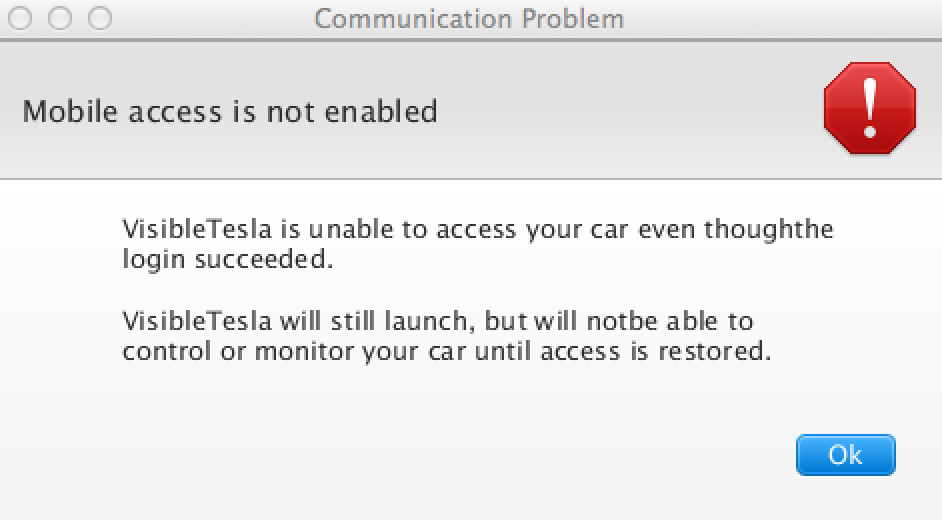 �
�
Aug 3, 2015
Duma Some questions:
- Does the phone app (iPhone or Android) work?
- Is remote access still enabled in the car (Touch Controls > Settings > Safety & Security > Remote Access > On)?
- Does the car have 3G connectivity? An easy check is to try a voice command - this will give an error if you don't have connectivity even though the display may show multiple bars, as if you have connectivity.
�
Aug 4, 2015
Klaus VT Mac had been silently not communicating for several days. No graph data, trips, no location map (although satellite view worked), and a missed notification when I had forgotten to plug in for one night. That got my attention and a re-launch yesterday needed reentering my password, with a slow login, but it's been fine since. I suspect that there was a server glitch recently and VT didn't recover gracefully. It's working now.�
Aug 4, 2015
instigator hmm .. seem to work OK today , thanks�
Aug 5, 2015
timidri Hi all! Just tried to download and run VT but on the site there are only outdated releases it seems, and building from source results in a not working app (Mac OS Yosemite / Java 8). Any ideas how to proceed? Thanks!�
Aug 5, 2015
SteveS0353 There is an experimental version you need to download. Refer to this post by Joe Pasqua (VT author) in this thread for the details. The Mac version linked there (0.50.08) works well for me on a Mac.�
Aug 6, 2015
timidri Thanks, I downloaded this version and it works!�
Aug 15, 2015
SluyterCapital Great Program! Thanks to all who made this possible.
Would love to see idea: Allow us to input the cost of hydro (cents per KWH) and within the stats it gives us the cost per trip etc...
Again Thanks!�
Aug 15, 2015
simonog The iPhone app Remote S allows you to set parameters after which it shows you for a trip the cost and the savings compared with an ICE.�
Aug 21, 2015
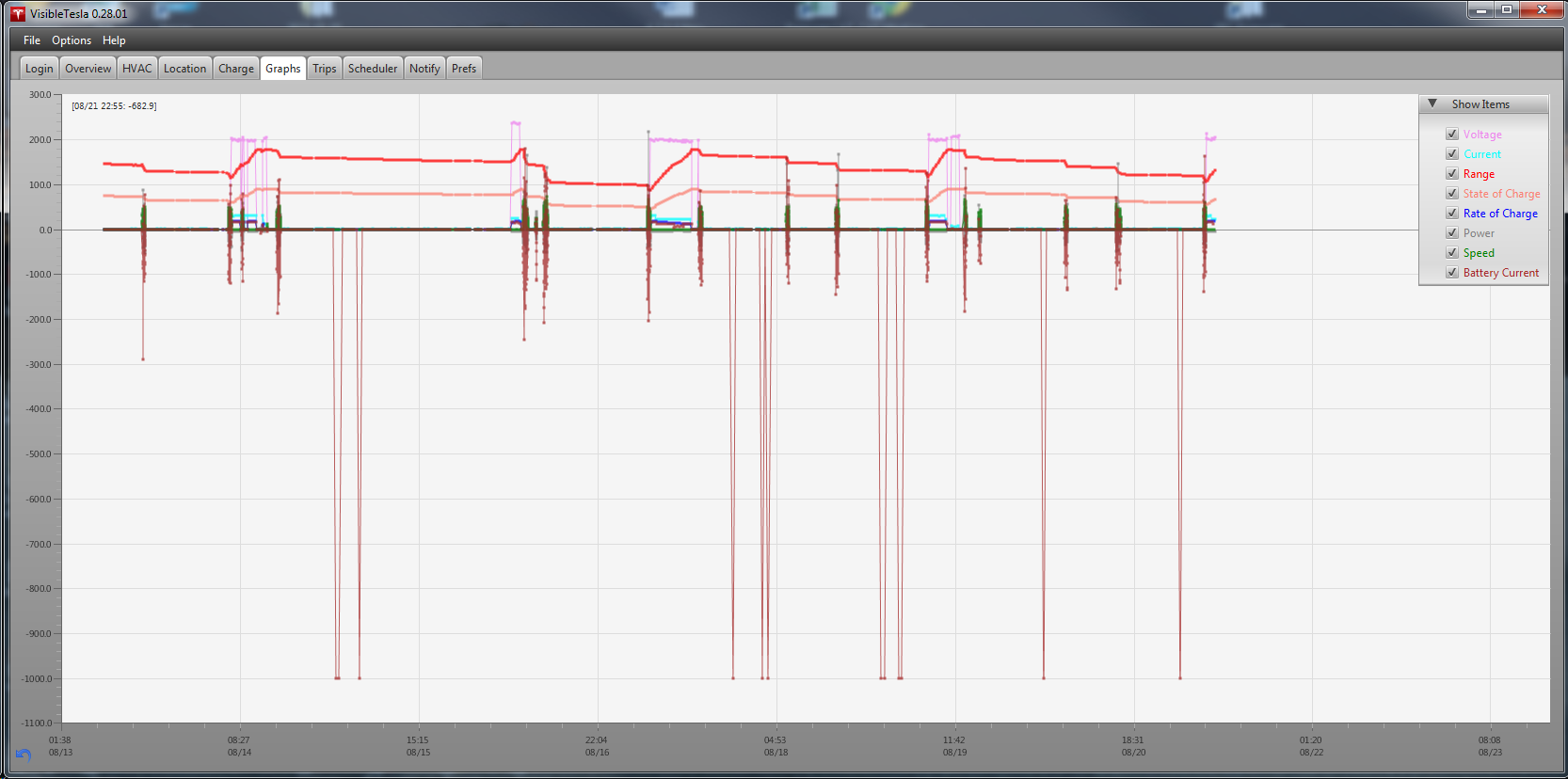
MichaelS Has anyone seen this? Ever since 2.5.36 was installed, I'm seeing 1000A battery current spikes when the car is in deep sleep.
 �
�
Aug 21, 2015
Veggen Yep, saw a spike like that last night just as VT was launched.
Pretty sure its just some corrupt data artifact, and not a real reading.�
Aug 22, 2015
Brightonuk Having issues signing in after a fresh install of 0.28.01
"Remember to use you email address as your user name"
I can sign in through the Tesla app and log on to My Tesla but I keep getting this pop up from VT (all the credentials are entered correctly)
Any help
Thanks
Steve�
Aug 22, 2015
Klaus From only 7 posts above yours:
There is an experimental version you need to download. Refer to this post by Joe Pasqua (VT author) in this thread for the details. The Mac version linked there (0.50.08) works well for me on a Mac.�
Aug 22, 2015
Brightonuk Ya Thanks�
Aug 24, 2015
MarcG I'm getting more and more events where VT stops being able to connect to the car. It does't matter if it's sitting idle, on the road, or being charged.
Quitting VT and restarting it restores the connection. I wonder if Tesla's servers are being more picky about how clients connect to them?�
Aug 24, 2015
Ingineer I'm noticing this too on version 0.50.08. Looks like it's connected, but no updates even when I hit the refresh button. I also tried logging into the Tesla app which works fine. (still no updates) A restart always fixes it.�

Không có nhận xét nào:
Đăng nhận xét