Mar 23, 2014
swegman Emailed you, as you requested.�
Mar 24, 2014
artsci Up to 46 orders as of this morning. With the April 5 order deadline about two weeks away looks like we'll get well over the 50 need for the price reduction and rebates to buyers.
I've already contacted the manufacturers to get production rolling. When they notify me about the schedule I'll post it here.�
Mar 24, 2014
EBill i just submitted my order for the kit.
I will need a bracket for the front license plate as well. I will be using this on a right hand drive (RHD) model. The first RHD models are due shortly and the front plate mounting is still to be finalized for our market. After Tesla finalizes the front plate design for HK and we get a few cars here I can figure out what bracket may be needed. I suspect that the Australian and UK versions can use a similar bracket as our license plate requirements are similar, albeit not identical.
The first batch of RHD models for customer delivery are reported to ship in June, second batch within 3 months.
Thanks for your perseverance.�
Mar 24, 2014
artsci When you have the license plate frame please post a photo so we can determine if you'll need a bracket.�
Mar 24, 2014
drtko147 
Here is mine.�
Mar 24, 2014
GasDoc Where do you think I should place my camera. This is a Skene mount.
Do you think the bottom of the plate frame will work?
 �
�
Mar 24, 2014
artsci There are two choices with this set-up:
-On the bottom edge of the plate frame (provided there's adequate clearance behind)
-On the grille under the lip at the bottom of the frame (routing the cable could be problematic here).
- - - Updated - - -
With this mount you'd mount the camera on the bottom edge of the plate frame with the bracket. The cable would run behind the plate the grille area under the nose cone.�
Mar 25, 2014
kbeckley For those in Canada wishing to get this (i.e. me!) the cost for the camera is $385 plus tax (which comes to $435). Available within 2 days.�
Mar 25, 2014
Kraken I wanted a reason to go to the service center, so I decided to go buy the camera (even though I never got around to reviewing the instructions first before making the investment like I told myself I would). So, count me in... I'm already invested.�
Mar 26, 2014
artsci We're stalled at 47 orders with no new ones for several days.�
Mar 26, 2014
AnOutsider I failed to keep up with this project, but nice to see it progressed. I read the info and watched the videos at the teslarati link. I like the homelink integration. I probably missed it in the original build discussion, but is the lag just from thru board switching?�
Mar 26, 2014
SUPRKAR Rick, did anything ever happen with the poster who wanted to buy 25 units?
"I would be willing to buy ~25 for resale in the OpenEV Store and coordinate a second production run when needed."�
Mar 26, 2014
Chris1howell Yes, I do plan to buy ~25. I will wait until April 5 so everyone who wants one from the fitst batch has a chance to get in early.�
Mar 26, 2014
Gizmotoy Time to start advertisingjk
I still need to order mine, just haven't gotten around to it.
Side note: work on modeling the no-dremel-required replacement camera bracket is nearly complete. Just need to round some corners and tweak the strain relief. Hopefully be finished up by this weekend.�
Mar 26, 2014
swegman Is this project posted on Tesla's forum? Rick, I'm sure it will be over 50 by April 5. Many people have a tendency to wait to the last minute to buy things.�
Mar 26, 2014
SUPRKAR Perhaps advertising the price considering the 25 Chris1howell will purchase will increase the orders, if the price is lower maybe those on the fence will jump....�
Mar 26, 2014
artsci Good idea. I'll get something posted as soon as I can.�
Mar 26, 2014
swegman Picked up the camera today. Tesla knows about the project but did not say anything to me about it affecting the warranty, as another poster had indicated. Cost for the camera is $361.05 plus tax in the U.S.
As an aside, I had the one year checkup done on my P85 with 21 inch Michelins. Tesla performed several TSB's, including replacing the 12V battery (never had a problem with it), installing numerous washers, installing updated rotors, etc. The loaner was a P85 with 19 inch wheels that had the parking assist and power mirrors. Liked the power mirrors (may get my car updated for this), but the parking assist kept sounding the alarm every time I was stopped at a light with a car in front of me or next to me. Also, the loaner had a very loud whine when accelerating, and the pano roof creaked. My car has never had either of these issues.�
Mar 27, 2014
artsci We're now up to 49 orders. Once we're over 50 we begin creating a rebate fund for all buyers. We'll do the final rebate calculation on the April 5 ordering deadline.
Production is proceeding. There have been several communications already between WhiteP85 and the manufacturers about production details. If all goes well we expect to ship in about one month or so, around the beginning of May.�
Mar 27, 2014
AnOutsider Any comment re: lag?�
Mar 27, 2014
swegman My recollection from prior posts was that there is a short period of time (1 or 2 seconds) in which the 17 inch screen syncs up with the camera input, and during this time you get no picture on the screen.�
Mar 27, 2014
artsci Yes, for about two seconds you see this image as the switch is made between cameras:
 �
�
Mar 27, 2014
TXjak Here's my "low-mount" plate. Does it look like there is enough space above it for the camera to mount under the nosecone?
 �
�
Mar 27, 2014
artsci Yes, but you'll have attach the camera high enough on the grille to see over the plate. Normally it would sit on the chrome cross bar, so you'll need some kind of booster to keep it high enough while the silicone glue dries.�
Mar 27, 2014
AnOutsider Yeah that's what the video showered. Just wondering if it's something that can be worked out or if it's something on teslas end.
Considering the project to help with pulling into spots, but just worried the lag would make it a bit impractical in actual use.�
Mar 27, 2014
artsci Remember, a functioning switch and front camera has been on my car for about a month. The lag is really not an issue, but it's far faster to make the camera switch with the remote rather than Homelink on the touch screen, as the touchscreen is slow to respond. I've gotten into the habit of using the remote.�
Mar 27, 2014
swegman Rick, what about using the "auto" switching mode, wherein the cameras switch based upon the car being in reverse or not in reverse? Isn't that better than even using a remote?�
Mar 27, 2014
Kraken nooooo... My wife would absolutely hate me if I installed it and that was the decision factor. She like many others uses the camera while driving to have more situational awareness of what's behind her.�
Mar 27, 2014
swegman Everyone is different. I find it distracting to drive with the rear camera on. BTW, my understanding is that the switching between cameras can be done using home link, or using a remote, or configured for auto switching. Rick, am I correct?�
Mar 27, 2014
Kraken Oh.. Thought you meant they would all be installed with auto switch... Which I was going to say"everyone is different, some prefer the rear camera on even when going forward".�
Mar 28, 2014
artsci It can be configured to auto-switch to the rear camera when on the front, but we haven't yet figured out the connection that will do that. Working on it.
We're now up to 51 orders, the threshold for a rebate to all buyers. Once we reach the April 5 deadline I'll report the number of orders, the amount of the rebate, and begin making the rebates.�
Mar 28, 2014
swegman Rick, have you asked the SC which wire under the front dash carries 12 volts when the reverse lights are activated?�
Mar 28, 2014
artsci I don't know which one but if you find out please let us all know.�
Mar 28, 2014
swegman I'm waiting for a call back from the SC for retrofitting the power mirrors and bottom shield. They know about the front camera mod. I'll ask them if they would be willing to tell me which wire is for the reverse (backup) lights.�
Mar 28, 2014
artsci Wonderful! If they tell you please post.�
Mar 28, 2014
swegman Rick, Tesla will not disclose the information. See a PM from me.�
Mar 28, 2014
artsci OK. Now were going to have a contest. The person who identifies one of the correct wires below wins a free camera switch.
1. The wire in harness on the driver or passenger side kick panels that supply 12 volts to backup lights
2. The wire to the front parking lights that turn them on when the car is placed in reverse
2. The wire in harness under dash that instructs car to be placed into reverse when the shifter is moved from drive or neutral position to reverse (this one may be a bit tricky and may not even be 12v, so it's a last resort)
The camera switch has a connection for a 12v signal that triggers when the car is placed in reverse. That will automatically switch to the rear camera when the front camera is on.�
Mar 29, 2014
SUPRKAR There is no 12 volt which comes from the shifter. The shifter when switched sends a can signal indicating what position the shifter is in. the gateway decides what to do and sends out the correct voltage and command depending on what gear the selector is in. The trick is going to be locating where the 12 volt source originates as we know it ends up at the reverse lights.�
Mar 29, 2014
artsci You sound very highly qualified to attempt this�
Mar 29, 2014
HankLloydRight I've seen several mods for cars that listen in on the CANBUS for certain messages (and some that even intercept and send out their own CANBUS messages) -- for instance, the SMARTTOP module (see MODS4CARS ) for many makes/models of convertible cars that add convenience features missing from the manufacturer.
I know nothing about CANBUS and what it would take, but it shouldn't be too hard to tap into any CANBUS line, and just listen for the packets that say "shift into reverse" and toggle a relay for the switch.
- - - Updated - - -
Here's another example of a CANBUS decoder that listens for, and cancels out system warning messages when people install after-market HID headlamps: Xenon HID Canbus Decoder Warning Canceller Capacitor Fit All Ballast and Bulbs | eBay
If they can build/sell that for $7, I wonder what it would take to do the same thing for us, except listen for a different message?�
Mar 29, 2014
pilotSteve Well, $29 gets this reprogrammable (can be reflashed from USB) CANBUS reader.
http://http://www.karlssonrobotics.com/cart/bus-pirate/?gclid=CKbN8enNuL0CFcRefgodL5YARg
Maybe we can incorporate this type of reader with a PIC micro controller to read the backup message
Rick, the installation plan gets power from the CANbus connector doesn't it? Future rev of the video switch board might be able to incorporate this. I'll see what I can discover when I install mine.�
Mar 29, 2014
artsci The switch is powered one of three ways: via a direct 12v connection via the OBD2 connector supplied with the kit, via a tap to the yellow wire with purple stripe in one of bundles behind the drivers side kick panel, or to fuse #75 in fuse box #3. The latter are switched off with the car. The OBD2 connection is always on and thus results in a very small 12v battery drain. No CANbus connection is made.�
Mar 29, 2014
pilotSteve My limited understanding is that OBD2 uses CANbus as one of its communications protocols and therefore perhaps both power and CANbus signal will be available from OBD2 connector. Need to experiment.�
Mar 29, 2014
artsci I think the Model S OBD2 connection only provides 12v and ground. No other connections.�
Mar 29, 2014
Kraken +1 purchase�
Mar 30, 2014
artsci With your order we're now up to 53 with a little less than a week to go before the April 5 order deadline.
It's now certain that everyone who orders by the deadline will get a rebate but until we know the number of orders at the deadline, we can't determine the amount of the rebate.�
Mar 30, 2014
SUPRKAR I have located the reverse wire. I will send pictures and specifics to Rick for him to verify and post. I will say the wire is on the passenger side not too hard to get to novice level...�
Mar 30, 2014
artsci Sounds like we have a winner. To be verified once I have the details.�
Mar 30, 2014
dsmith2189 Call me crazy, but would looking at the Mercedes wiring colors help with the MS colors?
---- Update ----
reminder: read to the end of the thread before posting crazy ideas.�
Mar 31, 2014
TeslaRumors WARRANTY ISSUES?
So has anyone found out if after installing the front camera, if their are any warranty issues? Will Tesla Motors no longer honor your warranty once you proceed with this?
Thanks!�
Mar 31, 2014
artsci Not as far was we know. This appears to have been one service center's judgment without any verification.
Thanks to SUPRKAR we know know that the reverse lamp wire comes from the body controller. This is located on the passenger side under the carpet. First we remove the side panel. This is the same panel you remove on the driver�s side to access the camera/touchscreen connections. After the panel is removed the carpet is pulled back, revealing the body controller cover and two large connectors. Find the grey connector and purple wire with green stripe. We�ve verified that this is the same wiring color at the reverse light itself. This wire is tapped and connected to the PCB. We�re going to suggest adding a low amp inline fuse to protect the controller maybe even a diode for back feed protection as this is one of the more expensive controllers in the car. I�ll be adding this information to the installation instructions.
SUPRKAR wins the free camera switch.�
Mar 31, 2014
dirkhh I'll admit that I haven't placed an order because of the report that Tesla is considering yanking warranty if one installs this mod. I paid for 8 years of service and 8 years of warranty and would feel really stupid to lose that...�
Mar 31, 2014
swegman Rockville Service Center appears to have no problem with this mod. They are well aware of Rick and this project, and have not expressed any reservation or warranty concerns. I also have 8 years of service and warranty, and they have not said one word about this project negating either the service or the warranty.�
Apr 1, 2014
cgiGuy Keeping Your Mod's Warranty Intact - For Dummies
Interesting stuff in here.. puts me more at ease about it.�
Apr 1, 2014
Gizmotoy My service center is the one that balked (supposedly under Fremont's direction), and my car goes in tomorrow to hopefully fix the parking sensors. I'll try to get more information, but the rep. I've found to be the most knowledgeable is out on vacation
I know I'm on the short list for the updated BCM (Body Control Module) with better RF shielding, so I won't be doing that part of the install any time soon.
Seems pretty accurate. The part has to cause the failure for a manufacturer to dishonor the warranty. As a practical matter, though, manufacturers often attempt to make this a matter for the courts and back off if you follow through with the proceedings. My last car had a note in its file that its entire powertrain warranty (front/rear/center diffs and engine) was voided when I changed the intake, for example. Fortunately I never needed it, but that would have required some court time to resolve.
No idea how Tesla will handle it, but they did not sound particularly happy about it. Certainly the camera, dash screen/computer, and BCM warranties are at risk if they choose to take a hard line on this.
�
Apr 1, 2014
artsci If I let fear of warranty issues drive my decisions I'd never touch my cars
But for those who worry about these kinds of things, to put your mind at ease, stay away from the camera switch. Then you'll have nothing to be concerned about.
P85's work on the camera switch involved a very thorough evaluation of the camera electronics and their interactions with the touchscreen. He runs an electronics company so he does this kind of thing for a living and knows his stuff.
We're now up to 58 orders.�
Apr 1, 2014
TeslaRumors When does the price fall below $225?
So the price is now $225, will it drop (via rebates) when it reaches 100 or before that? I know that there is one person waiting to order 25 on April 5th, so with the 58 you have now, and with the additional 25, that would put you and potentially 83.
Thanks.
�
Apr 2, 2014
artsci When we reach the April 5 order deadline with all orders in hand as of that date, we'll calculate the rebate and begin sending them to those who have ordered as of that date. For orders after that date, a new lower price will be established, but it won't be lower that what the early adapters have paid, including their rebates.
The 25 bulk order will be calculated into all of this.�
Apr 2, 2014
Gizmotoy Finally got around to ordering my kit and cables today. That's one more!�
Apr 2, 2014
artsci Based on the current number of orders (63), and assuming the bulk buy of 25 will happen, it now appears that everyone who orders by the April 5 deadline will receive a rebate of about $75. The price will be reset after April 5 but taking the rebate into account the early adapters will pay less than those who order after April 5.�
Apr 2, 2014
JerryNycom Any progress on the rear reverse wire for auto switching?�
Apr 3, 2014
artsci Posted this earlier:
Thanks to SUPRKAR we know know that the reverse lamp wire comes from the body controller. This is located on the passenger side under the carpet. First we remove the side panel. This is the same panel you remove on the driver�s side to access the camera/touchscreen connections. After the panel is removed the carpet is pulled back, revealing the body controller cover and two large connectors. Find the grey connector and purple wire with green stripe. We�ve verified that this is the same wiring color at the reverse light itself. This wire is tapped and connected to the PCB SW2 terminal.�
Apr 3, 2014
peterspd artsci: Other way to run camera cable and wire from frunk to camera switch kit instead for running the cable and wire under rubber door seal? Thanks�
Apr 3, 2014
artsci There are other ways to do this but they involve taking apart the frunk. Much more work and not that much better a solution.
Now up to 66 orders with the ordering deadline at midnight tomorrow, Saturday, April 5. All orders received before the deadline will qualify for the rebate.�
Apr 4, 2014
Adrian Can a post / ad be made so interested buyers don't have to thrawl through 47 and counting pages of this thread? With some concise info, or links to posts in this thread maybe.
I tried advertising this in a norwegian group of owners, but they were all just confused and dismissed the idea due to lack of information.�
Apr 4, 2014
Rastalew Please add me to the list. -- Let me know if I just need to sign up here or use your purchasing page.
- - - Updated - - -
Also, anyone in the Seattle area know of a reliable aftermarket shop they would trust with the install? Or perhaps get together for an install day? (While I am familiar with computer system building, my other handyman expertise stops with basic chicken roost making and light fixture installing...)�
Apr 4, 2014
artsci You should order on the purchase page. I'll confirm when received. There's really nothing technical about the installation - pretty normal stuff with wiring 12v systems. The camera switch PCB is plug and play.�
Apr 4, 2014
Rastalew Done, thanks!�
Apr 4, 2014
Shumdit Are triple digits going to happen? One day left...�
Apr 5, 2014
artsci If the bulk purchase of 25 happens we might get to 100. At 70 now.�
Apr 5, 2014
RavynArcadia 71. Just ordered mine.�
Apr 5, 2014
Gizmotoy So I think I finished up my Phase 1 design for a replacement camera bracket. Artsci asked me to make a brief post about my work.
Essentially, I don't want to cut or modify Tesla's camera. I discovered that we can completely replace the bracket Rich's instructions calls for cutting with a dremel as it easily removes with a couple screws (which Rick will include in the official instructions for easier cutting). This opens up the possibility to replace the bracket with one of our own design.
I picked up some digital calipers, learned SketchUp, and created a model of the "wing-less" camera bracket down to 0.1mm accuracy. I tried to do better, but I simply couldn't measure more accurately with the calipers I picked up. Hopefully that's enough. The link to my site below adds some more details about the process and provides the CAD files*. If you have a 3D printer and want to give it a shot, let me know. Otherwise, I believe Rick may try to have a few test parts printed, and assuming it goes well, they will be offered as an option if there's interest. They're not load-bearing so a plastic bracket should suffice, but our tests should give us a good idea.
Tesla Front Camera Bracket | Jason Nemeth
?
I also plan a Phase 2 design. I'd like a completely reversible install. The goal of this design would be to build upon Phase 1 to develop a replacement bracket that eliminates the need for tape and glue to mount the camera to the bumper, while also allowing the camera to be tilted down slightly such that the front lower fascia is visible in the frame for perspective (like the rear camera). I have a couple ideas for how this might work (two described in the link above), but if you have any suggestions I'd love to hear them.
*As a note, I am providing the CAD files to the community free of charge for non-commercial use. Feel free to print or cut your own if you have the means. For commercial uses, please contact me to work something out. Honor system, guys.�
Apr 5, 2014
Panacea 72. I just hopped in as well.
Nice work Gizmotoy!�
Apr 5, 2014
Chris1howell 97. :biggrin: Almost to 100...�
Apr 5, 2014
artsci After the latest buys, including Chris1howell's 25, we have 4 left. Deadline is midnight tonight. Tomorrow I will post the rebate amount for all buyers before the deadline.�
Apr 5, 2014
Shumdit Three Left..�
Apr 6, 2014
artsci Actually we're now sold out -- I've taken one to replace the beta in my car.
The remaining 25 will be sold by OpenEVSE. I'll email all buyers later today with rebate information. Haven't completed the calcualtion but safe to say it will be around $75.�
Apr 6, 2014
JerryNycom Awesome news! :love:�
Apr 6, 2014
artsci I've figured out how to run the wire from the 12v reverse source on the passenger side to the PCB on the driver's side -- this is for automatically switching to the rear camera when the front camera is on during a back-up situation.
I'll post some photos as soon as I can, likely tonight. I was worried about this but it's a piece of cake.�
Apr 6, 2014
bigmaple1 Probably late in the game to mention ideas about the camera mount, but what the heck? Anyone thought about swapping out the lens, and pointing it at a small, close, concave mirror to
1 - restore wide angle of view
2 - protect camera lens a bit from direct exposure to front of car airstream and what it carries,
3 - fix image reversal
Something like what I have drawn (though placed better than the drawing) Note: beginning image courtesy North West Auto Salon.
 �
�
Apr 6, 2014
JerryNycom Please take a video of auto switching!�
Apr 6, 2014
artsci Once the wire is connected to the body controller, it's run under the side panel on the left dash under the lip between the top of the dash and the metal piece underneath. A 22 gauge black wire is ideal for this, as it pushes in the gap easily with a plastic non-mafr tool and totally disappears from view. It's run all the way across the dash to the side panel on the driver's side, where it's connect to terminal SW2 on the switch PCB. A few photos are below. These steps will be incorporated into the installation instructions.
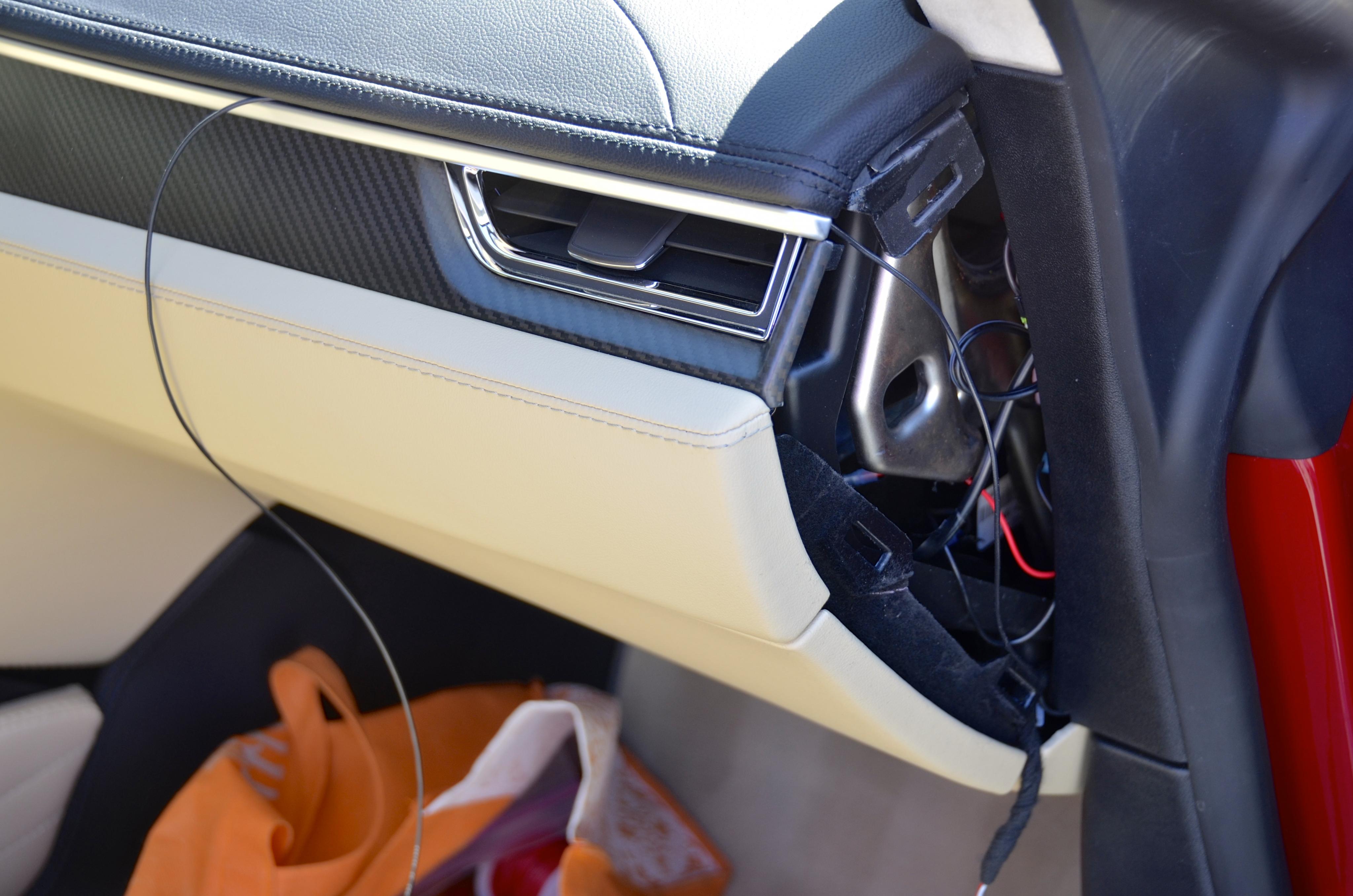
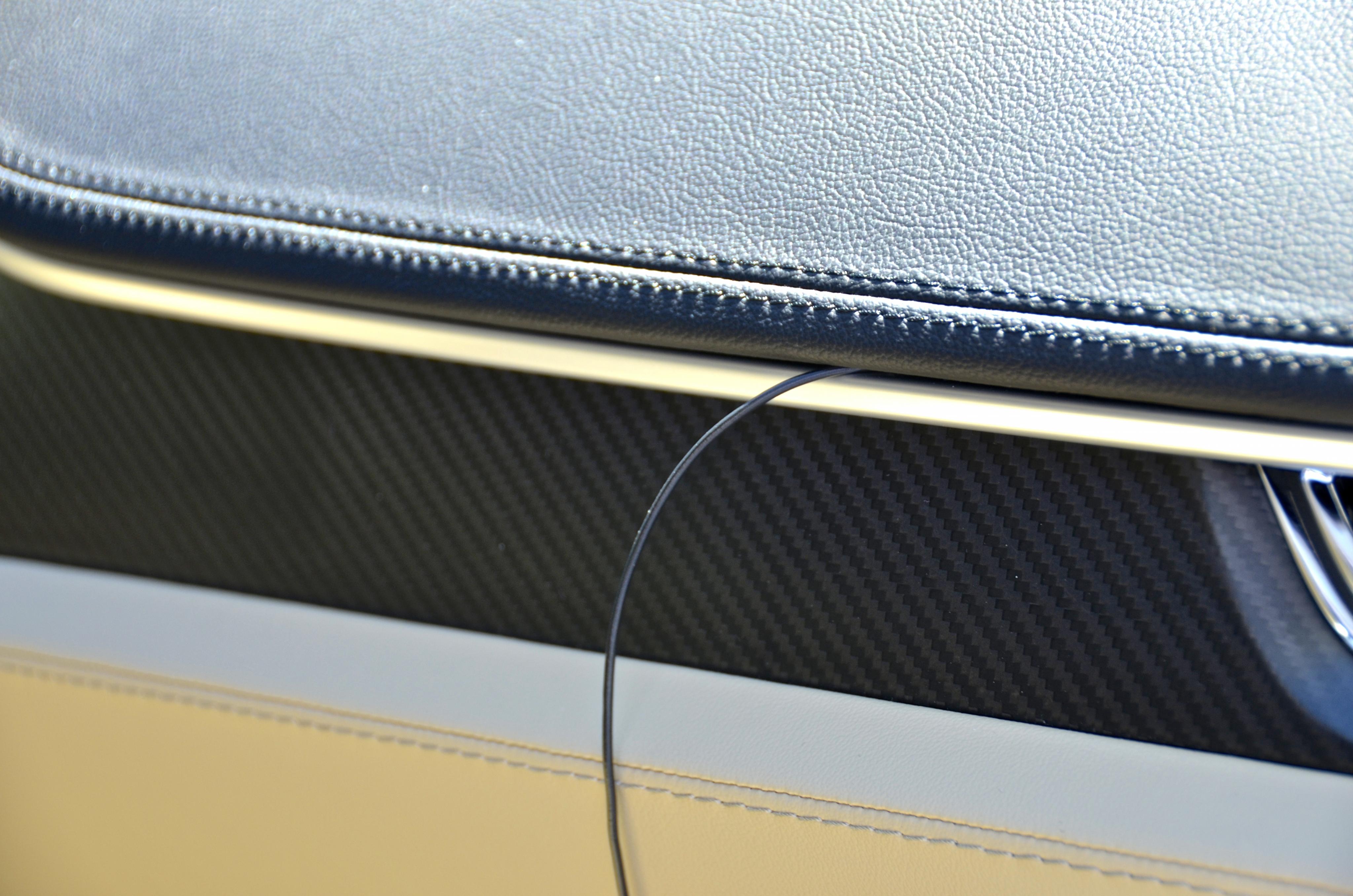
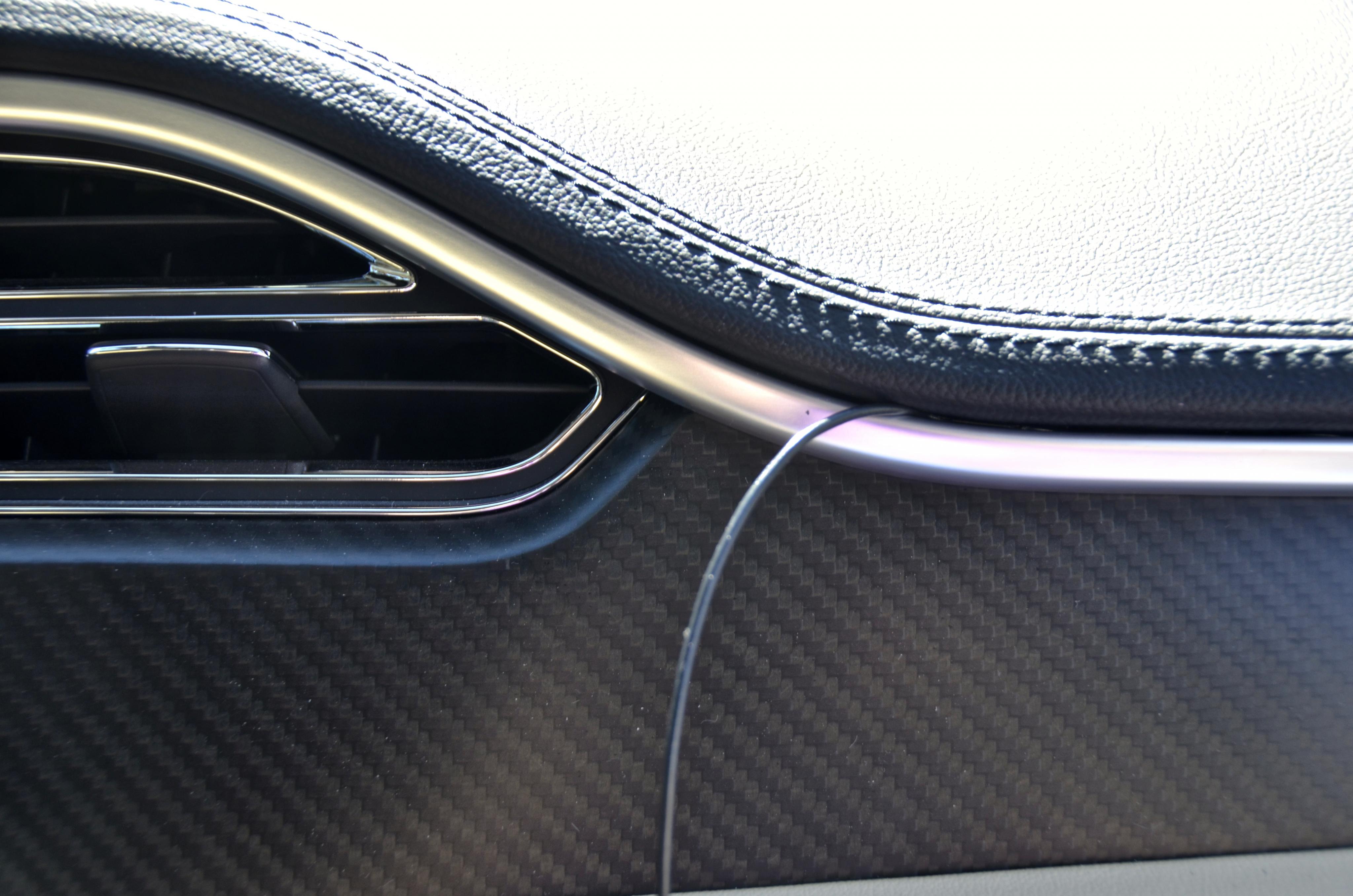
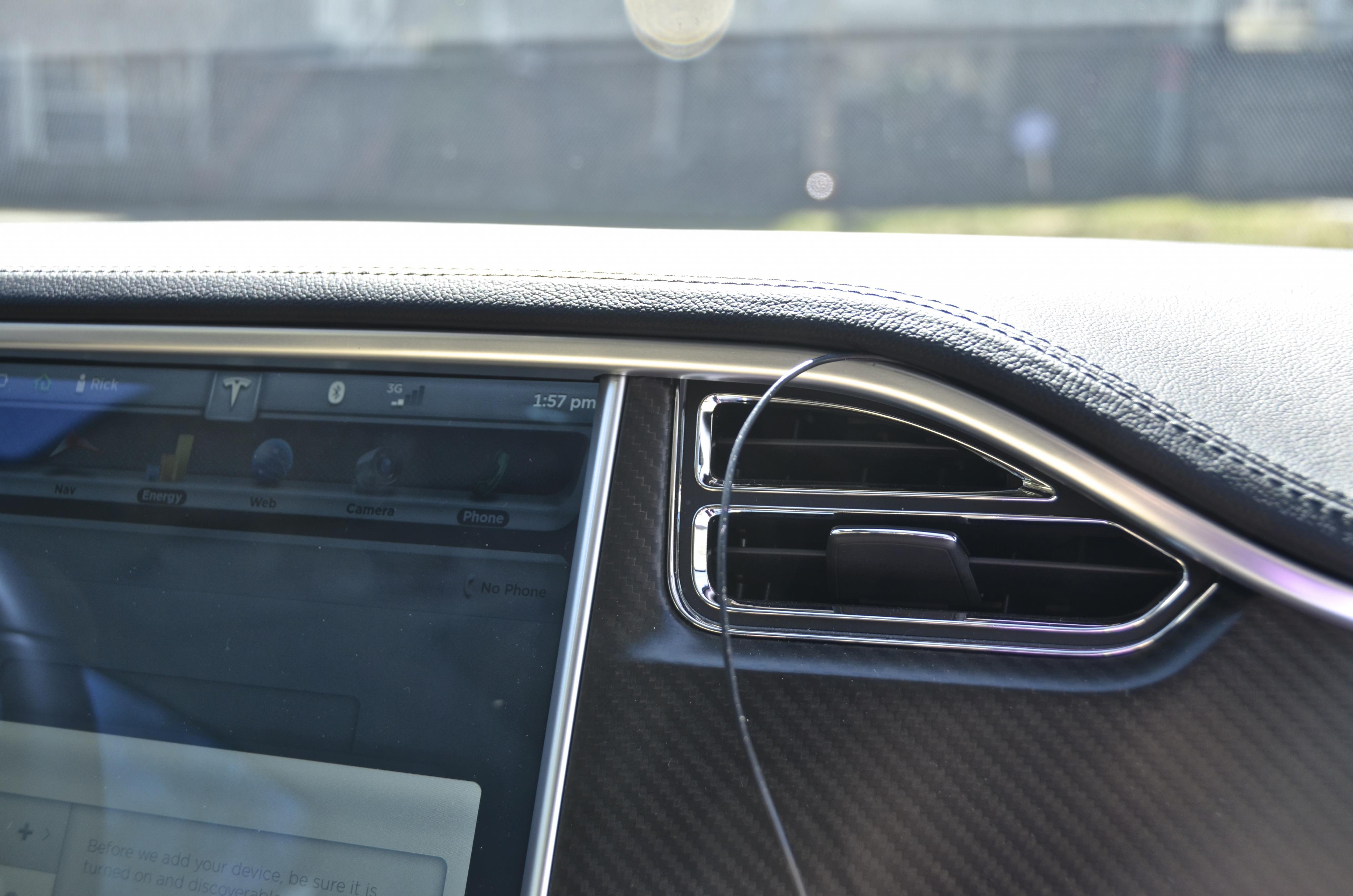
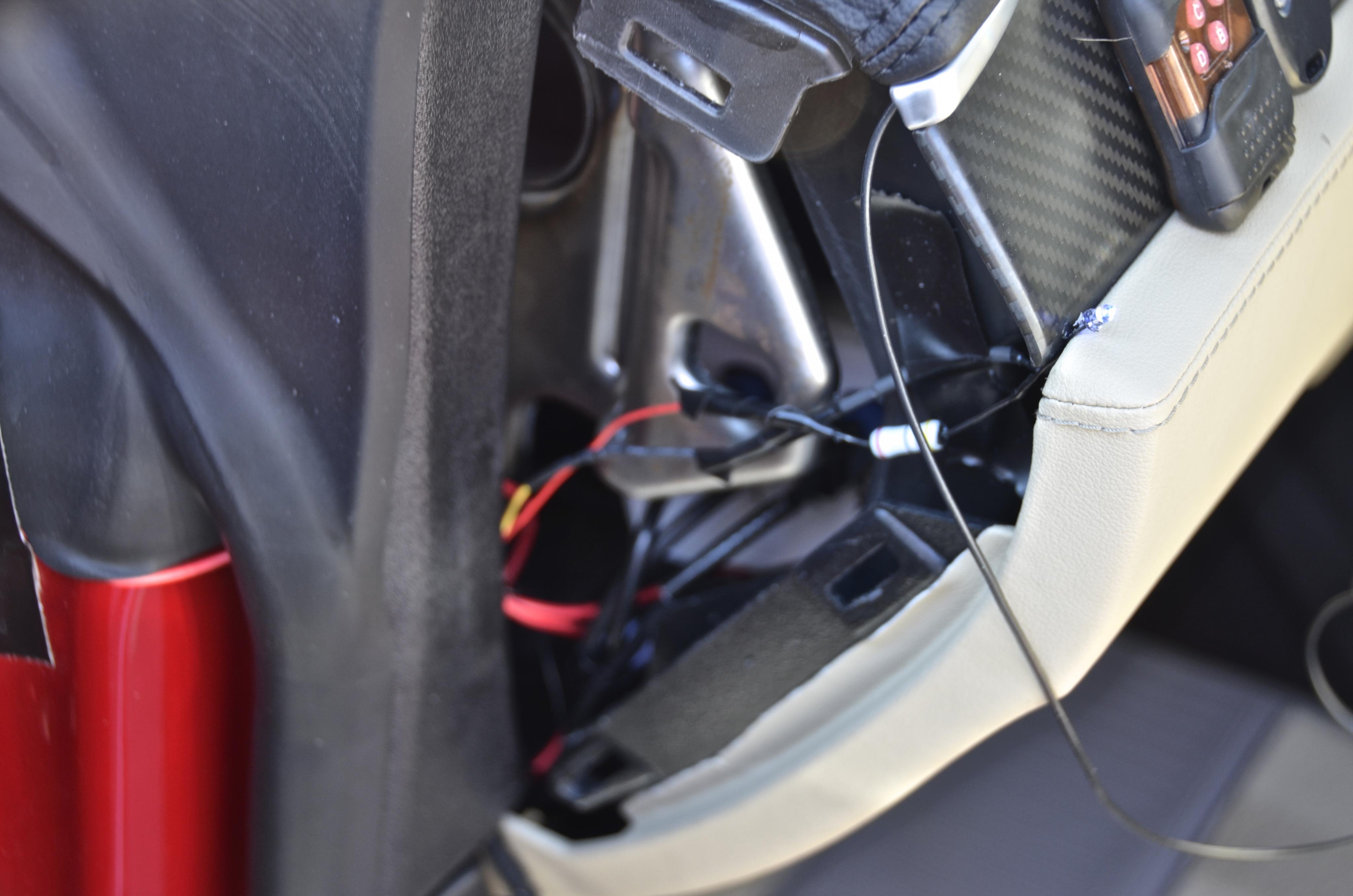 �
�
Apr 7, 2014
cgiGuy Yes.. I thought about this and, aside from replacing the lens, someone tried a 90-degree mirror with no luck. I didn't look at the camera close enough to see how easy it would be to get the lens off, but I'm not sure I'm willing to pry my ~$400 camera apart to try. I tried looking at the possibility of an add-on lens (like the ones you see on added to a smart phone) to convert from wide-angle to "normal" but I don't think that's possible. Any photographers want to weigh in?�
Apr 7, 2014
Gizmotoy While I haven't had the camera fully disassembled (only maybe 50%), from what I have seen the lens is pretty well-integrated. This should probably be expected given you need a water-tight enclosure capable of withstanding a direct blast of high-pressure water. Removing the lens and having it replaced with something else while preventing moisture from entering the enclosure is no small task.
You could create an assembly that allows secondary lens to be threaded on in front of the existing one, but if you try to convert from wide-angle back to something approaching normal perspective you'll just lose the edges of the frame. In other words, no real benefit. It might be worth trying something out just to fit a plain UV filter in front of the camera for protection, but I'm somewhat dubious that will be of value. While there may be models I haven't seen, UV filters typically aren't designed for ballistic protection.
(Note to clarify: In modern digital photography UV filters provide no filtering benefit as digital cameras aren't sensitive to UV light. So, UV filters are often used as fancy lens protectors.)�
Apr 7, 2014
artsci Agree completely with Gizmotoy's judgment.�
Apr 7, 2014
Klaus Maybe someone could design a small air foil flapper to attach to the camera or bracket that automatically covers the front camera above say 10 mph to avoid ballistic debris damage?�
Apr 7, 2014
JerryNycom Does the camera automatically switch from front to rear based on Drive and Reverse or just goes to rear when in reverse and stays? I ask for parallel parking......�
Apr 8, 2014
HankLloydRight I would vote for it's always switched to the front camera except when Reverse is engaged, it switches to the rear camera, and then auto-switches back to the front when done reversing.�
Apr 8, 2014
jerry33 Normally, I want the rear view camera on all the time so I can see the blind spots (the side mirrors don't quite do it as they don't angle out far enough). The front camera will only be used in some parking situations.�
Apr 8, 2014
HankLloydRight Then you would not need any"backup light" auto-switching at all. You would manually switch to the front camera only when parking and then switch back.�
Apr 8, 2014
artsci With the SW2 connection to the PCB from the backup light power, it will automatically switch to the rear camera if the front camera is on when reverse is engaged. But it will not switch back to the front camera when drive is engaged. That has to be done manually with the remote or Homelink.
Any solution involving auto switching to front camera would mean that the front camera would always be on unless reverse is engaged. So, for example, you could not use the rear camera to see traffic behind you in heavy traffic, which I do frequently.
Nonetheless, I'll raise this issue with WhiteP85 so see what he thinks. I don't know if there's a way to make the front camera the default, but I am curious to know. Will post what we conclude. Perhaps there's a way to make this an installation option so each driver can set it up the way he or she prefers.�
Apr 8, 2014
cgiGuy +1. This is my exact requirement, as well. The reverse wire will be useful still, since it will then mean I only need to put the front camera on while pulling into a parking spot, and then when I return to the car and start backing out it will go to rear camera and stay there as I drive.
Perfect setup, as is, for me. But I agree, some flexibility would be nice for others, if possible. Maybe on V2.�
Apr 8, 2014
dpodoll Perfect for me too!!�
Apr 9, 2014
HankLloydRight I would rephrase this to: Any solution involving auto switching to front camera would mean that the front camera would always be on unless reverse is engaged or manually switched to the rear camera with homelink or the remote when reverse is not engaged.
So it certainly would be possible to watch rear traffic if one wanted to by using the remote if the front camera is selected by default. And yes, I'm agreeing this should be a user selectable option: Front Default, or Rear Default, or no default (camera stays in last selected mode).�
Apr 9, 2014
JerryNycom Dumb question: Is it possible to know when we select the CAMERA icon on touch screen it activates a relay so every time its selected it goes from front to rear at each press??? Did I explain that right???�
Apr 9, 2014
Kraken It would be cool if there were three options that you could select on the go "front, rear, and corresponding to drive/reverse condition"
that would let you choose whether it is in front/rear camera manually most of the time, but if you wanted in certain situations you could have it set to auto switch back and forth when the car switches back and forth from drive to reverse and back.�
Apr 10, 2014
artsci The camera icon will always show whatever camera the PCB has set the touchscreen to. Getting the icon to do something else requires electronics that are beyond what WhiteP85 has done with the camera switch PCB.
The remote, which syncs with Homelink, has two functional buttons. One toggles the camera between front and rear. The second forces the camera to the rear. So Homelink can be set up with both.�
Apr 10, 2014
JerryNycom Gotcha! Ok if the camera is already on the rear, when we put car in reverse will it "blink" and go to the rear, or just stay on?�
Apr 11, 2014
artsci Update: Haven't had a chance to hook up the reverse light connection but WhiteP85 tells me that if the front camera is selected the rear will go on automatically when the car is put into reverse then switch to the front camera when in forward. Perfect for parallel parking situations, but not good if you want a rear view while driving. For that you'd have to toggle to the rear camera using the remote or HomeLink.
Based on my experience with the beta PCB I'm assuming it will just stay on with no blink. But I still haven't hooked up the reverse light 12v connection. I'm doing that tomorrow and will report back here when it's been tested.�
Apr 16, 2014
Jeremy Gavin Can I please get added to the pre order list
please email me to link to order
thanks
�
Apr 17, 2014
artsci The first production run is sold out. But a batch was purchased by OpenEVSE and will go on sale on its web site soon.�
Apr 18, 2014
swegman Rick, did you get the reverse light connection completed for auto switching of the camera?�
Apr 19, 2014
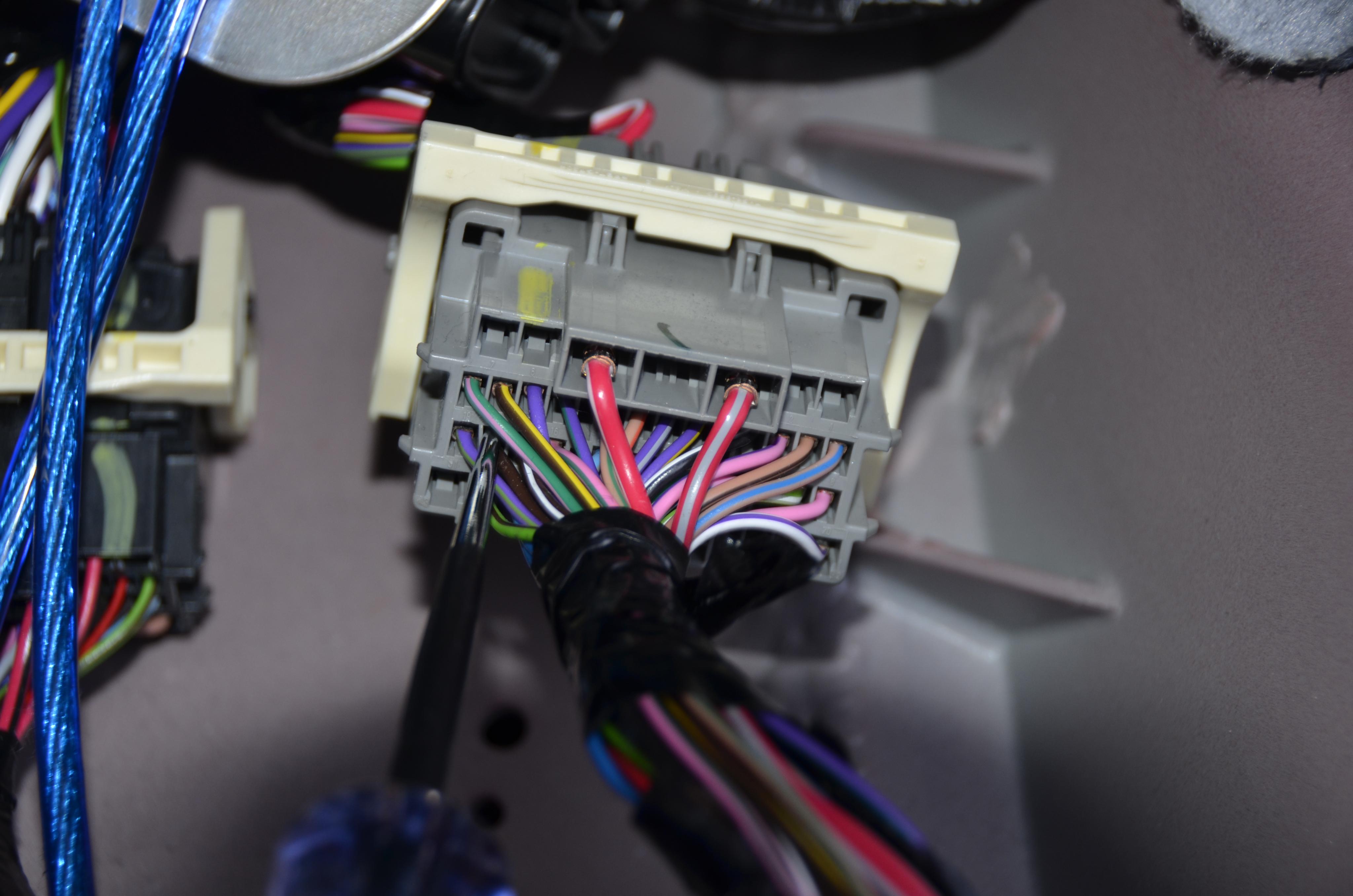
artsci Yes, finished the connection yesterday. In my car the connector to the body controller with the reverse wire is behind a metal footplate in the passenger footwell. The photos shows the metal plate, the gray connector under it, and the plate removed.
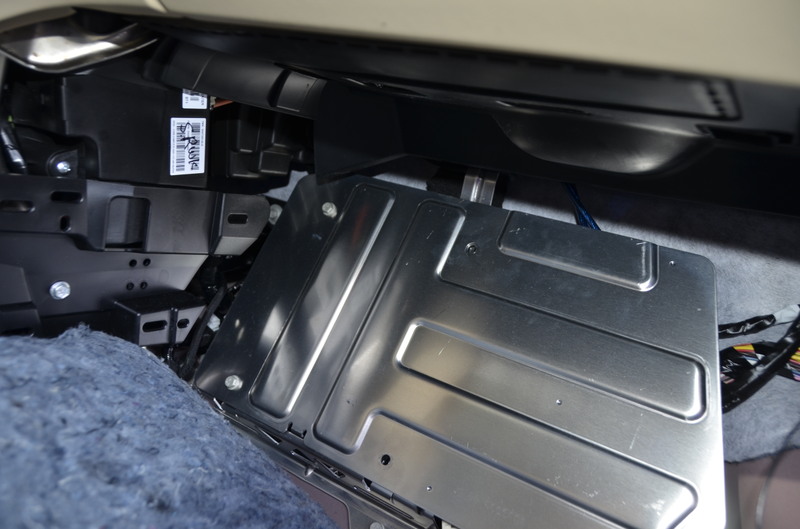
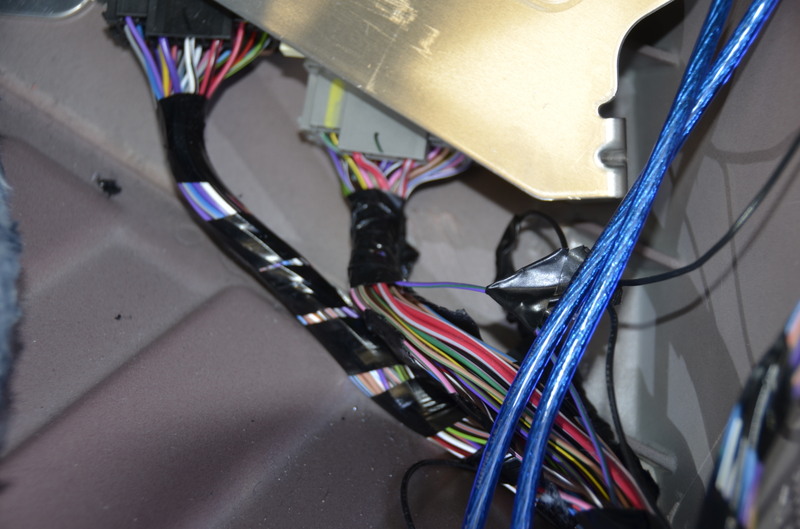
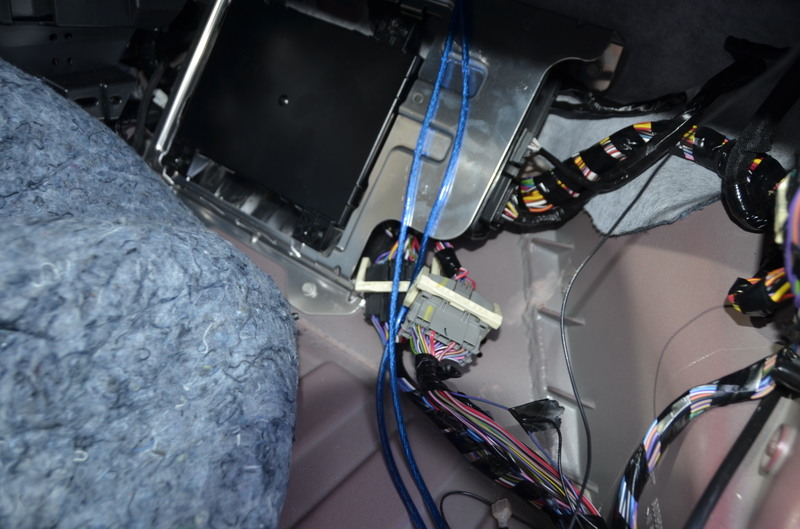
The plate has to be removed to access the connector and the carpet has to be pulled back to remove the plate. It's a bit of a PIA but not difficult to do, just some extra steps. The are also four purple wires, two with green stripes, one a kind of blue green, the other a lighter green. It's the light green one we want. But if you're not careful it's easy to make a wrong connection (which I did at first).
In the photo below the correct wire is in the slot just to the left of the probe.
Heres a photo of the wire tap attached to the reverse light 12v wire (purple with lighter green strip)
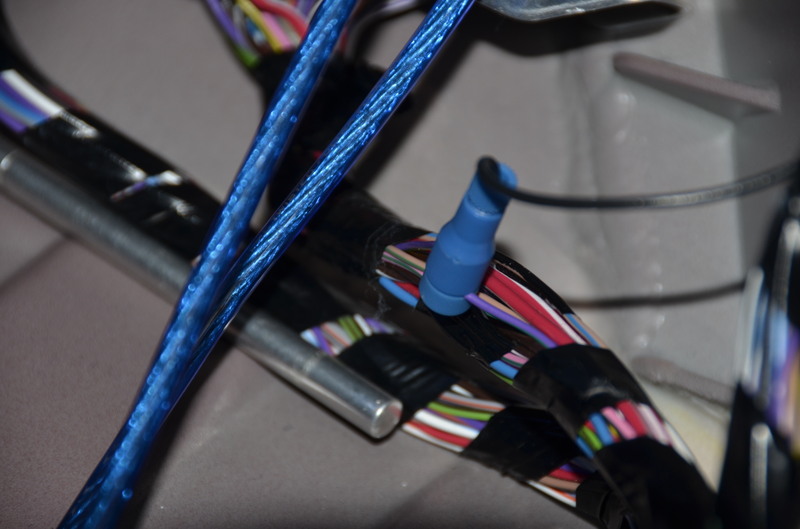
When the correct wire is connected to SW2 on the PCB it works as a toggle switch, which means that each time reverse is engaged it flips whatever camera happens to be on. This means that the front camera will be on every other time you engage reverse. Not what we want. It has to force to the rear camera every time it's engaged.
So I've emailed WhiteP85 to to see if reprogramming is possible but in the meantime I'm going to connect it to SW1 to see if that connection forces to rear. My emails with WhiteP85 about the functionality of SW1 and SW2 are a bit unclear, so just trying the two connections should answer the questions absent an immediate response from WhiteP85.�
Apr 20, 2014
swegman Rick, thanks for the update you emailed to purchasers of the controller. Is there any update on the design of the license plate mount?�
Apr 21, 2014
artsci A modified version is now in the hands of WhiteP85 for testing. Waiting to hear from if they're ok. If so they'll go into production ASAP.
Rick�
Apr 21, 2014
swegman Thanks for the update.�
Apr 24, 2014
peterspd Anyone know the camera that we ordered from Tesla is HD or not? I forgot to ask when I ordered.�
Apr 25, 2014
artsci It is.�
May 1, 2014
pilotSteve Rick, any news on shipping dates for the kit, also for the front plate frame?�
May 3, 2014
artsci I'll email everyone tomorrow about this but this is where things stand. Completion of the kits has been delayed for a number of reasons. First the receptacles for the two camera and touchscreen plugs have not yet been delivered. The PCBs are otherwise complete and have been programmed, but for obvious reasons cannot be tested and shipped without the receptacles. Second, a number of the remotes had cold solder joints, which might lead to failure. All the solder joints are being inspected and, if needed, repaired. Both the remotes and receptacles were sourced in China so we're taking extra care to check them and ensure quality.
Finally, once the boards are complete we're going to put them through testing for a week to ensure that they perform to our standards. That's another necessary step we believe. So I'm guessing it will be two weeks at least before they ship. This is longer than we expected but we think the extra time is necessary to ensure quality.�
May 5, 2014
cgiGuy Rick--thanks for the QC on these. I don't mind the wait, knowing it will be a more reliable product.�
May 5, 2014
swegman Rick, has the automatic switching issue via SW2 or SW1 been resolved?�
May 5, 2014
artsci I've been testing in my car but I can't rely on the results as I have the only prototype. On the prototype SW1 toggles and SW2, which is supposed to force to rear, appears to do nothing. But I need to do more tests. This is why we'll test the production version before shipping.
Rick�
May 7, 2014
artsci I've finished the testing and it's conclusive. SW2 is a toggle and SW1 forces to rear.�
May 7, 2014
HankLloydRight Are these momentary switches? For instance, if SW1 switches to the rear, is that when switched on, and then back to the front when switched off? Or does it just force to the rear regardless of the original setting and stay switched to the rear? Thanks.�
May 7, 2014
swegman I, too, am unclear what you are saying. Can you please explain the precise operation of the board (e.g., which camera image is displayed on the touchscreen) when SW1 is used and when SW2 is used.�
May 8, 2014
artsci Both SW1 and SW2 determine which camera image shows on the touch screen. Both are permanent switches, that is the camera image remains on the touchscreen until the switch is activated another time. The switch is a 12v signal from the backup light circuit, which is implemented by tapping the 12v lead under the passenger side kick panel (see an earlier post on that or the installation instructions now being modified) and running the tap to the drivers side and connecting it to SW1 or SW2 on the PCB.
SW1 always forces to rear. If the connection is made to SW1, when you put the car in reverse the rear camera is always displayed on the touchscreen and stays that way until the front camera is chosen with the remote or Homelink.
When SW2 is used each time you engage reverse the camera is switched between rear or front, which means half the time you'll see the front image when you're backing up. So SW1 is the sensible choice since it ensures the rear camera is always on when you back up. However, in situations when you want to see the front image you have to use the remote or Homelink (which just duplicates the remote) to switch to the front camera.
I'm working on a solution that will switch back and forth from rear camera to front camera in parallel parking situations. That will require some kind of 12v signal that's triggered when the car is put in drive. It will use SW2 and thus toggle the camera to the front when the car has been backed up then put into forward/drive.�
May 8, 2014
swegman Appreciate ll your efforts in finding a solution to this issue. Without a solution, I don't see the point of tapping into the reverse circuit to force to the rear camera, as you would need to use the remote or home link to then switch to the front camera. My preference is for automatic switching between the front and rear cameras; a seamless switching between camera inputs.�
May 8, 2014
HankLloydRight I don't think we need a +12v signal when the car is put into Drive -- what we need is a +12v signal when the reverse line (RL) goes low. I think this can be done with a simple normally closed relay on the RL, feeding +12v to SW2 when the relay closes when the RL goes low.
So regardless of any current camera setting (front or rear), the car goes into reverse and the RL to SW1 goes high, forcing the camera to the rear. At the same time, the normally closed relay opens, cutting +12V to SW2 (which I think should have no effect on the camera). When done backing up, the RL goes low, the relay closes, sending +12v to SW2 again to toggle to the front camera.
This is the behavior that I would prefer (always front except when backing), but I know other people want a different set up (always reverse, front camera toggle on demand). I think for those people, there is no automatic solution that will accomplish that, since it is truly "on demand". But if the camera switches SW1 and SW2 work like I think they do, a simple relay (or MOSFET) will do the trick for people like me.
I am not an electrical engineer, but more of an electronic hobbyist, so please feel free to correct me if I'm wrong.�
May 8, 2014
swegman +1 for Hank�

Không có nhận xét nào:
Đăng nhận xét