May 8, 2015
tomas Andy, you are probably right. Since I don't have D I keep forgetting that they are still tweaking the dual setup. Have been thru 2.5 years of forum response in release threads, and two most common unfounded observations after new FW are always "regen changed" and "whami changed". In this case, maybe true for D only.�
May 8, 2015
dirkhh There is at least one "regen got worse" or "regen got better" post for every single build of every single firmware that I can remember
I haven't seen as many "efficiency improved" emails. I'm certainly very aware of the impact of temperature. But I had two days where the overnight temperatures were down in the 40s and my D was outside and prior to .188 on days like that I tended to take 340-360Wh/mile when driving to my office. Earlier this week it was 295Wh/mile. Same road, same driver, same traffic. That seems a lot - and that one particular 21 mile segment really was all driven in more March like temperatures.
So do I have scientific data to show it got better? No. But I have pretty strong anecdotal evidence that the improvement is not just the better temperatures.�
May 8, 2015
NOLA_Mike Yes - it's time for the rest of the promised Autopilot features...�
May 8, 2015
dirkhh So what are we talking about here? The complete UI overhaul that Elon mentioned? I'm not sure they'll risk releasing that with the X, but I'll admit that I rephrased this sentence four times because I can't quite make up my mind on this one...
It would be a really cool "bang" to have that in the Model X. I'm pretty sure that they won't release it before the X starts shipping, so we are talking late Q3 (their words).
Which means there should be (based on their cadence so far) at least one release between now and then. But while I'm still not in the EAP (Tesla? Are you listening? I've asked, I've begged, I've tried to bribe...) I hear rumors from people who have friends who know other people who's neighbors know someone... anyway, there doesn't appear to be a 6.3 beta out there right now.
Which brings us back to wk057's question. It's a bit unclear. And given the small size of the software team and the massive pressure of the X launch... maybe we're in for a long slow period.
OK, time for bold (and likely incorrect predictions):
over the next four to five months we'll see only small incremental changes to 6.2
no new AP features until October
no new UI until October
Then with the Model X launch in October (that's late Q3 on Tesla's calendar, right?) we'll see firmware 7.0 which adds auto steering on the freeway and a new UI.
It will be Model X only for a while and will then show up in Model S starting November. But it won't work on pre-AP Teslas and there will be 63 different threads that the moderators will eventually merge into a 12 thousand post thread about the inability to run the new Firmware on older Teslas including threats of law suits and general upsettedness.
You read it here first. Bookmark this post so you can keep coming back throughout this year and continue to thank me for my brilliant insights and clairvoyance. Or more likely poke fun at my foolishness. Whichever works best for you.�
May 8, 2015
Andyw2100 Thanks for saying that.
I try to avoid falling into the trap of posting things about changed this or that unless I have pretty solid evidence, because I know what the patterns here have been. I really think this time Tesla has given us something to talk about!�
May 8, 2015
Cyclone
dirkhh, I truly hope that the new UI does go to all cars, even pre-Autopilot ones. From what I've seen in the few screenshots about it, it's a lovely switch up. Crossing my fingers!�
May 8, 2015
T.blomer Screenshots??�
May 8, 2015
Andyw2100 I think you're probably on the mark or close to it on a lot of what you said in the post I quoted from above.
The one thing I think you may be wrong about, and I expect you hope you are wrong about too is the "no new AP features until October." I'm pretty sure Musk and Tesla have been pretty open about more AP features coming this summer. I don't think they'll be delayed until October or later.
- - - Updated - - -
From the October D event.�
May 8, 2015
wk057 Not to go too far OT here... but unfortunately Tesla is not going to have a happy customer if there is no autopilot lane holding this summer. We're already pretty beyond the originally advertised "several months," IMO, and they're pretty much just sliding by on the good graces of enthusiastic owners at this point. Eventually, patience is going to run out when I don't have a key selling point feature that was bought and paid for already, especially 10 months after delivery. I've had my P85D for ~5 months now and it still doesn't have all advertised features. It's getting there, and really the only one I care about is lane keeping.
I like Tesla, but I have a date on my calendar that I've estimated will be my last day of patience on the autopilot issue, and I think it's pretty generous. After which time the pestering will begin.�
May 8, 2015
TexasEV If there is a specific software feature a potential purchaser really wants, and would be disappointed if he didn't have it, then it's best to wait until it is actually is implemented before buying the car. That way updates can be considered a bonus rather than having waited for a feature that was delayed. Tesla time can't be relied on. If the car isn't good enough for someone "as is" , don't buy it.�
May 8, 2015
wk057 Generic, unsolicited, and unhelpful advice that is pretty much not applicable in the real world.
There are many things we purchase that have longer term realizations. We pay for things based on promised time frames all the time in various industries. It's pretty much required for many. This is no different, really. To say to just not buy at all (and lose the gains of everything else the purchase entails) because of a single feature's estimated time frame is just silly.
Also, software updates aren't "bonuses". They're an advertised, and thus paid for, feature of the car in general.�
May 8, 2015
Bet TSLA Since we're making bold predictions, I'll predict these guesses are all wrong. My guess is that Tesla will not trust 7.0 until it has been extensively field tested. That means on us. So 7.0 will be released in August if possible. The "if possible" part is because the way software goes there's always the chance that it's just a hopeless mess at that point and it won't be released. But not because they're waiting for Model X.
I'd give it a decent chance that Model X gets released with 6.2 (or 6.3) in order to avoid an untested (widely in the field) vehicle combined with untested (widely in the field) software. Remember, Model X doesn't need even more new features to be exciting to people. It's already sold with a long waiting list, so nobody is going to walk because it doesn't have 7.0 yet. On the other hand people will be annoyed by bugs, so the least buggy software is what I think it will get. Perhaps this is more a cautious prediction than a bold one -- I'm thinking Tesla is going to be careful.�
May 8, 2015
apacheguy @Bet - I disagree. Back in the day, us Sigs and early productions thought we would get priority on software releases since Tesla wanted their product to be "field tested" by seasoned veterans. Turned out not to be the case at all. Tesla always pushes the latest and greatest to the cars coming off the line (even if it contains bugs). Never made sense to me, but I've seen abundant evidence of this strategy to know it's their MO.�
May 8, 2015
wk057 Judging by the bug in a previous firmware update that caused me to be stuck on the side of the road (and then wasn't fixed for a week), I'm not 100% sure Tesla is being careful. lol.�
May 8, 2015
dirkhh What's next appears to be .213
A TMC member noticed in his SC work order that that's what was loaded onto his car. He promised to post a screen shot (and any changes in the Release Notes) tonight.
So this release train is still getting a ton of work... 153 - 160 - 168 - 188 - 197 - 213...�
May 8, 2015
Fezzik 

I just got 213 today at the service center�
May 8, 2015
dirkhh Awesome! Would you mind adding this to the tracker? I heard from another member who also got .213 today so apparently that's what the SC installs these days...�
May 8, 2015
brianman Think larger: 7.0 in June, 8.0 in the X. There's plenty of room for everybody to wet...err...get excited.
- - - Updated - - -
This is a great philosophy for buyers, and a horrible mindset for Tesla to follow.�
May 8, 2015
Fezzik Was drop a pin available before 213? I dont remember having that before. Also I wonder what improvements there are from 188 or the 19x? Esp since going from 100s to 200s my thoughts would be more updates.�
May 8, 2015
Bugeater I believe it came in early 6.2 revisions.�
May 9, 2015
neroden I'm getting some very odd bugs where the radio is going on when the car is turned off and plugged in. Just since 6.2. I should probably report this.�
May 11, 2015
tomas OK, I'm 99% sure I've figured out the car audio mute issue. There are two symptoms: 1) If you have energy savings mode turned "On", and you pause the audio before you leave the car, the car will NOT remember that it was paused, and next time you wake it up, it will resume playing audio at previous volume. 2) Also if you have energy savings mode turned "On", and you pause the audio before you leave car for long period, you may come back to completely different song.
It is really very simple error. When car goes into energy savings mode, it somehow does not correctly save the state of the audio pause/play button. Or, possibly, when it wakes up, it does not check prior state. Either way, it wakes up playing. If you've only parked a while, then it will resume same song it was previously playing. If you've parked a long time - say, overnight to charge - the car has been woken up overnight and resumed playing while it was awake (and you were asleep!). So, when you turn car back on, the audio progressed from the song you were playing when you left.
BTW, none of this happens if you have energy savings mode "off".
Though I never had it before 6.2, this error was reported widely several releases ago. Then it seemed to be fixed. Now it is back. Should be ultra-easy fix.
Anyone have a good channel to report to Tesla? "Bug report" in the car doesn't work with this much info. I used to send these things to "ownership@", but that's gone. Now the "service@" is there, but for the past year, it seems they just forward everything to the local Service Center, then you get a call from some well-meaning person who can't fix code. This really needs to get to the software engineers.�
May 11, 2015
gpetti I nearly got sucked into this trap on my most recent update. I could have sworn that the hill hold improved, but now I'm pretty sure it hasn't.
- - - Updated - - -
I think that generally they have issues with the energy savings mode right now. If I use it, the 3G takes a very long time to recover after waking up. I've been advised not to use it unless I don't care about waiting for 3G for 10 mins or so.�
May 12, 2015
wk057 Few notes from my latest trip.
A change in .188 is annoying. The range assurance stuff is more nagging now. I started my ~230 mile trip Saturday and every couple of minutes for the first part of the trip it would pop up and complain. I know this trip is possible (done in ~6 times now), but the estimator doesn't think so.
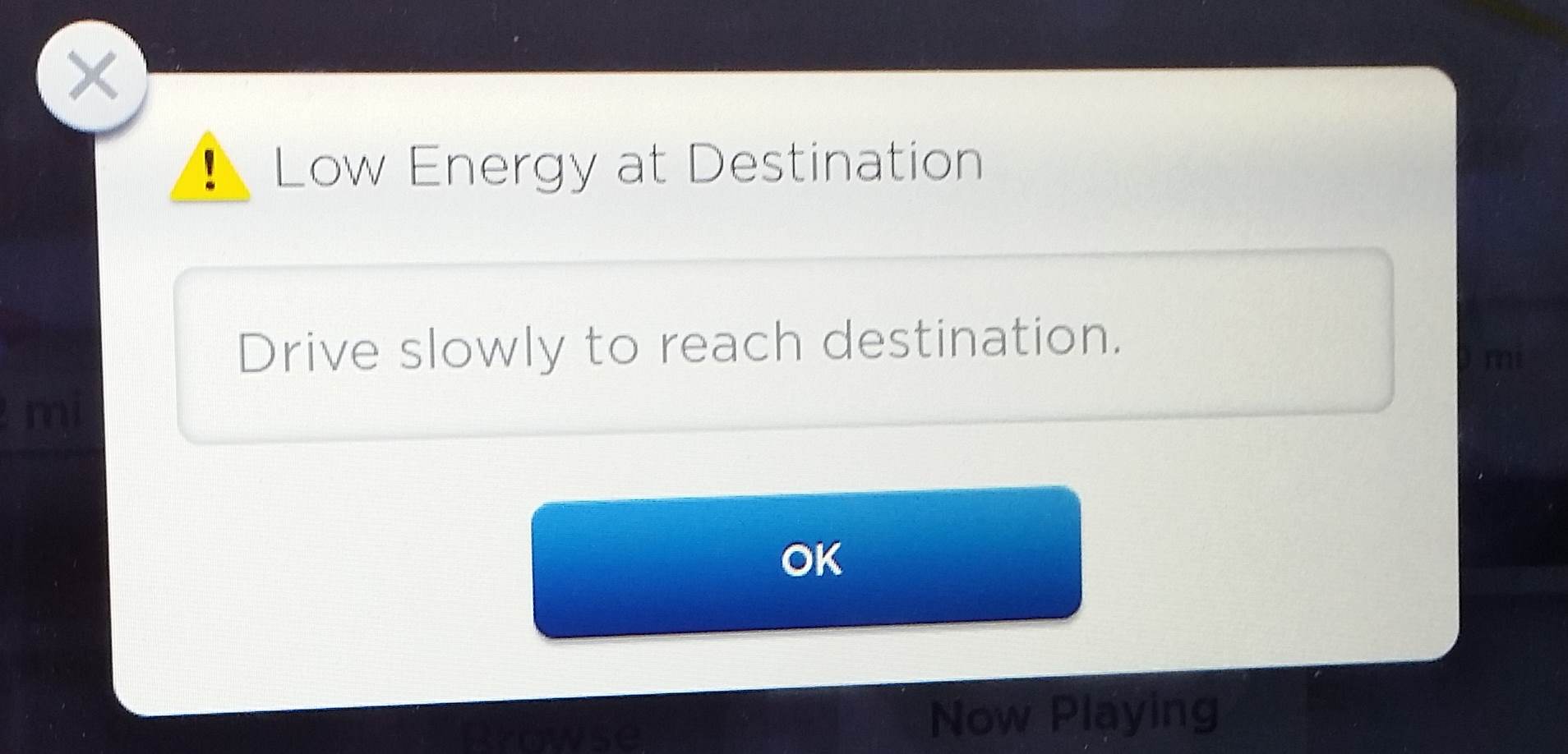
or
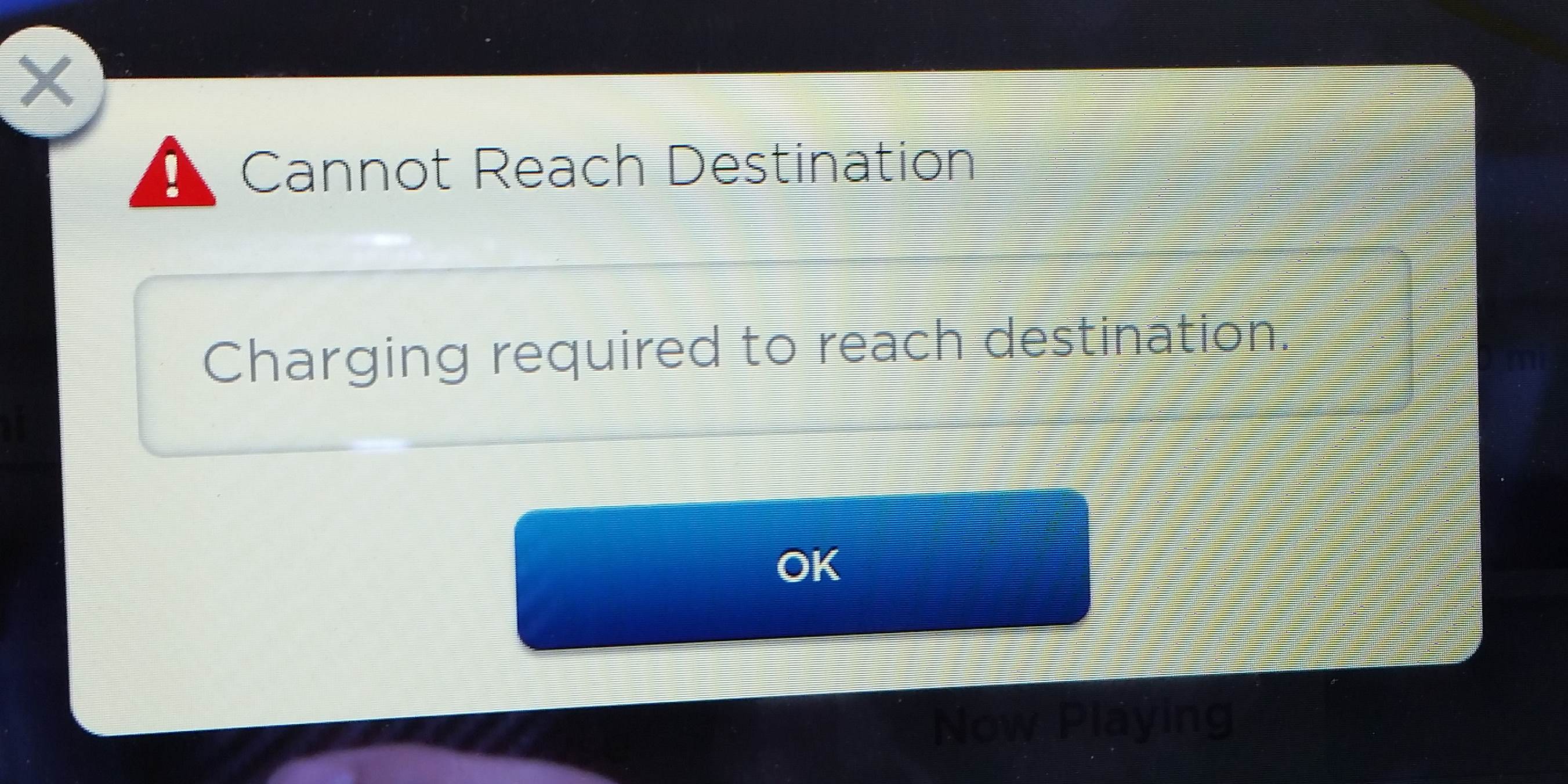
And then as the estimate dipped back below 0% and above again, it'd pop up again, etc. Seemed to be no way to disabled this. Called Tesla and put in a feature removal request... heh.
Also, funny thing at the supercharger:
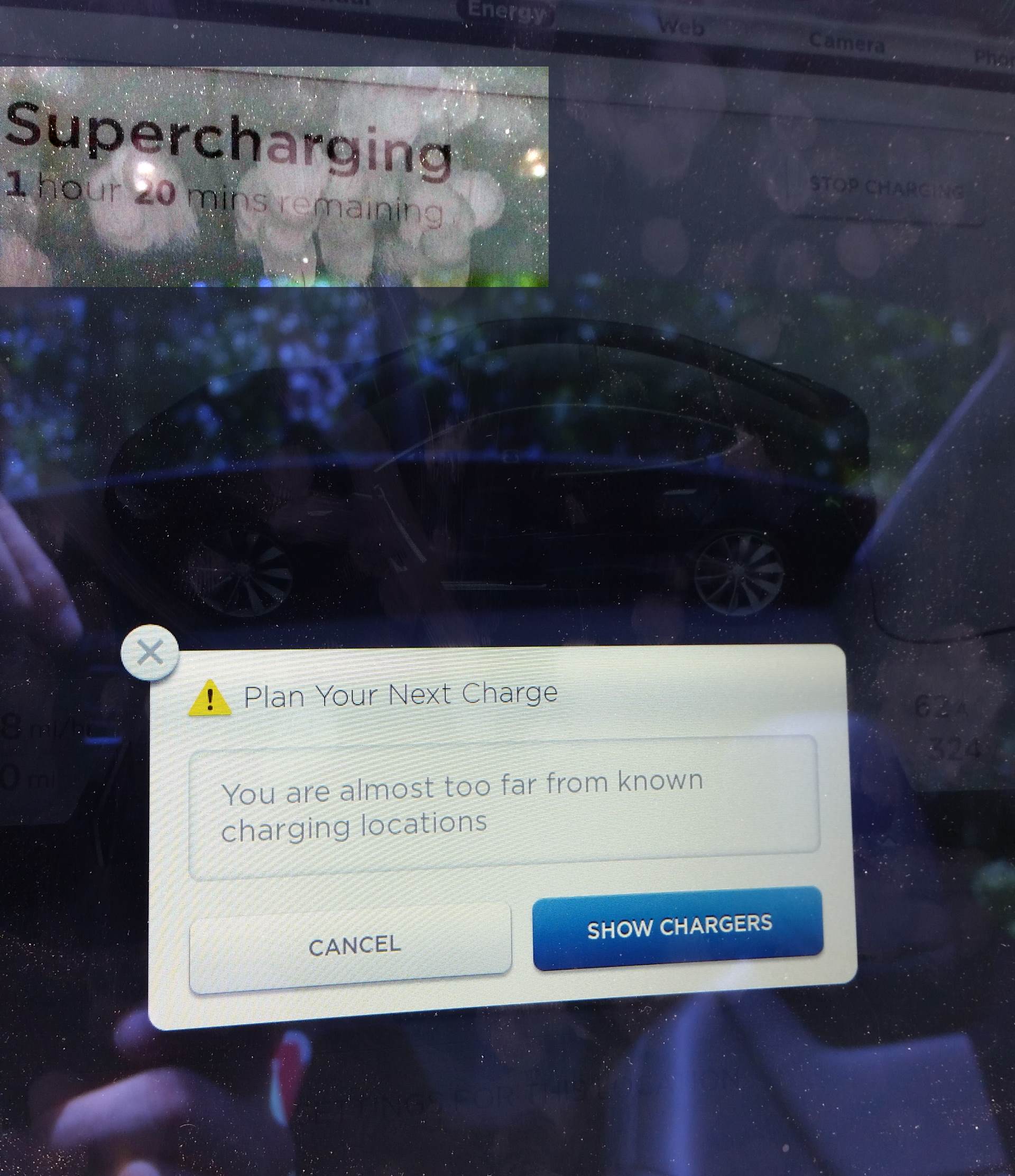
Pretty sure if I'm supercharging there was no need for this to pop up... (yes, it came up right after I had plugged in... notice the charging amperage hasn't ramped yet when I took the pic).
Seems they have some bugs to work out.�
May 12, 2015
trils0n Just installed .213 on my classic P85. Same release notes as before. I've never got a new version of the software this soon after first reports.�
May 13, 2015
SteveS0353 SC installed 2.4.213 on my classic P85+ yesterday. Tracker updated. It's curious that when the SC installs an update, the mirror reverse positions is not preserved. If I install the update OTA, all positions are preserved across the update. This is not the first time this has happened to me either.�
May 13, 2015
Cyclone Does the SC maybe do a "reset" along with installs perhaps? It couldn't be a hard reset though or else you would lose your driver profiles and homelink too.�
May 13, 2015
SUN-day Driver My mirror tilting was lost when I updated to 6.1 and it was an OTA update. Other people have reported losing the mirror sertings after OTA updates. But it doesn't happen on every update, and has only happened to me once. So I don't think it's a matter of SC vs. OTA, just something that is not rare but not consistent.�
May 13, 2015
Andyw2100 It may happen occasionally with OTA updates, but I believe the consensus here is that it happens 100% of the time with SC installed updates.�
May 14, 2015
mknox In over two years, I've only lost my mirror tilt settings once, and it was with an over-the-air update and not one of many that I've had installed during a service visit. What's interesting to me is just about every time my car's been in for service, they will report on the invoice that they installed the latest firmware. That seems to be one of the "standard" things they do at each visit. Anyone know if it's done via the SC's WiFi or whether they do it hard-wired?�
May 14, 2015
mibaro2 I think they do some reset, or reboot the center screen since everytime I get an update done at the SC, my cached passwords in the web browser are gone. Normally they only disappear when I reboot the center screen.�
May 14, 2015
pgiralt Not sure, but I had .213 installed at the SC yesterday and, as expected, I lost my mirror settings again. It happens to me every time the SC does an update.�
May 14, 2015
dirkhh Yes, the three times I got updates at the SC I always lost my mirror tilt setting. Don't recall losing it during any other upgrade�
May 15, 2015
scaesare I've lost it with OTA updates delivered when I was at home.�
May 15, 2015
MangroveMike Thanks for the tip. I listen to audiobooks a lot and it was very annoying as it reset back to the start of the book every time I hopped back into the car. Setting Energy Savings off solved it.
I reported to Tesla (via our local Aussie service manager) and they said they didn't know of the problem previously. When I updated them with the workaround, they commented that "they should read the forums more often"
I'm on 188 firmware.�
May 16, 2015
Bugeater Elon, I've heard many times just how much even you love I-405 in LA. Not! So trying to avoid it in Friday evening commute traffic should be a good idea. Unfortunately the Model S navigation software doesn't seem to think so.
Friday, May 15th I drove from the San Jose area down to Fullerton. Nav. wanted to stop at the Culver City supercharger before heading to Fullerton even though driving directly would leave me with over 100 miles charge to spare. No problem. I just removed that supercharger from the route. Problem solved right? Wrong! Along the way on the last leg of the route the nav. wanted me to avoid a slow section of I-5 due to traffic. I decided not to go off the freeway and the traffic wasn't so bad after all. However, unknown to me when nav. recalculated the route to Fullerton it ADDED the Culver City supercharger back into the route again! Nothing obvious about the new route showed up on nav. so I didn't know what had happened. So there we go on the 405 through LA during Friday evening commute time...
Elon, I hope you agree that this is a real bug and plan to have it fixed soon! Nav should never have added that supercharger back into the route without me confirming.
Before the traffic detour my final ETA was shown as minutes before 7:00pm. After not taking the traffic detour my ETA was shown as after 7:30pm! I arrived after 7:40pm. I didn't lose 40 minutes plus be not taking the detour. Traffic only slowed me down there by 1 - 2 minutes where nav. wanted me to detour.�
May 16, 2015
Cyclone How do you remove a single Supercharger from Trip Planner? I see how to turn them all off, but what if you want to remove a single stop?�
May 16, 2015
T.blomer You can't.�
May 16, 2015
Cyclone Then Bugeater's post is even more confusing to me.�
May 16, 2015
MarcG It may have been the last SC in the route, so it was the only one to remove at that point.�
May 16, 2015
Cyclone Ahh. Thank you Marc!�
May 16, 2015
andrewket Just turn on stay connected. Energy mode on, stay connected. Uses very little energy and the car will stay on the network.�
May 16, 2015
Bugeater Yea. It was the last one when I removed it.�
May 16, 2015
Cyclone I noticed an interesting oddity this evening with .136. The other half drove the car for the first time and was so nervous, we put the car in Valet mode. The air suspension raised at the preprogrammed locations as expected. When we got home, while the Homelink menu did not automatically appear as usual, it turn green instead of white.�
May 17, 2015
Stoneymonster You mean you couldn't access homelink to open your garage in valet mode? Sounds like a feature, not a bug. Valet mode is meant to protect you, your car, and your privacy.�
May 17, 2015
wk057 I think it is interesting that it still turned green, though, indicating a saved location.�
May 17, 2015
Stoneymonster Yeah, that's not good.�
May 17, 2015
Cyclone Exactly�
May 17, 2015
Todd Burch Let's not go overboard. Are we getting concerned that a valet might pull into hundreds or thousands of random driveways looking for the icon to turn green?
If the valet finds out your address via other means, he's already got your address and the green icon doesn't help at all. If he doesn't already have your address, he'd have to pull into random driveways all over the world until he found yours.
I fail to see the security concern here.
Edit: By the way, this comment is not directed at Stoneymonster...just responding to the general idea that the icon turning green would be a concern.�
May 17, 2015
wk057 Not really a security concern, IMO. Just interesting.
So... wheres 7.0....?�
May 17, 2015
Andyw2100 I agree it's not much of a security concern. But on the other hand there's just no reason that it shouldn't have also been disabled in valet mode. The fact that it wasn't is just another example of the software falling just a little short. Someone, somewhere, correctly identified the issue. The programmers were able to correctly prevent the Homelink options from displaying. How much harder would it have been to also have them not change color?�
May 17, 2015
Cyclone I agree it is not much of a security concern, it was just an interesting thing. I have not reported it to Tesla, but also agree with Andy that it should have simply been completely disabled in Valet mode, rather than masking the pop up display. As an Engineer, it just intrigues me as a band-aid more than a thorough decision. It works though, and I'm happy to have it.�
May 17, 2015
gpetti Unfortunately that doesn't work. I tested this again to make sure but even with the stay connected box selected, the 3G becomes completely disconnected and when I resume driving the car it takes more than 10 minutes or so before the 3G becomes usable. I thi this is a known problem as I was advised not to use the energy mode in order to avoid this. Maybe this is an issue with the Canadian provider.�
May 17, 2015
wk057 My fianc�'s P85 has been having a similar issue occasionally�
May 17, 2015
Andyw2100 Is the wrap Canadian? �
�
May 18, 2015
andrewket I have no such issues located in DC metro. That's odd.�
May 18, 2015
3s-a-charm I was having a similar issue... last service call they did something (not sure what) and haven't had this issue (loss of 3G) since. I do have another new problem but it is unrelated�
May 18, 2015
Cyclone Did the non-AP cars get the same disabling of the cruise light on the stalk? I am still on .136 of 6.2 and my light turns on, but maybe that came out with a later point release.�
May 18, 2015
wk057 My fiance's is still on that weird non 2.x.x revision of 6.2, and her cruise light still comes on. She has the stalks that are reversed of the P85D.�
May 18, 2015
Stoneymonster I agree it is a minor issue, but it is careless.�
May 18, 2015
Cyclone Yeah. A couple times I've changed my cruising speed when I meant to turn on my turn signals. That will take some getting used to. I wish I could get the stalks switched out to the newer versions, even though I know I won't have TACC. The layout just feels more natural to my others cars in the newer ones.�
May 18, 2015
SteveS0353 My "classic" P85+ is on 6.2-2.4.213, with the cruise stalk above the turn signal stalk (original stalk configuration), and the cruise light comes on as it always has.�
May 18, 2015
Cyclone
Well darn. I was hoping the "cruise light no longer illuminates" was a change to all vehicles. Guess its AP-only. Not a big deal. I just never understood "master" cruise on/off in any car.�
May 18, 2015
scaesare Yeah, on modern vehicles there's not much real need to turn CC off, as opposed to just not setting it, that I can see.
Similar to digital media players doing away with separate Pause and Stop buttons... no longer any real need.
(There is the argument that Off or Stop removes any current state... but it takes no less kepypresses/actions to reset state either way)
If the firmware update allowed you to no longer turn CC off, that would be great... my wife does that and it gets me every time I drive after her. Or better yet, link CC last-known state to driver profile...�
May 18, 2015
HankLloydRight Lawyers.�
May 18, 2015
SteveS0353 Well, my BMW M3 does not have an on/off capability on the cruise control. When I first start the car, the cruise is disabled. I can set the cruise speed at any time (above about 20mph), and then all cruise functions work as expected; increase, decrease, cancel, resume. One nice feature on the Beamer is that the increase or decrease double click sets the speed up or down to the nearest 5mph, unlike the Model S which increases or decreases the speed by 5mph from the current setting. As I drive at or near the speed limit most of the time, I like the way the Beamer is precise. Just my OCD...�
May 18, 2015
Cyclone True, but I would not be advocating removing whatever reminder (screen or stalk, depending on vehicle) is one when cruise control is engaged and "in control". One good thing about my last VW was that it was a hardware rocker switch w/o a light for the "master" on/off. I just left it on "on" the entire time I owned the car. A separate light would kick on when I engaged cruise control. But oh well, more important things in life to worry about.�
May 18, 2015
Todd Burch This used to be true, but not anymore. If you set the cruise to 48mph for instance, then tap the "all up" position, it will go to 50mph, then 55mph. Didn't used to--but does now.�
May 18, 2015
Cyclone Sadly, that is not the behavior on my car with .136 of 6.2. Did this change for a later point release of 6.2 or is that maybe a change for AP cars/cars with the newer stalks? Your sig makes me thing this would be on newer firmware, so I would hope I get this change too!�
May 18, 2015
Todd Burch I'm not sure when it changed...but I did notice it for the first time about 1.5 weeks ago. I'm almost positive it works that way now, and am absolutely positive that it used to NOT work that way. I think my version is newer than .136 (.148? can't remember). I doubt it's an AP vs classic thing--not sure why it would be.�
May 18, 2015
Cyclone Yay! I most definitely see the +/- 5 mph behavior on my Classic w/ .136, but the manual states the behavior you now see for the nearest 5 mpg increment for full pulls. I look forward to that one!�
May 18, 2015
brianman It doesn't take a lawyer to reasonably argue that it's safer to have a kill switch than not -- sense you have the stalk for the feature anyway. It's very easy to accidentally tap the wrong stalk (attempting to turn or interact with wipers) and be surprised by the vehicle's acceleration response from doing that maneuver.
- - - Updated - - -
Agree with the latter. Haven't tested the former recently.
I prefer the original behavior. As an example, when the speed limit is 55mph I'll sometimes set cruise at 62mph and bump it to 67mph when the speed limit rises to 60mph. With this feature it would bump my set speed to 65mph or 70mph, neither of which is what I would want. (I generally set to 10% above for casual driving and +10 when I'm actively watching for "speed profiteering" by towns.)�
May 18, 2015
CraigS They're changing out the seats today. A couple of hours ago my phone told me "New Update Available". Anyone else get this? Curious if it's actually something new, or just something they did at the service center that re-triggered the message.�
May 18, 2015
pgiralt +1 for this. I don't like this if they really did change it. I like to be going, say 73 in a 65 and then when there is a speed limit change to 55, just give it two clicks down to go to 63.�
May 18, 2015
brianman Yah, exactly.�
May 18, 2015
CraigS Service advisor confirmed I have .197 now. Still waiting for the car to be brought around. I'll post again in an hour or so to let you know what I find.�
May 18, 2015
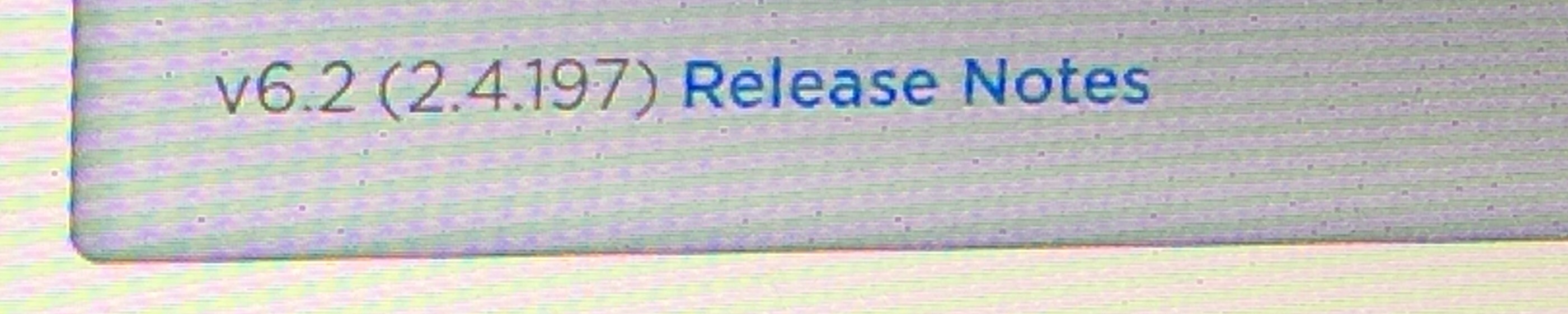
CraigS Skimmed the release notes for .197, nothing popped out at me. With 188 could you drop a pin on the map? If not you can now. Drove home, it seemed a little peppier, but I bet that's in my head from having just gotten out of the service loaner, a P85.
 �
�
May 18, 2015
brianman Yes.�
May 18, 2015
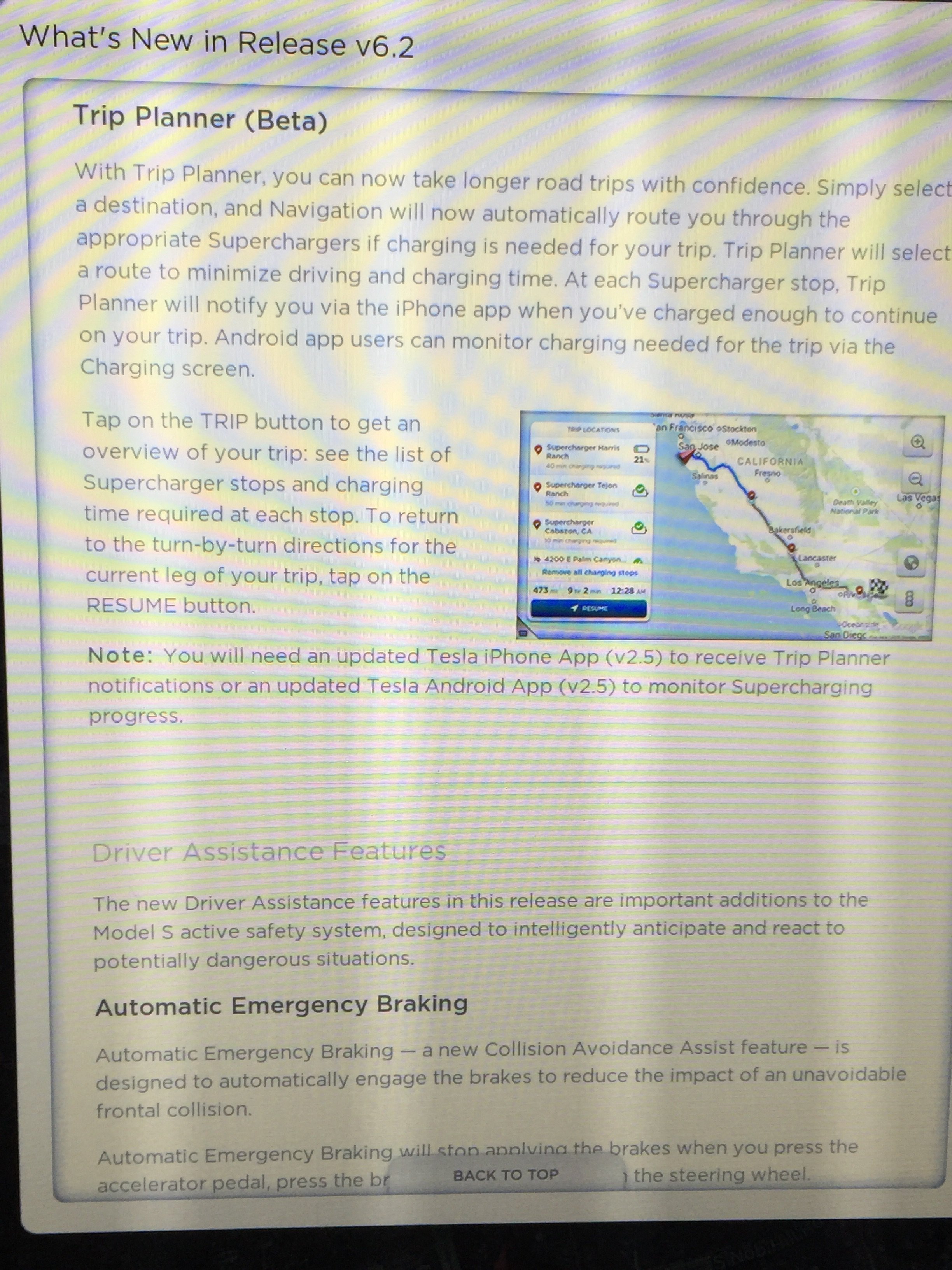
CraigS Think I found something. It says at each supercharger stop the iPhone app will let you know when you've charged enough to get to the next stop. If that was in 188, it wasn't working for me last week. Could be one of those things like the valet on/off which requires an update to the iPhone App.
 �
�
May 18, 2015
Lump Current iPhone App version is 2.3 so we need to wait for 2.5.
 �
�
May 18, 2015
rickgt just verified that I have 2.3 version. Wonder if this is hung up in Apple approval cycle or Tesla not yet submitting.
�
May 18, 2015
SteveS0353 Odd, I'm on 6.2-2.4.213 and I was in the car yesterday on the freeway and did not notice this behavior for cruise control. I'm pretty sure actually that it still does the +/- 5mph thing, and not increment to the nearest 5mph. I'll go out tonight and try this behavior specifically and report back.�
May 18, 2015
Todd Burch I verified this on my way home today. With TACC set to 43 mph, one full upward deflection changed the set speed to 45mph. Doing it again changed it to 50mph.
I am on the .188 flavor of 6.2. I for one prefer this behavior. (I think most people tend to go 5 mph over the limit, though I have no evidence to back this up--just based on how fast people around me tend to travel).�
May 18, 2015
pgiralt Looks like there must be a difference for TACC vs. pre-TACC. My "classic" 2013 Model S running .213 still works the way it always has - it goes +/- 5 mph relative to the speed you started - no stopping at even 5 mph increments.�
May 19, 2015
mibaro2 Before the 6.2 update, I thought you couldn't change driver profiles (from one person to another) unless you were in park. I remember having to put the car in park to switch the driver profiles so my brother could see what changes.
Now, on 2.183 , a driver was able to change the driver profile from one user to another while going 50 km. Is that a bug? I would think it unsafe.�
May 19, 2015
wk057 I've always been able to change at any time.�
May 19, 2015
mibaro2 Thanks.�
May 19, 2015
SteveS0353 Agreed. I tested this on my classic P85+ on firmware 6.2-1.4.213, and it does NOT work the way the manual says.
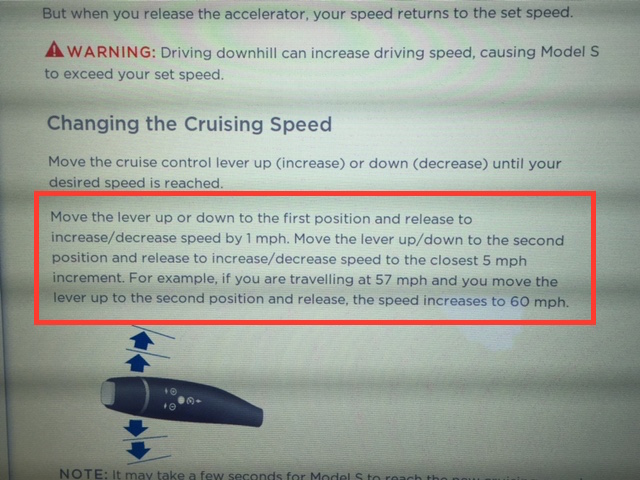
The cruise control on my car operates the way it always has -- adds or subtracts 5mph from the current cruise control setting. It does not increment or decrement to the nearest 5mph, as the manual specifies it should. I submitted a bug report.�
May 19, 2015
HankLloydRight Geeze, I sure hope they keep this this way for older cars... the "stop at a 5mph increment" is so messed up to me. I want the controls to do specific and predictable things. If I do a "full up" I want to know that's going to add exactly 5mph to my current speed, not 1,2,3 or 4 mph depending upon my current speed to the next 5mph increment, and then +5 more from there. What a misguided idea this is. IMHO.�
May 19, 2015
Cyclone My car currently doesn't do full 5 MPH increments. I can be at 35, hit full up twice, get to 45 or 46, then hit full down twice and end up anywhere between 34-36. I just "live with it". At least I have a digital display to tell me vs. analog ones that "looked" like they went specific increments, but who knows if they actually did or were off 1 mph.�
May 19, 2015
jgs Yeah, I'm unexcited about the change also, and will probably send in a complaint when it arrives on my car. It's clear from reading this thread that some people like it. Tesla should just make it user-selectable.�
May 19, 2015
brianman Just for completeness:
[1] What speed did TACC think was the local speed limit?
[2] What is your offset for TACC relative to speed limit (in the settings)?
- - - Updated - - -
Agree.�
May 19, 2015
Todd Burch 1: 50 mph.
2: +5 mph.�
May 20, 2015
Bugeater I was on an SJ to LA and back trip last weekend. In my early P85, CC goes up or down I 5mph increments only when full pushed. It doesn't stop at multiples of 5 on full push. I'm on .188. My biggest issue always has been that often it thinks I pushed it short once and then full once whenever I try to do a single full push. I end up with a 6mph change... Maybe I'm doing it pretty slow, but I've tried playing with it and that doesn't seem to matter.�
May 20, 2015
SteveS0353 I've noticed the same behavior. Occasionally, I get a 6mph change. I thought it may be because of tolerance stack, where the actual speed � the 5.0 ended up with a � 6 change.
On reflection I think there could be some "switch debounce" issues with the stalks, or software process synchronization issues, or some such. I sometimes get 4 blinker flashes for the lane change "tap", when it should be 3. I've tried figuring out a sequence where that behavior is repeatable, but I have not found it. Maybe the �1 then �5 on the cruise control is further evidence.�
May 23, 2015
0Q991 Whoa - Software Update Available
Just woke up to the Tesla app notification that a software update is available.
Only had the car for a week--first timer.
Anyone download already?�
May 23, 2015
AnOutsider what version are you currently on?�
May 23, 2015
0Q991 Not sure. Can was just delivered 7 days ago. Definitely some version of 6.2.�
May 23, 2015
AnOutsider OK. I just ask because it might just be a minor update to bring you in line with the latest. I personally haven't gotten a notification, but I don't typically get SW updates early either.�
May 23, 2015
0Q991 Currently on .213, I believe. Didn't update yet because it said it would take 2 hours, 15 minutes?!?! Will download tonight.�
May 23, 2015
Cyclone Yeah, always best to leave two hours uninterrupted for it to do the update. Which usually ends up meaning overnight.�
May 23, 2015
0Q991 Good advice. I was tempted to see what the update would add...but realized that any hiccups would ruin my day.�
May 23, 2015
KenN FYI, once you've gotten the notification, it's already downloaded. The next step is to install.�
May 23, 2015
0Q991 Wow. So 2 hours 15 minutes just to install?�
May 23, 2015
Andyw2100 You should plan on that amount of time, but there's a good chance it won't take that long. The last couple of updates haven't taken as long as some before them. But there have been some that did take in the two hour or even longer range.
Also in the past some people experienced odd issues, and some even had to have the firmware update pushed to them again, and go through the process again if they "interrupted" the process at all while it was happening by doing anything to interact with the car, like opening doors, etc. Obviously this shouldn't happen, but it has happened. So my advice to you would be that once you do start the countdown timer to the update, leave the car (efore the update actually begins) and don't check it again for a couple of hours, and then check only from the outside, by looking in, to see if the firmware update is complete. (You'll see a message on the 17" display.)
These precautions are probably unnecessary, but my feeling is better safe than sorry.�
May 23, 2015
Cyclone This is my plan as well. Probably no need to baby it, but really no reason to tempt fate either. Let it go overnight and rest assured all will be good in the morning. If you do go to check on it, don't have your keyfob with you so it won't know you are outside looking in.�
May 23, 2015
0Q991 Great advice. Will do.�
May 23, 2015
Cyclone After your update, feel free to post your details in the firmware tracker (if you wish to) so others can eagerly anticipate getting a new version.�
May 23, 2015
0Q991 Yep.
So so no one else has gotten this notification?�
May 23, 2015
Vitaman I received the same notification this morning too.
I think it dis say that it would over 2 hours to install.
Have had the car since December, and have had numerous updates ....none took that long. I assume this one is bigger or they just wanted to cover a worse case scenario (completely unlike their course of action on Consoles).�
May 23, 2015
wk057 No update notifications here on the P85D or P85. I've been in the first batch of updates the last few times, so, I'm disappointed.
Definitely curious to find out the version from someone who installs...... 7.0?!?!?!
*crosses fingers*
lol�
May 23, 2015
Denarius I'm on 2.4.213 and got the notification this morning. I won't be able to apply until late afternoon.�
May 23, 2015
Stoneymonster Every update ln the 6.2 line I have gotten has said the same thing.�
May 23, 2015
mike-415 We got the notification. Installing now. Should be done at 11 am Pacific.�
May 23, 2015
0Q991 Too early for 7.0, right?!?! Excited to install tonight.�
May 23, 2015
Jallum.pa.us I'm installing now, so I'll check back on it in an hour or so. I'll post pics if there's anything interesting.�
May 23, 2015
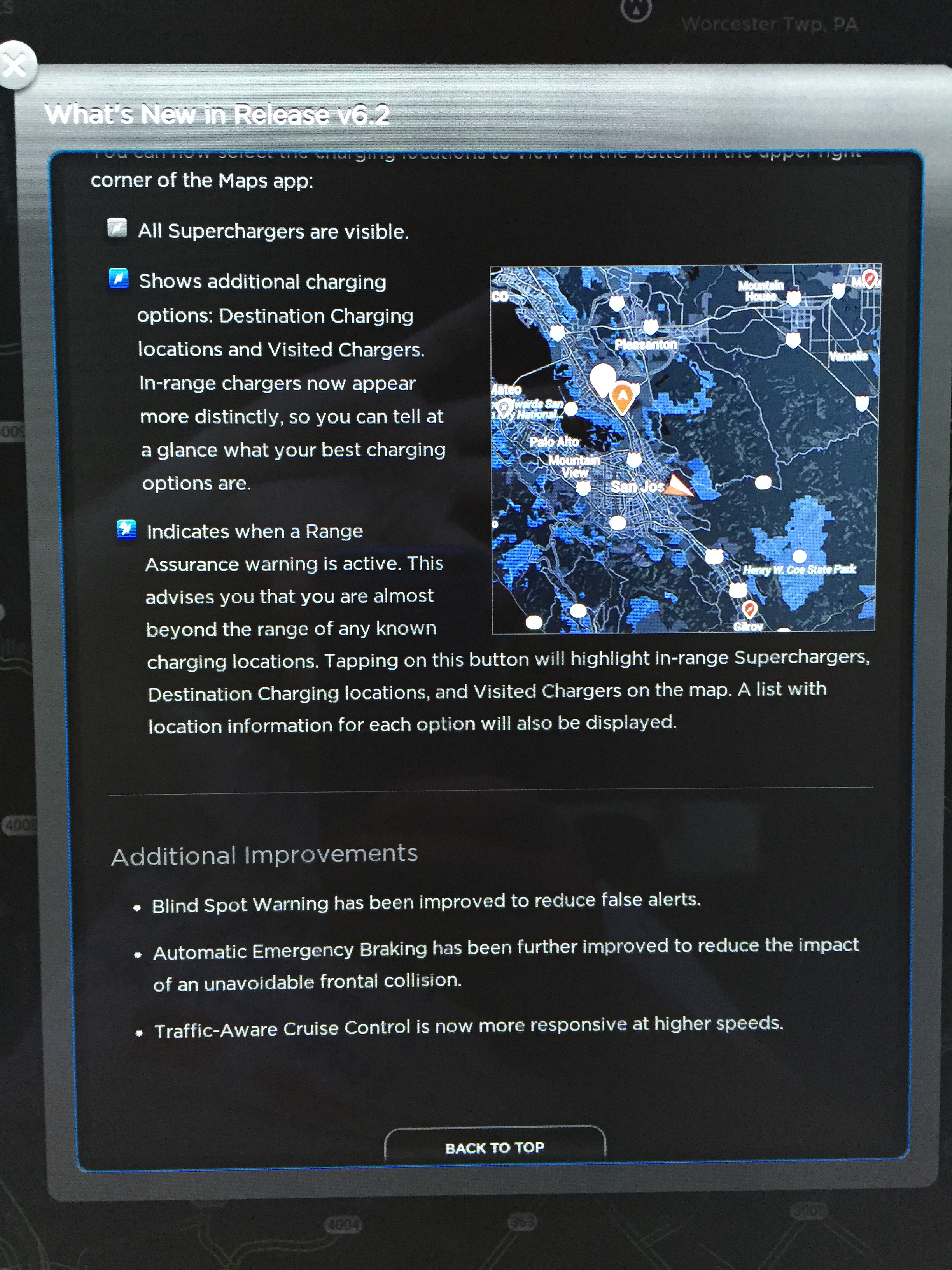
ThirdMartini 2.4.236
Changes to maps to indicate when a supercharger is in/out of range and additional routing options.
Also:
* Blind spot warning has been improved to reduce alerts
* Automatic Emergency Braking has been further improved to reduce the impact of an unavoidable frontal collision
* Traffic-aware Cruise Control is now more responsive at higher speeds.�
May 23, 2015
hans Those last two items sound like "fixed a bug that could cause the car to rear end the car in front when using cruise control at high speed"�
May 23, 2015
HankLloydRight I hope they fixed the bug that causes the nav to go nanners when you stop/start the car.�
May 23, 2015
Jallum.pa.us 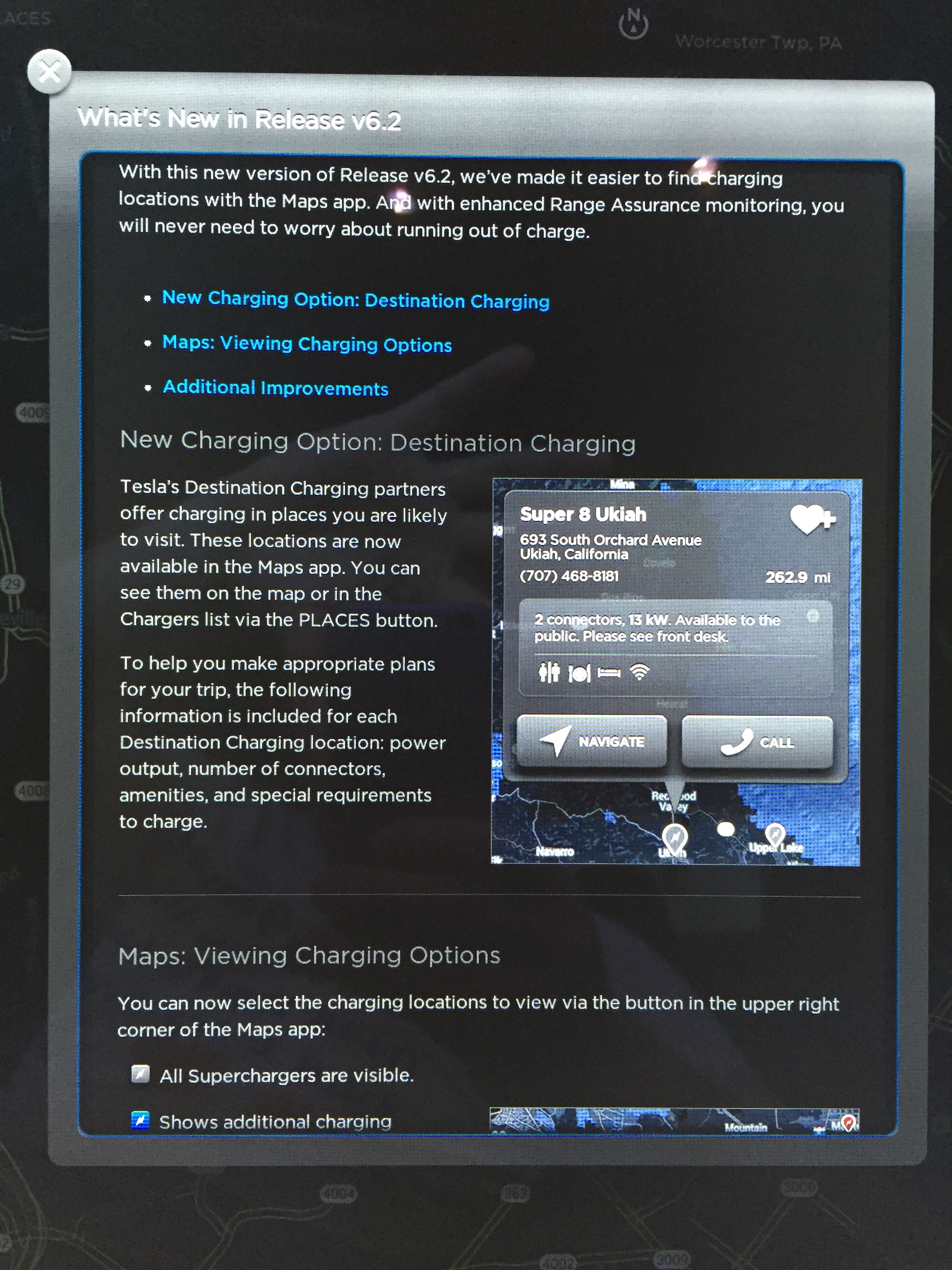
 �
�

Không có nhận xét nào:
Đăng nhận xét