Apr 1, 2015
Gra55h0pper I really like the idea of attempting to end range anxiety through this newly implemented warning mechanism that'll "prevent" you from going out of range of a charging station. I think the implementation of it can definitely be improved though.
1) If it has an algorithm to permanently estimate the range remaining based on driving conditions, weather, traffic, etc. then why is there no option to display *that* "real" range in the odometer rather than the "rated range"? That would be *much* more useful, especially when in trip mode (as it'll then be even more precise as it e.g. knows altitude differences). Doesn't the fact that (at least for many of us) the "rated range" displayed is too optimistic add to possible range anxiety?
2) If it keeps a list of (super) chargers in 6.2 that are in that "real" range, why can't we see whch nearby superchargers are considered to be in range and which are out of range? I think that would help lower any range anxiety also.
3) Also, does anyone know whether the "in range" chargers would contain superchargers only, or also destination chargers and others? I live close by a supercharger so there's no easy way for me to test this warning mechanism without going for a long drive or running my car to a low SOC. How do I know I can trust it without 1) and 2) above being implemented?
just some ideas for improvement. Overall, I love my Model S!!�
Apr 2, 2015
wk057 Keep in mind that "real" range is highly dependent on the route. So if the car doesn't know the destination, it doesn't know the route, and can't give you the "real" range number.
I think what the map should show is a bubble around the current position of everywhere I can make it to. It won't be a perfect bubble. If the bubble extended into some mountains, for example, that part of the bubble wouldn't be as far out. So it would basically look like a scribbled outline around the position that shows everywhere you can make it with the energy you have. A second inner bubble could indicate everywhere you can make it to and back (round trip).
This seems like it would be more useful than anything currently done for eliminating range anxiety. Destination in the bubble? Yay! Not? boo...�
Apr 2, 2015
Ugliest1 You get a gasp? Mine squeaks. Sometimes in a slightly profane manner.�
Apr 2, 2015
billarnett I like that idea. It would be fairly expensive to compute, though. But I guess it doesn't have to be updated very often.
If there's a supercharger inside the bubble then the bubble could be extended. And if there's a supercharger inside the extended bubble...�
Apr 2, 2015
cgiGuy Then you would just have this bubble on your map all the time. Sorry, Arkansas.
 �
�
Apr 2, 2015
benjiejr I've noticed 2 strange bugs that may be associated with 6.2:
1. I got in the car this morning and as I pulled out I noticed a large water puddle under the car. I'm pretty sure it's from the air conditioner running overnight. I know that the car was locked and I don't precondition the car so not sure why it would be running. (At least I hope that's what the water is from!)
2. I've noticed the windows roll down slightly - maybe twice as much as when you open the door - and stay down. This has happened on 2 separate occasions recently on doors that were not opened. I think it's happening when I open another door and I just happen to notice the window on another door down a bit.
Anyone else having this strange behavior?�
Apr 2, 2015
Kalud Do do you have smart preconditioning active? If so, I found it starting climate at wrong times often. Could also be during charging, where the AC is activated to cool down the battery.�
Apr 2, 2015
benjiejr No, I haven't been using the preconditioning.�
Apr 2, 2015
drsaab So on a trip I went out of range of a supercharger for a round trip return and the car warned me 2 times that I will be out of charging range. Once with a yellow exclamation on the lightning bolt icon on the map then a red one. It also brought up a warning on the dash that you had to click on to dismiss or reroute.�
Apr 2, 2015
Kalud Then it must be AC while charging, if its water...�
Apr 2, 2015
tomas Yikes, I think this thing is going to actually INCREASE range anxiety!�
Apr 2, 2015
Danal I've had this "water when I know of no reason for AC to be on" before 6.2. And with 6.2.
I do attribute it to battery cooling; I can't prove that.�
Apr 2, 2015
dirkhh I really like that idea. Compute intensive, but that could be addressed with a smart algorithm that only updates the edges. Our Nissan Leaf has a very very simplistic version of that - but the Tesla could do that so much better...�
Apr 2, 2015
wk057 I actually went ahead and sent the suggestion over to Tesla. *shrugs* Who knows if they'll do anything with it or not.�
Apr 2, 2015
Cottonwood Remember that water gets produced in an air conditioner when the air being cooled passed over the "cold" coils; when the air in contact with the "cold" coils is below its dew point, water condenses onto the "cold" coils.
If the heat pump is used to cool the battery pack, then all of the cooling is done through a liquid cooling loop and there is no place for water to be produced. The only way for water to be produced is if air is being chilled below its dew point. (e.g. the cabin air)
Normal air conditioner or heat pump terminology refers to the evaporator coil and condenser coil. That is referring to the evaporation and condensation of the refrigerant. I find it easier to call the evaporator coil, the "cold" coil, and the condenser coil, the "hot" coil.�
Apr 2, 2015
Gra55h0pper Agree. However, even if the car doesn't know the destination, I think it can do a better job at estimating the range than the "rated range". It can still factor in things like weather (at least temperature) and past average Wh/mile.
I like your bubble idea. Not sure how easy it is to implement though given the many routes that would need to be computed? I'm guessing the way it currently works us that it only considers routes to (super)chargers. It can the simply "dismiss" any for which the line of sight distance is already larger than the rated range as those can never be reached leaving only a few routes to be computed.
- - - Updated - - -
So that would mean the algorithm only considers superchargers? If so, then I think it did the right thing warning you. And you of course did the right thing dismissing it... :wink:
I personally prefer the the algorihtm to consider superchargers only as many other chargers have many "strings attached".�
Apr 2, 2015
apacheguy Nice idea but probably difficult to implement. I also question the utility of the tool for the average owner. If one is that concerned about range to pull up a bubble map, why not simply set the destination in the Nav and get an answer?�
Apr 2, 2015
brianman Now that the browser has GPS support, it's tempting to make this as a web page.�
Apr 2, 2015
jvonbokel Which makes me wonder, if you're driving 150mi from a Supercharger to your destination, knowing you have charging access there, isn't the car going to warn you that you don't have enough range to make it back to that Supercharger? I suppose if you've been to that destination before, it will have a record of it, and won't warn you unless you're out of range of your destination.
Software that does this exists, but it's not cheap. I wish Tesla would at least use it for their online Supercharger maps, instead of drawing somewhat arbitrary fixed radius circles around Superchargers.
Personally, I think what they need to do is start drawing a yellow and/or red line on the energy consumption graph that represents what average usage you need to stay below in order to make your destination. This may be misleading, however, if you've got a steep incline in the latter half of your route, as it will be accounting for that in the average, but the average driver may not be anticipating the increase in consumption.�
Apr 2, 2015
dirkhh So I'll admit that I vehemently disagree with that. The Leaf has this guess-o-meter that factors in "whatever" in the range it displays. That is the single biggest source of range anxiety there is. The rated range miles have a well defined meaning. If I want random guesses based on the last n miles I'll just bring up the energy app and look at its projected range.
- - - Updated - - -
The problem is that it's hard to tell the web page what your SOC is. I tried this back when I was working on the REST API tools. But with the changes to the way they run that API I don't think that's feasible anymore.�
Apr 2, 2015
Danal I own a Leaf. I drove it for a year or so, now my wife has driven it for about two years. Our experience tells me the adjustments made to the remaining range, based on recent past, are a very positive thing for Leaf drivers.
In particular, she doesn't know/care about EVs. The changing numbers have saved her more than once. She has been headed home at 70+ (Minimum survival speed on Dallas freeways at mid-day) and noticed that she's not going to make the house. (I encourage her to keep the nav system up with a route to the house and the voice muted). When she notices the range number is less than the nav number, she slows down (either in right lane or on service road or on surface streets). She's never been stranded... or had any anxiety... by the simple method of knowing the nav range to the house and the changing estimated (guess-o-meter) number.
It is quite clear that, if the range number in front of her was NOT sensitive to the recent past, she absolutely would have been stranded.
So... opinions vary. I realize the entire "MyNissanLeaf" forum uses the "Guess-O-Meter" term, and really hates it. I (and my wife) find the adjustments to be VERY high value.
Perhaps Tesla should have a couple of options in this arena.�
Apr 2, 2015
Kalud I agree with you Danal, and wished Tesla added the option to show the Estimated Range (projected) from the graph to replace the Rated Range in the dash. On long trips I am pretty sure everyone do the same. Set the Nav to the destination to get remaining distance and check the projected range on the graph.�
Apr 2, 2015
brianman When your wife drives the S, does she "mind" the rated vs. nav range delta or use some other metric to build/have confidence in arriving without drama?�
Apr 2, 2015
jvonbokel I believe in very early versions of the firmware (before my car was delivered) this was available. Maybe some of the early early adopters can shed some light on the reasoning for the removal of that option.�
Apr 2, 2015
brianman I still mourn the loss of Projected Range on the instrument cluster.�
Apr 2, 2015
ruby110 OK, maybe I don't understand what is being said. We use the Trip app for a route and leave the arriving percentage display up. The percentage various with recent energy usage. I use this feedback to adjust how I'm driving.
Doesnt this provide the functionality you're talking about?�
Apr 2, 2015
AmpedRealtor That makes total sense. I was thinking 2-dimensionally.�
Apr 2, 2015
wk057 I had actually contacted the designer of EV Trip Planner about doing this previously (~6 months ago?), but he had a lot going on. Seems he would have the data for making something useful, though. Might touch base again.�
Apr 2, 2015
Benjamin Brooks Still no one has a screenshot of the realtime SuperCharger status on new Trip Planner turning from green to red? Surely someone in CA has planned a nav route during heavy commute times when at least one SuperCharger site was 100% utilized? If no, perhaps we'll see one captured this holiday weekend?�
Apr 2, 2015
gregincal If the solution is using the Nav, then the Tesla is going to tell you a constantly updated projection of how much battery is going to be left at the end of the trip in a much more sophisticated way than the leaf (since it will also take into account that the last 10 miles you may have been driving downhill and the last 5 will be uphill). You also don't have to compare numbers. I definitely don't see why this isn't a far superior system.�
Apr 2, 2015
gpetti Slight change of tack. I was under the impression that the TACC hold time was now 30 seconds so I was annoyed to find that I am getting a 3 second hold only. Was about to raise a bug but decided to RT*M and discovered that hold is 30 seconds while on the highway and 3 seconds otherwise. I'm not sure what the logic is in this approach and how it decides what qualifies as a highway - maybe it is dependent on what speed is set?
Not sure if this is common knowledge, I missed this detail somehow.�
Apr 2, 2015
andrewket Those of you with P85Ds.. How long did 6.2 take to install? My car is currently in a funky state, and I'm trying to figure out if it failed or if it's still going. It's been running for 2 hours 10 min so far...
Edit: apparently it takes about 2 hours and 15 minutes. It's back to normal.�
Apr 2, 2015
Klaus Somewhat tangential to the main topic: My WiFi access point dedicated to the Model S (because of poor connection to our main WiFi upstairs) reports some 1.3M packets transmitted to Model S in the past day and a half, which I presume is the download for the 6.2 update. The transmit packet rate has slowed to nearly zero now. So far no indication of an update in the touchscreen UI. Does anyone who has registered the download in their network remember how long it took for the update to be ready?�
Apr 2, 2015
Andyw2100 Unfortunately I can't help you out here, Andrew, as I started it some time around 2:00 AM and then checked to see that it was done by shortly after 7:00 AM.
I do recall people talking about it taking longer than other updates though, so I think you might still be OK. I'd give it at least another hour before really worrying.�
Apr 2, 2015
Benjamin Brooks The install notes said expect it to take longer than that. Patience, all us classic Model S don't even have an install icon �
�
Apr 2, 2015
gpetti Sorry I didn't time it though I think up thread there are timings from others. It was a long one for sure, at least 2 hours. I did find it in weird states. My app seemed to be connecting at one point so I checked it to find the radio playing but otherwise nothing.�
Apr 2, 2015
Benjamin Brooks Could be due to the Slacker infinite streaming bug from 6.1.�
Apr 2, 2015
MikeBur When we were pontificating what the end to range anxiety might be, I mocked up something crudely that could do this based (loosely on the way this is done in the Leaf) at Elon - Page 75
repeated diagram here (as second diagram doesn't show for me):
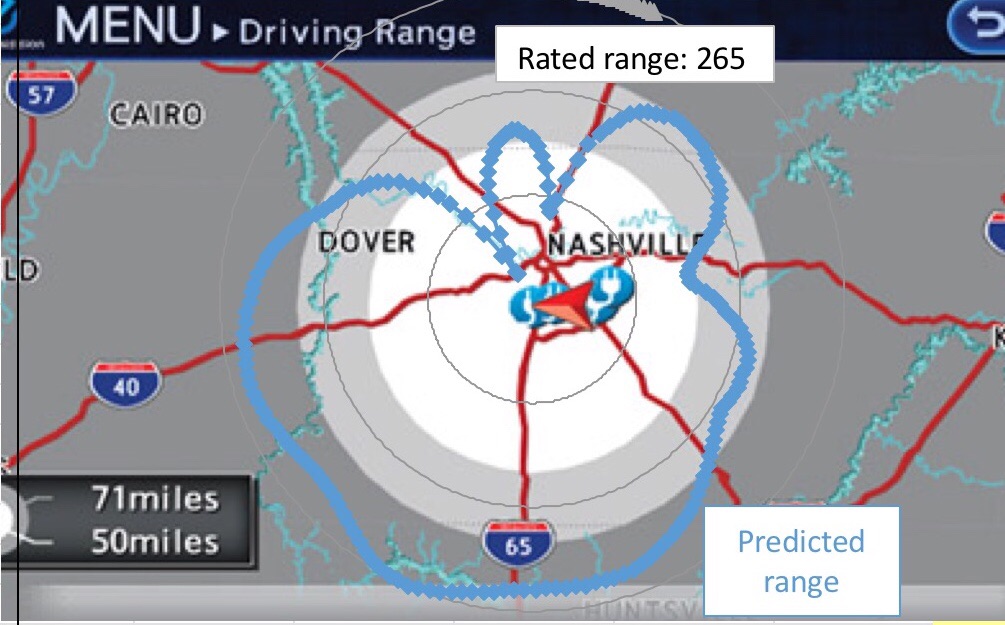
Idea in in this case would navigation / range overlay has traditional circles AS WELL AS predicted range based on weather, topography, current energy consumption, etc
as I mentioned earlier in this thread, I love the concept currently though it can be so much more, and needs to for anyone Whois doing distance driving without overnight destination (eg driving from Seattle to Canadian border to Seattle in the same day you get to ~7% estimated range), read more: Firmware 6.2 - Page 19�
Apr 2, 2015
wk057 Took over 2 hours for sure. I checked at the 2 hour mark and it wasn't done, and again at 2 hrs 45 min and it was done.�
Apr 2, 2015
MikeBur just under 2hrs 43 mins.
- - - Updated - - -
Lol - should have checked 2 mins earlier ;-)
i I used the start charging, do the update, not starting charging time again "trick"
- - - Updated - - -
As noted yesterday ( Firmware 6.2 - Page 27 ), my navigation is playing up. I've reset screens, etc, though wanted to ask one of you to try this as I can no longer find a route to my work favourite. Thankfully, this also fails with a search for a point of interest. This definitely used to work pre 6.2 as I often go to work I would have noticed this ;-)
Can someone please attempt to navigate to "union station parking garage Seattle" please?
I've "noted" this already, though would feel better if this wasn't just me seeing this
thanks, Mike
- - - Updated - - -
yes, noted a few times. Appears to be limited to freeways for me. I-5, I-90, 405, 520 all hold for > 3 seconds secs (bad traffic up here ;-)), highway 2, 202, etc only hold for 3 secs. Even ramp off 520 tonight only held for 3 secs.
I dont one understand why the hold on side streets either, though I'm hopeful this (as well as blind spot) improves in 7.0�
Apr 2, 2015
rickgt Car said 2 hrs and 43 mins... It worked�
Apr 2, 2015
Cyclone They obviously didn't hire the same engineers that did the Windows save dialog or Mac OS X installer dialog!�
Apr 2, 2015
Danal She won't drive the S. At least not so far. She sees it as my privilege, and doesn't want to step on my toes while the car is still quite new.
And... the "do the nav miles cross with the range miles" is MUCH less of an issue in the Tesla. We both became really good at arriving home with only a few miles in the Leaf. No worries, worked well... I can't count the number of times I rolled in the driveway with 3 miles. Totally freaks out Tesla drivers who've never owned a Leaf.
- - - Updated - - -
There really is an XKCD for everything:
 �
�
Apr 2, 2015
MikeBur rotflmao... This is so funny. Thank you�
Apr 2, 2015
Cyclone Yup. I had this picture on our team SharePoint for a couple weeks in 2014. Really got some laughs!�
Apr 2, 2015
ruby110 The bizarre navigation issue we saw with E and W Warren street has disappeared! It looks like the nav thought there was a problem where E and W came together. No issue showed on the map, at least that I could see.
The issue of going to the wrong location may have been because I went to a location that had been saved under 6.1. I don't know how but maybe.�
Apr 3, 2015
gpetti I discovered the same thing (I think). I selected my work favorite (as I have done a few times before) and although the address looks correct, it tried to navigate me to some bizarre location.
basically the address was 933 17th Avenue S.W. and it tried to find: 306200 17 Ave E. I was navigating from an area that I don't know to well (essentially to get out) but I had already gone a bit out of my way by the time I realized something wacky was going on.�
Apr 3, 2015
Todd Burch (Slight change of TACC?
Ahh, thanks! In the release notes I think it said "when the weather is clear" and I wasn't sure how it was determining that. I had a lot of the short 3-5 sec transitions to hold and I was about to report it as a bug too...the much longer pause before hold is so nice! Wish it did that all the time (actually, I could go for a 3-5 minute pause!)
- - - Updated - - -
The car would have to assume that you have no driving while at the destination, no charging, and no loss in milage just from vampire drain. That's probably a more dangerous assumption than just letting you figure it out.
- - - Updated - - -
I'm starting to rethink my opinion on blind spot. While I still think the indicators are a bit too subtle (a more noticible color would help), I think I like them where they are. Now, when I go to change lanes I first glance at the speedo to check for the indicators. While I would never trust the sensors to tell me that the lane is clear, If the indicator is lit up I immediately know a lane change is not possible without turning my head. This gets my eyes back on the road sooner.
If the indicators are off, then I do the rear camera/mirror/quick head turn.
Using it this way, I prefer blind spot indicators next to the speedo as opposed to having to glance all the way over to a mirror. In other words, I'm starting to feel that Tesla's implementation might make more sense. Just an opinion of course.�
Apr 3, 2015
dirkhh Stockholm Syndrom?
 �
�
Apr 3, 2015
tomas With my Classic P85, I do not have Tesla's blind spot, so take this FWIW.
I'm struggling with Todd's rationale. Seems like too many steps.
Manual (without blind spot) is 1.5 steps. Look in mirror, then if clear look over shoulder (I call that additional .5 because you have already turned that way). Then change.
I have had prior cars with blind spot display in mirror. That also required 1.5 steps to check at first. Turn head partially to glance at mirror for both visual mirror check and to see sensor. If clear, turn a fraction further to actually look. Then change lanes. Over time, as I came to trust sensor, I dispensed with the over-the shoulder, and it reduced to 1 step.
I can't see the Tesla approach ever being less than 2 steps. With Todd's camera check, 3. Looking at dash, then cam, then mirror, then visual check... 3.5. Could a car sneak into blind spot while you are swiveling your head? Probably.
Having said that, I do believe that Tesla's approach is borne out of 2 things: 1) mirrors built without display, so have to do it on dash to avoid expensive retrofit. 2) optimism about how fast they could deliver auto-pilot features. I'm really coming to believe that early deliver of a car without blind spot displays in mirrors or parking sensors was less an oversight, and more an expectation that they would quickly leapfrog these technologies with auto-pilot. As reality has settled in, they've had to add these driver assist features. I can just visualize the 2011 meetings: Musk saying "we don't need those things, because the car will drive itself soon", and the more experienced car guys leaving the room saying "we'll see about that".�
Apr 3, 2015
jbcarioca Yes, those must have been the same meetings that dealt with centre consoles, passenger grab handles and rear seat coathooks.�
Apr 3, 2015
tomas I honestly think those (and perhaps partially the parking sensors) were driven by a clean and minimalist interior design ethic. So that comes down to taste and feature preference. Personally, I'm totally aligned with that design ethic, and I like the difference. My Classic rear view mirror (now obsoleted by sensors) is really retro and beautiful... almost no plastic base. Ditto side mirrors. Beautiful... and I appreciate that they held off on folding until they could incorporate into same visual design. Front floor line reminds me of old Fury III station wagon... feels so spacious without console. One man's meat, another man's poison.�
Apr 3, 2015
liuping Overall I like the minimalist interior of the Model S. However, the need to storage and decently placed cupholders has me on the wait list for a center console.
And the lack of grab handles on a car with this kind of acceleration is just silly. I notice people grabbing anything they can find or just plain panicking when I accelerate hard, and I only have an S85. I only launch quickly now when showing someone who wants to feel it or when by myself. Fortunately My daily commute offers several point to do so.�
Apr 3, 2015
wk057 Haven't seen it mentioned, but a ranger was installing 6.2 (2.4.136) on my fiance's P85 earlier while he was installing my next gen rear seats in my P85D.
Unfortunately his laptop wasn't cooperating with my home WiFi for some reason and it kept disconnecting in the middle of his laptop downloading the firmware (to the laptop). Weird because I have a WiFi AP right there at the garage for the cars (which have perfect signal).
My P85D has 2.4.124 and he said I'll probably get .136 OTA on it soon.
My fiance's P85 is scheduled for contactor replacement near the end of the month, so, not too worried about it. I'll ask for whatever the latest firmware is then.�
Apr 3, 2015
dirkhh Very interesting. First mention of that software build. No one has entered it into the Firmware Upgrade Tracker, either, so this might be brand new.�
Apr 3, 2015
wk057 Yeah, it must be because the tech didn't even have it downloaded to his laptop yet.�
Apr 3, 2015
napabill Good luck on that. I placed my order for an Obeche Matte console on Nov 30, 2013. This is the last email I got, "you are ~1230 on the waitlist out of over 3500 customers. We estimate that a console will be available to ship to you in the April..." And that was April, 2014! Still nothing. I really can't understand this. This program needs to be cancelled.�
Apr 3, 2015
scaesare I've had temps colder than 29F in my garage overnight, and if I complete my normal daily charging within 20-30 minutes of my departure I don't have a regen limit.
How long is a charge session for you and at what current do you charge at?�
Apr 3, 2015
Stoneymonster Hey man, building a high-tech car is one thing, but a box made of wood and leather? That's a different level.�
Apr 3, 2015
HankLloydRight New builds are added automatically if someone enters a new/non-listed build number, but I added it anyway to the list. If it turns out that .136 doesn't actually exist, let me know so I can remove it.�
Apr 3, 2015
LetsGoFast I'm having a few weird Nav issues with the new firmware. I selected a destination from my previous searches and it tried to send me to a bogus location. I'm pretty sure it was trying to go to "East Main Street" instead of "West Main Street" even though it previously went to the correct location. When I did a new search instead of using my previous destinations, it found the location just fine.�
Apr 3, 2015
HankLloydRight Just had a Non-Autopilot user report getting 2.4.136 installed via Wifi. S85 Vin 27xxx.
Lookup up for us non-AP folks!�
Apr 3, 2015
dirkhh So I wonder if there is another report that you could do... updates by date (only the last 10 days). And then show the different versions that people report
Something like that...
2.4.124 2.4.136 2015-03-31 15 0 2015-04-01 40 0 2015-04-02 10 0 2015-04-03 2 1 �
Apr 3, 2015
Getting Amped So I agree that the current implementation of the Blind Spot Detection is not that useful, as the white arc visual cue is not noticeable. I'd prefer:
1) Chime when you turn the turn signal on and there's a car in your blind spot on that side.
2) Different chime and vibrate when you start to move to the lane and there is a car there.
The chimes could be the same that are used for Park Distance: "Ding" and "Dong" for 1) and 2) above.
Just my two cents - you're not looking at the speedometer when you are thinking about changing lanes!�
Apr 3, 2015
wk057 They pushed OTA the remainder of the partial download the tech did on the P85. Installing now. (Should be 2.4.136)�
Apr 3, 2015
redi I just got .136 ota in P85+ sn 21xxx�
Apr 3, 2015
REBroker Haven't gone through this whole thread but has anyone else gotten an error code saying "Software Update Required, Please Contact Service Center"? I called Tesla and they say that it is a known bug and that a patch will follow. I reset my dashboard and it seems to be gone now. This was after updating to 6.2.�
Apr 3, 2015
wk057 Holy crap... I almost missed an awesome part of the update.
My screen right now says:
Supercharging
40 mins remaining
!�
Apr 3, 2015
ken830 My car feels old now that I noticed that the tracker is grouping the VINs by the 10,000 instead of 1,000. All cars above 10,000 feel really new to me. I guess I'm not getting v6.2 before heading out for my road trip in a couple of hours.�
Apr 3, 2015
shelbri I received 6.2 update today on non-autopilot S85. Travel features look very helpful.�
Apr 3, 2015
HillCountryFun I agree, I'm really looking forward to that!!�
Apr 3, 2015
rickgt Have 2.4.124 installed, and while driving today, after a couple of hour stop, got a yellow triangle warning that software update was required. No "clock" icon or software update notice after it went away in a couple of seconds.
Tried to do voice based bug report, but it no longer recognizes that voice command.
- - - Updated - - -
YES... Just posted one about this. Good to know. Had to reboot as well to get some weird conditions to clear.�
Apr 3, 2015
wk057 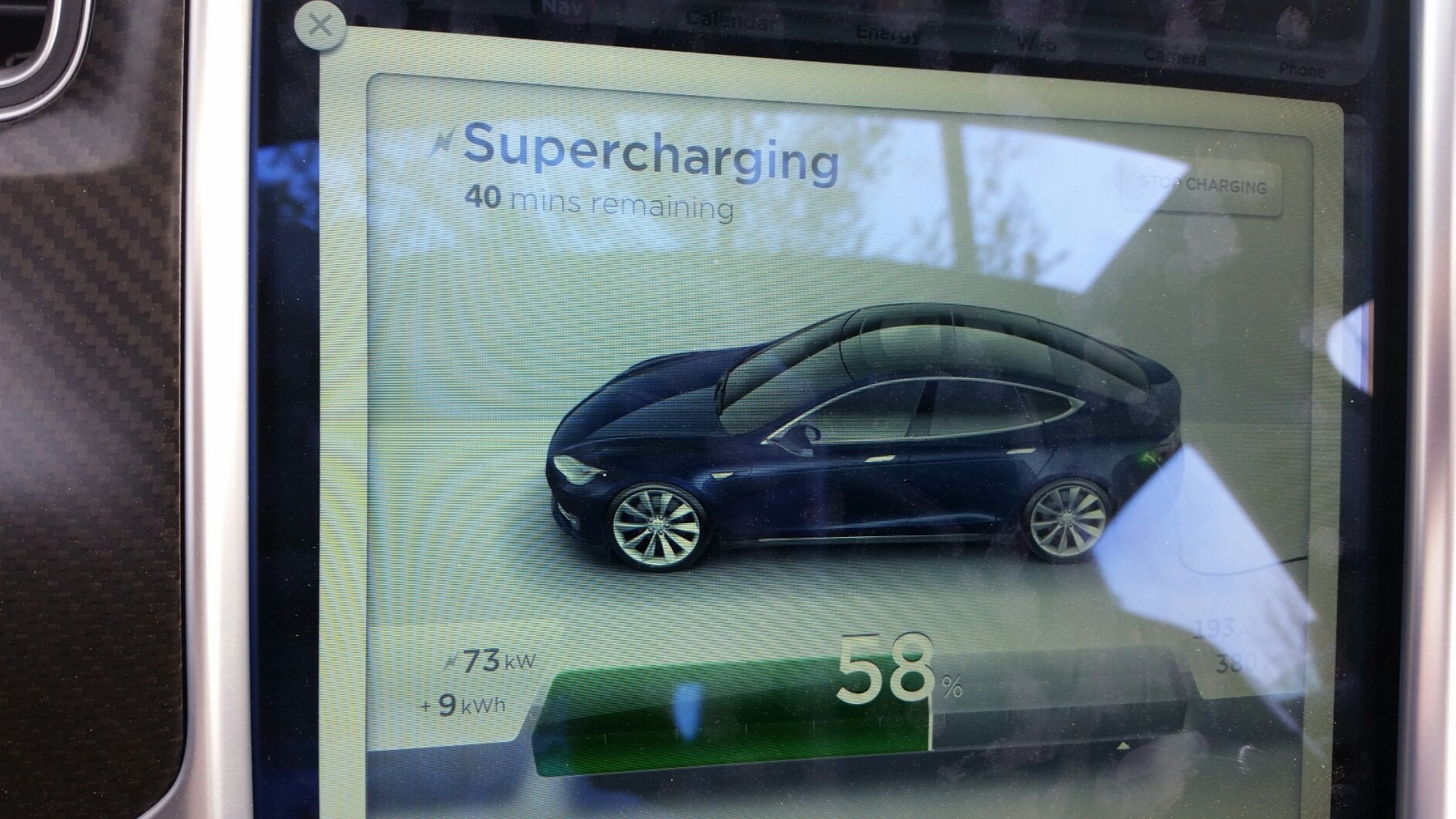 �
�
Apr 3, 2015
rickgt yes! Much better implementation.... My wife's MBZ works much more like this... Really works.�
Apr 3, 2015
redi Mine said this for the 2nd half hour through the 1 hour update. Then it went away.�
Apr 3, 2015
Stoneymonster I've been getting this once in a while when I first get in the car. Hmmmm. It quickly dismisses.�
Apr 3, 2015
Andyw2100 The most typical charge sessions are about three to four hours. I almost always charge at 56 amps. I generally try to have the charge sessions end somewhat close to when my wife is leaving, but tend to err on the conservative side, so they often end 30 minutes to an hour before she leaves.�
Apr 3, 2015
TexasEV Is the time remaing to 100% charge, or to what the trip planner says you need, or to what your charge limit is set at? I would hope it's not to 100%, that might suggest to the masses that they should stay there until they're charged to 100% even if they don't need it.�
Apr 3, 2015
HankLloydRight sure, but not today... Sunday perhaps�
Apr 3, 2015
wk057 In that pic it is time to the SoC set point (in my case 90%). I didn't have a trip planned.�
Apr 3, 2015
Brett Got back from a 910 mile roadtrip last night. 455 miles on 6.1, 455 miles on 6.2.
TACC is definitely improved. Didn't use the blind spot detection much, but seemed to work well. No false alerts on it for me.
The navigation definitely still needs some work. You should be able to remove individual Superchargers from the route. It insisted on me stopping at Gilroy SC, even thought I knew I didn't need to. You should be able to X out recommended stops, not just remove them all. Also, I had to re-choose my destination after each Supercharge. It "lost" my desired destination during charging.�
Apr 3, 2015
wk057 Yeah, I tinkered with it with some long distance destinations I frequent. It is super pessimistic. For example, I can drive from my house to the South Hill, VA supercharger on a 100% charge. Planner tells me I need 112% SoC (-12% on the planner) and that I need to stop in Burlington, NC on the way...... which I try to avoid during peak business hours.
*shrugs*
I guess it's for people who don't know how to plan and don't know how to drive properly to stick with a plan? heh�
Apr 3, 2015
dirkhh So 2.4.124 definitely has a "hemisphere bug".
I saw others post about this before but can't find it in the last few pages...
I wanted to go to SW 22nd Ave and the navigation instead got me the route NE 22nd Ave. Oops.
Reproduceable.�
Apr 3, 2015
AMPUP I also just got .136 OTA at the same time on my non autopilot P85+ 18k vin�
Apr 3, 2015
napabill May hold the current record. Vin 1571 OTA upgrade notice an hour ago. Looks like the Classics are starting to get some love.:smile:�
Apr 3, 2015
andrewket Drove from NoVA to Harrisburg, PA this afternoon. Charged to 100%, and got there with 40% left. Stopped at my first chademo charger, and raised the soc to ~60%+ . Used the nav to plot a course to Baltimore and started driving, but realized quickly it wanted to go the wrong way. Even though the direct route was possible with a estimated 20% buffer, it was routing me through the Hagerstown SC, which is at least a 40 mile detour. I removed the SC from the route, and despite driving 75+ mph in rain with range mode off I arrived in Baltimore with 14% remaining.
The trip planner software needs some tweaking, I think.�
Apr 3, 2015
ZBB Yay� I'm getting sick of all the D's chiming in ;-)�
Apr 3, 2015
SarahsDad P85+ VIN 18XXX just got upgrade notification 5 minutes ago. Looks like this is getting pushed out quickly now.�
Apr 3, 2015
dirkhh Now, now, now... that almost sounds like envy talking...�
Apr 3, 2015
birdsaresmarter I admit I don't have the patience to read all the prior posts. Maybe stating the obvious but, for any "classic" owners in the cheap seats (textile) there is no driver profile and ...therefore..no Valet mode. Maybe all newer cars have driver profiles. I honestly do not know.
--------
Update: Ok, check. So that's what the driver profile icon looks like. Ha! Sorry, was in too big of a hurry and not excessively interested I guess. Didn't notice the little robot looking dude showed up there. Glanced at the release notes about driver profile and mentally wrote it off as unavailable.�
Apr 3, 2015
AMPUP You still get valet if you don't have driver profiles. The driver profile icon is now present, but with valet function only.�
Apr 3, 2015
dirkhh So you have a non-tech package non-AP car...
How does the "range assurance" thing work for you? Do you now have navigation? Can you post screen shots?�
Apr 3, 2015
AMPUP I have and have always had navigation (no AP) ,so it all works for me.�
Apr 4, 2015
iadbound Andrew -- not to get way off topic, but which Chademo did you use in Harrisburg?�
Apr 4, 2015
andrewket Sheetz on Union Deposit Road
Sheetz | Harrisburg, PA | Electric Car Charging Station | PlugShare�
Apr 4, 2015
aaron.s Classic S85 here P03449 installed 6.2 last night!
Aaron�
Apr 4, 2015
iadbound Thanks.�
Apr 4, 2015
dirkhh regen limit line behavior change...
I haven't seen anyone comment on this... it seems to me that the behavior of the regen limit line has changed (for the better)
Last night my car was outside again at about 38F (3�C) and when I got in this morning I had a regen limit at about 30kW (much higher than it used to be after a night at that temperature with my 60, BTW).
With 6.1 the regen never reached the line - I'd always have what seemed like at least 5kW less than the limit line in maximum regen. But this morning with 6.2 I saw the regen reach just beyond the limit line (which kinda makes sense - the car consumes some energy for music, A/C, lights, computers, etc) so it can regen slightly more than what can be used to charge the battery.
Has anyone else noticed this new behavior?�
Apr 4, 2015
Larry S85 from Sept 2013. Installed update today�
Apr 4, 2015
si123ca I got this a couple of days ago (which was few days after I had installed 6.2), but it went away after 2 secs. I ignored it, but based on what you heard I guess I'll probably need this patch too.�
Apr 4, 2015
scaesare Interesting. You charge at a greater current than I do... yet you seem to be more severely regen limited. Perhaps it's the greater time before you leave?�
Apr 4, 2015
Denarius I can confirm that 6.2 (2.4.124) is still limited to 134MPH.�
Apr 4, 2015
wk057 I also confirmed this the other day... on the track, yeah... um, on the track.�
Apr 4, 2015
brianman Icky.�
Apr 4, 2015
Vger I have noticed what you describe on our P85D, but on 6.1 (as well as 6.2 now). Our classic P85 Sig hardly ever reached the line.
So I wonder if it is more the hardware than the software influencing it.�
Apr 4, 2015
Andyw2100 I'm not sure about the BEHAVIOR of the line, as I guess I've never paid close enough attention to notice it falling short of the line. I did comment a few days ago, though, about the fact that something seems to have changed with respect to the pack heating and/or the regen limits. (I don't think this is what you were referring to when you said you hadn't seen anyone comment on this yet, but it's relevant since you mentioned it in your "btw.")
Firmware 6.2 - Page 22�
Apr 4, 2015
Andyw2100 Very possibly. I also have a P85D, so that might be a factor.
Before 6.2, I'm almost 100% certain that if the battery was cold enough that it needed to be warmed to raise the regen limit, that limit would never be higher than 30, even if the Model S was plugged in and preheating, and even if it had just finished charging.�
Apr 4, 2015
reddy Maybe this is buried in the hundreds of posts here, but my rated miles has gone up. I have it set at 80%, and now I read 211 instead of 206.�
Apr 4, 2015
wk057 Probably just a reset of that calibration. Happens with a lot of the updates, it seems.�
Apr 5, 2015
tomas Yes. Further evidence that is true. Set at 80%. Last 6.1 charge 210. First 6.2 charge 217. Fully expect it to settle back over a few weeks.�
Apr 5, 2015
MarcG In my case I haven't seen any difference in rated range between the latter 6.1 versions and 6.2, as I keep track of this every time I "fully" charge (to either 90% or 100%).
Since I upgraded to 6.2, I've charged 3 times to 90% and it still shows 228 miles (this is with range mode ON), which it also showed on 6.1 the last few times I charged to 90%. At some point I did lose a mile or two due to battery degradation while on various 6.1 dot-releases.�
Apr 5, 2015
tomas I suspect it has to do with degradation. You have a much newer car. Mine is 2.5 years old and also A battery. When yours recalibrates, it gets same result as prior. Mine recalibrates and then sinks to actual which reflects a little loss. Also, I regularly charge to 80 so there's some balancing loss too.�
Apr 5, 2015
Rheazombi Noticed some bugs
Got it yesterday morning. The new nav stuff is awesome! Hope they continue to improve it though.
Since upgrading the firmware I have noticed a few bugs though.
* The pano roof no longer opens or closes. This may or may not be related but it was working fine the day before the upgrade. Tried rebooting, etc.
* I was going home, had input home into the nav but it kept trying to route me to a city 25 miles south of where I live. It showed the pin for home and my correct address, but the pin was located in Brockton, lol. Thankfully I know how to get home on my own!�
Apr 5, 2015
MikeBur Haven't heard of pano root issue from anyone else here.
Navigation appears to have issues with hemispheric disambiguation, ie. Has difficulty between se and ne, seemingly when these are pre-existing favorites. So this can be pretty significantly wrong, based on size of city and how far street is from centre, which is a little vexing if you happen to live on one of these ;-). I first noted this to TM and then on here with the .200 release (on 6.1); the 6.2 update updated a few days later and shows the same behavior. There is a later revision (.236?) being noted on some classic S', maybe they can confirm if this has been addressed?Best workaround that worked for me is delete favorite, search again and re-favorite�
Apr 6, 2015
mg012 Valet Mode = Nissan Leaf�
Apr 6, 2015
dhanson865 Still faster than the Eco Plus mode on the new VW E-Golf, stupid eco plus mode tops out at 56 MPH. :crying:�
Apr 6, 2015
dirkhh Eco mode on the Leaf is like taking sleeping pills...�
Apr 6, 2015
Rheazombi The pano roof is working again. Sort of. I think it may be a mechanical issue with the motor, unrelated to the software.
Here's what happens with the Nav (imagine when this photo was taken, I am already AT home. And the redacted part is my correct home address.
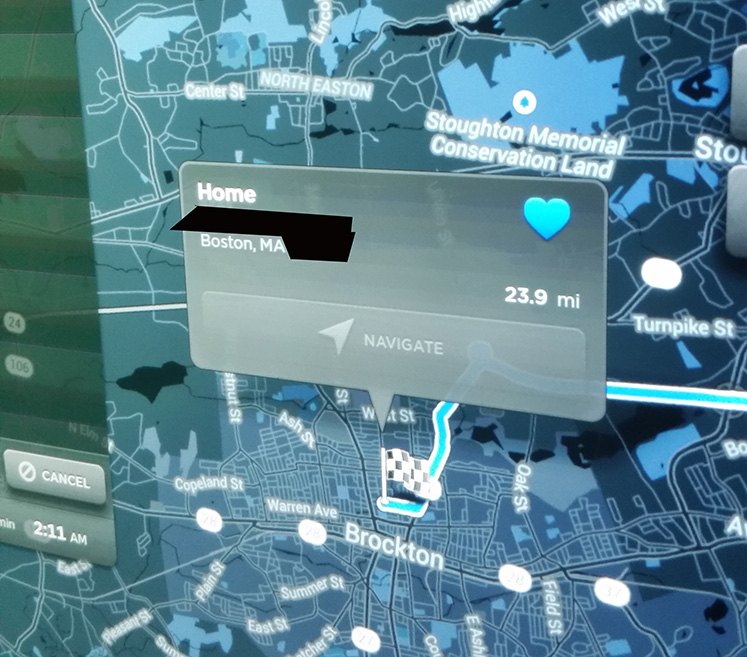
Interesting that I am not the only one with this problem. So will it have these problems if I try navigating to somewhere else in my favs? It'd be nice to know what to expect before I get lost, lol.�
Apr 6, 2015
dirkhh After more testing it appears to be stored addresses (Home, Work, previous locations). Which still sucks massively... but it's somewhat limited. It's as if some internal data format changed and they didn't upgrade the stored addresses...�
Apr 6, 2015
ra-san I have a new feature to report I hadn't seen posted yet - but don't actually know if it's real feature or a glitch, and didn't read the middle chunk of pages to see if it'd been reported (watched the thread for the first 20 pages or so, skimmed the last couple).
Twice now I've noticed that the door handles didn't present when I put the car in park, until I hit park again. Since 6.2 I haven't noticed that they ever presented the first press, but only specifically noticed that they *didn't* until the 2nd press in these two situations where I pulled out from the garage, then paused in the driveway for my wife to get in the car. I generally put the car back in park for her to do so because that way she doesn't have to press the handle to get it to present, and there's less warning beeps and such.
If this is a feature now, that's awesome from my point of view. Never liked that the handles popped out when you first put it in park, and you still have the option to easily present them with a simple press vs. any touch screen digging around. If it's a glitch, well it should be a feature�

Không có nhận xét nào:
Đăng nhận xét