Dec 11, 2014
FANGO edit: Well, the problem all along was I didn't have feature 14 1 set (Roadster 1.5). I'm dumb. Still have to get the app working but at least it's responding to texts now.
edit 2: Now I'm getting "GSM/GPRS: Not connected (0x0041)". I switched the switch away from the LEDs and reset the module twice. Changed the APN to att.mvno and the server address to 54.243.136.230�
Dec 11, 2014
tomsax FEATURE 14 1 doesn't matter for getting responses to text messages. In fact, I don't think it matters at all anymore, I'm pretty sure the firmware now detects V1.5 vs. 2.x from the VIN.
Which hardware version do you have?
Do you have solid cell reception where your car is? I'd recommend going somewhere you know has good visibility to cell towers.
Which cell service are you using? What version hardware are you using V1 (beige plastic box) or V2 (black metal box)?
What do you get back from these commands?
MODULE?
GPRS?
SERVER?
It should look like this:
Me: MODULE?
OVMS: 23:44:22
Module:
VehicleID:<your-vehicle-id>
Units:M
Notifications:SMSIP
VehicleType:TR
Me: GPRS?
OVMS: 23:44:52
GPRS:
APN:att.mvno
User:
Password:
GSM:AT&T
GPRS: OK
Server: Connected OK
Me: SERVER?
OVMS: 23:45:22
Server:
IP:54.243.136.230
Password:<your-password>
Paranoid:-�
Dec 12, 2014
FANGO Thanks! After seeing your responses and mine I figured out what the issue was. For some reason, all sorts of fields were filled in incorrectly. My password was in my vehicle ID part, my APN was my username, etc etc. No idea how it got this way in the first place. So upon going through the SERVER, MODULE and GPRS commands again to set everything properly using your examples and appendices to the setup guide, it finally responded to the app.
Odd that feature 14 1 wouldn't have changed anything, since it seemed to be the one command which made my car finally respond to my texts earlier today, which is what gave me the drive to finally make some progress on this thing since there was a light at the end of the tunnel. Maybe it was another issue, shrug.
Anyway looking forward to having this thing working now that I've got a smartphone and have gotten onto h2o's prepaid plan. Finally! Thanks again!�
Dec 12, 2014
AEdennis Congratulations FANGO. Welcome back to the OVMS enabled community�
Dec 12, 2014
supersnoop When the APN settings aren't correct, text message responses can be sporatic. The GPRS system seems to get stuck in a traffic loop and eat up all available resources. That's why there's a hard switch in the device to disable GPRS. I know mine went all haywire when I switched SIM cards; I had to disable GPRS before I could text the module to reset the APN.�
Dec 21, 2014
dpeilow Can I make a feature request please?
On the Android app could we have an estimated charge finishing time?�
Dec 21, 2014
AEdennis That would be great for iOS as well. I have to send a STAT command via SMS to get that info when the car is charging.�
Dec 21, 2014
FANGO Or better yet a way to set start/finish charging times in the UI? I understand this is possible through texts (right?) but it would be cool to have it in the app.�
Dec 21, 2014
tomsax ACC Setup Instructions
Yes, you can set the start or finish charge time with text messages. It would be nice to have a way to do it through the smartphone apps, but I imagine the UI would be a non-trivial amount of work to do well. It's pretty easy to do with text messages and you probably only need to do it once per charging location (home and/or work).
First, set/confirm you have the right time zone set. With a live connection, tap the Settings Tab, tap the ">" button, tap Control, tap Parameters. Scroll down to the last item, #23 and set it to your time zone offset. PDT is -7:00, EDT is -4:00, etc. While you're in there, you can also set the cooldown temperature, in degrees C, with parameter #15. The default is 31 (about 88F). I have mine set to 27 (about 80F), which may be too low in hot climates. (Don't mess with items #16 through #19, that's where the ACC parameters are stored in a compressed, unreadable, format.) Tap the "<Control" button at the top to save the change.
To verify that your time zone is correct, text the STAT command to your car. If the time zone is set correctly, the first line of the reply will be the current local time in 24-hour format.
Note that OVMS doesn't know anything about daylight saving time, so you'll have to change the time zone setting when DST turns on or off. If you don't, your car will start charging an hour later in the fall or an hour earlier in the spring.
ACC has a lot of options, which are documented in the user manual, but you can probably get it all set up with just three commands. The first step is to establish a location. Park your car where you want ACC to be active and send this command:
ACC HERE
That should respond and tell you which slot (1 through 4) is now associated with your car's current location.
Next, with the car still in the chosen location, set options using the ACC PARAMS command. For example, I have our car set to cool down whenever it's plugged in with the battery pack hot then delay charging so that will will be done around 7 am, limiting current to 32A and charging in Standard mode. All of that can be set with one command:
ACC PARAMS COOLDOWN CHARGEBY 07:00 LIMIT 32 MODE STA
After ACC is configured for a given location, it has to be enabled. This command will enable the car's current location:
ACC ENABLE.
That's it. You're all set up. A few things that may be of use later...
To disable ACC at the car's current location, so you can do a manual charge for example, send
ACC DISABLE
To disable COOLDOWN:
ACC PARAMS NOCOOLDOWN
To disable the CHARGEBY:
ACC PARAMS CHARGEPLUGIN
The full Roadster manual is here:
https://github.com/openvehicles/Open-Vehicle-Monitoring-System/raw/master/docs/OVMS_UserGuide_TeslaRoadster.pdf�
Dec 22, 2014
jnordeng Is there a similar function for heating the battery in the winter?�
Dec 22, 2014
dsm363 I believe only charging at a lower level like 12A is the thing to do there.�
Dec 22, 2014
AEdennis I don't believe so. There's no "pre-conditioning" on the Roadster, per se.�
Dec 22, 2014
tomsax That's an interesting idea. OVMS does not have a specific battery heating option.
Most Roadster owners haven't seen this, but if the battery is too cold, it has to be heated before charging starts. For driving, if the battery is too cold, power is limited and regen is disabled until the battery warms up.
I've only seen the cold battery behavior once with our car, which spends most of its time in moderate Seattle. Even at its coldest, our garage stays well above freezing.
If you set up ACC to do a CHARGEBY close to your departure time, your battery will presumably be warm enough for your drive. Would that do what you want?�
Dec 22, 2014
jnordeng I think the car will heat the battery if it's too cold. I left my car pluged in when I was away for e few weeks and got these messages on my phone "Standard - Charrging, Heating 236V/0A Full: 14 mins....."
I will try CHARGEBY ca 20mins before i leave in the morning and see if the car regens when i drive.�
Dec 22, 2014
tomsax I recommend setting the CHARGEBY time to be 30 minutes before departure. Sometimes a standard mode charge will run 30 minutes longer than expected, perhaps because the car is balancing the pack. I wouldn't expect the battery to cool off much in 30 minutes.
The charge time predictor doesn't take into account the time needed to heat up the pack before charging can start. I don't have enough data to be able to do that. If that's making the CHARGEBY scheme unreliable for you, perhaps you could share log data with me so I can improve the algorithm.�
Dec 22, 2014
markwj The logs I saw when developing the support for 'heating' state showed about 30mins of heating before charging started. I don't think a HEATUP function, comparable to COOLDOWN, makes much sense. Perhaps best just to leave a 30-60 minute buffer on the chargeby parameter.�
Dec 23, 2014
jnordeng I pluged in the car today and it took about an hour to heat from 0 to 10C (32 to 50F) and then it started standard charging. I'm trying to use ACC and "charge-at-time" one hour before I leave in the morning. The only problem now is that I can't get ACC to work. The only response I get when I try to set it up is a message from OVMS saying a SMS is received, no SMS. If I send STAT I receive a SMS response, so OVMS should be set up correct.�
Dec 23, 2014
AEdennis Do you have the latest firmware of OVMS loaded on the box?�
Dec 23, 2014
jnordeng My OVMS is version 2.6.5 so it should be good.�
Dec 23, 2014
supersnoop No, it's not. You need the Tesla-specific firmware loaded in order to use COOLDOWN or ACC. The OVMS does not come with that firmware loaded; you have to load it yourself. I know because I had the same problem.�
Dec 23, 2014
Roadrunner13 There is a 2.6.5 version that is Roadster specific.
You can find it here on Tom's blog with proper instruction on how to flash it...I also had the issue
OVMS Firmware Update Guide�
Dec 23, 2014
jnordeng The app's info screen says 2.6.5/TR/V2, what version am I looking for?�
Dec 23, 2014
supersnoop The version number is the same whether you have the Tesla specific firmware or not. the /TR/ means you've configured it for the Roadster, not that the firmware is for the roadster. Unless you've downloaded the firmware and updated it with the PICKit2 yourself, you do not have the firmware necessary to support ACC functions. Believe me, I'm speaking from experience.
Instructions to update the firmware are available here: OVMS Firmware Update Guide�
Dec 23, 2014
jnordeng Thank you all, now it's working:biggrin:. Now let's see if the battery is warn tomorrow when I leave for work.�
Dec 25, 2014
BartJ any idea when the hardware modules wil be available again from FastTech ?
temporarily sold out.
I bought a used roadster 2.5 white 2012 last month, and I would love to get OVMS hooked up....�
Dec 27, 2014
markwj Next batch will probably arrive mid January.�
Dec 27, 2014
adelman I have a "first revision" OVMS for Roadster that I'm not using. You'll need an antenna for it. Free to a good home in the USA; either give me a UPS account number or your address and I'll give you the shipping cost and you can paypal me.�
Jan 18, 2015
ecarfan I know we only recently reached "mid January" but...any update on when the OVMS modules will be available again? Thanks!
http://www.fasttech.com/product/1000300-ovms-car-module-v2�
Jan 18, 2015
jimmyz80 I'm waiting to order one as well. �
�
Jan 18, 2015
markwj Sorry: Chinese New Year hold-ups. Everything here gets real busy, but I am assured that our batch is going through and will be start QC stage "any day now" (what they told me). Hopefully back in stock in 7 to 10 days.�
Jan 18, 2015
FANGO Is there a reason that my Open Vehicles app isn't showing up in my notifications on iOS 8? It sends notifications to my iPad running iOS 6, but for some reason my iPhone doesn't get them. I turned off SMS notifications because I was tired of getting texts every time it started and stopped charging (also because I just had a charging issue I had to bring the car in for, and it was texting several times an hour while they diagnosed the problem, heh). But, when I go into settings -> notifications, I don't see Open Vehicles in there anywhere. I don't know if I did something special to set up the app in iOS 6, or if maybe it just hasn't been updated for iOS 8, but does anyone know how to solve this?�
Jan 18, 2015
dsm363 Where in the documentation does it explain the Cooldown feature and ACC? I looked in the Roadster PDF and saw appendix B and C about what numbers they are but not what number to put there or what they do (I think you change it from a 0 to a 1 to enable but wanted to make sure). Is the ACC still all setup via text messages for each location or in app?�
Jan 18, 2015
markwj ACC is setup via SMS text commands.
See page #32 of the roadster user guide for the available commands.
Also, see the post here (Open Vehicle Monitor System (OVMS) - Technical Discussion - Page 8) for some other info on how ACC works.�
Jan 29, 2015
markwj Just been informed by the factory that the latest batch of modules have been produced and are about to enter QC. We should get them on 3rd February, and they should be up on the fasttech store a few days after that. Hopefully by the end of next week.�
Jan 29, 2015
ecarfan Thank you that's good news. I'm ready to buy one.�
Jan 31, 2015
GVTesla Me 2! eagerly awayting the batch to be in store�
Feb 5, 2015
markwj OVMS modules (and cables and all) are back in stock at Fasttech. Enjoy.�
Feb 5, 2015
ecarfan Great! I am going to buy. In addition to the OVMS module is it correct that I also need the following:
Open Vehicles OVMS GSM antenna
OBD-II to DB9 Data Cable for OVMS ("Left" or "Right"?)
PICKIT 2 Compatible Programmer/Debugger
Note: I am located in California, if that makes any difference.�
Feb 5, 2015
7racer if anyone wants my old first generation OVMS they are welcome to it for free, but you will need an antenna for it. Love the OVMS though and the new features with the newer box!�
Feb 5, 2015
supersnoop No, you need the DB9 to Roadster cable, not the OBD-II cable.�
Feb 5, 2015
ecarfan Oops, my mistake. Thanks.�
Feb 5, 2015
GVTesla Is that the same as the OVMS Data Cable for Tesla Roadster 1.x/2.x?
Edit: too fast asking :redface: while google is our best friend: just ordered the DB9 tot Roadster cable = OVMS 4 tesla roadster cable�
Feb 5, 2015
markwj For information on which cables / bits to order, here's the best link we have:
Vehicle Support | Open Vehicles�
Feb 6, 2015
jimmyz80 I placed my order for the module, antenna, and cable last night, and now I'm wrestling with the SIM card decision. One thing I've been curious about, is whether a data-only SIM without SMS functionality would work, and if so whether it would cripple the functionality at all. The reason I ask, is T-Mobile provides tablet SIM cards with 200MB/month data for no cost at all. In fact they don't even collect any personal information or payment information. I have two of them that I used to use in my iPads, and I'm wondering if I can just use one of those.�
Feb 6, 2015
slcasner Some more expert OVMS users may have a different answer, but I use mine with only data communication, no SMS. I use the GeoSIM card which has very low charges for data (less than a dollar per month for my driving patterns).
The problem would be to get the OVMS configured at installation time. At the time mine was installed, my phone had SMS disabled because I never used texting and the only messages I received were spam. The Roadster friend who helped me with the installation needed to do so initially with his phone, then we changed the configuration to my phone number. Although my phone plan has subsequently been changed so that now SMS is enabled again, I still use OVMS only with data communication. My OVMS is a hand-me-down version 1, so I don't have access to the new advanced charging features, etc., and that might make a difference.�
Feb 6, 2015
AEdennis I have successfully moved a T-Mobile SIM card I had installed on a GSM iPad that failed to read the SIM into a MiFi.
It still works. I use the iPad behind that router as a WiFi iPad now.
It might work in OVMS.�
Feb 6, 2015
supersnoop You'll need SMS access to get the module set up. Also, I believe T-Mobile validates the device IMEI to ensure it is actually a table and not some other device. I might have to get an adapter so I can fit my iPad nano-sim in the OVMS's SIM slot.
I did, however, convert from AT&T to H2O Wireless a few months back. At $10/quarter, it seems like the cheapest option.�
Feb 6, 2015
jimmyz80 Well I ordered one of those super expensive $0.01 SIM cards from H2O mobile, lol. If the T-Mobile cards aren't useful, I guess I can't beat a penny.�
Mar 22, 2015
simonog I have just installed a new OVMS in the Roadster I bought 4 days ago. The device is excellent and I am most impressed with what people did to create it. (Love the car too!)
How do I check which version of firmware the box has in it and whether I need to flash new firmware to get the Tesla specific build please?
am I right in thinking that all he neat extra functionality like tyre pressures require that version?
finally can anyone point me to where that extra functionality is described best please?�
Mar 22, 2015
ecarfan I also just installed a new OVMS module in my 1.5, with valuable assistance (long distance) from Mark who helped detect some dumb set up errors I made! It is now working perfectly. What a cool tool to have in my Roadster.
I mounted the GSM antenna on the rear pillar up high just by the passengers right shoulder and tucked the antenna lead under the door sill piece. Very easy to do and no one will notice the antenna except me.
I bought a GSM SIM card for the Module from T-Mobile my cell provider; $10/month and 3Gb data allowance! They did not offer a lower level.
Thank you Mark and everyone who contributed to making OVMS happen for the Roadster!�
Mar 22, 2015
markwj Advanced Charge Control and Logging information is here:
v2.5.5 Vehicle Firmware | Open Vehicles�
Apr 13, 2015
n2mb_racing Quick question about H2O Wireless... Which plan should I be on?
Mine says:
Plan Detail H2O LTE MINUTE�
Apr 13, 2015
supersnoop Mine just says "MINUTE PLAN"
How much is it costing you? You should only have to load $10 every three months, and that should be more than enough.�
Apr 13, 2015
jimmyz80 That's the one. I remember being confused by this as well, but as long as you just load $10 at a time then it should be the correct plan. I think the others were $20/pop and up.�
Apr 14, 2015
n2mb_racing Thanks. I was concerned because it shows
Data Balance N/A
Rather than how much I have left out of 100 mb. I went through $1.60 doing the initial setup, but there were a lot of text messages.
Does it show your data remaining on the h2o wireless site?�
Apr 14, 2015
tomsax Here's what my balance screen looks like. Every 90 days, I add $10 to the account, which adds to the remaining cash balance and pushes the expiration date out by 90 days. It appears the unused cash balance just rolls over each period, so I have essentially infinite data and SMS messaging for how I use OVMS.
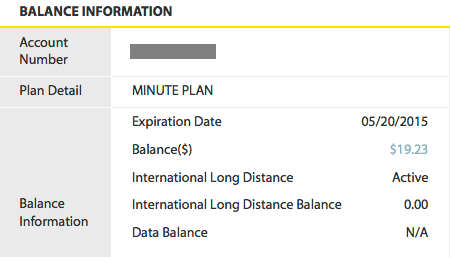
BTW, I also went through nearly $2 worth of text messages setting up OVMS when I switched to H2O Wireless, which had me a little concerned, but I've been gaining ground ever since.�
Apr 14, 2015
n2mb_racing Great! Thanks!
One last question... Am I running the latest firmware?
It shows:
Server: 2.1.1 - 20121216
Car: 2.6.3/TR/V2
App: 3.2.2 (20140628)
I ordered the USB flashing cable just in case.�
Apr 14, 2015
samcarney I am running OVMS firmware 2.6.5/TR/V2. Does this version support the ACC functions? Does ACC work with Roadster 1.5. I cannot seem to make ACC work with Homelink.�
Apr 14, 2015
markwj Easiest way is to sms 'ACC STAT' and see what comes back. If it doesn't recognise the command, then no ACC in the firmware you have.
The roadster-specific firmware is not loaded onto any modules from the factory, so the only way for you to get it is to flash it yourself.
Regards, Mark.
P.S. Yes, ACC does work with the 1.5 cars.�
Apr 14, 2015
samcarney Thanks Mark, One more question.
When I go to GitHub and click on the roadster firmware update, I get a text file, instead of the HEX file. I have updated my OVMS with Picket2 several times over the years. Any idea what I'm missing, am looking for the file in the wrong place? Can you provide a link?
Thanks in advance for your continued assistance.�
Apr 14, 2015
markwj Tom's page is the best resource for this:
OVMS Firmware Update Guide
That site has some direct links to the latest firmware.
The .hex files are really just text files. I think it might depend on your browser how those are displayed. You should be able to save to disk.�
Apr 14, 2015
samcarney Thanks again Mark, after saving it is displayed as a HEX file. I confuse easily.LOL�
Apr 15, 2015
marco2228 Just ran into a problem, but don't know if the OVMS is causing this.
I cleared ACC, but when I plug the car in, it starts charging for 5 seconds or so and then stops.
The display says "Stopped Charging by request". Does anyone have a clue for this behavior?
Thanks�
Apr 15, 2015
marco2228 seems like even after texting the following, ACC was still stored in the car.
-acc disable (Answer: acc disabled)
-acc clear (acc configuration cleared)
-acc nothere (acc not at this location)
-acc stat (acc status #0 state: free)
There still seems to be the former stopsoc limit stored in the car, due to this the charge starts, and stops immediately.
After I removed the stopsoc limit, the car charges.
So my new question is: How can I disable ACC? Usually the car should charge to soc 65, but on weekends I want to be able to do a complete charge. ACC disable would be the command for this, correct? But I obviously did something wrong, as ACC didn't get disabled.�
Apr 15, 2015
TOBASH Any hope of OVMS working on Windows phones?�
Apr 15, 2015
AEdennis You can always use the SMS commands to the device.�
Apr 15, 2015
n2mb_racing I just realized why H2Owireless doesn't show the data balance remaining. It is $0.10 / MB flat rate at $0.05 / SMS. So, there isn't a data counter. Each MB takes out $0.10 from your account balance. So, yeah, once you use a bunch of SMS messages to get it setup, the data usage should be very, very low cost.
Anyway, maybe that was obvious to everyone else, but I thought I'd make that clear.
Unrelated question.... I also happen to have an extra OVMS 1.0 lying around that came with the car. Can it be programmed to get GPS from it's own radio? I was thinking of sticking it on my other car, just as a car tracker, since it is so cheap to run with H2OWireless.�
Apr 15, 2015
markwj Do you mean the old v1 hardware (big white box)? If so, no the module doesn't have GPS at all.
The v2 hardware does include GPS, and there are some experimental vehicle types to act as trackers.�
Apr 18, 2015
simonog I notice that the OVMS gives me one set of figures for ideal and estimated miles in the battery, and the car gives me a different set of numbers.
Should these be the same or is there a different calculation being used...and which do people find the better forecast?�
Apr 18, 2015
samcarney Try "waking up the car" to get a status update. Just a guess.�
Apr 19, 2015
markwj The figures should be identical. They come from the same CAN bus messages.
I suggest you double-check that the App is online to the car (green antenna) and if you see a difference, get a screenshot of the App and pictures of the VDS showing estimated and ideal ranges, then send to support (at) openvehicles (dot) com along with your vehicle ID and the date/time/timezone you saw the problem.
Regards, Mark.�
Apr 19, 2015
simonog @samc: thank you - perfect guess! I hadn't realised that the car had to be awake to give accurate figures.�
Apr 19, 2015
markwj It really shouldn't. If the car is giving you figures (ie; you are sitting in it and viewing the screens), the car should already be awake. Similarly if you are charging, the car is also awake. The only figures that are affected by car awake/sleep are the temperatures and tpms (which show in gray colour if the figures are stale due to the car sleeping).�
Apr 19, 2015
simonog If I get this again I'll take the requested pictures. It did puzzle me.�
Apr 19, 2015
samcarney I Agree with Mark. On my Android app. It gives me the time in days, minutes, or seconds since the app was online to the car. When it changes to "Live" the SOC will update. The wake up command only affects the temps, and tpms as Mark stated.
Thanks for the thanks simonog but I was mistaken.�
Apr 19, 2015
markwj I guess a simpler explanation is that if you are comparing the car vs the app, then you are sitting in the car, right? If you are sitting in the car looking at the screen, surely it is awake already?�
Apr 20, 2015
m0rph Here I can tell the figures can be off by 1km. The car shows 305km range and the app 306km for example. But this must be the conversion miles/kms, the same reason why the ODO meter sometimes jumps 2km at once.. The ovms is more precise than the car. I only use SMS though on my Windows Phone, so I always see realtime data.
I do have the Android app (emulated on my Windows laptop) and it loses connection after a while, so it stops updating. Then it can show different figures.�
Apr 20, 2015
markwj Everything on the CAN bus is in miles, so yes there is a conversion to Km. We try to make it as close to the car, but there can be rounding up/down differences. We think our algorithm is better than the car's - there is a whole developer's eMail thread on how to quickly multiply by 8/5, using only integer maths on an 8 bit microprocessor ;-)�
Apr 20, 2015
simonog I love it: takes me back 40 years to writing assembler and using bits to store data. XOR was a useful operator
If I am sitting in the car, I assume that it is awake, although the phone app I realise may not yet on line so could have a delay.�
Apr 28, 2015
simonog As I dig into the OVMS settings i see there is something called Digital Speedo.
what does this do please someone?�
Apr 28, 2015
tomsax In v2.x Roadsters, the Roadster's speed can be displayed on the LCD near the speedometer. (The analog speedometer is both inaccurate and often difficult to read.) The same trick does not work on v1.5 Roadsters.
It's documented in the Roadster User Guide, available from OpenVehicles.com.�
Apr 28, 2015
simonog Thank you.
i am unclear, however, from the documentation how I enable it on my Roadster 2.5. In one place I see that the opt-in feature is set to 1; somewhere else that that causes drive logging.
Advice would be appreciated.�
Apr 28, 2015
tomsax It's in Appendix B of the Roadster User Guide.
On the Control/Features screen, item #13 "Opt-In Bits", the features and values are:
1 Digital Speedometer
2 Log Drives
4 Log Charges
Take the values that correspond to the features you want to enable, add them together, and set that value as the "Opt-In Bits." For example:
The logging features require version 2.5.1 or later.
- Digital speedometer only, set the value to 1
- Log drives and charges, set the value to 6
- To enable all, set the value to 7
�
Apr 28, 2015
simonog Tom
thank you. By the way, I love to see data stored in bits not just KB or MB blocks - reminds me of my early days squeezing the most out of limited computers (often in the OS)?
if anyone is planning a new phone app release one day, it would be great to see the speed displayed on the location tab, just as the Model S does.�
Apr 28, 2015
tomsax At least in the iOS app, if you tap on the vehicle in the Location view, it will show you the speed.�
Apr 29, 2015
supersnoop :scared:
Excuse me for a moment. I need to go delete an app from my wife's phone.�
Apr 29, 2015
simonog I must be doing something wrong: I set the opt-in bits to 1 and there is no change to the orange lit display below the analogue speedometer, nor is there any indication of speed on the iOS location tab.
is there something else I need to do to make it appear? Mine is a 2.5 a Roadster with the latest firmware.�
Apr 29, 2015
tomsax If you close the Features window on the iOS app and bring it back up does it show the Opt-In Bits value of 1? Beyond that, I can't speak to the digital speedometer; our Roadster is a 1.5.
When you tap on the car on the map in the Location view, do you get a little pop-up window? That should show your car's OVMS ID and your speed.
BTW, you can use Reply instead of Reply With Quote to save space on the thread when the context is clear.�
Apr 29, 2015
Habious I think "latest firmware" refers to the firmware in the OVMS module, not necessarily the firmware in the Roadster itself.
From what I understand (I could be completely wrong with this - and I'm sure someone will correct me if I am), the OVMS module does NOT ship with the latest Roadster-specific firmware. The only way to unlock these advanced features is to buy an OVMS module, buy the "OVMS Firmware Upgrade DooDadd", and flash the newest Roadster-specific firmware into the OVMS module.�
Apr 29, 2015
tomsax Habious is right, if you have V2 hardware (black aluminum enclosure) you need the Roadster specific firmware for some features (logging and ACC). You can get your version by going to the vehicle info screen (wait for the connection to go "live", then Settings screen, tap the (i) near the rear wheel, scroll down to view the OVMS Firmware section and look at the Car field). Your version string should be something like 2.6.5/TR/V2. As far as I know, V1 hardware and the generic firmware will do digital speedometer and send the vehicle's speed to the smartphone apps.
See my OVMS Firmware Update Guide page for instructions on updating firmware. For North American owners, if you don't want to deal with the hassle, you can mail your device to me with return postage and I'll update it and ship it back. PM me to arrange details.
simong, what does the iOS app show for your firmware version?�
Apr 29, 2015
Habious This confuses me. Mine says...
Car: 2.6.5/TR/V2
App: 3.2.2 (20140628)
Which, according to the research I've done, says I have "the latest, Roadster-specific version". But, I don't. This is how it came out of the box, I have NOT upgraded the firmware in it (I don't have the firmware updater thingy), and the ACC commands are ignored by the OVMS module.�
Apr 29, 2015
tomsax The three parts of the version string mean the following:
2.6.5 is the firmware version. That could be the generic firmware or the Roadster-specific firmware.
TR says you've configured the firmware to expect Roadster messages on the CAN bus.
V2 says you have version 2 hardware
Looking at the code, I don't see any way to tell if you have the Roadster-specific firmware other than trying an ACC command, like ACC STAT. If that doesn't get a response, I would assume you have the generic firmware.
The generic firmware has basic support for the Roadster, including the digital speedometer and reporting the vehicle speed to the smartphone apps, everything that v2.3.2 supported for the Roadster.�
Apr 29, 2015
simonog Tom:
Thank you for being so helpful and apologies for omitting key information. I have the latest OVMS hardware box (bought 2 months ago) and I blew the Roadster firmware in it before installing (using your excellent instructions!).
OVMS firmware for Car is 2.6.5/TR/V2 and I use the ACC commands for one or two functions.
I didn't realise that I had actually to tap the car on the iOS app to get the speed. It works! That is great.
Can I get it in the car on the display just under the analogue speedo? Or does it appear elsewhere?
There is a speed shown as xx mph in the bottom right hand corner of the little square touch screen on the central console, but it is there whether I have the opt-in bits set to 0 or 1. Yes, when set the value appears if I exit the features screen and then return to it. It is also always exactly a digital version of the analogue speedometer sp for those two reasons I assumed that is not the OVMS created speed.
(The reason I may use Reply with Quote slightly more often than I should is that on an iPad, Reply produces a type in box which only accepts one character before it loses the keyboard, and i have to touch the end of the line to get the keyboard back. This continues until there is a line of two of text after which normal typing is possible. Reply with Quote starts with enough data�
Apr 29, 2015
tomsax There are some notes from when it was first implemented as an experimental feature. Sadly, the YouTube video doesn't seem to be available.
Reading the notes reminds me that you have to enable CAN writing (set #15 CAN Write to 1 on the same screen as the Opt-In Bits), but you must have that enabled if you're using ACC to to do anything interesting.
The speed is supposed to appear on the display just under the analog speedometer. OVMS doesn't mess with anything on the touch screen.
(The iPad bug sounds annoying.)�
Apr 29, 2015
simonog Does anyone have a picture of the LCD display showing the digital speedometer please? At least I might then work out why I don't seem to have it.�
Apr 29, 2015
markwj �
Apr 30, 2015
simonog Should setting the opt-in bits to 1 be enough to enable the digital speedometer or do I also need the SMS command to make it happen? if so, why are both required please?�
May 2, 2015
markwj For firmware >= 2.5.1, you need feature #13 set to 1 (or any odd value, depending on what other opt-in features you want), AND feature #15 to 1. You can set these either by SMS messages or via the App.
If you have to change CANWRITE (feature #15), I recommend resetting the module to make sure the new setting is effective.�
May 3, 2015
simonog Thank you - I do have both set. I will try sending the text command as well and see whether that is needed.�
May 4, 2015
Habious I can verify this works. I just did this (thanks to the recent posts by markwj in this thread).
I had already had Feature #15 set to 1 (so I could do things like lock/unlock the doors). I just sent the "Feature 13 1" command (via SMS). I received "Feature has been set" back from the car and, lo and behold, I now get my speed on the little amber display above the steering wheel! The only negative I see to this little hack is that it still says "amps" next to the number. I very minor complaint, I know.�
May 4, 2015
markwj A good test to see if it works is to sit in the car with the ignition on, aircon on, but car in park. You should see about 1 to 3 Amps shown on that display.
Then, SMS "FEATURE 13 1", and the amps should go to zero. After all, you're going 0mph.
The feature is far from perfect, but pretty usable. Nothing we can do about the word 'Amps'. You may find the display flickers every now and again (changing to a weird value, not your speed) - again nothing we can do about that as once in a while the car will win and display the real Amps (as opposed to our faked speed). Watch the video for more information on why that is.�
May 5, 2015
Vip I'm new to the OVMS installation and currently going through the installation guide. I have the module and and antenna. I just need to get a SIM card.
Can anyone tell me if the first post (with all the info) on this thread is still valid. Especially the AT&T information about the SIM card and password. The first post hasn't been updated since 2013 and just want to make sure nothing major has changed.�
May 5, 2015
AEdennis A lot of us moved over to h2owireless. SIM cards at Amazon are at $0.01 and the service every 90 days is $10... Search for that in the thread...�
May 5, 2015
tomsax I wrote up instructions for H2O Wireless.�
May 5, 2015
AEdennis Thanks Tom, on a road trip, and working off mobile devices...�
May 5, 2015
jaanton My experience with H2O Wireless was a little different. This was about 5 months ago. I got a penny sim card from Amazon, but the H2O wireless site would not let me activate it without some info I didn't have. I did an online chat and the chat told me I needed to buy an activation pack at a retailer. Going to Target, they didn't have anything other then the more costly plan activation kits. But, the sim card came from some online company which had a website with a form for activation. That took about a day to work. I think they just had the activation packets and did it for me from the information I put on the form. Pretty horrible. On the plus side, after that was done, I can refill directly on the H2O site.
I think I got my sim and activation from U.S ANYSIM (they sold the sim through amazon.) Then http://www.h2owirelessnow.com
I agree about not giving any of these sites any critical information. I use a unique password for them and my credit card company has a way to get unique card numbers for online payments. That's the way to go. Those online card numbers can have repeat charges, but the repeat charges have to come from the same name making them hard to steal.�
May 11, 2015
hjr can you refill H2O by buying a PIN at a target store and therefore not have to give credit card info to the shaky H2O site? Ihave been using ATT and it is much more expensive and I am getting a bit tired of paying for it.�
May 14, 2015
simonog This helped me: mine was working all along. I had not realised that the word Amps was fixed and so assumed the digital speedo hadn't taken. Sorry for the misunderstanding and thank you for the patience.�
Jun 27, 2015
dhrivnak I finally installed my OVMS with an H2o card and while texts seem to work fine the android app and GPRS does not seem to be working. The module is giving me 2 green flashes (GSM ready). When I send the text GPRS I get back
GPRS:
APN:att.mvno
User:
Password:
GSM:AT&T
GSM/GPRS: Not connected (0x0042)
I assume the GSM/GPRS: Not connected is an issue. I chatted with H2o wireless and he said their cards are for phones only and he was not able to help.
By any chance do you know what I may be doing wrong?
PS it shows my car is on Palo Alto area, far away from Tennessee.
I also received a message:
US0255 (my car id)
vehicle authentication failed (166.192.92.209)
I assume it is due to the GPRS issue.
Thank you�
Jun 27, 2015
jimmyz80 What server address do you have it registering with? I had the same problem but discovered the documentation listed an IP address inconsistent with what you're actually supposed to use.�
Jun 28, 2015
dhrivnak Here is what I have on the server command.
Server:
IP:54.243.136.230
Password:xxxxx
Paranoid:-
Thank you.�
Jun 28, 2015
Marius Use your SIM card first in a standard phone and let it work on GPRS, propably you have a setup then and if everything works fine, install the SIM card in the OVMS module. Check if the dip switch in the module is set on GPRS active.�
Jun 28, 2015
dhrivnak I double checked the dip switch (away from LEDs) and rebooted. I will try and find a GSM phone. Thanks.
Problem resolved. I was foolishly using the module password in place of the server password.�
Jul 2, 2015
dhrivnak I had an annoying issue with the OVMS last night. The car detected a BMS isolation fault an issue that hits me 2-4 times a year and then goes away after a day or so. But the OVMS sent me over 50 text messages, one like every 10 seconds. I finally had to go down to the car and unplug the module? Is there a way to send a command to stop sending texts and/or to set it so it does not send so many duplicate messages? Thank you�
Jul 2, 2015
Habious Another thing that would be nice is the ability to filter OUT certain messages (like, for example, I don't need my phone notifying me if "Key in switch door open" or "Fasten seatbelt")�
Jul 2, 2015
Mark77a Agreed�
Jul 2, 2015
markwj This happens if the car is flapping the alert message (e.g. alert "something wrong", ok all fine now, oh! alert "something wrong", ok all fine now, etc.).
You can suppress these vehicle alert messages by setting FEATURE_CARBITS (#14) to 8. Either SMS "FEATURE 14 8" or use the App.�
Jul 2, 2015
dhrivnak Wonderful thank you Markwj. I assume that an SMS text to FEATURE 14 8 will stop the texts but I can see those messages in the app.�
Jul 2, 2015
markwj Nope. That feature will stop the alerts.
To control whether notifications are delivered via sms or ip push, use PARAM_NOTIFIES. Set to "IP" for IP push notification, "SMS" for SMS notification, "SMS,IP" for both, or "-" for none.�
Jul 3, 2015
dpeilow I seem to remember there was a separate document that comprehensively described how the ACC features worked. I printed it out about a year ago, but I've lost the printout and now I can't find it online either.
Can someone please point me to the link?�

Không có nhận xét nào:
Đăng nhận xét