Oct 23, 2015
youlikeadajuice I tried several page refreshes on my hour long commute with no luck. Was back to normal a few hours later though on my ride home. Weird.�
Nov 17, 2015
chang Hey guys,
I've been loving this feature, but I was just told by my SC that having this loaded, even in the background, is data-heavy and it could affect your GPS accuracy and even HVAC systems. They recommended to not use it all the time. Hence it may be why my GPS is often off by 2-20 miles or my heater sometimes doesn't work. (Waze was in the background, my main screens are usually Media/GPS.)
Is that possible?�
Nov 17, 2015
scaesare Were they speaking of the car's GPS as reflected on the Tesla NAV screen, or the cars location as represented on the Waze for Tesla webpage?
I use it occasionally, and have never seen the car's NAV affected, nor heater issues. I've included some stints of having it running for an hour or more.
Now I've seen the Waze page occasionally stop updating/refreshing correctly, but I assumed that was because of the rather laggardly response time of the car's browser... a refresh usually did the trick.�
Nov 17, 2015
Max* Doubt it, whenever I reopen my browser it always asks me if I want to allow waze to know my location. It times out fairly quickly.�
Nov 17, 2015
mspohr Yes, it is possible that the heavy data communication of Waze and processing that data by the browser could leave other systems (NAV, HVAC, etc.) starved for computing and data resources.
However, I have Waze running all of the time (3G) and have never encountered any of these problems (20,000 miles).�
Nov 17, 2015
ericwol That is no true. The Waze REST query returns only 30KB of data (a slacker song download is in the mega bytes of data). Along with that, Tesla browser limits poll intervals to every 30 seconds. The SC as no data to backup his assertions. The 7.0 release is pretty buggy and I had the center console reboot on it's own for no reason already.�
Nov 17, 2015
fact200 No way. That map runs fine on an old iPhone 3G (2009). Most modern web pages consume more resources.�
Nov 17, 2015
Discoducky Where in the world did they come up with this? If the micro couldn't process any communication from the GPS module for a period of 20 miles I'd eat my hat �
�
Nov 17, 2015
Reekdog "If there's a Will theres a Wayz" good job�
Nov 17, 2015
Ingineer More SC misinformation. The CID uses no processing to maintain HVAC functions. There is a separate ECU for this, and all the CID does is send temp and mode commands via the CAN bus and then the ECU monitors the temp sensors, makes adjustments, etc. There's no way a tied up CID will cause heat or A/C to fail.�
Jan 15, 2016
fact200 Just an update.
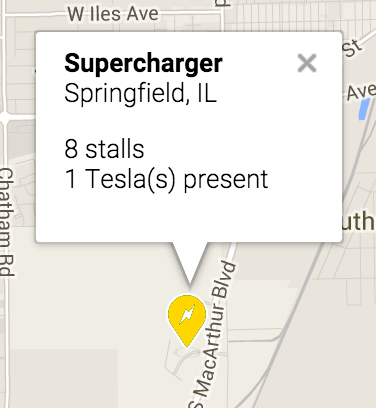
With all the commotion over supercharger lines in CA during the holiday break, I thought it would be a natural fit to add
automatic supercharger tracking to the web service. You'll know that you've been detected at a supercharger if an additional button pops up
asking if you want to add additional info about the supercharger queue depth.
Hope you guys find it useful. Note that it only saves supercharger "hits" and otherwise no other data is retained. It also uses a session cookie to avoid duplicate counting.
Waze for Tesla Incidents
 �
�
Jan 15, 2016
scaesare Nice!
Thanks for the continued work on this...�
Jan 15, 2016
bollar That's cool! We just need to get everyone on board with keeping your app front & center.�
Jan 15, 2016
kort677 isn't this feature now part of the upgraded nav found in 7.1?�
Jan 15, 2016
Max* ROOOFL. You think Tesla actually added something useful to the nav in 7.1?
AHAHHHAHAHAHAHAHAHAHAHAHAHHHHAHAAAAA
Sorry, back to reality. What they added was that if the SpC is down for maintenance, it'll show a different icon. It will not tell you how many cars are there.�
Jan 15, 2016
kort677 ok, calm down, how would waze get the data needed to inform you of SC usage?�
Jan 15, 2016
Max* Umn....
�
Jan 15, 2016
kort677 ummm, that sounds like notification from each individual charging unit would need to provide date to waze or tesla, what you alluded to may or may not be feasible it certainly doesn't sound as if it would give a true representation of usage of a particular unit. I know that I don't often comment on plugshare or waze and I would guess that the percentage of users "checking" would very high.�
Jan 15, 2016
SabrToothSqrl ha! that is so cool.
any way to make the roads/cops a little bigger?�
Jan 15, 2016
Max* No. The OP who wrote the Waze plugin for Tesla, has your car location based on it's GPS. If your car is located within X feet from a Supercharger, the icon pops up and you can tell the SpC how many cars are there. Then the next person can see how many cars are there.
The OP's implementation is not real time, and dependent on crowd sourced data (OP, please correct me if I'm wrong)
I didn't allude to anything, I think you misunderstood what the OP said.
The only way to get accurate representation is if Tesla does it. Only Tesla has the data. And even then it would only be accurate at the specific point in time you look at it. Because you don't know how many cars are traveling to the Supercharger, or how long they're going to charge. Both of these numbers can be estimated with decent precision, but you will never get a perfect answer until all cars are autonomous.�
Jan 15, 2016
Lloyd I believe we need a time and date stamp also on the reports, or have them time out after 30 minutes.�
Jan 15, 2016
MrClown Under the "report charger queue" I think you need an option for zero. I was playing with it and picked 1 but now I can't clear it. The SpC now shows 1 car present and 1.0 waiting. Speaking of which, fractional cars waiting is probably unnecessary. Nice feature though, I like the idea and hope people use it.�
Jan 16, 2016
Madartist That's an excellent suggestion to avoid seeing outdated data.�
Jan 16, 2016
Fezzik One issue with the superchargers is that I was driving a loaner that the SC loaned me and had it up. I forgot to close it out and it stayed on there all night as one there. Maybe do a timeout period?�
Jan 16, 2016
aesculus For the life of me I cannot figure out why Tesla does not provide this today.�
Jan 16, 2016
thegruf Is this meant to work in the UK?
I have no success on my Telsa browser here�
Jan 17, 2016
fact200 Mostly correct. However the implementation is realtime. To clarify, there are 2 pieces of information the website now tracks:
1) It passively tracks Teslas using the web app as they pass through supercharger sites. This translates into a tailing 1hr summary of Tesla presence that can be seen from the web app.
2) It offers the option for Teslas using the web app to volunteer information on the wait time in terms of queue length (How many Teslas are waiting for a charge). This is reported separately from 1) as a trailing 1hr average of the reports.
- - - Updated - - -
It should work. At least the Waze data for the UK/London area appears load correctly.
The Tesla browser can be horrendously slow. Try to reload the website a couple times.
- - - Updated - - -
The reports are based on the latest 1hr window of data.�
Jan 18, 2016
thegruf really tried very hard and no success at all - even on wifi
it does work on the PC at home though so is not a server issue - is almost like Tesla have locked this site out in the UK.�
Jan 19, 2016
fact200 Interesting. Can you tell what part isn't loading? Tesla sends all web traffic through a central proxy so it's possible things are getting stuck there. Here in the US I've had it hang on loading the map tiles a few times.�
Jan 19, 2016
thegruf never get anything displayed at all in the car, black screen until timeout then revert to previous webpage.
wish I could provide more info - sorry - but doesnt seem much I can offer to help you debug.
edit:
one possibility if you could make a temporary basic html page under the domain, then at least if I can browse to that we can eliminate domain related issues.
thanks.�
Jan 19, 2016
fact200 Ok, i put up a test page. Try this:
http://tesla-waze.excelsis.com/test.html�
Jan 20, 2016
RealSnurf Love the site! It'll become my new default. I wish the tap targets for events and dismissing the hovers were bigger though. Really difficult to hit that tiny X while driving.�
Jan 20, 2016
thegruf
Doh - I just realized I have been typing in tesla~waze.excelsis.com not tesla-waze.excelsis.com
when spelled correctly all is fine.
(the "tilde" symbol is next to the + symbol on the uk keyboard, which I had misinterpreted as the "-" symbol)
Thankyou so much for your help, and as everyone else here many, many thanks for a great extra feature.�
Jan 23, 2016
gnxs Thank you for the additional functionality to the Waze Browser page. In my limited experience it seems to work very well.�
Jan 23, 2016
fact200 its not obvious (and the sluggishness of the browser doesn't help) but the entire marker annotation is touchable; you don't need to isolate taps to the tiny x in the corner.�
Jan 23, 2016
SW2Fiddler I appreciate the updates made to the Waze For Tesla Incidents page. Too many of the other "utility" or "novelty" pages I've bookmarked in the car seem to be frozen in time. (And that time apparently was pre 7.0
I usually have this page loaded full time while driving.
Only complaint is not being able to turn off a Hover info except by either opening a different one or Refreshing the page.�
Jan 24, 2016
Camera-Cruiser I'm sorry, but I might be missing something. What is supposed to happen? On my iPad I get a white screen, when I try the test url, it says "it works" on my iPad, in the car it keeps telling to try reloading the page and times out. Am I supposed to basicly get Waze, working on my tesla, and it will actually show the car on the map the same way it does on my phone?
from what I've read, that is kind of what I expect, but so far, no connection in Southern California.�
Jan 24, 2016
Lloyd I love the queue reporting on the site. I used it over the weekend on a ~1000 mile trip to Northern California. I reported a queue at Vacaville, but only one car, and he waited only several minutes. I found it un-useful for planning purposes as I was unable to zoom out or scroll down to see the status of Superchargers a long distance away. Only about 100 miles from my present position was visible, or am I doing something wrong?�
Jan 24, 2016
fact200 You should see it asking permissions for your location. You have to allow this or else it doesn't know where to center the map.
- - - Updated - - -
Are you zooming out all the way? The zoom out is a little limited to avoid overloading the map with incidents, but you should be able to zoom out about 2 levels from the default. From there, it's possible to touch-drag the map, although this is admittedly sluggish.�
Jan 25, 2016
Lloyd Would not allow me to drag the map..... Tried for about 15 minutes while driving. Perhaps low coverage area. I'll try it again. How about a summary page for supercharger status????�
Jan 28, 2016
Camera-Cruiser I got it to work! But I could not type the url in. I had to link to the pages on this forum and click the link. Very weird.
But, it works!�
Jan 28, 2016
fact200 Another should be to search for "tesla waze". Should be the first search result in Google.�
Jan 31, 2016
FlatSix911 Well done!�
Feb 12, 2016
fact200 Make a quick hack to show info on superchargers within a 150mi radius. You may need to hit the "refresh" icon/button to get the update.�
Feb 14, 2016
MikeBur I noticed this earlier, thanks. Great idea and good implementation of the data screen showing super chargers. Any way to either make the button smaller and to the right so it doesn't interfere with driving north visibility please? I often use this on half of screen and this makes it relatively large. Perhaps a lightning bolt icon next to day/night? Or bottom right? Thinking out loud here ;-)�
Feb 16, 2016
SW2Fiddler Happy to say, this is no longer the case! Hovers disappear by a mere touch. Coolage.
And I still keep this page up all the time unless I want to surf while parked. While moving, you betcha "Waze For Tesla And Supercharger Queues" is showing!�
Feb 23, 2016
tess020 It seems that fixed cameras Cameras - waze are not showing up, at least not in Belgium. Only traffic events show up. Is Waze not exposing cameras in its API?�
Feb 23, 2016
brucet999 I had the same blank white screen you describe when trying to access via the link on TMC using Safari 9.0.2. It worked fine when I switched to Chrome browser.�
Feb 24, 2016
MikeBur Happy to report this was changed to an icon a few days ago. Apologies for not highlighting this previously - thank you. Rep (that little star under profile name...) given to Fact200�
Mar 7, 2016
12man thank you for teslawaze, just saw the addons saturday, great stuff and thanks again, works 1a in sweden�
Mar 22, 2016
TTT i noticed that we can now enter the number of cars in the QUEUE for the supercharger, may I suggest a 0 entry?�
Apr 9, 2016
Innovator I am from Austria / Europe. I also will use waze, because it is the best solution on the market. I use it already as an App on Galaxy S7. It works well!!!
Now I am trying to use it in my Tesla browser. Therefore I also try to use the Waze for Tesla Incidents and Supercharger Traffic link. But it does not work well....
I see the map, the zoom buttons, the list of super chargers, day / night symbol and my car arrow. Every 30 seconds I see a refresh. Although I can see a "danger sign" - triangle (live information from cloud), I can�t see any speed trap. But this is a very useful information....
I have also started the Waze for Tesla Incidents and Supercharger Traffic link on my S7. It works exact like on the Tesla browser. Same problem.... No speed trap information...
Can someone help? Is there a geographical restriction in Austria? Is there someone in Austria with a solution?�
Apr 9, 2016
Whitmarsh Anybody know how to report errors in Tesla Waze? In the UK, not all the SCs are listed and the list-heading says it is showing km when in fact it's showing miles. It doesn't show occupancy either.�
Apr 9, 2016
fact200 Hi,
Waze has some special handling with regards to speed traps/cameras in that they only appear when the viewer is approaching them; seems like some kind of compromise with the local authorities. Unfortunately, I haven't had the time to reverse engineer the channels through which Waze handles this.
�
Apr 9, 2016
fact200 Best place is probably here. Which SCs don't show up? Right now it uses the data set supplied by supercharger.info. So if it shows up there, it should technically appear here too.
This distance really is in km. It appears correct from my location and the calculations are "as the crow flies" using 6371000 as the earth's radius (in meters).
Occupancy is based on others using the web app.�
Apr 10, 2016
Innovator Thanks for the answer! I am wondering why my waze APP is working in Austria (on Galaxy S7).... Any idea about the reason?�
Apr 10, 2016
fact200 Hi, the official app supports it of course because they are their own first class customer. The waze for tesla site is an unofficial extension that required reverse engineering pieces of waze. The part of waze that handles the cameras and speed traps is apparently different from regular incidents and cop sitings and this requires further work to de-code.�
Apr 10, 2016
MrClown @fact200, thanks again for making this extension. Any chance you could add a URL-based option to load up in night mode? I always have my touchscreen in night mode and it would be great if it didn't have to come up in the very bright day mode first.�
Apr 11, 2016
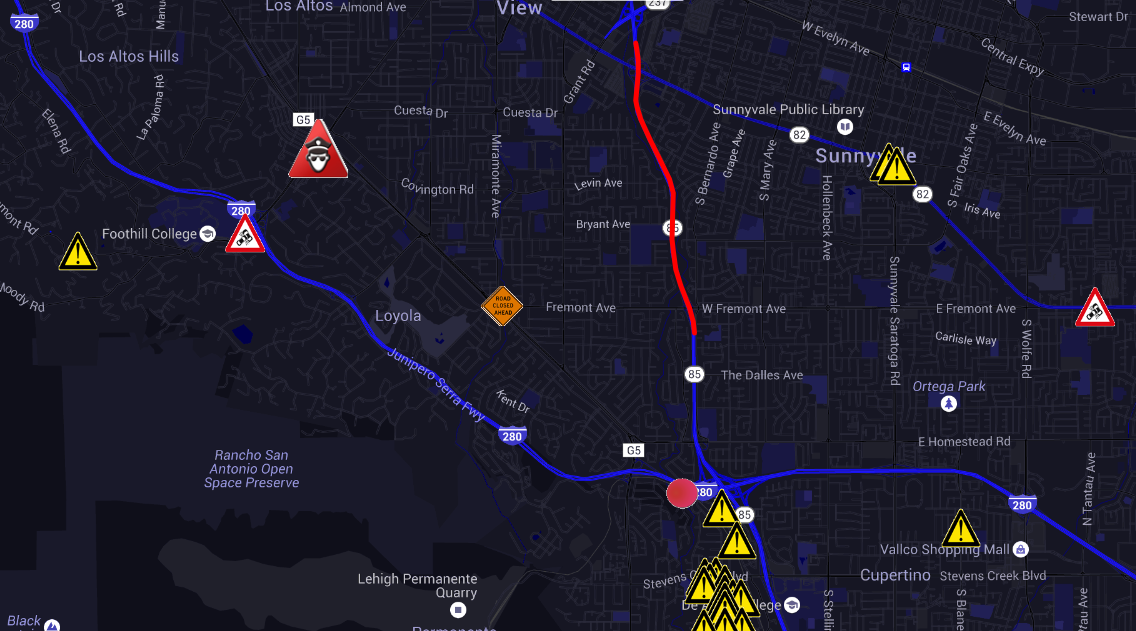
fact200 Ask and ye shall receive, try this url (with an added nightmode parameter):
Waze for Tesla Incidents and Supercharger Traffic�
Apr 11, 2016
FlatSix911 Well done!
 �
�
Apr 11, 2016
LetsGoFast I can't remember if anyone asked this earlier, but is it possible to attempt to orient the map with the direction of travel up?�
Apr 11, 2016
MrClown Thanks. Works great!�
Apr 12, 2016
fact200 It uses standard, web based, google maps. So until that can rotate itself, this version cannot either.�
Apr 14, 2016
neptune2000 It does not work with Safari. Load the Google browser on the iPad, and it will work.�
Apr 14, 2016
Camera-Cruiser Thanks.�
Apr 15, 2016
fact200 It works with Safari, however it needs location permission. Chrome will load the page without.�
Apr 18, 2016
Whitmarsh Here's a link to all the UK SCs - a lot more than are in the t-waze list. Tesla Superchargers in United Kingdom | Tesla Motors UK
Yes, I now understand that the distances are in km but that's not useful given that Nav and everything else in the UK are in miles.
Do you mean that, unless someone using an SC reports that, t-w doesn't know? How does one report it?�
Apr 18, 2016
fact200 All those superchargers are in the database, however Tesla-Waze only reports superchargers within a radius of 150 miles of your location.
Yes, the units are a bit inconsistent with some being reported in km. I'll make a note to update this in the future, however the exact distance itself is not terribly useful because, like the Telsa nav, the reported distance to the charger is "as the crow flies", not a routed road distance. The number most useful as a hint as to the relative distances away things are as so that it can sort the list from closest to farthest.
The database used is grabbed from supercharger.info which is kept up-to-date with open supercharges.
The reporting comes in only for the usage data Tesla Waze presents: Teslas using the web app will be automatically detected at superchargers. Because not all Teslas are using the app, users can also manually report a queue at the charger.
Hope this answers all your Qs�
Apr 18, 2016
brucet999 I looked at tesla-waze for the first time this morning. I found a list of SuperChargers, but quite implausibly, all sites showed the number of stations but none of them in use.�
Apr 19, 2016
fact200 What area are you looking at? The data reflects other users using the web site in their Teslas; so there are going to be sampling gaps.
Made a few changes this AM to clear up wording, replacing "in use" with "detected". Also, supercharger distances are now reported in miles vs km.�
Apr 19, 2016
Whitmarsh Yes, thanks for clarifying - and for the mods you made later.�
Apr 19, 2016
brucet999 I'm in SoCal, home of the busiest SuperChargers in the system. Other than maybe 3-4am, I doubt that San Juan Capistrano or Fountain Valley ever has zero users. Tesla-Waze showed 0/8 for Fountain Valley this morning but there were 8 cars charging when I arrived. That reflects a 100% "sampling gap".
What are the odds that out of 17 SC sites within 145 miles of me with a total 147 stalls, all would have zero chargers in use?�
Apr 19, 2016
MrLunch Really brilliant fact2000, well done!�
Apr 19, 2016
aesculus Is there a way to report you are at a supercharger charging via the app or do you need to use something else for that like Waze itself?�
Apr 19, 2016
brucet999 I must be dense. "In use" I can understand. What does "detected" tell me?�
Apr 19, 2016
aesculus Maybe he is answering my question too? If I bring up his app while at the supercharger he could detect my presence, and then report that to others. Just a WAG.�
Apr 20, 2016
fact200 Yep, it's all automatic unless you want to amend the information and report a queue.�
Apr 20, 2016
Andyw2100 The app can not report data that is not available. If you were under the mistaken impression that Fact200's free web page was going to give you an accurate representation of the number of superchargers in use in realtime you simply didn't understand the limitations of the technology.
All that fact200 is doing through his page is a) allowing people to provide feedback on what they saw when they were at the supercharger and incorporating that information, and b) automatically incorporating the information from anyone supercharging who is using his web app.
Since only a tiny proportion of Tesla users are using his web app, I would expect that in most cases the information provided about supercharging usage will not be accurate. You can help others by reporting accurate information when you can.
As for complaining about the shortcomings, the expression "Don't look a gift horse in the mouth" comes to mind. This is a free app, that works very well, and fact200 has asked for nothing in return. In my opinion your criticism, and particularly your tone were out of line.�
Apr 21, 2016
kort677 Knowing the volume at a SpC outside of densely SpC covered SOCAL
is not very important info that I need to know.
when on a road trip what choice other than waiting do you have if the SpC is busy? it's not like there's another one a few miles away.�
Apr 21, 2016
brucet999 Good point. Information on location of SuperChargers and number of stalls can be useful but info on number of stalls in use matters only where there may be SpCs close to one another (Truckee, CA, or Roseville, for example, where there are two SpCs within 5 miles of one another). Given Andyw2100's explanation that only a tiny fraction of Tesla drivers use the app, then it appears that usage values are not going to be useful any time soon in any case.
What would be really great would be for Tesla to collect and distribute real time usage status, but people on TMC have been asking in vain for that feature on Tesla Nav for years. Maybe they haven't done it for just the reason you brought up. Only in a few locations, or for locals (without home charging capability) who don't have time constraints on visiting a SpC would it be helpful anyway.�
Apr 21, 2016
brucet999 Andyw2100's overactive "tone detector" to the contrary, I hope you understand that I meant nothing harsh in my comments about the inaccuracy of SuperCharger information.
Being brand new to trying the app, and without having read through the first 10 pages of the thread, I hadn't noticed your earlier posts telling how you get SpC user info so I did not understand that the data were dependent on affirmative user input. I thought it would be useful to you to know that the data at present were entirely inaccurate. If I understand correctly now, it would take probably 10% of motivated Tesla-Waze users among the population at busy SuperChargers, manually reporting, for the data to be very accurate; a pretty tall order right now.
Just having ordinary Waze info visible on a large screen is a great advantage for users as well as a promoter of safety by keeping drivers from trying to log in and peer at a tiny, hand held screen on a smart phone while driving in traffic.
At the moment, Waze is reporting police at three locations within a half mile on Brookhurst St in Huntington Beach. Is that just an artifact of the reporting algorithm using the user's location at the time of reporting and so likely to be just one police car somewhere in that half mile?
Thanks for the good work�
Apr 21, 2016
aesculus It would really be cool when you are doing long distance traveling that you could reserve a charging station like Open Table. The system could keep track of your progress and either shutdown a local or prohibit a local from charging when you are just about to arrive. They could post your name or license number on a marquee on the charger kind of like Hertz does at rental locations. If they added your ETA than non reservationists would know that they were taking a spot that had limited use. And a website could provide the same status as is mentioned above.
Not going to happen but I can dream.�
May 25, 2016
ksquared Forgive me if there is a dedicated thread on this topic, but if there is I haven't found it. I've become so addicted to Waze that I tend to use it over a fairly good navigation system in my 535i and despite the fact this means I lose the nice heads up display (HUD) in my car. I read one post that notes that Tesla's rerouting approach uses Waze data, but my issue is that I have two primary routes home, and deciding between the two is really simplest with Waze. And I've also found it's predictive algorithm related to commute time keeps getting better, and is often frighteningly accurate.
What I'd like to know from current MX users (or Model S owners waiting to switch to the MX) who are also Waze fans, is: How do you currently use Waze in your vehicles? That is, other than using your phone to effectively bypass the car's nav, which is what I'm doing now and frustrates me given the cost of my upgraded Nav and negation of the benefits of my HUD.�
May 25, 2016
ecarfan I am unclear on why you are addressing your post only to X owners or S owners planning to switch to an X, since the Tesla in-car nav is the same in all S and X cars.
I am an S owner who uses Waze routinely simply because the Waze traffic data and driving times appear to me to be more accurate and up to date then the traffic data shown in the center display.�
May 25, 2016
Jurnimon ksquared,
I've rented a Tesla four times. I've settled on using Waze only for short trips and both Waze and the NAV together if I need to supercharge along the way and for longer trips. I use Waze for road and traffic alerts (disabling the turn by turn direction announcements) and the NAV for everything else
On my last trip few weeks ago, the Tesla NAV actually saved me from a messy traffic jam on the Jersey Turnpike that Waze had not yet detected. If it were not for the NAV, I would have surely ended up stuck in that mess for an hour or more.�
May 25, 2016
ksquared Good point. No particular reason, and I did realize that the Model S drivers would provide the largest pool of experience. I'll ask the question there, as well.�
May 25, 2016
Softwizard I am pretty certain that Waze is built-into the MX Google Maps Nav. The Nav has a setting to reroute based on X number of minutes of time savings. It has told multiple times of new routing based on better routes.�
May 25, 2016
ecarfan Hmmm...really? That is news to me. I own an S, not an X, but I will be very surprised if the X has a nav feature that the S does not have.
Last month, at the Tesla "Sunday Social" event at my local SC (and at SC's across the country) the onboard nav functions were discussed. There was no mention of the X nav having a feature not present in the S nav.�
May 25, 2016
FlatSix911 Try using search ... there is a dedicated thread on this topic View Waze Incidents on the Tesla browser
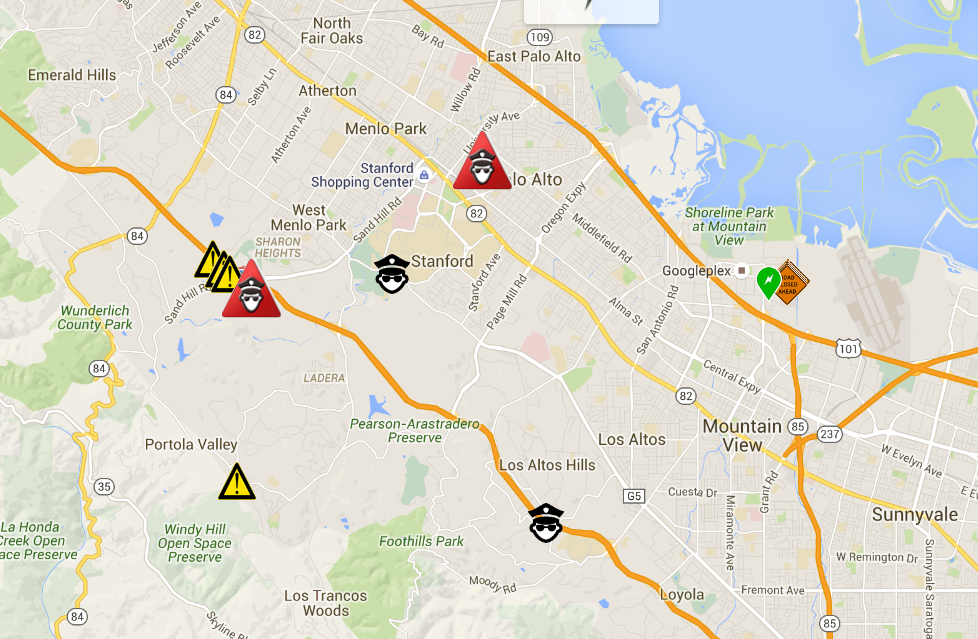
The custom app is a great tool for viewing traffic conditions and police activity in real time. Waze for Tesla Incidents and Supercharger Traffic
 �
�
May 26, 2016
Jasermd I am new here, just received X a few days ago. The navigation system on the X provided by google is disappointing. it does not appear to offer alternate routes for traffic. I noticed this thread. is Waze running in/oveer the google nav icon map or does it need to be loaded and used inside the browser? If so, how do I upload the settings? Thanks�
May 26, 2016
Jasermd I am new here, just received X a few days ago. The navigation system on the X provided by google is disappointing. it does not appear to offer alternate routes for traffic. I noticed this thread. is Waze running in/oveer the google nav icon map or does it need to be loaded and used inside the browser? If so, how do I upload the settings? Thanks�
May 26, 2016
ecarfan You can use Waze on your mobile device (smartphone or tablet) in the car, or you can use Waze in the Tesla browser in the center display.
The navigation map shown in the center display is from Google but it does not show events shown in Waze, nor does it allow you to select alternate routes.
If you input a destination into the navigation map in the center display and you are satisfied with the route shown, then use it. If you are not satisfied with that route then I suggest you use Waze.�
May 26, 2016
eye.surgeon You need to load it in the browser here�
May 26, 2016
Jasermd tesla browser? so it does not integrate into the tesla navigation/google map? and, tesla nav does not allow for auto rerouting for things like traffic? Thanks�
May 26, 2016
jvonbokel Correct, it loads in the Tesla browser, and does not integrate.
Also, minor correction, while the route does overlay on the Google Map in the center console, the routing is done by Tesla. I believe they licensed navigation technology from Garmin/Navigon, who in turn uses Navteq maps. Elon has talked about accounting for traffic in routing, but apparently it's not been a priority thus far.
Btw, thanks for reminding me why I didn't pay $3750 for the "Tech Package" back in 2012. Sometimes I wish I had. This is not one of those times.�
May 26, 2016
mspohr The update to the Nav software shows traffic (and has better detail than Waze).�
May 26, 2016
jvonbokel When you say "Nav software" are you referring to the map on the center touchscreen, or the birdseye navigation view in the instrument cluster? Also, does it take traffic into account in routing and ETAs, or does it just display it?�
May 26, 2016
ecarfan Not in my opinion. I use Waze on my phone and find it has much better traffic information.
Nav software in this case means the map shown in the center display.
I suspect the nav software takes traffic into account when showing the ETA, but am not sure. I do not believe that the nav software takes traffic into account when selecting a route, but again I am not sure of that.�
May 26, 2016
aesculus A bit off topic for the Waze posts but the Nav system goes way overboard on traffic rerouting on my Model X. I have gotten to the point of ignoring it.
It does not offer alternative routes (which I wish it did). Instead it automatically reroutes you. Sometimes it will take you way out of the way just to save you 5 minutes of time. I have watched it reroute in going into the bay area 5 or 6 times in the course of 50 miles.
What is missing that would be good is to offer to you the reroute and state how much it will expect to help and see if you want to accept it. Now it just runs off thinking it's best. Unless you were paying close attention just before the reroute took place you cannot see the time savings. And some of these routes are just BS. Like the other day it sent me off to city streets where the signals killed any potential savings.�
May 26, 2016
Lloyd The Nav does take traffic into consideration, and may re-route you after your start. Only about 1/2 of the time is the re-route beneficial.
Last weekend after charging at Burbank, (4 cars waiting), I got a routing to go side-streets to the 210 freeway, then to down Orange grove to the 110 freeway through downtown LA to the 5 south. Well after getting down orange grove it re-routed me to do a 180 back up orange grove to the 210 and eventually to the 215 S. through Temecula.
I gave up and finally just took the 5 south and fought the traffic. Long drive!!! I think I would have been better off just getting on the 5 from Burbank in the first place. I don't believe that it takes into consideration that you have access to the HOV lanes, and that regular reported traffic may not impede you as much as those outside of the HOV.
A toggle to disable re-routes should be added IMO.�
May 26, 2016
msnow There is already a toggle. Controls/Settings/Maps & Navigation/Traffic-Based Routing. Turn that off because it will drive you crazy until they fix it and give you route choices.�
May 26, 2016
Lloyd Thanks!! did not see that.�
May 26, 2016
Jasermd again, newbie here.
1) Nav refers to the Google Nav red arrow button on the top.
2) Waze only works with the browser button at top and does not overlay on Nav.
3) When using Waze, i do not see a way to enter an address for turn by turn directions
4) Nav does not offer shorter alternative directions or reroute based upon traffic to say time (or i do not know how to make this work)
5) is there a way to use a voice command to request directions. If so, does this only work with Nav
Thanks�
May 26, 2016
EdA 3.) Waze using the browser has no inputs besides resizing or moving, you can't report violations or use it for directions
5.) "Drive to <ADDRESS>" will request directions if you have NAV�
May 26, 2016
msnow 4) it does and you turn it on or off per my post above but it is not accurate and doesn't give you route choices.
5) or Navigate to <POI>�
Jun 30, 2016
gnxs Is this still working? I can bring up the website and the waze map loads in my browser, but the Waze user input information no longer shows (police, traffic, accidents, etc.) All I get is the map, none of the important info from Waze is there.
Anybody else having this issue?�
Jun 30, 2016
msnow It worked for me a couple of days ago.�
Jun 30, 2016
Wuggado? I experienced the same thing last night when using it for the first time. I just assumed there was nothing going on close by, but even when I zoomed out there was nothing along some pretty major freeways/roads. I only looked at it for 5 minutes or so.�
Jun 30, 2016
supratachophobia Waze broken in a loaner right now. Will try the other car when pick it up.�
Jun 30, 2016
DPDsModelS It hasn't worked for me since Tuesday.�
Jun 30, 2016
kort677 I gave up on the waze browser, the app on the I phone is far superior.�
Jun 30, 2016
goldenstop1 1- nice "priceless" tagline
2- yep, it's broken for me here in NJ too. It broke the day after I started using it. So I guess I broke it. Sorry.�
Jun 30, 2016
msnow I'll be seeking reimbursement from you from any tickets I may get until it's fixed.�
Jun 30, 2016
goldenstop1 Pattern analysis: I drove to a meeting, and it worked. Then I picked up my wife to drive to dinner, and it didn't work. Please address your grievances to the clear root cause of our problem...�
Jun 30, 2016
SomeJoe7777 Yep, I'm seeing the same -- the past couple of days, the site is loading and showing the maps fine, but there is no data from Waze displayed (no traffic, accidents, etc.)
I think this may not bode well. It may mean that Waze has changed their API and the Tesla Waze site is no longer able to retrieve the Waze data.�
Jun 30, 2016
fact200 Should be fixed. Please try again.�
Jul 1, 2016
WannabeOwner Could it show a message if it is not getting any useful data from the API pls?
I came through two highway closures yesterday evening, neither were shown (nor on Google Maps as it happens), [presumable because of the problem you had) and I could fire up Waze on my phone if I knew your site was having a problem�
Jul 1, 2016
msnow Don't forget this is a free app, no ads, labor of love.�
Jul 1, 2016
scaesare It also was not working for me yesterday.
I see the report of it being fixed so I will try again. I'd like to thank fact200 for his generous effort in providing the app, and responding to the reports here.�
Jul 1, 2016
SomeJoe7777 It worked great this morning, thanks for the fix!�

Không có nhận xét nào:
Đăng nhận xét