Mar 13, 2012
dsm363 Just picked it up at the post office. Will hopefully find time to install it this week.�
Mar 13, 2012
NigelM Antenna Installation Tip
I installed the antenna today and threading the cable behind the waterfall was turning into a PITA. (Maybe the CF has less play than the original parts?) Then had the following idea and it suddenly became very simple :smile: :
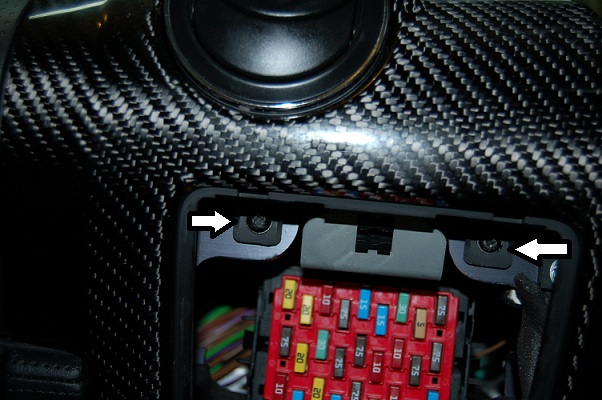
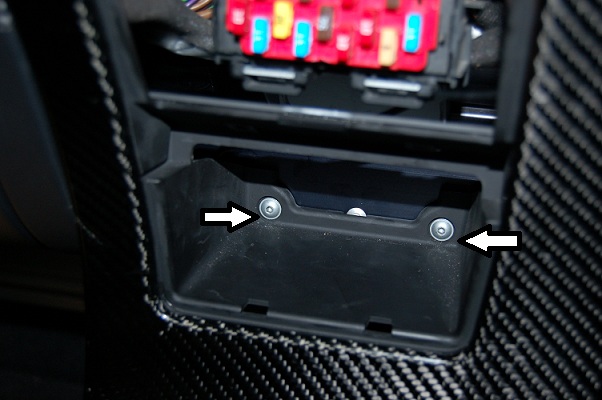
If you're mounting on the windshield then removing the binnacle/waterfall makes sense. However, I was a little worried to try this as it also slots in behind the airbag cover and I definitely didn't want to risk damaging anything there. I did see 2 screws and 2 bolts which looked like they held the binnacle in place so I loosened those and the pulled up the door sill (which is only fixed with velcro). By removing those screws/bolts the binnacle was easily loose enough to thread the antenna cable through in seconds, no problem and no need for a guide wire (fish tape). Here's the pics:
Use a medium size crosshead on these two:
Use a 3mm hex key on these two:
 �
�
Mar 13, 2012
dsm363 I'm still in the process of installing it. Looks like it only came with half of the velco part to attach it but I can find that around here I'm sure.
I placed my antenna on the passenger back window behind the headrest and ran it along the side of the carpet so it's mostly hidden. Do you only need to do what you did above if you're placing it on the front windshield?�
Mar 13, 2012
NigelM Yes... Living on an island here, the cell tower is on the mainland and I figured that the antenna needs all the direct exposure I can give it.�
Mar 13, 2012
dsm363 Ok. Have SMS control now but can't get data connection to work. I'm sure I set something wrong but is anyone else using the AT&T Paygo setup? I used WAP.CINGULAR for my APN and my phone number and PIN for my username and password. Maybe that's not correct.
The first time I sent the SMS to setup data connection, I typed the wrong phone number in so I sent a second one and got a second response 'System parameters have been sent'�
Mar 13, 2012
markwj The latest velcro that we use sticks to itself - it is unisex ;-)
You should be able to cut it in two to end up with two halves (one for the car and one for the module.�
Mar 13, 2012
markwj The car seems to be reporting in ok, but you've got the App connected to the default (Open Vehicle Systems) server.
On your iPhone can you go to Settings / Open Vehicles and set "tmc.openvehicles.com" as the server. Then, re-launch the App and everything should work fine.
P.S. This is very common. Growing pains of the App still having the old default server. The next update to Apple will resolve this ongoing.�
Mar 13, 2012
dsm363 Thanks. Found the openvehicle settings under the iPhone settings area.
username is blank and password has something in it. Leave those alone? Thanks for your help.
It's working! Awesome. So cool.
Is PIN to lock car the PIN in the VMS you use to activate Valet mode?�
Mar 13, 2012
markwj Yes, not currently used. They will be your openvehicles.com username and password, in future.
Yes.�
Mar 13, 2012
dsm363 Thanks. I've got my car plugged in now and the icon of the Tesla connector is there. My car is scheduled to charge and 1AM but I slide the connector back and forth and it said 'starting charge' then the app crashes. The car also didn't start charging. Could that be because I have it set to charge in a few hours?�
Mar 13, 2012
markwj You most likely have "CAN write" (feature #15) off. If you want to control charge from the App, then:
Launch the App and wait for the icon to stop flashing and the car to be "live".
Click "Control" in the top-right corner.
Choose "Features".
Scroll (?) down to feature #15 (CAN Write).
Set feature #15 to 1 (default is 0).
Click away anywhere on the screen and wait for the feature change to be saved.
Go back to "Control".
Press "Reset OVMS Module".
It will then take a minute or two to reset and reconnect, then you should be able to control the charge.
Regards, Mark.�
Mar 13, 2012
dsm363 That did it. Thanks for walking me through it. Everything seems to work great now.�
Mar 13, 2012
vfx Thanks for posting the videos Mark. It looks great. Did not know it was an info only system.
Where is the best place to log user feature requests?�
Mar 13, 2012
markwj Not sure what you mean by info-only. It started out only monitoring (v1.0), but the v1.2 has the function to write-enable the CAN bus and then issue commands (lock/unlock the car, set valet mode, set charge mode, start/stop charge, activate ejector seat [not], etc). There are also experimental features which should eventually make it mainstream (like digital speedo, which is really cool).
Probably most up-to-date list of _current_ features is at:
Open Vehicle Monitoring System
For in-depth discussion, hop on board the developers mailing list. http://lists.teslaclub.hk/mailman/listinfo/ovmsdev
Alternatively, there is the original _product_ thread here: Open Vehicle Monitoring System�
Mar 14, 2012
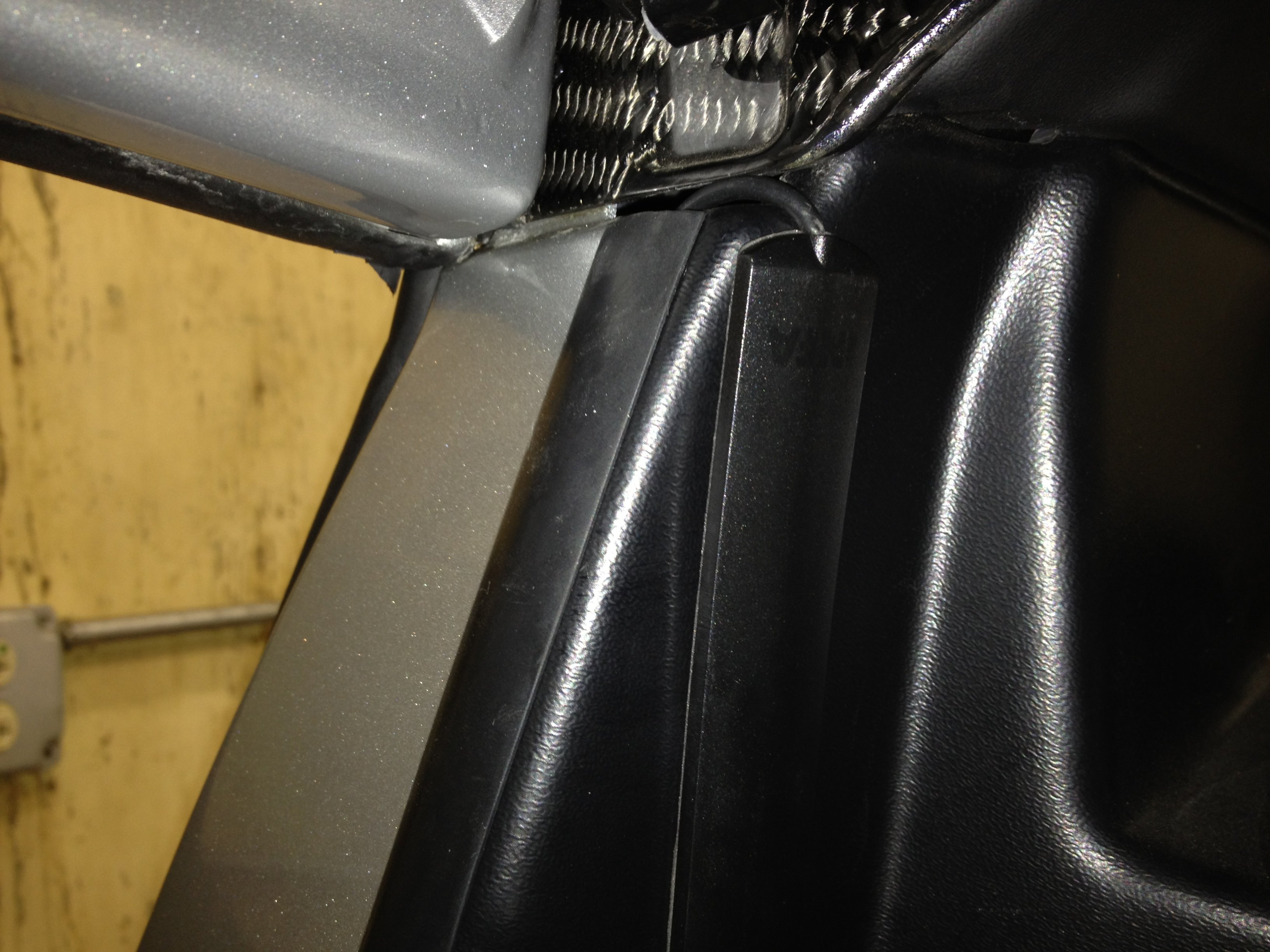
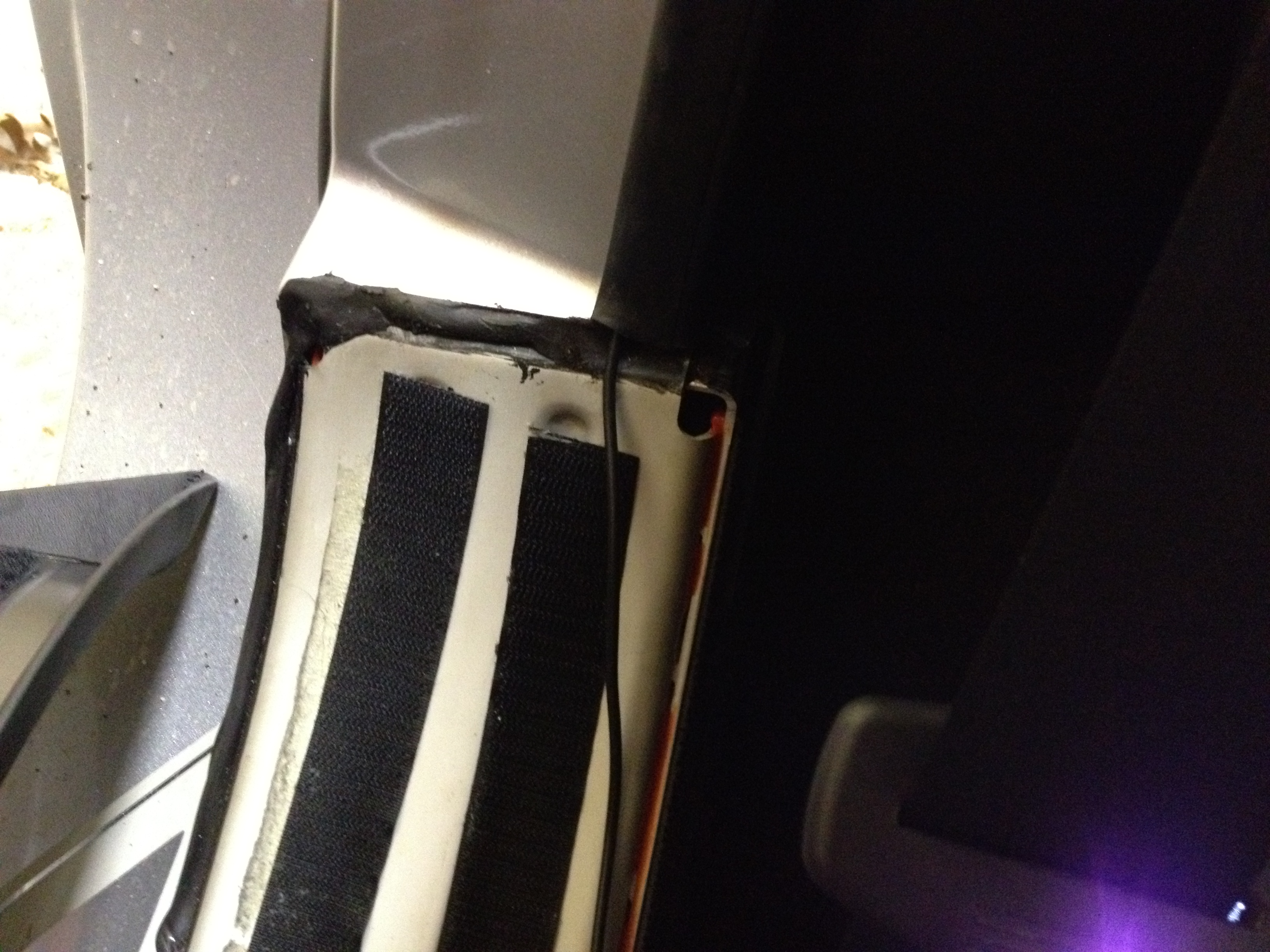
mpt I've installed the antenna next to the passengers head; seems to work ok. I ran the cable behind the rubber strip that links the interior black plastic to the body.
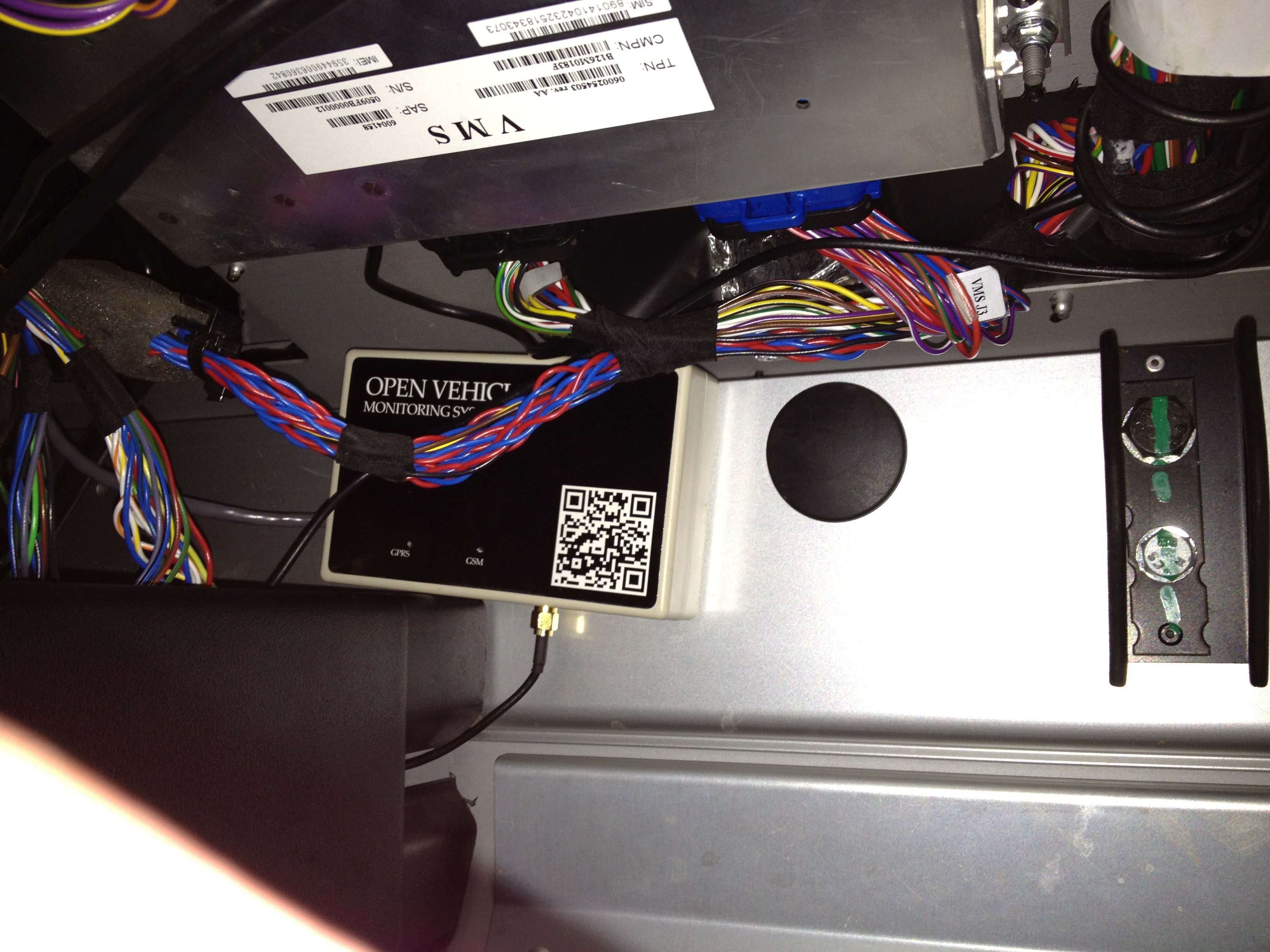 �
�
Mar 14, 2012
mpt Just to confirm; I have PayGo working fine "-" and "-" are the userid and password so:
PARAMS M IP 64.111.70.40 WAP.CINGULAR - - VEHICLEID PASSWORD -
�works for me, VEHICLEID being my vehicle id and PASSWORD being where the password goes.�
Mar 14, 2012
markwj Cool: VMS + OVMS�
Mar 14, 2012
mpt Shame we couldn't glom onto their GPRS service!�
Mar 14, 2012
dsm363 Correct. I got it working now too. User ID is ten digit phone number (all digits with no spaces or dashes) and password is four digit PIN.�
Mar 14, 2012
mpt I don't think so, as I understand it, the userid and password aren't required on AT&T, never used them in the past, not using them now. I suspect they're being ignored if you're passing values in.�
Apr 10, 2013
wiztecy Any word on getting the battery cool down feature implemented like the Tattler? Would be sweet to just press a cool-down button that sets the AMPS down to 12 and charge mode to Range Mode. Then once the battery pack temp has reached 26C shutdown the charge.�
Apr 23, 2013
markwj Targeted for v2.5.x - but still a few months off.�
Apr 24, 2013
wiztecy Cool, LiterallyThanks Mark!
�
Jul 31, 2013
JohnnyLounge21 I have a Verizon account and an iPhone. I already have a second device on my plan (Jet Pack - like and AirCard) and I'd like to look into getting OVMS. Has anyone used Verizon for this? What else do I need to know? I'd like to have everything set up on the phone side of the house and then go get the OVMS.
Thanks so much in advance,
RW�
Jul 31, 2013
DrComputer Since Verizon does not use a GSM network they do not sell pre-paid SIM cards. You'll need to use a GSM provider like AT&T, TMobile or the international one that Mark suggests. I've used the AT&T prepaid SIM and it works great. You can just load it with $100 for 1 year and you'll never use it all.�
Jul 31, 2013
NapaValleyMike Can this be installed on a 2008 version 1.5?�
Jul 31, 2013
shrink Would the product below from Amazon do the trick or should I just walk into a local AT&T store and ask for a prepaid GSM SIM card? I have the OVMS module, cable, and antenna, but am still waiting for the Roadster.
Amazon.com: Att Att Go Sim Card for Gsm Prepaid Cell Phone Service-no Contract Required: Everything Else�
Jul 31, 2013
markwj Yep, no problem. Both 1.5 and 2.x cars supported.
(only limitation being the experimental digital speedo feature is only for 2.x cars)�
Aug 1, 2013
JohnnyLounge21 Thanks so much for the support and thoughts, DrComputer. It sounds like Mark may offer an arrangement with a SIM ready to go with the OVMS (I hope I'm not dreaming!). If that route is available, I could potentially get this done all at once. The whole AT&T thing is was really makes me leery. Especially when I already have Verizon and I'd like to avoid having another bill to deal with!
Every hour I read more about ALL THIS - I'm understanding it more. At first it all read like stereo instructions, now I can really decipher what we're doing on this thing! I can't wait to get my order in! Moreover, I can't wait for it to be working in #1190!
What a great community.�
Aug 7, 2013
Fabrizio Is there a listing of vehicle alert codes for the Roadster 2.5? Such as 1463, 1174, 934, etc?�
Aug 7, 2013
markwj This is the most comprehensive I know of:
Open-Vehicle-Monitoring-System/server/ovms_server_tr.vece at master · markwj/Open-Vehicle-Monitoring-System · GitHub
If you see any others, please get a picture of the VDS and send it in to me.�
Aug 7, 2013
DrComputer Yes, that should work or just walk into any AT&T store and they will give you one for free and you can even have them put credit on it for you while you are there.�
Aug 7, 2013
DrComputer Verizon really can't help since they don't offer pre-paid GSM SIM cards. If you just load up the AT&T card with $100 of credit you only have to deal with AT&T once a year (and just then it's just adding another $100 of credit from the online page).�
Aug 7, 2013
Fabrizio Unfortunately that list does not contain the codes that my OVMS keeps texting me, and they do not appear on the VDS. What I have been getting is as follows:
Vehicle Alert Code: TR2N/934 (00000002)
Vehicle Alert Code: TR2N/1174 (00004000)
Vehicle Alert Code: TR2N/1174 (00004020)
Vehicle Alert Code:TR2N/1463 (00800000)
Can you decipher these?�
Aug 8, 2013
markwj Not really - if I could, they would be in the OVMS list with nice names
I think 934 is most likely charging related. 1174 is a debug level event that I sometimes see (I'm told nothing to worry about). Haven't seen 1463 before.
Sorry I can't be more definite. We don't have any document on the codes, so all we know is from people seeing it on their VDS and reporting the code and message to us.�
Aug 8, 2013
adiggs There is a 920 - Charging Problem that I've seen Mark. I don't have a picture from when it happened, but the circumstances were trying to make use of a Nema 14-50 outlet at a hotel. Our guess is that there was a problem with the breaker or the wiring, but never did nail it down precisely (or get a high power charge there).
On the really fun side - when I talked to Tesla Service that night, they didn't have the code on their list either and didn't have any ideas about what to do about it either.
�
Aug 8, 2013
markwj Yeah, it seems the 9xx ones are charger related. If you, or anyone, sees these codes come up, please try to snap a picture and send to me,
P.S. Me want that list...�
Aug 8, 2013
mg012 I just want to mention a small "gotcha" i had with the AT&T Go SIM card: you need a PIN number to allow you to refill the account for the card. That pin gets sent to your "phone" but of course the sim card is actually in the module and although i think its supposed to forward any messages to your actual phone, mine didn't. I had to put the sim into a real phone to get the pin once and then put it in the OVMS module. Maybe I just did something wrong but it can happen.�
Aug 8, 2013
markwj Not sure if it works on AT&T, but the apps (in the control menu) have an option to send an MMI/USSD code. That is operator-dependent, but normal is a sequence of numbers, # and *. The response, as an SMS, should come back to the App. You just need to find the appropriate code for check-balance, or check-pin.�
Aug 8, 2013
7racer Hmmm that's weird. I just log in to the AT&T go website and refill the account. Never have to take the sim out.�
Aug 8, 2013
vfx Something I'm sure will be included later...�
Aug 9, 2013
mg012 7racer: I only had to do it once to set up the pin. Now I login to the att website whenever I need to without touching the sim.�
Aug 10, 2013
FANGO Hi all, I'm the happy new owner of #163, and I just got my OVMS module in the mail. I went to this website: Updated and Expanded: The Best US Prepaid Data Deals | Prepaid Phone News to find out which carriers give the best deal on prepaid cards. I notice everyone here is getting AT&T, but PTEL seems to have a plan which is half the price, and has the positive bonus of not having to do business with AT&T. If PTEL has GSM SIMs, can I use one of them for OVMS? Or does it require some sort of special login, as the "wap.cingular APN" seems to imply?�
Aug 12, 2013
FANGO I attempted to post a reply to this post a few days ago and it doesn't seem to have shown up. I figure it could be because I'm a new account and I tried to post a link, so I guess I won't post it here.
For the SIM card for OVMS, can I use any GSM SIM card? I found a link which talks about the cheapest prepaid plans, and there's one (PTel) which costs half as much as AT&T and has the added benefit of not being AT&T. Can I use this other provider, would it still work for OVMS?�
Aug 12, 2013
markwj OVMS uses GPRS data and is quad band (850/ 900/ 1800/ 1900 MHz). Seems to be PTel card uses T-Mobile on 1700 or 1900 MHz, so should work on 1900. Coverage may not be as good as AT&T (850 and 1900).�
Aug 23, 2013
rgjones Hi Folks,
From the Tattler's comprehensive database of alerts;
934, "DMC FW: Line OverCurrent Peak fault"
1174, "Fasten Seatbelt"
1463, "HVAC: Compressor OverTemp"
You might want to talk to your ranger/local service office about those other than "fasten seatbelt".�
Aug 23, 2013
Doug_G HVAC Compressor Overtemp is often ignored by service, but in fact it may indicate that your freon was not charged correctly. There is a part in the system that tends to freeze when it is filled, and if that happens the charge doesn't work right. My car did that error whenever it was charging for over a year, until I had the front heat exchanger upgrade and my Ranger charged the freon properly.�
Sep 20, 2013
jayfrost I have recently installed my OVMS v2 into my Tesla Roadster. The install was smooth and sms works fine with the OVMS. My issue is that it cannot connect via GPRS. I have followed the guides and tried all the various suggestions.
My setup:
ATT $.10 per minute plan* it says data is $.01 per 5KB
APN of WAP.CINGULAR
No login and no Pass (i have tried using my sim card # and pin but failed as well)
I keep getting the error (0x0042) not connected.
Can anyone help?
Thanks,
Jason�
Sep 20, 2013
AudubonB What IS the OVMS and is it applicable/useful only for Roadsters, or is it something good also for Model S's? When I go to http://www.openvehicles.com.....there is, as far as this troglodyte can determine, absolutely nothing that describes just what the OVMS is/does.�
Sep 20, 2013
dsm363 It's an open source project (awesome project by the way) that is hardware/software that brings many of the functions (and more actually) that the Model S has to the Roadster. Can locate your car, lock and unlock doors, start charging...etc�
Sep 20, 2013
Kratus It can also be used on other cars such as Volt/Ampera, Twizy, iMiEV, etc.
You can remotely Monitor the state of charge, vehicle location, temp�ratures, tire pressures, etc.�
Sep 20, 2013
markwj Assuming you have SMS access, can you send the results of these SMS requests to support (at) openvehicles (dot) com:
DIAG
GPRS?
MODULE?
SERVER?
STAT
Also, make sure the little switch on the module is pointing inwards (GPRS enable).�
Sep 20, 2013
jayfrost I wanted to follow up my post so if anyone else has a problem they will not make the same mistake I made.
When Mark asked for the results of the sms access, I noticed that the VehicleID was incorrect in my settings. Of course I figured it had to be the sim and tried everything to adjust that. I actuality it was a typing error that made the server not connect. I have since correct my silly mistake and all is working fine. Thanks Mark for the help.
J�
Oct 13, 2013
AEdennis Was it the Vehicle or the Nickname? I'm getting the same error and doublechecked those settings and it looked fine (using the OVMS Vehicle ID)
Thanks,�
Oct 13, 2013
markwj VehicleID. Nickname doesn't matter.
Probably best to eMail support (at) openvehicles (dot) com, with results for following SMS commands: STAT, MODULE?, SERVER?, GPRS?, DIAG.�
Oct 13, 2013
jayfrost It was the vehichle id�
Oct 13, 2013
asgard What is the typical support response time of Fasttech? My OVMS unit seems to be DOA...it's been a couple of days, no response.�
Oct 13, 2013
markwj Fast, but they have been shutdown for golden week.
Better to go through me for RMA (they'll probably just direct it back to me anyway).
Can you eMail support (at) openvehicles (dot) com with details? What flashing LEDs do you get when you plugin? Any SMS response? What sim are you using? Anything else relevant?�
Oct 14, 2013
asgard I will send you an email separately.
It gets stuck on 06 - GSM COPS lock failed.
There is no SMS response.
I am using an AT&T sim.�
Oct 14, 2013
AEdennis OK... Looks like AT&T disables access to GPRS when the credit balance falls below $5... As a result, I couldn't connect the car to the Internet. I just added the credit, and am waiting for the better half to get home so that I can re-install and test.
Will update later.�
Oct 14, 2013
markwj Yes, that is very common. Think of GPRS like a VPN connection. Cellular providers seems to authenticate it (and allow/disallow) when it connects, but have no way of tearing down a connection once established. So, they impose a dollar limit at the GPRS connection authentication time (hoping you can't use up more than that dollar amount on a single connection, given their shoddy cellular coverage will drop the connection at some point anyway).
Value of $5 or $6 are commonly used.�
Oct 14, 2013
AEdennis That did it... Got the app working just fine. Need to go ahead and tuck everything in nicely and complete the install. Everything is working great now...�
Oct 21, 2013
AEdennis Ok... Install complete with lessons learned. Wrote a post on my formerly ActiveE blog, now have to figure out a new name for it as it will soon be outnumbered 2:1 by Teslas and then replaced by a Roadster and Model S...
Thanks for the OVMS community for making such a great solution to bring the Roadster inline with the rest of the EVs out there. (not quite with the Ford Focus Electric from what I'm hearing regarding the iOS 7 incompatibility of their App). By the way, based on what I read on the manual, I would assume that the Speedometer hack only works with Roadster 2.x and not on 1.5?
Thanks,�
Oct 21, 2013
markwj Yes, only on 2.x cars. The dashboard is different for 1.5, and can bus messages are different.�
Oct 30, 2013
AEdennis
Ok...
I noticed that the IOS App had a RED Antenna for 9 hours (just now) and the following was the result of the GPRS?
GPRS: APN:WAP.CINGULAR User: Password: GSM:AT&T GSM: OK Server: Not connected
I checked the balance on my account and I have $9.82 and was told when I originally had the problem of connectivity that the threshhold was $5 before they disable GPRS.
So, any ideas? Is the server down? Car has been parked for five days.�
Oct 30, 2013
shrink I'm having the same issue and just e-mailed Mark. I imagine it's on the server side. It was working just fine last night and when I woke up this morning I was getting the blinking red antenna.
I'm sure Mark will chime in when he's available.�
Oct 30, 2013
AEdennis That sounds reasonable. I've been playing around with my initial $20 (two $10 recharges) before I commit to $100 recharge to keep it active for a year. Funny enough I was getting ready to do a post on my blog comparing my delightful OVMS experience and My BMW App for my Active E... So, this just helps with further content stuff for me.�
Oct 30, 2013
blavenn Same issue here as well went down 9 hours ago and just went back online a minute ago!�
Oct 30, 2013
thefortunes My connection is down too but, more importantly...FIVE DAYS WITHOUT DRIVING THE ROADSTER? :scared:�
Oct 30, 2013
AEdennis Wife's car... We were in Austin for a wedding Friday to Sunday... There was rain Monday and Tuesday (she doesn't like to get her car wet). Additionally, I've been driving her around (carpooling, still no HOV stickers on her Roadster) to work so she can make it to the office in time for a couple of early morning meetings... The Active E is plenty fun and sometimes I don't feel like being a contortionist to get in the car (and I get to use the carpool lane solo).�
Oct 30, 2013
markwj Strange. I just checked the server and everything running fine there. Not getting any alerts from pingdom either.
A good way to answer 'car or server problem?' Is to try the demo car (DEMO/DEMO) - if you can access the demo car, then the server is ok.
Is this still down for people, or ok now? If still down, can you let me know your cellular provider?�
Oct 30, 2013
AEdennis Live now... Just checked.
OVMS? = GPRS: APN:WAP.CINGULAR User: Password: GSM:AT&T GPRS: OK Server: Connected OK
Thanks,�
Oct 30, 2013
blavenn Live now again too for the past few hours...�
Oct 30, 2013
shrink Working here, too.�
Oct 30, 2013
markwj Really no idea of the cause, but glad to hear it is ok now.
Perhaps swamp gas from a weather balloon was trapped in a thermal pocket and reflected the light from Venus.�
Jan 19, 2014
Roadrunner13 Hello,
I just started installing my OVMS and I'm getting all of the proper SMS responses but I can't seem to get the GPRS to connect.
Since I just bought it, the firmware is pretty much up to date for the roadster: 2.5.5./TR/V2.
I'm in Canada and using a Rogers SIM pay-as-you-go for which I ordered a week data pass of 60MB using my phone to validate that data worked.
When I type GPRS?, I get the following response back from OVMS:
GPRS:
APN:internet.com
User:wapuser1
Password:wap
GSM:ROGERS
GSM/GPRS:Not connected (0x0042)
The APN/user/password is as described on page 1 of this thread. I've also tried an all uppercase version of the entries with no success.
Any idea what 0x0042 means?
I'm also getting 5 greens and 8 red LED flashes...which points to GPRS Init...but that I'm kind of already aware through this error code.
Also, when I re-enter all the parameter with the GPRS command, the error codes reads as follows instead: (0x0042AT+CIPSHUT)
Thx�
Jan 19, 2014
znino Hi Roadrunner,
I have had my OVMS model installed for over 2 years and running on the Rogers network. I really had no issues setting it up by using the supplied user manual and following all the steps. I have looked at my parameters that are set and they all seem to be identical to what you have listed above (APN, Network user, pw etc). The only difference is mine come back as all uppercase but I doubt that makes a difference and you say you tried it with uppercase anyway. Maybe someone will know what that error code means.
On another point, what is a week data pass for 60MB? I do not know this plan with Rogers but from the title it sounds like something that is good for a week and then auto-renews. If so, there is really no need for that much data every week. I am using a Rogers sim for tablets that scales up as you need it and basically has 10MB for 7.83$ every month including all taxes. I have never exceeded the limit and use the app regularly. You might want to look into that. contact me if you need more info.�
Jan 19, 2014
tomsax Do you have the GPRS switch on the board in the right position? If the switch is in the position nearest the edge of the board, it disables GPRS, so make sure it's slid away from the edge.
Also, do a MODULE? command to make sure your notification mode is SMSIP.�
Jan 19, 2014
markwj Best to contact support (at) openvehicles (dot) com, and give us the output of the following SMS messages:
MODULE?
SERVER?
GPRS?
DIAG
STAT
I would also suggest triple-checking all usernames and passwords.
Regards, Mark.�
Jan 20, 2014
Marius My advise is first test the SIM in a standard telephone to test the GPRS connection. In my situation this has solved connection problems.
Sometimes the SIM has to be setup in a mobile to make connection work.
Also like said above check the dip switch in the module.�
Jan 20, 2014
Roadrunner13 Great feedback guys. Thanks a lot.
After reading your responses I figured the best thing was to get a brand new SIM card rather than re-use my wife's.
I had tried it in her phone and had to call Rogers to enable GPRS and even if data worked in her phone afterwards, I felt suspicious.
Since I had tried everything you guys had suggested:
reconfigured 4 to 5 times, tried different APN/user/password found on the internet for Rogers, tried dip switch in both positions...that really was all that was left.
So looking at ZNINO's response, I went to Rogers and picked a new SIM card for tablets with 5$/10Mb/month.
Definitely the best deal. What I was trying was 5$/60Mb/1 week, and it couldn't be renewed automatically.
They call it a weekly data pass that must be renewed from the device/phone... no good for our situation.
Of course, I put this new SIM card in tonight without any validation with a phone and everything worked immediately.:biggrin:
No other changes in configuration, no SMS to do... the green LED when through its countdown sequence and stopped at 1.
I proceeded to install the iphone apps, configured it and voil�! Remote control of my electric car! So cool!!!
Now, if only I had the proper PIN for the car, it would allow more benefits from the apps.
I just bought the car and the PIN was supposed to still be set to the default (1234)... and it's not :cursing:
Considering the VMS was just replaced, I was that much more surprised that it's not the default...
I guess I'll have to ask the Service Center figure out how to reset it now.�
Jan 20, 2014
znino Glad my suggestion to pick up the tablet data sim from Rogers worked out�
Jan 20, 2014
markwj Glad to hear you got the OVMS working.
For the PIN, this thread might help:
Security PIN: Method to recover, or return to default 1234?
Regards, Mark.
P.S. In theory, a system like OVMS could 'recover' that pin for you. There are only 10,000 combinations. But, there is 'hacking' and *hacking*, and I'm only in favour of the former (given my day job).�
Jan 21, 2014
Roadrunner13 Thanks for the link Mark, I'll get my logs and send them to Tesla.
As for *hacking*, I agree with an open source project available adding a quick loop to try all 10K combinations is not much of a challenge but let's avoid going there (...similar type of day job) :smile:�
Jan 21, 2014
smorgasbord I think it's 999,999 combinations. At least, I have a 6 digit code on my v2.5 and if I enter only the first 5 it doesn't work.�
Jan 21, 2014
markwj Yes, I think they actually allow up to 8 digits. I should have said _usually_, as most people use four.
Aside: my 10 year old daughter proudly showed me her iPod Touch the other day - with a lock screen newly asking for PIN code. 'Now I am safe', she proudly proclaims. I take it, enter 1234, and it unlocks. She leaves all grumpy, muttering something about hacker papa.�
Jan 28, 2014
Pantera Dude Hello Mark,
My 1.5 Roadster will not charge when scheduled with the timer, there is no problem charging manually. Tesla diagnosed the problem as a bad APS or auxiliary power supply. It was going to cost $5500 to repair which involved replacing the battery with a refurbished one. It isn't worth that much money to me to have the timer working. It was suggested by someone on the forum that the OVMS might solve the problem? I'd like to get your thoughts regarding this.
Thanks,
Art�
Jan 28, 2014
tomsax Art,
If the APS is bad, I wonder if OVMS would be able to start a charge while the car is sleeping. I'd recommend borrowing an OVMS (or Tattler) from someone and giving it a try. Plug the car in, wait at least five minutes without touching the car, then try to start a charge from the gizmo.
I'm sure there's someone in the Long Beach area with one, but if not I have an old v1 OVMS I could mail to you to try out.�
Jan 28, 2014
markwj Pantera: Tom's advice is sound. I would be concerned with what else being broken. That APS runs a bunch of systems,�
Jan 28, 2014
AEdennis Art,
I'm in Long Beach and have OVMS in my wife's 1.5 Roadster. PM me and I can see if I can lend you my OVMS to test... I DID just flash it to the new firmware a few weeks ago. (is your Roadster a black one? My wife swears she's seen one around the 405 near LGB)�
Jan 30, 2014
Pantera Dude Thank you Tom!
- - - Updated - - -
Thank you Mark. Everything else on the car seems to work fine. That does seem a little strange doesn't it?�
Feb 6, 2014
Pantera Dude AEdennis has kindly lent me his OVMS to try in my car. I need an antenna to do the test. Where can I find one and what kind of antenna is it? Is this a radio shack item?
Thanks,
Art�
Feb 6, 2014
Pantera Dude Dennis' antenna is not easily removable from his car. If he programs the OVMS, (installed in his car), to start charging at 12 AM, will the unit attempt to start charging my car, (when we move the unit to my car), with no antenna in my car? I assume the OVMS box itself would be programmed to start charging and that it would make no difference what car it is installed in? And in this case, no antenna would be required in my car, right?�
Feb 6, 2014
markwj If your car is a 2.x, easiest is to 'borrow' the antenna from the Tesla VMS. You'll see the same connector type plugged into the VMS just next to where OVMS would be in the footwell. While disconnected from the VMS, Tesla GSM won't work.
Failing that, this one looks similar:
Quad-band Wired Cellular Antenna SMA - CEL-00290 - SparkFun Electronics
You need a quad band gsm antenna with a SMA connector.�
Feb 6, 2014
markwj If he is using the ACC system, correct. Everything is in the module and it doesn't care what specific car it is in.�
Feb 6, 2014
AEdennis Mark,
Pantera Dude's Roadster is a 1.5 , like our Roadster...
Does the timed charging function work on 1.5
I just flashed the module to the latest firmware last month. Only using OVMS for the iOS app, I do not use the ACC command set on our OVMS. If we do test at his location, that will require me to bring our Roadster to his location, right? GPS coordinates, etc, right?�
Feb 6, 2014
markwj Yes, to all questions.�
Feb 6, 2014
tomsax As far as I know, you have to configure ACC via text message. With the OVMS in a car parked in the location you want charging to happen, text these commands to the OVMS:
ACC HERE
ACC PARAMS CHARGEBY 06:00 LIMIT 32 MODE STA
ACC ENABLE
The first command sets the ACC location. The second says to have the car charged by 6 AM, limiting current to 32A, in Standard mode. The last command enables ACC.
When you are done, you can send ACC CLEAR to remove all ACC settings.
For this to work, you have to have your time zone set correctly. The easiest way to do that is from the mobile app. On iOS:
Go to the Settings tab.
Tap on the little arrow to the right of the Roadster image.
Tap on Control.
Tap on Parameters.
The last item in the list, #23, is the time zone offset. For PST, set it to -08:00
Tap on the left-pointing Control button to save the new setting.
Text a RESET command (or unplug/replug the device) to make sure everything sticks. Text STAT and you should get the status message with your correct local time at the top.
With this setup, when you get home and plug in, the car will charge for a few seconds then stop and wait until it's time to start the charge so that it completes around the target time (give or take 30 minutes, but in my car it's usually within 15 minutes). After it's done the few seconds of charging, text ACC STAT to get a message something like this:
ACC Status #1
(your latitude and longitude)
Enabled
State: Wait Charge
Wake at: 04:30:00
Charge: 7680W
Estimate: 90mins
It took me a couple of tries to get it right. Hopefully my instructions cover everything. It works great on my v1.5. Now I'm so used to it that it seems dumb to have the car start charging at a fixed time instead of ending at a (somewhat) fixed time.�
Feb 9, 2014
Pantera Dude Thank you for the excellent instructions Tom!
Art
- - - Updated - - -
Thanks for all the info Mark!
Art�
Feb 9, 2014
JohnGarziglia Just wondering if there is any possibility of the OVMS being able to re-set the tire pressure monitors when the wheels are changed out to a 2nd set of wheels. The only reference to this possibility appeared in Roadster Tire Pressure Monitor Reset Tool Group Buy:
Having the OVMS reset the tire pressure sensors sure would be useful when swapping out summer tires/wheels for winder tires/wheels, or the reverse.
BTW, OVMS is a great device and great app. Kudos to Mark for all of his work and his responsiveness to questions. I installed the OMVS several weeks ago, am about to take my first road trip with it in, and it will be incredibly useful to monitor the charging of the car at various locations.
John�
Feb 9, 2014
markwj It is being looked at, but no progress so far.
Thanks for your kind words, and good luck on your trip. I suggest you check the charge alert is setup fine for you, before you leave (test by just sliding the charge switch back on the cable, and make sure you get alerted). That is one of the more useful features for road trips.�
Feb 10, 2014
znino Just opened my app and it says it has not beeb connected for the last 14 hours (antenna is red). Never saw this before. Is there anything i can do to check what is going on? I am not getting a live signal. My car is CA1281. Thanks�
Feb 10, 2014
markwj Red would mean your app can connect to server, but car is not connected to the server (disconnected 14 hours ago).
I suggest you try SMS. GPRS? and DIAG will help show connection status. If no response to SMS, then perhaps out of cellular coverage area?�
Feb 10, 2014
znino Thanks Mark. It is in its normal parking space where coverage is usually fine. Can you PM me specific instructions on how to ping the unit as you suggest? Thanks�
Feb 10, 2014
Pantera Dude If I understand correctly, once I have the box programmed to start or finish timing when I want, I will no longer need a cell connection? I'm only looking for the box to start charging when I want, I don't need any of the other benefits it provides. Also, I only have a simple, old flip phone. No cutting edge techies at my house. :biggrin:�
Feb 10, 2014
markwj Yes. Once setup it doesn't need any cellular connection (although really is designed for one).
Regards, Mark.
P.S. You might consider a simple SMS-only plan. That would work from your flip phone, and would allow control and change of settings.�
Feb 10, 2014
AEdennis The challenge with either AT&T or T-Mobile in the US is the prepaid plans expire themselves (the numbers and SIM cards) if you don't top up $X per Y months (or 1 year for $100 recharge)... so, a text-only plan is as valuable as a full-featured one.
I'll just lend Pantera Dude my SIM card when we get to the point of configuring his OVMS (after testing with the box from my wife's Roadster).
--Dennis�
Feb 11, 2014
Pantera Dude Thank you Mark!
- - - Updated - - -
Thanks Dennis, I'll let you know when I get the antenna.
Art�
Feb 11, 2014
JohnGarziglia That worked great! I had not tried that before and it is good to know that it works. Thanks!
John�
Mar 2, 2014
Chris Lockfort Sorry for chiming in on an ancient thread, but does anyone have instructions for doing a full setup just via the serial console? (Roadster / GlobalSimCard)
There isn't GSM cell coverage in my garage, and all of the serial console documentation that I can find seems to just be dev-oriented for debugging and porting to new cars.�
Mar 2, 2014
markwj First, get the module into SETUP diagnostics mode:
OVMS Setup Diagnostics Mode - YouTube
Once there, you can use "S " to "send" SMS messages to the module. eg;
S MODULE?
S STAT
S PARAMS?
You won't be able to register your phone, but you can just do that later (when you have cellular signal).
Regards, Mark
P.S. One caveat - the backspace key won't work. No command line editor at all, so maybe easier to put all your setup messages in a different window and then cut-and-paste them across one by one.�
Mar 2, 2014
Chris Lockfort That was the part I was already past :tongue:, I'm pretty used to PIC dev / serial console stuff.
I was just wondering if there was a guide for all of the parameters you have to put in for each of the S options. No matter, I'll dig through enough documentation or source to figure out what all of the parameters are supposed to be.�
Mar 2, 2014
markwj Just use the normal OVMS roadster manual. When it says "SMS", type S instead�
Mar 4, 2014
blavenn Has anyone's OVMS been down for the past few days? Checked my GeoSim account and still has over $22 of value. hmmm�
Mar 4, 2014
mpt Nope, mines working now - AT&T sim.�
Mar 4, 2014
AEdennis Same here... AT&T in SoCal.
Installed a few months ago.�
Mar 4, 2014
blavenn Well I tried unplugging the unit for a while and plugged it back in and from what the red led blinking tells me is that the GPRS connection is failing. Something that happened to me for a while when I first got the unit. How much have you guys been paying for the service with an AT&T sim? With the GeoSim I averaged about 1$ a month in data usage (using the OVMS app a few times per day)�
Mar 4, 2014
markwj AT&T is about US$10/month. GeoSIM around US$2-3/month.
If you eMail me your VEHICLEID, I'll have a look at server logs.�
May 25, 2014
tomsax We had our OVMS on our AT&T family plan for $10 per month plus $2/MB. That gave me unlimited text messages and netted out around $17 per month on average. I use between 100 and 250 text messages per month, and that spiked up to 500 on months when I've been working on the firmware. So that was an OK deal and very convenient to have it billed with our family plan. When we switched to using one of the new shared data plans, the deal got better for our phones but the OVMS bill went up to $25/month (which included sharing in the now gigantic shared data pool). Cathy spent a bunch of time trying to get help from AT&T to put OVMS on anything cheaper than a smartphone plan, but couldn't make any progress.
So, I decided it was time to switch to something else. I tried to get a AT&T GoPhone plan, but none of the currently available plans were significantly better than the $25/month plan. Even the "no data" plans were too expensive to justify switching.
So, Cathy started doing research and found a couple of providers that sell cell service which uses the AT&T network and suit how OVMS uses cell service: H20 Wireless and Air Voice Wireless. Analyzing our text and data usage, she decided we could use the H2O Wireless prepaid plan and end up spending under $10 per month, about $90 per year. Air Voice Wireless has a monthly plan that gives you text messages for $0.02 and data at $0.066/MB, with a $10 monthly minimum.
We decided to try H20, partly because we expect it will be a little bit cheaper and partly because Cathy found it first and I started working on getting an H2O SIM. Cathy reports that Air Voice Wireless seems to have a better reputation for both quality of service and customer support. They are definitely worth a try.
You can order an H20 SIM directly from their web site for $10, plus $10 for the first chunk of service. It looks like the shipping will be free until after you put in your credit card, then it's crazy ($26 for the default shipping method and $15 for the cheapest/slowest, as I recall). You can also buy them locally, at Target, etc., and save the shipping charge. I was all ready to do that, when Cathy found you can order H20 SIMs from Amazon for $0.01 with free shipping. Really, one penny and no shipping!
I got it yesterday. It works. Here are the step-by-step instructions:
1. Order an H20 SIM from Amazon for $0.01 with free shipping.
2. When you get the SIM, go to the H2O wireless site, create an account (click on log in, then "not registered yet? click here"), then activate your SIM card. All you need for the activation is the ActFast code from the back of the SIM carrier card. That will assign you a phone number. Write it down from the bottom of the activation page, as I have found no way to look it up. That wouldn't be an issue with an actual phone, but not knowing the phone number would present problems with OVMS.
3. Install the SIM in the OVMS device.
4. Confirm it works by sending it a text message, STAT for example. If your OVMS was previously set up for a different network, you'll get back the usual response. If not, you'll get a "permission denied" message. If that's the case, go through the normal setup process.
5. When you get to configuring for network data: the configuration information for the H2O network boils down to one OVMS setup command:
That's it! It was a little wonky right after I configured it until it did a self-reboot. Perhaps it had problems switching from the old AT&T configuration to the H2O setup. So, I'd recommend a power cycle after setting the network configuration. It seems very responsive, although I am seeing a fair number of broken pipe messages on the server, although I'd occasionally see clumps of those messages when on the AT&T plan.
That all said, the jury is still out on this experiment. There are two issues.
Issue #1: I see that I've used up $1.26 of my initial $10.00 payment. I've used about 20 text messages, so that's $1.00. It's hard to know the exact count because some messages apparently didn't go through. That's way over my average daily rate. It's possible that those "broken pipe" messages mean OVMS has to keep making new connections, which drive up data usage. It will take at least a few days of normal use to see if the billing is what I expect.
Issue #2: Their web site security is horrifying. When I set up my account, I generated a cryptographically random 20-character password. It worked great until I tried to log in later. I couldn't understand why the password I recorded wasn't working, so I went through the "I forgot my password" process. They sent me a crazy-looking password in plain text email, and didn't force me to reset it (security problem #1, force good security). I couldn't see how to reset my password (security problem #2, don't make good security hard). To change your password, go to "update information," then look for the "change password" button next to the submit button. When I went to record the random password they sent me, I noticed it was the first 10 characters of the password I gave them. So, they just silently truncate super secure passwords to weak passwords (security problem #3, don't force poor security and terrible UI on your users). All of that is bad, but the implied security problem #4 is far worse: they store user passwords in plain text. That mistake is what gets you into the headlines when someone hacks your site and steals all of your users' passwords.
Warning Do not give these idiots a password you use anywhere else. I'm also a little nervous about letting them store my credit card info.
I'm definitely interested to see how well the cheap Air Voice Wireless monthly plan compares. If someone gives them a try, let us know.
Update 11/17/2014: Six months in and it's working very well. The service has been reliable and it's costing just $10 every 90 days, so just over $40/year. Today I checked the balance: $6.91 with 4 days to go before the current expiration date, so I had plenty of bandwidth left over for more data and text messages. As an experiment, I recharged it early and was pleased to see the new expiration date (2/19/2015) is 90 days after the old expiration date (11/21/2014), not 90 days after the recharge. It's good to know I don't have to wait until the last minute to recharge.�
May 25, 2014
dsm363 I never use the text message (or voice of course) and am just looking for minimal (<10mb/month) of data. I've had success so far calling and complaining to AT&T to push my expiration of funds back but that gets annoying.�

Không có nhận xét nào:
Đăng nhận xét