Dec 25, 2015
tornado7 To be honest, I am not sure about this. Will check with the sales personel at my nearest store and keep you updated. Also not sure how to compare states within the same country (US) and actual multiple countries (e.g. buying a norwegian car as a swiss person).
Oh, and surely there's no need to hurry ;-)�
Dec 25, 2015
Cyclone The difference is that on the U.S., you can only pick one US State at a time to get the listings, though you can buy from any state. With a dozen+ states, it's extremely annoying to get a list, look through them, pick another state, look through those, etc.
For the international sites, all cars within a county are on one page. So you do not have the nice tabular format of EV-CPO, but you can get to all listed cars easily. Now, if you can buy from other European countries, then you have the same problem as the US site in trying to see all the listings available to you.�
Dec 28, 2015
cab Well couldn't resist signing up any longer...just did the 3 month fully loaded Hank. Really appreciate all your work on this.�
Dec 28, 2015
HankLloydRight thanks!�
Dec 29, 2015
supersnoop I've been doing way to much research, and found some discrepancies between the way options are presented for the seats.
It appears that "Leather" and "Nappa" are the same thing.
And, it looks like "Leather and Alcantara" is the same as the "Performance" seats.
Is there any actually difference between these options? In some cases, I think they new codes for the same option.�
Dec 29, 2015
HankLloydRight I absolutely agree. But this is just the way that Tesla has encoded the options. Perhaps there were small production changes in the seats that warranted a different option code. Who knows? All I know is that the option codes come in, they have descriptions, and that's what is displayed. Unfortunately, I don't have any way to merge together the options that in reality are exactly the same.�
Dec 29, 2015
MorrisonHiker I might've missed it (long thread)...but did you change it so that the ability to search by option codes is now only available with a Premium subscription? I've tried searching by various option codes and it doesn't seem to work.�
Dec 29, 2015
HankLloydRight That's always been the case. Loading all the options for all cars listed takes a significant amount of bandwidth for each page load.�
Dec 29, 2015
MorrisonHiker Ah ok. I went by your use of "otherwise" and thought you meant you could search by options even without a subscription. Thanks.�
Dec 29, 2015
HankLloydRight Yeah, maybe poor grammar on my part in that post. Sorry.�
Dec 31, 2015
cab Hank,
Now that I've had a chance to use the subscription version, a couple of requests:
1. Alert Naming - When saving an Alert can you allow for a user-defined name to be applied to the alert like "Pearl White S85s with air suspension". This could be included in the body and header of the alert e-mail as well. Since there are few "Or" options with the searcehs it requires multiple searches be defined and this would help to weed through them. I find I relied on this a lot with my Autotrader alerts.
2. Alert Editing - If I'm not mistaken, alerts can't be edited and thus any changes require an alert be deleted and re-added. Editing would be nice. Let me know if I am mistaken on this!
3. Not Conditions - For the alerts it looks like "OR" conditions require separate alerts. If "ORs" are too difficult to implement, what about "Not" conditions? As an example, If I am interested only in 85kwh hr cars and above, there could be a '<>60 or "Not S60" in the Trim selection.
None of these are deal breakers of course since the total # of CPO cars is tiny overall.
Thanks!�
Jan 2, 2016
rog Great tool, thanks Hank!
One qq: I get the mail alerts always at some specific time at night (like they are coming from a timed batch/cron job). Shouldn't it be the case that e-mails are going out as soon as your backend finds a new matching entry?
Cheers,
Rog�
Jan 2, 2016
HankLloydRight Yes, for now that is happening at around 5am, and I'm not sure why. The regular updates are still happening, and you will be alerted if a new car pops up (or the price changes), but overnight for some reason I haven't been able to determine -- ALL cars are being updated (removed/added back) triggering the alerts. I plan to look into this more fully this next week and figure out what's causing the trigger, and find a way to stop it.�
Jan 3, 2016
rog Thanks Hank! Only noticed now that I got repeated alerts for the same cars, despite price (or anything else) changing. Oh well, it's kind of a fun activity every morning to go through them :biggrin:�
Jan 5, 2016
Skotty The column filters are what make this tool great. It would be even greater if you could multi-select options from the filters. For example, I want grey leather seats, but I don't care if they are nappa, performance, etc.; I just want them to be grey. Can't review the options easily if I can only select one option at a time.
Looking back, I see that there is no multi-select because it's not supported by the filtering tool you are using. What kind of tool is it? Maybe it can be modified to support multi-select. I might even be willing to take a look at it (I'm a web app developer).
EDIT -- Actually, I can just examine the page source myself. No need to tell me.
EDIT AGAIN -- Looks like JQuery DataTable? I do see some support for muti-select lists. Would need to review versions and stuff to see what would be required to utilize it. Here's an example (see the CSS grade dropdown; checkboxes perhaps not quite as classy but it works; might need thorough testing though, drop down filtering seems buggy at first glance):
Possibly buggy implementation: Using DataTable with column filter plugin - Multi-select
This one works in testing so far, not sure what all is different (other than it is r82 rather than r80): Using DataTable with column filter plugin - Multi-select�
Jan 6, 2016
Skotty If you look at the multi-select implementation (for r82 -- Using DataTable with column filter plugin - Multi-select), note that their display of the code at the bottom is NOT what they are actually doing. If you actually look at the code, instead of this:
$(document).ready(function(){
$('#example').dataTable()
.columnFilter({
aoColumns: [ { type: "select", values: [ 'Gecko', 'Trident', 'KHTML', 'Misc', 'Presto', 'Webkit', 'Tasman'] },
{ type: "text" },
null,
{ type: "number" },
{ type: "select" }
]
});
});
It's actually doing this:
$(document).ready(function(){
$('#example').dataTable()
.columnFilter({
aoColumns: [ { type: "select", multiple: true, values: [ 'Gecko', 'Trident "New"', 'Trident', 'KHTML', 'Misc', 'Presto', 'Webkit', 'Tasman'], selected: 'Misc' },
{ type: "text" },
{ type: "select", multiple: true, sSelector : "#filterPlatform", values: [ 'Win XP', 'Win 95+', 'S60', 'OSX.2+', 'OSX.3+', 'Text only' ] },
{ type: "number" },
{ type: "select", multiple: true }
]
});
//$("select").multiselect({
$("table#example tfoot tr th#cssFilter").find("select").multiselect({
selectedList: 1,
multiple: true,
minWidth: "100",
height: "auto"
});//.multiselectfilter();
});
And of course, need the actual script for multi-select support:
<script src="media/js/jquery.multiselect.js" type="text/javascript"></script>
There's also an extra import, not sure if it's critical or not:
@import "media/css/jquery.multiselect.css";�
Jan 6, 2016
Skotty On closer inspection, I see you are potentially further confined by using DataTables CDN hosting of some of the datatables scripts. I think it's still doable, even if CDN isn't hosting the multi-select plug-in (I didn't see it at first glance), though there may be some integration issues to work through. Also might be worth recommending to the DataTables CDN folks to add the multi-select filtering plugin.�
Jan 7, 2016
Superloud Hi Hank,
First of all, I'd just like to say thanks. I signed up for the full 12 month Signature package. much appreciated!
I skimmed through all 30 pages of this thread. I know I'm duplicating some suggestions for improving your
tool, but I figure it's good for you to know how badly people want certain things so you can weigh that against
how annoying it would be for you to implement.
1) Ability to add "NO" search criteria
A lot of others have said this. While some options are deal breakers if the car doesn't have it, some things
are deal breakers if the car *does* have it (i.e. certain colors). A better way would be to support multi-select
as others have said. So...I'm not saying anything new here. Just adding to the push to solve this.
2) Column names down at bottom (and Y/N selectors at top too?)
When I use your site on my phone especially, I lose track of what column is which. I scroll way down, and
then forget which column corresponds to which feature. Why not simply add a duplicate row of column names
down at the bottom?
And even better, add another row of Y/N selector boxes up at the top so I can tweak it from either end?
3) Ability to see ALL entries
Someone else mentioned 100 entries can in some cases be too few
4) Ability to edit Alerts
Already mentioned, I know.
5) ability to see # of days at each price
Was already mentioned. But I'd really LOVE when hovering over the Delta symbol, for it to say:
Previous price for this VIN: $88k (14 days) $84k (10 days) $80k (7 days)
6) Original msrp estimator?
I know it's super hard to do this, since option costs are always changing. But it would be crazy good to be able to
see an estimate of original MSRP along with something that says the given car is let's say 62% of original MSRP.
I'm sure there are people that are kind of shopping on "value" as well as actual cost.
If it were me, I'd take a real crude stab at it. I'd make a table with model years across the top (ignoring the fact that prices
sometimes change mid-year), and each row would look like:
S60 base price:
S70 base price:
S70D base price:
...
P90D base price: (this for example would be N/A for older model years)
pano roof price:
XXX paint price:
....
tech pkg price:
air suspension price:
...
delivery price: (is $1,200 now but was probably less in 2012)
So for each car, you already have a list of all options, then for each option you just go to your table, pluck the value and add them all up.
You could even publish this table and folks might be able to tell you if any values are wrong.
thanks again!�
Jan 7, 2016
HankLloydRight Thanks for your subscription and feedback!
I'll try to address each one:
1) Ability to add "NO" search criteria -- I do plan to add this to the Alerts in the future.
2) Column names down at bottom (and Y/N selectors at top too?) -- I've already tried this several different ways -- due to the way the filters are created dynamically, I can't move them to the top.. and likewise, I can't repeat the column names in the footer (you can get one or the other, but not both!).
3) Ability to see ALL entries -- for subscribers, I added a "1000" option to show them all.
4) Ability to edit Alerts -- yes, someday
5) ability to see # of days at each price -- I'll investigate to see about this. The price changes are kind of erratic (frequent and small changes) so I'm not sure how much extra value this would add
6) Original msrp estimator? -- there's no way I could do that.. scratch that - I could do it, it's extremely complicated, prices of each base model and options have changed frequently and significantly over time (also what options were options or standard also changed, and what options were in which package Tech, Premium, Lighting, etc).. so I could do it, but I would assign a confidence level of ZERO and a margin of error 100% to any number created. Any number conjured up this was would be so inaccurate as to be useful in any meaningful manner. Oh, and to add to that, as far as I know, there's no mapping of VIN range to actual MSRP base or option prices (bits and pieces are out there, but not in any complete way). That database would have to be created entirely by user submissions, and would only really work when fully populated with every base model and option price at that time for that VIN. And then, what's the price for VIN doesn't mean that's the same price for VIN +/- 1. The only way to really get the original MSRP is to get the original MVPA for that VIN. Or ask Tesla.
- - - Updated - - -
I also wanted to add, that I designed the site to be a desktop/browser app -- I knew that due to the wide table design, and wall of data presented, that using on a phone or small tablet just wouldn't work, so I didn't even try to make it phone-friendly. So if you have problems using on a phone, please realize it wasn't designed for that platform due to the nature of the data presented. It does work pretty well on my iPad mini (and larger), so keep that in mind.
That said, and I've asked previously, if anyone knows of a native mobile app that has a unique way of presenting wide tabular data, please let me know, and I can look into a native app that's easier to use than the desktop browser version.
- - - Updated - - -
and "One more thing...".. I think I fixed the problem with all the cars being reset each night and triggering repeat alerts.
So that shouldn't be a problem any longer.�
Jan 7, 2016
swgdan In the members historical I'm getting: DataTables warning: table id=sold - Requested unknown parameter '22' for row 0. For more information about this error, please see 4. Warning: Requested unknown parameter�
Jan 7, 2016
Superloud I understand approximating prices is a very hand waving thing. But personally I feel like it could be a worthwhile experiment. Probably for 2012, your numbers would be way further off the mark. But at least for 2015, pricing seems to have gotten fairly simple.
You could even apply today's pricing to everything and I think that could be valuable. It would be like saying if you were to build this same (or closest to it) car today, this is how much it would cost you.
and the nice thing is, even if you're off, at least all the cars are judged by the same yard stick so to speak. So your % of MSRP number, while not correct, might still be useful as a side to side comparison tool. For example, hey look, this P85 costs $10k more than this S60, but it's a 40% discount as opposed to only 25%
anyway, more pressingly, when I attempt to login, after a type my password, I instinctively hit Enter on my real keyboard (or Go) on my iPhone. Both seem to default to "I forgot my password" and instead of logging in I instead get a password reminder email.�
Jan 7, 2016
HankLloydRight I hear what your saying, but having been in the user-facing web business for a long time, all I can see is endless complaints from people demanding better accuracy or pointing out pricing discrepancies. ESPECIALLY from the types of people on TMC why are very particular/anal/detail oriented/etc who would reject any accuracy disclaimers I may post. It would be a huge data gathering and matching headache, ending up with marginally useful information and opening myself up for users who doubt the accuracy and question the value/price I've assigned to every base model or option to the exact dollar. Nope, sorry, I just can't do that.
Ok, this I fixed. thanks.
- - - Updated - - -
Just one example of this -- the tech package. For the first few years, this was an option that added to the cost. Now it's standard. And Autopilot is the "option". How do I price an older car with that option?
Also, for a while, the second charger was an option bundled with the HPWC for I think $3000 ($1500 each). But neither of those options are available today (from the factory).
There are just too many specific exceptions I'd have to code around, decreasing the accuracy of any MSRP price guestimate.�
Jan 7, 2016
Superloud LOL!! I love that bit
im a long time lurker and infrequently actually post and this is part of the reason.
I totally get get what you're saying. For the sake of argument (cuz I'm detail oriented) the tech pkg would ultimately have zero value on a CPO vehicle. That's IMO kind of good cuz it takes into account the improvements tesla has made over time. If most ppl are deciding between a CPO vs new it could make that more apples to apples.
Im not sure I understand the charger example. But the general rule would be if you don't have to pay for X today, then feature X gets zero value. I'm sure there would be a bunch of corner cases that would be really annoying. But that's why I suggest you should be the one to figure them all out ;-)
just kidding. And I'll drop it!
seriously, your site is super awesome I wouldn't take the time to type this if I didn't feel I owed you something more than the subscription fee.�
Jan 7, 2016
HankLloydRight Yeah, it's fun to think about 'out of the box' features. The MSRP is a good one, I just don't think it's feasible.
I'd still love to make a native mobile app, but I have no clues or paradigms for how to present this kind of data in a phone-sized screen.�
Jan 7, 2016
Cyclone Not that I'm suggesting Hank build in a MSRP estimator, but if he does, it should be based on current pricing for the market of the car (so US and Canada). This is because ultimately, one should compare the price of a CPO or Inventory car against what they could buy today. There are things you just cannot get today (green paint, etc.), but by and large, the comparison is against what you can. So something like Tech Pkg I would personally count as $5,500 for $3k power liftgate + $2.5k autopilot. But honestly, I'm in Hank's camp of not doing it at all. So many variations and ways to do it, the interested person should hair do it him/herself.�
Jan 7, 2016
Superloud Thinking out loud about how to represent that big tabular search tool on mobile...
First, it seems you could squish some of the columns further:
Location could become 2-3 letter abbreviation as they do for NFL teams and everyone probably would understand NY, SF, CHI, NE, etc
Colors could become swatches? Maybe a white square with a "P" to tell the difference between multicoat vs solid white.
Y/N boxes just become dots for YES and empty for NO (easier to read when zoomed out)
Year: can shrink to 2 digits
Also, I was thinking that as you filter on any option, why continue displaying it at all - it's a waste of real estate, right?
For example, once I set roof type to "pano", eliminate that column, making the whole table more readable. Then add a banner somewhere where you list all currently applied filters and you can "X" them out individually if you want them gone. As you apply a few filters might the table quickly become more readable?
Also, it's TOTALLY just me. But I feel like all the columns from AP/TP to Options belong to the right of "Interior". I usually logically put together a car in my mind starting with trim, exterior color, interior color, then roof actually, then wheels, and then all those options.
Sorry for the long write up. I'm cuddling next to a 2 year old as he falls asleep and I tend to get long winded as I lose track of time.
Cheers�
Jan 8, 2016
HankLloydRight Yes, I'm aware that there is an issue with the "Hidden" and "Sold" cars. Tesla changed the page that pops up when a car is sold, which horked my code to flag each sold car as hidden. This should be fixed soon.�
Jan 9, 2016
cab Thanks Hank!!!�
Jan 9, 2016
Jo- Hank- just paid for subscription but would like to switch alerts to a different email address. Accidentally used my junk email that I don't often monitor and won't send notifications to my phone. Can I get it switched?�
Jan 9, 2016
HankLloydRight PM me with your email address and I'll change it.�
Jan 9, 2016
Jo- Sent, thanks. Will fill out the survey when I find my car!�
Jan 11, 2016
rickrickrick Hank, just wanted to say thank you for your work, your site was instrumental in helping me find what I wanted. Much more helpful than the Tesla rep. I took delivery in December �
�
Jan 11, 2016
HankLloydRight You're welcome, and congrats!!!
Please fill out the Survey on the site if you haven't already. thanks.�
Jan 11, 2016
rickrickrick Yes, I gladly submitted the survey last month.�
Jan 12, 2016
jlk Just a heads up Hank. The site has no listings for me when I check it.
- - - Updated - - -
Nvm. All seems well again�
Jan 12, 2016
HankLloydRight Yup, I was working on it to add European CPO cars, which it now includes.�
Jan 13, 2016
Zaphod Hank, I see this car on the Telsa CPO site, but doesn't appear to be showing on your site. Any idea why? Thanks and keep up the great work!
https://www.teslamotors.com/models/preowned/107976�
Jan 13, 2016
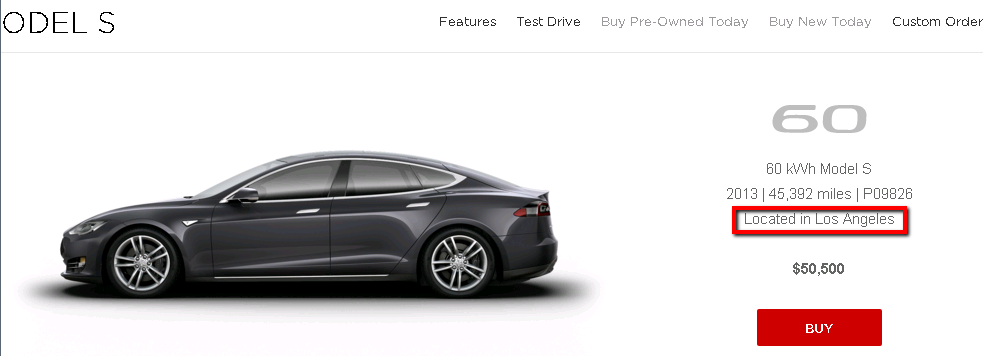
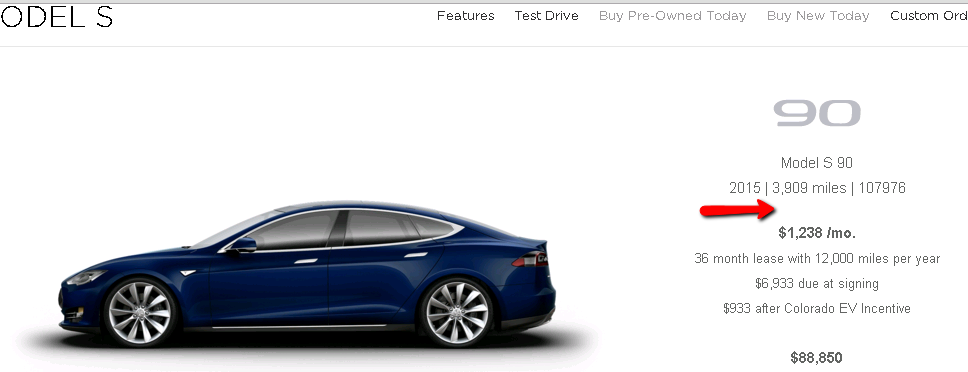
MorrisonHiker I noticed this a few weeks ago when I found one that had an "unknown" location. Notice how it doesn't say where it is located. Others have "Located in ..." under the year/odometer/VIN line.
 �
�
Jan 13, 2016
HankLloydRight Where did you find this on the Tesla site? What location?�
Jan 13, 2016
Zaphod I sorted by New, Any Location, and then was going model by model. When you get to 90kWh Rear Wheel Drive, that one comes up. There is no location showing so I guess that is why it doesn't show up on your site?�
Jan 13, 2016
supersnoop When I go into the "Manage Alerts" section and click on the number in the "Matches" column (to view the matches for that alert), I get the following error and the column headers are missing:�
Jan 13, 2016
HankLloydRight ok, that's fixed, thanks!
- - - Updated - - -
This is interesting now. Looks like they are listing many cars without a location (or rather, the location is "placeholder"). I need to now go through this list of cars to find any that are not getting picked up with a location and add them to EVCPO. That's for tomorrow.
Thanks for pointing this out.�
Jan 16, 2016
SW1 Question About Historical Listings:
When the "Days on Market" column shows a "0" for a particular car, what does that mean? That it was on Tesla's CPO site for less than a day, or that it never showed up there?
Apologize if this questions has been asked before, but I'm new to the historical listings.�
Jan 16, 2016
HankLloydRight Listed and sold (or removed) the same day.
All cars listed on EV-CPO have shown up on Tesla site at least once.�
Feb 4, 2016
theflyer First, thank you for creating this tool. I signed up for a year as much as anything to say thank you by supporting you with some $s. Tesla's CPO tools are terrible. Your site ain't pretty but it does most of what I was looking for.
Suggestions/questions/enhancements
- I sure would like to have OR statements in the alerts and filter selections. Let's say for instance that I'd be okay with white, blue, and Red exterior color. Why should I have to set up separate alerts. The permutation list gets huge if that is the case across multiple fields. There are a few features for a Model S that I'm very picky about and many others that I'm much less finicky. The current tools don't accommodate that characteristic well.
- It doesn't appear there is an email option for alerts. Is it there and I'm missing it? My desire would be to have some pretty tight alerts that only fire in rare circumstances and then be notified by email when they do fire. Conversely, even a broader alert could send an update when a new vehicle matches the criteria.
- The Option code list doesn't have the performance seats. Why is that?
- It sure would be nice to be able to name my alerts. Sure I can glance at the various filters, but being able to assign descriptive names would be awesome.
- It would be nice to be able to use the UI to set an alert for a specific vehicle so you could see what happens to it over time. Get alerts on changes in price or status for instance. Sure we can do this now by manually setting up an alert by VIN but it seems it should be easy to make that a one click option from the search results page.
Thanks again for creating this tool.
Don�
Feb 4, 2016
HankLloydRight Hi Don,
Thanks for your support and feedback. As Elon says (but just might not practice enough) feedback is good, negative feedback is better. Let me address your comments:
1. Yes, other people have requested this, but this by far is the most complicated feature to implement. I will investigate this further to see what I can do in this department.
2. Whenever any alert is triggered, it sends an email out automatically. So you can have tight and/or broad alerts, and you'll be notified when each one is fired.
3. I think these are the codes you're looking for:
4. Yes, another requested feature which isn't hard to do, I just have to do it.
5. Well, it is pretty easy to use the existing UI to create an alert by VIN to do what you want, I'm not sure I see the real need to make it a "one-click alert" option, over implementing other requested features. Besides, I don't want to get sued by Amazon.
When I get some free time, I'll look into setting up OR criteria for the alerts.
thanks again for your comments and subscription.�
Feb 4, 2016
shrspeedblade Just signed up (have been visiting the sight for a while now). Got to the point where I decided to let Hank's program do the digging- it was fun for the first couple of months. Plus, starting to get a little more serious in my looking since I'm not sure I'm willing to wait 2+ years for a Model 3.�
Feb 4, 2016
HankLloydRight Thank you, and good luck on finding the perfect CPO car.�
Feb 4, 2016
theflyer Hank,
Thank you for the prompt reply.
1. I expected this might be tough. I understand if it isn't really doable and appreciate any progress you can make on it.
2. Ah, I just didn't wait long enough. I might suggest adding some verbiage in the UI that confirms each alert will fire off an email whenever it is triggered. I may have missed it, but don't recall seeing anything like that in the existing UI.
3. Ah. I used CTRL-F to searching for "performance" and "seat" without success. This list is another perfect example of where an OR statement would be useful since the color is less important to me than the seat design.
4.
5. np. I agree it can be done easily by manually setting up an alert. It was, as all these thins are, just a thought and opinion.
Don�
Feb 4, 2016
HankLloydRight I had to abbreviate many of the option code descriptions because the main data table is so wide, if that column matched how Tesla describes them:
Black Performance Interior
Grey Performance Interior
Tan Performance Interior
White Performance Interior
That would blow out the table width just too far. So for many of the options, I abbreviated and removed all redundant information.�
Feb 6, 2016
theflyer More observations and a request for info
Hank,
A couple of additional observations.
I received my first alert via email. Very nice.
There are two entries for "Pano" roof. I see there are two entries in the Model S Option Codes List (RFPO and RFP2) so I guess that is consistent. Do you know where I can find information on what is different with these two roofs? The site you link to options.teslastuff.net shows the two but the descriptions look identical.
For now, I've had to remove that option from my alerts because it is messing with the results, or I guess I could just set up two alerts that are identical except for those two codes.
Don
- - - Updated - - -
Hank, I still haven't found a clear description of the differences between RFPO and RFP2 but I have found that it appears your "PANO" selector in the alert generator sets RFP2 as the option type when a user selects the 1st of the two PANO options on your list. Yet, in looking through the options list of existing cars, it appears they all use RFP0. IMHO, your selector list should have the most used code first and the UX should be updated to help the user know which one to pick instead of two pick list items with exactly the same name. Cheers. Don�
Feb 6, 2016
HankLloydRight If you look at the Options list, there are many options that have more than one code for the same option. As far as I know, there is just one Pano roof. The differences in option codes is likely some internal or engineering changes that we really wouldn't know about, just in-line improvements. Looks like the VIN cutoffs is around 96xxx between RFPO and RFP2. I really wouldn't worry too much about it, and I doubt you'll be able to find out exactly what the differences are.
But I'll look into creating a Roof "group" to group those two options together like I do for some of the other options in the Alerts area.
- - - Updated - - -
There are 5 cars now with RFP2. Look at the History page to see more of both types.
Like I said above, there really is only one roof, and the option code changes by VIN. I will group them together.�
Feb 6, 2016
DougH Hank your site is awesome, it has and lists enough info. I appreciate the hard work you have done to create the site.�
Feb 6, 2016
theflyer Thanks, Hank. You've made an incredibly useful tool.
Using the options code capability in alerts, I've really been able to hone in on what I'm looking for (e.g. any S with the 85kWh pack). I also just realized you have the capability to set alerts for any 19" wheels, which is a feature I really appreciate; The 19" wheel size is one of my criteria and I'm less picky about the specific wheel style.
I hope Tesla appreciates what you've created because I'm 100% certain your tool will lead to increased sales of CPO cars.
Don�
Feb 6, 2016
HankLloydRight Thanks. I know they know about it, as we had a dialog early on after I created the Consolidator. They were considering having me help them enhance their site to have many of the same advanced features, which I was open to do. But then they suddently decided to "utilize internal resources" for the job.
Interestingly, they said during their development that they had several different versions of their Pre-Owned site (or should I say, "Pre-Powned"
We've also heard scattered reports of Sales Associates in the Tesla stores referencing the site, because it's easier than their internal system.
- - - Updated - - -
Yes, that's an example of the option grouping I'm using for several of the options. For instance, if you want a Black, Grey or Tan Leather interior, that could be any of these option codes:
Black Leather: IPMB QPMB QXMB QNLB QNEB QREB QRLB IZMB QZMB QYMB
Grey Leather: IPMG QXMG QZMG QYMG QPMG QNEG QRLG QNLG QREG IZMG
Tan Leather: IPMT QXMT QYMT QZMT QPMT QRLT QRET QNLT QNET IZMT
Or you want Black Next Gen seats? That's: QNLB,QNEB,QREB or QRLB.
Go figure.�
Feb 6, 2016
mkjayakumar Micro management. Why should Elon be involved in every little itty bitty decision? Does he think other folks can't even make a decision on the look and feel of the CPO website?�
Feb 6, 2016
HankLloydRight That's what they told me. I guess when it comes to maximizing sales and their customer facing website, they wanted the BMOC to make the final call as to which version goes live.
Also, I think Tesla still operates as a "small" company, which is evidenced by their continued communication challenges with customers and clients, so it's not surprising that they asked Elon to make the final call.�
Feb 6, 2016
JPP Hank:
AFAIK there was a production mod to the pano roof around June 2015. This changed the flip-up caps that covered the mounting holes for the roof rack (which broke or got pulled off very easily), and also changed the appearance of the fixed front panel of the pano system. Changes were made to address 'gen. 1' issues (gaskets/seals). You might look into this and see if this jibes with production date/VIN.�
Feb 8, 2016
HankLloydRight I've now created a roof "group" to group those two option codes together. All existing Roof alerts have been updated to reflect this new group.
I'm also working on making some of the alert options "multi-select" so you can select only the options you want. This also should take care of selecting a "NOT" option by being able to select all the options except the ones you don't want. This should be ready in a couple of days. I have the interface part working great.. now the hard part of implementing "OR" logic into the Alerting code.�
Feb 8, 2016
DougH How about a 500 list instead of 1000 :smile:�
Feb 9, 2016
HankLloydRight Ok, some big changes for EV-CPO for Premium and non-subscribers.
Hopefully this addresses many of the suggestions and feedback provided.
For Premium subscribers, when creating an alert, the following fields now allow for multiple entries (essentially "OR" criteria):
Trim
Body Color
Specific Interior
Interior Decor
Model Year
You can also use this to select "NOT" options by selecting all the values you want, and not the ones you want to exclude.
You can now also give your alerts names (or not, it's optional).
Here's an example of an alert looking for any 85kWh car, Red paint, any Black leather interior, Carbon Fiber or Obeche Wood decor, and 2014 or 2015 model year:
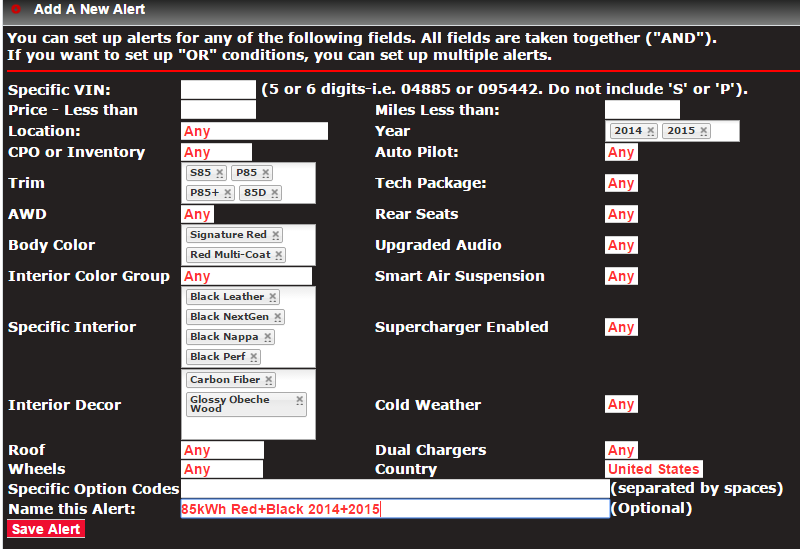
Interestingly, this search returns three matching cars.
Secondly, I've had to remove the ability for non-subscribers to search the CPOs by specific option codes. Those option code lists take up too much bandwidth for every CPO car. It adds up. If you want to search for cars with specific codes, please subscribe!
Thanks.�
Feb 10, 2016
Xpress Any chance of adding a 'greater than" for the VIN#? I'd like to limit my search to cars with VIN's higher than 51000 in hopes of find one with the AP hardware.
Thanks.�
Feb 10, 2016
HankLloydRight You want to capture cars that don't have AP enabled, but have the AP hardware?
There might be an option code that indicates that (I'll look), or it's also possible we've heard that Tesla is enabling AP for all CPO cars ( I don't know if that's true)�
Feb 10, 2016
Xpress
Yes, exactly! At a minimum if I can limit my search to those cars above 5xxxx I can call the store and ask them to physically check for the hardware.
Thanks - love the work you've done.
PS - Any interest in hoping over to the Porsche CPO website and doing something similar??? I'm sure the people on Rennlist would love it.
PPS - Can I edit an Alert? I don't see an options to do this.�
Feb 10, 2016
playoutside +1 I'd love to rename all my old unnamed alerts.�
Feb 10, 2016
HankLloydRight I'll see what I can do about that.�
Feb 11, 2016
playoutside Also, it would be nice to have the email alerts state the name of the alert in the subject or body instead of just the alert #.�
Feb 11, 2016
SabrToothSqrl Awesome website! I plan to subscribe as soon as we see some CPO Model Xs.
When that hits... I'll be there�
Feb 11, 2016
HankLloydRight You're in for a LOOOONG wait.
But thanks!�
Feb 12, 2016
SabrToothSqrl I know�
Feb 12, 2016
SUN-day Driver Did the private listings (from sellers other than Tesla Motors) go away? I'm thinking of selling mine soon.�
Feb 12, 2016
HankLloydRight Yes, it did. It wasn't getting very much traction, and took a lot of time to maintain to see if the listings were sold or off the market. It was basically more trouble than it was worth and less popular than I had hoped. Sorry.�
Feb 14, 2016
cab
Hank - AWESOME UPDATES! Can I ask for one more tweak on the "Naming of Alerts" - have that name for our as the subject (or in the body) of the Alert e-mail (instead of just "Alert # 3), etc. This way I can easily tell which alert is coming in w/o having to remember all the criteria I selected for that particular alert (i.e. Red, P85, with parking sensors, etc.).�
Feb 14, 2016
HankLloydRight Yup, that's an obvious change I need to make, as also suggested above -- I just haven't gotten around to it -- hopefully tomorrow or Tuesday.
thanks.�
Feb 15, 2016
cab I believe someone was beta testing changes today...:smile:�
Feb 15, 2016
HankLloydRight yeah, I had a few unexpected "features" crop up. Sorry if people got incomplete or repeat alerts.
They should all be resolved now.�
Feb 16, 2016
kwjayhawk Tried looking on forms, but was not successful- when signing up for premium acct is it possible to receive emails when a search criteria is met? I'm able to see my search criteria while on the website but didn't know if it could trigger an email when conditions are met.
Thanks�
Feb 16, 2016
SabrToothSqrl Anyone trending the cost of a CPO P85D?
If I can squeeze into one at 80 or 85...�
Feb 16, 2016
HankLloydRight Yes, once you have a subscription, you can set up one or more alerts, and yes, you will receive an email when any alerts are triggered by new cars being added or the price changing.�
Feb 16, 2016
playoutside Hi Hank, are the price changes still being tracked? I noticed some vehicles today with lower prices, but no history of changes (however cars with changes from January and December are still displaying the price history).
Another feature idea: add additional email notification. I would like to receive my alerts at two addresses. I currently have a forward setup, but I would like to cut out any delays�
Feb 16, 2016
HankLloydRight Yes, price changes are tracked -- can you give me one or two examples and I'll investigate?
I'll look into adding a second email address next time I open up that part of the code.�
Feb 16, 2016
supersnoop I don't think it's price changes. I think there are some cars that were taken off the page and then re-listed at the same (most recent) price. I saw a P85+ in the $50k's with a date from a month prior and no "new price" indicator. But I'm pretty sure it was just an old listing that popped back up. I suppose there's some sort of balancing act between retaining the original listing date and recognizing cars that are re-listed after a few weeks off the list.�
Feb 18, 2016
playoutside I am not sure of the VINs as now they are all gone. I remember seeing an S85 drop from something like $58K to $50 yesterday or the day before, but their was no price change delta symbol. I saw a few others with recent changes with no delta. I did see deltas beside cars that had price changes a couple months ago.
PS: I love the recent updates. Alert name in email subject is very handy! Keep up the good work.�
Feb 18, 2016
cjp767 I'm brand new to this forum and relatively new to watching the CPO vehicles-- I noticed that the number of cars was reduced dramatically over the last couple days-- from about 300 to about 120. Is this a normal variation? I'd guess that Tesla does remove then re-list cars, but a swing of 200 cars seems rather wild. Thoughts?�
Feb 18, 2016
HankLloydRight It's not the first time.
As long as I make sure Ev-CPO matches what's on the TM site, all we can do is wait and post wild speculations.�
Feb 19, 2016
mon40 I concur
After watching this thing more than daily there is a huge drop off of cars. Not sure what is up this weekend I will see if I notice any cars missing that are on the teslamotors.com site.
I did notice that the car count changed through the day but never by more than about 40.�
Feb 22, 2016
jossim Am in the process of subscribing but before I do I'm curious (hope this isnt a DAQ) why I only see S60,S85 and P85 listed and no 85D which is what I am searching for? Thanks.�
Feb 22, 2016
HankLloydRight A few days ago Tesla removed about 75% of the CPO inventory. So what is displayed is what is currently available. If you subscribe to History also, you can see most models have been listed previously.
Tesla says over the next few months the CPO inventory will be replenished.�
Feb 22, 2016
bonaire Leasing began in 2013 so if three year leases are up in earnest starting this spring, CPO inventory should rise. But where did those few hundred go in one fell swoop? Especially since they were nation-wide? Taken off the web but kept "closer" on a shared database within Tesla sales sites is my guess. Lets those walking in ask a sales rep "so, what do you have in inventory that I might like?"�
Feb 22, 2016
HankLloydRight All the CPOs removed on 2/17 and 2/18 are no longer for sale. They have been re-purposed as permanent service loaners. They are not kept for walk-in sales. The problem was previously, all demo, loaner and display cars were new, and always for sale at a discount. People kept buying up these Inventory cars, leaving the service centers without loaners, and they'd have to turn to Enterprise to rent ICE cars, which is a bad policy all around.�
Feb 23, 2016
Nismode I hope that doesn't mean that that window of opportunity to score a great AP enabled car at a discount has closed...�
Feb 23, 2016
HankLloydRight Not at all, in fact I think it increases the chances once they have a chance to replenish the CPO stock with more (recent) customer trade-ins. Just takes some patience for a few months. Just watch EV-CPO.com for more AP cars.�
Feb 24, 2016
sitter_k Was there any correlation in the cars removed? Wasn't early vins I saw. Dual motors? Lesser equipped? No p's?�
Feb 24, 2016
HankLloydRight Take a look at this post: What happened to the cpo inventory? - Page 13�
Feb 25, 2016
Ampontour Aaaaaand... CPO's are back! Almost 400 as of now.�
Feb 25, 2016
bonaire Most are Inventory, and not CPO. Many 90D and P90D - and lots of high Vins - built in January maybe?
Hank mentioned it earlier in the thread. Sounds like CPOs went into the loaner fleet and new builds are now inventory, ready to sell as new.�
Feb 25, 2016
HankLloydRight There are three current threads on CPOs -- so let's keep it all in one place for now:
What happened to the cpo inventory?
thanks.�
Mar 4, 2016
Zaphod Hi Hank, any idea why this car shows up on the official Tesla CPO site, but does not show up on ev-cpo? Thanks!
https://www.teslamotors.com/models/preowned/p32446�
Mar 4, 2016
HankLloydRight It was a previously "hidden" car that is now "unhidden", but EV-CPO only re-validates all the hidden cars once per day. So it should show up tomorrow in the regular list.�
Mar 4, 2016
Zaphod I think I noticed it not showing up on ev-cpo for at least a few days now, definitely more than one for sure. Not a big deal, but something I just noticed as I've been looking at both sites more frequently now.�
Mar 4, 2016
HankLloydRight I'm actually traveling for a few more days, I'll look into it when I get back.�
Mar 4, 2016
Zaphod Thanks, safe travels!�
Mar 6, 2016
OEO63 Is there any way to find out which CPO cars can be upgraded to the autopilot option? As I understand it only cars built after 9/23/14 have the hardware to support autopilot. Is there anyway to find the manufacture date on EV CPO? Thanks for the website. It works well.�
Mar 6, 2016
HankLloydRight I'm sorry, but no. Manufacture date is not provided from Tesla.�
Mar 7, 2016
labfm Hank...
Maybe this is a feature that others requested before or maybe isn't very useful, but i just thought about it. Is there a way, to receive an email alert when one of your matches is removed from the site?
So for example, i have an alert setup currently that had 4 cars matched. This morning I logged in and now it's down to 3. I then had to go to "history" to see that it was removed. Again, not sure how useful that is for most people, so just throwing it out there.�
Mar 9, 2016
HankLloydRight Yeah, I think that's possible, but I have to look into it in a week or two. thanks.�
Mar 10, 2016
HankLloydRight It was triggering one of my tests for a "hidden" car, and was displayed in that section. I've fixed that test and now it should appear in the regular section (and any others that might have been falsely assigned as "hidden").
thanks.�
Mar 12, 2016
labfm One more feature request, but more so for the "history" site. The ability to multi-select options in the dropdown. So for example, if I want to see what similar cars were listed for in the history site, it's very hard to do because I can't multi-select, for example, year, interior type, wheel type, color, trim type to make an exact comparison.
On the regular site, it's not that big of a deal because I can use the "alert" page, which I can then be very specific about those criteria.
The alternative could be to simply do a similar page like the "alert" page, except it performs the search criteria in your "history" site instead of the regular site.
Or another alternative is to make it where the "alert" page has an additional option to search "regular", "history", or both. If both is selected, when you click to get your search results, there's an additional column that you can filter by "current" or "history".�
Mar 12, 2016
HankLloydRight This is by far the simplest solution which I can add in a week or so when I'm done traveling. Thanks for the suggestion.�
Apr 18, 2016
myke3000 Hank - Great site, and so useful! I send everyone I know there who might be interested in a used Tesla.
2 questions:
1) Is there a future possibility of adding a column to differentiate the "new" (refreshed update) of Model S with the new front end vs. a "Classic" Model S?
2) Any thoughts of adding Model X's? Inventory cars? - i know these are just getting out to the masses who are back-ordered.
Again, thanks for all your great work!�
Apr 18, 2016
HankLloydRight Thanks for your comments! A few remarks:
Just be aware that right now, Tesla is only listing about FOUR actual CPO/used cars on their site, and as such, on EV-CPO. The rest are new "Inventory" cars which are loaners or demo cars or just unsold new inventory with minimal miles. When the site launched last year, there were hundreds of CPO cars available each month with lots of variety/selection of different models and options. The rumor is that now that the Model 3 reveal and the Model S facelift is over, there should be a flood of held-back CPO cars to be listed "sometime soon." Nobody (except for Tesla) knows if or when that will happen. But just keep watch of this thread and the main CPO thread as they will surely pick up when that happens: Tesla Model S CPO Website - Now Live
Of course! But it's going to be some time until that happens. I'll probably replace the AutoPilot column with Facelift, as fewer and fewer CPO cars will be without AP.
Keep in mind that I am not in control of what's listed on EV-CPO. I am beholden to whatever Tesla lists on their "Preowned" website. If and when Model Xs are listed (which I really don't expect any time soon), I'll be sure to add them the EV-CPO.�
Apr 18, 2016
Jeffmeister Did anyone notice preowned 90Ds disappeared from the Tesla site last night?�
Apr 18, 2016
dalamchops MODEL X IS HEREEEE�
Apr 18, 2016
HankLloydRight There are still lots of 90Ds on the Preowned site. All Inventory though.
Where?�
Apr 18, 2016
Xpress Hank - Any movement on searching for a VIN # that is greater than (>) option? I want to try and weed out the potential Non-AP cars and search for VIN's great than 53XXX for instance.
Thanks�
Apr 18, 2016
HankLloydRight I just looked into this earlier today, and as of now, there are only three CPO cars without Autopilot, and they are the few that have been listed for ages.
I suspect as time moves forward with real CPO cars added to the site, fewer and fewer will not be AP enabled. If a lot of non-AP cars get added in the future, I'll revisit the >/< VIN criteria.�
Apr 18, 2016
dalamchops Model X 90D 004095 | Tesla Motors
Model X P90D 000567 | Tesla Motors�
Apr 18, 2016
HankLloydRight wow, thanks! They still have some work to do on their Model S Preowned website since the car images don't render correctly. I suspect these were not intended to be listed on the Preowned website just yet.�
Apr 18, 2016
HankLloydRight Ok, I've added a new "Model X" section for any Inventory or Preowned Model X cars!
I'll work on Alerts for MX later this week, but in the mean time, you can always set up an alert for option code: MDLX�
Apr 19, 2016
tga (I moved my reply here from the general CPO thread, since it's more of an EV-CPO question)
The last several AP cars I looked at both had "DA02 Autopilot Convenience Features" and "DCF0 Autopilot Convenience Features." Do AP cars always have DA02 and DCF0?
If I were searching for/alerting on AP with + suspension, would I want PX01 + DA02 + DCF0?�

Không có nhận xét nào:
Đăng nhận xét