Apr 13, 2015
rickgt Yes, happens a lot...
�
Apr 13, 2015
ChriZ Finally got 2.4.153 on my classic M60 today.
Ran into one big issue maybe related to the other NAV issues reported. The location of my car seems to be off especially if I go into navigation mode. It about one street off in terms of location. When I'm on the freeway, it thinks I'm on the local street next to the freeway and keeps rerouting. This is consistent after stopping and starting NAV again. I haven't done a soft reset. Will do tomorrow.
One minor issue that still hasn't been fixed. Audio is not lowering when opening the driver door. Kinda annoying since I don't want my EDM music blasting when I exit the car LOL�
Apr 13, 2015
jamieb I have noticed this too, but I haven't received any variant of 6.2, so this is a change in Slacker behavior not related to the 6.2 update.�
Apr 13, 2015
Brett I rebooted and I haven't seen the problem since. I think it may have been a GPS mis-read at the moment I approached my home.�
Apr 14, 2015
Plug Me In Anyone having Bluetooth problems?
I updated to .146 a few days ago and to iOS 8.3 around the same time and now my phone won't connect. Rebooted phone and center console a few times each, no success. iPhone 6 which is new but worked fine before these upgrades. The car and the phone will "see" each other (after what seems a pretty long search) but the phone says it can't connect.�
Apr 14, 2015
dirkhh .146 ? You're the only one so far with that version. Or is this a typo and you meant .136?
Would you mind adding an entry to the Firmware Upgrade Tracker?
I had BT problems in .136 and had to delete the car from the iPhone and re-pair for things to work�
Apr 14, 2015
SeminoleFSU I kept saying to myself that if I got the update notification, I would wait a little while due to all these bugs being reported.... but then the alarm clock appeared today and I just couldn't resist...
Dirkhh, once it completes and I have a version # I'll update the tracker.�
Apr 14, 2015
Lawsteve Maybe we should ask them to modify the tracker database to also indicate the number of Seminole fans who have received the update!�
Apr 14, 2015
SeminoleFSU I tried to up-vote this post, but apparently I have already upvoted you too many times to give out more gold stars for awesome comments :-D
- - - Updated - - -
Updated tracker. As I expected: .153�
Apr 14, 2015
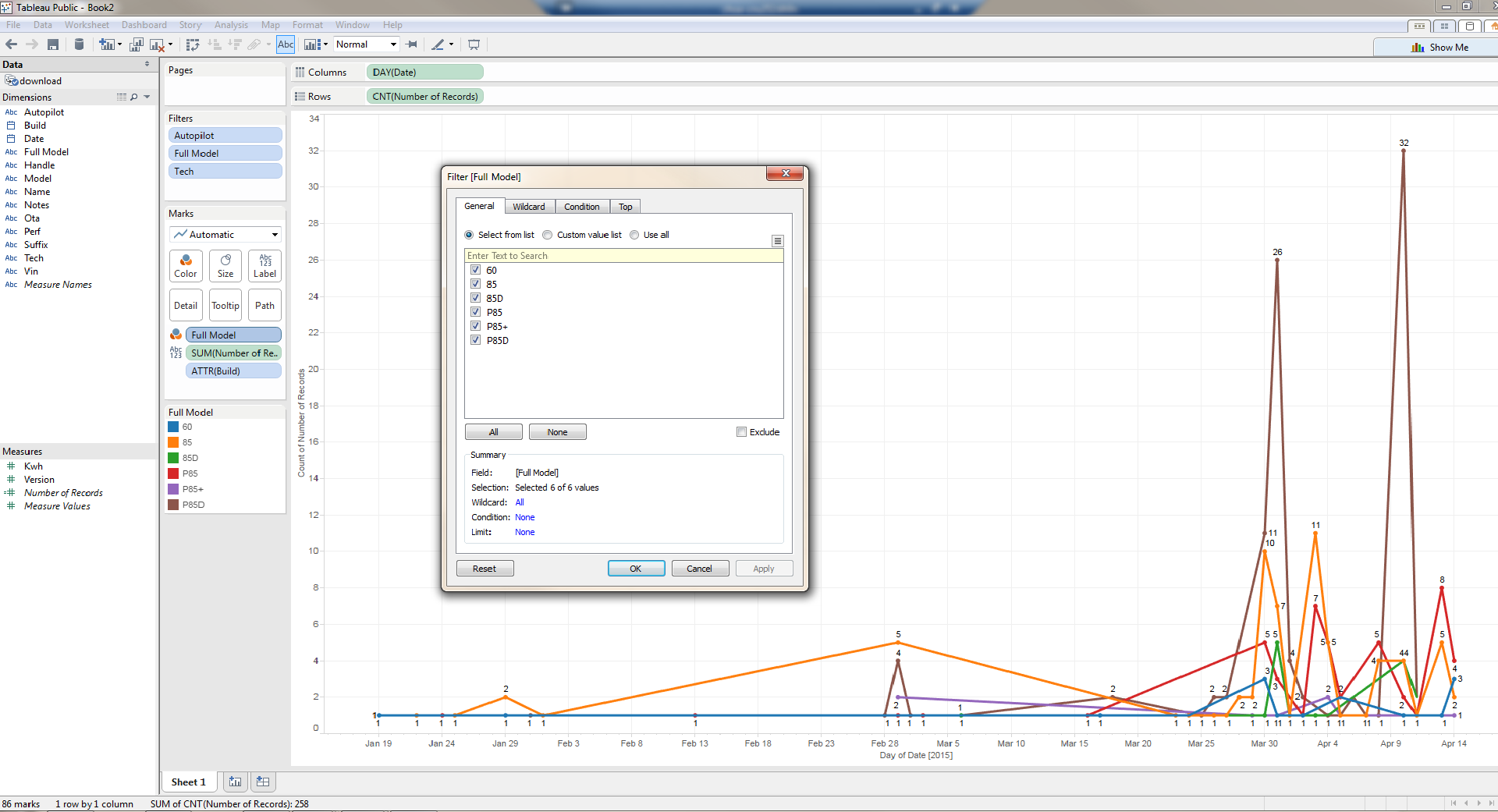
SeminoleFSU Let me know how you guys would like to see stuff... I can make it look nice and pretty with Tableau, Qlikview, SSRS, Excel, SAS, etc...
 �
�
Apr 14, 2015
Cyclone Count me in! A Nole undergrad degree and up in College Park today visiting where I got my graduate degree. An All-ACC education (at the time of getting the degree at least)!�
Apr 14, 2015
dirkhh In general I love graphical visualizations of data... but that line graph doesn't really seem to add a lot to my ability to parse things...
Data visualization is really hard - I actually thought about ways in which I would like to visualize this and haven't come up with anything brilliant... but by all means, keep playing with it, if you find something that's intuitive I'd love to see it!�
Apr 14, 2015
SeminoleFSU I haven't read through the entire thread to see what you guys are trying to home in on... I just threw that together so you can see the volume of firmware pushes over time by "Full Model" which is just a derived column I created consisting of "Perf"&"Kwh"&"Suffix"�
Apr 14, 2015
dirkhh And that's the hard part. We are trying to track the "waves" of roll-outs. Different build versions appear to be shipped to different groups of cars over time.
So for example since Saturday it's only been non-D cars that received .153 - but up until Saturday it was pretty much only AP cars that got .153.
Previously .124 was almost only D cars, but .136 was mostly non-AP cars.
So I really don't know how to make this visual, how to help parse the data easier...�
Apr 14, 2015
ksdprasad this happened with my mercedes as well when NAV is upgraded with newer DVD and all my old saved addresses are off with the map. re-entered all the addresses..that fixed the issue.
did you tried re-entering a new address and tried?�
Apr 14, 2015
SeminoleFSU I could easily do that if I had the full firmware version # in a column... the export I got just gives me 6.1 or 6.2 in the Version# column... You're capturing the subversion, so if that data is somewhere I could easily build you separate line, pie, or tabular graphs based on each build.... and by whatever you want... to me that would be "FullModel"... and to make "Full Model" more precise, I could add in Tech and Auto to make it all one composite field. IE. P85AT (P85 w/ auto pilot and tech)�
Apr 14, 2015
dirkhh If you get the download.csv from the tracker website it has the full build version in the aptly named 'build' column �
�
Apr 14, 2015
SeminoleFSU Ahh... my bad. I see. this got screwy when I brought it into Tableau..�
Apr 14, 2015
brianman 3-D surface plots come to mind.
X axis date
Y axis model/configuration
Z axis count�
Apr 14, 2015
SeminoleFSU Okay... Here... you can filter by anything under the sun and see how the counts change over time. I think that's what you're asking for...
https://public.tableau.com/views/TeslaFirmwareSurveyData/Sheet1?:embed=y&:showTabs=y&:display_count=yes
- - - Updated - - -
I did something very close in 2D:
X axis: date
Y axis: count
Color: build
Filters: Model Type, Update Method (OTA, etc), AutoPilot Y/N, Tech Y/N
I could see doing something similar to this but instead doing it by:
X Axis: date
Y Axis: count
Color: Model
Filters: Build, Update Method (OTA, etc), AutoPilot Y/N, Tech Y/N
https://public.tableau.com/views/TeslaFirmwareSurveyData/Sheet1?:embed=y&:showTabs=y&:display_count=yes�
Apr 14, 2015
dirkhh To reduce clutter and stretch the timeline... could you drop the 6.1 data? Or make this user selectable as well?�
Apr 14, 2015
SeminoleFSU Done. https://public.tableau.com/views/TeslaFirmwareSurveyData/Sheet1?:embed=y&:showTabs=y&:display_count=yes�
Apr 14, 2015
Plug Me In Sorry, short term memory, couldn't remember from the walk from the car. .136 . I tried starting from scratch a couple of times without success. First time in 2+ years I've had a BT problem that lasted more than a few minutes.�
Apr 14, 2015
dirkhh Cool - I like it!�
Apr 14, 2015
brianman Looking at this data and playing with the knobs, I see:
1. 124 was generally released ~3/26; issues were found and addressed relatively quickly (by 4/02)
2. 136 was generally released ~4/02; issues were found and addressed relatively quickly (by 4/10)
3. 153 was generally released ~4/10; they might choose to drop a new release on 4/17ish as a general rhythm thing
4. All of the "late" 124s (post 3/26) were non-Perf (i.e. uncheck P85 P85+ P85D and they remain in the chart).
5. Only 2 reports of non-Tech-package in the data.
6. No reports of P85D or 85D getting 136.
Someone more attuned to release management could probably draw some decent conclusions about branches/forks from that data.�
Apr 14, 2015
rickgt Has anyone had the calendar pop up return at random times after being dismissed? I set it to show this when started, but it comes back.... Release .153�
Apr 14, 2015
dirkhh Haven't seen that one. So you click on the little 'x' that you don't want and route to your next meeting and it comes back? Right away? Or while you are driving? Is it the same meeting? Or the next one?
I don't think I've ever had it pop up after the first minute or so of driving...�
Apr 14, 2015
rickgt I dismiss the whole pop up, by clicking the X in the upper left corner of the pop up.... Sometimes after selecting a meeting, sometimes without selecting anything. The pop up returns shortly afterwards, or at some random times... Have not tracked that yet, since I'm usually driving and need to dismiss it. Happens soon after starting, rather than many miles down the road.�
Apr 14, 2015
dirkhh So this sounds almost like something that I've seen. If the calendar is open and you dismiss it right as you start the car, then maybe a minute later I sometimes get the dialog for the next meeting which I then have to dismiss again.
But not "at random times" - only within the first minute, actually, I'd say the first 45 seconds of driving. And I don't recall ever having to dismiss the same alert twice, so if the alert came up while the calendar was open and I dismissed it, then it doesn't pop up again.�
Apr 14, 2015
rickgt So, you're saying it has to do with the actual calendar appointments that it treats as alerts... I missed that somehow. I will pay attention now and re-post if this doesn't solve the issue... thanks..
Rick
�
Apr 15, 2015
NigelM Returning to the auto-mute discussion: I rec'd .153 a couple days ago and now if I turn off the audio completely before exiting the car it automatically starts playing when any door (incl trunk) is opened. Auto-mute has mutated to auto-play!
Edit: yesterday this was reproducible, my wife tells me that today it didn't happen.�
Apr 15, 2015
ecarfan I think my S behaved that way before I got V6.2 two days ago.
Or perhaps I do not understand what you mean by "turn off the audio completely "?�
Apr 15, 2015
Thud One bug I noticed today: when driving in moderate to heavy rain, the blind spot warning chimes every time I change lanes. Even though there is never a car there. I think the sonar is mistaking raindrops for a car. Funny thing is that the white blind spot indicator isn't lit, but the warning sound (along with RED indicator lines) appear as soon as the car starts moving over.�
Apr 15, 2015
NigelM I meant when you click the left scroll wheel so that audio volume is completely off. Pre v6.2 the volume resumed where it was previously, so off meant off until you increased volume again.�
Apr 15, 2015
scottm OK, I'm calling this a bug!
This clocks on console and dash displays both have a gratuitous "0" zero in the tens of hours digit, when it should be blank.
This is not military time, otherwise, I'd understand.
Before 6.2 the time would display like this, 8:32 am <<<----- MUCH PREFERRED TESLA!!
Now, with 6.2, time displays in both places like this, 08:32 am <<<---- semi-military style... kinda dumb for human drivers
It's the first thing my son noticed after the upgrade yesterday, "Why is there a zero in the time now?"
There shouldn't be.
It actually takes my eyes slightly longer to read time and have to filter out the first 0.
Hope this bug is taken out soon.�
Apr 15, 2015
dirkhh It sometimes rains here in Oregon. I've had this happen a couple of times, but definitely not EVERY time I change lanes.�
Apr 15, 2015
mibaro2 Yup...same here.
And it would be so easy to fix. 2 possible ways :
1) If AM/PM is selected, and 0 is the far left digit, only display the 3 right digits.
0r
2) If AM/PM is selected and 0 is the far left digit, color the far left digit to be grey (the same color as the bar, so we can't see it).�
Apr 15, 2015
scottm There's no mystery for fixing a bug like the clock display leading zero.
Tesla doesn't have to fake anything out, they own the code, and had it right pre-6.2.
Simply don't include a pre-pended zero in the display string, make it a space.
If offering a display setting option to the user for 12hr/24hr clock choice... then, having a leading zero on 24hr display is proper "military style" to show and pronounce leading zero for hours < 10:00 (which is always a.m. on a 24 clock).
If Tesla wants to stick with military style then they should also drop the "a.m." "p.m." thing on the end if a user has made the setting selection for 24 clock.
Right now, time display straddles the two styles. MAYBE clock is now displaying "Tesla Time" or "Elon Time" (things run slower than expected).
Someone mixed something up in the code.
Put it back to the way it was please!�
Apr 15, 2015
NigelM This should be around #53 on the priority list. Sure correct it, but it's beyond a #firstworldproblem.�
Apr 15, 2015
brianman Ahem.�
Apr 15, 2015
NigelM I searched this thread for "music" and "resume" so didn't include "slacker"....sorry. BTW, would be interesting if this is reproducible with slacker but not with other audio sources. [Heads to garage....]�
Apr 15, 2015
Paul Carter While in Valet Mode, bluetooth connection remains active, but access disabled on the console. This morning I left my phone in the house while setting my pin (~30 feet from the car). I was still able to pull up my contacts and recent calls using the steering wheel controls. Should of tried placing a call from the car. Should valet mode disable bluetooth?�
Apr 15, 2015
jamieb Received 6.2 (.153) yesterday morning over my home wifi. Installed while parked at work in the afternoon. Seemed to really mess up the GPS, my car thinks it's about 1/4 mile from its actual location. Multiple re-boots of the center console and instrument cluster seems to fix it briefly then it drifts off. Something in the firmware seems to have messed up the GPS calibration. Two side-effects - my geo-fenced suspension and HomeLink settings didn't work as I approached my home, and when I plugged in at home, I didn't notice that it had failed to recognize it was at my home (where I have a charging schedule set up to use off-peak rates) so unbeknownst to me it started charging at peak rates until I noticed on my phone that the car was charging.
I've reported to Tesla, and discussed with my local Service Center, and they've all received reports of this. I was told by my SC manager that in most cases the GPS resets itself after a few days of driving. Very frustrating, I've found the GPS until now to be extremely accurate. My previous cars with GPS had a calibration utility. Would be nice to give us drivers the ability to force a re-calibration of the GPS and make adjustments.�
Apr 15, 2015
Cyclone Jamie, others in this thread have noted that deleting any saved locations, such as home, and re-entering them will have them be I the corrected location.�
Apr 15, 2015
jamieb Yes I know that, but the problem here was that the GPS thought the car was in the wrong place, not the destination(s) � a GPS error, not a Nav error. Driving around in the car there's still an approximately 1/4 mile offset from where I actually am, so when driving on the freeway the Nav thinks I am flying through a residential neighborhood about 1/4 mile to the north of the highway (and the Nav is frantically re-routing every few seconds because it thinks I'm driving 80 mph across residential streets and through people's backyards).
To your point, the Nav directed me correctly to my house (or at least tried to - my house was placed correctly on the map) but when I parked in my garage the GPS error meant that the Nav thought the car was parked in a house 1/4 mile away. Thus it thought this was a new charging spot and assumed I wanted to start charging immediately. Also why geofenced suspension settings didn't work - it thought the car was 1/4 mile away.�
Apr 15, 2015
Cyclone Ahh, I misunderstood what you were seeing. Got it. Thanks for the clarification!�
Apr 16, 2015
gzerninplatz I deleted a nav favorite and re-entered it, and it navigated to the same mistaken place...put in "68 N Ivy St." and it took me to "100 N Ivy St." Most others are fine, but this one always is wrong...�
Apr 16, 2015
billarnett I've heard about that. Does that really mean free water coming down from the sky? Doesn't that mean everything gets all wet without even turning on the sprinklers? If I drove up to Oregon do you think I could actually see this phenomenon for myself?�
Apr 16, 2015
dirkhh It's usually not Midwestern style rain, so not pouring / dumping buckets of water. But it's a steady easy drizzle. Often for days. Or weeks.
Californians are welcome to come here and watch that beautiful experience, but as our former Governor used to say "come, enjoy, and then LEAVE"
There is now a border checkpoint on I5 making sure that you are not taking unreasonable amounts of water back to CA with you...�
Apr 16, 2015
jamieb Just an update on my GPS mis-calibration after 6.2 update.
After driving about 30 minutes last night, the GPS is re-calibrated to its pre-update precision. So my Service Center advisor was correct, that just driving allows the system to re-calibrate.
In retrospect, this was the first time I ran the update in a location (basement of a large parking structure at work) where the car probably had no GPS signal.
I wonder whether, when the system re-boots after an OS update, if it doesn't see a GPS signal it wipes its prior location and starts the re-calibration process?
If this is the case, it would be nice if Tesla warned you that the GPS signal is low or non-existant before hitting the 'update' button and warning you that doing the update in that location might require a period of re-calibration of the GPS system after the update.�
Apr 16, 2015
scottm
This adding a leading zero to the hours in the clock was probably not a bug with 6.2, but a design change.
I was split on where to put the recommendation "make it like it was."
Technically, not a new requested feature. Because it's not new.
Technically, not a bug... probably a design change.
You see my predicament?
The point being Tesla is wasting time and energy on the wrong things.
Fixing what isn't broken should not the priority... or maybe they've run out of things to do?�
Apr 16, 2015
NigelM Quite honestly, no. But that's ok, maybe you and I have different understandings of the word "predicament".�
Apr 16, 2015
jerry33 That will make it look like the rest of my clocks (at least the ones I have control over the format). Not a problem.�
Apr 19, 2015
mgdurand Here's my problem:
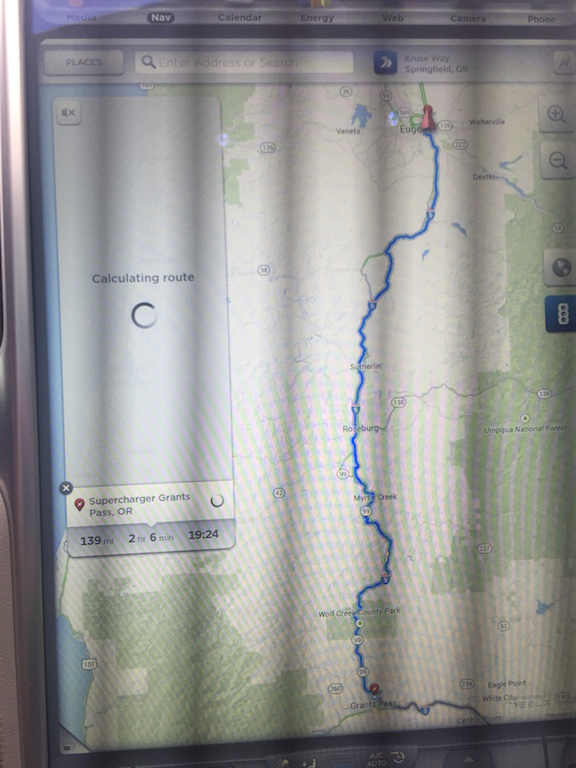
I just did a RT from PHX to SEA a week ago and updated at exactly the turnaround point. On the way up I did what I always do, which is navigate to the next supercharger only and charge accordingly. If I have to make any diversions I usually use my phone which works better for local stuff. The entire way back I tried to use the new "stress free" nav system, but it crashed like this almost every time I stopped, and I would have to restart the entire route. I stopped restarting the route, and just went to navigating to the next supercharger like I used to do, however now the computer sometimes advises me to backtrack to the last supercharger before continuing to the next one. The simple workaround here is to flip the trip menu over and turn off supercharger routing. Also, the "tell you the minutes of charging" is useless when you can't do multi-leg trips. It's ok for me, I don't get range anxiety anyway because I always just charge an extra 30-50 miles over my trip, depending. Just annoying to see such a glaring failure happening on the screen of my car.
So in other words, this nav works less well and requires more effort to use than the last nav, and it crashes more. This is the only bad thing I've ever said about my favorite car company, but this software is abysmal. I hope they can hire some more software engineers and get it sorted out. And put a faster processor suite in my next car so the entire UI will respond more naturally.�
Apr 19, 2015
LetsGoFast I was just coming online to post basically both of these after completing our "Reach the Beach" roadtrip. If we stopped for a bathroom break or to grab a snack, the nav system would lock up as shown more often than not. You have to recalculate your destination to fix it.
I also had the backtracking problem in a completely different scenario. On my way to reach the beach, the nav system initially decided I could make it to Salisbury and skip the Woodbridge supercharger. It would have been close, but the chances of making it were getting better and better. At one point, for no apparent reason, it suddenly decided charging was needed urgently and instead of adding in Woodbridge (which I could obviously make with TONS of room to spare), it asked me to backtrack 30 miles or so back to the Richmond supercharger. I was, at that point, barely closer to Richmond than Woodbridge and was going to arrive at Woodbridge with like 60% or something.
The nav system also made some curious decisions about traffic avoidance in the Northern Virginia area. Choosing when to bail off I-95 and take Route 1 and when to get back on is always a challenge in heavy traffic. I trust Waze a lot more in those scenarios and Waze was predicting I'd get to Woodbridge 6 minutes sooner than the car by taking a different route. The crazy thing is that when I ignored the nav and drove past the exit it suggested, it recalculated the route and agreed with Waze that the new way was faster than the old way. In other words, it stayed with a reroute that its own data said was ~5 minutes longer.�
Apr 20, 2015
dirkhh I went to Hoodsport yesterday for one of my semi-frequent local diving trips. This is a trip that I've made more than a dozen times in my 60 and once already in the P85D. Just like everyone else I always simply routed from home to the next supercharger and from there to the destination, figuring out how much range I needed to be safe. Yesterday I thought "Ha, let's use the new feature" and routed directly to my destination and directly home. If in either direction I would have stopped supercharging when my car told me I had enough there is NO WAY I would have made it back to Centralia (so Centralia - Hoodsport - Centralia) or from Centralia to home.
They REALLY need to fix this piece of crap. Ending range anxiety? My a.. errr... rear. This thing will get people stranded if they are naive enough to believe they can stop charging when they are told so. I'm on .153, not sure if anything improved in the half dozen different trial balloon beta releases they apparently have pushed to the unsuspecting owners since, but yeah, wow. What a disaster.�
Apr 20, 2015
LetsGoFast My suggested charging time in Salisbury was basically right on. I arrived at Woodbridge on the way home with 12% instead of the 9% it was projecting initially. That was enough room to feel safe without feeling like it was excessively cautious. Of course, conditions were nearly perfect, so perhaps it failed because of elevation or something in your case? That really is a major failure if it tells you to stop charging well before you have adequate charge.�
Apr 20, 2015
taurusking Last week I was in Dallas and decided to see how my trip planner works. Have not used it since I installed it on 4/14/15. I had about 153 miles left on the battery and it was warm weather ( 75-80 F). I needed about 118 miles to reach home and the navigation kept routing me to nearest supercharger.
I kept hitting home in my favorites on the navigation screen and still it routed me to the supercharger.
After being pissed off I unchecked the Trip planner and then navigation routed me to home. Reached home with 30 miles left on the battery. I am never going to use this beta version of the trip planner again.:cursing:�
Apr 20, 2015
steve841 The SC uploaded .160 Thursday ... today, ALL my settings disappeared. EVERYTHING wiped.
Very odd.�
Apr 21, 2015
NigelM Map appeared with some grey 'tiles' and slacker stopped working due to "No connectivity" although the screen showed 5 full bars....center console reboot fixed the problem. I'm on vers .153
P.S. console reboots are very rare for us, I think we've only had to do that maybe 3 or 4 times in the last 2.5 years.�
Apr 22, 2015
scottm Sorry, Jerry, are you saying a leading zero is like every other clock you have?
As I look around me now, there are 5 clocks within immediate view or reach at work. I can change all of them. None of them have a leading zero. Windows laptop, Blackberry phone, Cisco IP land phone, Android tablet, Blackberry tablet.. and I assure you these devices are all in their default format for North America consumers.�
Apr 22, 2015
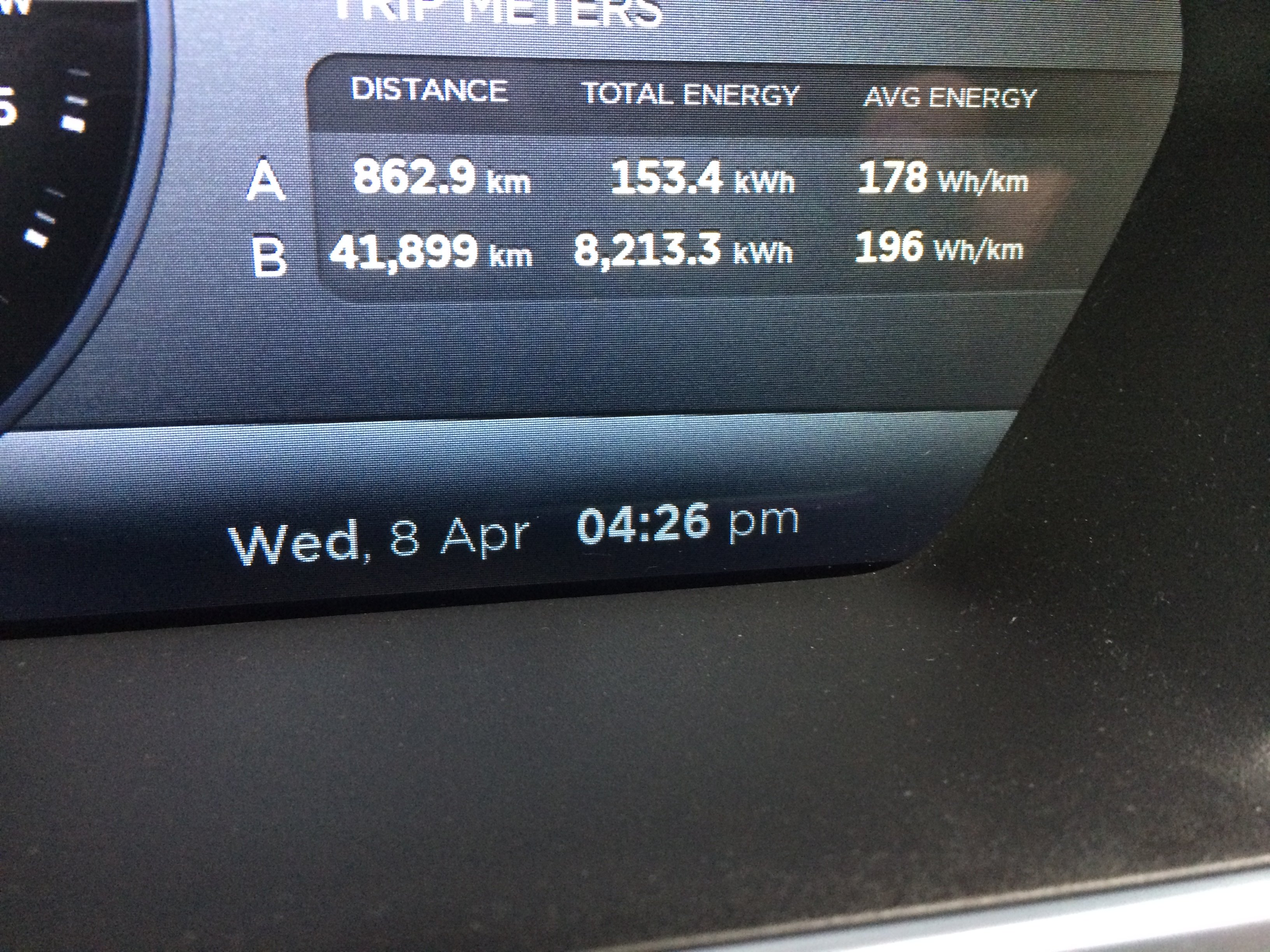
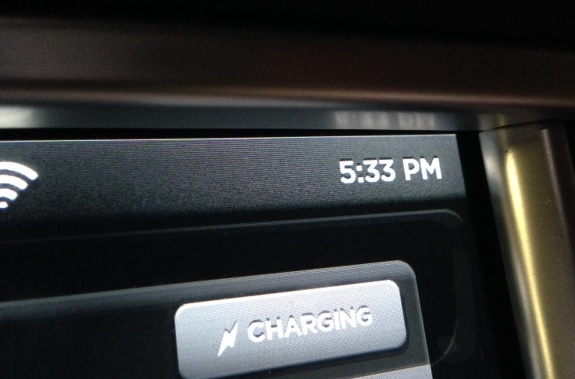
NigelM Actually I finally got around to checking and it doesn't show a leading zero if the clock is in am/pm mode. Perhaps you have some sort of one-off bug (as no one else has reported it AFAIK), can you post a photo?�
Apr 22, 2015
mibaro2 I've reported it also. Here is a photo:
- - - Updated - - -
I wonder if this is just a Canadian issue... We had our keyboard key changed to .ca from .com with this firmware release.�
Apr 22, 2015
green1 Well that shows a complete lack of understanding of the Canadian market. We are far more likely to use a .com key than a .ca key, even in Canada.�
Apr 22, 2015
NigelM Here's a photo from my U.S. car:
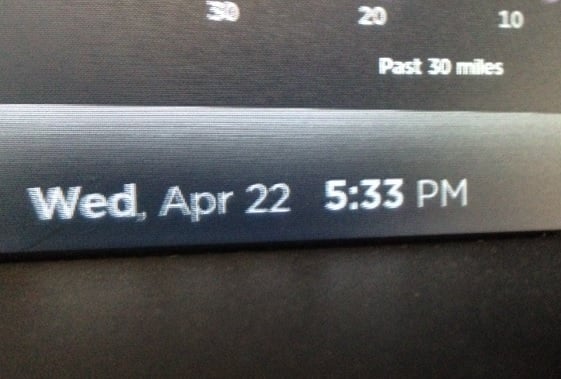
Canada obviously has a different date and time format.
P.S. Here's my center console clock:
 �
�
Apr 22, 2015
brianman Yah, definitely some format string differences.�
Apr 22, 2015
Andyw2100 Not to mention the fact that Canada seems two weeks behind.�
Apr 22, 2015
NigelM Perhaps it's because Canadians use metric time?�
Apr 22, 2015
Ugliest1 Slower rotation of the earth north of 49�
Apr 23, 2015
krnshh Every other morning, my driver assistance features get disabled, telling me to contact tesla service. Later in the day they work fine though.
Is anyone else facing this bug on 6.2 as well?�
Apr 23, 2015
RDoc Are you saying that "Elon Time" is based on the surface speed of the Earth rather than the angular speed, so the further North or South you go the slower time runs?
I suppose that could explain some of the delays in delivery of various cars and features.�
Apr 23, 2015
Paul Carter According to a few Oracle Apps I use, Canada uses periods as number group separators and commas as decimals. So if you change your app preference to Canada one million appears very french. 1.000.000,00$ yet time time format appears to be 'normal'. But suspect it might be some localization bug.�
Apr 23, 2015
green1 It appears you chose French Canadian localization, they reverse their commas and periods in numbers compared to English Canadian (or everywhere else)�
Apr 23, 2015
Paul Carter Yes, if I were to choose that, that's what to expect, but not when you only get to pick "Canada" as the territory as the number format changes.�
Apr 23, 2015
DavidB I suspect that this is not a 6.2 bug, but rather a hardware intermittent failure. I had a problem where my rear camera would not work in cold mornings and worked fine after the car warmed up. It turns out that the gasket that seals the camera had failed and moisture got inside.�
Apr 23, 2015
golfski I did not read the whole thread, but has anyone reported their console freezing much more frequently with 6.2? I listen to slacker and at least half the time the whole console freezes up when searching for a new song. I never had this happen pre-6.2.�
Apr 23, 2015
dirkhh I haven't seen any such reports. This was actually quite common with some version of 6.0... I assume that you have done a 40 second reboot to make sure it's not some weird setting that wasn't properly reset?�
Apr 23, 2015
tnawara I haven't reported this yet, but it has definitely been happening to me since the 6.2 (2.4.136) upgrade (along with the auto-mute and nav issues).�
Apr 24, 2015
xy46 40 second reboot? This one is new to me. Are you saying that you hold the buttons down for 40 seconds before you let go when you reboot both screens?�
Apr 24, 2015
dirkhh Yep, keep holding them even after the reboots start.�
Apr 25, 2015
xy46 Does the screen go through a second reboot then or simply continue starting up - meaning is there a way to know I have held the buttons down for 40 seconds other than counting it out myself?�
Apr 25, 2015
dirkhh I haven't tried this in a while (needed it on my 60 a few times) - I think it reboots again...�
Apr 29, 2015
scottm How do you know this? Was it in release notes, did the keys on the pop-up keyboard change, do you personally scan the code as it routes through your wifi router to the car while getting its updated code set?..
Thanks for reporting it. I haven't done that. I will too.
I want the old format sans zero.�
Apr 29, 2015
mesalum I finally got tired of hearing that something is wrong chime in the morning and called service.
My P85 was at the Rocklin Service Center yesterday for the "Software Update Required. Contact Tesla Service." They flashed .188.
Paperwork said "Firmware is stuck in install loop and will require a new push for latest version."
So for those few of you in this thread that said you have the same problem I would call Tesla service. There is apparently an issue.�
Apr 29, 2015
scottm stuck in install loop...
that is something I was hoping to never hear from Tesla, wish they had built a fail-safe mode using an upper-bound watchdog timer that would forcibly break a loop and demote / return to last version�
Apr 30, 2015
ksdprasad Posted 2 bugs on valet mode
yesterday i have posted 2 bugs to TESLA. and they were accepted.
Bug #1 : in valet mode, all your earlier charging locations are visible on the map when you zoom out. Big privacy issue, one of them might be your home address :scared:. Advised TESLA to hide all my earlier charging stations.
Bug #2 : in valet mode, your phone is still connected until you go farther from your car. until that time all your phone contacts are available for the valet driver to see. Advised TESLA to disconnect all Bluetooth devices once you put the car in valet mode.�
May 1, 2015
xy46 I am interested in how you submit bugs and know they are accepted by Tesla? I have noted several bugs and just reported them via the "bug report" feature in the car; however, since you can't actually give details about the bug you are experiencing, I thought it would be much better to report it some where that allows me to give more details. I would really appreciate more info on how to do this.�
May 1, 2015
xy46 Realized yesterday that there is an apparent bug that has been present since at least .168 and still present in .188, that I haven't seen posted before. When turning on the emergency flashers, the small, red, side tail lights (the ones with the three individual red lights) will blink on/off with the main tail lights; however, after approximately 5-10 minutes, they stop blinking and instead just remain on. Anyone else notice this?�
May 1, 2015
mibaro2 I found that the keyboard was changed only when I was surfing the internet on the console and went to put in a URL. Went to press the ".com" key, and it was ".ca" instead. I didn't see it in any release notes.
I can't remember the last time I used a .ca URL.�
May 1, 2015
andrewket How do you know they were accepted? I'd love a better way to submit and track bugs.�
May 1, 2015
NigelM Service Centers will note bugs and enter them in the system; though we as individuals have no way of tracking said bugs.�
May 1, 2015
scottm Thank you, I will look for that.
- - - Updated - - -
Agreed need: let me type in a bug, instead of voice command.
When reporting a bug using voice command in car, I was only able to get a few seconds of description accepted... anything longer gives an 'unclear' error message.
- - - Updated - - -
Update .188 still has the leading zero on the clocks.
So, still a bug.
Probably goes hand-in-hand with other localization efforts of trying to make the car Canadian. No thanks.
English speaking Canadians usually prefer and select the "USA" keyboards and languages choices in software.
I'm not going to speak for French Canadian preferences.
How about let the driver select the localization preferences... same as we can select Units to display... ?�
May 1, 2015
ksdprasad i have mentioned these bugs to Tech Support member when we called the Tesla Support. He was asked me to provide the screenshots. Sent thru email, and he was able to verify that quickly on one of their cars, and confirmed he was able to re-produce it. and forwarded to thier DEV team.
BTW, today i got alert saying SW update available. Don't know if this related to it or not, will find out once i got my car from service center :wink:
- - - Updated - - -
tech told me over the phone.�
May 2, 2015
ZBB Anybody else having problems with the touchscreen being laggy on the latest update (.188)?
I've had one or two previous updates that introduced laginess, but it was minor. I'm having noticeable lags on taps on .188... For example pushing the Homelink to close my garage door this morning took 3-4 seconds to register. Other similar lags too... Never had that before.
I have rebooted also...�
May 2, 2015
ksdprasad Got software update .188 and this fixed bug #1 : Now all your earlier charged locations are hidden in valet mode.
Bug #2: not fixed, still reproducable on .188 version.�
May 2, 2015
KurtR Think so. I was driving this afternoon and it took several presses, several times, to browse through music, but that's the only time I noticed it.
Also, I've only had the car for a week and don't know if this is a bug, but after I park the car and leave it for a while, when I get back in, my current playlist that I'm shuffling through is lost. No repeat and shuffle icons below the song, and when the music resumes the track starts from the beginning and then the music stops when it ends. This can get annoying when listening to classical music where my tracks can last between 40 minutes to sometimes an hour. I'd never reach the end of a symphony, for example, because it would just keep starting over again each time I go to and from work.�
May 3, 2015
AmpedRealtor Looks like the audio muting bug is fixed in .188. Sorry if this has already been mentioned. I got .188 on Friday.�
May 3, 2015
evp Confirmed -- I got the update Thursday night (Friday morning).�
May 3, 2015
rpo I am still having issues with the navigation not knowing what to do with addresses in the Seattle area that have directional indicators. (NW, SW, N, NE, SE, etc). It thinks my house is now 13 miles away and 5 out of the last 6 addresses I tried were off by miles. Anyone else still having this issue?�
May 4, 2015
Maarten Quite a few forum members in The Netherlands have stopped using the navigation because of issues. It really is not up to par with the rest of the car.
Imho it works OK most of the time for me and I refuse to use my TomTom on the phone next to my wonderful big screen. But every now and then it makes strange mistakes and detours here.:crying:�
May 4, 2015
Andyw2100 And that's the issue in a nutshell. Because a navigation system that can be counted on to be completely accurate 99% of the time, and to be strangely inaccurate 1% of the time can't be relied on at all. It becomes essentially useless as a navigation system if it can't be trusted.�
May 4, 2015
tinm That describes my experience, though "accurate 99% of the time" is being generous.
Most recent "strangely inaccurate" behavior involved me searching for the nearest Albertson's grocery store in Santa Fe. The list popped up and showed several, and I selected the one that was like 3-4 miles away. Then the nav route list view pops up, does its thing, and the map redraws the route, and I look, and wait a minute, the distance is 66 miles!? I zoom out and out and out and I see a blue line leading from Santa Fe all the way down to an Albertsons store in Albuquerque, an hour away! Repeated tries led to exactly same result. It's a bug.
The other annoying bug in the nav system, something that has been there much longer than 6.2: when you type in a place, and it shows up in the quick search results, and says, oh, 5.2 miles for the distance, and then you tap it, and the nav route list view pops up on the left, does its thing showing the route waypoints, and then you look and see the distance is now something like 7.6 miles, usually 15-20% longer. Drives me crazy.�
May 4, 2015
RichardL I completely agree with the first point.
The second point is due to the quick find displaying the direct distance, as the crow flies, which can be calculated from the lat and long co-ordinates. Then, when you select it, it is actually figuring the distance to drive. To do an accurate distance immediately would, in fact, be far from immediate, since it would have to calculate the routing for each offered destination.�
May 4, 2015
Andyw2100 Yes, I was just making a point, and using an extreme example to do so. I in no way meant to imply that the current Tesla navigation system is accurate 99% of the time.�
May 4, 2015
dirkhh I have been driving with my phone mounted near the lower right corner of the big display pretty much the whole 21 months of owning a Model S. It feels ridiculous and the occasional passenger has given me grief, but Waze on the small phone screen is so much better than what Tesla has to offer. Can you imagine how amazing Waze would be on that big screen?�
May 4, 2015
Cyclone I've started trying out Waze instead of Google Maps and Apple Maps. I like all the reporting, but wow are the POI searches lacking and the routing is very different than the other two. It has me make many turns to cut across streets rather than spend an extra mile or two minutes and avoid four turns.�
May 5, 2015
efusco It's not the full Waze app, which I too want, but you do know about this option, right? View Waze Incidents on the Tesla browser�
May 5, 2015
dirkhh No, I did not know about this. Cool�
May 6, 2015
Sparrow I have .188 and my music that I listen to is on a USB drive. Despite pausing the music before exiting the car, it starts to play immediately upon opening the door. This does not occur if you get out and close the door and then open it back. I think the car has to go to sleep for it to do it.
It also advances tracks while I am away from the car. I have seen as many as 20 tracks skipped over while the music is in pause and the car is supposedly asleep. This started happening after .188 was installed.�
May 21, 2015
stevezzzz I'm driving from Denver to Dallas via the Superchargers on I-70 and I-35. I'm on 6.2 (2.4.213). The trip planner did a weird thing today leaving Perry, OK for Ardmore, OK: from the very first it insisted that I return to Perry for a charge before pushing on to Ardmore, even though I'd just verified a 22% buffer before unplugging. I'd also just rebooted the touch screen due to some anomalies I encountered starting a charge...but I digress.
Its roughly 150 miles from Perry to Ardmore, and the nav continued to insist that I return to Perry until I was within 35 miles of Ardmore and it was no longer possible to reach Perry with the remaining charge. At this point things took a further turn toward the weird, as the nav system now told me to charge at Ardmore (progress!) and then (wait for it) to return to Perry for another charge before proceeding to Ardmore. That represented a total of 360 miles and two charge stops to reach the destination right in front of me, within reach with a 23% buffer.
I've attached a lousy cell photo as evidence that I Am Not Making This Up...
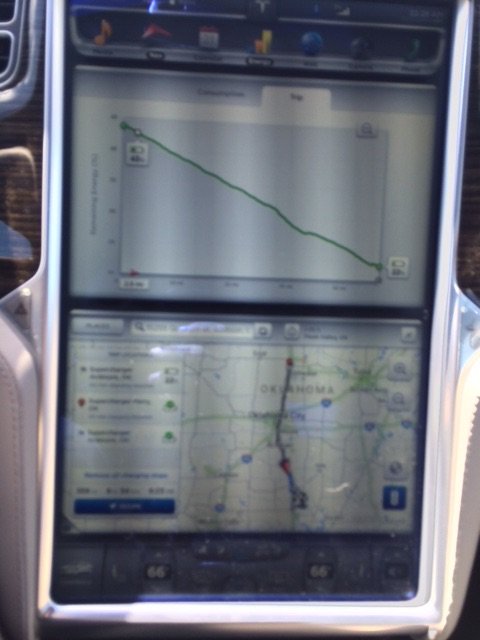
I reported the the bug to Tesla, and the rep suggested that I reboot first the touch screen and then immediately reboot the instrument cluster while the touch screen was still dark. Amazingly, that cleared up the problem and I was able to proceed to Ardmore without having the nice nav lady squawking at me the whole way to turn around.�
May 21, 2015
Larry Chanin I encountered a bug yesterday on version .188.
I had just done a range charge and my rated range was 261. At of curiousity I always like to monitor how quickly the limitation on regeneration is lifted after driving. My past experience is just a mile or two. This time I drove 4 miles and it was still showing my rated range at 261 with the limitation on regeneration. I pulled over, parked and reported the bug via the voice recognition feature and rebooted the display. The problem was resolved.
Larry�
May 21, 2015
scaesare Out of curiosity, what was the display result after the reboot?
I'll occasionally drive 2-3 miles before the range decrements... particularly if it's a 90% charge on the weekend after I've been charging to 60-70% during the week. Or if the temp is warming up from the time the car had finished charging.�
May 21, 2015
Larry Chanin It was exactly the same as before the reboot, 261 miles. The important difference was that instead of driving 4 miles without the range decrementing, it dropped to 260 in just a few hundred yards of driving.
Larry�
May 21, 2015
scaesare I wonder if it was on the cusp of decrementing anyway...�
Jun 5, 2015
Cyclone So I've been on .239 for near a week and I've run into a scenario that maybe is a bug, or maybe just is my inexperience with a Model S. This week, there have been multiple times where I walk up to the car, the handles extend, I open the door, sit down (without pressing the brake), and as soon as I hit the seat, the car gives me three beeps (the same kind when trying to change drive/reverse too fast or auto raising of suspension can't happen because you are too fast). Additionally, if the rear camera was on or I was in an enclosed space, I can see that in this case, my tail lights also blink. It doesn't always happen, but has happened 3 or 4 times already. No messages are on the screen, no exclamation on the 17", and if I hit the brake, the car turns on successfully. Any idea what the car might be trying to tell me?�
Jun 5, 2015
thecloud When I get the three quick beeps, it's because I forgot to switch out of Park before pressing the accelerator pedal, or I opened the door before putting the car in Park. But if you haven't touched any pedal and the car hasn't even turned on, I'm not sure what it's complaining about. It sounds like something to ask the service center.�
Jun 6, 2015
WillAustin I've had issues with the driver's side mirror not unfolding automatically. They are checking into a firmware issue because I'm apparently not the only one. I was on .239. Took it in for service, and they updated me to .245 yesterday. Mirror didn't unfold again this morning.�
Jun 7, 2015
Sparrow I know one thing they finally tried to work on with .239, which I just got this morning. I have 15 icons spread around my house to indicate where I have charged. All 15 of those were for me charging in the exact same spot in my garage. Up until .239 each of the 15 had their own icon on the center screen map. Now depending on how much I zoom in or out the number of icons varies. I noticed today after the update because I had the map zoomed out a little ways I saw a circle with the number 15 inside instead of the normal charging icons. I then zoomed in a bit to where I usually leave it and I got 3 three circles instead, 2 that had a 6 inside and one that had a 3 inside. None of the three circles were actually at my house, but they kind of surround the house. I zoomed in even further and I got all 15 normal icons including the one that is actually my house.
I was hoping the new firmware would fix the problem, which most annoys me now, where the music starts up whenever I open the car door even when it was put in pause before exiting. It apparently does not fix that problem.�
Jun 8, 2015
Cyclone So last night I noticed that the three beeps are in fact different than the error beeps. Tweaking my search on the forums a bit, I found this thread: Ding Ding Ding goes my Tesla
Sure enough, I was able to recreate and confirm from that thread this was my problem. I bet the keyfob "top" was facing my leg in my pocket and as I sat down, I pressed it between my leg and jeans. At least now I know why my car was dinging at me!�
Jun 8, 2015
brianman When you sit, your key fob buttons are being pressed. Buy pants that aren't so tight.�

Không có nhận xét nào:
Đăng nhận xét