Mar 17, 2016
garygid I connected the adapter cable and connected a LELink dongle (Bluetooth 4.0 Low Energy) to the OBD end of the adapter. Then, using the free LightBlue app (a Bluetooth LE scanner) on the iPad 3, I got:
So, at least the dongle is able to connect... when a test version of TM-Spy is available.
Cheers, Gary�
Mar 17, 2016
garygid Strange, I cannot edit the first post to insert the screenshot.
So,here it is:

And, a thumbnail to the screenshot:

It appears that, in this new forum, one cannot edit the first post... a bit strange?
Cheers, Gary�
Mar 17, 2016
markb1 I'm in the same place. I have my LELink and cable, and it shows up in LightBlue (but on my iPhone 6S).�
Mar 17, 2016
garygid Turbo3 says the data from the OBDBLE dongle, posted above,
appears to be as expected.. So, we are on the right path.�
Mar 18, 2016
garygid The first Alpha Test of the iOS version of TM-Spy has been submitted to Apple for testing, and the testers should now have an email with their TestFlight Invitation Code, but my TestFlight program does not accept digits, only alphabetic.
More info soon.�
Mar 18, 2016
Turbo3 There is no need for any code just start up TestFlight and install TM-Spy.�
Mar 18, 2016
Benjamin Brooks I shared my Dropbox folder for TM Spy iOS with Turbo3.
Looks like from the ELM trace logs that some CAN bus capturing is working, but I have had a BLE->OBD2 connection drop (requiring power cycle of the LeLink module) and app crash occur so far.
Making progress though �
�
Mar 18, 2016
garygid In the email from Jim, there is a Start Testing button,
which works to get access to v0.0.1 of TM-Spy for iOS.
Further, the app opens, but I have not yet been to the car to test it.�
Mar 18, 2016
Turbo3 Ok, I see the problem. Will try to fix and get it uploaded in the next hour.
---------------------------
Version 0.0.2 is being processed by iTunes.
---------------------------
The best way to get data to me is to use the Dropbox sync function in TM-Spy and then share the TM-Spy folder with [email�protected]. Then I can review any traces and data files.�
Mar 18, 2016
garygid From version 0.0.1, which connected to my LELink, and took some time to show any data ... but got most everything excerpt the 12v battery info in the lower left.
The app asks for access to Location Services, and just has OK ... no No.
It also asks for Location Services for LeafSpy. Perhaps these are not intended?
Exiting the app and restarting, the app would not connect to the apparently-busy LELink without powering the dongle off and on (plugging out then in again). While watching for data, the app's green button would flash yellow occasionally, apparently to try to reconnect?
Here is a screenshot from the iPad 3:
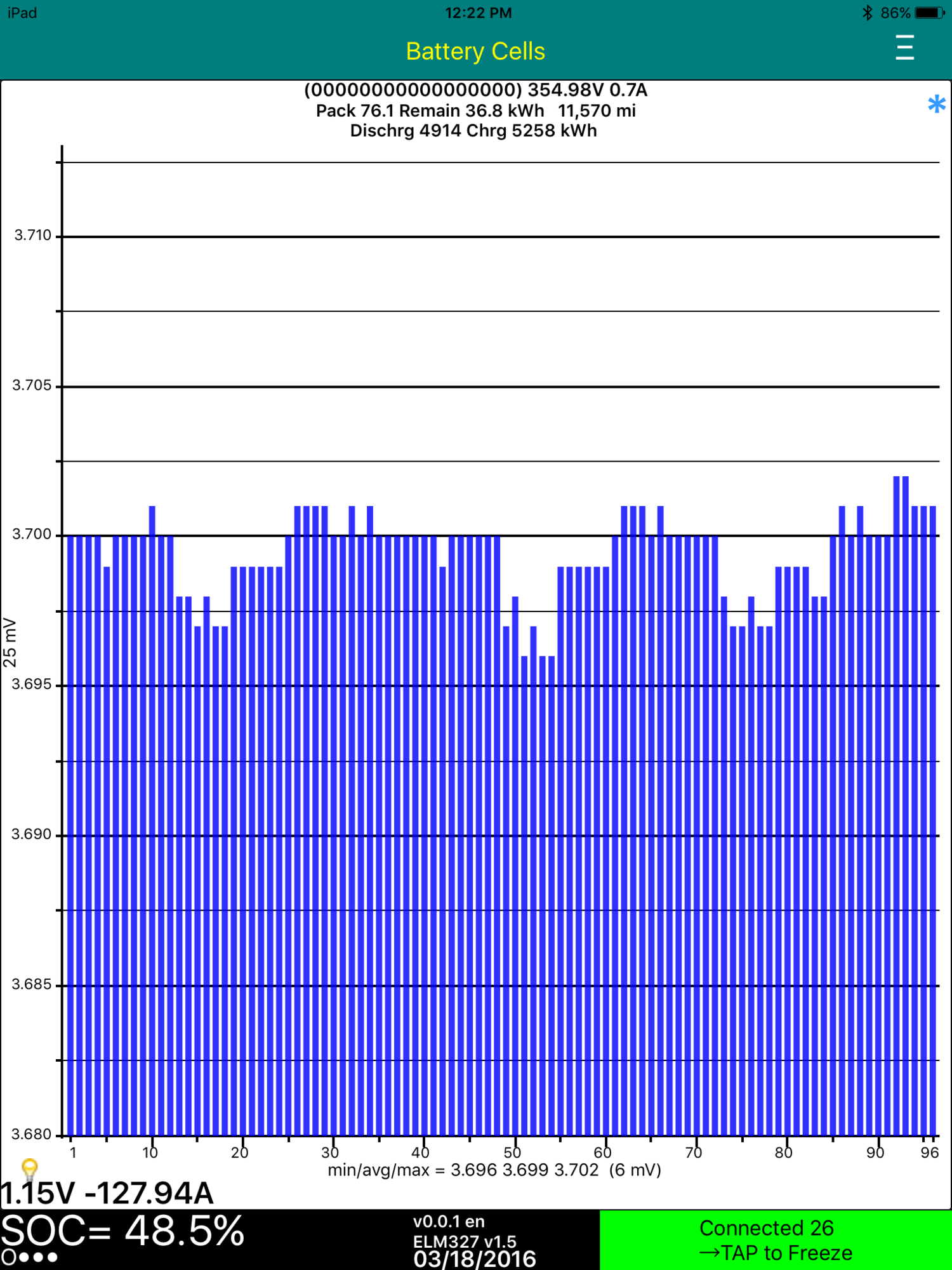
Very good for a first shot and mostly LEAF testing... cool, Jim!
Thanks a bunch for the early test opportunity (big smile) ?
Cheers, Gary�
Mar 18, 2016
Turbo3 What Gary did was to work around the bug in 0.0.1 that prevents moving to reading the next frame by unplugging and plugging the LELink back in again. Slow but you can cycle through reading all the frames this way with 0.0.1.�
Mar 18, 2016
garygid The v0.0.1 read all the data (Brick Volts, Module Temperatures, and the Total kWh charge and discharge, the Odometer, the two kWh values ...) and kept updating (at least Pack amps) without needing to re-plug the dongle.
What is a "frame", please? Perhaps one set of all of this data, where possibly the Pack Volts and Amps are handled outside of the "frame" as a special case?
I turned the A/C up to high-fan, and the amps went up to around 3.0, and then came back down after I returned the fan to low.�
Mar 18, 2016
Turbo3 When I say "Frame" I mean frames having a specific ID number like 0x102 for pack voltage/current or 0x210 for DC-DC information. Version 0.0.1 will sit on one frame ID until you unplug/plug the LELink again. While sitting on that one ID the display will be updated reflecting the incoming data for that one ID. This is how graphing works sitting on a single ID so when I tested with the Leaf everything looked good. The problem is the app will not step to the next ID when not graphing which I currently can not test with the Leaf.�
Mar 18, 2016
Benjamin Brooks I'm confused how Gary got graphs in 0.0.1 when the release notes say that graphing isn't supported in this version.
How many minutes to capture all the data Gary? I tried for ~10 minutes on my car and it wouldn't render any graphs nor log any frame files.�
Mar 18, 2016
Benjamin Brooks Never mind, I got it working for the battery cell data. Had to turn off the debug hooks and cycle the LeLink module...�
Mar 18, 2016
garygid There are 3 bar-graphs supported, the Cell (Brick) Voltages, the Module Temperatures, and a histogram of the Cell Voltages, call them "charts".
The "graphing" part is the gathering of data values over time and plotting them on a horizontal time axis. These data values are extracted from the 8 (or less) data bytes that accompany each CAN message. These messages have a "name", or message identifier (msgID), which is actually a numeric identifier, from 0x000 to 0x7FF in hex, 0 to 2047 in decimal.
The TM-Spy app supports "Recipes" for specifying the msgID and how to extract the data value from the 8 bytes (D1 through D8) ... like use byte D5 and D2 as a 16-bit integer, with D5 (or D2) being the Most Significant Byte (MSB).
Using up to 4 lines of Recipe, all with the SAME msgID, one can specify extraction of up to 4 values, like 4 temperature values, from one message, and thus get a string of values that vary over time from a series of messages. This "collecting data" and displaying the data in a time-graph is what Jim calls "graphing". It works (or sometimes not) on the Android version of TM-Spy, but is still under development in the early iOS versions ... so not enabled yet.�
Mar 18, 2016
Turbo3 Since recipes are applied after the data is captured you can update them to show additional new information within the eight bytes to create an updated graph. You can use this feature to capture Message IDs for which we do not know the function and try different recipes to try to see their function.
Version 0.0.2 is still in the automated step of "processing" so it does not look like it will get to the review step today.
Most likely I will replace it with a newer version tonight (0.0.3) with additional improvements for tomorrow.�
Mar 18, 2016
garygid Where are the files, like Recipes, frames, logs, etc. that we might need to see, edit, send to you, etc.? Apple seems to hide things that are not in the Documents folder. It appears that in Settings one can choose to use the Apple Cloud (which I do not use) for your output files, but how about accessing and editing the Recipe files?
Perhaps you intend to show and edit them, line by line, on one screen in the app?
Can the app access files in the Documents folder?
Thanks for this first iOS app, Gary�
Mar 18, 2016
MikeBur Got this going, thanks Jim.
Using BT LELink.
First time plugging in, was amazed how fast adapter sync'd. Much better than BT pairing nonsense. No data was exchanged with TM-spy 0.01 with app halted at "connected 20" in green at bottom right. 1 dropped frame from 2497.
Exiting app and restarting resulted in data being captured for battery and connecting cycling from 1-26/27.
Buglet: connected to old Dropbox account by mistake and cannot reset. I had stupidly backed up the settings after doing this, do restoring does not address. Can you add a "reset to default" in the settings please? ;-)
Resolution / orientation all looks good. I'd like to upload some screens, though this new forum sw appears to have taken the simple and make it too complex... 3 media albums created by me, though none accessible by me :-(�
Mar 18, 2016
Turbo3 You use iTunes to access the TM-Spy Documents folder.
Startup iTunes with your iOS device plugged in. Select "Apps" just below "Summary" in the left top window. Scroll down to the "File Sharing" panel and select "TM-Spy". You will now see the folder with all the documents TM-Spy uses/creates. Unfortunately user accessible sub-folders are not supported in iTunes so everything goes together. For Dropbox TM-Spy uploads things to separate folders.�
Mar 18, 2016
Turbo3 I think you will need to uninstall and re-install TM-Spy to reset Dropbox. TM-Spy just tries to open a connection. What happens next is unknown to TM-Spy.
Over 6 hours and version 0.0.2 is still in the "Processing" stage.�
Mar 18, 2016
garygid Ok, sorry, but I am iOS dumb ... what iTunes, where?
My iOS device is the iPad ... plugged in ... to what, a PC's USB port?
The iPad is the only iOS device that I have.
Is there no way to access these files using the iPad?
Oops, in post 18 above, I said Apple Cloud, and I should have said Dropbox.
Thanks for any help.
Cheers, Gary�
Mar 18, 2016
Turbo3 iTunes is Apple's program for the PC/Mac that connects through USB. First thing would be to install iTunes on your PC. When you plug the USB cable in iTunes will automatically startup. When detected you will see a small icon on the line below where "File Edit View Controls..." are listed. Put your mouse over it and it should show your iPad name. Click it to get to the next screen. From there follow my previous directions.
Apple is big on security. As far as I know no app can access another apps folder. So there is no Folder Manger app like on Android. Which leaves only iTunes.�
Mar 18, 2016
garygid I think that apps can share files with the user.
So, the app could put/use the files from/in a directory that the
app can share with the user? Then, another computer would
not be needed to edit the Recipe files while in the car.
I sent an email to tmspy1 with a link to some iOS app/directory info.
Maybe someone else out there has experience with iOS apps that
must share files with the user, like a word processor perhaps.�
Mar 18, 2016
faughtz My car is in for Ludicrous; so my feedback will be delayed, but thanks Turbo3, in advance.�
Mar 18, 2016
MikeBur Thanks. Un/re-install worked.
Away from so can't test data capture right now.
Couple of things I noticed:
1) emulation doesn't work, though some data on cells displayed it is not animating nor recorded
2) drop box folders are created in both root of do share *and* under apps/TM-Spy directories.
Looking forward to .02/3
Thanks, Mike�
Mar 19, 2016
Turbo3 Next version will be 0.0.3.
1) Emulation does not work as it was design for Bluetooth/WiFi and does not work with Bluetooth 4.0 LE. I did not think of this when I added that option under Debug.
2) That would be a Dropbox issue/fearue as TM-Spy just creates sub-folders (like /Frames or /Graphs) anything else is done up at your Dropbox.�
Mar 19, 2016
Turbo3 Some bad news. My last three attempts to upload a new build to iTunes have failed in their "import" step. I have never seen this error from iTunes before having uploaded builds to iTunes for over a year now.
If this is an iTunes bug it will probably be a few days before they fix it and I will just need to keep trying to upload new builds increasing the version number each time. Version 0.0.2 through 0.0.4 have all failed after being stuck in Apple's "Processing" step for many hours and all they report is "There was an error importing this build." with no other information.
(this forum is really slow today)
Seems to be an Apple problem as there are reports of other developers having the same problem.�
Mar 19, 2016
garygid Jim, we all appreciate your great work.�
Mar 19, 2016
Turbo3 Finally got the next version (0.0.5) released after three failed attempts due to Apple's processing bug.
Now let's see how long it takes them to review it for release.�
Mar 20, 2016
MikeBur Just to second Gary's comment. Thanks for continuing to wrestle the Appl alligator ;-)�
Mar 20, 2016
Turbo3 Version 0.0.6 is waiting for Apple's review which should happen Monday morning. Version 0.0.5 is dead replaced with this one.
Version 0.0.6 now includes the new and improved graphing screen. However, the ability to take a trace has not been enabled so I have include an "Insane" mode run X_ file which you can load to try out the zoom in/out and scroll functions.
You can also copy over any Android TM-Spy "X_" files for viewing on this new screen or someone who has an interesting one could post it for others to try out. You will need to use iTunes to place any 'X_" files on the TM-Spy shared folder.
I will be having some visitors from out of the country stopping by tomorrow and staying through Wednesday so this may be the last update until then.�
Mar 20, 2016
MikeBur Looking forward to it. In the interim, I'm going to chat with Brian about getting the other logger back - I have graphing withdrawal symptoms�
Mar 21, 2016
Turbo3 Version 0.0.7, when released, will allow you to download files to TM-Spy's documents folder without the need for iTunes. All that is needed is a DropBox.
When TM-Spy starts it will create a special folder in Dropbox named "/Copy To TM-Spy" if it does not already exist. Any files you place in that folder will be copied to TM-Spy's document folder. This feature can be used to more easily copy custom spyvarparlist.csv files or X_ frame files onto your iOS device without the need for a USB cable and iTunes
You can also create the files on the iOS device and copy them to your Dropbox which will then copy them to TM-Spy.
The copy happens once each time you start or switch to TM-Spy. So if TM-Spy is running and you place a new file in the folder just press the Home button then return to TM-Spy and all files in the folder will be copied down again including any new or updated ones.
Once a file has been downloaded it is best to remove if from the /Copy To TM-Spy folder to avoid needless copying each time TM-Spy is started/switched to.�
Mar 21, 2016
garygid Turbo3,
This very nice development for iOS TM-Spy continues while your guests are sleeping?
Now, I will go sign up for Dropbox. Is there a function in the app Settings to Clear the "Copy to TM-Spy" folder, and another to Copy the existing Recipe and X_ files from the app to Dropbox, if the folder is empty?
Was there a significant reason, other than that you already had Dropbox supported in the app, to use Dropbox instead of iCloud?
Not complaining, just curious about the merits and weaknesses of each.
Thanks a bunch for the new feature.
Cheers, Gary�
Mar 21, 2016
Benjamin Brooks Version 0.0.6 is now available, but I left my TDC cable at home today�
Mar 21, 2016
garygid So, a Ludicrous launch, ... more powerful than Insane, Power, Hotshot, Smooth, or Wimp, I guess. Thanks. Good progress. Looking at v0.0.6 now, with an iPad 3.
There is a stray "switch" that is unlabeled in Settings for Graphs.
The ELM Trace on next Start ... says still LeafSpy.
The graph redraw seems to occur a noticeable time after an expand tap.
After a scroll swipe, the graph seems to redraw once moved somewhat,
and a second time after a noticable pause, in the final position.�
Mar 21, 2016
jrreno Got my LE dongle today and version 0.0.6.
All worked flawlessly.�
Mar 21, 2016
garygid Should the "Copy To TM-Spy" folder in DropBox be in the "Apps/TM-Spy" folder, or did your writing "/Copy To ..." mean put it in the DropBox "root"?
Thanks.�
Mar 22, 2016
Turbo3 The bad voltage and current displayed a the bottom left for the DC-DC converter will be fixed in 0.0.7. Divide voltage by 0.08 to see correct value (1.14/0.08 = 14.25V).�
Mar 22, 2016
Turbo3 The folder is automatically created by TM-Spy (v 0.0.7) and the folder name is "/Dropbox/Apps/TM-Spy/Copy to TM-Spy"�
Mar 22, 2016
Turbo3 There will be a switch in settings to clear the contents of the "Copy to TM-Spy" folder. The setting is automatically cleared after the folder contents is removed.
I don't know anything about iCloud. Dropbox support is already in TM-Spy to upload data from the app to Dropbox so it is easy to add a few lines of code to download all the files in a Dropbox folder to the apps Document folder.�
Mar 22, 2016
Turbo3 The "stray switch" has been removed.
All references to LeafSpy have been changed to TM-Spy.
The default number of plot points has been changed from 1200 to whatever the current panel width is which should speed up the redraw.
Version 0.0.7 will probably be released to iTunes on Wednesday.�
Mar 22, 2016
Benjamin Brooks Thanks Turbo3. It also appears that when the VIN Msg is decoded from the CAN bus, the pack voltage and current is no longer printed at top of the Battery Cells window (unless you toggle the obfuscate VIN setting).�
Mar 22, 2016
Turbo3 Actually I fixed that bug but for some reason only partially implemented the fix. Will be taken care of in 0.0.7. Thanks for reporting it.
If you kill the app and restart you will see the problem has been fixed in the saved version of the VIN. Only when it is actually read again from the Tesla does the problem occur .�
Mar 22, 2016
garygid With an iPad 3, I just updated to iOS 9.3 from 9.2.1 and it appears that all went well. TM-Spy runs offline, but have not had a chance to try it in the car.
By the way, in the car, with no Internet connectivity, it will not be able to access Dropbox, for reading, or for saving files. Hopefully it remembers what files to upload (perhaps puts them into a local folder to be uploaded later) when it again starts up with Dropbox available?�
Mar 22, 2016
Turbo3 Yes, as soon as you get connected to the Internet any new files will be uploaded. Although at the moment you can not enable taking a trace so there will be nothing new except the errdata.txt file.�
Mar 23, 2016
garygid I just got v0.0.8 .... Thanks.
The app downloaded my X_ files from Dropbox.
After setting the Clear switch, either the files were erased when exiting the app, or apparently BEFORE reading them on the next startup.
Settings has a selection for three languages, which the app now supports.
The locked vertical scale seems to work nicely. A good new feature, thanks.
bugs:
The zero based scale graph type, on your x_102_02... file does not show the red data, because the scale is appropriately 600 to 1100 (or higher) after the first time, when the zero based scale was correct.
(The other graph types, both full screen auto scale to data, and two half screen autoscale seem to work well.)�
Mar 23, 2016
garygid Putting a User-defined Plots file ("spyvarparmlines.csv" with appropriate lines of Recipe definitions) into the Dropbox "Apps/TM-Spy/Copy to TM-Spy" folder will cause v0.0.8 to download the user plots file when the app starts from "off" (not restarts).
Then, when there is a user plots file available, the app will logically (not physically) append the user plot definitions to the built-in plot definitions.
I have tried this, it works, and the user plots are available in the app's Settings.
Cool, and even better wrinkles are likely to happen.�
Mar 23, 2016
garygid As of v0.0.8, the "Calculate Power" option in Settings is only used with the first built-in Plot.
Later, if we find that other Plots need the "multiply" feature, we might be able to re-think this limitation. In most cases, plotting Volts and Amps is roughly equivalent, because the Volts do not vary that much, and the Power graph line looks a lot like the Amps graph line.�
Mar 24, 2016
garygid A User Plot definition is 1 to 4 Recipe lines in the spyvarparmlines.csv file, also known as the User Plot file. There is also a Spy Plot file, that is provided with the Spy app, containing useful "well established" Plot definitions.
For now, creation of a Recipe line is not very difficult, but rather technical, and we hope to have a Recipe Line Editor or Creator included in some future version of the app. For now my CAN-Do progran for PC can create Recipe Lines.
See www.wwwsite.com/puzzles/cando if you want to try it.
Each Recipe Line specifies how to extract one value from one CAN message.
Like this...
We specify the message ID that we want to process.
The Tesla uses several hundred msgIDs, ranging from 0x000 to 0x7FF (hex values), and a CAN message might contain up to 8 bytes of data.
For example, assume that it has been discovered that a message has 8 bytes (D1 through D8), and that byte D3 contains the car's inside temperature in degrees C, over a range of plus or minus 50 degrees, in half-degree steps ... we can build a Recipe to get a value like 20.5 which is useful for plotting.
Another example might be two bytes that contain plus or minus 32000 which were discovered to be the RPM of the rear motor, which could lead us to being able to make a graph of the car's Speed, in miles per hour. Of course, to change an RPM into a MPH number takes additional calculations, reducing the RPM by the rear reduction gear factor, and assuming an "effective wheel diameter" to calculate how far the car moves with each turn of the wheel. Notice that the speed that we calculate is only approximate, because tire pressure, wear, and temperature all change the "effective diameter". So, even if the RPM was accurate, our calculated value would be just an approximation. But, two bytes would be included in this Recipe.
More later.�
Mar 25, 2016
garygid A little food on the river of time, so that you will keep swimming upstream with us:
1. If I read a recent screenshot and comment from Turbo3 correctly, v0.0.9 will include more generalized support for the option of plotting the Product of two values, even for User Plots. This option is probably being renaned "Plot Product" (as in the Product of A times B) instead of "Calculate Power". It will be interesting to see what unlikely uses users ultimately use this feature for ... usefully!
2. The beginnings (perhaps an Alpha or Beta version) of Data Gathering for Plots is likely to be enabled in v0.0.9. If so, that well give us something exciting to experiment with ... err, Test, I mean. Apparently someone is working hard to make that happen, but he could test his code better if someone would give him a Tesla to use.�
Mar 25, 2016
Turbo3 Version 0.0.9 has just been released.
You can now take your own traces from your Tesla's CAN bus using the new fourth graph screen.
Next release will add "Delete" so you can delete a trace file you no longer need from your iOS device.�
Mar 25, 2016
garygid I just updated v0.0.8 to v0.0.9 .... excitement building, Thanks.�
Mar 25, 2016
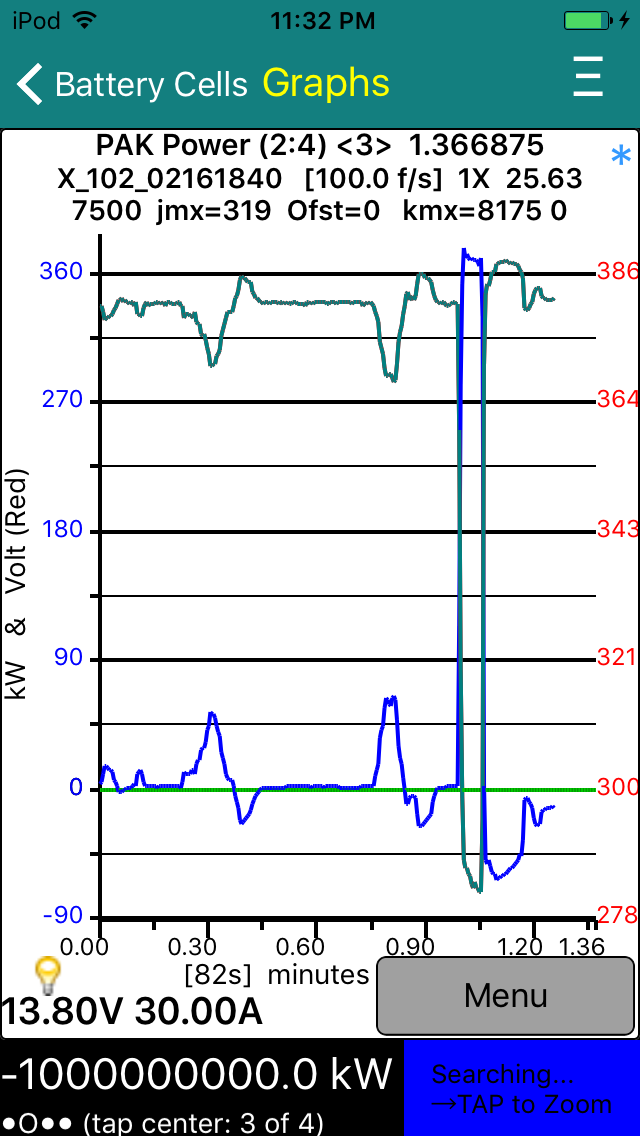
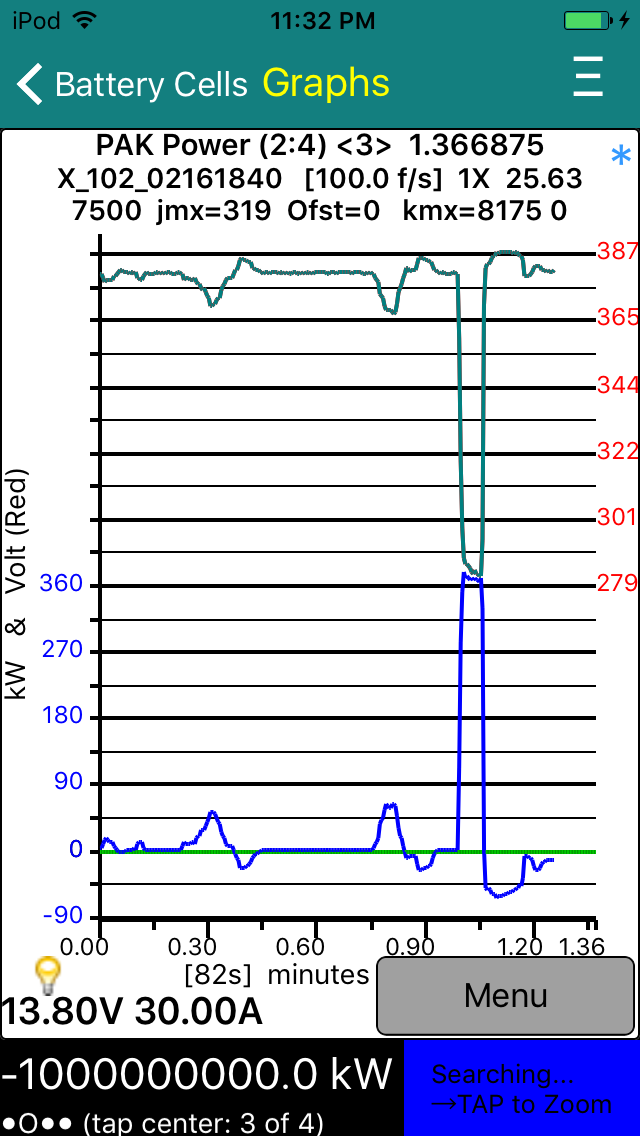
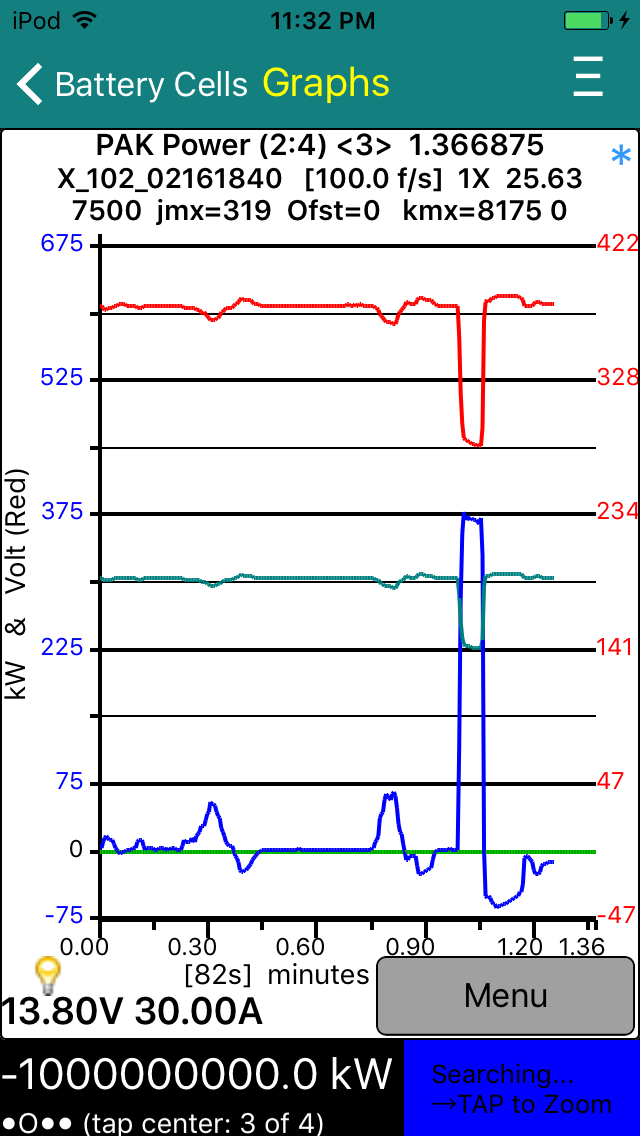
garygid Trying to test the use of User Plot definitions, which appear to work rather well, except for one wrinkle seen in scaling the blue line below. I reported it to Turbo3 and he says that it will get fixed in the next version.
In using the Plot Product feature, the first and second variables of the Plot definition are used, and the first variable must be the one that might go negative, like Amps. The second variable should stay positive, like the pack Volts. Jim's rules, at least for now.
The (2:4) <3> indicates that this Plot uses lines 2 through 4 of the User Plot file, and that it is a 3-Recipe Plot. The first line of the User Plot file is the text of the spreadsheet column headers.
I inserted a copy of my User Plot file's line 3 as line 4, changing the volts scaling factor from 0.01 to 0.005 to show V/2 (half-volts) as the 3rd variable. In the FullScale Graph style, it works, as seen in the first pic below. However, the other two styles get confused, apparently just using the last plot variable for scaling.
But, in any case, a pleasant surprise, finding an unreleased feature, I suspect. Way cool, Jim.
You have "busted your hump" to get the Data Collection feature out to us, so now please take time to do those accumulated house chores, and other SWMBO stuff. I keep playing with this stuff, and learning to use iOS and Dropbox with a text editor for the csv files (how do others do this?), but I really should try to finish taxes first. So, taxes, then data collection.
Great cheers for you, Jim.
Plot of 3 variables from one msgID:

But, three variables still needs work:

Cheers, Gary�
Mar 25, 2016
Turbo3 Version 0.0.10 is out and adds a Delete graph function. The top plot in the above post should now have a better negative scale so all of the blue line is shown (-88 on my device instead of the -32 in Gary's above plot).�
Mar 25, 2016
jrreno Graph looked ok until I plugged in and started to charge.
�
Mar 25, 2016
Turbo3 Hopefully you saved the data for the graph. If so please send it to me or a Dropbox link.�
Mar 25, 2016
jrreno Drop Box link sent.�
Mar 25, 2016
faughtz Using 0.0.10, I can't see the 3rd page-going down from here or up from page 2- the app crashes-
�
Mar 25, 2016
garygid Perhaps while busy Gathering Data, the app is in, or should be in, a do not disturb mode?
With no disturbances, my iPod Gathered Data nicely with v0.0.9 and graphed the data with v0.0.10 ... the app seemed to keep the iPad alive while Gathering Data. The bug in zero-based graph style when doing a 3-variable plot seems to be eradicated, as seen below.
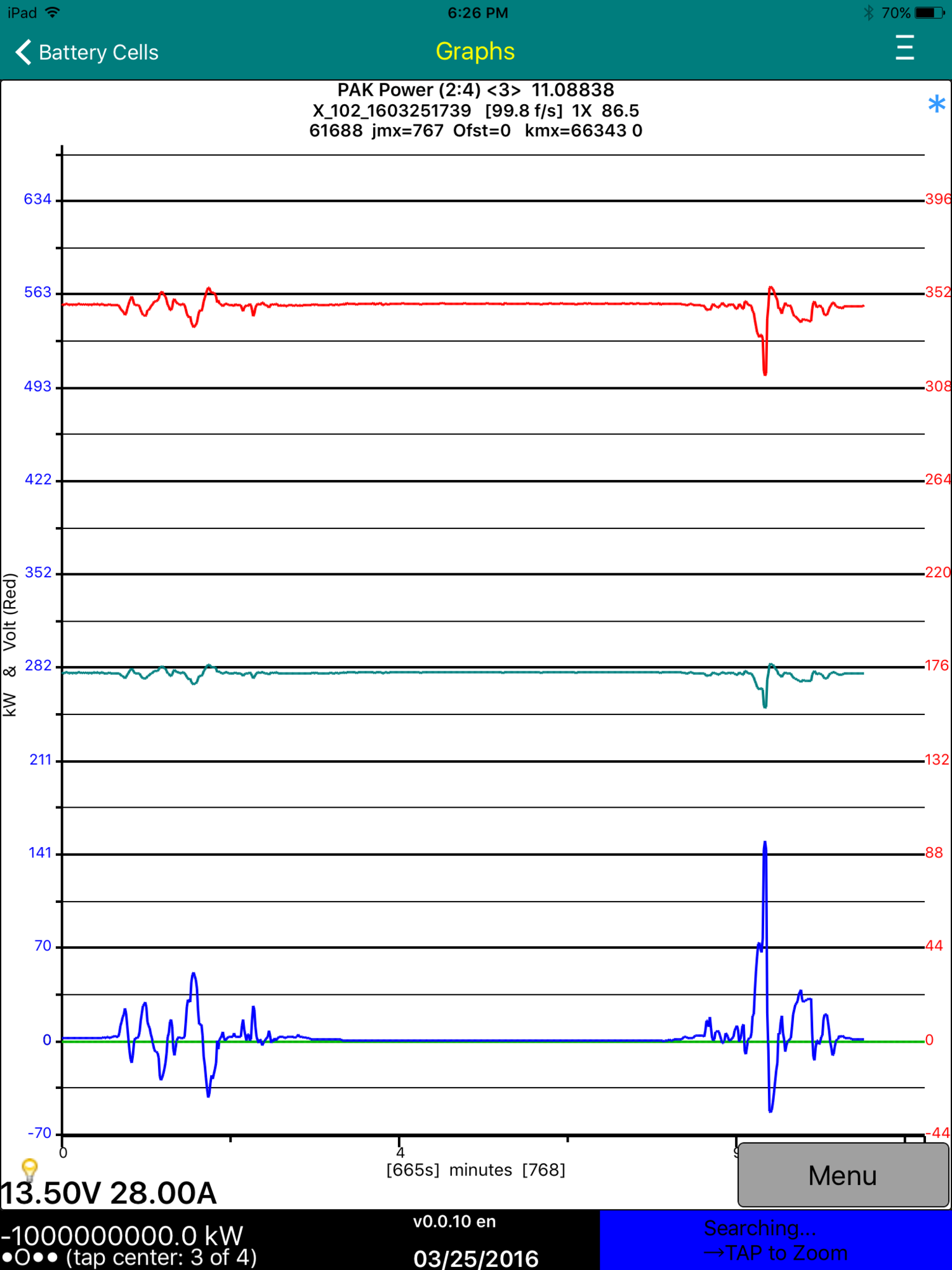
The middle line is green, representing half-voltage.
Thanks Jim.�
Mar 25, 2016
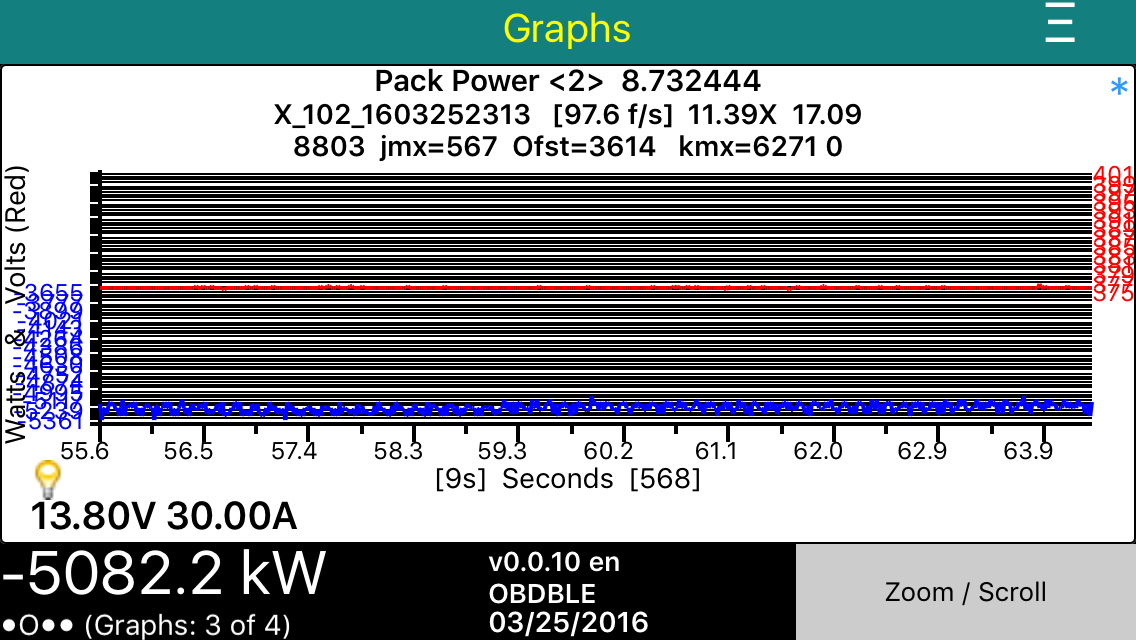
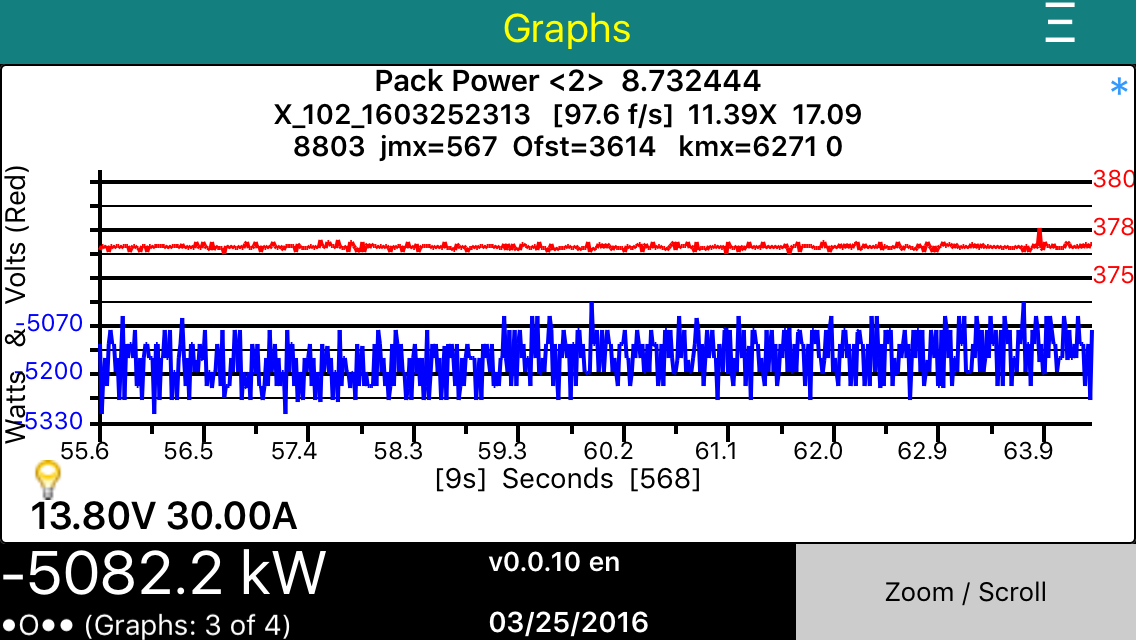
Turbo3 Here are screenshots of before and after I fixed this problem. Fix will be in version 0.0.11.
 �
�
Mar 25, 2016
Turbo3 Here is the fix for this one. Now all three three plot graph types plot correctly. Only a two character change to fix this one. ("=2" to ">1").
 �
�
Mar 25, 2016
markb1 Me too. iOS 9.3, iPhone 6S.�
Mar 26, 2016
Turbo3 There is a bug that crashes the app if there is no graph to plot. Will be fixed in next release.
Version 0.0.11 with all the fixes is waiting for Beta Review which should happen sometime after 9 AM.�
Mar 26, 2016
garygid Turbo3.
In your three screenshots above, the last shows the first variable as blue amps or power, the second as red volts, and the third as green half-volts.
The top two still show the first variable as blue, but the second volts is shown in green ... at least the scale would indicate the volts, rather than the half-volts.
So, maybe you plotted the 2nd variable in red, with the red scale, but then plotted the 3rd variable, to a different auto-scale which is not shown, which then exactly covers the red due to the auto-scaling of the green?
But, great work anyway.�
Mar 26, 2016
Turbo3 When displaying all three plots with auto scaling the 1 volt and 1/2 volts will expand to the same plot since they are the same data and overlay exactly. That means you only see the last one drawn which is the green one. The right hand scale is only for the over written and unseen Red plot. The same thing will happen if you graph 2,3 or 4 plots of exactly the same data. You will only see the last one plotted.
I could try making the colors a bit transparent and see what that looks like.
Version 0.0.11 is out and everyone should update to it to avoid the crashes seen on earlier versions.�
Mar 26, 2016
garygid In zooming in and out, a factor of 1.5 is used in v0.0.11 but probably 2.0 would be sufficient, and perhaps take less taps to use, and might be easier for the user to read the "x" factor.
Nice having Reset available after zooming, but Reset Time Scale or just Full Time Scale or some such would be easier to understand. Initially I thought that Reset might mean erase my collected data ... before I had a chance to Save it.
I will try a Plot with 3 and 4 variables, with different data for each.�
Mar 26, 2016
faughtz I downloaded 0.0.11, and looking better and better - but I still crash on screen 3 as above.�
Mar 26, 2016
Turbo3 I found a factor of 2 too coarse so changed it to 1.5.
I have made plot colors 2 and 3 a little transparent but of course you still end up with just a single line. It just has a mix of plot 2 and 3 colors. That is probably good enough as this is a corner case.�
Mar 26, 2016
Turbo3 Just crashed for me too!�
Mar 26, 2016
Turbo3 Found a bug you need to avoid until the next release.
When taking a trace you can be on graph screen 3 and when you tap the menu key you will be allowed to save the active trace. DON'T DO IT.
You must stop a trace by going to graph screen 4 and pressing the Stop Rec button first.
If you save an active trace while on graph screen 3 it will not have the ending time stamp and will crash the app when you try to read it in again.
Next version will handle traces saved this way but will need to assume a 100 f/s sample rate since the end stamp was not saved. It will also not give you the Save option on graph screen 3 until the trace is stopped.�
Mar 26, 2016
faughtz �
Mar 26, 2016
faughtz Is there a way to recover?
Deleting and reinstalling seems to have the same problem.�
Mar 26, 2016
garygid Zoom Factor of 1.5 is Ok, but it could be a future choice in Settings.
Plots with 4 different variables below, but I might have accidently defined the Plot with two different msgIDs. I will check, fix, and try again. Yes, I had some msgIDs wrong, fixed them, but get the same graphs. So, it appears that only the msgID in the first recipe of the Plot is actually used.
First, all 4 show up in the Auto-Scale graph type.
Maybe a tap on the left axis could alternate to show the green scale numbers,
and a tap on the right alternate between red and purple scale?
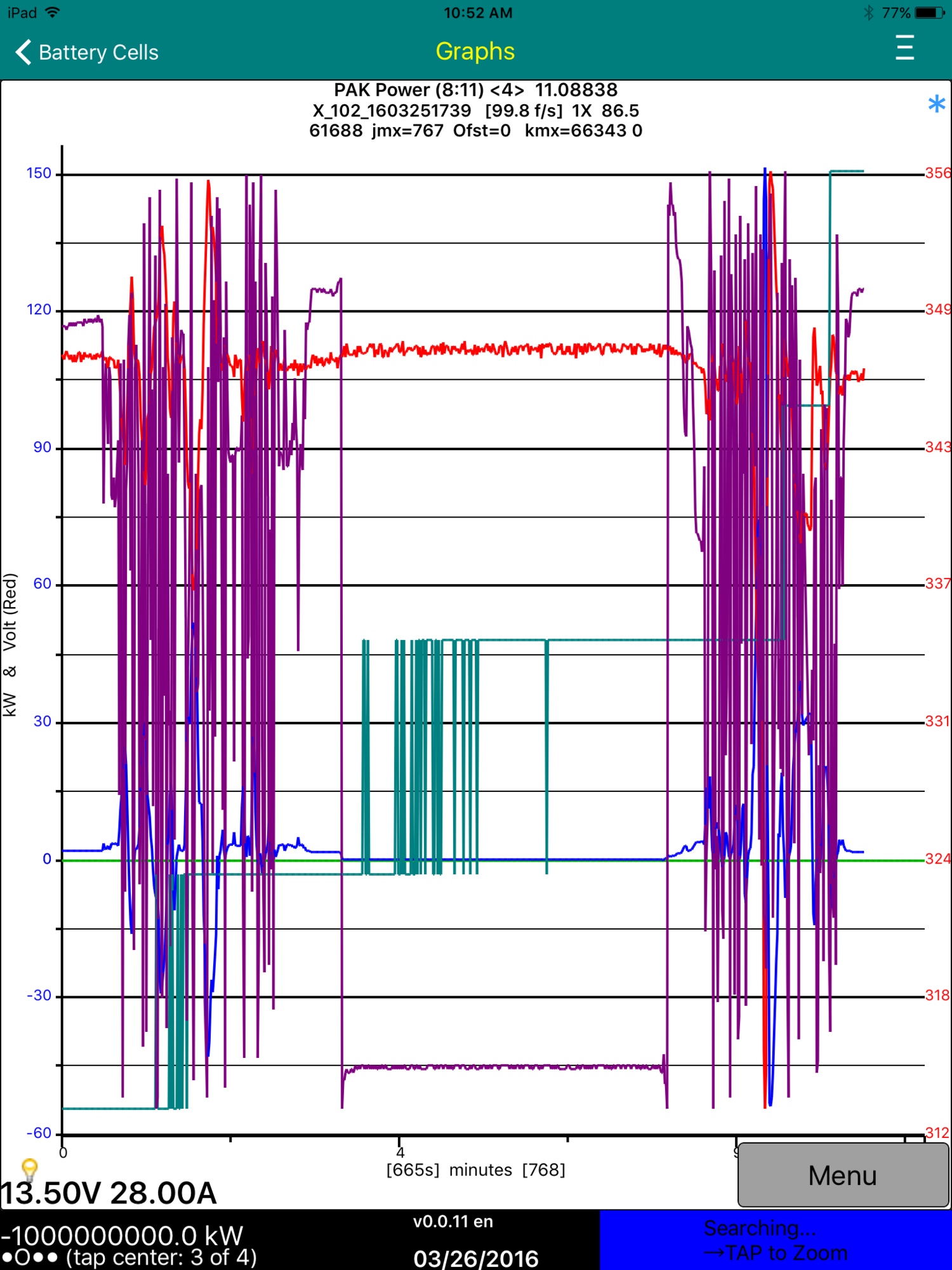
The Split-Screen graph seems to auto scale the red and green in the top half, but the purple seems to be missing.
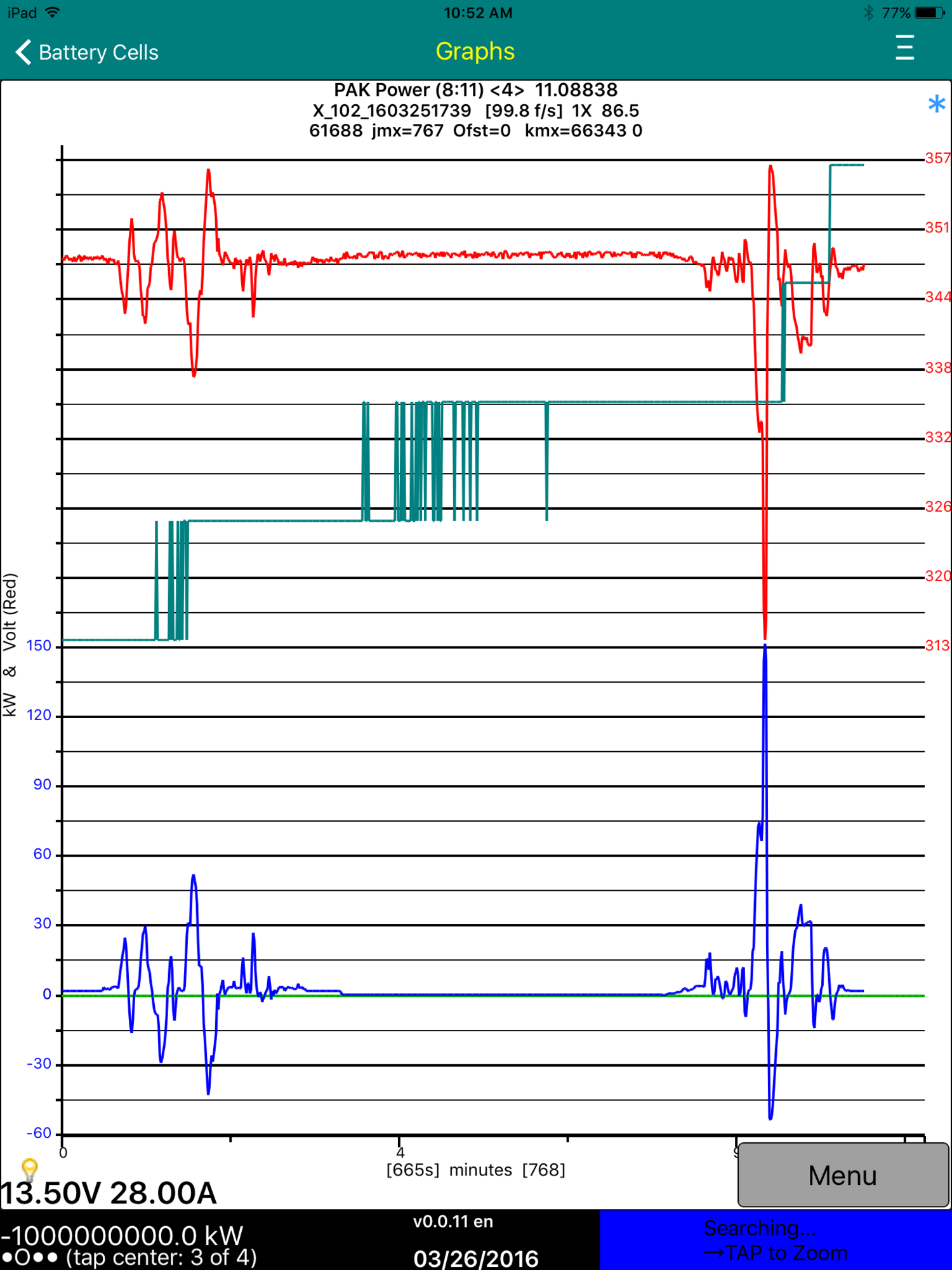
The Full-Scale graph might show the green on the green zero line, but i would expect it to clobber the blue, but it does not ... so maybe missing. The purple seems to be missing.
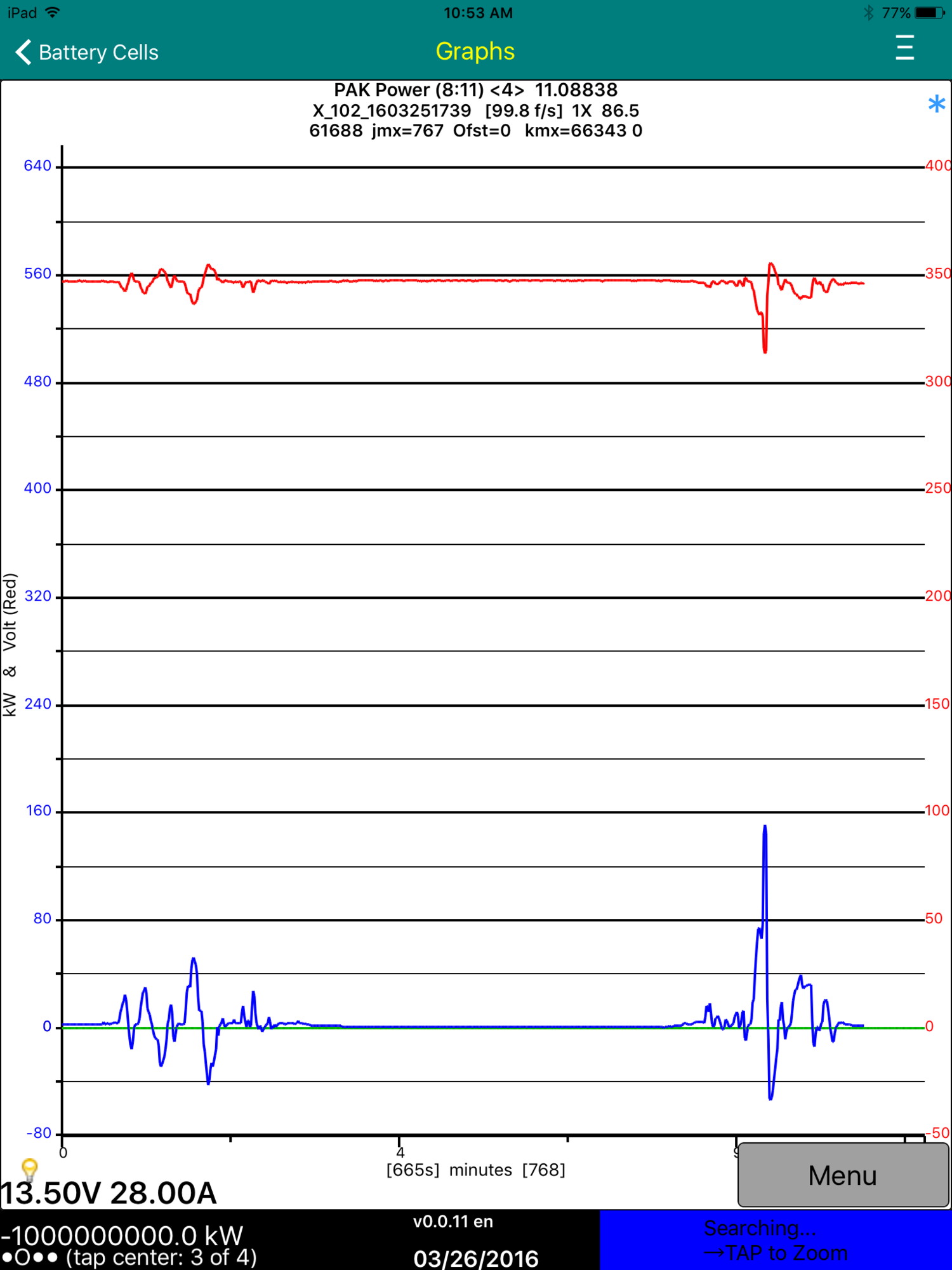
This app is really getting better, almost every day, sometimes "sooner".
Yes, I sent the User Plot file to Turbo3.
Cheers, Gary�
Mar 26, 2016
Turbo3 Any chance you remember what was on graph screen 3? Was it a previous trace you had taken. If so or you think it was then I would need to get that trace X_ file or files if you don't know which one.
If you are using Dropbox so all your X_ files are saved on Dropbox you can try using iTunes to rename the files by changeing X_ to Y_ so the app can not read it in. Or erase them all since you have them saved on Dropbox. If the problem goes away then you can put them back until you find the one causing the problem. That is the one I need to see.�
Mar 26, 2016
Turbo3 Let me go try a fresh install and see if I can get it to fail.�
Mar 26, 2016
faughtz I don't know what was on screen 3.
I started using dropbox after the problem started, but just copied itunes files into dropbox "itunes from failed screen 3", and you should have access. I'll see if I can find the bad file.�
Mar 26, 2016
faughtz
Doesn't look like a file is causing the problem.
I used itunes to delete tm-spy files,
synched itunes and phone,
deleted tm-spy from phone,
reinstalled tm-spy on phone,
and still crash on screen 3.�
Mar 26, 2016
Turbo3 Fails on first install now. Fix coming soon...�
Mar 26, 2016
Turbo3 Unfortunately Apple did not get around to reviewing the next beta release before they closed for the weekend. So the fix for the crash bug won't be available until Monday morning.
Here are some test screenshots of the new stacked graphs with support for 2 through 4 plots. Scales on either side still need work. Using Gary's three and four plot recipes.
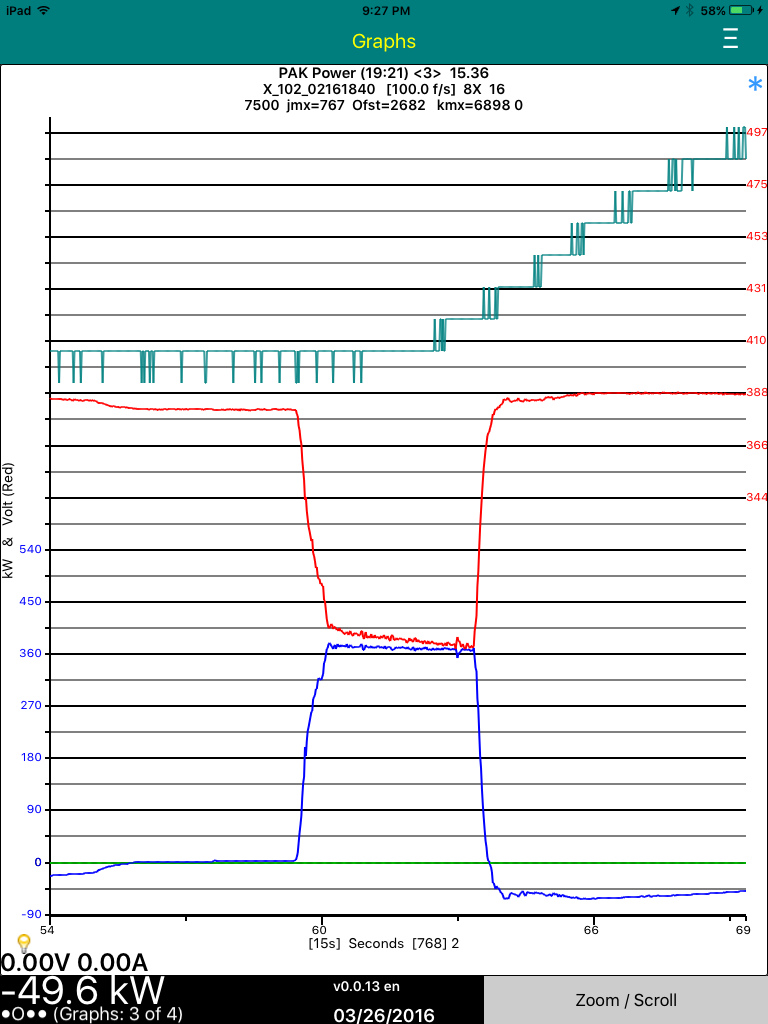
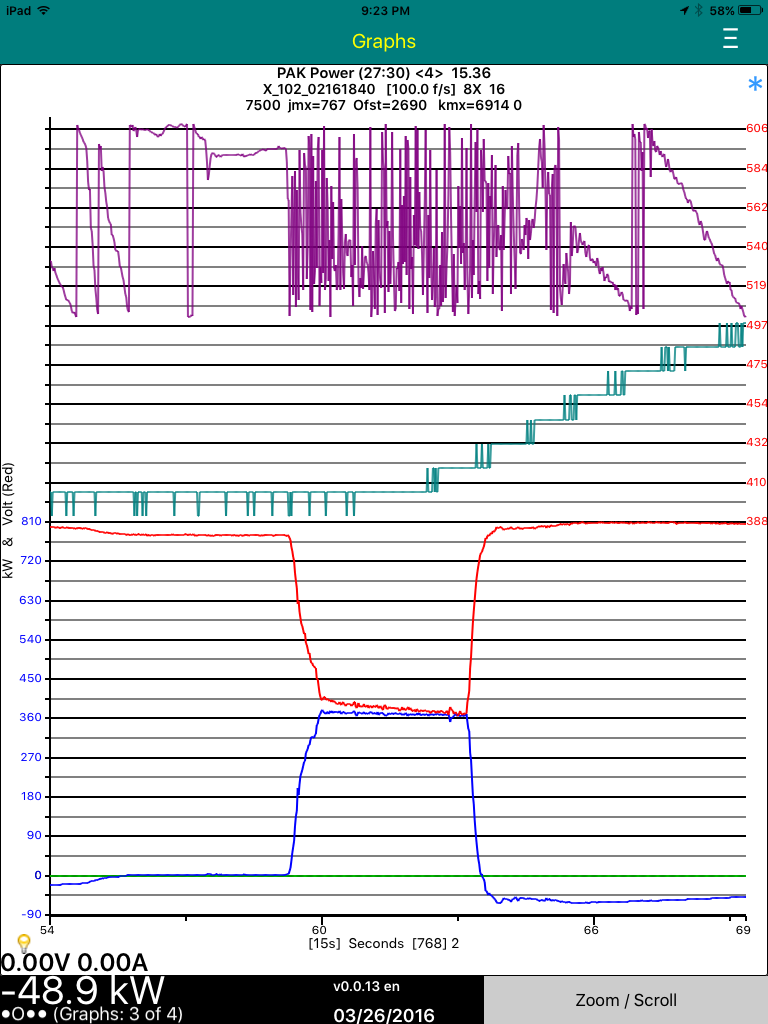 �
�
Mar 26, 2016
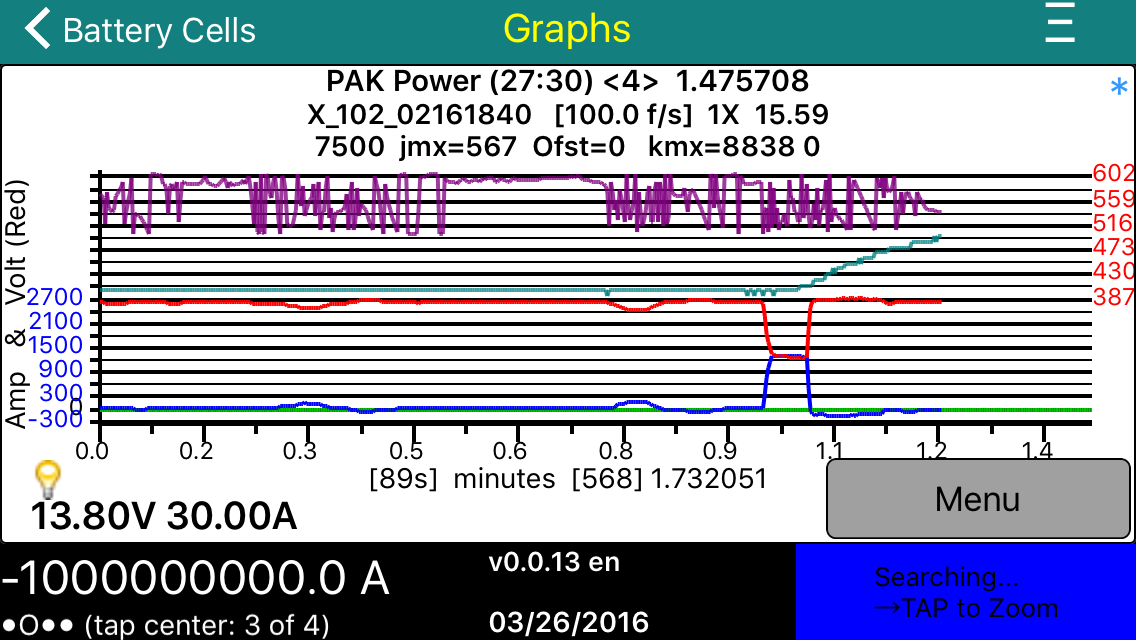
Turbo3 Here are four plots on an iTouch. Small but all there.
 �
�
Mar 26, 2016
garygid Jim,
We appreciate all your hard work and dedication to making this app something special for us. Please have a good Sunday yourself. We will be looking forward to Monday morning and trying out the latest of your creations.
Happy Easter to you and to all people everywhere.
Let us try for a century or two of Peace, for a change.
Sincerely, Gary�
Mar 27, 2016
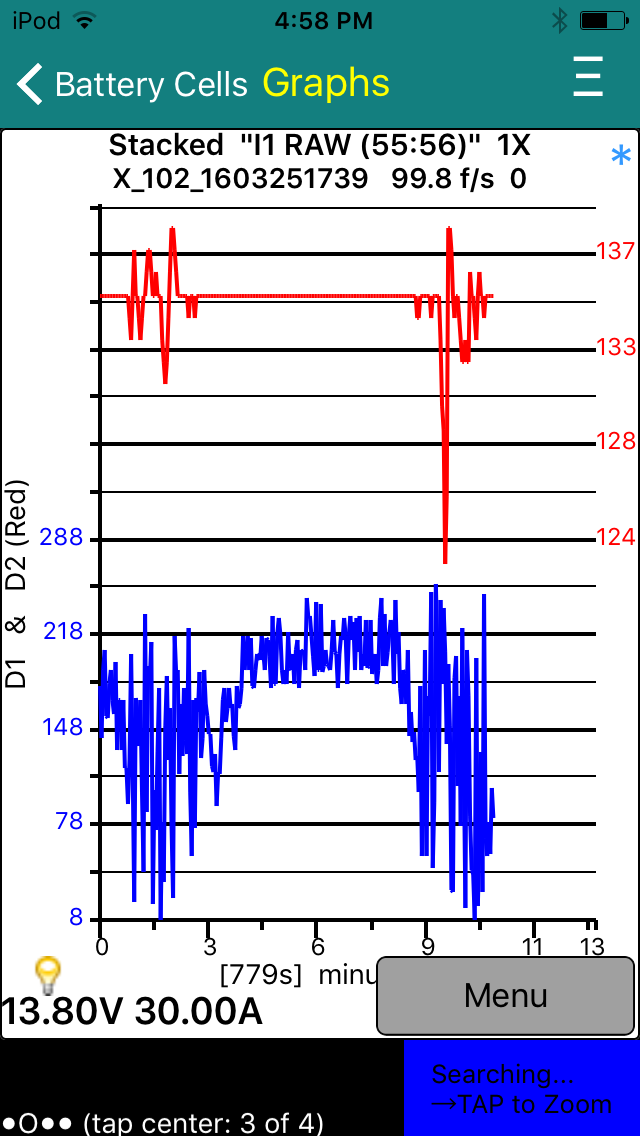
garygid Easter Egg, showing bytes D1 and D2.
Education: Note that the red graph could represent Amps into the battery pack, or perhaps the Pack's voltage. However, this byte D2 is a bit jagged, as if it is low resolution data. In this case, the adjacent byte, in this case D1, appears to have some well-correlated "noise". Here, D2 is probably the high order byte of a 2-byte value, and D1 is likely to be the "detail" carried in the low order byte of the same value. Happy Easter.
I tried scaling by 1 (to get values 0 to 255), and setting scaling to zero, which should mean no scaling (also values 0 to 255), so the scaling in v0.0.11 must be a little broken.
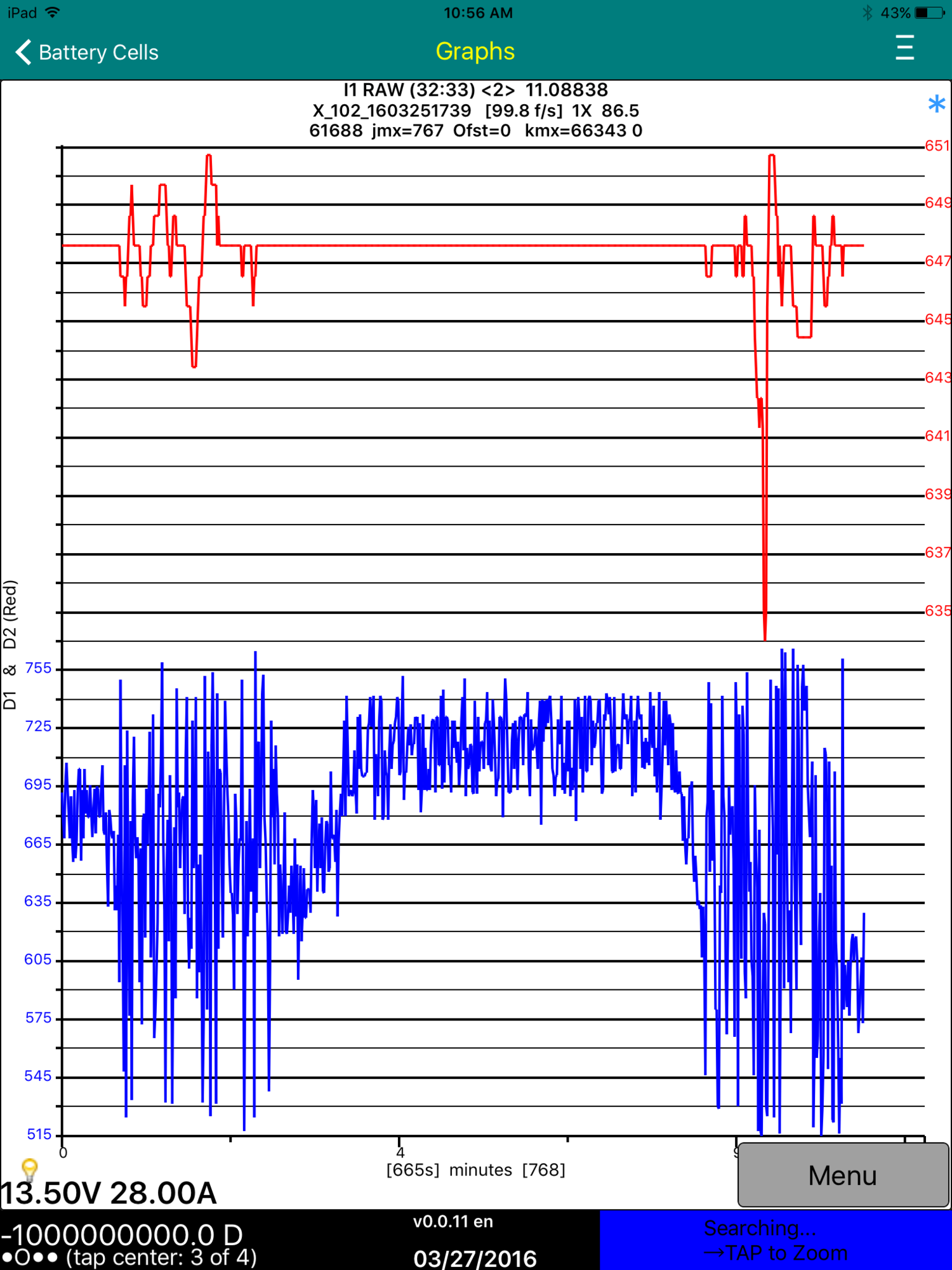
Somehow this 2-variable plot from v0.0.11 shows too high values.
Maybe this has already been fixed in the v0.0.13 that is in for review?�
Mar 27, 2016
faughtz just downloaded 0.0.13.
No more screen 3 crashes.
Thanks!�
Mar 27, 2016
garygid The byte value problem shown in my post 2 above is still there in v0.0.13
but I will test other features more later.�
Mar 27, 2016
Turbo3 Fixed in next release.
 �
�
Mar 27, 2016
garygid I will wait for the next version before posting more on scaling issues.
The Expansion Factor used when looking at data and Zooming In or Out can now, in v0.0.13, be set in Settings to:
a. 1.414... (the square root of 2) so that every other step is a nice power of 2.
b. 1.5 as similar, but slightly different.
c. 2.0 like two steps of (a).�
Mar 28, 2016
Turbo3 There are a lot of improvements in Monday's version 0.0.14 release. I believe all the bugs reported have been fixed. Let me know if I missed any.
Version 0.0.13 seems to have fixed the crashing problems.
I was surprised to see Apple reviewing on a Sunday.�
Mar 28, 2016
garygid This is an example of the Plots and Recipes that I am using to test various 1, 2, 3, and 4-variable Plots:
I will attempt to explain a typical line later, but there are 4 main parts:Code:Var Name v2.00,Byte A#,Mask A,Shift A,Byte B#,Mask B,Shift B,Plot Min,Plot Max,2's Comp Ck,Scale Fact,Raw Zero,Reserved,Byte C#,Mask C,Equals C,Msg ID,Byte D#,Mask D,Shift D,Byte E#,Mask E,Shift E PT:pAK Amps:Amps:Watt,3,255,0,4,127,8,-160,1600,1,-0.1,10000,100,0,255,3,258,0,0,0,0,0,0 PT:pAK Volts:Volts:kW,1,255,0,2,255,8,0,400,0,0.01,0,100,0,255,3,258,0,0,0,0,0,0 PT:DC2DC Amps:As:W,5,255,0,0,224,-5,0,160,0,1,0,10,0,255,3,528,0,0,0,0,0,0 PT:DC2DC Volts:Vs:Ws,6,255,0,0,224,-5,0,16,0,0.1,0,10,0,255,3,528,0,0,0,0,0,0 PT:pAK Power:Amp:Watt,3,255,0,4,127,8,-160,1600,1,-0.1,10000,100,0,255,3,258,0,0,0,0,0,0 PT:pAK Power:Volt:kW,1,255,0,2,255,8,0,400,0,0.01,0,100,0,255,3,258,0,0,0,0,0,0 PT:DC2DC Power:A:W,5,255,0,0,224,-5,0,160,0,1,0,10,0,255,3,528,0,0,0,0,0,0 PT:DC2DC Power:Vs:Ws,6,255,0,0,224,-5,0,16,0,0.1,0,10,0,255,3,528,0,0,0,0,0,0 PT:pAK Power:Amp:Watt,3,255,0,4,127,8,-160,1600,1,-0.1,10000,100,0,255,3,258,0,0,0,0,0,0 PT:pAK Power:Volt:kW,1,255,0,2,255,8,0,400,0,0.01,0,100,0,255,3,258,0,0,0,0,0,0 PT:pAK Power:D7:byte,7,255,0,0,255,8,0,256,0,1,0,100,0,255,3,258,0,0,0,0,0,0 PT:DC2DC Power:A:W,5,255,0,0,224,-5,0,160,0,1,0,10,0,255,3,528,0,0,0,0,0,0 PT:DC2DC Power:Vs:Ws,6,255,0,0,224,-5,0,16,0,0.1,0,10,0,255,3,528,0,0,0,0,0,0 PT:DC2DC Power:D3:byte,3,255,0,0,127,8,0,256,0,1,0,10,0,255,3,528,0,0,0,0,0,0 PT:pAK Power:Amp:Watt,3,255,0,4,127,8,-160,1600,1,-0.1,10000,100,0,255,3,258,0,0,0,0,0,0 PT:pAK Power:Volt:kW,1,255,0,2,255,8,0,400,0,0.01,0,100,0,255,3,258,0,0,0,0,0,0 PT:pAK Power:D7:byte,7,255,0,0,255,8,0,256,0,1,0,100,0,255,3,258,0,0,0,0,0,0 PT:pAK Power:D3:byte,3,255,0,0,255,8,0,256,0,1,0,100,0,255,3,258,0,0,0,0,0,0 PT:DC2DC Power:A:W,5,255,0,0,224,-5,0,160,0,1,0,10,0,255,3,528,0,0,0,0,0,0 PT:DC2DC Power:Vs:Ws,6,255,0,0,224,-5,0,16,0,0.1,0,10,0,255,3,528,0,0,0,0,0,0 PT:DC2DC Power:D3:Byte,3,255,0,0,127,8,0,256,0,1,0,10,0,255,3,528,0,0,0,0,0,0 PT:DC2DC Power:D4:byte,4,255,0,0,127,8,0,256,0,1,0,10,0,255,3,528,0,0,0,0,0,0 PT:D1-D4 RAW:D1:byte,1,255,0,0,255,8,0,256,0,1,0,100,0,255,3,258,0,0,0,0,0,0 PT:D1-D4 RAW:D2:byte,2,255,0,0,255,8,0,256,0,1,0,100,0,255,3,258,0,0,0,0,0,0 PT:D1-D4 RAW:D3:byte,3,255,0,0,255,8,0,256,0,1,0,100,0,255,3,258,0,0,0,0,0,0 PT:D1-D4 RAW:D4:byte,4,255,0,0,255,8,0,256,0,1,0,100,0,255,3,258,0,0,0,0,0,0 PT:D5-D8 RAW:D5:byte,5,255,0,0,255,8,0,256,0,1,0,100,0,255,3,258,0,0,0,0,0,0 PT:D5-D8 RAW:D6:byte,6,255,0,0,255,8,0,256,0,1,0,100,0,255,3,258,0,0,0,0,0,0 PT:D5-D8 RAW:D7:byte,7,255,0,0,255,8,0,256,0,1,0,100,0,255,3,258,0,0,0,0,0,0 PT:D5-D8 RAW:D8:byte,8,255,0,0,255,8,0,256,0,1,0,100,0,255,3,258,0,0,0,0,0,0 PT:I1 RAW:D1:byte,1,255,0,0,255,8,0,256,0,0,0,100,0,255,3,258,0,0,0,0,0,0 PT:I1 RAW:D2:byte,2,255,0,0,255,8,0,256,0,0,0,100,0,255,3,258,0,0,0,0,0,0 PT:I2 RAW:D3:byte,3,255,0,0,255,8,0,256,0,1,0,100,0,255,3,258,0,0,0,0,0,0 PT:I2 RAW:D4:byte,4,255,0,0,255,8,0,256,0,1,0,100,0,255,3,258,0,0,0,0,0,0 PT:I3 RAW:D5:byte,5,255,0,0,255,8,0,256,0,1,0,100,0,255,3,258,0,0,0,0,0,0 PT:I3 RAW:D6:byte,6,255,0,0,255,8,0,256,0,1,0,100,0,255,3,258,0,0,0,0,0,0 PT:I4 RAW:D7:byte,7,255,0,0,255,8,0,256,0,1,0,100,0,255,3,258,0,0,0,0,0,0 PT:I4 RAW:D8:byte,8,255,0,0,255,8,0,256,0,1,0,100,0,255,3,258,0,0,0,0,0,0 PT:LI1-LI2/100:Int1:I1xI2,1,255,0,2,255,8,0,500,0,0.01,0,100,0,255,3,258,0,0,0,0,0,0 PT:LI1-LI2/100:Int2:I1xI2,3,255,0,4,255,8,0,500,0,0.01,0,100,0,255,3,258,0,0,0,0,0,0 PT:LI3-LI4/100:Int3:I1xI2,5,255,0,6,255,8,0,500,0,0.01,0,100,0,255,3,258,0,0,0,0,0,0 PT:LI3-LI4/100:Int4:I1xI2,7,255,0,8,255,8,0,500,0,0.01,0,100,0,255,3,258,0,0,0,0,0,0 PT:HI1-HI2/100:Int1:I1xI2,2,255,0,1,255,8,0,500,0,0.01,0,100,0,255,3,258,0,0,0,0,0,0 PT:HI1-HI2/100:Int2:I1xI2,4,255,0,3,255,8,0,500,0,0.01,0,100,0,255,3,258,0,0,0,0,0,0 PT:HI3-HI4/100:Int3:I1xI2,6,255,0,5,255,8,0,500,0,0.01,0,100,0,255,3,258,0,0,0,0,0,0 PT:HI3-HI4/100:Int4:I1xI2,8,255,0,7,255,8,0,500,0,0.01,0,100,0,255,3,258,0,0,0,0,0,0 PT:LI1-LI4/100:Int1:I1xI2,1,255,0,2,255,8,0,500,0,0.01,0,100,0,255,3,258,0,0,0,0,0,0 PT:LI1-LI4/100:Int2:I1xI2,3,255,0,4,255,8,0,500,0,0.01,0,100,0,255,3,258,0,0,0,0,0,0 PT:LI1-LI4/100:Int3:I1xI2,5,255,0,6,255,8,0,500,0,0.01,0,100,0,255,3,258,0,0,0,0,0,0 PT:LI1-LI4/100:Int4:I1xI2,7,255,0,8,255,8,0,500,0,0.01,0,100,0,255,3,258,0,0,0,0,0,0 PT:HI1-HI4/100:Int1:I1xI2,2,255,0,1,255,8,0,500,0,0.01,0,100,0,255,3,258,0,0,0,0,0,0 PT:HI1-HI4/100:Int2:I1xI2,4,255,0,3,255,8,0,500,0,0.01,0,100,0,255,3,258,0,0,0,0,0,0 PT:HI1-HI4/100:Int3:I1xI2,6,255,0,5,255,8,0,500,0,0.01,0,100,0,255,3,258,0,0,0,0,0,0 PT:HI1-HI4/100:Int4:I1xI2,8,255,0,7,255,8,0,500,0,0.01,0,100,0,255,3,258,0,0,0,0,0,0
(refering to the first line that lists the column headers for this "spreadsheet")
1. Define the data bytes that are used, and how to assemble a "RAW" binary number.
Byte A#,Mask A,Shift A,
Byte B#,Mask B,Shift B,
Byte D#,Mask D,Shift D,
Byte E#,Mask E,Shift E
The Byte# is set to 1 through 8 to select D1 through D8, and zero (0) means not used.
The Mask is the decimal equivalent of an 8-bit binary to AND with the selected byte,
usually 255 to specify 0xFF or 1111 1111 to use all 8 bits of the data byte.
Shift is the number of bits to shift the data byte left before assembling the RAW binary number.
Typically 0 for the low order byte, or 8 for the high order byte, but more rarely other values.
2. Name the Plot and values, and specify the CAN messages of interest
Var Name v2.00, (text, typically 4 parts, separated by colons)
Example
PT
a.
b.
c.
d.
Msg ID, (the msgID to be gathered, in decimal, for example 0x102 is 258. Values 0 to 0x7FF)
Reserved, (number of CAN messages per second to try to gather while Gathering Data)
Byte C#,Mask C,Equals C, (might not be used yet)
3. Provide some defaults for graphing the "values" of interest.
Plot Min,Plot Max,
Byte C#,Mask C,Equals C, (might not be used yet)
4. Details of calculating the "value" from the assembled binary.
2's Comp Ck, (set to 1 if the raw binary represents a two's compliment signed number, 0 otherwise)
Raw Zero, (the raw value that represents a zero "value")
Scale Fact,�
Mar 28, 2016
garygid I ran out of time to ediit the above post ... TMC forum only allows 60 minutes of editing.
So, I will finish the rest here:
Scale Fact, (0 means no scaling, otherwise multiply the binary number by this value to get
the units that you desire. If the binary represents Volts x 1000 to represent millivolts, you
might use 0.001 to get Volts, like to convert 3241 mv to 3.241 volts for your graph.)
Example of the 4 parts of the Var Name entry:
a. PT (represents a reminder thar the Recipe is for messages from the PowerTrain CAN bus)
b. Pack Power (the name of this Plot, and all the sequential Recipes for this Plot have the identical name)
c. Amps (a name for the values produced by this Recipe line)
d. Amp (a name for the value's units, l believe ... might vary if Plot Product is On)
That covers most of it, I will answer questions later.
Cheers, Gary�
Mar 28, 2016
garygid v0.0.14 is available in TestFlight for Testing.
v13 bug: Earlier today, I used v13 to gather DC-DC Power data (0x210) while driving. At a Supercharger, I stopped gathering data, Saved, changed to Pack Power in Settings, and started gathering data again ... but it continued to gather 0x210 data, not the 0x102 messages that I expected.
V14 has some great new features, the best is the ability to change to other Plots after Loading data once, to much more conveniently explore the data. Very Nice.
Some, even many bugs in v13 are now missing, so those who really like them might not want to update to v14. However, I suggest going to v0.0.14 now.
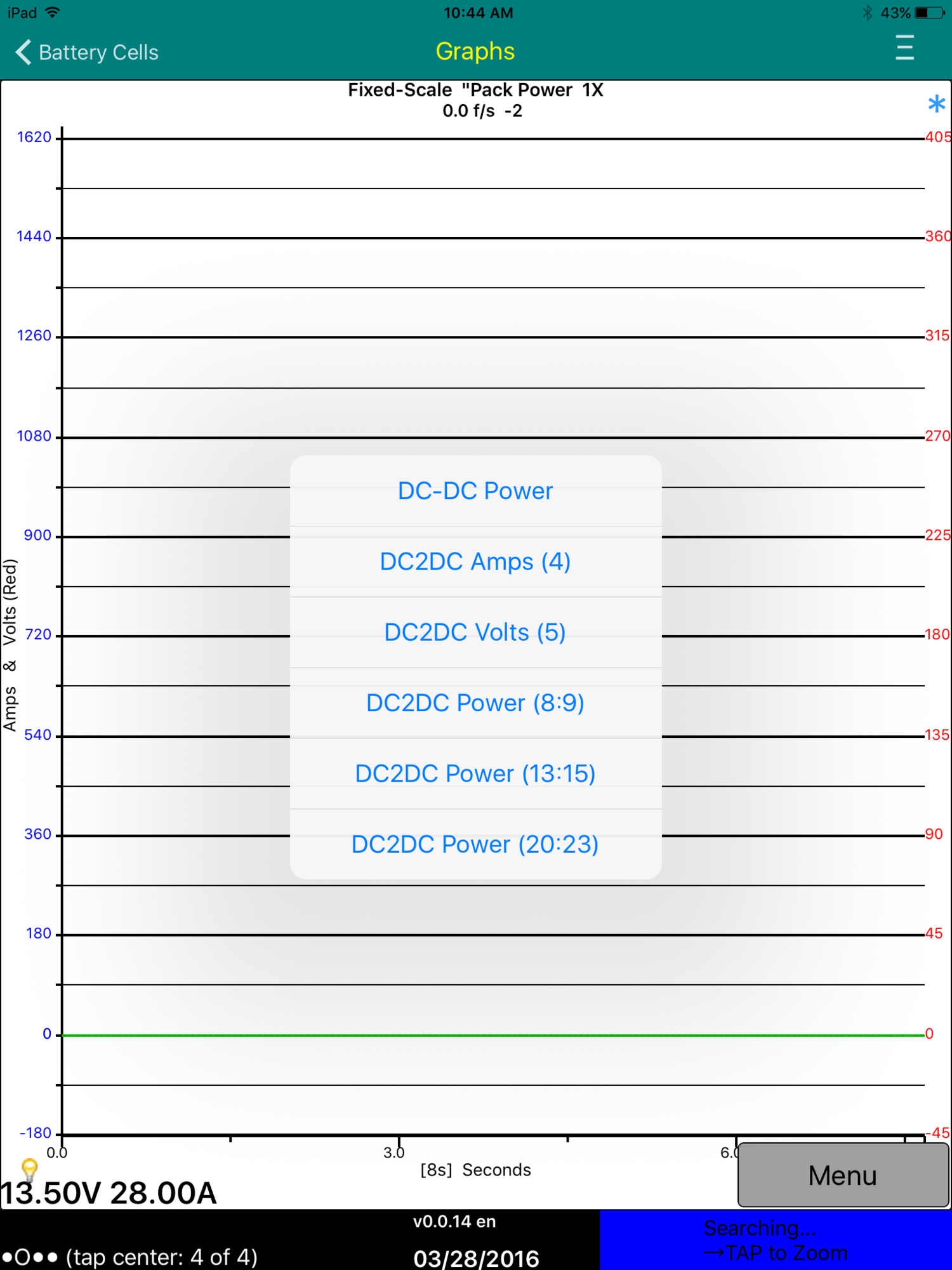
1. This picture is of the data capture screen (4 of 4), after having chosen Pack Power as the Plot to specify what message to gather. The default fixed scale values appear to be from the Pack Power plot, but Menu allows one to select a different Plot, but only those that match the data currently loaded on screen 3.
Is this a bug?
2. Is a double-quote missing after Pack Power?
3. Since I was offline when checking this, the option to start gathering data was missing, as expected, but seeing the DC to DC options makes me wonder if v14 has the same bug as v13 described above.
Cheers, Gary�
Mar 28, 2016
garygid v14 graph of four 2-byte values:
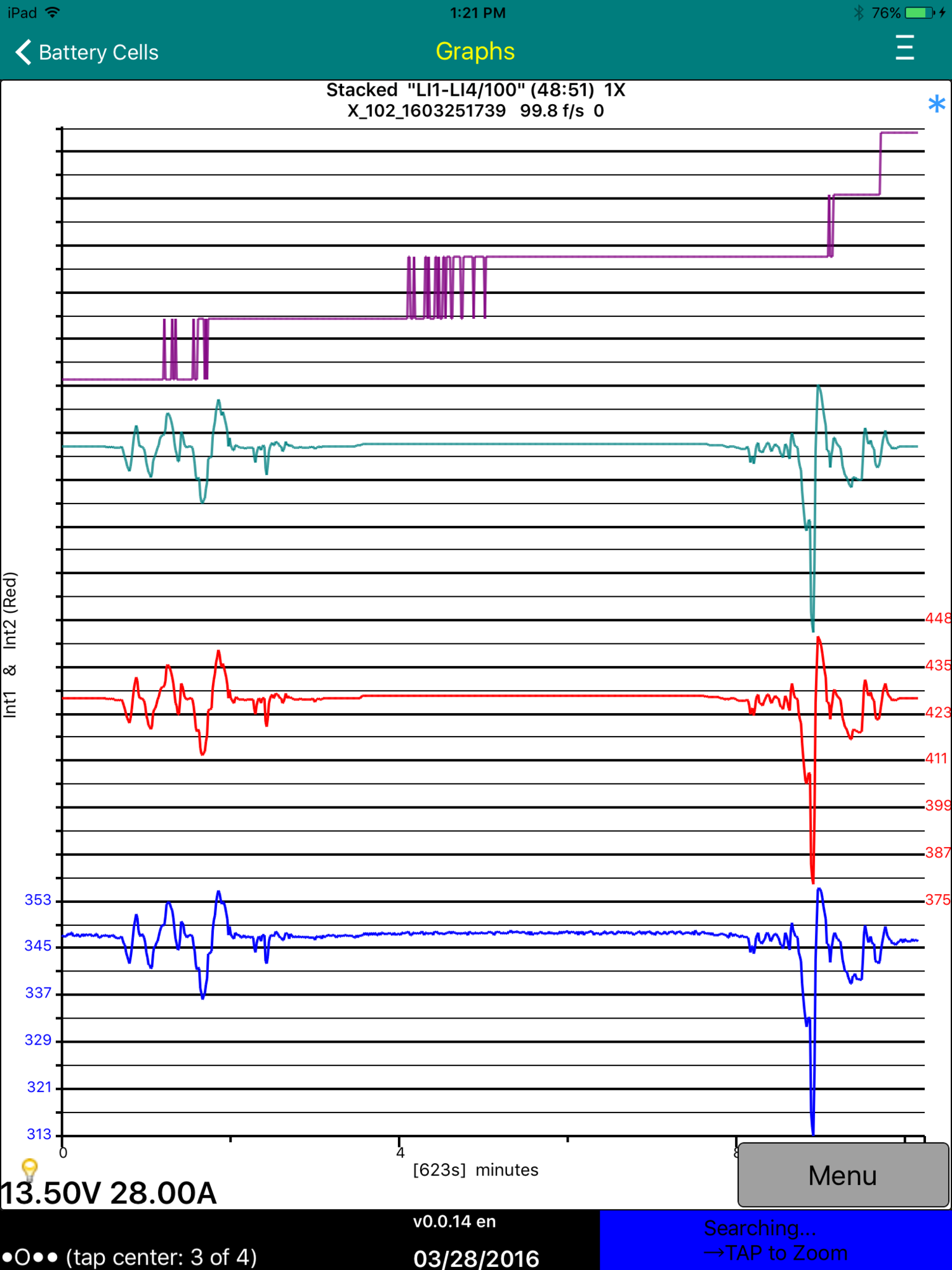
Could add green scale values on the left, and purple scale values on the right?
Vertical axis caption could be "Int1 (B) & Int2 (R) & Int3 (G) & Int4 (P)"?
Perhaps similar for 3-variable plots, I suspect?
Overall, very nice work.�
Mar 28, 2016
garygid 4 variables, Full-Scale graph type:
A tap of the left axis-values column could toggle to the green trace values.
Likewise, a tap of the right column could toggle to the purple trace values.
The Menu button could be a little less wide, to show more of the minute axis?
Similar comments for 3-variable plots?
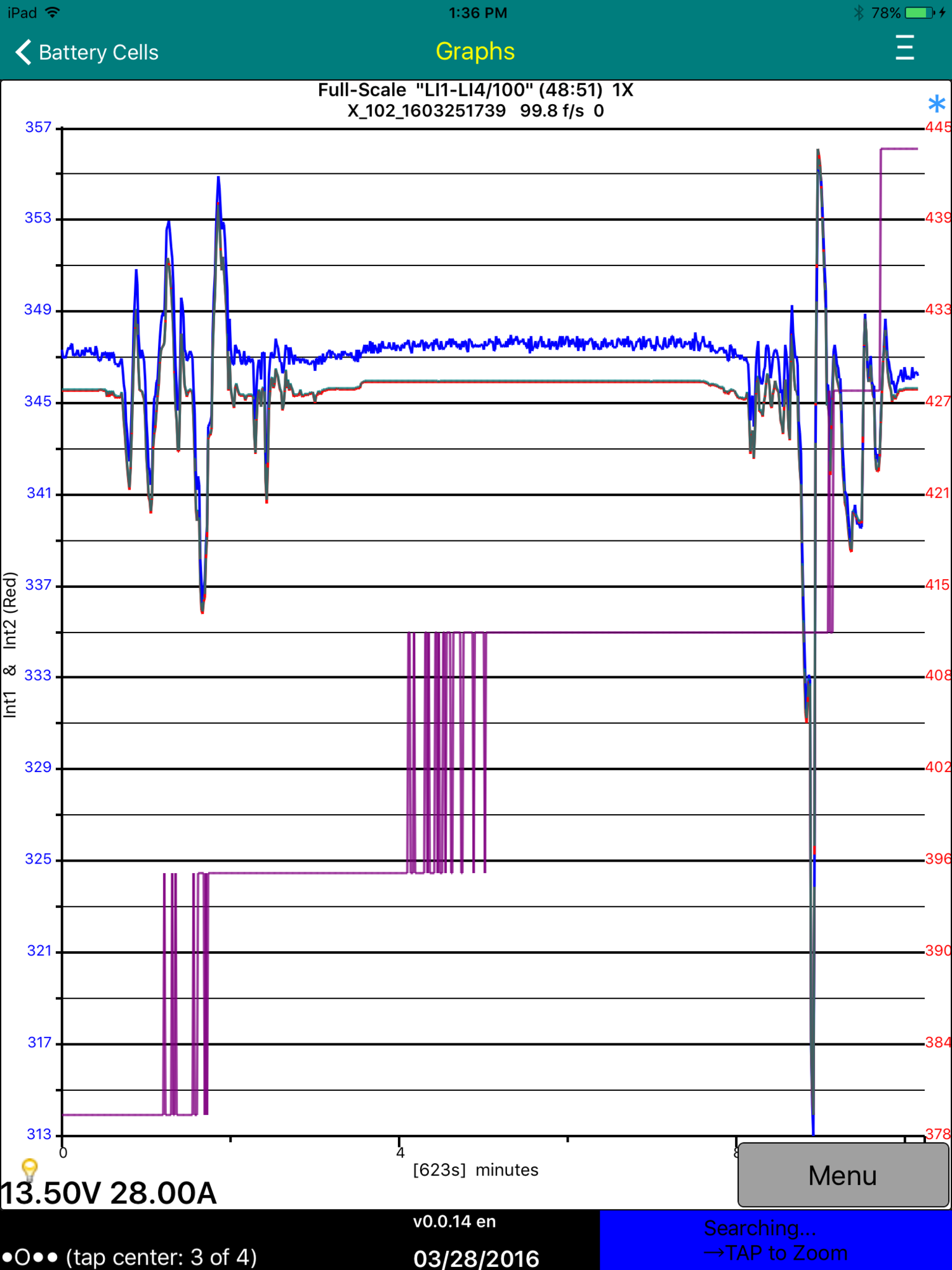
While on these Plot screens, Menu could offer a "See Plot Recipes" option that would just pop up a text list of the 1 to 4 Recipes being used for the plot, perhaps using 2 or 3 lines per Recipe?
Cheers, Gary�
Mar 28, 2016
Turbo3 Did you not read the Change Log? It says the third and fourth y-axis scales for the Stacked graph will be added in a future release. Just a matter of copying and pasting code and changing the basic graph routine to accept the new y-axis parameters but it takes time and there are other priorities like getting fixes out.�
Mar 28, 2016
garygid Guilty, I forgot to read the Change History, sorry.
I agree, bugs are far more important.
Ok, a bug: Scrolling makes two jumps every time I scroll, the first one almost immediately, sometimes almost to the point that I am at while dragging and it updates, but sometimes the drag is not even finished. The second jump is maybe a second later, almost always far beyond the point that I drag to.
Dragging very slowly ...�
Mar 28, 2016
garygid Ran out of time to submit my edit to the above post, and lost the addition ... so trying again to explain.
Dragging very slowly in Scrolling, it acts like it is trying to make incremental jumps to keep up with my finger, but it seems to be using the distance from position 0 to pos N rather than the incremental distance from pos N-1 to pos N. So, it gets further and further ahead, and then makes one last big jump after I stop dragging, going far beyond my end-drag point.�
Mar 28, 2016
Turbo3 Version 0.0.15 is waiting for Apple's review and should be available Tuesday morning. Again it should fix all newly reported bugs. (But still does not have scales for the third and fourth plots.)�
Mar 29, 2016
garygid in v0.0.14 ...
Perhaps not a big-beetle bug, but maybe a tiny ant-bug:
The right side axis labels have space to show 3 digits, but not 4.
Perhaps a little more space would help?
v15 not out yet ... but v0.0.16 just arrived for testing.�
Mar 29, 2016
apacheguy How are you getting 12 V voltage? I see DC DC output voltage decodes in wk's document but I don't see this parameter.�
Mar 29, 2016
Turbo3 Don't understand as DC-DC Power plots 12 volt output voltage and current. What other parameter are you referring to as both of these are in the wk document.�
Mar 29, 2016
garygid in v0.0.16 ...
1. Zoom continues to work well, nicely centering around the "time" of the touched point.
2. However, Scrolling still has the same problems (on the iPad), jumping twice on a quick scroll-swipe ... ending up too far, and following a slow drag-swipe, getting further and further ahead, and doing a final after-swipe jump that puts it even further out of place. But it does move the data left and right.
3. The message-gathering filter in the Recipe line is Byte C#, Mask C, and Equals.
When the byte # is zero, filtering is OFF.
Setting byte to 1, mask to 255, and equals to 4 with msgID 0x6F2 (1778) for the Cell Voltages would capture the brick voltage data of the first four bricks in module three (as we number them).
My next post will show how to decode the four voltage values there.�
Mar 29, 2016
Turbo3 You have probably reached the limit of refresh on your iPad. Swipe up and see how long it takes to redraw the screen. That is now the limit on how fast you can scroll-swipe left/right. It is also dependent on how many points must be plotted each time so the more plots the longer it will take.
I don't have this problem on my iTouch 6 Gen with A8 processor.
Keep in mind that cell voltages frames, when filtered that way, only appear every 3.2 seconds so you are going to get a very very slow graph.�
Mar 29, 2016
garygid The basic battery cell/brick/module voltage and temperature info, copied from my post in a Battery thread:
For those that do not speak "code", the 8 data bytes (8 bits each) can be called D1, D2 ... D8.
The D1 value is an Index value, a counter for the 24 0x6F2 messages.
Each message has bytes D2 through D8 (7 bytes) used for 4 values, of 14 bits each.
So, string out the 8 bits of the 7 bytes as 8 x 7 = 56 bits, and use those bits, in groups
of 14 bits, as the 4 voltage (or temperature) values (14 x 4 = 56).
The 14 bits for the voltages are an unsigned integer. Multiply by 0.000305 to get cell voltage.
The 14 bits for the temperatures are a signed integer. Multiply by 0.0122 to get degrees C.
Thanks to wk057 for the exact scale factors.�
Mar 29, 2016
apacheguy Could be wrong, but the DC DC output voltage is not equal to the 12 V battery voltage. It will always be slightly higher, otherwise no current would flow.�
Mar 29, 2016
Turbo3 To graph two of the four cell voltages in the 0x6F2 message TM-Spy will need to be upgraded to support three byte variables (i.e. the "D" values).
You can capture the data now but you will only be able to graph the first and last cells in the frame.
Graphing the middle two values will required the upgraded TM-Spy and of course the recipes.
To be precises you can actually still plot the middle two values but at reduced resolution as you will be missing some low order bits.�
Mar 29, 2016
Turbo3 TM-Spy only displays/graphs the DC-DC 12 v output voltage.�
Mar 29, 2016
garygid 1. Extracting the first 14 bits from D2 and D3: 2, 255, 6 and 3, 0xFC, -2
(gets 8 bits from D2 and 6 bits from D3)
2. Extract the next 14 bits from D3, D4, and D5: 3, 0x03, 12 and 4, 255, 4 and 5, 0xF0, -4
(gets 2 from D3, 8 from D4, and 4 from D5)
3. Extract the next 14 bits from D5, D6, and D7: 5, 0x0F, 10 and 6, 255, 2 and 7, 0xC0, -6
(gets 4 from D5, 8 from D6, and 2 from D7)
4. Extract the last 14 bits from D7 and D8: 7, 0x3F, 8 and 8, 255, 0
(gets 6 bits from D7 and 8 bits from D8)
Yes, TM-Spy would need to support 3-byte extraction for doing #2 and #3, but the existing version should be able to do the first and last exreactions, to see two of the voltages ... a good test.�
Mar 29, 2016
garygid The DC to DC converter's output is probably connected to the "12v" bus, and the 12v battery is most likely also connected directly to that bus. So, when the DC to DC converter is running (like the alternator running in an ICE), the battery voltage will typically be higher and the battery will be charging.
When the 12v battery gets "fully or sufficiently" charged, the DC to DC concerter will either produce less current, or shut itself Off, and then the 12v battery will power all the car's electronics for several hours, then the DC to DC converter should turn On again, and recharge the somewhat discharged 12v battery. This cycle typically repeats 4 or 5 times a day.
Gathering the "DC-DC" data for around 6 to 12 hours should show this charging cycle.�
Mar 29, 2016
garygid Good point, nicely observed.
I am preparing a Brick Voltage recipe now.�
Mar 29, 2016
garygid The Plot Recipe lines for Brick Volts (hopefully correct):
PT:Brick Volts:V1:v, 2, 255, 6, 3, 252,-2, 0,5, 0,0.000305,0, 2,1,255,3,1778, 0,0,0, 0,0,0
PT:Brick Volts:V2:v, 3, 003, 12, 4, 255, 4, 0,5, 0,0.000305,0, 2,1,255,3,1778, 5, 240, -4, 0,0,0
PT:Brick Volts:V3:v, 5, 015, 10, 6, 255, 2, 0,5, 0,0.000305,0, 2,1,255,3,1778, 7, 192, -6, 0,0,0
PT:Brick Volts:V4:v, 7, 063, 8, 8, 255, 0, 0,5, 0,0.000305,0, 2,1,255,3,1778, 0,0,0, 0,0,0
I discovered that the Recipe items Mask and MsgID cannot be written in hex, like 0x6F2 for 1778.
It would be handy if the 0x... hex values were accepted ... in some future version.
Remember, in v0.0.16, that the Byte D# values are ignored, but this Recipe should still work now.
Questions:
1. If we did not use the filter when capturing the 0x3F2 messages, would the capturing be able to capture all the messages in each clump? At 8 values per module / 4 values per message ... that is 32 messages in a clump. If the 32 messages are too big of a clump, perhaps we could filter for half, or a quarter of the messages, by using a Mask C with some bits set to zero.
2. Assuming we can capture clumps of some size, does graphing use the Byte C# values to filter the captured data for the purposes of display? If not yet, in the future perhaps?
If we can do both, that would be very helpful, being able to capture all the voltage and temperature dara at one time, and then be able to see any brick voltage and/or module temperature, 4 at a time. In the future.�
Mar 29, 2016
Turbo3 All values except min,max,scale are loaded into integer variables so if one supports the 0x hex format I don't see why another would not. Will test when I have time.
1. 0x6F2 messages come in at 10 per second which is very slow. So no problem capturing all of them. They are not sent together but equally spaced out which is why it takes 3.2 seconds to get all 32 frames.
2a. Filtering is done during capture so only the frames passing the filter are saved. Excluded frames are discarded so not saved
2b. To filter after capture would in the general case require a second frame buffer to hold all the filtered frames so zoom in/out would work. However, since there are so few filtered frames when you have one every 3.2 seconds zoom is most likely not needed. I could add filter support to "saved data" but if used on frames in the 100 per second rate the results could be very strange. To use this with the 0x6F2 frames you would capture without the filter so you get all the frames then use a recipe with the filter to view it. Version 0.0.17 that is waiting for review does not have this so it will be in 0.0.18. I could use an unfiltered 0x6F2 X_ trace file for testing.�
Mar 29, 2016
garygid As far as I know, no Recipe entries are accepted by TM-Spy in hex 0xHHH format.
It just would be nice if you would accept that format, because it makes the Masks much easier to debug.
I will add a Brick Capture Plot to my User Plot file, to use for unfiltered capturing.
Then, I will try to use it for a while to get a reasonable X file, and ... send both to you�
Mar 29, 2016
garygid When I change to capture a new msgID, screen 4 of 4 shows the new msgid on the second line, but still shows the old Plot name on the first line.
Then, if I try to use Menu to select a new Plot, it only allows me to select those plots that apply to the old msgID ... perhaps a little, but confusing, bug?
Worse, now the app just quits, and I cannot fix the conflict between the two msgIDs, even with a restart, so I await your sage advice to get the app usable again. I will try an uninstall and install ... that worked to get the app up, so I can try gathering data.�
Mar 29, 2016
garygid v0.0.17 appeared while I was uninstalling and then installing again ... and again ...
This version seems to work differently, not updating the two top lines on screen 4 of 4 until you start capture.
I used this no-filter Plot to capture data:
PT:Brick Capture:V1:v,2,255,6,3,252,-2,0,5,0,0.000305,0,2,0,255,3,1778,0,0,0,0,0,0
I got repeating sets of data like this, with Index values in D1 of 0x00 through 0x1F (0 through 31):
6F2007673DD6C37DBCD
6F2017973DD6C37DFCD
6F2027573DE6C37DBCD
6F20373B3DC2C37D3CD
6F20474F3DC2C37D7CD
6F20575B3DD4C37DBCD
6F20676F3DD6C37DBCD
6F2077873DE5C37D7CD
6F2087573DD5C37DBCD
6F2097573DD5C37D3CD
6F20A7433DD7C37DFCD
6F20B74B3DD8C37D7CD
6F20C6D73DBBC36AFCD
6F20D6BF3DA6C37DBCD
6F20E76B3DD6C37D7CD
6F20F7573DD6C37D7CD
6F2107873DD7C37D7CD
6F2117573DD6C37D7CD
6F2127373DC2C37CBCD
6F21371F3DC6C37DBCD
6F2147573DD8C37E3CD
6F21576F3DD6C37DBCD
6F21679B3DD5C37DBCD
6F21772B3DD5C37DBCD
6F21803054B51518414
6F2190E454561504C14
6F21A1A854721514814
6F21B01054001513014
6F21C27C53BE14F7814
6F21D118547B1516C14
6F21E11C54731528814
6F21F21054BB152F414
Graphing the first 14-bit value in each message, there are 24 voltages followed by 8 temperatures.
Converting the extracted values to voltages, I get too-low values, so something is wrong.
Of course, the temperatures would need a different conversion, probably with this Plot:
PT:ModuleTemps:TC1:degC,2,255,6,3,252,-2,-55,55,1,0.0122,0,2,1,24,24,1778,0,0,0,0,0,0
The graph shows the groups of 24 and the groups of 8:
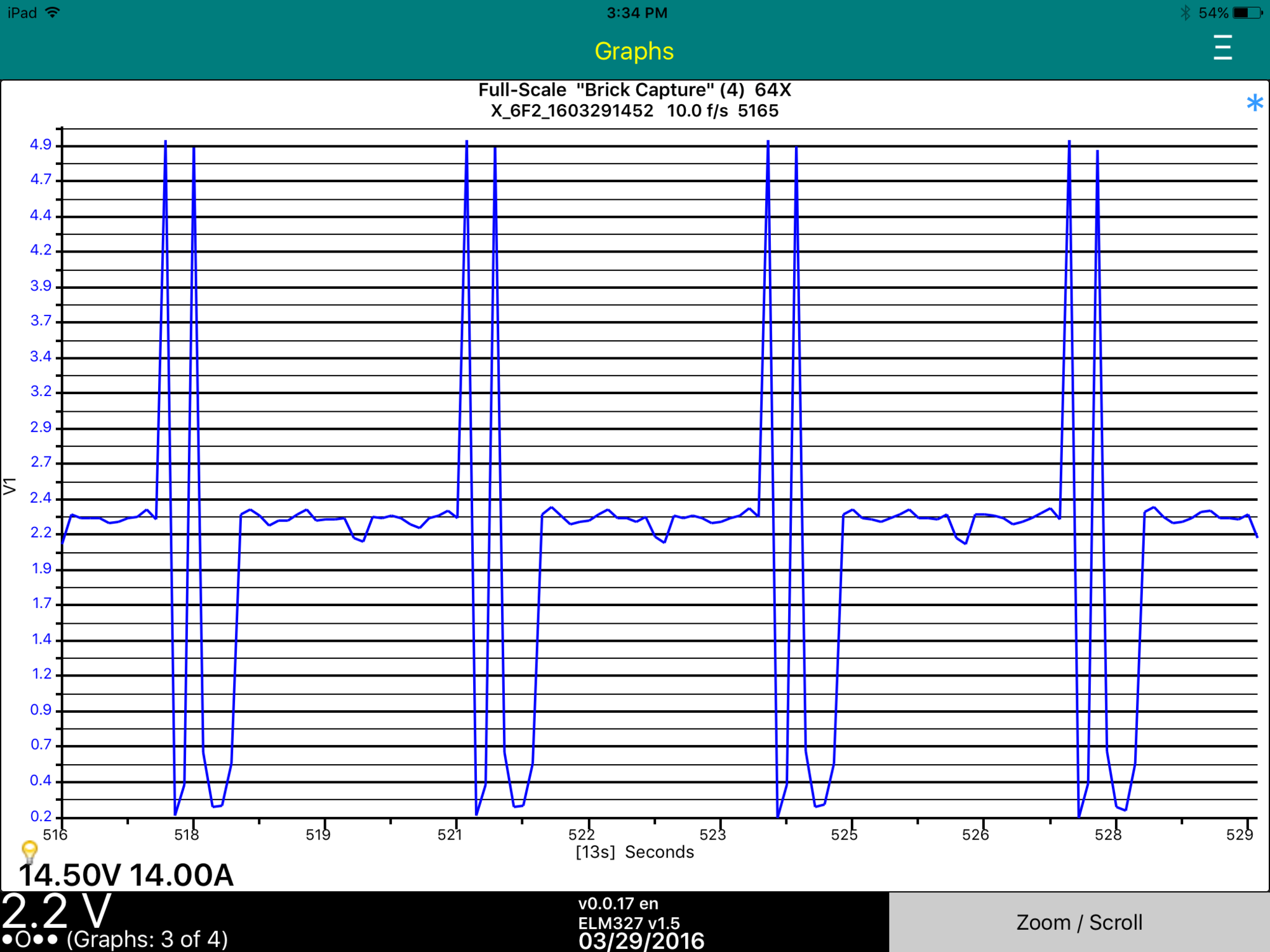
More Later, Gary�
Mar 29, 2016
garygid The all-Index brick voltage and module temperature data, graphed as collected but expanded (Zoomed by a factor of 4X), looks like this: Note the dip in the cell voltages when I turned the A/C on high for almost a minute.
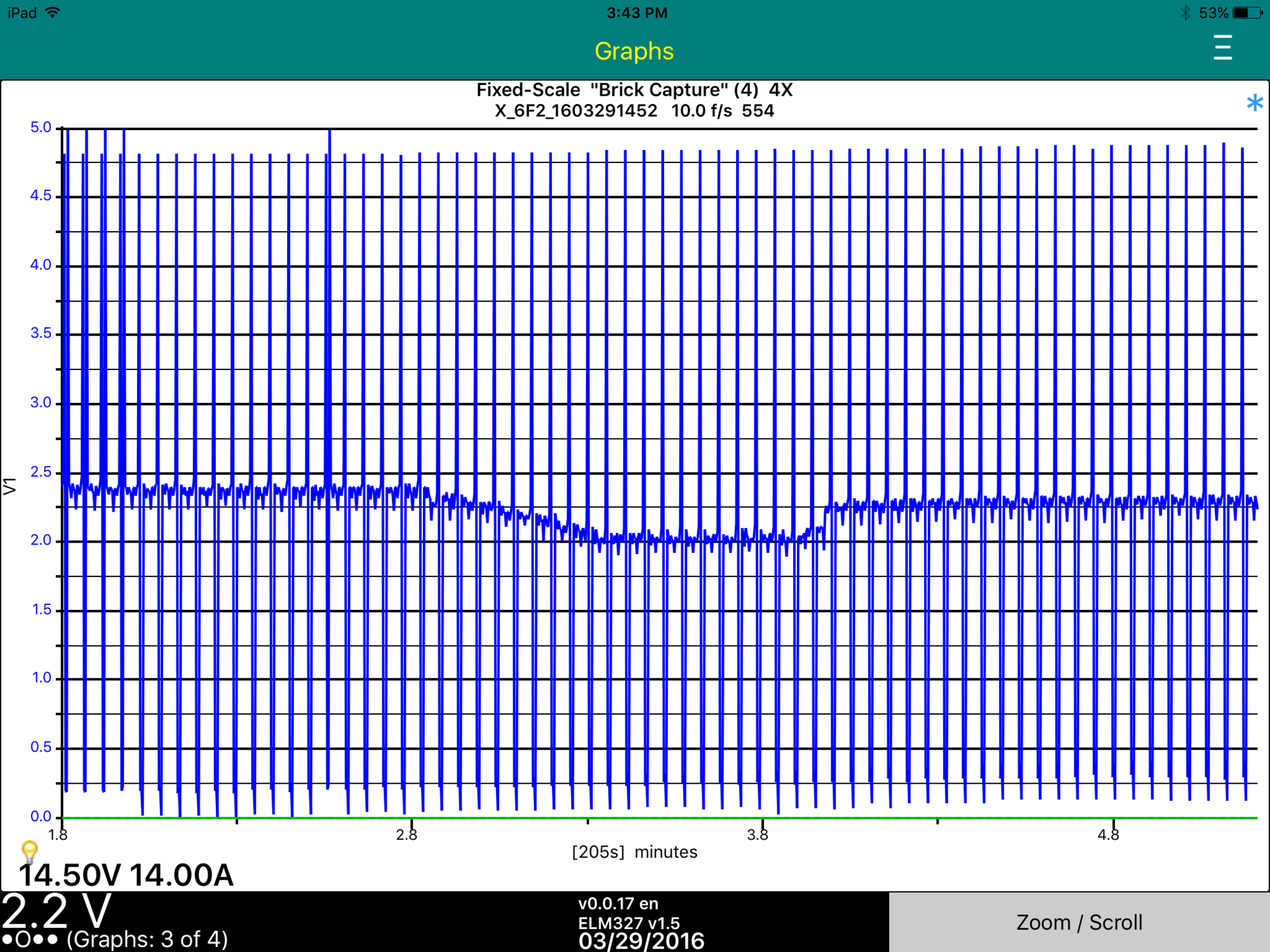
Later, Gary�
Mar 29, 2016
Turbo3 Version 0.0.18 has just been released. Note it says it supports hex notation in the recipe files but that is only partially true. Only for byte values so don't use hex for the MsgID or your MsgID will be converted to 0. Fixed in next release.
The one addition in this version is post capture filtering.
Three releases in one day. That is a record. I am starting to think one of my testers is also an Apple Beta reviewer.�
Mar 29, 2016
Benjamin Brooks I can neither confirm nor deny�
Mar 29, 2016
Turbo3 After fixing a few bugs and changing the right side scale control parameters from integer to float here is what the post filtered data looks like on tomorrows version 0.0.19. Looks like post filtering messes up the time scale big time.
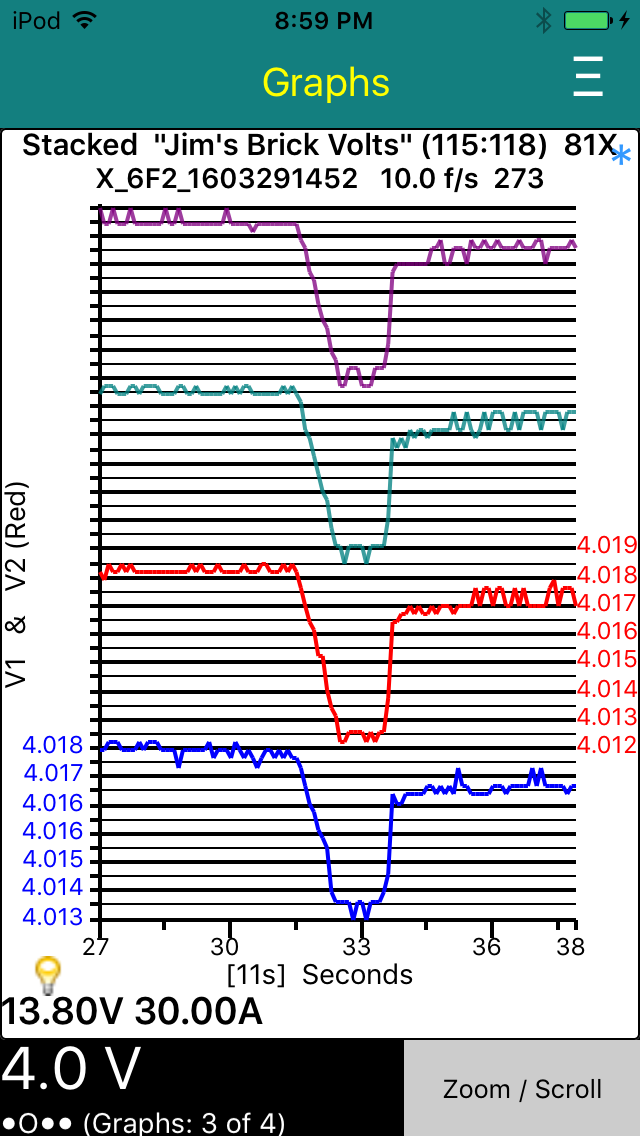 �
�
Mar 29, 2016
garygid Something is strange with decoding these groups of 14 bits ...
are these bits high order on the right instead of on the left?
If so, we are going to need a way to reverse the order of the bits in a byte,
like making the byte # negative to flip the bits from right-to-left to left-to-right.
WAIT, WHAT DID YOU DO TO MAKE IT WORK ... recipe for Plot, please?�

Không có nhận xét nào:
Đăng nhận xét