Oct 19, 2015
Gr8pursuit Re-phrasing my earlier question: Has anyone with a clear bra covering the sensors got the auto park to work?
I would hate to cutout the sensor covering and it still not work.�
Oct 19, 2015
markcm Yes. It's worked every time I've tried it. At least 5 times. Xpel over front and rear sensors, not cut out for sure.
I don't really know if there is any trick to it, but here is what i do:
Drive close enough so the front sensor shows yellow, usually about 3 feet
Drive slow, usually under 10 mph, the one time I really paid attention to speed, I was at 5
Need to pull well past front vehicle before the P shows. Like over half the car in some cases.
Always has been a proper curb
�
Oct 19, 2015
Andyw2100 It sounds, based on Ingineer's post, that you may want to cut coating away from the sensors anyway, without regard for whether or not you can get Auto Park working with the sensors covered or not. Assuming his information is correct, and based on his history of posting here I have every reason to believe that it is, you are unnecessarily reducing the sensitivity of your sensors at all times by covering them. I don't know what the downside to uncovering them may be, but I imagine if it were done well any downside would be minimal, and the increased efficacy of the sensors would far outweigh it.
Just offering some admittedly completely unsolicited advice. I'll butt out, now.
- - - Updated - - -
Great video, Tuan! That's the first one I've seen that combines the view from inside the car with the view from the street. Nicely done!�
Oct 19, 2015
Ingineer Of course it's possible that the sensors will work ok with the coating. The physics vary, but it's impossible to predict. Seems to me like it's an easy job, especially if you only do the 4 side senors that really need the range, and there is no downside, so why not?�
Oct 19, 2015
pox I can't get it to work in my home town Riverton Wyoming on main street, I think it's the solid lines for the parking area. Worked great in Vegas this weekend. It's so fast it's a bit scary. 30sec each time I tried it. How fast are the other cars that can parallel park?�
Oct 19, 2015
travwill Man, first post here but have tried now about 10 times, all in spots that our other two cars would have easily have picked up and parked in. Been close the cars, breezed by slowly with spots surely big enough but not too big, nice curb, pulled up different lengths multiple times etc. All times it is fail, no option to self park after putting it in reverse.
The auto parking is a bit fail in my opinion at this point. The highway use of auto-steering seems good enough at least. My final opinion is one that i've heard similar which is the toy car with generic car drawings in front/side of if all the time is of little value and the speed itself it a bit too high for those of us that are tall. Needs some UI tweaks and options for sure, and parking needs improved (especially since this car has more sensors but our others with less whip it in parking).
-T�
Oct 19, 2015
ar4c I miss the old speedometer setup. The toy car with other toy cars randomly pop up offer no value to me, or provide information I actually need. I wish this could be user configurable as 50% of the display screen is completely useless to me now. Blind spot awareness is also a massive fail.
trip planner: fail
blind spot awareness indicators: fail
P85D 691 HP: fail - max HP only available for 1.5 seconds from a dead stop
toy car/spy hunter graphics: fail
autopark: fail
Why are are so many people happy with these mediocre things about the car? Let's all be real here, Tesla is over promising and under delivering and I'm getting tired of it.�
Oct 19, 2015
Stoneymonster Sorry, we'll try harder to be more upset with our space cars.�
Oct 19, 2015
Soolim Why? Because of one or some the following:
1. There is no viable alternate BEV with the same range and super charging infrastructure, yet.
2. Some of us have progress from angry, denial, into acceptance of the limitation and hoping for 3.
3. Some of the limitations can hopefully be improved overtime (e.g. software updates of trip planner, navigation)
4. Some of the limitations are not as important to some owners, or does not apply (e.g. not everyone has a P85D)
For me, Tesla has corrected these deficiencies:
1. TPMS display
2. 3G disconnection
3. AP is now in public Beta use, and can still be improved.
I am still waiting for further AP enhancement and UI restoration / improvement:
1. Stall parking and home garage parking.
2. Time, Date, and temperature restore at the IC.
3. 360 view (may need additional cameras)�
Oct 19, 2015
LetsGoFast I discovered today that autopark works sometimes when you didn't get the P. I identified a parallel parking spot and jammed to a stop. I didn't have any indicators. I put the car in reverse and the indicator appeared and the button was on the 17" screen and it parked flawlessly.�
Oct 19, 2015
msnow Because I LOVE this car and everything about it. Other than just the pure joy in driving it, the best thing about it is most things can be fixed OTA without buying a whole new car.�
Oct 19, 2015
ericallyn It took me several times to get AutoPark to work, but it now it works flawlessly. There are several posts above which describe what you need to do - and where you need to look on the car's dashboard. Having read through these and practiced a bit, I now have engaged the AutoPark successfully, and repeatedly. There is some technique involved, but once you get the "feel" its rather wonderful.�
Oct 19, 2015
travwill Totally agree with you, we are all very picky owners it seems. There were some blantant features missing but at least a few are there now like TPMS, parking, etc. The car is amazing overall and what makes it special primarily is its all electric drivetrain and range. The software is pretty good for what it is. We forgive things like interface dislikes/glitches/bugs, and missing "oh sh$t" handles, build quality issues, etc. easier it seems.
Now given that, (a little off topic here now), if MB/BMW/Audi/etc come out with a comparable range car, comparable prices, and at the more plush/solid quality they are usually at, then I'd likely switch over - as long as the flexible tech is there too. Sure love having a mostly American head of the pack car though for now �
�
Oct 19, 2015
Khatsalano I've gotten better with practice. The trick is to drive the car "into the slot" at the right speed at the right distance away from the cars and curb so the sensors are able to sweep the data they need on the forward pass.
Still, I wish the front edge buffer on the first turn was not 12-16 inches. It always gets so close and makes me super nervous. I tried it again today and it did back me into a really tight spot with 12 inches to the rear and 24 inches in front. Unfortunately, there was no auto-get-out function so I had to make 3 maneuvers to get it out within my comfort tolerance.
- K�
Oct 19, 2015
ar4c The fact there is even a thread with so many complaints, and people having to break this down into a science how to get it to work- is proof it is flawed and needs to be immediately addressed by Tesla.�
Oct 19, 2015
Stoneymonster �
Oct 19, 2015
msnow That's absolutely correct and I'm sure they will.�
Oct 19, 2015
markcm Thanks, appreciate the feedback. The sensors do seem a bit laggy sensing cars in the blindspot sometimes. I don't know if this is the Xpel or me or normal...
�
Oct 19, 2015
ecarfan Why are so many people happy with their Tesla? Maybe because: Tesla is a new car company that has designed and produced a truly revolutionary and amazing car that is a blast to drive, the first successful new car company since 1925 (!), the first company to build a long range high quality EV, first to build an extensive high speed DC charging network that is constantly expanding, first to do Internet-enabled OTA updates, first to make an EV that offers a vastly superior driving experience compared to ICEs, first to sell directly and cut out the universally hated dealership "experience", first to use a huge touchscreen interface, first to mass produce an amazingly sophisticated high capacity lithium ion automotive battery pack with temperature management, first to introduce an Autopilot function that will rapidly learn and improve based on the experience of the entire fleet of cars on the road (I think many fail to grasp how amazing that is), I could go on and on and on and on.
But some people obsess about some modest UI changes as if was the END OF THE WORLD AND THEIR TESLA IS NOW A WORTHLESS PIECE OF JUNK.
What I am getting "tired of" is the incessant complaining about a minor UI change. It's software and it will continue to evolve and change and yes IMPROVE with time. In the meantime, the car is still AWESOME. Yes, it still is. If some people can't see that, I suggest that they have lost their perspective on what really matters in this transportation revolution that Tesla owners are so fortunate to be part of.
To some, this post may come across as a tirade. In fact it is a restrained reaction to the tirades of some who have been repeatedly posting that the V7 UI is a catastrophe of epic proportions. It is not. It is a minor bump in the road. Some people like it, some don't. In the meantime, Tesla continues to sell more and more cars and push forward.�
Oct 20, 2015
Max* A. The other "toy" cars popping up are not random.
2. Blind spot awareness has MASSIVELY improved from 6.2
III. Trip planner hasn't gotten worse from 6.2 to 7.0
d. I don't know how much power the P85D actually produces, and honestly I don't care. But based on your anecdotal evidence that it produces 691hp (which based on every other thread here, it does not) even for "1.5 seconds" then Tesla met it's advertising spec. Do you think an ICE produces 700HP during it's whole RPM band? lol
Me thinks troll is trolling and getting offended when other users call him a troll to appear as if not really a troll...�
Oct 20, 2015
Max* Nice selective reading. I never said anything about gears. I don't know where you got your 1.5seconds number from (0-60 acceleration is not linear).
Here's some light reading for you: P85D 691HP should have an asterisk * next to it..
Cliff Notes: It never hits 691HP.�
Oct 20, 2015
ar4c I met the guy who started that thread at a supercharger and he said Tesla sent him a cease and desist and forum moderators banned him for that post.�
Oct 20, 2015
MarcG Which thread? The P85D 691HP should have an asterisk * next to it.. one??�
Oct 21, 2015
Max* That doesn't make it not true.�
Oct 21, 2015
Robbie I've used it once and was really impressed how well it worked. So far it's worked 1 out of 1 times for me.�
Oct 21, 2015
gaucho20 I've tried it countless times. Low curbs. High curbs. 8 mph, 13 mph. super close to parked cars (almost touching:scared
I have never seen the "P" on the display. I stop and put it in reverse, and have nothing on the 17" other than the usual reverse display.
Many times, the toy car on the display does not even register that there are cars next to me, though autopark does not work even when it does.
It sounds like I am not the only one with this issue, and many of us have spent a bunch of time trying to get this to work. Is it possible that some of our sensors are not working appropriately for autopark?�
Oct 21, 2015
mobe I noticed that when I have autopilot on I see the rear ultrasonic sensors firing away but nothing at all from the front. I noticed in the autopilot videos that both front and rear sensors are firing away. Maybe if a car is not firing the front sensors the autopilot will work but not the self parking. This is purely speculation on my part.�
Oct 21, 2015
ibdb Had my first success today. I was trying to demonstrate for my wife what is supposed to happen before I parked myself when the P indicator appeared. I hit the go button and away it went -- perfectly parked in about the same time that I would have done it myself.
To be honest, it freaked us both out a bit. It did seem quite close at the front corner of the car when making the turn in, but we ended up perfectly placed about 6" from the curb and I could tell from the mirrors that at no point were we in danger of getting curb rash.�
Oct 21, 2015
PhillyGal Works great
Tesla Model S Autopilot (Autopark) Demonstration - YouTube
Tesla Model S Autopilot (Autopark) Space Testing - YouTube�
Oct 21, 2015
Vger I would call Tesla Roadside next time and have them log into the car and see what is happening in real time. Whether it is a bug or a failure on your car, they will want to help you fix it!�
Oct 21, 2015
joek
Very nice videos. The last one handled about as small a space as I can do.�
Oct 22, 2015
f-stop Yes, it works on the left side - I tried it tonight and it worked like a charm. It was also dark out, so impressed by that, too.
I have to say that on my first 2 auto parking attempts with a normal spot on the right side, I bailed out early by pressing the brake, not quite trusting things (I'm only test-driving the car overnight so this is my first experience with autopilot). But after that I just let it to do its thing, and success. Then next attempt I tried it on the left side and it worked first time.�
Oct 22, 2015
PhillyGal The videos I posted a few posts ago were both on the left side of the street.�
Oct 22, 2015
jshear Auto park was not working for me but suddenly started working yesterday. I guess it takes time for it to work for some.
Jeff�
Oct 22, 2015
brkaus Wonder when they will add auto calibrate to the sensors. Car starts bumping into cars/walls and detects torque change to determine accurate 0 point
On a serious note though, curious if it is sensitive enough to avoid something like a trailer hitch on the front car? Many of those extend quite a ways. Sensitive topic for me, I have a big dent in the front of my (non-tesla) car from someone backing into it in a parking lot.�
Oct 22, 2015
ecarfan Someone else posted a few days ago that the car did not detect a trailer hitch so you have to be very careful in that situation.�
Oct 22, 2015
steph280 Mine also started to show more places with P since yesterday. I guess what Elon said about the system auto-learns and improves is really true.�
Oct 22, 2015
jlucero still no luck for me---repeatedly trying everything listed on this thread. got it to work once out of 25 times.�
Oct 22, 2015
3s-a-charm Count myself in that situation as well...�
Oct 22, 2015
jlucero in that video, looks like she doesnt look for the P...and she parks the pretty far up, then just reverses and looks on the touchscreen.�
Oct 22, 2015
CHG-ON I used it for the first time tonight. Parked the car in about 10 seconds and absolutely perfectly. I was stunned at how well it worked. I didn't expect it at all.�
Oct 22, 2015
gpetti Funny, normally I'm cursing how few rounded curbs there are in our city
as they are much harder to curb. On the other hand it is the pronounced curbs where I'm more likely to want the P.P. feature as it presumably never curbs the wheels. I have made this feature work a couple of times. I think I had to brake in the (previously mentioned) ideal position in order for the P to show up. The car actually parks close enough to the curb that you need to be careful about any movement forward or backwards to get out of the parking space.�
Oct 24, 2015
martinwinlow 'Fraid I can't be bothered to wade thru the entire thread to see but in case no-one else has mentioned it yet, the V7.0 release notes refer to a period of self park mode 'calibration' after first installing V7.0... which might explain why lots of people who have installed 7.0 and rushed out to play with it may not get to work initially. (I expect this has been mentioned to death so pls ignore). MW�
Oct 24, 2015
rxlawdude Yes, but 9 days of "calibration?" My S70D has yet to present the "P." In fact, it's so slow "learning," I've placed it on academic probation.�
Oct 24, 2015
JenniferQ Haha! Mine is signed up for summer school as well! No P ever!�
Oct 25, 2015
orlenok Installed v7 (Europe) this morning. Auto parking worked 1/2 times today. I drove about 150km before trying it. First time, it parallel parked great (to be honest, I actually stopped it by breaking at some point as it was going a bit too fast for me given how tight the spot was, one-way street and heavy evening traffic behind me).
Second time, it refused to back into a charging spot and I had to do it by hand. Perhaps because the spot was separated by a bicycle lane and an "EV marker" lane, here is the link to the configuration:
Google Maps�
Oct 25, 2015
MarcG Salut! And welcome to the forum
In your second example, I will take a guess and say that the reason it couldn't AutoPark was due to the fact that there was no other car on the other side of the parking space from the Renault Twizy. AutoPark needs specific conditions to work, and one of them is that the parking space is between two cars (and spaces by a certain distance, not too much but also not too little).�
Oct 25, 2015
bhzmark Just tried Autopark three times and it worked perfectly three times.
Perhaps the key difference is that I have about 400 miles of autopilot driving which perhaps calibrates things first?
I just pulled a little ahead of the front car, the P presented itself, I put it in R and pressed the button on the screen and away it went. worked great.
if having problems try driving on autopilot for a long time.
Also it was at night and very easy to see the P on the dash.�
Oct 25, 2015
Khatsalano These videos are the best ones on Youtube right now. PhillyGal, welcome to TMC. We just landed us a celebrity from the Tesla forums.
I've gotten better at getting the car to P. It does take some finding out what is the optimal speed, distance, and situation. I think on Day 1, I was batting 1/20. But now I can get it maybe 90% of the time. Once you get it, it's pretty easy to get it to P. I've even had success getting it to autopark between two spaces where there is a curb cut/driveway ... just for fun.
- K�
Oct 26, 2015
Chasedrgc1223 Tesla Model S Autopark - YouTube
Demonstration of and how to use autopark. I know there are probably many other videos posted here, but I just thought some would like to see this.�
Oct 26, 2015
Andyw2100 In the video above, people walk through the parking spot as the Model S is autoparking. I wonder if it needed to, if the Model S would stop to avoid hitting a pedestrian that did that, or if while autoparking, pedestrians are essentially invisible to the Model S.
I realize, of course, that the driver is always responsible, and should be prepared to brake to avoid hitting a pedestrian. I'm just wondering what the car would do without driver intervention.�
Oct 26, 2015
Chasedrgc1223 I wondered that as well... I'd think they would be detected by the parking sensors, but I'm guessing that would throw off the interpreted size of the spot?�
Oct 26, 2015
bigdomer I was finally able to get it to work twice in a row in a spot that I have tried over ten times since the software release date. Works fantastic. Heed others advice and pull further ahead of the lead vehicle than you think you will need.�
Oct 26, 2015
joek I was one where the parallel park wouldn't trigger no matter what. I downloaded the 7.0 update the first day. Finally today it started working, and worked well. Managed to have the P appear on multiple spots. Successfully auto-parked into one of them.
Didn't do anything different than before. I guess it does just take time.�
Oct 27, 2015
jlucero interesting joek...still no luck for me. people behind me are getting mad by me screwing around trying to get the P!�
Oct 27, 2015
ecarfan When you are moving slowly to try to detect an open space, is your right turn signal activated? That would let other drivers know that you are evaluating parking spaces.�
Oct 27, 2015
Chasedrgc1223 You don't need the turn signal on, but you must be travelling below 15 mph, which I'm sure you all know. If not, it simply will not recognize spaces.�
Oct 27, 2015
ecarfan I am not suggesting that V7 requires the driver to have the turn signal on when looking for an open space, just that if the turn signal was on it would serve to alert a car behind you that the reason you are moving so slowly was because you were looking for a space. @jlucero's post said that drivers behind him/her were upset at the slow speed necessary for AP to locate a space to park in.�
Oct 27, 2015
Chasedrgc1223 Oh that makes sense! That probably is a good idea, as I also do that too.�
Oct 27, 2015
JenniferQ I am having the same problem. My daughter has even given up on it and tells me to "just park it yourself!" I need to find a place to practice with no one around and the perfect space, I guess.
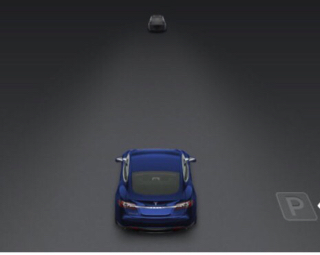
Is the "P" obvious when it shows up?�
Oct 27, 2015
msnow Yes and no. It pops up on the dash but it's gray and there's not a lot of contrast. See screenshot from page 76 of the new 7.0 manual
 �
�
Oct 27, 2015
Chasedrgc1223 The P can be seen in the video posted on page 18.�
Oct 27, 2015
ibdb Had a second success this morning dropping my son off at school. Freaked him out a little as he'd never seen it in action before. Really freaked out the mom of one of his friends who happened to be across the street when we were parking and I waved to her with two hands as the car parked itself. :scared:
I think the biggest key for me now that I seem to be past the calibration phase is to make sure I pull further forward than I would have parking myself.�
Oct 27, 2015
Gr8pursuit I started this thread 12 days ago and finally got auto park to work today:smile:. The last few days I have noticed that the right side warning beam had been more active when I was near cars or objects on the right side.
Not sure if the sensors needed to calibrate itself or what but it works now. Did nothing different in approaching parking spot when it wasn't working. Those still having problems still, see if your right side warning beam is active enough.�
Oct 28, 2015
samuel Yup, I had the exact same thing happen to me. Auto-park worked for the first time yesterday, but now it works pretty much all the time. I actually thought that my front right sensor wasn't working right because it didn't seem to show things properly. But now suddenly it is a lot more active and auto-park works even on really low rounded curbs.
Unfortunately, the wheel makes a weird rumbling noise when turned by auto-park so I am going to have to ask the service center to take a look.�
Oct 28, 2015
slevit1md I also finally had the auto-park work for the first time about 2 days ago! I was actually about to show a friend how it doesn't work, and all of the sudden the icon popped up for me. I also had to drive forward further than I typically would do to park the car myself. However, I put the car into reverse, hit the button, and it auto-parked perfectly! I haven't had the chance to test it since, but I'm hopeful that it will work for me next time I actually need to parallel park. I can parallel park just fine on my own, but it's so much more fun watching the car do it!�
Oct 28, 2015
3s-a-charm Mine is done calibrating and Parallel Parking on it's own now!
First time was funny as I was with my daughter and explaining how it's supposed to park itself but hasn't done it yet... woah! Then the P appeared for the first time. Tightest parking spot EVER! It parked like a boss - except it had to dry-steer several times. I actually had a hard time getting OUT of the parkings spot! I could use Auto Unpark�
Oct 28, 2015
Max* I thought the minimum was 20 feet length? Are you saying it parked in a tighter parking spot?�
Oct 28, 2015
Patrick W I stopped by the local (SLC) service center last week and we set up a test "track" with one vehicle, then a space and then two more vehicles.
Autopark worked fine when the space was 20 feet but when we shrunk that to 19 it did not work.�
Oct 28, 2015
Max* Thank you.
I was optimistic by the "tightest parking spot EVER" comment. But 20' isn't tight unfortunately.�
Oct 28, 2015
jlucero i have driven about 700 miles since autopilot update was released, and still only had success 1 time out of 30 times. frustrating....seems like 700 miles is enough to "learn" the dang thing. aint working for me�
Oct 28, 2015
Andyw2100 I wonder if the calibrating / learning distance for parallel parking has to be in situations similar to the actual parking situations. In other words, assuming this whole calibration thing is real, is there any reason to believe that 1000 miles on the highway would get the car ready for parallel parking, better than say 50 or 100 miles driven along city streets, with parked cars and parking spaces available?�
Oct 29, 2015
Patrick W Perhaps I should have added the disclaimer: "Your results may vary"�
Oct 29, 2015
msnow If the car is 16' that would leave 2' front and back to get out. Seems tight enough for me.�
Oct 29, 2015
Max* I've commented about this in another thread. 20' is acceptable for many people, but it really depends on where you live. In a large metropolitan city, you wont find many 20+' spaces. You're going to have to force yourself into a smaller space or park much further away (or pay to have a valet curb your rims�
Oct 29, 2015
green1 While I was driving out of my back alley last night I got the "P" indicator for the first time while passing some garbage cans, it did it 2 more times before the end of the alley, so on my way home I tried it on the street and it worked beautifully, first time it left me about 6" from the curb which I thought was marginal, but the second spot I tried it was nice and close to the curb.
Guess the "calibration" period worked as I hadn't seen any "P" indicators for the previous week even though I had tried many times the same type of situations.�
Oct 29, 2015
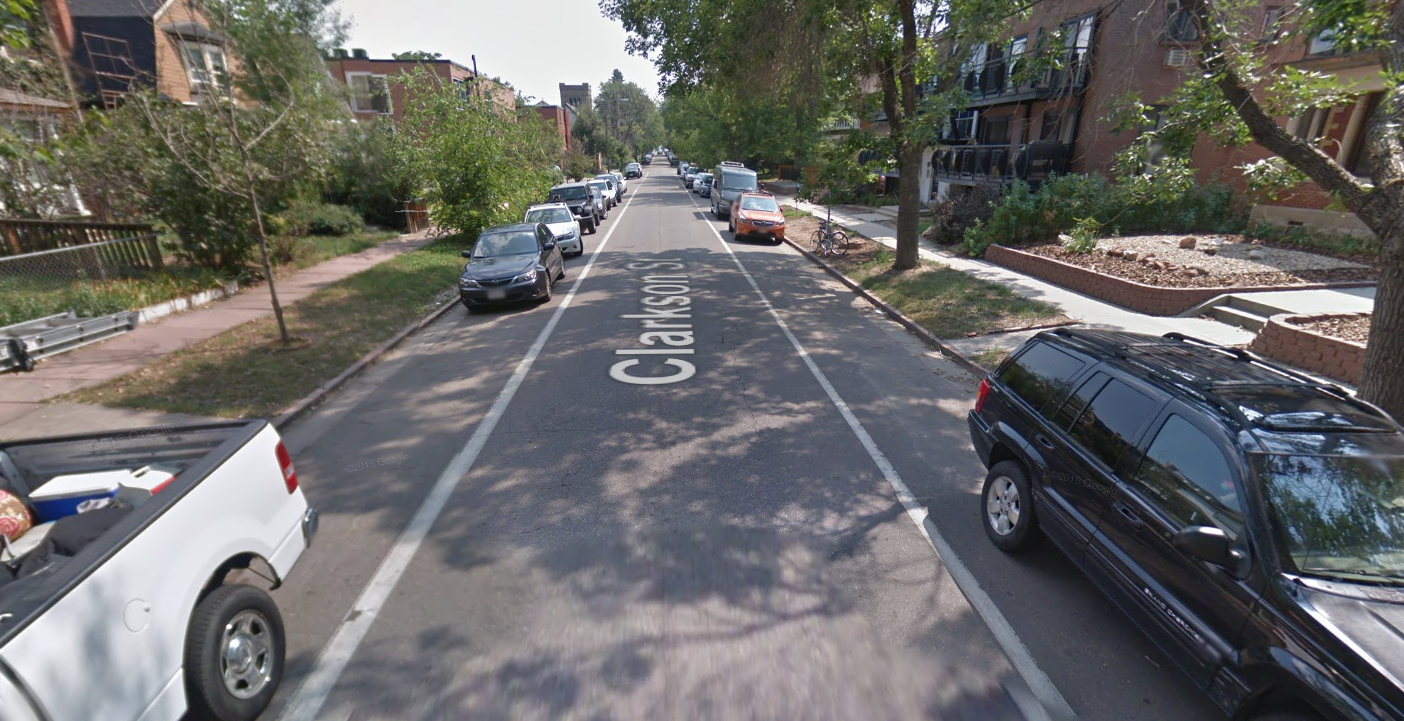
MorrisonHiker I haven't seen this mentioned before...but has anyone tested auto parallel parking on a narrow one-way street? I'm wondering how it shows up if there are available spaces on both sides of the street and how you choose which side of the street you want it to park on.�
Oct 29, 2015
Max* I've only gotten the notification for spots on the right side. Though it could be user error on my part.�
Oct 29, 2015
MorrisonHiker Thanks. Let me know if you ever get them for spots on the driver's side. I know with other auto-parking systems, you can indicate the side with your turn signals but Tesla's system doesn't need the signals. I wonder if it would display two spots on the screen and let you choose or if it just shows the first one as it's highly unlikely they would be exactly the same distance away on each side of the street.
There are a lot of one lane one-way streets near downtown Denver, hence my curiosity.
 �
�
Oct 29, 2015
jlucero very interesting question on the one way street issue...
has anyone taken their car to the service center for difficulty not seeing the P????�
Oct 29, 2015
JvdS parking issues
has anyone taken their car to the service center for difficulty not seeing the P????[/QUOTE]
I find it ridiculous that the car needs a learning curve to be able to park. Tesla pick up this frustration with many Tesla owners and bring out an update taking care of this problem.
I am planning to go to service center next week will let you know what there response is.�
Oct 29, 2015
Soolim AP is really reaching the limits of the current sensor suite. I hope the next AP H/W upgrade will include side cameras for better AP auto-parking in all conditions.�
Oct 29, 2015
msnow A lot of people including me that had difficulty at first are now reporting that it works which seems to validate the "sensor calibration" info that came out of Tesla�
Oct 29, 2015
Max* I disagree. I think there are many more improvements coming.
I agree that with the current HW AP, there are a lot of limitations, but I don't think we're anywhere near the limits.�
Oct 29, 2015
Soolim Any examples you want to share, that is not yet known or advertised by Tesla? I am patiently waiting for the stall parking and home garage parking. :wink:�
Oct 29, 2015
Max* Just a speculation. From things I've been reading, the Mobileye chip still has a lot of processing power that's not being utilized, so with the current sensor suite, there is still a lot of room for potential software improvements. They obviously can never get to Level 3 without a ton more sensors, but they can do better than what we have now.
I think AP will keep getting better and better - all of these are random things I came up with in the last 5 minutes, I'm sure Tesla has a much more in depth list
-better lane holding
-adjusting to speed limits (hopefully optional)
-tighter parallel parking (I don't get why it's 20' minimum)
-stop lights/traffic signs (EM stated this)
-assisted stall parking (EM said in 7.1)
-home garage parking (EM said in 7.1)
-pedestrian/bicycle detection (I think EM mentioned this)
-driving on poorly marked roads
-city driving
-adjusting behavior in construction zones
-if they can utilize the rear view camera and are not doing so they can do something similar to what mercedes is doing with rear-accident avoidance (wont be as good without radar, but hey, use what you got)
-cross collision avoidance in parking lots (16' is better than 0', but again radar would be even better)
-back to the parking lots, when you're backing out, the car can stop if it sees someone is cutting you off (rear camera is fisheye)
-etc. etc.�
Oct 29, 2015
Stoneymonster It already does more than you claimed it ever would be capable of. I'd stop digging.�
Oct 29, 2015
MorrisonHiker In the "Your Autopilot has arrived" email that Tesla sent out on October 16th, 2015, it mentions cameras (plural) but radar (singular)??:
I don't know if that was a typo as they only mention one camera in the blog:
I guess those are four modules...so the camera module could have multiple cameras. It could mean they do use the rear camera. Then again, maybe they meant the dual/redundant cameras that we've seen in pictures of the X. :wink:�
Oct 29, 2015
Stoneymonster I would add that the crowd-sourcing capability is something none of us considered. That, integrated with Nav is going to be very interesting.�
Oct 29, 2015
Max* That's what I was getting at, but I guess I never got there
We have NO idea what Tesla is doing, and [for the most part] they have not failed to impress with things that no other manufacturer can do.
Sure their AP hardware isn't the best on the market, but they've already done MORE with the "limited" hardware, than other manufacturers have done with what they have.
And I still don't think we're anywhere NEAR the limits of the hardware capabilities.�
Oct 29, 2015
green1 I have had the "P" show up on both sides of the car, though never at the same time, I also have not tried parking left, only right.�
Oct 29, 2015
msnow Would love to see the screenshot of the 17" if auto park detects one on each side of the street at the same time. Perhaps another Easter Egg? [emoji3]�
Oct 29, 2015
Soolim I claimed that it will have difficulty with auto-parking in situation where there are no obstruction beside it, i.e. just relying on lane marking. I continue to speculate that AP7.1 will still have that limitation.:tongue:�
Oct 29, 2015
Max* I'm not going through all your posts to find it, but I'm pretty sure you said that without side cameras the car will never be able to parallel park�
Oct 29, 2015
green1 I'd bet it won't do it, only pick one or the other to display (though could switch to the other a couple inches further ahead or behind), I suppose someone with access to a bit of road and 4 spare cars (or a fwe garbage cans) could make a test location and see...�
Oct 29, 2015
JenniferQ Fnally, just now, got it to work. Wow! Very cool, but a little bit white knuckled too as it kept reversing to less than a foot from the rear car so I panicked and hit the brake and had to pull forward on my own. AP has been a little more snarky for me, too, today so I just wasn't trusting her today.�
Oct 29, 2015
Soolim Since my memory is not very good, I searched my post and found the discussions on curb detection for stall parking.
This is what I posted and also this
My interest is mostly stall parking since I seldom need parallel parking. Current auto parallel parking still has problem with some type of curb.�
Oct 29, 2015
Max* I'll take your word for it, this may have been one of the posts, but I'm remembering something wrt parallel parking...
Autopilot lane keeping still not available over 6 months after delivery - Page 33
ETA: http://www.teslamotorsclub.com/showthread.php/49500-Autopilot-lane-keeping-still-not-available-over-6-months-after-delivery/page34?p=1067307&highlight=parking#post1067307 You clarified that it's for stall parking
But here you stated "not just for self parking" implying you didn't think self parking was possible either.
Autopilot lane keeping still not available over 6 months after delivery - Page 139�
Oct 29, 2015
Max* @Soolim, you're right, you never mentioned parallel parking. Though you mentioned AP not happening due to lack of sensors
Autopilot lane keeping still not available over 6 months after delivery - Page 20�
Oct 29, 2015
msnow I did the same exact thing. Never really completed a full test of parallel parking because I chickened out. Car moved much faster than I expected so I bailed out.�
Oct 29, 2015
JenniferQ But a friend who came out to see it noticed it was perfectly parked - as only a computer could do. Exact same distance from rear and front wheels to curb. Wonder if it can be taught to turn wheels to or from curb on the hills?�
Oct 29, 2015
Discoducky Why? It puts on the emergency brake when in Park. There are second set of calipers that engage when in Park that keeps the car from rolling.�
Oct 29, 2015
JenniferQ Because in CA they will ticket for just that, or so I've been told.�
Oct 29, 2015
Andyw2100 There are probably some locales where you can be issued a parking ticket for not properly turning your wheels when parked on a hill. On the other hand, it is certainly easy enough to turn the wheels yourself once parked.
If the car is going to be taught anything with respect to parallel parking, I'd like to see it taught not to turn the wheels while not moving. That's bad for both the tires and the power steering system.�
Oct 29, 2015
Discoducky I see reports on various sites that state the CA law is that wheels must be curbed if the grade is 3% or more. However, I can't find the actual law verbiage. But in theory the car does know if there is a curb there and could deduce from various sensors whether it is on an incline or decline and make the proper wheel adjustment.�
Oct 29, 2015
JenniferQ Indeed. And for the future if we are to get to autonomous parking, then it may have to do just that. Just a thought, not an argument. And sometimes just a thought so that maybe tesla will listen...�
Oct 29, 2015
jlucero got it to work this evening once again, and then tried 6 times after that with no luck. AGHHH!!!!�
Oct 30, 2015
Max* Had my first failure today, it was odd.
It was a decent sized space too, but I think what caused it to fail was that there bushes growing next to the curb (i.e. if I had a passenger, he wouldn't be able to open the door).
Car started to park like it usually does, and midway it stopped and a notification popped up saying something along the lines of "AutoPark incomplete" or "AutoPark aborted" or something.�
Oct 30, 2015
Soolim I hardly do parallel parking in the area that I visit / shop / work. I am guessing that due to lack of side cameras, AP is using the sonic sensors as a substitute to determine the size of the available parking space (i.e. using the rear sensor to measure how much your car has traveled based on obstruction detection). When you stopped beside the car did your sensor detected the side fender of that car? Others reported that the type of curb is a challenge to sonic sensor (may be camera could help in the future?)
- - - Updated - - -
Strange indeed. Could it be the sensors did not pickup the bushes before it even started the parking sequence. Maybe the AP should know that you have no passenger in front (by the seat detector) and continue to park? Could the sonic sensor distinguish a curb from the bushes?�
Oct 30, 2015
Max* I don't think autopark is smart enough to know that the passenger wouldn't be able to get out (I actually didn't have a passenger at the time), I think it just got scared of the bushes when it got closer to them. I was about 75% into the parking space when autopark said "nope, not happening, you deal with it!"�
Oct 30, 2015
Soolim Noticed that this guy stop his S half passed the car beside him (i.e. rear sensor almost aligned with the B pillar of the car beside him). That might be a requirement for the rear sensor to complete the measurement of the parking space.
- - - Updated - - -
Did the bushes stick-out more than the curb? Why did the Auto Park even start to park if the lateral space is inadequate? But I know why the AP gave-up on you, because it knows that you are an expert parallel park driver.:biggrin:�
Oct 30, 2015
Max* At the level the sensors are the bushes were probably on the same level as the curb. But the higher they went, the less trimmed they got, and they were definitely protruding over the curb.
I finished the job, no problem. The car did most of the work anyways�
Oct 30, 2015
ny888 I've been ticketed in San Francisco for not turning my wheels !
In my area there's not a lot of opportunities for parallel parking. My 1st attempt a week ago failed without the "P" symbol but yesterday dropping my daughter's friend off at soccer, it popped up. I dropped the friend off, turned around to try it and it worked ! My daughter was screaming out the window "The car is parking itself !!!".�
Oct 30, 2015
Andyw2100 Howie Mandel would approve!�
Nov 2, 2015
slevit1md The one time that it worked for me, it was for a spot on the left. I'm not sure if it can handle two sides at once, but it can definitely parallel park on both sides.�
Nov 2, 2015
Max* I had it show up on the left recently too.
Not sure I have any streets narrow enough for it to show up on both sides at the same time...�
Nov 2, 2015
Ingineer Just FYI, the car lets you know if it's still "Calibrating" and that autopark will not work:
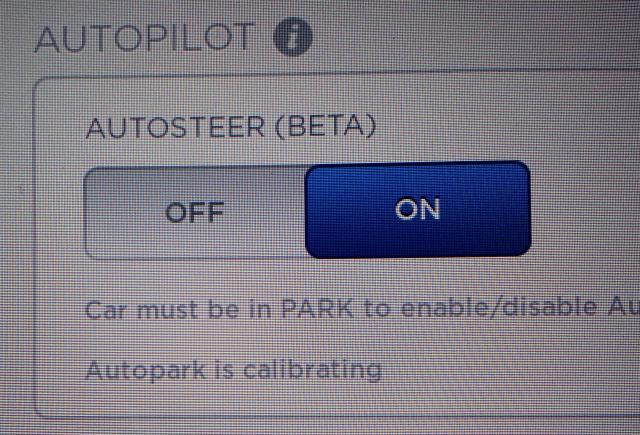
Just go to Settings, Driver Assistance, and look to see if it shows the above "Autopark is Calibrating" text.�
Nov 3, 2015
cynix Mine says it's calibrating, but Autopark works fine.�
Nov 3, 2015
jlucero Does "calibrating" imply that it can work, but will start working better soon?�
Nov 3, 2015
Ingineer From the manual:
�

Không có nhận xét nào:
Đăng nhận xét