Mar 4, 2014
Theshadows Has anyone noticed a klunking sound from the motor area when at low speed, like in a parking lot when you press lightly on the accelerator? The sound reminds me of a sloppy universal joint on the driveshaft of an ICE.�
Mar 5, 2014
steve841 I haven't noted anything like that...�
Mar 5, 2014
Forty Creek I am experiencing that sound. TC has a part on order to repair it. A motor mount I believe.�
Mar 5, 2014
Tommy I had a similar sound; turned out to be a cracked axle nut which was replaced under warranty.�
Mar 7, 2014
mknox Anyone know what this is: About one time in ten when I'm getting out of the car, it will start to "chime" in sets of three "bongs" for maybe 30 seconds. This isn't the rapid three bongs you get when an alert comes up on the dash, but slower and makes me think of a key-in-ignition or headlights on reminder. There's no message of any sort on the screen, and it does stop on it's own. I'm curious to know what the car is trying to tell me. �
�
Mar 7, 2014
scaesare In a few different threads it's been surmised this is accidental touching of the brake pedal when getting in tothe car and thus the door is still open.
It's happened to me on a number of occasions, and I'm not convinced I touched the pedal, but I've yet to hear another plausible cause...�
Mar 7, 2014
steve841 I believe that's been narrowed down to the FOB in your pocket being "clicked" to lock by accident .... with the door open.�
Mar 7, 2014
Theshadows Taking ours to the service center next week. Will let everyone know what the prognosis is.�
Mar 7, 2014
mknox I'm pretty sure that's not it because it usually starts when I'm half way out of the car. I'll certainly pay attention to it, however.
- - - Updated - - -
This could be more likely it. I might be pressing it as I swing my legs out of the car.
It is a "different" sounding alert which is what made me wonder. With most messages and alerts, there is a rapid "bing-bing-bing" sound, but this is more like the old key-in-ignition chime some ICE cars will give,�
Mar 8, 2014
huntjo Pretty sure it's this and have only noticed it when fob is in my jeans pocket, rather than times when fob is in my shirt pocket.�
Mar 8, 2014
ibcs I had that issue when the tire sensor broke loose in tire causing a noise at low speed.�
Mar 8, 2014
DCWitt I had this and it required an entire new drive unit (motor and inverter), which was installed quickly by Chicago service center.�
Mar 8, 2014
Super Gizmo I have a P85 VIN:1586 bought in 11/2012. I have close to 16K miles on the car. I live in the Bay Area where the temp today is approximately 70. Last night I did a range charge for only the 4th time since owning the car and I was shocked to see that the Rated Miles on a full charge are only 246. I never let the battery get down below 100- 140 miles. I only used the Superchargers on the way back from LA last year on I-5 because the ones on 101 were not active at the time. When I Supercharged on that trip, I only charged to 90% or less. My car is usually charged to 170-180 miles for daily use. My 90% Rated charge is down to 212. I have been doing all the right things espoused by Tesla - like leaving the car plugged in most of the time so I am very disappointed to see the loss in range. My life time Wh per mile is 316.
I feel this is unacceptable. I have taken care of the car and bought 8 year extended warranty and maintenance plans, had the car serviced on time. I don't hod rod or race the car because I have a bad back and have had neck surgery. I think it is time to get in touch with the higher ups in Tesla and find out what the hell is going on here. This is very upsetting to say the least.�
Mar 9, 2014
nlc Maybe try to completely empty your battery, and try a new charge to 100%
- - - Updated - - -
I checked, 246 miles is 396Km, in rated range it's totaly normal !? We have the same value here in Europe with new car !�
Mar 9, 2014
ch_model_s the EU cars calculate the range diffeent. EU ideal miles are more like US rated miles! supergizmo you see just a wrong calculation from the bad tesla range guessing algoritems and not a real degration. don't panic�
Mar 9, 2014
napabill Welcome to my world! (vin #1571, 17,000 miles)�
Mar 9, 2014
drees You car and battery are very likely fine, don't worry about it.
Cars charged to less than 90% regularly and rarely range-charged are more likely to drift out of balance as it's harder to balance a pack when it's not near full or full.�
Mar 9, 2014
Mario Kadastik Yes that's what I've understood as well. The basic only way to test this is to drive it to low charge, charge to 100% (and let it sit until it finishes the charge itself) and repeat it soon after going again to 0 and then charge to 100%. With a couple of cycles you should see the range creeping back, but you won't see it on the first cycle as I understood so it has to be at least 2-3 cycles to start seeing the improvement. I think someone was told by Tesla to do it preferably in winter and range charge many times in row to let the pack balance and he was back to almost no degradation after a couple of weeks (and had 40k miles on it?). There is a thread under Battery and Charging here somewhere.�
Mar 9, 2014
JRP3 I'm not sure there is any good reason to drive it to or near to 0 to balance the pack. Lithium has no memory effect and the balancing takes place near the end of charge, assuming they are top balancing the cells. Leaving it plugged in for extended periods after range charging should do the trick.�
Mar 9, 2014
jerry33 I think the idea here is to have has much "empty space" in the cells as possible so that the "sprinkler filling a number of glasses" effect reduces the difference in charge level on the way up so some of the balancing happens before the one minute remaining. This assumes a somewhat slow rate of charging.
I'm not convinced that running to zero and then going to 100% just to balance the pack is a good thing unless your pack is very badly out of balance.�
Mar 9, 2014
JRP3 I'd be surprised of any type of balancing was taking place at lower SOC's, and most balancers that I'm aware of do most of their work near the end of charge.�
Mar 9, 2014
jerry33 Any balancing that takes place on the way up isn't "active balancing" in the sense that we normally think about. It's passive balancing.�
Mar 9, 2014
JRP3 I'm not sure by what mechanism "passive" balancing would occur.�
Mar 9, 2014
jerry33 My understanding, and it could be bad since it's based on what I've read rather than personal expertise, is that during a slow charge the SOC tends to level out between the cells because the cells with the highest SOC tend to take a bit less over a given time period. That doesn't happen during a rapid charge. Of course, there are the questions of "what constitutes slowly" and "is there enough variance in the individual cell's rate of charge in this situation to make a significant difference".�
Mar 9, 2014
Super Gizmo The biggest problem I see with all the kind suggestions by Forum members to Range charge repeatedly and then discharge the battery to minimum is that it is completely contrary to what it says in Tesla's manuals. If a Service Center tells me in writing on a Repair Order to follow that procedure, I would gladly do it. I have been following Tesla's instructions to charge the battery daily between 60%-70% and keep Range Charging to a minimum.�
Mar 9, 2014
steve841 I tend to lean to your thinking .... (less keeping plugged in at all times per manual). I charge to 70% and try not to let range drop below 60 miles of rated range.
Happily have no clue what a range charge will get me.�
Mar 9, 2014
JRP3 What you are describing could only happen when a cell is full or nearly so. Say you have two cells, one is at 3.44V and the other is at 3.50V. Assuming similar effective internal resistance* both cells will keep accepting charge at the same rate. Now at higher voltage/SOC if one of them is nearly full then it may start to shed excess charge as heat due to an increase in effective internal resistance. However you don't really want that to happen, you want an external balancer to start dumping some charge either through a resistor or by shuttling it to a lower cell. Complicating this is the effective internal resistance of one cell could be higher than another and that cell may show a higher voltage when charging even though it's not actually at a higher SOC. Lower charge currents help avoid that, and ideally measurements would be taken after the charging has stopped at resting voltages, which eliminates the internal resistance issue.
*I'm using the term "effective internal resistance" because it's not really resistance but diffusion rates of ions through the SEI layer and into the structure of the electrode.�
Mar 10, 2014
jerry33 Okay, that sounds reasonable. Thanks for the explanation.�
Mar 11, 2014
Bugeater But what constitutes a slow rate of charging? Does my HPWC at 80 amps? Or does it take 20 amps or less?�
Mar 11, 2014
JRP3 No matter what charger you use the end of charge rate still tapers down. Leaving it plugged in after charging should allow extended balancing to occur.�
Mar 12, 2014
Theshadows In regards to the klunking sound from the motor I described earlier.
The service center checked all suspension points and retorqued them. They also checked the motor mounts and they are fine too. The determined that the sound is coming from within the motor.
They let me take our car home and they will be bringing us a s60 loaner next week so they can do a drivetrain diagnostics with the engineering team from CA. I was told that they may end up replacing the drive train.
They would have kept it today but they only have s60 loaners and I need an 85 to get home. (I was puzzled by the s60 loaners, I thought they were only doing p85+ loaners, perhaps they are trade ins from people buying the p85+'s?) I will let you know what the issue is once they find it.
Updated: oh yea, they told me they didn't notice it with creep turned on. Since we have always driven stick, we keep creep turned off. I think the creep function hides it by always having torque on the motor.�
Mar 12, 2014
Forty Creek Thanks for the update on this. I am still waiting for a call back from Tesla and continue to have the klunk/knock sound. Opposite to your experience, I seemed to start hearing it sometime after turning creep on. It doesn't just happen from a dead stop-to-go movement. Also happens with acceleration from moderately low speeds or speed reduction from a lower pace.�
Mar 12, 2014
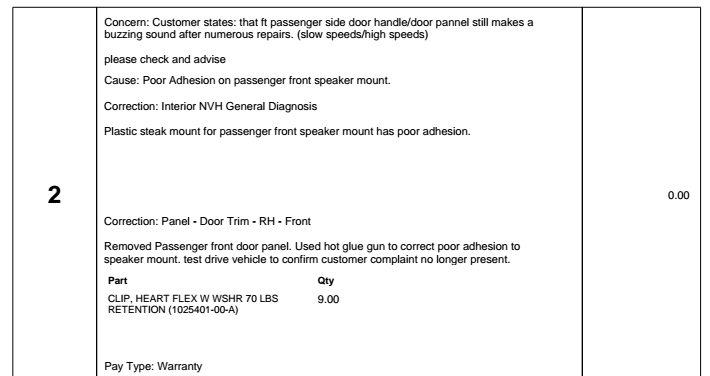
gg_got_a_tesla Aargh. This front passenger door handle is giving me a headache. Have to take it into the service center for the third time in 6 weeks. First, the handle used to come out but not let the door be opened. Tesla replaced the old-style handle with a new one. Then, the window started making a clunking sound as it went up or down; turned out that the door handle harness was loose. Now, there's a constant, loud rattle from the vicinity of the handle that I have to drown out with music.�
Mar 13, 2014
teslasguy UMC blinks red and stopped working. I unplugged my car today and noticed after getting into the car that I only had 138 rated miles even though I had the charge limit set to about 180 miles. When I got home I plugged the UMC in and charge port went immediately solid red and saw a message on the dash that said bad charge cable. I removed and tried again. No good. Unplugged the 14-50 plug an replugged. No good reset the UMC no good. The UMC always blinks red 3 times, pauses and blinks 3 red again. Called SC and they said it sounded like a bad cable and asked if I could bring the car in tomorrow to check the cable. I said a neighbor has an S and I could ask him if I can try his UMC. They said great so I went over to his house and plugged his cable in. Immediately red. So the SC said that it looks like a problem with my car. Well...just got a call from my neighbor. He just got home with his S and his charge port goes immediately red when he plugs in. His son told him about me stopping by to test his cable with my car. So he then reset his UMC and tried again. No good. His charge port now goes solid red when plugging in. Looks like whatever is wrong with my car has now fubarred his UMC. Hopefully his now messed up UMC didn't also damage his car. Anyone else have anything like this happen?�
Mar 14, 2014
VolkerP Is there a faint possibility of bad grid power quality in your area? Heavy machinery or cogeneration plants in any near industrial premises?�
Mar 14, 2014
FlasherZ This can happen if there is not a good connection with the ground and pilot pins, I'd inspect the connectors to see if there is any grease, dirt, sludge, etc. in those smaller holes in the connector. While there is a remote possibility of a car damaging the UMC electronics, I'd start with the mechanical reasons first.�
Mar 14, 2014
teslasguy No grid issues I'm aware of. Our development is about 10 years old and all underground utilities. We never lost power all winter even when other areas did. I've been using my setup for about a year and a half since I got my car with no issues. I unplugged the adapter from the outlet and removed it from the UMC cable. Connectors all look good. No overheating signs or deformities. My neighbors UMC had also been working fine until I plugged it into my car and now it's no longer working with his car. Taking my car and cable to the SC this morning along with my neighbor's cable. I'll post an update when they figure out what's going on.�
Mar 14, 2014
teslasguy So the SC determined that my charge port is bad and that in turn fubarred both my and my neighbor's UMCs. They are replacing the charge port and giving us each new UMCs.�
Mar 14, 2014
RobsJester
Sadly Darth, a new window and labor cost $1,444
� $875 for the glass, labor is 490 +tax (almost twice the cost to replace the windshield of a "S Class" Merc - $800+/-)
I have an early VIN (03818) and this is the second window crack originating from the passenger "A" Pillar. The first was replaced in Dana Beach, FL without any question last summer. Although the crack looks eerily similar to the last break, I've been told it failed the ball-point pen check, so I'm out the insurance deductible - and my insurance company is out a grand on top of that.
There is always a silver-lining, for the last month, I've watched the crack slowly grow, marking the spiderweb's progress like a proud mother penciling her first-born's height in a doorframe, at least I now have something to do while sitting in LA traffic.
To those in the know, a ranger preformed Sb-13-10-006 on the passenger "A" pillar to reduce the "popping" noises when driving, but I doubt a flathead screwdriver and mallet solved the underlying body flex that could be contributing multiple cracking windshields.
Here's a link to the pict: Windshield2_zpsfd9b1f80.jpg Photo by roadhd | Photobucket
Don't get me wrong, I love the car, company, and brand; I'm just hope my car doesn't continue to pop $1,488 windshields every six months.�
Mar 14, 2014
Zextraterrestrial wow, that sucks.
Didn't think it should be possible for that to happen�
Mar 14, 2014
mknox I had early problems getting the UMC to connect. The cable would plug in, but the port would just stay white and not lock or charge. I would have to fiddle with is for a while before it would finally connect. They replaced the UMC a couple of times, then finally replaced the charge port on the car. Since the charge port replacement, it has worked flawlessly. I never got a red light or any kind of error.�
Mar 14, 2014
JRP3 Seriously. Now you have to think twice before lending a charge to someone having problems.�
Mar 14, 2014
Doug_G A few days ago my auto-present handles stopped working. Walk-away locking also stopped working at the same time.
I've tried rebooting the touchscreen with no effect. Also tried toggling the settings off and back on again.
Around the same time my auto-tilt mirrors stopped working, but I was able to get them working again by resetting them.�
Mar 14, 2014
mknox Sounds it's not sensing the fob outside of the car. I assume you can click the fob to unlock the car and drive, which means it IS seeing the fob inside the car.�
Mar 14, 2014
inottawa Was going to ask if you had accidentally forgotten one fob in the car? I've done that more times than if like to admit. Forgotten one in the car and come back with the other wondering why the handles don't present.
If the problem still persists, I've got ranger coming to town Thursday.�
Mar 14, 2014
Doug_G The other fob doesn't work. Tesla Montreal had some problems with my fob for some reason last time they worked on the car, and they reprogrammed it. Of course they didn't have the second fob at the time so that disabled it.
Yeah, he's dropping in on me as well.�
Mar 14, 2014
teslasguy Well, now the SC says the engineers from Ca told them not to replace my charge port. They wanted to run more diagnostics. They've now decided that an electrical surge in our development fried both my and my neighbor's UMC. They're keeping my car overnight to charge using a new UMC. They also sent out a new UMC for him to try as well. I have two 400 amp panels in my house, each with a whole house surge protector installed. Surprised that a surge like this got through to the UMC but bothered nothing else in my house.�
Mar 14, 2014
steve841 Holy crap! You need your own reactor. :scared:�
Mar 14, 2014
teslasguy Oops. Meant to say 2 panels, 400 amps total.�
Mar 14, 2014
ckessel Not really a mechanical failure, but I have to have a headlight replaced due to a small accident. Apparently they're in short supply because Tesla has changed the front of the car somewhat and are using a new design/format. Could mean repairs on early cars will take longer than usual to complete since over the long term there won't be very much demand given the small number of early Teslas.
Oh, apparently it's a $1200 headlight.�
Mar 17, 2014
gg_got_a_tesla Turned out to be this:
 �
�
Mar 26, 2014
Brit4864 Has anybody experienced this problem yet? "Key not present; car unable to start" message when the key is in your hand inside the car AND it has a new battery. I've tried the Tesla suggestion of holding the fob close to the 12v battery/RFID source without success. Either it's the key or the car not recognizing the key. Either way, I'm currently stuck in a hotel in Greensboro, NC! I've called Tesla Roadside and it being 10pm+ they are getting a tech out from Raleigh, NC first thing tomorrow am (they say).�
Mar 26, 2014
cinergi Oi. You try rebooting both screens and doing stuff like exiting the car, lock/unlock ... ?
Placing the key in the cupholder area?�
Mar 26, 2014
znino I've had that happen sometimes when my key has been in my pocket (I suppose a certain way or certain angle) but taking it out and moving it around a bit has always made the message go away and the car start. Perhaps try locking and unlocking the car or resetting one or both of the screens?�
Mar 26, 2014
Doug_G Make sure you don't have TWO fobs on your person (e.g. One in pocket, one in hand). Believe it or not, that doesn't work.�
Mar 26, 2014
brianstorms This has been my experience. Hasn't happened in a while, but it has happened, and I just wave the blasted fob around while grumbling, and the car stops being persnickety and I am allowed to proceed.
Nowadays what happens a lot is my UMC charger plug's button doesn't pop open the charger port, and I have to wave THAT around grumbling before the car stops being persnickety and I'm allowed to proceed.�
Mar 27, 2014
Brit4864 I've tried all these suggestions already. No such luck. I'm thinking the RFID transmitter onboard the car is bad. I'm really surprised they didn't consider some way of remotely bypassing the onboard system, something I believe OnStar will do.
2 Tech's from Raleigh SC are on their way here. They say it will be fixed on site one way or another.�
Mar 27, 2014
Theshadows Just got off the phone with service. They are replacing the drive unit. We should have our car back tomorrow.
We have a P85 for future reference if this happens to anyone else. Can't wait to get our car back. It will have V5.9 too�
Mar 27, 2014
Brit4864 Update: The 2 tech's from Raleigh arrived and determined my old key was the problem. Possibly dropped and internal damage causing the car not to recognize the key. They had 2 new keys with them and programmed them for my MS. I was back on the road by 12pm :smile: Could any franchise dealer do that? No way!
The Tech's from Raleigh about to go to work
![IMG_20140327_103920[1].jpg](https://teslamotorsclub.com/tmc/attachments/img_20140327_103920-1-jpg.45959/)
The new keys
![IMG_20140327_105325[1].jpg](https://teslamotorsclub.com/tmc/attachments/img_20140327_105325-1-jpg.45960/) �
�
Mar 27, 2014
Phillymomof4 I've had my car for 2 weeks and this has happened twice. Key fob was in my coat pocket that I was wearing and I got that message.
Waved fob around and waited a minute or so and car would turn on.�
Mar 28, 2014
mknox Me too, but to be fair, I had the same problem on occasion with my last car that had a fob-based keyless system.�
Mar 28, 2014
Forty Creek This message will appear if your fob is too close to your cell phone. It has happened to me with this car as well as my previous one when the phone and the fob found their way into the same coat pocket. It will also prevent the door handles from presenting.�
Mar 30, 2014
brianstorms I've reported this issue before, both in the TMC forum and to the local Tesla service shop. I have an update.
First, the problem, or, mystery.
Lately, as in past few months, most mornings when I come down to the garage, unplug the UMC from the charge port, and manually close the charge port door, it makes no electromagnetic clanging sound to indicate it's locked. It usually does when I am on the road somewhere supercharging, and when I've tried to reproduce it at the local Tesla Service Center, it always loudly clicks right on cue, but when I am at home, usually not.
What I also noticed lately, as in since around December, is that when I get in the car, which says "Car Off", and press the brake pedal, the pedal is very stiff, and requires some effort to push it down for the car to start. Right when I do this, I hear a loud clapping sound in the rear portion of the car, and suddenly the car wakes up.
It was only this morning that I figured it out --- it's the charge port door, finally locking. That's what's making the loud clapping/clanging sound.
Questions: does anyone else's car do this? Why has my car started to do this? Is this a symptom of a problem, or just some harmless weirdness?�
Mar 30, 2014
EarlyAdopter My car started doing this right after I got a new UMC.�
Mar 30, 2014
ckessel Yep, mine does the same thing. If I remove the charge cable and close the charge port door before the car has woken up (booted) this sometimes happens. My typical routine is open the car door, put in my back pack, throw my coat on top of it, then go unplug. By which time, often the car is booted. But if I unplug first then get into the car, I've had this happen. Usually on weekends since then I'm not lugging the extra office stuff with me that I stick in the car first.�
Mar 30, 2014
FlasherZ Yes, occasionally I get the "clack" as well when I step on the brake. Lately I've been having some other challenges too, like a charge port that turns red for 2 seconds before going green and charging, and the other night I got a "charging failure - contact tesla service", corrected by an unplug/replug. Engineering has suggested that I might have a bad/dirty connection to ground and pilot occasionally based on logs.
Mine has done it even when I don't let the car sleep (before I started using the -z teslams/streaming flag it would do it). And occasionally my charge door would pop back open by itself because it wasn't being locked.
They're going to look at it next time I'm in or the next time it fails.
I charge via HPWC.�
Mar 30, 2014
Btrflyl8e OK, I just had an odd experience. I haven't been in my car all day and it wasn't plugged in. I just went to go to the grocery store, but my phone battery was low so I plugged in the USB to charge it before I turned on the car. When I looked up, I had the "Car needs service" message like a couple of weeks ago, and again my touchscreen was not responding to touch, just like last time. I rebooted the main screen and the service message went away, and stayed away, but the touchscreen still was non responsive. I decided I would deal with it Monday and continued on my way since the car was drivable.
When I got to the grocery store I started thinking, and realized that when this happened a couple of weeks ago, the common factor was plugging in the USB to charge my phone. I unplugged it, and voila! My screen started functioning normally! Coincidence?�
Mar 30, 2014
FlasherZ No, I believe it's a known problem. A couple of months ago I was getting the same message. It was caused by something sticky on the touchscreen that seemed to be confusing the car - it thought the screen was constantly being touched. When I called service, they asked me a couple of questions -- if I had multiple USB devices plugged into the car, if I was using a microfiber cloth to clean it, and if the screen was clean. It seems that some USB devices can cause the car to have an issue.�
Mar 30, 2014
dlmorgan999 I experienced this problem myself quite some time ago. I can reproduce it at will by plugging in my USB hard drive. It would be nice if this gets fixed in 6.0.�
Mar 31, 2014
scaesare I've had USB-device-induced touchscreen wonkiness as well... my Android phone will do it...�
Mar 31, 2014
Jack_L Same with mine right after I received a new UMC too.�
Mar 31, 2014
Btrflyl8e Thanks! I hadn't seen this mentioned here so must have missed it. Glad to know I'm not making a connection between two unrelated things! I'm really glad that's all it was.�
Mar 31, 2014
Alan Sherman I've had my 85 S for 6 weeks now and can report 2 significant issues. While driving, a warning message appeared on the dash that said, "Car needs service, Power Reduced". The car then went into a reduced power state. I braked to a stop, then tried accelerating. The car was only able to do 0-60 in about 45 seconds. It actually was dangerous to drive in that condition, so I called Tesla. They picked the car up within 2 hours, at about 7pm, and had it back to me by noon the next day with a new engine. Yes, they said the problem was rare, but it had to do with the engine electronics and the solution is replacing the engine. They said replacing the engine takes less than an hour in this car. Amazing !
The 2nd issue is that my center screen keeps rebooting by itself while I'm driving. I tried a manual reboot a few times, but it continues to happen. I guess I would have taken it in for this eventually, but independently Tesla called me and asked if they can have my car back for a day for them to replace the dashboard screen and electronics. Why ? They said it might have a faulty "soldering". The girl who called didn't know more than that, but while they have the car, they'll see about the rebooting center screen. And by the way, they already have limited supplies of the new titanium battery protector. They also have a long list of safety conscious people who want it, so they may or may not be able to install one for me this trip.
So that's it for my first 6 weeks with the Model S. Yes, I do love it. I've taken it on 2 x 50 miles round trip drives and one 185 round trip using a Tesla Supercharger...and it's been a great car to drive and own.�
Apr 1, 2014
scaesare I had about half a dozen instances of the brakes on my car feeling unresponsive over the course of two days. It hasn't happened since.
Typically I let the car regen as much as possible, and have a good feel for when I'll need to use the actual friction brakes to bring the car to a halt if I don't have enough distance left.... as I suspect we all have developed. Thus I think I have a pretty good handle on how the brakes are supposed to feel.
In these specific occurrences, the brake feel was very vague in the pedal, and baraking perfomance was reduced. Almost as if one set of calipers wasn't engaging.
It didn't feel like lack of power assist, which tends to make the pedal feel stiffer. Nor did it feel like it was rust buildup on the disks, which I can feel and hear with the initial brake pad contact after having been parked a while (and this was in the middle of a driving session).
My son actually commented on my coming in to a turn faster than I expected while I was noticing it initially. We tested in a parking lot a couple of times and I was able to reproduce it there.
I have a service appointment for something else tomorrow... I'll mention it to them.
Anybody else ever get this?�
Apr 1, 2014
bsd Was the ground wet? I've once had the brakes fail to grab for a couple seconds as I was coming to a stop sign. It was very wet out, and there are others who've complained of this on TMC. Hasn't happened to me since.�
Apr 1, 2014
scaesare Yes, but no more so than many other times I've driven.
It was, however, a slight wintery mix. I did wonder if there was any correlation there... I know that the hall-effect sensors used to detect wheel speed can be affect by foreign contamination, but that seemed like a long shot given the rather mild amount of precip...�
Apr 2, 2014
inottawa Yes! Happened to me numerous (yet sporadic times over the winter)!
I called service about it and they had me doubting myself with all the snow around saying it was probably just the car sliding with the weather.
With the fact that it was not repeatable, I've had a hard time thinking there was an issue with the brakes.
The last service, I had tesla change the rotors (as they squeak a LOT) but the brakes still feel really 'squishy' or 'mushy'. Not the kind of braking feeling that id expect with brakes like these.
I wanted to wait until the weather cleared a bit and had my winters taken off before I can truly attribute it to the brakes.
On a side note, when parked, how many presses of the break before you hear the brake vacuum kick in?�
Apr 2, 2014
SeminoleFSU Yup this started happening to me also around 5.8 IIRC
- - - Updated - - -
do you have anything plugged into the USB ports? Some members have reported there is a problem with certain devices causing the screen to go on a reboot rampage. If you're charing your phone you could consider picking up a DC to USB adapter... U get faster charging too�
Apr 2, 2014
brianstorms This is one of the consequences of a car whose firmware gets updated all the time by the manufacturer.
In the ICE world if a car started making weird snap sounds after months of ownership you would wonder what's wrong and prolly take the car in for service.
In the computer-on-skateboard world of Tesla, even the most innocuous software updates can cause new behavior (bug? weird unanticipated side-effect? actual intended but undocumented change?) just like when any software vendor updates an app or OS. I wish Tesla would definitely explain to owners which is the case in this instance. Doing so in release notes would be helpful, for instance. A section on little things that you may notice, etc.�
Apr 2, 2014
brianman Clarification: Did the receipt include "drive unit replacement" or something else?�
Apr 2, 2014
johnbr Same here, at first I kept wondering how I kept forgetting to close the charge door every morning. I can't say for certain. but around 5.8 sounds about right to me too.�
Apr 3, 2014
dirkhh Rather "interesting" and disconcerting experience this morning. I walk up to the car, it unlocks, I get in. Dashboard is on, looking normal (not asleep), main screen is black.
I press the break pedal, nothing happens - dashboard stays on the "off" screen.
I try to reset the main screen with the steering wheel buttons. Nothing.
I try to reset the dashboard with the other steering wheel buttons. Nothing.
I am beginning to get nervous
I get out of the car, plug the charger back in. Dashboard shows it's plugged in but says "Charging Complete" (ok, I had charged last night, so that was somewhat reasonable).
Get back in the car. Press the break pedal. Ahhhh - display flips to "car is on" mode.
Reset the big screen.
Reset the dashboard.
Car is driving fine.
As luck would have it, this morning the Service Center picked the car up for my 1 year service plus 5.9 install plus installation of the chest augmentation
I of course told them about what happened, let's see what they report when they return the car tonight.�
Apr 3, 2014
ckessel Had this happen a couple times before my 12V died. No idea of it's correlation or causation though.�
Apr 3, 2014
dirkhh Oh that's interesting. I know a few people reported that their 12V was replaced during the 1 year service. I'll ping the service center and ask if they will replace mine...
Thanks for that pointer.�
Apr 3, 2014
mknox My 12v was pro-actively replaced at my last service visit, which was roughly at the 1 year of ownership point (the car was in for other reasons). As far as I knew I had no 12v issues, but did have the "dead car" experience you describe above once. At the time, I just chocked it up to a random glitch.�
Apr 3, 2014
scaesare Interesting. I believe I know the behavior of the car with loss of traction and subsequent ABS engagement feels liking in a braking scenario, and I'm also certain that wasn't it. And the circumstances would have made it rather unlikely. It sounds like we may have experienced a similar issue.
I generally can hear/feel the power assist[1] kick in on the first press. I think I've had one or two occasions where there was only a slight delay.
[1] I don't know if its a vacuum module or a positive pressure system
�
Apr 3, 2014
dirkhh And indeed, they replaced my 12V. I also mentioned to them that at my 1500 mile trip to the Bay Area I had suddenly noticed much louder than before driving noise. I thought it might be a sound insulation issue and that maybe I was hearing more of the road noise? I was wrong. They replaced the drive unit(!!).
As always, amazing service. I don't have Ranger service, but the SC is out of loaner cars (intense selling going on the last couple of weeks) and so they picked up the car and dropped it off again - for free.�
Apr 4, 2014
scaesare A quick shout-out to the Tesla folks keeping up with the forum :wink:...
My car was buttoned up and finished at the service center for some unrelated issues, and I got a call back from the folks there inquiring about my experience with the brakes noted above. Because it was an isolated issue (and had my mind on the other issue I experienced the night before), I hadn't mentioned it to them when I brought it in.... but they asked of they could keep the car a bit longer so they could look in to it.
Gotta love a company that's proactive like that... of course Tesla is undoubtedly the most interweb-saavy car company on the planet, being silicon-valley folks and all. Kudos to them.
In any case, if they discover anything regarding the brakes, I'll pass it on here. Oh, and while there they installed 5.9, and informed me the proactively changed out the 12v battery as well. Good stuff...�
Apr 4, 2014
ckessel Our cars must be twins�
Apr 4, 2014
dirkhh That's pretty funny.
I can't remember BMW ever offering to me to replace the engine for free... just because of a noise.
Tesla is amazing me.
Some people (Edmunds) seem upset about the replacements (or more specifically, about the need for the replacements). To me this is a young manufacturer that is constantly improving their product and doing an amazing job at keeping their early adopters whole. Yes, I know not everything is perfect and some people are frustrated (cough, A batteries, cough), but by and large I think what they are doing is just amazing.�
Apr 4, 2014
mknox Yes, I had mine replaced because of noise too, but to be fair, the electric motor is probably a lot less expensive and certainly a lot simpler to replace than an ICE. Tesla is a lot more conservative with replacing the much more expensive battery pack for minor issues. Just look at the A vs. B Pack Supercharging thread.�
Apr 4, 2014
JRP3 On the other hand a motor making unusual noise is different than a battery pack working the same as when new.�
Apr 4, 2014
scaesare Just got a call back from service center. They were able to detect some brake feel issues in a test drive, and did a fluid flush/change. Although that service is not specified until two years, I have ~22K miles on mine, and they said they've seen a few times cars with higher mileage for their age with similar issues...
Again great service from the folks in Rockville.�
Apr 5, 2014
jerry33 All the ICE cars I had made noise and the manufacturer never replaced them--Well VW did, but that was because it stopped making the noise�
Apr 5, 2014
brianstorms Hmm, on my 1700-mile SF Bay Area trip last month, I noticed the car noise was much louder and at times borderline obnoxious. Happens on long stretches of I-5, out in the boonies of Central CA, where the speed limit is 70 and everyone whooshes by at 80-90+. I had it in cruise control between 72-74, and right around there the motor hum gets not only loud, but develops parallel hums that sort of throb and reverberate and resonate, and the throbbing especially starts getting to you after 10, 20, 30 solid minutes of it.
Is this the kind of thing that people are getting their drive units replaced for?�
Apr 5, 2014
scaesare It sounds very much like what mine was replaced for... especially under moderate (20-40kWh) propulsion...�
Apr 7, 2014
JasonZX12R I wish I had read this topic before. My car has been into Tesla 3x for the touchscreen crashing. I ended up finding it out on my own. It seems to be limited to android phones for me, and only in the USB ports. Confirmed with a Android Samsung Note 3, but my work iPhone does not do it. It also will not crash if using a car adapter to usb in the car plug.
It appears to be when the android phone tries to connect as an installer, it either blocks it, or causes a reset. It will then repeatedly, and quickly, attempt to make the connection which will eventually cause the dash to crash. If I catch it quick enough and turn it to media / camera it does not cause the crash.
I am wondering if it isn't some sort of bug or protection in the Linux side of the dash when exposed to certain filesystems / content. I might try to repeatedly plug in a usb key with a couple different filesystems on it and see if it will cause the crash.�
Apr 7, 2014
Btrflyl8e The day after I posted this my local SC left me a message saying they wanted to talk to me about my USB/screen issue. A little stalkery(?) But in a good way. They told me to just use the 12v other and it would charge faster anyway. It's only the second time I've plugged my phone in in my car in nearly a year, so not a big deal. I have a Samsung Note 2.�
Apr 7, 2014
doctrewho Weird, I have a Note 3 and plug it into the car's USB port (farthest from the driver) every day on my way to and from work. Never switched it away from being an Installer either. Wonder what is different between them? I have a Verizon version and it is running older code (MI9, the original code it shipped with when I received it in November).�
Apr 8, 2014
nlc You can probably change the default USB profile of the Note 3 when connected to an usb host. If you set the profile to USB charge only, there is no reason it crash the console ?�
Apr 8, 2014
Mario Kadastik Or you could all just switch to iPhones�
Apr 8, 2014
JasonZX12R I have Verizon as well, but with the newest code. I do have developer mode USB turned on, I may try turning it off and see if it causes it to crash again this morning.
I'll have to see if you can pick a default without rooting the phone, not sure if it will let you. I am sure I could with ADB.
Uh oh, this thread is about to get derailed :biggrin:�
Apr 8, 2014
nlc When my samsung galaxy S3 was not rooted, if I remember correctly each time I connected to USB the phone asked me how to connect, charge only or other choice.�
Apr 8, 2014
JasonZX12R First connect this morning didn't crash, second for lunch did. Doesn't seem to make a difference.�
Apr 18, 2014
tslas Wow,
No new post for 10 days.
Is no one experiencing problems?
Does this mean my car will be issue free when I get it on May 3rd?:wink:�
Apr 18, 2014
dsm363 No company can promise zero issues but that is good news there is less activity here than when the cars first rolled out. Best of luck. Will be an exciting day when it arrives.�
Apr 30, 2014
Atebit When I first got my car at the end of March, there was some cruise control weirdness when trying to cancel the cruise by stepping on the brake. The car was just as likely to speed up a bit before canceling the cruise as it was to act normally & just start slowing down.
This is puzzled me for a while until I realized that Tesla handles regen differently than the hybrids & LEAF. Those cars use regenerative braking where applying the brakes increases the amount of regen. On the Model S, regen & braking are separate; the brakes actually reduce the regen because the brakes are dissipating some of the energy that would be captured by regen.
So I surmised what was happening was that the cruise sometimes wasn't getting the message that the brake pedal was bring pushed, and when it sensed the car slowing down it applied more power to compensate. Turns out this was correct...Tesla replaced my brake light switch a few weeks back & since then the cruise has behaved perfectly.
Note that it took some convincing at the service center. The first tech that drove the car said it was "normal". Not so much. So I took a ride with one of the service managers & let him drive. He agreed that it was acting dodgy & opened a case with a Tesla, who suggested the brake light switch replacement.�
May 2, 2014
Bugeater Atebit great deduction! Very impressed!�
May 5, 2014
tslas Took the delivery on Saturday (05/03)
Car is everything I expected.
Some minor glitches:
1) I hear some rattles from Front Passenger side, Haven't notified service center yet about it.
2) I guess, I didn't inspect the car as much as I should have. After driving car for 20 miles and stopping for groceries on my way to home, I noticed rear right flap was loose. Promptly, I went back to Tesla Service center and the service adviser said that, They don't deliver car like that and I might have hit something while driving. But, I didn't notice driving over anything or didn't feel any bump. So Not sure, what to do to get it fixed.
Car drives like a dream.�
May 5, 2014
Duckjybe My car has developed a case of creaking rear suspension. With the windows open, when good torque is applied to the wheels from standstill and is then let off, I can hear very noticeable creaking sounds coming from both sides when the back end sits and then rebounds. I don't think it is air springs as I tried bouncing them and they were quiet. Something loose? Lubrication?�
May 19, 2014
bareyb The Speedometer Display behind the steering wheel on my P85 has stopped working. It�s completely Black. I tried rebooting with the two knobs on the steering wheel but it did not solve the problem. I think I can drive it, but I won�t have any way to know what gear I�m in or how fast I�m going so I�d like to get it looked at as soon as possible. Has anyone heard of this happening and if so, is there any kind of fix I can do myself?
UPDATE: Just found the "Two Top Button" reboot trick in another post. Seems to have done the trick. I'll leave this post anyway for anyone searching at a later date.�
May 19, 2014
howardc64 I lost the ability to program the display to the right side of speedo. Also did the 2 top button reboot instrument panel trick (pushing the 2 scroll wheel only reboots the infotainment center) and it came back. I'm on 5.9 firmware, I don't recall ever having this problem prior to 5.9�
May 19, 2014
Btrflyl8e Interesting... Saturday when I got in my car the right side of the driver display was blank and it wouldn't let me change anything. I rebooted and everything came back and it has been fine since...�
May 19, 2014
jerry33 About half the reboots I've done over the past year have been on 5.9.�
May 21, 2014
loganss This morning I got into the car and as the car woke up from sleep, the main screen didn't come on. My car also didn't perform the scheduled charge I had set at 1am. Luckily I had 180+ rated miles. I'm on 5.9 (*.94). This has never happened before. The day before I got a software update message but I skipped it.
This makes me think I should bypass scheduled charge and just have the car charge immediately when plugged in since I don' have TOU from my electric company.
Has this happened to others?�
May 21, 2014
ecarfan Hasn't happened to me but if you don't have TOU entering why just charge the car immediately upon arriving home for the day?
Can you not get TOU metering where you live?�
May 21, 2014
loganss The two reasons I use scheduled charging is to try and have the charging done closer to the time I'm about to leave the house as well as to try and not put as much strain on the grid during peak hours. TOU is available through BGE where I live but it's an unbelievable rip off so I didn't sign up. Basically the low offpeak rate of TOU is close to my current rate and the onpeak is $0.03 or $0.04 / kWh more than that on top of getting a service charge for using TOU.�
May 26, 2014
Duckjybe
The noise got worse over the course of a week until I was embarrassed to drive the car around town. Every time I accelerated from stopped a very noticeable creeeek would sound. Even though I had a service appointment booked in a week and a half I was to visit an energy conservation day the town was having and guests were coming over to test drive the car. I called Toronto Mississauga service and explained the situation and they said to bring it in right away and they would look at it even though they were pretty booked up. Turns out the creaking noise was coming from the drive axle to wheel hub connection which had a bit of corrosion. They also changed the axle washers I believe. Noise is now gone. Silence is bliss! I ended up going to the Town of Oakville Energy Conservation fair and had a nice talk with the fire department about EV's as they have just added two new Ford Focus EV's to their fleet of 4. They asked if I wanted to park the Model S up on the sidewalk for display and I obliged and answered questions from interested people. My test drive for some friends went well and they may be putting in an order.
Thanks very much to Toronto Mississauga service who went out of there way to resolve the noise. They were amazing!�
May 26, 2014
Lloyd I checked my speedometer the other day and noticed that it is fast by 2mph at 60. ( I am indicating 60 and traveling at 58) Anyone else notice this? It was dead on when the car was new.
I know BMW does this intentionally on all their vehicles supposedly for 'safety' and has been a major peeve with them. I say Build it accurate and right. I hope Tesla is not following in the same track.�
May 26, 2014
TexasEV How are you certain you were traveling at 58 when the car said 60?
For what it's worth I've encountered the mobile signs that tell you your speed to get to slow down, and it's always shown exactly what the speedometer said, but that was in the 30-40 mph range.�

Không có nhận xét nào:
Đăng nhận xét