Oct 5, 2011
richkae My car is almost 27 months old, and it has 17500 miles on it.
I have very little battery capacity loss over that time, I still get standard mode charges of 189 miles and range mode charges of 240 miles.
The community here at TMC provides us with a great opportunity to learn more about this issue.
I worked with Tom Saxton to add some features to his log parser. It is available here: http://www.idleloop.com/tesla/vmsparser/
If you run "VMSParser -b *.tar" and pipe the output into a text file, it will record summary data so you can make histograms for the following items:
1) charging amps
2) state of charge
3) ESS temperature
4) brick ah capacity average
5) time range covered
No GPS, speed or other identifying data is in the output.
Note that the interesting data is in the temporary section of the log file, so if you do not have a steady stream of log files ( one every 4 or 5 months ) then there will be some holes in the data but it is not a fatal problem.
If a great many owners from our community would be interested in getting the log parser, and generating the data and sending it to me, I will try to analyze it and look for correlations and relationships among those variables and battery capacity. It's very likely that I will add more variables to the parser and reissue it and ask for new data.
As soon as I have any interesting findings I will report them.
To send me the data, please just email the text file to teslalogdata at gmail dot com, please add the ideal miles you got at your last standard mode charge and range mode charge if possible.
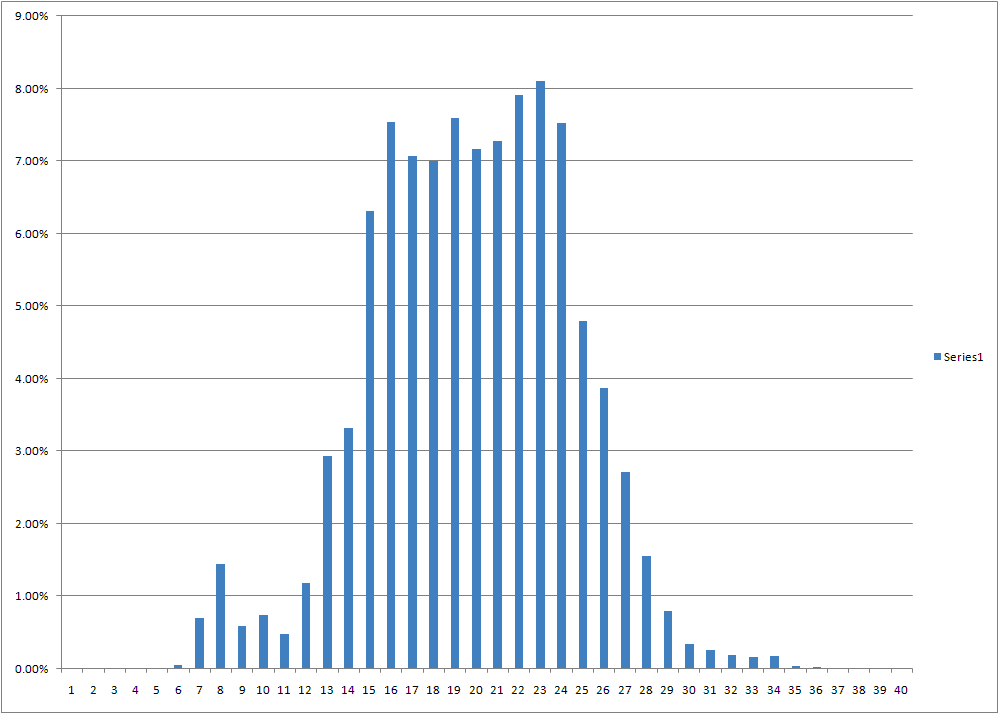
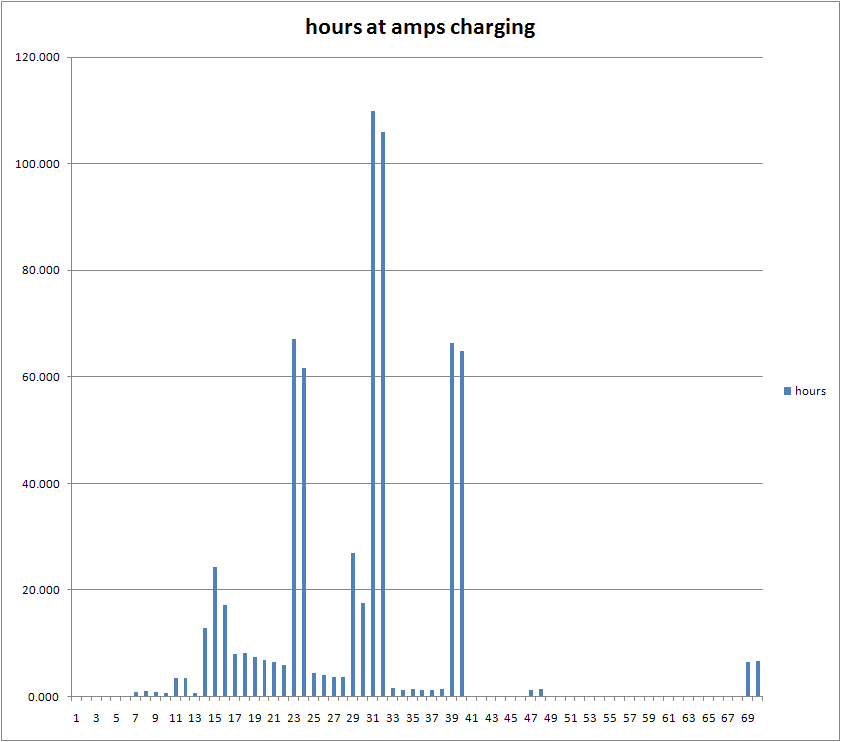
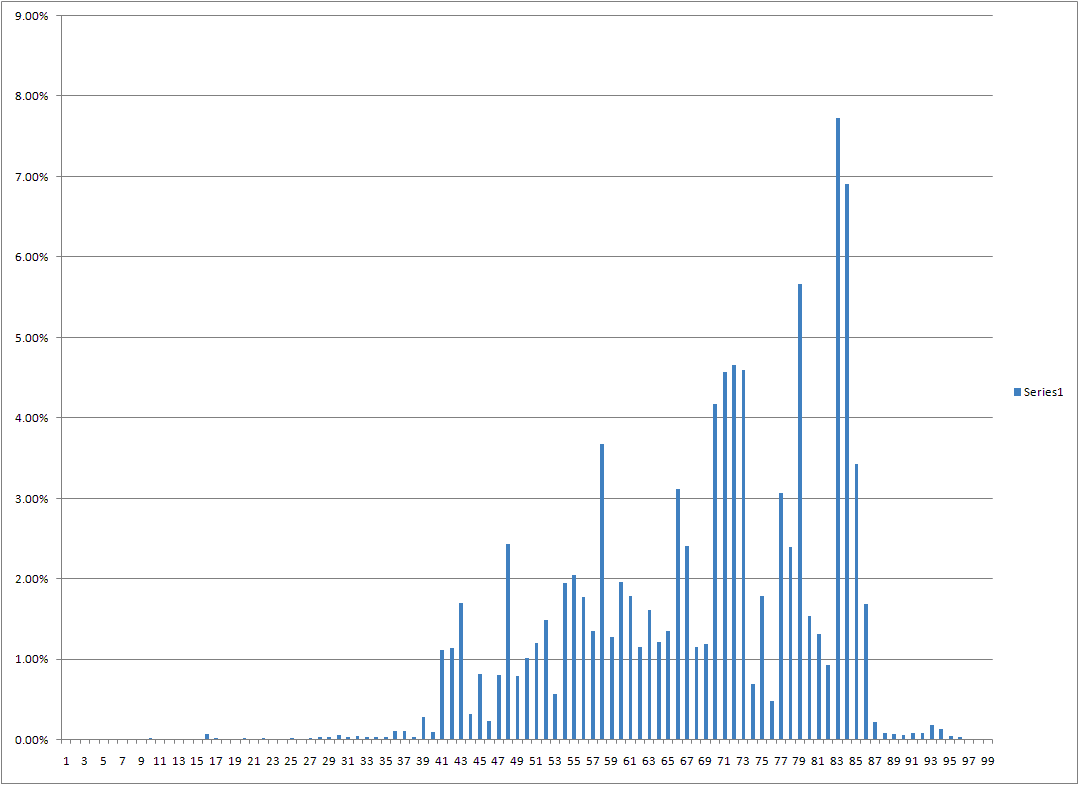
Here are the histograms ( courtesy of Excel ) from my car:
The first is ESS temperature in C
The second is charging amps in hours
The last is state of charge in % of time
Some possibilities in the future:
1) divide temperature into idle, charging, driving
2) divide soc into idle, and driving
3) add ESS power output
4) complicate it all by adding a dimension: state of charge vs temperature�
Oct 5, 2011
donauker Sent my data through September 21.
After seeing standard mode charge completions in the high 150s some months ago I have seen an improvement back up to the low 170s. This is credited to firmware updates. I will be doing a range mode charge tomorrow and will collect a new log this weekend.�
Oct 5, 2011
DZCPA My 2011 Roadster 2.5 #1263 is almost 6 months old with 10,000 miles on it. It is my daily driver as I got rid of my Porsche 911 and Mercedes SL 500. I just love this Roadster!. I get 183 to 189 miles on a standard charge and 230 to 240 miles on a range charge.�
Oct 6, 2011
tomsax Great work, Rich. I'm in. I figure it's good for owners to be looking at this data so we can all understand battery lifetime issues better.
I hope others will submit data as there's nothing in there that gives away any personal info.�
Oct 6, 2011
dhrivnak Will try to get a log to you
Thank you for doing this and I know this is a question near the top of every Roadster's list. I have been monitoring ideal miles for about 2 months now after a standard charge. I have never seen quite the ideal miles others see as I average 178. If I average my first 4 readings and the last 4 my miles went up from 176 to 179. I did take two long trips of 500 miles in 24 hours so I did several days of range charging. Maybe my pack needed that for some balancing.
How much data do you need? I have about 3 months of since the ranger pulled my last logs. Am I right they are cleared out after the download?�
Oct 7, 2011
slcasner No, downloading the log does not clear it. It is a constant-length buffer that wraps around.
However, in my car the log was completely erased one time when service was performed and firmware was updated. Other times when service was performed, with or without a firmware update, the log was not affected.�
Oct 7, 2011
hcsharp How old do you want a car to be before it is useful to send you data? I don't think you want new cars. Is this a one-shot thing you're doing now? Or ongoing project? Thx. It's very helpful.�
Oct 7, 2011
tomsax To add a bit to what slcasner said, there are two sections on the log file. The permanent section contains daily records with some interesting info all the way back to the car's birth day. The transient section contains much more detailed records about driving and charging for the last ~60 hours of driving. So, to get a complete record of your log data, you need to capture a log file every 50 hours of driving. How often that is depends on how much you drive, could be few weeks or a few months.�
Oct 7, 2011
richkae This will be an ongoing project. I hope to continue until we learn something useful about how long our batteries will last.
I want to have good data to help make a battery replacement decision when the time comes.
The older the car, the better the data at this point. If your car is young, just make sure you grab and save a log file every couple of months.
There is a new version available, Tom and I have made some improvements: http://www.idleloop.com/programs/VMSParser_0.9.12.zip
It adds a histogram of miles per day, and adds more detail about the battery capacity.
I have data from 4 cars so far, not enough to learn anything yet.�
Oct 11, 2011
dhrivnak Just checking to ensure you have the file from me from Tesla 255. If not send me a note. Thank you�
Oct 11, 2011
richkae Yep, I got the data from Tesla 255, thanks. I have 5 cars worth of data now.
The sample size is still too small to do serious number crunching on, but I will try to adhoc analyze all 5 and see if there is anything interesting to post here. ( and see if there are any bug fixes we need to make to the parser to make sure it is providing good data )
More fun than my day job, but it'll have to happen in spare time nonetheless.�
Oct 30, 2011
davidrmay I'd like to submit my data. can you reply with detailed instructions.�
Oct 30, 2011
richkae Step 1: Use a USB stick to download log files from your car. Try to do so at least every 3 months.
Step 2: Download http://www.idleloop.com/programs/VMSParser_0.9.12.zip
Step 3: Put all your log files in the directory with the VMSParser.exe you extracted from the zip
Step 4: Run "VMSParser.exe -b *.tar >output.txt" in a command window.
Step 5: Email the file output.txt to me at the email address: teslalogdata at gmail dot com
Thanks a lot for helping with this project!�
Oct 30, 2011
tomsax There's a bit more detail about using the command line parser on this post.�
Oct 31, 2011
richkae Here is a chart comparing 3 different cars state of charge over time ( vertical axis is hours ):
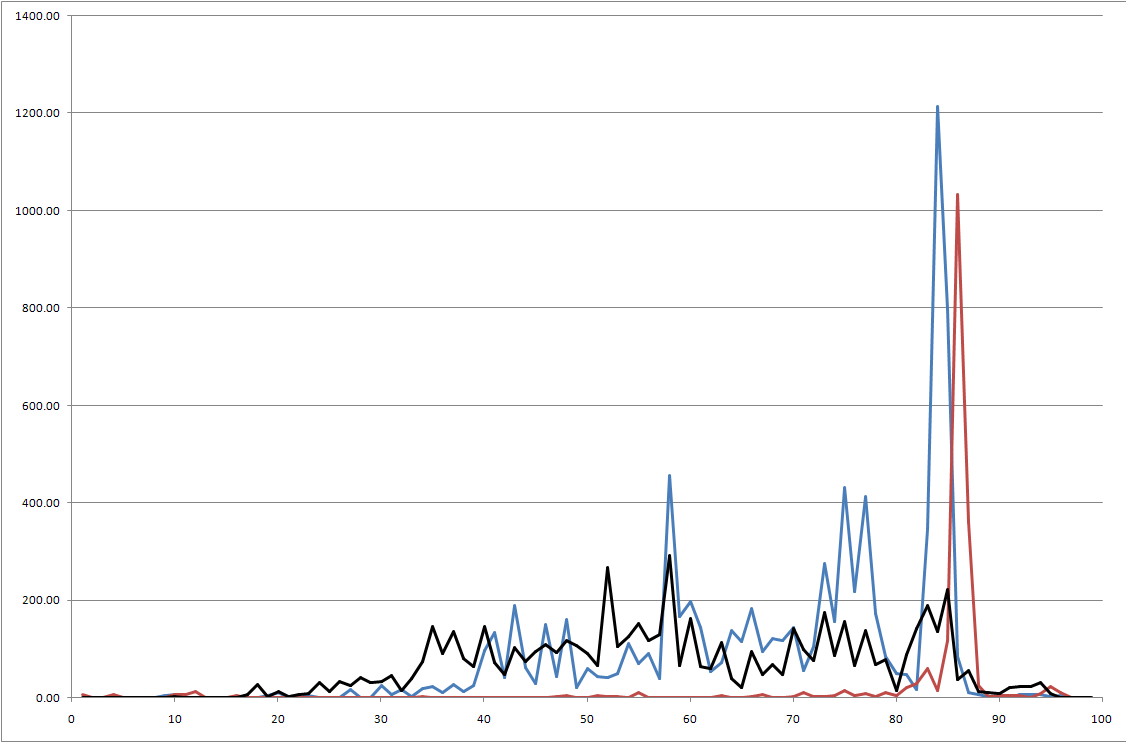
The blue car has a usage pattern you would expect, lots of time at 85% but also lots of time between 40 and 85.
The red car has led a low mileage life so far, and spent most of its time at 85%
The black car appears to use the charge timer almost exclusively so that it is always driven immediately after charging - and sits at 85% very infrequently.
Which battery will last the longest? Only more data can tell.�
Oct 31, 2011
tdevince I just had my first annual maintenance recently. The Tesla Ranger told me that the car will update the battery calibration if you take the car from approximately 80% charge down to 20% charge. However, this has to be done on a single key cycle, (i.e., do not turn the car off during this event). Then after your next charge, the battery capacity gets recalibrated. I haven't done this yet, but after one year and almost 12,000 miles, I'm still showing 192 miles on a std charge.�
Oct 31, 2011
hcsharp Hard to believe that's accurate. If that were true, some cars would never get recalibrated. Lots of people drive from 80% to 20 but rarely on one key cycle. A rare event like that might help provide more data for the calibration software but I think it is calibrated much more often based on how many kWh you get when going from voltage point A to voltage point B.�
Nov 2, 2011
rgjones Just sent in my data for 2.0 sport @ 18k miles.
I've been using the Tesla Tattler for several months with the cooldown feature, which should show the battery spends more time at a lower temperature, but also at a lower state of charge. It will be interesting to see how this compares with the other logs.�
Nov 4, 2011
cinergi When I run it, the section for AH is empty ...
timestamp, brickahmin, brickahave, bricknumber
--------------
timestamp, firmware version
02/23/2032 20:15:15, 4.3.12 33
(as is miles per day)
milesperday, count
--------------
TeslaGLOP shows I started out with 157.62 AH and I'm now at 155.74 (13 months, 11,000 miles).�
Nov 5, 2011
richkae Would you be willing to send your log files so I can debug? If you prefer, I will delete them as soon as I have fixed the problem.�
Nov 5, 2011
richkae I will look into whether the existing parser will allow you to generate histograms from specific time ranges.
Then you can run it and generate histograms from before and after the Tattler. It will be interesting to compare temperatures.
If the code does not currently support it, I will update it and add it.
I should probably also include the ambient temperature in the data otherwise those comparisons are less meaningful.
It would have been much easier to just ask everyone to send in all their log files at a regular basis - that way I could add variables that become interesting.
But this way you know exactly what data is being sent, and don't have to have apprehension about sending GPS data or other unknowns.�
Nov 5, 2011
cinergi I gave them to Tom last night -- PM me if you still want them and I'll send them along.�
Nov 5, 2011
Doug_G No GPS data is recorded in the logs. There is a separate file that includes the coordinates of where you plug in, but it is encrypted.�
Nov 27, 2011
tomsax I just posted a new version of my command-line-based parser that adds support for firmware versions earlier than 3.2 (prior to March, 2009), and fixes the problem that cinergi was seeing with the aggregation feature that Rich is using for his study.
VMS Log Parser for Tesla Roadster�
Nov 28, 2011
W.Petefish I'll send mine as soon as I pull the logs. I recently had a near miss in terms of range and almost not making it home. (8 miles left on standard charge)�
Nov 29, 2011
JoshG If it showed 8 miles of range, that's no near-miss. Mine has twice gone into "---" miles left (happens below 8 or 9 miles of range) with a warning message on screen that the charge is so low that accurate range can no linger be determined. Last week when it happened, I actually made it ANOTHER 5 miles after that to home... So they build in a healthy buffer on their range calcs for some safety.�
Nov 29, 2011
zack I've seen that message right after seeing 20 miles of range left. Made it through 30 minutes of rush hour traffic and 12 miles of travel.�
Nov 29, 2011
Dragon Happened to me several times. You need to switch to range mode (otherwise the car will shut off, this warning will pop up with 2-3 miles in standard mode left) and when going below the 20 miles the car will not show any range anymore. Theoretically the car should be able to move another 20 miles, but you are at the limit and it's highly recommended to charge as soon as possible. I think I've read that there will be another warning later, but then the battery will be as good as empty and you should not continue to drive.�
Nov 29, 2011
user497 Showing only 167 ideal miles after 1 year and a half
I just sent over my logs. The car is 1 1/2 years old and has 11k miles on it. I've only ever charged it with my 110V adapter since I only do about 20 miles per day on average. I don't think I have ever charged it range mode (maybe once a year ago). When I fully charge it in standard mode, I only get around 167 miles which seems very low. I've talked to Tesla about this several times and they have said that the battery is actually fine but the firmware is showing a lower number than expected because it is not properly calibrated and because I rarely charge it completely or from near empty. Hopefully you can confirm what Tesla is saying.�
Nov 29, 2011
dhrivnak If that is 167 standard miles that could be normal. If that is 167 ideal miles I would be concerned. While I normally show 179 ideal miles I will frequently show only 150 STD miles with all the hills here.�
Nov 29, 2011
user497 It is ideal miles. My standard miles (on the odometer by the steering wheel) is usually 20-30 miles less but I don't really look at that very often so I could be a little off there.�
Nov 29, 2011
Alan What Tesla are saying makes sense, but why not try it out. Dont charge for a few days to allow the level to drop. Given your battery may not be correctly calibrated dont push it too far - perhaps down to 20 ideal miles in standard mode (50 plus in range mode). Then fully recharge in range mode and see what happens.�
Nov 30, 2011
user497 I actually did that the last time I charged. From the VMSParser this is the output:
11/26/2011 19:47:43 - 11/27/2011 22:13:50 (26:26:07) Charge 26% -> 86% 122V 15A of 15A 48.3 kWh 0.0 Ah 0.0 Ah 556 Wh/mi
It only went up to 167 on that last charge. In the past it had been slightly higher (around 169). They suggested that when I bring it in for its annual service in March that they will bleed it and then charge back up with a 440V and it should also help. They've looked at the logs and insist the battery is fine and I have no reason not to believe them but at the same time no one else seems to be reporting similar issues. I may also have a slightly different driving habit than most since I drive it every day but only put about 20 miles a day.�
Nov 30, 2011
Alan I guess if you went from 26% to 86% you re-charged in standard rather than range mode. There are plenty here who know more than me, but I think that unless once in a while you charge to 100% in range mode it will struggle to give an accurate state of charge.�
Nov 30, 2011
richkae Make sure you are retrieving a log file from your car every couple of months and archiving them.
If we make discoveries about the health of batteries the parser can be improved and used to reprocess the old data.�
Nov 30, 2011
hcsharp How high is the max voltage that you can charge with? I thought it was 268. Can you really do 440?
To back up what Alan said, unless you've had a recent software update then you won't balance your cells without a full range-mode charge and then let it sit for a couple hours. Even with the new software it does more balancing with range mode than std.�
Nov 30, 2011
jory where is the USB slot and how should the USB drive be formatted? i assume a small (1GB or less) USB drive is fine? thanks.�
Nov 30, 2011
user497 The file is only about 12 MB so anything bigger than that should be OK. I first tried with an old 30MB thumb drive but it didn't work for me (I don't think it was a size issue) so I used the one that comes with the roadster which was a 1GB one and it worked. Note that if you are using your own drive you will need to create a directory named "VehicleLogs" in the root of your drive.�
Nov 30, 2011
jory thanks user497, knowing the directory naming was very helpful.
for those who have never done it, i turned the car "on" with the key and found the USB port under the center console towards the front of the car. i plugged the USB drive in and a message came up on the display.
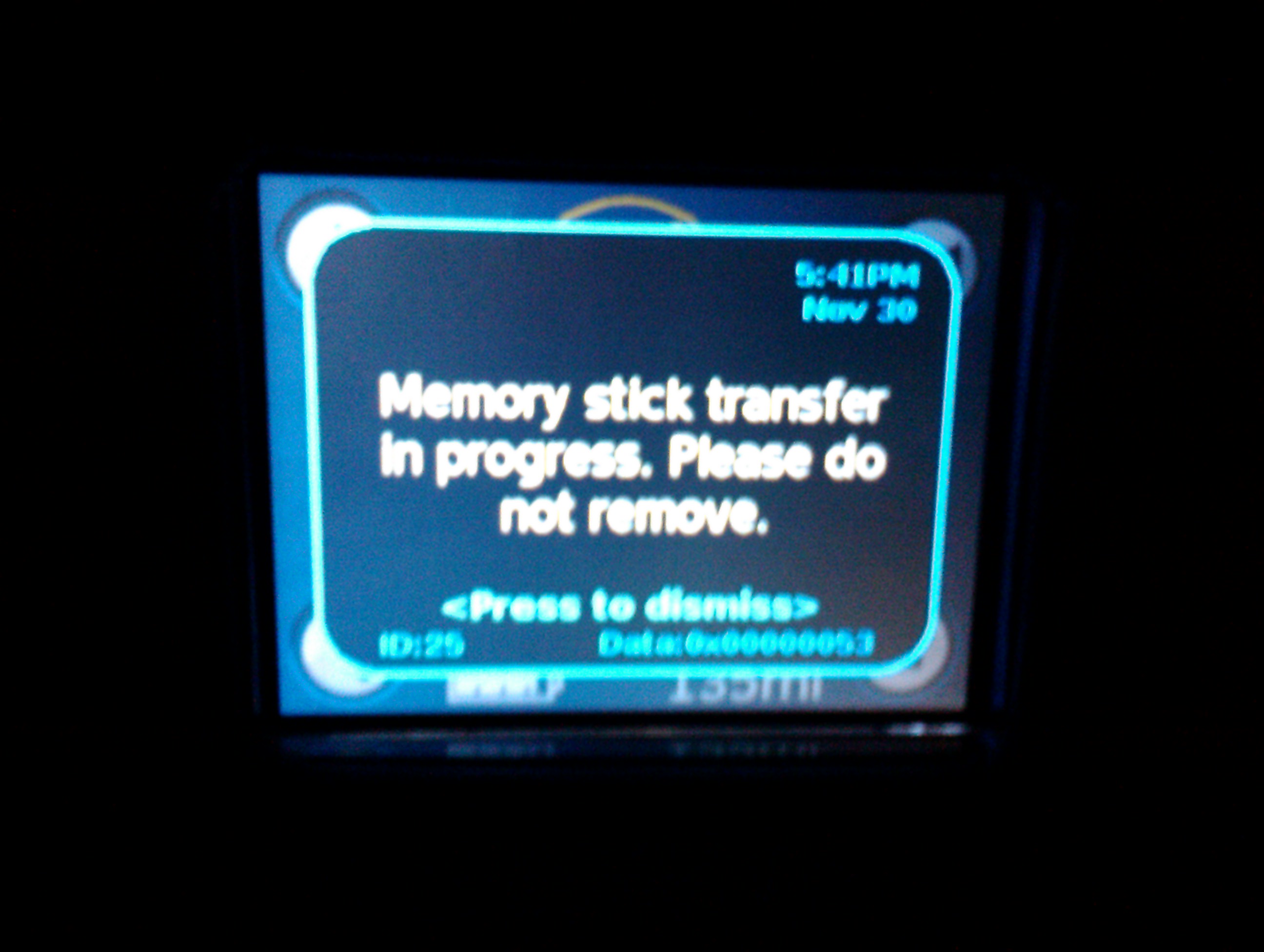
the number on the lower right incremented slowly for a minute or two then the notification went away. i pulled the key out plugged the USB drive into my mac and can see a tar archive file in a new folder (with my VIN number as the name of the new folder) in the VehicleLogs folder. the .tar archive file name itself specifies the date so it look like i could just plug the same USB stick in without having to rename anything and no old data would be overwritten.
i first tried a 1GB USB drive which had been formatted FAT16. the roadster tried to download to it but failed. i reformatted FAT32 and that worked.�
Nov 30, 2011
jory finally went to this page to get the parser and found that it contained good instructions for downloading the log data from the car. people should go here first if they are getting started and read the helpful guidance! �
�
Dec 1, 2011
tennis_trs I'm sure someone has mentioned this elsewhere: the number counts up in hexadecimal to 0X64, which is decimal 100 (indicating percentage, I assume). It does seem to take a fair amount of extra time after hitting 0X64 to finish up (i.e., the count doesn't seem to be a good indication of the percentage of time done for the entire process).
Also, if the display goes blank, you can tap on the display a couple times and the message and progress will be displayed again.�
Dec 1, 2011
tomsax Do you ever have a chance to not drive the Roadster for a couple of days? If so, I would recommend not charging until it gets down below 30% in Standard, then doing a full Range mode charge. That will take a couple of days with 120V charging. In my experience, the Roadster needs to see how the battery behaves from a low state of charge all the way to the top of range mode in order to get a good idea of what the capacity of the battery pack is.
The range mode charge also helps with leveling the pack. If you have one pack that gets out of sync with the rest, it can dramatically impact your range.
You definitely want to get an accurate measure of how healthy your battery pack is while you still have lots of warranty left.�
Dec 1, 2011
user497 I have the chance to do that every week but I like driving it�
Dec 1, 2011
Alan If you are nearly charged then just charge in range mode even if you do not have the chance to discharge first. The "car" needs to learn both empty and full so charging in range mode gives one of th two required answers and may well improve (hopefully) the no of ideal miles when you go back to charging in standard mode.
Go on - I think lots of us want to know if it helps!�
Dec 3, 2011
Kevin Sharpe I have submitted my logs....�
Dec 3, 2011
richkae Here is the summary of all the battery temperature data for all the cars submitted. ( temperature in Celsius )
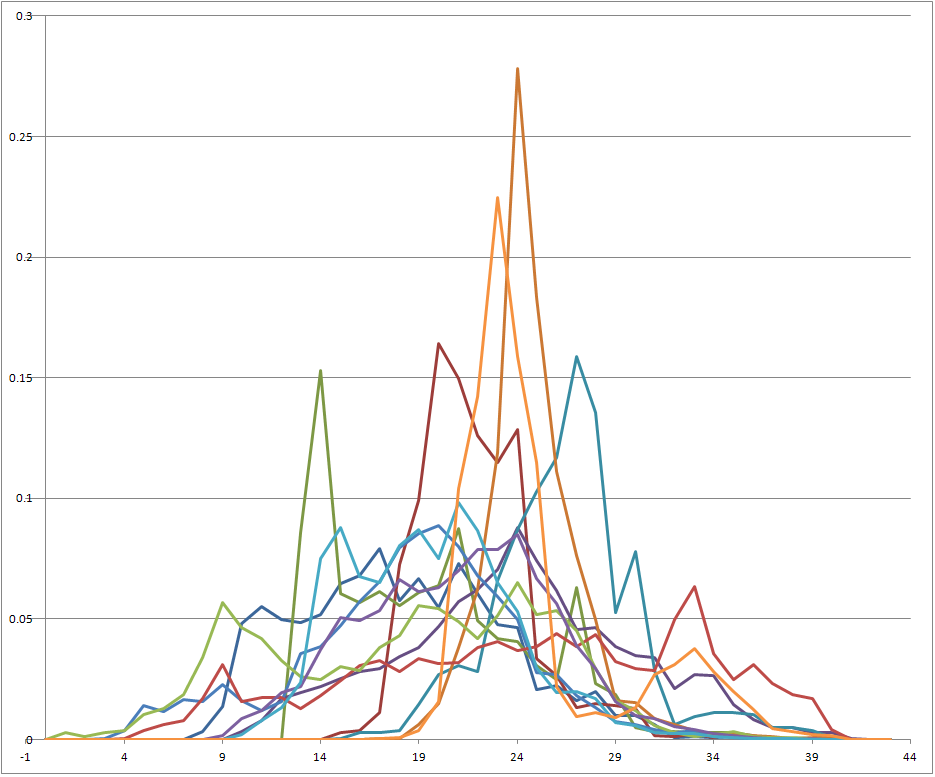
only 4 of 12 cars spent significant time above 30C�
Dec 3, 2011
user497 I am planning on charging in range mode tonight (although I am probably about 80% full now - I will charge to charge from a lower SOC next weekend). I believe I am one of the 4 cars with a spike after 30 degrees. But I don't think I am usually getting it that hot when I am driving it. Could it be that charging it with 110V means that it charges longer and therefore gets hotter? I wonder if those 4 are mainly charged with 110V and the other 8 are charged with 220V.�
Dec 3, 2011
richkae I believe that most of the time charging actually cools the battery - even at 110V ( the charging process cycles between charging and cooling to keep the temperature low ) so I don't think so.
I'll post other charts here soon. I didn't mean to imply any particular relevance to the temperature data.
I've gotten tired of manually wrangling the data in Excel and am writing some code to pull all the data together and automate the chart making.�
Dec 5, 2011
Kevin Sharpe did you get them?�
Dec 5, 2011
jory i submitted my logs last week. not sure if they were received either.�
Dec 5, 2011
richkae Yep, I got Kevin's and Jory's logs. Thanks!
Like I said, there is now enough data that manually loading and manipulating it in Excel is annoying, so I am trying to write some code.�
Dec 5, 2011
Kevin Sharpe Great! Do you want us to submit them on a regular basis?�
Dec 5, 2011
user497 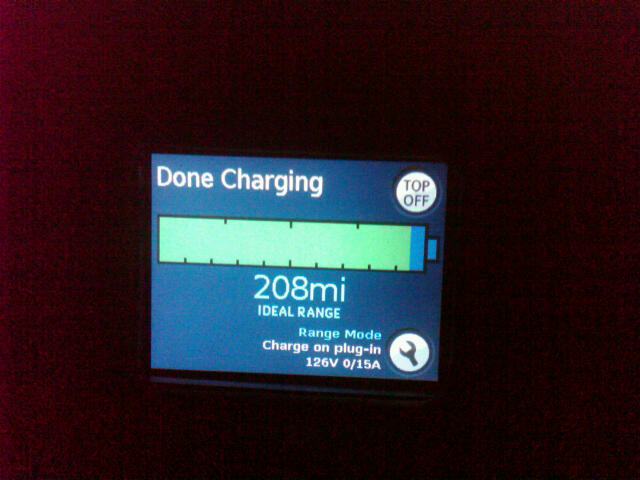
OK, so I brought the car down to about 120 miles ideal and then charged it in range mode. It went up to 208 miles. I was expecting closer to 220. However, based on the image it looks like it only charged about 95% (I guess you need to click the "top off" button for it to complete the remaining 5%?). Since 208 miles is 95% of 219 miles, I think I am seeing what I expected.
My next plan is to let the battery go down as much as possible this week (at least below 100 miles) and recharge it 100% in normal mode and see if I get more than the 167 miles I had been seeing. I would expect around 190 miles.�
Dec 5, 2011
richkae My suggestions:
Pull a new log file and run it through the parser.
If you do the "-b" option the 2nd last section has the average brick amp-hours and the minimum brick amp-hours for each day of history.
See if the average value ( "brickahave" ) increased from before you did the range mode charge.
I would suggest doing another range mode charge from a low state of charge and see if it increases again. If it increases, keep doing the range mode charge cycles until it stops increasing.
If the amp-hour value of the weakest brick ( "brickahmin" ) is significantly lower than the average brick ( "brickahave" ), then that is another reason to do the range mode charges - because it should get the charger to attempt to balance the bricks. ( You know which brick is weakest - it is in the "bricknumber" column )�
Dec 5, 2011
richkae The most important thing is to pull a log from the car every couple of months so you keep a complete detailed history.
I'll make more improvements to the parser that gather new data and ask for more logs.
The next thing I am thinking about doing to it is to figure out how much confidence to have in the amp-hour values for the bricks.
From user497s logs - it seems possible that if you don't exercise the battery then the amp-hour values are inaccurate.�
Dec 6, 2011
user497 The challenge for people like me (daily driver but only putting about 20-30 miles per week day - further on the weekends) is knowing how often to charge up. I know Tesla officially says you should fully charge every day. But in speaking with my Tesla ambassador, he tells me that it doesn't matter as long as you don't keep it too low for awhile. And of course it looks like if you don't ever let it drain too low and recharge in range mode then the indicators become inaccurate. And then there are the theories that it is better long term to leave the battery pack around 50% charged (some people going so far as to think about only charging in storage mode which isn't a good idea because the batteries aren't rebalanced). They really don't make it easy.�
Dec 6, 2011
Lloyd One of the questions that I asked at the Oct event was "What charging and driving modes will be offered on the Model S?" I was told that it was under discussion and that it was possible that a more limited number of charge and driving modes would be available.�
Dec 6, 2011
vfx Should probably separate the differences between "charging" and "battery preservation".
That is, you might want to plug in just because your car is sitting in an extreme temperature area.�
Dec 7, 2011
tomsax If you drive a lot, capturing log files every couple of months won't give you a complete record. It's the one-second drive records that fill up the detailed transient section. That section fills up with about 60 hours of driving, give or take a couple of hours. Distance doesn't matter; it's time driving.
I just analyzed all of my log files. I see log files that cover anywhere from 29 days to 4 months, between 1500 and 2100 miles, but the driving time is in the narrow band between 58 and 62 hours.
I try to grab a log file once a month, or after any significant road trip.
If you want to know how often to capture your log file, just run one of your files through my parser with no command line options. You'll see a summary of your driving and charging sessions. Note how far back that history goes. That should give you an idea of how often you need to download the log file, more often if you're doing an unusual amount of driving, less often if you do less driving.
There are a couple of potential issues with service calls...
Occasionally, the techs will do something that erases the log file. So, it's a good idea to grab a log file just before each service visit.
Tesla has a way to turn on more verbose logging which dumps a record every second, 24x7. That drops the cycle time to about a week. This issue seems to be a rare problem, but it's a good idea to take a look at your log file to make sure things look right especially if you're about to do a drive that you want to capture in the logs.
I'll add this stuff to my page, and the next release of my parser will show a warning if your log looks like it's capturing verbosely.�
Dec 7, 2011
bolosky I suspect that your battery is badly out of balance. What that means is that some sheets have more charge than others. The car charges and discharges the sheets evenly, so most of the time they're at the same level. However, small differences add up over time and result in varied amounts of charge in the sheets. The car will only charge until the sheet with the highest amount of charge is full, and will only discharge until the sheet with the lowest amount of charge is empty. The fact that there's more left in the other sheets is useless.
For example, imagine that you had a car with only two sheets, and sheet A had 5% more charge than sheet B. When you charge the car, it will charge both sheets in parallel until sheet A is full; sheet B will be at 95%. Then when you drive the car, when sheet B gets to empty, it stops even though sheet A is at 5%.
In order to fix this, you need to balance the batteries. This happens automatically, but it used to only occur after a full range mode charge. Newer versions of the firmware may be trying to balance after standard mode charges, but I'm not positive about that. Balancing is much slower than charging or discharging, and if your battery is badly out of balance it may take DAYS. I had my battery replaced last spring with a battery that was unbalanced in the extreme. It took about a week of charging up in range mode and letting it sit overnight to get it to fully balance, but doing so added something like 15-20 ideal miles to the standard mode charge.
Your description of rarely if ever doing a range mode charge makes me think that this might be your problem. If it is, you can just do what I did. Be patient, though. While batteries that aren't terribly unbalanced can get to balance in an hour or so, you may take MUCH longer.�
Dec 7, 2011
benji4 This looks like it's getting a bit off topic, but the above discussion has made me curious about a couple of things:
1) It's apparent that rarely or never charging in range mode leads to imbalances in the battery pack, but can this in itself cause damage or permanatly decrease range? What if the situation is left uncorrected for months or longer?
2) In order to get the batteries to rebalance, why is driving the car down to a low state of charge before charging in range mode neccessary? Wouldn't charging in range mode from any level of charge accomplish the same thing?�
Dec 7, 2011
richkae I think we are talking about 2 completely different animals and range mode charging solves them both for you.
The first is balancing the battery. Charging in range mode may not require any deep cycle to do this.
The second is knowing the capacity of your pack. If the pack is only exercised between 85% and 70% it loses track of what the full range is.
Charging in range mode from a low SOC to "full" SOC helps it to relearn this.
You may have both issues or only one of them.�
Dec 10, 2011
hcsharp It's possible but it wouldn't be much damage. Just like frequent charging in range mode shortens life, frequent deep discharge also shortens life. If your pack is out of balance then some of the cells will be deep discharged much more easily because they are starting at a lower SOC than the rest of the pack. Because those cells are stressed more than the others, they will eventually fail earlier, shortening range and the life of the pack. So a range-mode charge every couple of months or whenever you suspect there might be balance issues is advisable.
While range mode full charge and sitting provides the best balancing, the latest software does some balancing with only a std mode chrg.�
Dec 11, 2011
benji4 That makes sense... so basically while it's 'better' to keep the battery pack balanced, since using range mode charging to correct an out-of-balance battery pack in itself is damaging to the battery pack, it's a tough call. Kind of like chemotherapy for the battery pack.
Then the second problem -- using deep charge cycles to get the range indication more accurate. That really should not be done all that often one would think unless the indication is pretty far off base.�
Dec 11, 2011
user497 Last night I fully charged the car in standard mode and only got back to 164 miles. (When I charged in range mode last weekend I got 208 miles). So it doesn't look like charging in range mode really did anything for me. Unfortunately I wasn't able to fully charge in standard mode in one night so it was recharged over 2 nights (Friday and Saturday). I will try to get the car under 100 ideal miles and fully recharge in range mode to give it another shot. I am bringing the car in for its yearly service in March so I will have Tesla take yet another look then if I don't see more mileage by then.
 �
�
Dec 11, 2011
benji4 In my case I was down to 179 ideal miles for a standard charge after 6 months and 4000 miles on the odometer. One deep charge cycle followed by a range mode charge got it back up to 185 or 186 on a standard charge at 110V/15A. I may try this again and see if it improves it further. When the car was new I was getting 193+ with standard charging so still a bit off that, but not too bad. Tesla just checked the battery for me last week and said their were no problems with it and the range was still what they considered to be normal. I'm curious to hear what they say about yours as 164 definately seems too low.�
Dec 12, 2011
vfx Charge rate may have an effect here. Tesla told me that continually charging on my 120V 16 amp plug was getting my battery out of balance. The also noted my voltage dropped down to 100 on occasion and was not too happy about it's effect in the sheets.
I now have a 220V 30A option�
Mar 11, 2012
richkae shameless bump�
Mar 12, 2012
zack I had something interesting happen Saturday. I've left the car in storage mode for the last few months and took it out for a 30 mile drive. It started with a range reading of 101 miles, and ended at a range of 103 miles with an ideal range of 142.�
Mar 12, 2012
dhrivnak That is entirely possible. The normal range is calculated based on the average usage of the last 30 miles. If you got onto it hard say 25 to 30 miles ago and then took it for an easy 5 miles then you average watts/mile could drop substantially and thus boost your range.�
Mar 12, 2012
richkae Was that ideal miles or estimated miles? I assume it was estimated.�
Mar 13, 2012
ChargeIt! What's interesting here is (assuming you did not charge after taking it out of "Storage Mode") that the car, even if it was fully charged at the start of StorageMode, still had 142+ (+30? depending on how you drove) Ideal Miles left after "the last few months" sitting in StorageMode. So ... do you have more info ?�
Mar 14, 2012
richkae I have some interesting charts to share.
I don't know what they mean.
3 cars, all 2008 1.5 Roadsters with high miles:
46371 miles and 94% battery capacity remaining
49920 miles and 91% battery capacity remaining
35682 miles and 92% battery capacity remaining
Its worth noting that I have data for lots of other cars that have between 10000 and 21000 miles and most dont show any significant battery capacity change.
For example, my car is 33 months old with 21000 miles and still has 99% battery capacity.
So these 3 high mileage cars are the "worst" data I have in terms of battery capacity loss over time and distance.
Here are the charts ( red is the average amp hours of all the bricks, blue is the amp hours of the weakest brick in the pack )
Roadster 1: 46371 miles and 94% battery capacity remaining
This Roadster has not had any sheets replaced.
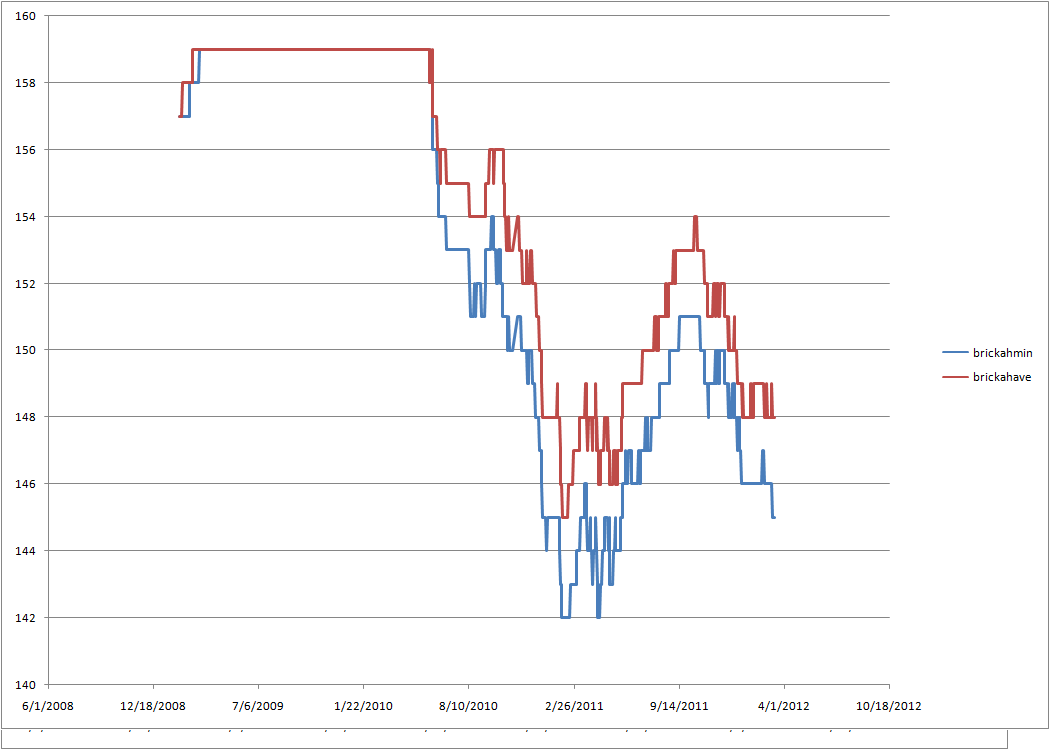
Roadster 2: 49920 miles and 91% battery capacity remaining
This Roadster had a couple of sheets replaced in january 2011.

Roadster 3: 35682 miles and 92% battery capacity remaining
Unknown if any sheets have been replaced.
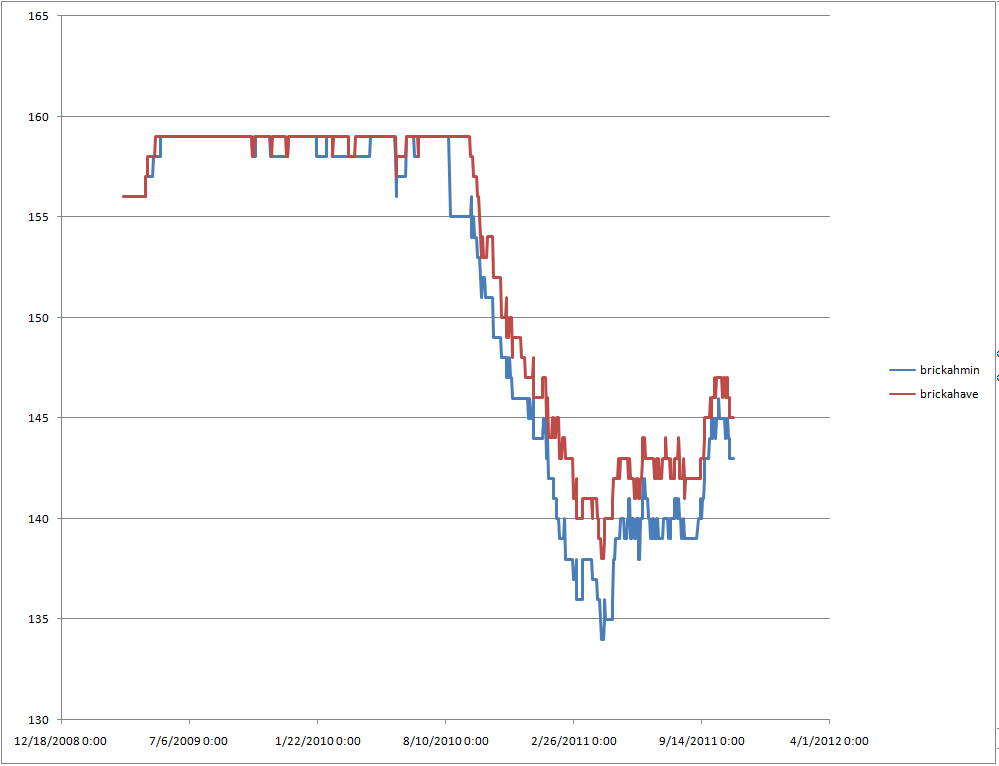
Looking at the charts, it seems likely that early firmware did not measure the bricks in the same way, because the bricks didn't really change much until early 2010 when the firmware changed.
The big mystery is why does the capacity bounce back up? Is it just a firmware change that is interpreting the voltages from the battery differently? Was the firmware operating in late 2010 too pessimistic?
Is it seasonal? Does temperature have a big effect? Another 6-12 months of data will be telling.�
Mar 14, 2012
hcsharp Rich there are some good arguments for the firmware-changed-how-it-measured theory. But they don't all follow the same pattern. What about the theory that it starts bouncing up because the firmware started managing the batteries differently? Better cooling and/or balancing got them to perform better? And Tesla has a big incentive NOT to change the way they measure. It's unscientific. Makes it harder for them to do reliable R&D. And they have done a LOT of R&D looking at factors affecting battery life.
Then again we haven't decoded everything in the logs. Maybe there's a section with battery capacity and no changes to the measuring method?�
Mar 14, 2012
Alan Rich, I thought the firmware version was included in the logs? If so it would be interesting to see if they all got updated at the same time.
As for the temperature / seasonal effect this would carry more weight if the cars are geographically close. Eg if one is in the US, another in the UK and a third in Australia then we can rule out seasonal effects.�
Mar 15, 2012
donauker The answer I received from Tesla was yes to both of these items.
It was a firmware update that started the rapid drop in capacity from the original overly optimistic value. My Roadster is # 3 above, it has never had any battery work. As I saw my ideal range on standard mode charge completion rapidly drop into the 150's I had some discussions with Tesla. Several bleed tests were run and everything was reported as fine and it was indicated that the firmware was now overly pessimistic and they were working to correct it. A later firmware update did reverse the drop and brought my ideal range back up to 168-171 on charge completion with almost 40,000 miles and 35 months on the odometer.
I would consider this battery to have had a rather protected life. I have used performance mode very little (only 1 full performance mode charge). It had a very limited use of range mode in its early life and I have never used the lower range mode portion of the battery (never below the 0 mile standard mode level).�
Mar 15, 2012
richkae Thanks, thats good to know. I knew I should have plotted the changes in firmware revision on the chart. I'll do that next time.
It adds another level of complexity in trying to figure out how long our batteries will last.
I'd love to get more data from high mileage Roadsters and have it yield something meaningful to share.�
Mar 15, 2012
hcsharp Yes, this "firmware factor" makes it hard to do any meaningful analysis. We don't even know if the current firmware is measuring accurately. There's a slight incentive for Tesla to make it a little optimistic. Owners will report to their friends "I still have 98% of capacity..." when we don't really know but are assuming we do.�
Mar 15, 2012
JRP3 You can always do a full charge and see how far you can actually go at a steady speed, if you don't mind risking a tow. Nothing like a real world range test.�
Mar 15, 2012
hcsharp Not sure if you were joking or serious? Aside from the fact that this is hopelessly impractical, there are too many variables to control. Tires, air temp, humidity, battery temp, how it's driven, etc. You could improve the results by repeating the test enough times but for our purposes we want to know within 1 or 2% which would be pretty much impossible.�
Mar 15, 2012
zack I have no explanation.�
Mar 16, 2012
JRP3 I was serious, though I realize the difficulty. I would suggest trying to replicate the conditions that Tesla used to get their range numbers. Level ground, moderate temperatures, proper tire pressure, etc. You probably are correct that you could not guarantee results within 1-2%.�
Mar 16, 2012
tomsax I don't care if the Tesla estimate of the battery capacity is off by a few percent, I just want to know if it's significantly wrong. I log data on every drive and charge segment so I can go back and compare comparable drives over time. I also capture my log files so the detail information from the car's logs adds to my records and my records give context to what's in the car's log.
I generally drive to Portland a few times a year and I have a pretty consistent routine: drive conservatively (60 mph) to Burgerville in Centralia, in case the charger isn't available. The charger has never failed me, so after 30 minutes of charging I have enough juice to drive the speed limit (70 mph) for the second half. I then do the reverse process on the way back. I'll be able to tell if the range is dropping more than what the car's SOC estimate indicates.
BTW, I starting doing my logging by taking notes on my iPhone, but that was a pain because it was difficult to extract data. So, I wrote an app for that. It lets you customize what data you want to enter for charging and drive records and stores everything in a SQLite3 database. You can then export the data either in a tab-delimited file ready to load into a spreadsheet or the raw database file. It's available on the app store, EV Logger.�
Mar 16, 2012
richkae I believe the log file has data for the volts and amps coming out of the pack every second as you drive.
We should be able to accumulate all the data for the drive and then you would have a bunch of things to put together:
1) battery % charge before the drive ( as calculated by the firmware with some algorithm we dont know )
2) total energy used during the drive
3) battery % charge after the drive ( see 1 )
This should give us another way to calculate the energy capacity of the pack - right?
If you started from 100% and drove to 0% that would be definitive, but short of that if you go for a really really long drive you can minimize the impact of the uncertainty in the numbers from step 1 and 3 in the calculation.�
Mar 16, 2012
tomsax I believe the battery pack is better modeled as storing amp-hours than kilowatt-hours. When you romp on it, the pack voltage sags, reducing the power you get out of those amps. That's one reason why it's difficult to estimate remaining capacity in energy units. It's even worse trying to estimate miles of range remaining. Not only does how you drive affect how efficiently you use the energy you pull out of the pack, it also affects the amount of energy that can be pulled from the pack.
If people are collecting their log files, we can model the battery pack different ways and see how its behavior changes over time. The log files record info about how you're driving (pedal position, speed) and even some environmental information (temperatures, elevation, etc.). With enough data, we can control many of those variables. So grab your log files every 50 hours of driving and either send them to Rich or keep them to run the battery profiler as we update it to extract more useful information.�
Mar 16, 2012
doug Yeah, the key is to find the raw value (cell Voltage?) they're converting from to get ideal range. Hopefully that's also logged. Assuming the current conversion formula is accurate, you could correlate it to the raw values and see how the range has changed over time independent of firmware changes.�
Mar 16, 2012
JRP3 I would think they are counting amp hours in and out of the pack to calculate capacity and range.�
Mar 16, 2012
vfx Is this something the Tattler or OVMS can help with?�
Mar 16, 2012
doug Sorry, I see now that my previous post was a couple hours out of date. Even the mods can't keep up now.�
Mar 16, 2012
markwj The charge and drive logs (something like Tom has in his iPhone App) is something we want to do for OVMS. Particularly the charge logs, so we can build up history of charge data and use that to estimate charge duration. The end goal being you being able to say "I leave at 8am - finish by then, please" and OVMS takes care of the scheduling.
But, memory is limited. We can only do this per charge or per drive. Not per second/minute.
Tattler has more memory, but harder to get the data out.�
Mar 16, 2012
vfx Cool,
I was just thinking it could tell you when the car has gone 50 miles* to remind you to record logs.
*Hours not miles
(Thnx CI)�
Mar 17, 2012
ChargeIt! Of course, he means HOURS. But yes, that would be a nice "reminder" feature. As an immediate alternative the Trip Meter (which also logs hours) could be used -- if you don't mind resetting (and checking) it regularly.�
Mar 17, 2012
bonnie Over 12k miles ...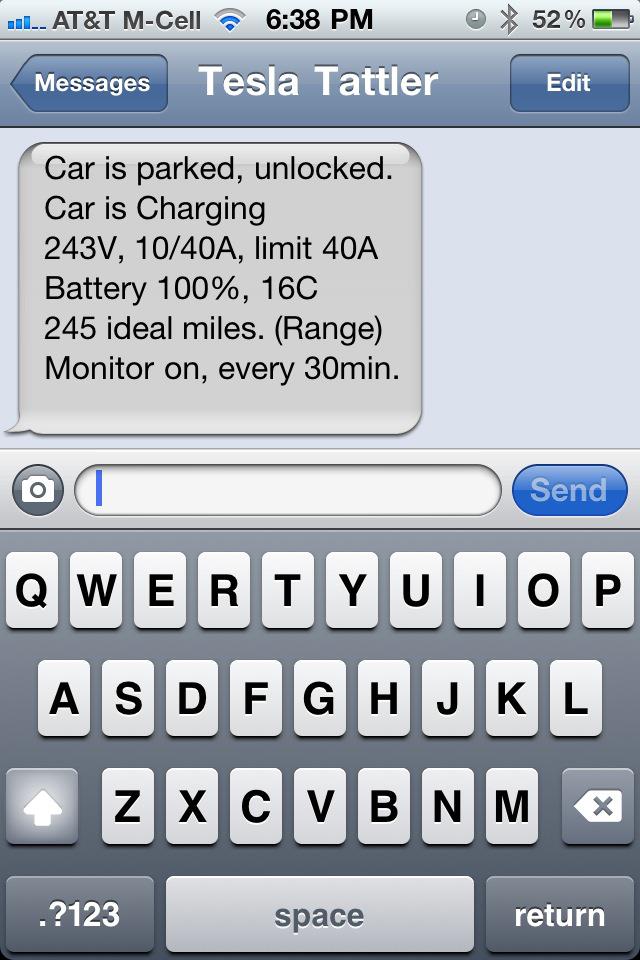 �
�
Mar 17, 2012
markwj It would be interesting if we could pickup 'logs being pulled' events, but even then we wouldn't be sure if it was the ranger or owner. I suspect it would have to be a user-resettable warning - something similar to the 'service due' reminder.�
Apr 14, 2012
richkae Bump to remind everyone to gather log files from their cars, get the updated log parser and send results.
Especially interesting is anyone with over 30,000 miles or has a car that had an out of balance battery.�
Apr 18, 2012
pvmike data send�
Apr 19, 2012
Botbldr45 Slightly off theme but battery related... If I leave car for 4-5 days and it does not get driven should I change it to storage mode to prevent standard mode from recycling at 95% to 97% each night ..... holding this charge constant for that period of time?�
Apr 19, 2012
mgemmell Just sent my first logs. Hope they help add to the sample size and therefore the accuracy of the conclusions.
I zipped the directory... if that is a problem let me know but it reduced the file by 50%, and who am I to squander bandwidth.
Thanks for all the great work on this everyone.
Mark�
Apr 19, 2012
JRP3 Yes it's better to keep the cell voltages lower if not being used.�
Apr 19, 2012
strider I do but I like fiddling w/ things and making things more complicated than they have to be. I also have a Tattler so I can switch the mode from my phone. I doubt it will make a noticeable difference in the long run but it makes me feel better.�
Apr 20, 2012
davidrmay 10 days of no charging
I was just on vacation and could not keep car plugged in. I was told it would be fine by Tesla.
It was 10 days between charges. I noticed no change when I started charging again (and could not detect change in battery level either).
I've been pulling my logs.
- David�
Apr 20, 2012
Botbldr45 Thanks for suggestions....... Just changed mode via Tattler from 1000 miles away. ....... So cool!�
Apr 20, 2012
dsm363 Do you want just the most recent one or all the ones we've collected? I'm sure I have gaps in time since I don't remember to pull the logs each month.�
Apr 20, 2012
Botbldr45 Pulling logs sounds like a good thing to do. If the information can help us understand our batteries better I'm all for it.
Problem: I'm not the most computer literate individual so I'm sure your going to hear some really stupid questions in future blogs.
Sorry!�
Apr 20, 2012
dsm363 There are more options on the PC but you basically stick the USB thumb drive that came with your car into the USB port below the VDS maybe once a month. It takes about 15 minutes or so while the car is parked to download the data. A screen pops up on the VDS telling you not to remove the USB drive. The rest of the details are in another thread on the forum about what the various programs are.�
Apr 20, 2012
richkae If you want to send the raw log files then please send them all ( unless you remember which ones you have sent in the past and only send the new ones ).
If you just want to send the output from the log parser, then you run it from a directory that contains all the log files you have ever downloaded from the car and run "vmsparser -b *.tar >output.txt". When you do that, the parser uses all the available data and skips over the gaps.
If you send the raw files, then when improvements are made to the parser, I can re-run the files without asking you to resend the data. I included the option of just sending the output of the parser because there may be data in the log files that people do not want to share. Supposedly there is encrypted GPS data in the log files, but I do not know how to read it, nor how to decrypt it, nor do I have the decryption key. But with encryption it is always possible that it has flaws that make it easy to crack. The files are stored on my home computer and backed up on my NAS ( unencrypted ). If someone stole my computers then they would have whatever you sent.
When you run the parser with -b it outputs the following data sections ( this is from memory, as I don't have it in front of me - but it is a text file you can inspect ):
1) time spent at SOC%
2) time spent at temp
3) time spent charging at each amp level
4) a summary of distance traveled over time ( I think it is how long did each 1000 miles take to accumulate )
5) battery amp-hour stats per day
6) firmware revision history
Lastly, please send a quick note detailing any battery replacement you have had done. If you have had any sheets, or the entire battery replaced - please try to include the date that happened to the best of your recollection. If you are the second owner of the car, and do not know what happened to the battery before you owned it, it would be very good to know the date you aquired the car.�
Apr 20, 2012
tomsax To be clear, the only known GPS data in the log files is just a table of the places you've charged. As far as I know, no one has made any progress breaking the encryption and we're pretty convinced there isn't any other GPS data in the log files.�
May 25, 2012
lmore Using the OVMS to compare two Roadsters over several days, I noticed that for one of the cars, the battery pack temperature is 8-15 �C higher than the ambient temperature.
While for the other car the battery pack temperature is roughly equal to the ambient temperature. The ambient temperature has been in the range 15-20 �C. The comparison is done when the car have been parked and not driven.
Can this be an indication that the "warm" battery pack has a problem?�
May 25, 2012
JRP3 If they are parked in the same place I'd say that something unusual may be going on to cause that much temperature difference. Vehicle color may have some effect but I wouldn't think that much.�
May 25, 2012
tomsax It would be interesting to see logs from each car. PM me if you'd like me to take a look.�
May 25, 2012
markwj Are you sure the temperature subsystem in the car is not "asleep" and not updating?
To be sure, I would suggest that the next time you drive, call up the temp display on the VDS. Also, in the iPhone App tap on the boot of the car and then choose Wakeup to get updated readings.�
May 25, 2012
lmore This is something I have seen over several days, under different conditions. Now, for example, the "warm battery" car has an ambient temp of 10 C while the battery temp is 21 C (car is plugged in and probably done charging several hours ago at 12 amp/220 Volts). I will pull the log files files when I get to access the cars, appreciate the help!�
Jun 9, 2012
dhrivnak Has the program name changed? I downloaded and installed the Tesla log parser called TeslaGLOP.exe. It does not allow me to pipe files to it. I now have over 10,000 miles and was going to submit my logs again. I have been tracking my range in STD mode for nearly a year now and I have not seen any drop in capacity. Thank you �
�
Jun 9, 2012
tomsax That's a different log parser. For this study, you need to use my command line app.
Complete instructions are here: VMS Log Parser for Tesla Roadster. Download the program then follow the instructions in the "Battery Longevity Study" section. The section "Using a Command Line App" may be helpful for those who haven't used one before.�
Jun 9, 2012
Ben W Chiming in with a random data point: my 3 1/2 year old Roadster with 31k miles on it just completed a full charge in Range mode, and shows 222 ideal miles. This represents a loss of roughly 3% capacity per year. I can live with that, though I'm still hoping for a 400-mile replacement pack upgrade when it comes time in 2016 ;-)�
Jun 16, 2012
richkae Here is a summary of all the data I have.
Some of the data is very old ( 6 months ), a couple of the submissions were made by a very old version of the log parser that had some bugs, and I could not get useful data of it.
Here is a chart of battery capacity vs miles driven:
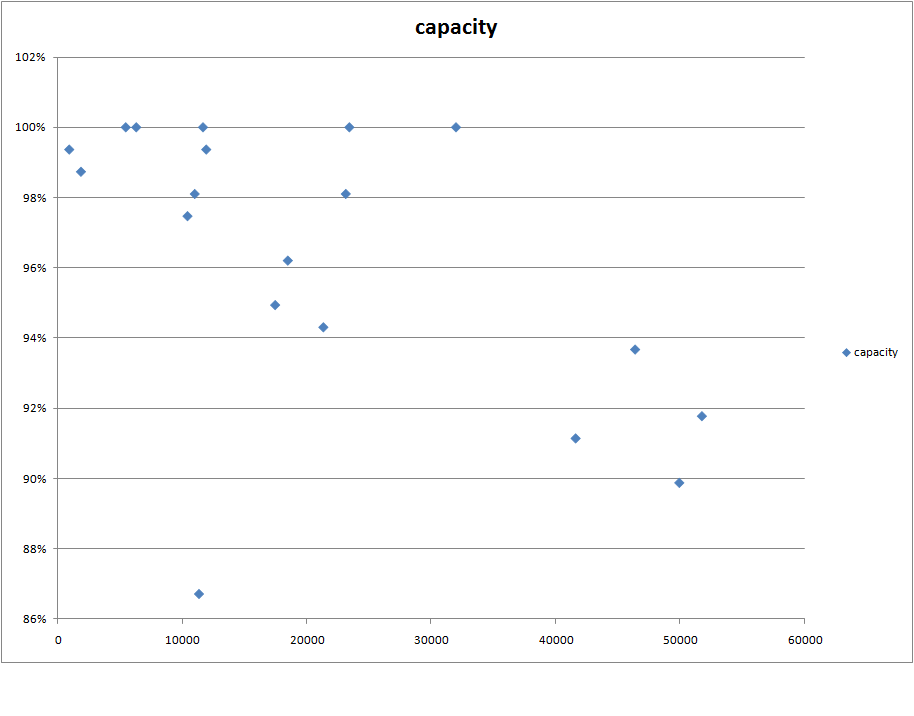
You'll notice one data point that stands out as having a low capacity after only 11000 miles. That car sat for a very long time unused, and the data was submitted after it changed owners after that long period of disuse.
I believe that the battery needs to be cycled a few times to discover its true capacity, as the computer is being conservative.
Here is a chart of battery capacity vs age in years:

I believe that this is evidence that there is not a lot of capacity loss due to age, it is primarily a function of miles driven. The data point that stands out in this chart is actually a car that has driven 51k+ miles in 1.5 years.
There are fewer data points in this chart because some of the data is truncated - the oldest data is lost - and I don't know how old the car actually is.�
Jun 16, 2012
dhrivnak Can yo translate capacity to ideal miles or kwh? As i never had it new i am not sure where i am on the chart. Thank you.�
Jun 16, 2012
richkae Ideal miles in range mode should be = percentage from chart * 245
I used the amp hours from the average brick to compute the percentage, that may be wrong - it might be necessary to use the minimum brick.
The minimum brick is usually within 1% or 2% of the average brick. So that would skew all the numbers down a little, unless the car has one very low brick.�
Jun 16, 2012
richkae This chart includes the average brick and the minimum brick. Clearly understanding how ideal miles relates to the average brick and the minimum brick is important.
 �
�
Jun 29, 2012
SCW-Greg Hey not that I own a Tesla yet, but working on it... I just want to give a shout-out to Richkae (as well I'm sure of the parallel internal efforts of Tesla), for doing this pioneering research. It will aid Tesla, and it will aid us all in future vehicles/battery packs to be totally brainless/transparent charging efforts. The entire community benefits from those who are sharing their logs, and Richkae's ongoing volunteer work.
thx!�

Không có nhận xét nào:
Đăng nhận xét