Jan 9, 2015
wk057 Mod note: This thread started with a carve-out from Firmware-6-1
---------------------------------
I'll note that there are very lengthy descriptions on TACC and such in the in-car manual now.�
Jan 9, 2015
wk057 Ah yeah, I have no issues with Tesla service. They're always great.
I was just hoping it was something they could reset remotely or something.
- - - Updated - - -
I'll note that when the TACC was working... it was pretty awesome. Better than any ACC I've ever used in other vehicles (only used a couple of others).
I was curious as to how it would handle coming to a stop on the closest setting, and the car in front of me came to a stop, I was ready with the brake pedal, and it took the pedal from me and slowed perfectly.So, it doesn't just use regen, it will actually use the friction brakes when needed. Worked when a car in front of me slowed to make a turn also, then when the car was out of the way it just sped back up to the set speed.
The fact that it can stay engaged after full stops and such is pretty neat. Just takes a tap of the pedal or lever to continue.
I look forward to using this more...�
Jan 9, 2015
Brett Drove Northbound 405 in moderate traffic from El Segundo to Santa Monica this morning. Wow - the TACC is really amazing! I didn't touch the pedals at all for a good 5 miles. Even came to a full stop, and then accelerated when the car in front of me did - without any pedal press.�
Jan 9, 2015
randompersonx I tested out the adaptive cruise control on my way to the office today ... Worked fantastic. Came to a stop with traffic, continued on when traffic started moving ... handled people changing lanes in front of me, etc ...
The distance setting of "1" is certainly more distance than average people would leave in Miami traffic, though... I can't imagine where you would use a setting of 7!�
Jan 9, 2015
wk057 Actually, I could see people feeling safer with a larger distance. The complete stop from ~50 MPH on the 1 setting was more abrupt than I would personally make.�
Jan 9, 2015
drsaab I use number one setting. Same as mb distronic. It Brakes better for cars at full stop in front of you than my 2011 mb. Cutting in Lane the tesla will warn you of impending collision but continue to stop in time. The mb would warn you. Activate brake assist for max braking but turn off distronic plus so you brake manually. This is better. Not full Collison prevention assist but close.
Also mb would not stop for a car at a red light stopped in front of you. This tacc tracks the car farther out to slow/stop in time.
The blue tracking on vs grey no tracking is very useful. The mb I would be guessing if it's locked on. This let's me know.
Lastly. On turns this tacc slows based on g force. I don't think my Mb did as well. So I can set to 70. Take an on ramp circle and it will limit to 50 mph etc till the straight road is reached .
I got so used to mb distronic plus. I used it 90% of driving in 30k miles. Once you trust and understand the car, it can do so much for you.�
Jan 9, 2015
tezzla The release notes say that the TACC only works for 45mph & greater (activating it anyways)�
Jan 9, 2015
wk057 Thats for the overtake acceleration. In the manual it says TACC will operate at 18 MPH or higher.�
Jan 9, 2015
tezzla I also saw a cool collision warning graphic when the car two lanes over & I both moved to the same lane. The dash showed my car with a red bang/explosion on the front left corner.
- - - Updated - - -
Oh, you're right. My car wouldn't go into TACC when under 35mph (I haven't tested other speeds)�
Jan 9, 2015
wk057 I always use the cruise control in low speed areas like 25 MPH zones just to make sure I stick to the speed limit. If I can't do that now because of TACC, that's a problem.�
Jan 9, 2015
tomas Isn't there a driver assist option you can set so car will stay within X mph of posted limit (as detected by mobileye)? My P85 doesn't have any of this driver assist stuff (of which I'm glad), but I had loaner for 2 days this week and I could swear I saw that.�
Jan 9, 2015
tezzla I do the same thing, we have a number of 25mph streets that constantly have motorcycle radar cops. I always set to 29mph on those streets.�
Jan 9, 2015
drsaab Ok. Turned off main power to car. Powered on. Cruise still did not work.
Walked away and Left car for few min. Cruise works again
Confirmed Tacc can activate at 17 mph and over.
When stopped without any memory speed in Tacc. Pulling leaver to go forward activates Tacc to default of 17 mph.
Dunno yet why it stopped working for one segment of today's drive.�
Jan 9, 2015
wk057 Yeah, I went for another drive and the TACC worked perfectly. Set it at 55, it followed and came to stops like it should behind other cars. One time it was coming up pretty quick on a car and the collision avoidance alert came up, but it slowed down in plenty of time.
Interesting that both of ours stopped working after a brief stop, then started working again after another stop.
- - - Updated - - -
I will note an interesting point though. There is a light at the top of a hill nearby. You go up the hill then down a hair to the light. There was a car stopped at the light, and the TACC didn't "see" it and react until I was about level at the top of the hill, several seconds after I noticed it. I knew I could change lanes and avoid a problem, but I was curious how the TACC would handle it, and it seems like it would have failed without intervention.�
Jan 9, 2015
ItsNotAboutTheMoney That's something to report to Tesla. Of course, there's often a statement in car user manuals that you shouldn't use cruise control in hills ...�
Jan 9, 2015
evboost My update came in overnight and it was like a experiencing a whole new car this morning. The TACC works amazingly well. I turned on cruise, set my speed and away I went. I tried various settings for the following distance setting and that worked very well too. I could maybe do with a little less aggressive stopping but other than that I am quite pleased. The backup camera lines for parking are also a very welcome addition.�
Jan 9, 2015
wk057 Yeah, it's already listed as a scenario where it may not be effective. I just thought it was interesting that I encountered such a scenario on day one.�
Jan 9, 2015
ecarfan I think that the cruise control on my late 2013 S will work at 25mph. Not in it right now so can't check. Am I imagining that? Or confusing the S with how my Roadster cruise control works?�
Jan 9, 2015
tezzla A lot of funny stuff playing with the tacc:
1st incident: I came up to a slight curve with nobody in front of me, except a parked car. I was going 29mph, the car pretty much slammed on the brakes (thinking the parked car was in my lane). (didn't expect it)
This is no big deal, unless, someone is following you! Luckily, no one was.
2nd incident: Cruising at 45mph, nobody in front (or behind), came to a very slight (2'-3' curve) for a traffic median (with bushes), car slammed on brakes! (didn't expect it)
3rd incident: Came to a stoplight behind a car (we're both turning right), he turns on red light, my car tries to speed thru the intersection/corner. (I was expecting this of course)�
Jan 9, 2015
wk057 Yeah, it seems to have issues distinguishing even slightly curved roads. I noticed this with the lane departure warning before this update also. It wouldn't alert when leaving the lane in some curves.
The manual does say that TACC is less effective on curvy roads, though....
- - - Updated - - -
Yeah, I always used the cruise at 25 in my P85 and now the P85D without issue, until now.�
Jan 9, 2015
tezzla
Makes sense. I was just having fun and testing the limits (actually, having a blast!).�
Jan 9, 2015
Andyw2100 I just had my first real drive using the TACC. This is definitely some powerful stuff! It really changes the driving experience.
I don't think I've seen the following discussed yet. There's no question that using the TACC I lost efficiency as opposed to how I would have been controlling the go pedal. The TACC would try to close gaps faster than I would and would maintain speed longer and then have to brake harder, etc. (I'm not complaining--just pointing this out.) So assuming everyone can agree that the TACC, as programmed now, is going to behave less efficiently than a driver attempting to drive efficiently, there are several questions.
One would be how using the TACC impacts the range estimation now available in the NAV system. Perhaps the differences are not significant enough to make much of a difference there, but it is a question. A more important question, I think, is will there wind up being modes at some point, perhaps user-configurable, between "range-priority" or "proximity-priority" when using TACC. The former would allow the car you're following to remain further ahead of you at times, to save some energy, and accelerate at a more reasonable pace when you need to catch up to it. The latter would try to stay closer to the car in front of you, accelerating faster if needed, and would not be concerned with the energy expenditure.
My sense is that for the most part, the current TACC is basically in 100% "proximity-priority" mode. I'm not saying that's a bad thing. But as the technology matures, it would be great to be able to use TACC, but also maximize range, knowing that doing so will mean TACC is somewhat less effective, but still useful.
Does that make sense?�
Jan 9, 2015
tezzla What level of distance (1-7) were you using? I'm pretty much using 1-2. I think the 6-7 would probably be a little more smooth�
Jan 9, 2015
Andyw2100 I was using 7 pretty much exclusively. I played around with 5 and 6 some of the time, but for the most part it was 7.�
Jan 9, 2015
tezzla Well, there goes my theory!�
Jan 9, 2015
wk057 Yeah it seems to wait too long to slow down and then needs the friction brakes. Not sure if this is by design or a limitation of the hardware.�
Jan 9, 2015
stevezzzz Just picked up my D from the detailer and had a chance to try out the new features during a stop-and-go commute on surface streets where the speed limit varied between 35 and 55 mph.
Executive summary: I'm sold! It's a very solid first release.
I verified tacc functioning at various distance settings, all the way to a dead stop behind traffic at stop lights. When the light turns green, all you have to do is tap on the accelerator and tacc re-engages with the previous settings. I also verified lane-change acceleration up to the speed-limit-plus-offset. I paid particular attention to the regen and friction braking behavior when traffic slowed in front of me; as others have noted, the software waits longer to begin slowing that you or I would (after our experience with one-pedal driving). Regen engages first, then the friction brakes come in using a noticeable step-function braking profile. As the car slows to a full stop, you can feel the friction brakes back off the max braking force used (also in stepwise fashion) and then there's a little jolt as the brakes lock fully just before the car reaches a dead stop. It feels like a limo driver's stop as simulated by a robot using an 8-bit brake controller.
At at any rate, I'm about to go back out to the car and dri...er, collect some more data. :wink:
- - - Updated - - -
By the way, my Sig S has always had the ability to set cruise control at any speed down to and including 20mph. Will investigate if the D is different on 6.1.�
Jan 9, 2015
sillydriver Tesla should be glad their customer base of intelligent early adopters is on average capable of handling beta testing and developmental test driving. If their base consisted of typical, lowest common denominator car buyers, the internet would soon be full of stories about the upcoming rash of crashes.�
Jan 9, 2015
Andyw2100 As much as I enjoyed playing with the TACC, when I do the other end of this trip on Monday I'm not going to use the TACC at all, will set cruise control at 68 or so on the highway, will drive "normally", and will see how things turn out.�
Jan 9, 2015
4SUPER9 Wow. This is all pretty scarey. Probably perfectly fine for the ultra savvy driver, but we've all seen how many ignorant drivers there are on the road. Probably less so with Tesla drivers, but wow, I can see some disasters about to happen�
Jan 9, 2015
Stoneymonster I don't see how this is worse than with normal cruise control and inattentiveness. At least with this you have a chance.
Edit: I see I was replying to sort of the wrong post. But still, I think erring on the side of brakeing is likely where we are at right now and safer than the alternative.�
Jan 9, 2015
Canuck It will be interesting to see over time how many people turn off tacc after trying it, and how the system improves with software updates rather than requiring updated hardware.�
Jan 9, 2015
Canuck Maybe then they should have held back tacc until it could work together with autopilot to avoid potentially dangerous situations?�
Jan 9, 2015
AnxietyRanger A tip to try: One thing that I've learned to do with adaptive cruise is to actually drive "against" other cars in curves. Make the traffic in front something to "bounce from" (not physically, but let the radar beam be that buffer).
I know it sounds silly, and not having driven Tesla's implementation I don't know how applicable, but instead of hitting the breaks if the ACC is not seeing the car in front for whatever reason (say, a strong curve), I often point the car towards some other car, perhaps on another lane, to do the trick.
This sounds more extreme in writing than it does in reality. I wouldn't do anything dangerous like moving between lanes, it is more a consciousness that develops into pointing the car at the traffic in front, through minor adjustments to the driving line. Eventually it just becomes second nature to react to the nature of the radar.
Of course through developing the ACC and its use of various sensors and navigation data, adaptive cruise can take curves better into count. Things are a lot better today than they were in the first adaptive cruises 10+ years ago.�
Jan 9, 2015
Todd Burch Regarding TACC:
Let's all remember this is not autopilot...it's just an advanced form of ACC. It's not steering for you, and really seems to be more intended for highway use.
Like others I also intend to try it and most likely use it on surface streets...but it is not appropriate to be used for turning in intersections, IMHO.
Be very careful.�
Jan 9, 2015
commasign In the 3 incidents that you described, were you able to see the lane lines on the ground? Could it have been a situation where the lines were so faded that the autopilot camera couldn't accurately judge what was coming up within the lane versus outside of the lane?�
Jan 9, 2015
AnxietyRanger Reading my comment, even basic adaptive cruise control can be useful for turning in intersections, if one is careful at keeping the car pointed towards the car turning in front (if there is such a car).
It is a fine art, that of driving "against" other cars in front to control your own speed without touching pedals.
(Disclaimer: General ACC comment, I haven't driven Tesla's implementation yet.)�
Jan 9, 2015
tliving I'd love to hear how someone with this update experiences ACC when regen is limited due to cold. Does it still work?�
Jan 9, 2015
tezzla Yes, the lane markings were very visible. Like Todd Burch says; this is really meant for the fwy/hwy. It's just fun to play with it though.�
Jan 9, 2015
Todd Burch I've never driven a car with ACC that is enabled below 20 or 25 MPH, but those that have ACC (like our Toyota Avalon) would certainly apply brakes if used in a shallow curved turn lane.
- - - Updated - - -
Thanks for testing the limits for those of us (im)patiently waiting for the update notification!�
Jan 9, 2015
tezzla Believe me, it's my pleasure! You guys are gonna love it!�
Jan 9, 2015
rlang59 Perhaps all of the TACC and ACC discussion should be pulled into its own thread.�
Jan 9, 2015
wk057 Went out to test TACC some more as well as auto high beam stuff.
First, the auto high beam control is pretty solid. Turns off the high beams a moment before I see on coming vehicles (presumably since the cam sits higher than my biological cams) and to my surprise works fairly well when vehicles are ahead of you in the same lane. Impressive feature. Better than any other auto high beam implementation I've seen by far. No others work consistently when following orher vehicles and seem limited to on coming vehicles. Tesla works on both.
TACC.... it needs to work on smoother stops for sure. On any following distance setting it stops more abruptly than I would normally. It tends to use the friction brakes more than I would also, which seems inefficient.
It freaks out a bit when a car in front is slowing for a turn and turns off the road. It slowed wayyy more than I would have and surprised the car behind me a bit it seemed. It also took a moment to continue after the parh was clear.
These were all 2-lane 50 MPH roads. I think on an interstate drive it will be much more useful, although in my testing I was able to go through town and lights and such with minimal pedal interactions.
Overall, still better than an other ACC setup I've used.
It seems tesla was able to remotely reset whatever caused my earlier issue. No problems since.�
Jan 9, 2015
HankLloydRight I second that motion.
As one with the antique P85+ and no AP features, we're pretty much left out of the discussion.�
Jan 9, 2015
Majerus I had this issue where it keep coming up, then went to an interstate and it was fine not sure if it saw a 30mph speed limit sign and decided not to enable cruise.�
Jan 9, 2015
drsaab Yes it still works.�
Jan 9, 2015
mgboyes Can you turn it off? One of the most annoying limitations of the ACC on my previous Audi A8 was that it was always adaptive - there was no way to make it fall back to the non-adaptive variety. As a result of this you could also only set 5mph increments on the target speed in that car (since you never have to make fine adjustments to suit the traffic, since it's adaptive).�
Jan 9, 2015
tezzla I don't think you can turn it off. You can do 1 or 5 mile increments though.�
Jan 9, 2015
drsaab I do not see an off setting and never understood a reason you would want to either.�
Jan 9, 2015
Footbag A prior infiniti I had would allow you to disable it and return to normal cruise control. It was a good thing too, as the camera it used would easily get dirty and not function. My recent BMW did not allow ACC to be disabled (or I never found it). While it had much less issues with cameras getting obstructed, it did still occur a couple of times, and I was left with no cruise (as the car won't allow ACC when the sensors are obstructed). If Tesla defaults to regular CC when the camera is obstructed (which seems to happen easily), thats just fine, but it will be a bit annoying if you simply lose cruise entirely (ala BMW).�
Jan 9, 2015
drsaab Ah.. Good point. My Mb distronic plus only did not work a couple times in 30k miles and that was in heavy rain or snow where cruise was dangerous anyways.
My Tesla acc failed to turn on once already today for one segment of about 10 on my driving today.�
Jan 9, 2015
mgboyes ACC is brilliant when there are cars to follow.
But if you're on an empty freeway doing an 80mph cruise and you come up behind another car doing 65 then as soon as the ACC catches sight of the slower vehicle far ahead it starts slowing down, even though you know you are are obviously just going to pull out into the next lane and overtake it, and the only way to stop it from doing this is to start pulling out into the next lane comically early.�
Jan 9, 2015
MikeBur I don't believe so. When using a 1/2 second (seems to be closer to 2) pull on the cruise control stick matches your cruise set point to the current speed limit +/- your override value, eg.
Observed behavior:
In 35 zone, enable cruise control, pull cruise stick for 1/2 sec+, release. Car cruises at 42mph (my override is 7 over speed limit, and I like 42 ;-)). Car enters 25 limit, car still cruises at 42, after telling you that speed limit has changed to 25... Result Mike quickly presses cruise stick down (all the way 3-4times), ie 42-40mph, 40-35, 35-30, then maybe 30-25 (if it's school zone, etc)
Utopic behavior (for me):
cruise override value is %of speed limit (eg 15% over), eg. 69 in 60, 40 in 35, 28 in 25 (assuming truncate), and car changes cruise control set point when moving between zones, both up and down.
Of course, my update did not complete successfully and I have Tesla service fixing next week, so maybe I'm out of sync here too?�
Jan 9, 2015
GetAmped Did you try adjusting the distance allowed between your car and the car being tracked? It is done with the dial on the end of the Cruise Stalk. You can set the distance from 1 to 7 with 7 being the furthest distance.�
Jan 9, 2015
Saghost I don't think you're out of sync or confused - your observed behavior is exactly what the release notes say the current version will do.
However, TACC is clearly a work in progress as they build toward full autopilot, and the October demo cars displayed your Utopic behavior, so I'm thinking you'll get what you wanted in due time.
I'm not sure why it wasn't in this update - possibly Tesla isn't that confident in the speed assist results yet after the car took the vandalized 35/85 mph sign?
Walter�
Jan 9, 2015
stevezzzz A couple more observations about 6.1 and tacc in my P85D.
- Normal cruise control (non-tacc) may now be set as low as 18 mph.
- WARNING: When you allow tacc to bring the car to a dead stop in traffic, don't forget that it's still armed: if you're the second car in line at a stop and the car ahead of you makes a right turn, you can't just ease forward to the stop line (creep OFF) because tacc will assume you want to resume traveling at speed as soon as you touch the accelerator. Surprised the heck out of me, though on reflection I should have been able to predict the behavior.
This is the first circumstance in which I've ever thought creep might be a good thing. :biggrin:�
Jan 9, 2015
anxman I used TACC for about 45 miles up 280/380/101 from Palo Alto to San Francisco. Works just as advertised and my drive felt more relaxing. I feel less tired from driving compared to how I would usually. I also averaged 290kw in my P85D compared to a normal of around 340.
One word of caution is that the system still requires oversight. I was approaching the end of 280N into SF and the car in front of me pulled into the right lane. The traffic in the left lane was fully stopped but beyond the end of the curve. The car started accelerating up to 70mph and wouldn't have had enough time to stop. I've found TACC to be excellent for pure highway driving but I would advise against using it anywhere else -- just like the case would be with any cruise control.�
Jan 9, 2015
wk057 The speed assist stuff should be completely optional, honestly.
Honestly folks, does anyone *really* follow the speed limit? I'll be the first to say that the only time I do is in school zones and slow areas like 25 zones, and even then I'll do 5 over. In a 65 zone... 78. In a 55... 69. And even doing 13-14 over, I'm generally not the fastest on the road. If the car is going to make adjustments based on speed limit signs it is going to have to be 100% optional. I mean, has anyone been on a road like the NJ Turnpike? Speed limit 65... but if you're doing 65 you're going to get mowed down. Definitely not safe to do 65. 55 on 495 near DC? LOL.
I like the idea. And I like it as it stands, alerting me when I happen to bump over my set 13 MPH over... but it really should stop there, IMO. This feature is complete.�
Jan 9, 2015
berryja Got to play with the 6.1 features on my P85D today. ACC works great. I did have a feature happen I did not know it had. A car pulled in front of me across lanes while I was going around 50mph and my instrument display flashed a (red star I think) crash symbol and braked hard. Could be collision mitigation.�
Jan 9, 2015
wk057 I think folks need to just realize that TACC is just another tool in the driver's toolbox. It is good for what it is supposed to do. But don't think it is the all-in-one of driving tools... be smart.�
Jan 9, 2015
Andyw2100 Did you see my post upthread, where I pose the question about possible improved efficiency? Your improvement clearly isn't due to the ACC. Do you think Tesla may have given us Torque Sleep without giving us a new driving mode, and without documenting it? We really need some more P85D owners to weigh in on this. I just had a sense of improvement, but no real numbers. You seem to have pretty good numbers, (though not "wk057-good" numbers.) We need more data, to support or refute this.�
Jan 9, 2015
anxman This is the crash indicator warning. It can be set to Off/Early/Medium/Late warning in Settings. I think default is "Medium" but I set mine to "Early". I saw the same notification in the same scenario that you described when a car merged in front of me. My car decelerated on its own to avoid the collision.
It's too early for me to tell. I normally drive very spirited so the cruise control could indeed substantially drop my energy consumption. I wouldn't rely on me as a good data point just yet. I'll know tomorrow when I make a trip that last averaged 380k/hw.
So far in my P85D, 12/19-12/21 I was averaging 420kw/hw. After I got her back from repair, it was around 380k/w, and then since the firmware update around 1/1, I've been seeing 320-340kw/h. They might be sneaking in updates into each firmware update and we are feeling its largest effects now.�
Jan 9, 2015
Andyw2100 I believe you can still use regular cruise control. If you want to set a TACC cruising speed you do so by pulling the lever towards you. Unless I'm mistaken, you should still be able to set a regular cruise control cruising speed the old way, by attaining a speed, and moving the lever up or down to set the speed.
- - - Updated - - -
OK, thanks.
What ever happened with respect to that issue and repair?�
Jan 9, 2015
Saghost I thought that was just the difference between having it snap to the speed assist speed and having it set to the current speed.
I wouldn't expect it to have anything to do with whether the radar is engaged and whether the car will slow down for other traffic.
There might be some way of disabling the adaptive aspects, but I'd be surprised if that was it.
Walter�
Jan 9, 2015
Andyw2100 You may very well be correct, and I could be wrong. I did not attempt to use regular cruise control on my drive today.�
Jan 9, 2015
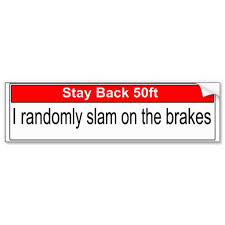
MartinAustin This could become a useful rear bumper sticker -
 �
�
Jan 9, 2015
MikeBur Ah... Great. I'll go back to being patient ;-)�
Jan 9, 2015
smac I do a lot of the time.
In the UK we have a nasty "average speed camera" systems all over the place. They are spaced miles apart and use video numberplate recognition as you enter and exit stretches of roads. All automated, and rake in millions in fines every year.
Then we also have thousands of automated speed traps, normally just after a change in speed limit. I can see speed assist saving you in this case.
One key missing feature is speed camera warnings. Even my old Diesel Nissan Frontier had this�
Jan 10, 2015
AnxietyRanger I always assumed ACC cars not allowing non-ACC cruise was a safety feature - so you don't forget you are non-ACC cruising and slam the car in front on highway.
No comment on whether this is good or not, or if Tesla uses this thinking, just putting the idea out there.�
Jan 10, 2015
Mayhemm I was under the impression that there were different icons on the instrument cluster for ACC-cruise Vs. Non-ACC-cruise (or at least different colours?)�
Jan 10, 2015
AnxietyRanger I don't know how it is in Tesla but sure the ACC and non-ACC symbols are often different. Still, often if car has ACC, it doesn't seem to allow non-ACC cruise. I guess it could be confusing if at times the stalk does one thing and other an other thing?�
Jan 10, 2015
stevezzzz Yes, that's true: under 6.1 the non-ACC cruise control symbol is like the old indication, but gray instead of blue. The ACC indication adds a little car-from-behind icon, and it's blue.
- - - Updated - - -
Both modes of cruise control are still available; the non-ACC mode is initiated as before, with an up-down motion of the stalk, while TACC is initiated by pulling the stalk toward you and holding it for a couple of seconds.�
Jan 10, 2015
Saghost That sounds exactly like the description someone else gave somewhere here for TACC without a car in sight vs TACC tracking a car.
Walter�
Jan 10, 2015
stevezzzz That's quite possible: I guess I'll have to take one for the team and go drive my D some more. :biggrin:�
Jan 10, 2015
AnxietyRanger Thank you for the info how it is on Tesla.
I must say Tesla's Merc stalkage and the cruise are confusing already as is. I can seen TACC adding to confusion, usability wise.
The cruise is one of my least favorite part of the car.
Audi has very nice and logical cruise controls, ACC or not.�
Jan 10, 2015
R�B Just to be clear, I believe after 6.1 there is only TACC cruise. The grey "Cruise" icon is simply an indicator that the TACC is not actively tracking a car in front of you. When a car comes into range of the radar, the icon changes to blue. TACC is always "ON" when cruise is set.�
Jan 10, 2015
Majerus
What is confusing about it? If you want to set the cruise speed push up, if you want it to determine speed based on signs pull to you for 3 seconds.�
Jan 10, 2015
AnxietyRanger I don't have Tesla's ACC but the basic cruise already feels very unintuitive to me. First is turning it on/off from button with light which wont set speed. The light is annoying and hard to see at the same time, so I often miss is the cruise ready (I know of the arrow on screen) and don't want to leave it on due to the light... Then you have to turn up to set speed separately, which is unintuitive because up/down also means increase/decrease speed. I'm not even sure how to turn it off temporarily.
Contrast this to e.g. Audi: Button always sets speed. Push away to the off (far away to physical click to turn entirely off) and towards yourself to resume. Up and down is always increase/decrease speed.�
Jan 10, 2015
yoyo just tried the TACC. It is great. I used at 45 miles road and highway. It was able to slow down and follow the stop and go traffic on highway. The only thing I am not very sure is how quickly it slows when a car suddenly pulls in front you. Twice it happened and I quickly stepped on brake without waiting for the TACC as it is just 2 car length. Once you step on brake it cancels the TACC and you have to pull toward you again to engage Also when car in front of you switch lane to turn, it still tracks it and slows, you need to hit accelerator before the car behind you honks. It does use regen brake as I see the regen lights up all the way to the limit when it slows downVery cool. But have you foot ready next to brake�
Jan 10, 2015
Majerus Agree the light is very annoying, I was about to put tape over it. I think we have two different stalks because my adjustment knob did nothing prior to the TACC so perhaps yours config is more confusing.�
Jan 10, 2015
Andyw2100 This is ironic, because unless I am mistaken, you are, in fact, confused.
You are correct about the first part: pushing up will set the cruise speed.
But you are confused about the second part, as pulling towards you will not set the speed based on the speed limit signs. What it will do is set the speed based on your Speed Assist setting at the time it is set. So it will set based on --ONE-- sign, but then you are set permanently at that speed, and the speed is not going to adjust based on "signs", as you suggest.
In the future, when the auto pilot is more fully implemented, there will be some option for something along those lines, but right now there is no way to have the car change speed based on the signs it is reading.�
Jan 10, 2015
skilly Given the level of detail around the specifics of a P85D range improvement, specifically torque sleep, it seems logical that if this feature was included in 6.1 that it would have been included in the release notes. Perhaps they are doing some optimization across the Model S line up first. Then, they will follow with a specific release to address the dual motor challenges.�
Jan 10, 2015
MarcG There's a P85D highway data thread that I (and others) have added a bunch of hwy trip data from 6.0, so we can keep adding to it now that we're on 6.1 and compare efficiency:
P85D range and highway battery performance
P85D Uninterrupted Hwy Trip Data - Google Sheets�
Jan 10, 2015
Andyw2100 There's actually an even more specific thread that might be better for discussing this particular issue. Check this one out, if you like: P85D efficiency up after 6.1�
Jan 10, 2015
AnxietyRanger What is most confusing about the non-ACC Tesla cruise is that buttons and moves do different things at different times. If it is off, nothing happens. If it is on, up and down activate, if it is active, up and down change speed (and even then depending on how far you push the stalk). It is annoying to have to guess what mode the cruise is in and what happens now.
On e.g. Audi, the best cruise UI I've seen, the cruise both sets speed and activates on pressing button, very easy to start because basically it is always ready. Press button again to set a new speed, anytime, if you want to use gas pedal to increase the cruise speed. Up and down always only change speed if you want to use those. Forward and backward resume/inactivate. If the cruise is off completely, the stalk is physically pushed away so you can sense that with your finger and not have to look for annoying lights. This is very logical both with ACC or not (ACC just adds an additional distance knob).
I will have to wait and see how the Tesla ACC cruise is.�
Jan 10, 2015
yoyo well, on the return trip, no matter how I tried, cruise control simply would not work, kept saying "cruise control unavailable". Lane assist and speed warning still worked.
When I got home, realized that a chunk of snow blocked the radar! Ha
so two things:
1) lane assist and speed warning do not use the radar at all
2) when radar is not working, there is no conventional cruise control either - mmm....
�
Jan 10, 2015
bylund I had this problem too. I was driving today while it was snowing, and when the radar filled up with snow, TACC turned off, and I had no way of turning on any type of cruise control. Stopped and removed the snow, and it worked again for a few kms. Later the temperature was above freezing, and even on the longest following distance the car is to close to the vehicle in front to avoid splash and dirt from it, so it stopped working in that condition too.
But when it works, it's great!�
Jan 10, 2015
Andyw2100 It sounds like our regular cruise control has been converted to TACC, and it generally works well. But there are times, when the radar is obstructed, that the TACC can't function. At those times, we now have no cruise control at all. It would seem that we need the ability to turn off TACC in these situations and revert back to standard cruise control. Without this, in some ways and at some times TACC is a step backwards.�
Jan 10, 2015
Saghost The challenge here is in making sure the driver understands that they aren't in TACC. If a driver can find any way to misunderstand, it would be very dangerous - you'd only find out it wasn't in TACC by getting close enough to some other car to be a collision risk.
Walter�
Jan 10, 2015
NigelM You don't have to guess at all, the indicators are all there....
On = Light on the stalk is illuminated, and just in case you can't see that there is an arrow on the outside rim of the speedometer.
Active = The words "Cruise Control" illuminated with a reassuring blue glow are shown immediately above the vehicle speed, center of your speedometer..
Off = No light on stalk, no signs on the speedometer.�
Jan 10, 2015
yoyo has anyone else experienced this?
TACC is on, cruise at 40mph, coming to traffic light and almost 3 car length to the cars in front, the speed was not reduced enough - it was slowing down though, still at about 20mph, I had to quickly step on the brake to stop it.
Is it only using regen to slow or brake is also used?
also, right before it was to slow down, I was fiddling with the stalk to adjust the speed - still struggling with adjusting by 1 or 2 miles, as it simply wants to adjust to the 5 mile increment... not sure if it was confused or what...
but definitely be very cautious and be ready to brake at any time!�
Jan 10, 2015
Andyw2100 Agreed.
But there are other things in our cars that are somewhat complicated and that if misunderstood also could easily cause problems. When the battery is cold and we have no regenerative braking, if someone expects to slow down just by letting off the go pedal, that would be a problem. I understand it's not quite the same thing. I'm just saying that the Model S is more complex than your average car, and I'm hoping Tesla won't take away cruise control when the radar is obstructed just so that some people aren't confused.�
Jan 10, 2015
AnxietyRanger Those indicators are, of course, true and I do know them. In reality, maintaining an appreciation of the status of the cruise control in a Model S is, in my view, difficult: I don't see the light on the cruise control stalk normally, unless I turn the wheel. In which case, if I'm not using the cruise, it can be annoyingly bright when I get off the highway and turn the wheel and see it - suggesting to turn it off. The arrow on the rim of the speedometer is small and requires specific checking - you can't do this by hand or by feel, and the fact that sometimes the cruise is on and sometimes off, it is a bit of a chore.
Contrast this to e.g. the Audi solution, where the cruise control is always on, unless you push the stalk physically back out of the way - which you will notice immediately when you try to operate it. No need to see any indicators or lights (there are none), you will feel it when you operate it. Also, the cruise on/off button in Tesla is a toggle, so the same button turns on or off depending on the mode it was in. Again, if you get confused by not paying attention to the small visual cues, you may accidentally turn it off when intending to turn it on.
Two more things:
In normal situations the Audi cruise control is ready start driving at any moment - when driving at the speed you want, just press the stalk button to set speed and activate. In a (non-ACC at least) Tesla Model S, you have to press the cruise control to turn it on (including the annoying light you see only occasionally) and then after hopefully you turned it on and not off, to activate and set the speed, you move the lever up or down (which is illogical in itself, why are there two directions to move to activate). If the cruise was not on, you will not feel it by hand, instead you will simply notice that the cruise didn't activate when you let go of the gas pedal - and you have to press a button and move a stalk to repeat. If you get confused and the cruise was already active, this move will actually increase the speed of the vehicle because moving the lever up and down has two separate functions (activate cruise, change cruise speed). In an Audi, there is no harm in re-activating the cruise, it just sets the current speed again because the set-button has a single function, it is not a toggle.
There is another thing: In an Audi, pressing the button always sets cruise speed and activates cruise if it isn't active. This is very useful because if you need to increase speed, you just use the gas pedal and press cruise button again - all the while the cruise remains active and sets the new speed when you press the button. In a Tesla, at least not according to the manual, there isn't a way to set a new current speed without deactivating the cruise control first and then going back through the motions (or using the lever to alter speed setting).
I argue the Tesla cruise control stalk is unnecessarily complex to operate. Operating a cruise is a many-times-a-day operation, it can and should be as simple as driving itself.
In reality, very often I try to activate the Tesla cruise when it is off - or won't bother at all because changing the speed while driving is so bothersome. The moves just don't feel logical at all and there is no "doing by touch".�
Jan 10, 2015
tezzla My experience is completely different, I just got back from a 60 mile drive (fwy though), worked flawlessly. I drove the whole way without touching the gas or brake. (and averaged 300 wH/mile!)�
Jan 10, 2015
anxman For anybody that is curious, I put together a quick video of my P85D using TACC on Highway 101.
P85D TACC demo on HWY101
Note that it is being reprocessed to be rotated correctly. Give it 15 more mins.�
Jan 10, 2015
Todd Burch Maybe it's me, but I don't find the Tesla cruise control to be confusing to operate at all. My only complaint is that pushing forward ought to activate and pulling back ought to disengage, but my mind has adjusted to the way it works now (and I recognize peole's preference depends on what they're used to). That, and moving the stalk to the second detent sometimes increases speed by 6mph instead of 5 (something I think we can attribute to rounding on the speedo display).
I always leave the CC button on, so engaging requires nothing more than a flick of the stalk.�
Jan 10, 2015
AnxietyRanger Obviously people's frame of reference is part of it, but there is no way to set current speed without disengaging the cruise - that is annoying, because using the gas pedal is often the best way to adjust speed when the speed limit increases. Also, no matter how one thinks about it, it is illogical to have two ways of pushing the lever to set speed/engage the cruise (up or down). I would say these two observations, at least, are not really a matter of taste alone. The rest, of course, depends greatly on what one is used to.
Leaving the cruise always on is an option, of course, but the button is pretty easy to press by mistake (say, confuse it with the washer button) - so if you make a mistake, you won't notice until trying to activate the cruise... Also, that light is pretty annoying when it shines in an otherwise dark area of the car when one turns the wheel. Were it not for the light, I too might leave the cruise control on all the time, but even then, it is annoying if someone or something did turn it off and you didn't notice - you will only notice when the cruise fails to engage.
I guess I've been spoiled by better implementations in this regard.�
Jan 10, 2015
Rebel44 I have a question: Does model S automatically brake to prevent crash always (unless sensors are blocked etc.) or only when using ACC?�
Jan 10, 2015
patp Today I got the collision alert but car didn't stop.�
Jan 10, 2015
Saghost According to the current release notes, a Model S with the full sensor set and v6.1 will brake to a stop when TACC is active, but not otherwise.
There's a collision warning feature right now, but not a braking/mitigation feature. (I expect the crash mitigation functionality will show up on autopilot cars in future updates, but that's just a guess.)
Walter�
Jan 10, 2015
yoyo did you notice how fast it reacts when someone suddenly switch in front of you? I had to quickly brake because i did not feel it was reacting (at least fast enough for me to feel comfortable )�
Jan 10, 2015
Rebel44 thx�
Jan 10, 2015
patp I agree it feels too last minute.�
Jan 10, 2015
tezzla I have NOT had to touch the brakes while on TACC. I've had my foot ready in a few cases, but relied on the tacc to react. It has aggressively braked though.�
Jan 10, 2015
wk057 It definitely waits longer than I would to start slowing for things and ends up using the friction brakes at the last moment. It does work, but seems inefficient. Makes me wonder how far ahead it can actually track/see the vehicle in front.�
Jan 10, 2015
tezzla From what I've seen, I'd say close to 150-200 yards. It's a long way.�
Jan 10, 2015
ecarfan That is what I do as well. It makes using the CC very simple. The little light on the stalk does not bother me. The onscreen icons are clear. I adapted to how it works very quickly, despite the fact that my other cars CC operation was quite different.
Every car manufacturer implements CC differently. There is no standard. And no one implementation will satisfy everyone. I am always amused by the wide range of reactions to the same UI.�
Jan 10, 2015
drsaab This is more of a collision avoidance which or can not do fully. So far it is meant more for moving traffic and Highway. Coming up on a car stopped fully will not work well yet. If that car in front is even moving at 5 mph, the Tacc will react. Same as mb distronic plus.
It's the same as driving going behind a parked car. It won't stop.
My guess it disregards fully stopped objects like parked cars.�
Jan 10, 2015
drsaab It is quite reactive vs mb system. The collision sign will come up. Radio will mute. Be prepared but the car will slow if you let it.
I do not think it will apply maximum Brakes as if your fully slamming the abs pulsating brakes though.�
Jan 11, 2015
AnxietyRanger For completeness sake, I was pointed that you can set a new current speed (if you've accelerated), by holding the stalk up or down for a while. I will certainly try if I can get into a rhythm with it. Since the up/down stalk now has three functions, small and large increments, as well as setting current speed, it does seem even more confusing logically speaking - but at least the function seems to be there.
Every day is a learning day on TMC and that's good. Thanks to those who helped me out.
I will let the thread get back to ACC talk.�
Jan 11, 2015
si123ca Great video, thanks.
TACC seems awesome. I especially liked how it slowed down when another car merged into the lane in front of you.
Looking forward to getting the update.�
Jan 11, 2015
drsaab 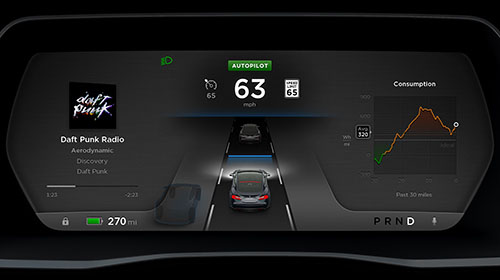
Here are my summary of notes on TACC so far after 30k miles in a mb distronic plus tacc.
Confirmed Tacc can activate at 17 mph and over.
When stopped without any memory speed in Tacc. Pulling leaver to go forward activates Tacc to default of 17 mph.
There is no normal cruise... TACC is on by default and no way to switch to normal cruise.
Cutting in Lane into slower cars the tesla will warn you of impending collision but continue to stop in time. The mb would warn you. Activate brake assist for max braking but turn off distronic plus so you brake manually. This is better. Not full Collison prevention assist "yet" but close. It is quite reactive vs mb system. The collision sign will come up. Radio will mute so you pay attention. Be prepared but the car will slow if you let it. It will not apply maximum Brakes as if your fully slamming the abs pulsating brakes though "yet".
Coming up on a car stopped fully will not work well yet. If that car in front is even moving at 5 mph, the Tacc will lock on and react. Same as mb distronic plus. It's the same as driving going behind a parked car. It won't stop. My guess it disregards fully stopped objects like parked cars.
My speed up to pass feature works as soon as you put the signal on but only on the left signal. And remember it won't pass the set speed on the cruise. Meaning if you have it set for 70 and are going 50 it will work. 70 and 65 you won't see much effect.
The blue tracking on vs grey no tracking is very useful. The mb I would be guessing if it's locked on. This let's me know.
Lastly. On turns this tacc speeds up based on g force. I don't think my Mb did this as well. So I can set to 70. Take an on ramp circle and it will limit to 50 mph etc till the straight highway road is reached .
I got so used to mb distronic plus. I used it 90% of driving, city and highway in 30k miles. Once you trust and understand the limits, it can do so much of the driving for you.
The bad:
Wish it displayed speed your setting cruise at vs the little triangle tick. Hard to tell 75 from 74 or 73 etc. Should show set number for a brief second.
This TACC has a high failure rate so far. My Mb distronic plus did not work only couple times in over 30k miles and that was in very heavy rain or snow where cruise was dangerous anyways.
My Tesla acc failed to turn on already today for about three segments of 15 on my driving last few days. It says Cruise not available. I tried stopping and turning power off, no fix. Tried to leave car for a few minutes... fixed. Tried soft reset with wheel scroll buttons.. fixed. It randomly does not work. My sensor, windshield, and radar were clean all 3 times.
I am trying to debug this, my first hypothesis is that possibly setting cruise to early when entering vehicle before it sees any speed signs and the speed limit indicator is a dash mark vs solid line cause it to fail. Still working on figuring if that's the reason.
I do not think i am able to turn on TACC to the speed limit setting. It always just goes to the speed I am traveling. In theory you should be able to drive at 40 and the car sees a speed limit of 55, it your threshold is +9mph then the tick mark is at 64 and pulling for 1/2 sec should turn TACC to 64mph, but i seem to always get it setting at my current 40mph speed. Maybe operator error, if anyone has this work properly please report back method used.
The New videogame autopilot display with all the autopilot features on the new website seem "insane". Can't wait!
By autopilot video game display I mean the picture above which is the one on the Tesla Autopilot option on the order page... not that there is some video game out.
�
Jan 11, 2015
Saghost I think the "video game" display is quite clever and will be really useful in the future. The car is reflecting back to you its understanding of the world around it, which not only gives you things like blindspot warning that you might not see otherwise, but makes it easy to quickly compare the car's grasp of the situation with what you see (cars in front of you, lane lines, etc.) It's a pity the real time energy usage goes away with the AP display, but it's probably a better use of the real estate.
I wonder how Tesla is planning to notify blind spots when autopilot isn't active? It'd be nice if it had "passive" notification like the AP display provides somehow - as in, let you know in real time when you don't have a turn signal on by something on the displays somewhere.
Walter�
Jan 11, 2015
stevezzzz Thanks for the analysis, drsaab: good stuff.
I have been been successful in resetting the tacc set speed as the speed limit changes, using the following method. 1) Observe the gray line on the speedo (the one that represents the current speed limit plus your desired offset); when the software detects a change in the speed limit the gray line will move to reflect the change. 2) Pull the cc stalk toward you and hold it until the set point changes to match the gray line; release. There are some subtleties I don't yet understand, but that's the basic idea.
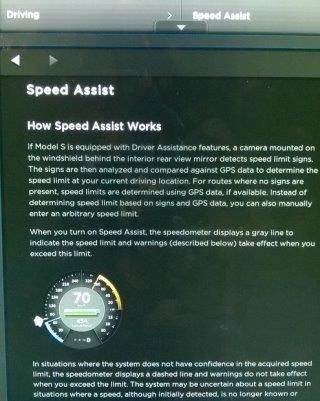
For instance, instead of a solid gray line I will occasionally see a dotted line; I'm not sure what it means.�
Jan 11, 2015
tezzla The dotted line is when it's guessing the speed limit (without seeing an actual sign).�
Jan 11, 2015
Saghost You mean looking up from GPS data?
Somehow I doubt the car does much actual guessing - especially since it can't really see the things drivers use to guess (size of turn lanes, nature of access points, divided status, etc.)
Walter�
Jan 11, 2015
tezzla I'm assuming from GPS, I've read it from the prior release notes (I think). I'll try to find the actual wording.
 �
�
Jan 11, 2015
drsaab Yes someone posted same on tm.
The dotted line is guessing speed. It does use GPS or memory. I have seen it set speed limit before any signs were on the road.�
Jan 11, 2015
randompersonx I found a regression compared to the regular cruise control. Maximum speed of the tacc is 90mph. I don't know the limit of the old cruise control, but I have had it set to at least 95mph.�
Jan 11, 2015
wk057 This has not been my experience so far. I've come up over a hill and had a car in front of me a bit that was stopped at a light. TACC wasn't locked onto anything initially, but eventually saw this car and braked hard. Later than I would have, admittedly, but I had an out (jumping into another lane) if it didn't react and wanted to test it. I got the beeping and collision warning, but it definitely came to a stop on its own behind a fully stopped vehicle in plenty of time. (Was from ~45 MPH)�

Không có nhận xét nào:
Đăng nhận xét