Jun 26, 2016
Canh99 The dash board rendition of your surrounding represents other cars as tiny model X's. But when you drive near a big truck it makes them trucks on the dash instead.�
Jun 26, 2016
Gas Guzzler You can turn off explicit music on Slacker radio. Email Tesla for your slacker login/pass, then change your settings from a browser. This was covered in the thread below but wanted to bring this up for those that missed it. My MX is in the shop again for problems and I needed to filter the music on the loaner MS, so this issue came up again for my now very foul mouthed kids.
Turn off Explicit Lyrics in Slacker�
Jun 26, 2016
ccutrer Or if it's a motorcycle, it shows a motorcycle. Pretty cool that it can tell the difference between these different types of things.�
Jun 26, 2016
umeshunni I've noticed:
- Some cars are model S's
- Bicycles and motorcycles show up as motorcycles
- Trucks, busses and trams show up as trucks.�
Jun 27, 2016
Pjjava34 When you say email Tesla for your slacker login/pass which email address are you referring to? Can I just set up my own slacker account online or do they have an account set for me/my X?
Thanks!�
Jun 27, 2016
mzpolo Go through a tunnel and the left side of the dash, where the music info is, shows you in a tunnel!�
Jun 29, 2016
ssq I did not know that I could have Autosteer enabled and it would limit me to posted Speed limits in some places like schools and neighborhoods, BUT then I could just use the go/accelerator pedal to override that and let the X autosteer only.�
Jun 29, 2016
ccutrer Right. Autosteer is limited to speed limit + 5 on non-highways. Up to 88 I believe on highways (cause any faster than that and it would cause a time paradox?!) as per the manual (haven't tried). What I can't figure out is how it knows what's a surface street and what's a freeway. At first I thought it was speed limits 55 and under, but then in a 55 zone on a freeway it let me go higher than 60.�
Jun 29, 2016
grommet Tesla has access to a robust map database and GPS, ya know.�
Jun 29, 2016
ccutrer I know, which is possibly where they get it for auto steer limits. But they do not get speed limits from a database. It will see speed limits on new roads just fine, and will not show a speed limit on a freeway that's been around for a long time, that it has been on before, and this time the sign happened to be obstructed when I drove past.�
Jun 29, 2016
ohmman I've got one that's slightly embarrassing to admit.
The front doors open a lot wider than I thought they did (and that they ever automatically open). This is really valuable when your falcon wing doors are in limited open/umbrella mode and you feel trapped in the Falcuda triangle. If you push the front door open a bit more, you'll find it's much easier to navigate that falcon wing door corner.
OK, everyone already knew that except for me. �
�
Jun 29, 2016
ssq Of course I knew that, huh its the first thing I learnt about the X!
Today I also learnt you need to SCREAM HELLL NOOOO at people who dont know how a FWD works. I almost slapped a guy silly when he tried to close the FWD by almost hanging on it to bring it down and slam shut. WTFFFF!!!
Xcuse my french!�
Jun 30, 2016
Xponential I don't know this for sure 100%, but my understanding is that you can close the FWD by hand without causing any damage to them. Just like the lift gate.�
Jun 30, 2016
ssq Nooo! thou shalt not molest thee falcon!�
Jun 30, 2016
cclaygo If you are parked perpendicular and the falcon wing doors are aligned between two cars (front and back, like the parking at Disney) they will show no obsticle and the front door will open into the car next to you while you scream, 'Grab the door!'�
Jun 30, 2016
gjunky If you have two phones paired, the X will remember the last one that was selected (It would be really nice if they linked this to the selected profile) but, if that phone is not available and another previously paired phone is, it seems to select that one if there is any action on this phone (like you try to dial out). I haven't found out the exact sequence yet but I have seen it change from the selected phone to the one that is actually in the car more than once now. Pretty nice.�
Jun 30, 2016
Gwgan You car may remind you that "repeated charging to more than required for daily driving (or similar text) may reduce battery life" and then ask "Would you like to lower the charge limit now?" I saw this on the second day of a trip where the charge was set to 95% and the car used 75% the first day (omuch better than expected given heavy rain and unfamiliar terrain), but only a few percent the second. I said no since the next day me may need all 95% to get home and will reset it to the usual daily limit of 80%.�
Jun 30, 2016
ssq I bet there is a thread on it and I'll go search but shouldn't I be plugging in every day or every other day assuming I have a 40-50 mile usage ( 36 mile commute with fun) on a X75D which does 211 @90% charge.�
Jul 3, 2016
Infinite It showed a warning on the screen when I was going at 70+ that I needed to slow down to 55 if I wanted to reach home without charging.
It shows images of motorcycles even if they are 2 cars ahead - i thought that was cool
Learnt not to walk to the car with Auto present door if the car next to you is pulling out. Almost hit the next car even though I was only behind the trunk - gave both me and the other driver a scare.�
Jul 3, 2016
FalcnX Had this happen few times also. Have been searching for cover that prevents accidental button pushes.�
Jul 5, 2016
Gwgan You can drive with the rear hatch open but it cannot open or close while the vehicle is moving. If you start driving after you start closing/opening the hatch door it will stop closing/opening.�
Jul 9, 2016
jackbowers The 22" performance Pirellis are rated for nearly twice the treadwear of the 21" performance tires I had on my Model S. I'm at 20k miles now and it appears the tires will not need replacement until the 25k service interval.�
Jul 9, 2016
aesculus On another thread I posted that at some supercharger sites with service centers you can touch the icon on the navigation map to get a code to the waiting room door. Certainly true for Seaside, CA.�
Jul 10, 2016
gdrum Range Mode on the driving LED headlights will not be on.
Range mode off the driving LED headlights will be on.
Manually switching headlights from 'Auto' to 'Parking' gives BOTH headlight led and fog led.�
Jul 10, 2016
Infinite Noticed this yesterday, if you play music loud and open your door car automatically lowers volume.�
Jul 10, 2016
ssq Only when parked AND in a dark setting. I love the fog led "fangs" but they won't stay On when outside in daylight. Try it and let me know if thats not the case.�
Jul 10, 2016
gdrum I just drove up and down my street in the daylight. In drive when i slide to parking they both illuminate and stay on. I will keep an eye out and see if it changes. They really need to add DRL button to the screen, silly its not on there lije the model S. You try as well and update if figure out anymore with these lights. I feel silly driving around in range mode with everything off the whole time I've owned it.�
Jul 10, 2016
ssq Encouraging but probably not the case for the rest of us over @ Model x daytime running lights
You need to start driving and then check if they stay on, there are delay functions added to the lights when they transition (its not an immediate On/Off). Does your Vehicle Settigns X-real-time icon also show lights on when driving around? That's the second best way to verify other than someone who can see the fog leds confirming the case.�
Jul 10, 2016
gdrum What firmware build are you running?�
Jul 10, 2016
neverdone I was helping my brother in law install 2 read facing car seats (for their 8 month old twins) and I thought my X was possessed. Every couple of minutes the FWD doors would start to close. It was awful. Turns out my brother in law had the X key in his pocket and by moving in awkward positions trying to do the car seats he was pocket pressing the buttons on the key fob. We put the key fob in the front seat and all was good.�
Jul 10, 2016
ssq Latest, 7.1, took delivery last week�
Jul 10, 2016
xkwizit @ssq - just 7.1 is not good enough..check further by clicking the Tesla icon on your screen. It will show the full build more likely ending with .86. Usually the delivery build is a couple of releases old. They don't update it at the time of delivery it's what got loaded at the factory. And then couple of days later your car will catch up.�
Jul 10, 2016
Infinite I took deliver 6/30 for a car that started building the previous week and the firmware was and still is .30 not yet .86
Checking every day to see I got upgraded as the new version is supposed to give me ability to force my FWD to open fully in my garage�
Jul 10, 2016
xkwizit @Infinite - the car gets into the update queue after your DS marks it as delivered in their system. I haven't read anywhere what the algorithm is for updating delivered cars but seems like too long a time it is taking for your car. If you have a trip to the SC in the works, they would also automatically do the upgrade too. I don't understand why they don't update the firmware as part of the pre-delivery inspection.�
Jul 11, 2016
ssq I am on .78. I wonder if there is a way for me to force an upgrade?�
Jul 11, 2016
gdrum I am on 7.1 2.24.86 delivery was 30th.�
Jul 11, 2016
aesculus I notice that on the navigation map there is a little charging icon at my home. Rumor is that wherever you have charged before, if not know by Tesla (ie SC) a charging icon will be on you map at that location.�
Jul 12, 2016
NJ Plugin I am not sure if this works all the time, or with both X's and S's...
If you just go to a Service Center, there is a geo-fence that will detect a Tesla, and start the download of any new car update. Shortly afterwards you will get a notice in the car saying a update is available to install.
Again, I am not sure if this works for all cars and all service centers and if a simple drive by works, or you need to be there for 5 minutes or longer.�
Jul 12, 2016
ohmman Where did you get this information? I've had my car plenty of times at the SC without getting the latest update pushed. Now, while it's in service, they often trigger an update. But that's driven by the staff.�
Jul 12, 2016
NJ Plugin Last week I went to the service center to have a issue looked at. They were having a staff meeting, so I told them I would go to lunch and come back in 45 minutes.
After lunch, I had a notice that a update was available to install.
At the service center, I mentioned about the update to my service adviser, thought maybe they pushed it to me to fix my issue. That is when she said they have a geo-fence to at the service center to push the latest update to cars when they are there.
Again, YMMV
(And we all know in the past many have received wrong or misleading information from someone at Tesla.)�
Jul 12, 2016
ohmman Very interesting. And cool, if it's the case. I suppose service center parking lots are about to get really crowded soon..�
Jul 12, 2016
K-MTG Or use a GPS spoofer??? Not sure if those are legal�
Jul 12, 2016
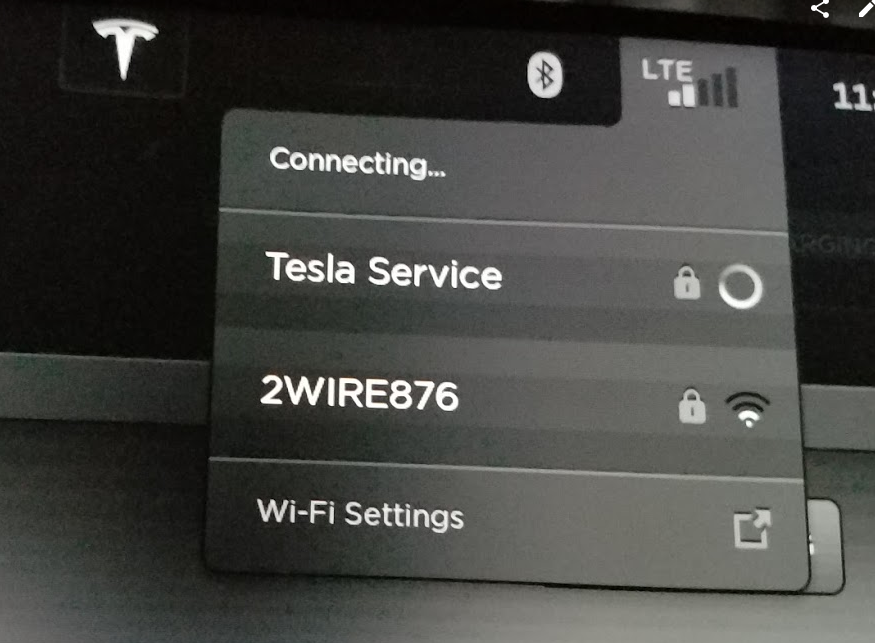
ssq I am almost 100% sure its not geofence based and is based on "Tesla Service" Wifi SSID, which in turn lets the car open a VPN service to register with tesla servers in something like a service mode. Now then, if you are in close proximity of the SC you will automatically connect to "Tesla Service" WiFi, your car comes pre-provisioned with it.�
Jul 12, 2016
K-MTG Can I just create a SSID call Tesla Service and see what happens�
Jul 12, 2016
ohmman No. I prohibit it.�
Jul 12, 2016
K-MTG What if I create it while I am the SC�
Jul 12, 2016
aesculus On a related note: If you stop by a SC that has a supercharger is it acceptable to go in and ask them for the wifi code? I was at Dublin the other day for 30 minutes and could have used WiFi but felt that was pushing it since there were 4 cars waiting. I did not want them to think I was just hanging out like I understand a lot of the locals do.�
Jul 12, 2016
Blurry_Eyed I took my X to the service center at night, parked in the parking lot and it did connect to the 'Tesla Service' wifi. I parked there for about 30 minutes. Sadly, no software update notification arrived. I'm currently on 2.24.86. Have been on it since June 25th. Went to the service center July 7th.�
Jul 13, 2016
ohmman The Tesla-provided sunshade in its case fits snugly in the space under the front passenger seat. This also makes for convenient access.�
Jul 13, 2016
ssq Good to know, for now my biggest problem is where do I keep my laptop when commuting to and from work. Wherever I keep it inside the car except the trunk/frunk it ends up sliding all over the place and is usually under the farthest away seat from where I first kept it.. #firstWorldAccelerationProblems
P.S: Do not keep your laptop on the seats, it may fly off unless wearing seatbelts.�
Jul 14, 2016
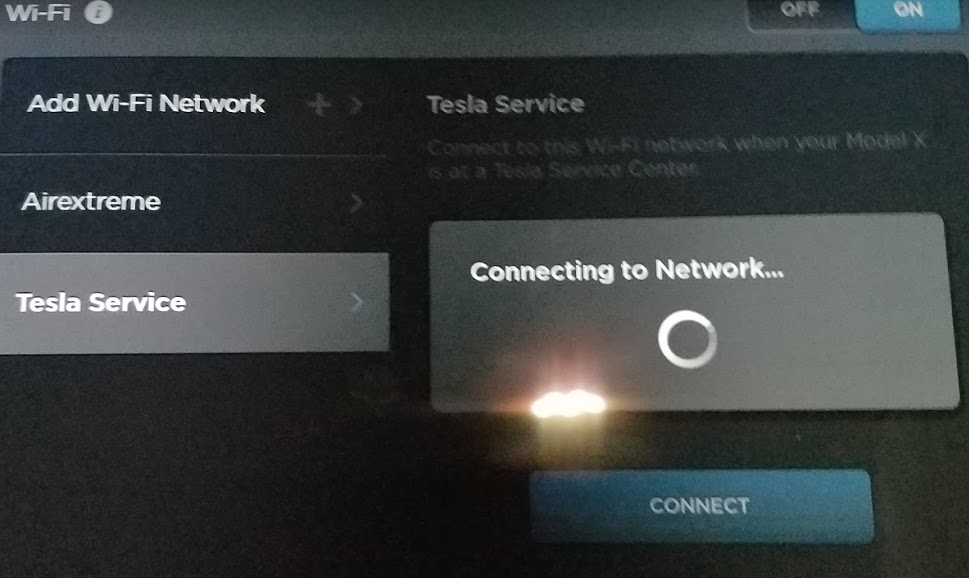
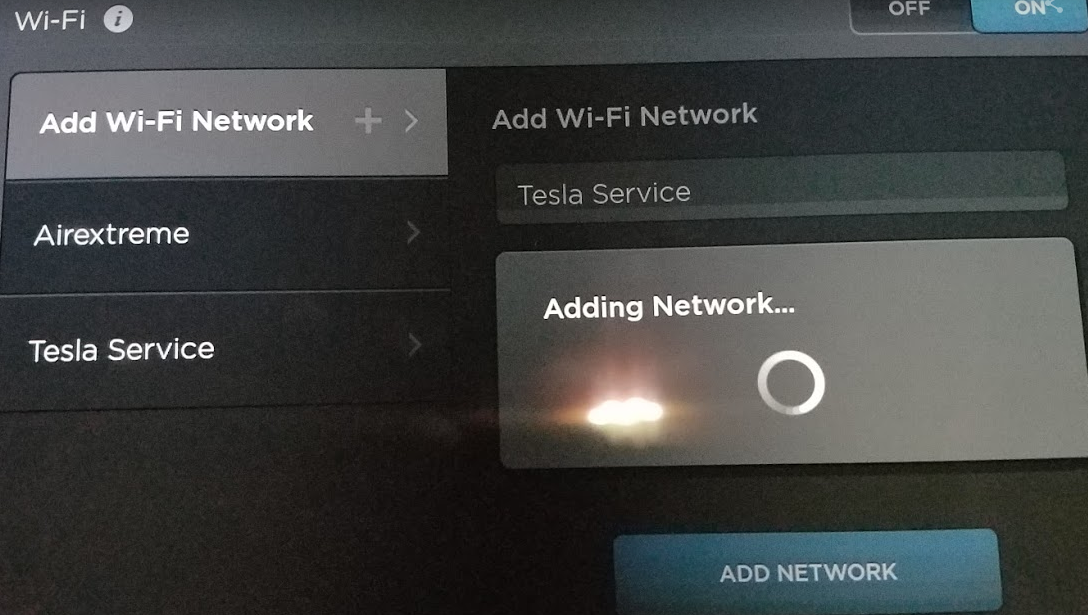
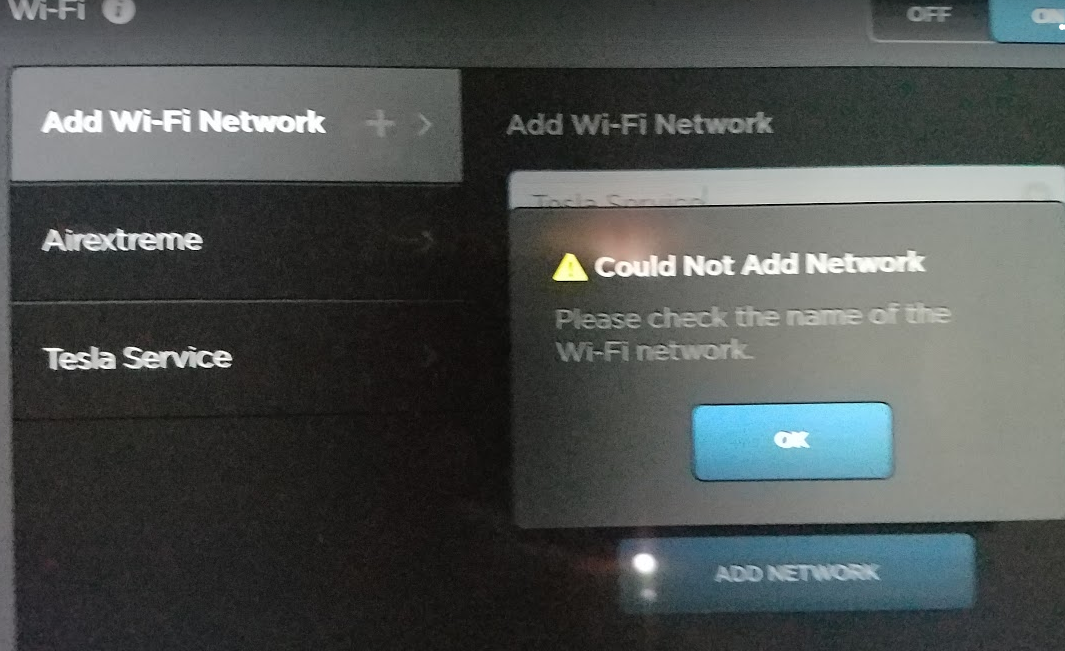
ssq I did it already and the way the tesla wifi settings is coded sucks, they have harcoded "Tesla Service" as a preprovisioned entry so essentially one cannot have the same WiFi SSID name. I put the 2.4Ghz band on my router to advertise "Tesla Service". The X with its silly implementation tried to latch on to the matching SSID with its preprovisioned password and ofcourse could not associate with my router. Now then you cannot even change or remove "Tesla Service" preprovisioned and hardcoded entry from wifi settings..Also tried adding "Tesla service" (with a small "s") manually and that wont work either as it clashes with the preprovisioned SSID (so its also case insensitive).
So there you go, no luck with this hopeful experiment. And apologies if I nerded out a bit too much..\
I should probably advertise "Musk" or "SpaceX" or "42" as SSID and see if I discover a ton more "cowbells"
 �
�
Jul 14, 2016
K-MTG Oh wow, they really need to get a better wifi card on the X�
Jul 14, 2016
ssq Actually they need to rectify code for SSID handling. They could debate probably no one will be using the SSID "Tesla Service" as their home/office wifi SSID so this should not cause any problems. So yeah.. a nerdy prod is all it was. The wifi card is fine.�
Jul 14, 2016
K-MTG But I mean it is the only device on my network that operates on 802.11g doesn't operating G devices on a AC network slow things down??�
Jul 14, 2016
ssq Oh yes it does, legacy 802.11 devies will penalize newer variants for sake of backward compatibility. But do note going on 5 GhZ reduces range, so going with 2.4GHz is the right design decision since the car will be further away from the base station/router in most houses. You could perhaps argue with this stating they could put a rather large antennae to mitigate range loss, but even then 2.4GHz is likely to be the design choice preference.�
Jul 14, 2016
K-MTG Most of my other devices are 5GHz so will having my X connected to 2.4 slow down the 5GHZ? I have an AirPort Extreme and 6 airport extremes that I also use as access points on gigabit Internet. Just ordered a couple of Nest Outdoor Cameras for the garage, don't want the X to slow down the speed�
Jul 14, 2016
ssq Nope, thats the advantage of dual band routers. Having legacy and new 802.11 on the same band creates a bottleneck. Dual band routers (2.4G+5G) solve this by creating two channel sets which are indepdendent and non overlapping. Now then if you have legacy devices on 2.4 GHz you will still have the bottleneck dragging back newer 802.11 devices. Its unlikely legacy 802.11 devices will operate on the 5GHz band. In my house I setup a streamlined system with just one router and no range extenders, with 3db gain external antennas, dual band setup. I did not need to invest any more than $150 to design a fully capable WiFi system that supports security IP cameras, multiple gaming consoles, half a dozen phones and same number of tablets and lost count of how many IOT smart devices like sensors, echo, sonos etc etc. No issues with latency except on connnecting to the X, which I blame on shoddy algorithms by Tesla.�
Jul 28, 2016
ohmman If one of the front doors is nearly closed, but not enough to latch and close, it will not close with a lock signal from the fob. Apparently the door cannot get enough closing momentum to latch. So if you're, say, washing your car, and you decide to, for instance, use the fob to close the doors before hosing it off... you might want to be aware that the doors could need a checking before you spray. Cough.�
Jul 28, 2016
nctalkinghead Just another reason to use the Optimum No Rinse to safely wash the X.�
Jul 28, 2016
ohmman I do. But I do a hose off for the half inch layer of dust first.�
Jul 28, 2016
aesculus And 1/4" of black road soot.�
Jul 29, 2016
F123456 One thing I just learned, is that the angle of the auto steer Icon changes to match the angle of the steering wheel. Cute.�
Aug 14, 2016
cantdecide I can't believe it took me this long to notice... But the third row has a USB port, and an led light in there to help you find it! (It is just beneath the cup holders)�
Aug 14, 2016
ohmman This is not Model X specific, but if you hold the media "skip" button for a second, it'll change to the next source.�
Aug 14, 2016
xkwizit I assume you are talking about laptop on its own and not in a bag, right? If so, you could put the rear trunk divider in the lower position and put a foam packing on one side to keep the laptop from sliding around.�
Aug 14, 2016
Stasla There's a way to articulate the middle 2nd row seat all the way forward on the 7 seaters so it's in line with the outboard seats when they are articulated for 3rd row access.
This can only be done from the main screen on my car. With the outboard seats all the way forward and articulated for 3rd row access - 1 touch on the main screen to move the middle seat back followed by 1 touch to move it forward brings the middle all the way forward and articulates it so that it's fully in line with the outboard seats!!!
I've only seen the middle seat tilt forward slightly before and was wondering if it's even mechanically possible to move it as far forward as the outboard ones. Turns out it is!
Much more cargo room this way in the 7 seater, provided the 2nd row is not occupied !!!
Full disclosure: not sure if the latch warning will come up, as I haven't tried driving it like this.�
Aug 14, 2016
Gwgan I found that I first had to put the middle seat all the way back with the console button and only then would it move all the way forward. Once forward, the button on the bottom of the seat is inactive.
The car will drive with a warning on the center console but not on the dash (at least at driveway speeds).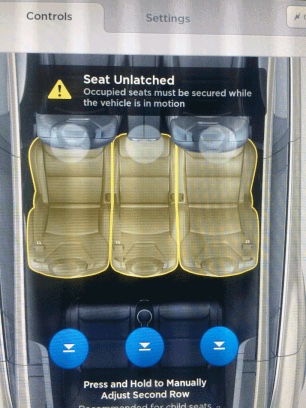
Also, putting a side seat back with the button on the seat itself brings the middle seat back with it.
Maybe we�ll have a single Cargo Mode button for this soon.�
Aug 14, 2016
Zapped Anyone know what these 4 spring covered slots are for behind the 2nd row of seats ?
�
Aug 14, 2016
Stasla I was told it was for some sort of parcel shelf cargo net/hammock thingy that's not yet released.�
Aug 14, 2016
ohmman Mine were filled with Franklins, but I think they only started that after the Sigs were delivered. Sorry!�
Aug 14, 2016
xkwizit @ohmma - Maybe there are wads of franklins weighing down your FWDs? Rip the doors apart�
Aug 15, 2016
Zapped Are you sure ? I'd better have closer look.�
Aug 15, 2016
Zapped 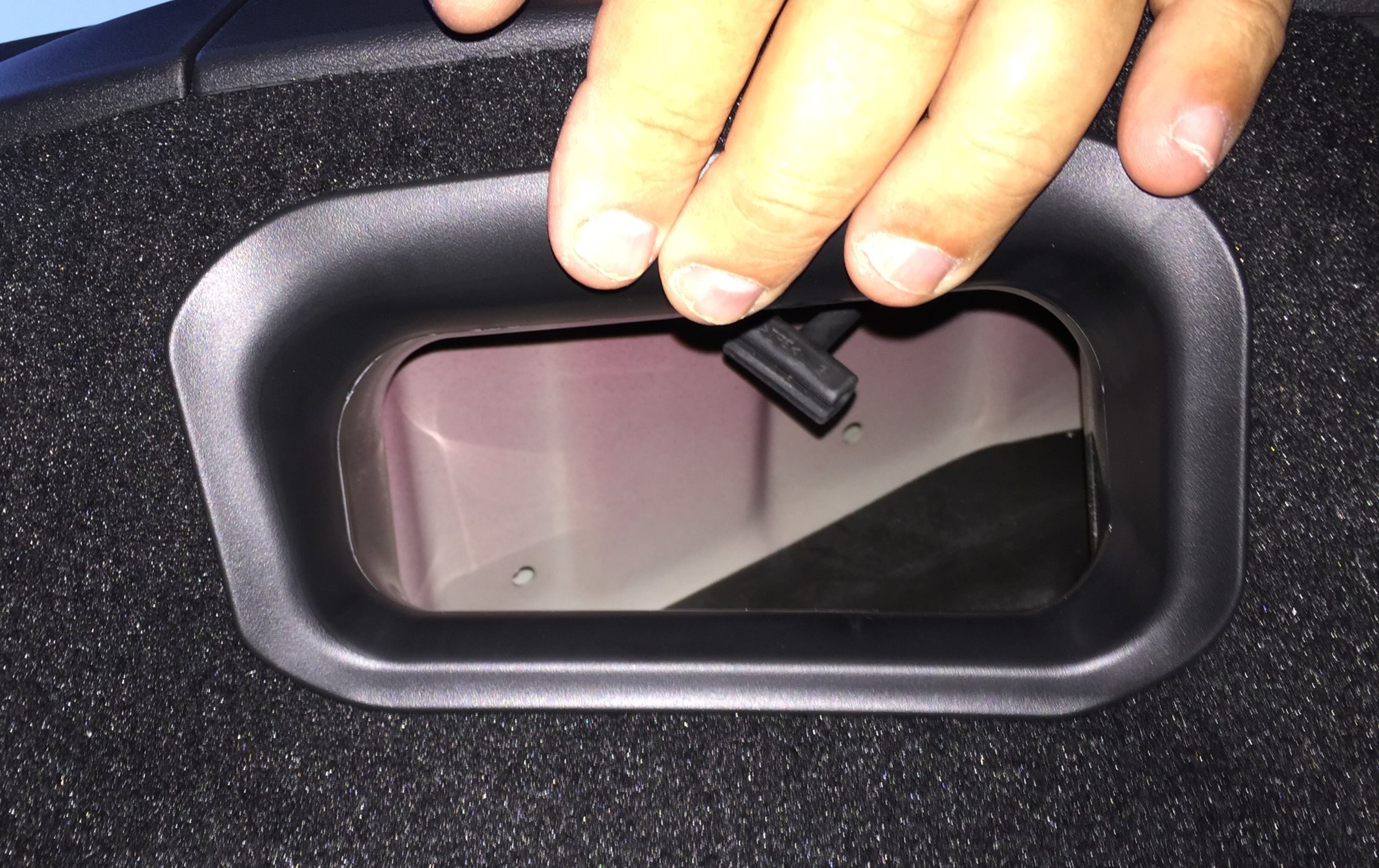
I wonder what is hidden up in here ?�
Aug 15, 2016
ccutrer Is that the left side in the trunk? It's the subwoofer for UHFS.�
Aug 15, 2016
Zapped Yes, that correct.
I'm sorry but what does UHFS stand for ? Some kind of wireless sound system ?�
Aug 15, 2016
ohmman Ultra High Fidelity Sound.
I had it in my S, was disappointed, didn't order it in my X, wish I had.�
Aug 15, 2016
PacManMX No, I believe that picture is of the manual release for the charger.�
Aug 20, 2016
Infinite Yes I noticed that too and was amazed at the little things that the engineers took care of in design.�
Aug 20, 2016
ccutrer And the cruise icon (both the needle and the set point arrow) reflect current speed.�

Không có nhận xét nào:
Đăng nhận xét