Sep 21, 2014
ecarfan I've had the updated app for three days now since V6 installed in my car. When I got it I set all the notifications to be "On". However the only notification I get is for "Charging completed". I do not get the "Charging started" notification.
--- UPDATE ---
A few minutes after making my post I am now able to connect to my car using the app.�
Sep 21, 2014
Theshadows Is anyone else having problems using the app this morning? My wife's phone and mine keep giving the "My Tesla can not be reached at this time error."�
Sep 21, 2014
Edgewood Dome Same here.�
Sep 21, 2014
bemental +1 TouchID�
Sep 21, 2014
ecarfan Just tried the new app feature "Start" which allows you to open, start, and drive the car without the key fob (of course you have to be logged into the app with your Tesla account username and password).
The new "Start" feature worked perfectly. I walked up to the car without the fob. Phone app open. Hit Start. Entered my Tesla account password (which is long and has letters and numbers in it for extra security). App displayed a message saying I had two minutes to get in and start driving. Used "Unlock" in the app to open the doors, got in, sat down, pressed the brake pedal and put the car in D. Drove off.
Very cool.
Caveats: of course this new app feature will only work if you have internet connectivity. The phone and the car have to have a cell data signal or wifi.
And if you use this feature to start the car and you drive off without the fob, when you arrive at your destination and still don't have the fob, then to lock the car and then get back into the car you also need to have Internet connectivity.�
Sep 21, 2014
bollar And Tesla's servers need to be up!�
Sep 22, 2014
ecarfan So now that the V2 app allows you to "name" your Model S, for those with more than one Model S in a household, can they use the app to access either car, and if so, how?
Does each Model S have its own Tesla Account with a unique username/password? In that case, in the app you would sign out of one account, sign in to the other, and then be able to access either Model S?
Or can you have more than one Model S in the same Tesla account, and if so how do you switch between cars in the app?�
Sep 22, 2014
apacheguy
The app has always supported more than 1 vehicle per account. The name just makes it easier.�
Sep 22, 2014
ken830 Yeah. Before V6.0, the "name" was just the last 6 char of the VIN.�
Sep 22, 2014
ecarfan Okay thanks. So in the app how do you switch between vehicles? Is there a menu somewhere that shows a list of available vehicles?
Can there be multiple cars in one Tesla account?�
Sep 23, 2014
spentan Yes, there is a menu,
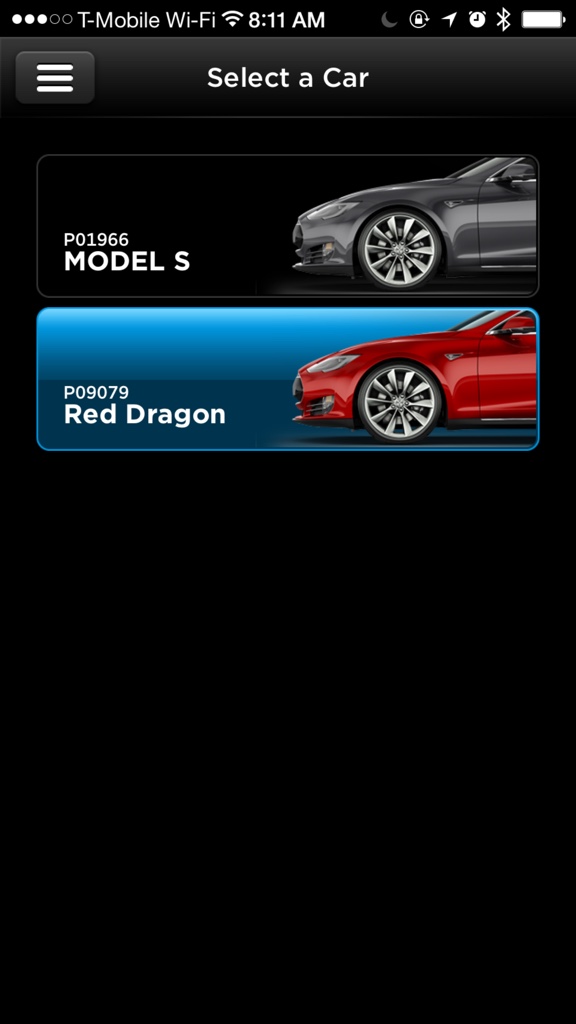 �
�
Sep 24, 2014
loganss Is there any word if the charge slider or notification system is being worked for Android?
Hmmm. The car start can be handy. I just beefed up my TM password because of this. I'll definitely only use it in emergency situations.
As a precaution I'll be adding a wifi connection to the car based on my phone's tethering access point, just for an emergency situation where the car doesn't have cell coverage but my phone does.
Has anyone tested that this car start feature works when the car only has wifi coverage and no 3G?�
Sep 26, 2014
HWS How did you get the second Tesla in your app? Do you have to change both accounts to the same e-mailadres and password? I tried this but that doesn't seem to be trick.�
Sep 26, 2014
spentan My tesla's were both put under the same account when I bought them.
You might need to call ownership to merge them�
Sep 26, 2014
HWS Thanks for the tip. Saves me a lot of time:smile:�
Sep 26, 2014
jomo25 This sounds like a great idea if it works. Then at least you only need cell coverage on your phone.�
Sep 28, 2014
ecarfan My parents two Model S vehicles are both under the same account as far as I know but they can't get both cars to show up in their iPhone app. My dad is going to go to his local Service Center and ask how to do it.
I thought that once both of their cars were on V6 (they are) and the updated to the V2 app that both cars would show up on their app. But they didn't.�
Sep 28, 2014
hans What does it show when they login the to My Telsa portion of the Tesla Motors Web Site?�
Sep 28, 2014
tomp Does this work? If so, can you give a bit more detail?�
Sep 29, 2014
pete8314 I think that just means using the phone as a wifi hotspot, so the car just sees it as another wifi connection.�
Sep 29, 2014
R�B Right. Isn't this what folks have to do now anyway to get the MS using LTE...�
Sep 29, 2014
loganss Correct. This is what I meant. I don't have an area close to me that the car doesn't have 3G coverage so I can't easily test this.�
Sep 29, 2014
simonog From a recent test I did, the car requires a 3G connection to get woken if it has dropped off to sleep. Only then is the wifi any good.
i think this makes the app Start button a wonderful backup, but not to be relied on for normal everyday use�
Oct 2, 2014
ecarfan It turns out that my parents two Model S's each have their own account with Tesla. That is why both cars were not showing up in the app on their phones.
Tesla told them that they are unable to "merge" the two accounts into one account. What Tesla will do is make it so that both cars are visible in my fathers app and in my mothers app.
�
Oct 2, 2014
jvonbokel If they can do that, then they can "merge" the accounts. Just delete one of the accounts afterwards.
I wonder if anybody could do this... just "share" your car with another owner. Not sure I'd want to do it, but I can see cases where it would be useful.�
Oct 2, 2014
tomas Yep, it seems so easy, except if the key to the entire database of logs, history, payments, contracts, contacts, is userid(email address). Then a conversion is not so easy. So, best not to be concerned with HOW they give both access, just THAT they do.
Curious @jvon... what useful cases can you see? I usually have overactive imagination but drawing a blank here!�
Oct 2, 2014
hans If you sell your car they can transfer the history to the new owner so it's clearly possible to change the primary userid/email address.�
Oct 20, 2014
Edgewood Dome I sent an email to Ownership yesterday (Sunday) about the Android app missing the Charge Slider and Notifications that are in the iPhone app. Received the following response within about 10 minutes: "Thank you for contacting Tesla Motors technical support regarding our Android app. I will get your concerns to the appropriate team so that we can get those features added as soon as possible."
Not holding my breath, however if all of us Android users would email ownership and ask for them to have pity on us Android users, maybe they would get the hint. Might ask for the Windows one too.�
Nov 2, 2014
ThosEM I'm surprised there aren't more complaints about failure to connect with the car. I often get the unable to connect message, usually but not always after a long time spinning the wheels. Then I often get the waking car message, even when I just left the car on a supercharger and I know full well it is awake. This has gotten a lot worse since v2 of the App, and needs to be fixed.
A related issue is that changes in the charge complete level are often dropped and unconfirmed. But sometimes this is in error too and the change has actually been made, though not indicated. In one case the charging was interrupted when this happened.
If this all results from the Tesla servers having their own problems, that needs to be fixed! It won't do to no longer have insight into how our car is progressing with a charge. How can we leave the car if we cannot monitor its progress while away from it, especially given the possibility of interrupted charging!?�
Nov 2, 2014
liuping I used to get that a lot before 6.0 and v2.0 of the app. I don't remember getting it even once since the updates.�
Nov 3, 2014
pete8314 Just for the record, I changed my email address associated with my Tesla account a few weeks ago, and since then the app constantly failed to connect (I didn't associate the two events until yesterday). I then realized that it wasn't able to log in becuase it was using my old email address, so as soon as I changed it, it worked fine. The point of this story is that the app is not smart enough to report incorrect credentials, so it just appears as if it's not connecting.�
Dec 17, 2014
Mayhemm Just wanted to report a new bug/glitch with the Android app.
For the last week or so it acts like it doesn't always load fully despite having the appearance of doing so (able to view the car, switch menus, check SOC, etc).
However, it will be extremely sluggish to accept new commands such as turning on the climate control or starting charging. It may even refuse to do them once or twice. You can tell this has occurred because the activity icons (air movement arrows, rising current/voltage numbers, etc) do not immediately appear.
Setting the charge limit has also failed as part of this bug. You can set a new limit but before charging starts the arrow shifts back to your previous setting.
Repeating any of the problem processes will eventually be successful but it is still annoying to not have it work the first time.
A good way to tell the app isn't fully loaded is if your car is plugged in but the cord doesn't show up on the home screen.�
Dec 17, 2014
Peter_M I often see that kind of behaviour if the phone or the car is in a poor coverage area. When both are at home on WiFi, it generally works great for me. It would be nice if the app gave better error messages, though, like "Can't connect to server" or "Server can't connect to car" or "Server lost connection to car" or "Server timed out waiting for car to respond" rather than just spinning or going back to the screen as if nothing happened like you say, where the climate "Turn On" button has a spinner for a while and then just goes back to "Turn On".�
Dec 18, 2014
Mayhemm Agree, I only thought this worth mentioning because:
a) It is relatively new behavior for me (in the last 2 weeks)
b) I'm on my home WiFi network�
Dec 30, 2014
jamieb FYI, I just got a nice automatic update of the American Express Card app - they enabled TouchID, so that I can authenticate into the app and manage my Amex card with my fingerprint on my iPhone 6.
Now that two generations of iPhones have TouchID and the TouchID API is out there and open for use by developers, fingerprint authentication with TouchID seems a logical new feature for the Tesla app.
Seems that Tesla isn't devoting a lot of resources on their app development (for example the Tesla app isn't yet upgraded to take full advantage of the iPhone 6+ resolution and screen, something their developer tools make very easy).�
Dec 30, 2014
ojee99 Neither on the in-car software, LOL.�
Jan 5, 2015
Gizmotoy Certainly most of the software development resources are devoted to getting autopilot operational. I just wish they had a bigger team. It seems like they can only concentrate on one thing at a time (air suspension updates, navigation improvements, now autopilot). Certainly there's a ton going on behind the scenes, but from the driver's seat progress is slow. I'm not missing anything that was promised to me, which gives me little room to complain, I just hoped I'd at least have a shuffle option or basic phone/media functionality by now. So it goes with new companies.�
Jan 5, 2015
Mayhemm ...and old companies. I was just thinking back to my previous vehicles (MB, Hyundai, and Audi) and I don't think they had shuffle/random on their audio systems either. Mind you, it was mostly confined to CDs back then, so it really wasn't a big deal to manually shuffle 10-12 tracks. The cars with USB definitely did NOT have shuffle functionality.�
Jan 8, 2015
R�B The official app just got an update today. So far all I've noticed is that the Battery level is displayed as a % to match the settings of the car.�
Jan 8, 2015
Mayhemm Supposedly, this was just a minor bug fix update. Went from v2.1.78 to v2.1.79.
Unfortunately, none of the bugs I encounter were corrected. Maybe next time?�
Jan 8, 2015
NigelM Went from v2.1 to v2.2 on ios devices. In the App Store it stated "minor fixes and improvements".�
Jan 8, 2015
tomas 6.1 release notes say that updated mobile app required for certain functions - I forget which. So could be this is the release to enable those functions.�
Jan 9, 2015
mibaro2 Tesla App had an update last night
The iphone Tesla app had an update available last night. When I installed it, I didn't see anything different. However, this morning I had no problem connecting to my car (unlike the last few days). This is the first update I have seen for the Tesla app.
I am wondering if this app update is related to firmware 6.1 being released. I haven't received 6.1 yet.
Did anyone else see any new features in the app update?�
Jan 9, 2015
dsm363 Mod note: In general, it is helpful to look for existing threads on a topic before posting especially if it is a big event like a product announcement of software release. Thanks!�
Jan 9, 2015
mnx Does the Android Tesla app have support for Calendar? Should I be getting notifications for firmware updates, car alarm, charging getting inturrupted?
My wife has all of the above functionality on her iPhone, but none of it works on my 3 year old Samsung Galaxy Nexus... Is my phone too old, or is something messed up?
Recently I had to re-install the app as it couldn't connect to the Tesla severs over a several day period. It was very bizarre as the problem only existed on my phone.
Any info about what functionality the android app is supposed to have is much appreciated.�
Jan 9, 2015
TexasEV If it's like the 6.0 update, the new iPhone app features won't show up until your car has upgraded to the new firmware.�
Jan 9, 2015
rlang59 The Android app does have Calendar support but does not have any notifications.�
Jan 9, 2015
jvonbokel Off topic: Now I know I'm not the only one in the very small sliver in the middle of a Venn diagram of Tesla Model S drivers and Samsung Galaxy Nexus users. �
�
Jan 9, 2015
SeminoleFSU +1 I've seen this too�
Jan 9, 2015
mnx Does the calendar functionality work for you?
- - - Updated - - -
�
Jan 9, 2015
tezzla And notifies you of Software Updates!�
Jan 9, 2015
jamieb The iOS update does not appear to take advantage of the new iOS hardware features, even though Apple's iOS developer kit makes adding these features quite easy.
Specifically the new version of the iOS app doesn't take full advantage of the higher screen resolution of the new iPhone 6 and 6 plus.
More importantly, it is now relatively easy for developers to add TouchID authentication to their apps, to further lock down access to the app behind fingerprint authentication. It would be nice to have the Tesla App upgraded to take advantage of this new security feature, especially now that you can unlock and even start your car from the app. I would advocate putting remote unlock, start and automobile location behind device-based authentication.
version 2.5?�
Jan 10, 2015
Pilot_51 Me too! The GNex is a great phone, still going strong. (let's ignore the warranty repair I had on mine)
Good to know it's not only the Android app missing very useful functionality that is relatively easy to implement. But still, not happy that the Android app continues to lack features that the iOS app has had for nearly a year. I want push notifications already!�
Jan 10, 2015
jvonbokel Works great for me. Are you having trouble with it?
Woohoo! We should start a club.�
Jan 10, 2015
Pilot_51 It's usually because of too many apps hogging resources than it is the hardware. I find that wiping the phone (in my case, almost always when installing a custom ROM) gives a significant boost in battery life and speed, which gradually dwindles as I install more apps. On the other hand, better hardware means more resources to go around.
And yeah, maybe a club would help keep us from dragging this thread off topic. :wink: Actually, might not be a bad idea to have an Android group and an iOS group on TMC.�
Jan 11, 2015
ken830 The Android app just got the ability to set charge-level like a year after iOS... And iOS got notifications only a couple of months ago. I guess we still have a year to wait...�
Jan 14, 2015
mnx When I bring up the calendar in my car it says to download the Tesla app or whatever. It doesn't work at all. (I checked in the Tesla app and calendar is set to on). Do you think it's something I should contact ownership about to file a bug report?�
Jan 14, 2015
jvonbokel Is your phone connected to the car via Bluetooth? I think that's how it transfers the calendar data. If it already is, then yes, I would contact Tesla to see if they can sort it out.�
Jan 14, 2015
mnx Yeah it connects via BT. Thanks, I'll try reaching out to them.�
Jan 17, 2015
Dborn With notifications on an iPhone 4S, does your phone give an audible sound? Mine does not, and I can't see any setting anywhere that allows you to turn it on. I have the latest version of iOS. The service centre also could not turn sounds on for the app.�
Jan 22, 2015
Fezzik What I found cool was that Tesla took my car from work to get service done on it. I check on it and it shows the speed of the car as well as the energy consumption like the front drivers screen.�
Jan 26, 2015
Dborn While i get notifications on the iPhone, they are silent. Why? Most other apps with notifications allow a sound to alert you of their presence. Apparently this was available with earlier iterations of the app. If so, why was this functionality removed?�
Jan 27, 2015
tomas Alert sounds are a function of your phone not the app. Check your phone settings. All apps can do is send an alert. How you are notified on phone is function of settings.�
Jan 27, 2015
mibaro2 Correct. Check the phone settings.
My iphone plays a sound whenever there is a notification from the app.�
Jan 27, 2015
arijaycomet The sounds not playing is a known issue. Those members who have owned their Tesla long enough to have had the old version of the app (or an old version iOS firmware) had a version where sounds worked. In those cases, a newer iOS version or newer Tesla app version still seems to carry the sounds over. During a test/phone call I had with tech support at Tesla is was determined the current app does not properly handle sounds. For new Tesla owners (i.e.: myself) the sound feature doesn't show up in the settings, hence you get alerts but no sound/vibration. They are aware of this issue and hopefully working on a solution.�
Jan 27, 2015
mibaro2 Thanks...learn something new everyday!�
Feb 19, 2015
SUN-day Driver I decided to try keyless start for the first time the other day. To avoid any issue of going somewhere without the key and possibly getting stranded if my phone has connectivity problems, I just took a drive around the neighborhood and came back without getting out and having to re-start.
From inside my house I told the app to unlock the doors (I have auto locking turned on). I'm relatively sure the app said the doors unlocked. I went out to the garage with the phone and the handles were not extended, but I figured the car must be unlocked. I activated keyless start and the countdown timer started. I pushed on the handles but they did not extend because the car
hadn't unlocked. With the countdown timer going I could not issue another unlock request so I waited the 2 minutes for it to stop. But after it stopped the controls underneath were still inaccessible and one of them, I think the unlock button, had a busy cursor rotating on it. So I killed the app and ran it again. This time the car unlocked and extended the handles when requested, and I could get in and start after issuing the keyless start request.
Two things from this experience where improvements can be made are:
1. If a user issues a keyless start request and the doors are locked, unlock them. What good is being able to start the car without a key fob while you're not able to get in it to do so? I can't think of a valid reason not to unlock the doors if keyless start is requested.
2. Make a way to cancel the keyless start in the app and return access to the app's controls to the user. Don't make me wait 2 mins after I request keyless start to do something else in the app.
I was using an iPhone 5S on IOS 7, and the car is on 6.1 (.115).�
Feb 20, 2015
ken830 Why didn't you get into the car first before enabling keyless driving? If you're already inside the car, you probably don't need or want the doors to unlock and extend.�
Apr 28, 2015
RDoc Android - Set Charge Limit is a bit flakey
When I attempt to change the charge limit remotely, it often doesn't actually do it. I think it may be related to not logging in fresh each time. The car was showing fully charged in the app at 90%, I moved the slider to max range charge, the little spinning wheel showed for awhile but the car never went into charging mode and when I went to the Home screen in the app, then back to the Charge screen, the charge level was still shown as 90%. I then exited the app, re-logged back in, it showed 90% and fully charged, but this time I was able to reset the limit and get the car to enter charging mode.
If the app can't change settings without a fresh login, it should say so, or even better, it should get fixed so it works. This is a bug either way.�

Không có nhận xét nào:
Đăng nhận xét