Sep 11, 2014
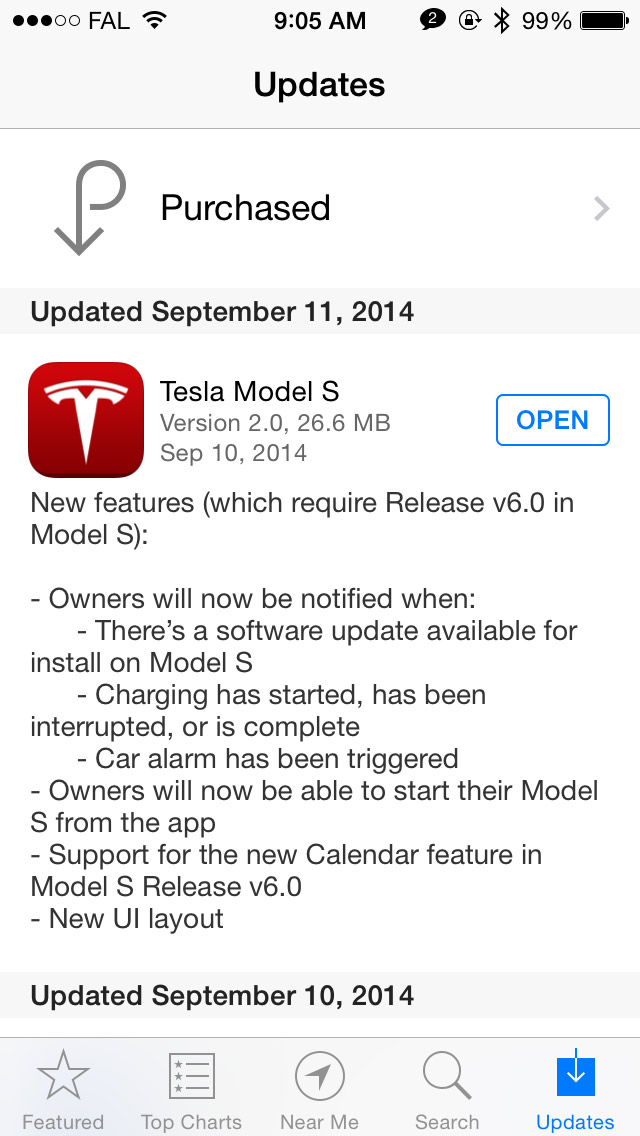
pgiralt Nice new features included in the new iOS app related to 6.0. From the release notes on the phone:
Owners will now be notified when:
- There's a software update available for install on Model S
- Charging has started, been interrupted, or is complete
- Car alarm has been triggered
Owners will now be able to start their Model S from the app
Support for the new Calendar feature in Model S Release v6.0
New UI Layout�
Sep 11, 2014
bollar So, can you start the car from your iPhone? I see that's not mentioned in the 6.0 release notes.�
Sep 11, 2014
GaryREM Which means there are probably other surprises (I hope). �
�
Sep 11, 2014
FlasherZ Yes.
Android app out this morning.
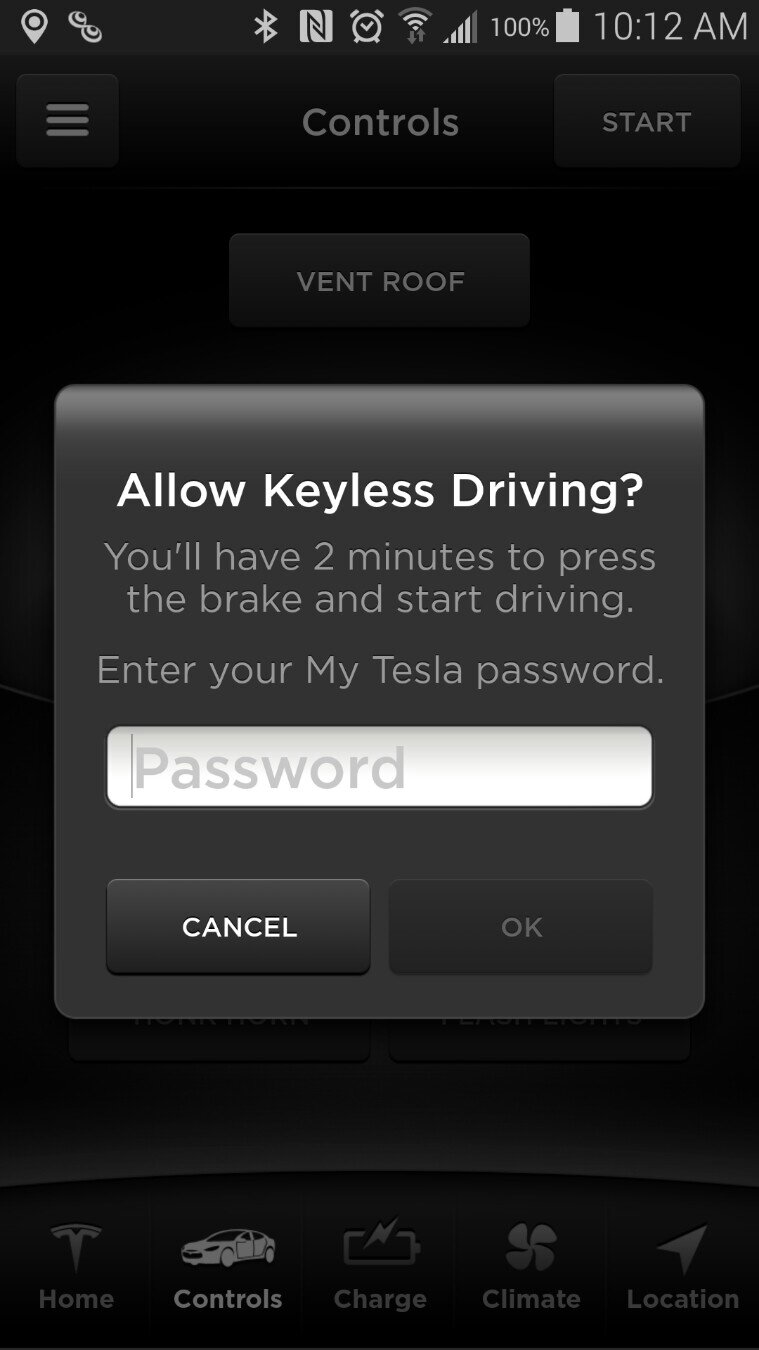
Requires you to enter your My Tesla password to start the car, though. I think that's an incredible mistake as my phone is already secured, the keyfob is already less secure, and typing my (properly) complex password is a pain in the ass. I want the convenience... and if (Apple)pay can be as simple as tapping your phone to a pay kiosk, then (Tesla)Start can be as simple as just hitting the button. If you want security, Tesla could force you to log into the app each time you want to bring it up. I'd opt-out of that.
It's a button at the top of the "controls" screen.
Does not require BT or proximity to the car, just used OTA like the rest of the app functionality.
 �
�
Sep 11, 2014
bollar And a collective "ugh" comes from the room. I have a complex password as well.
I assume you've also figured out if this is working via WAN or BT?�
Sep 11, 2014
Eggplant Ouch. Great example of bad security.�
Sep 11, 2014
DaveT I am very confident that this will be updated in the future. The Tesla app will allow TouchID (on at least in iOS) instead of having to manually input your password to start the car. I think as is its an okay first iteration that will improve over time.�
Sep 11, 2014
Eggplant Unfortunately it will only encourage people to use simple passwords on their account. This is textbook bad security. I though they hired some security expert out from Apple? They should know better.�
Sep 11, 2014
RichardL For now, it looks like this should be considered an emergency backup only�
Sep 11, 2014
bollar Yes. If I understand FlasherZ correctly, it is using the API, so you would't be able to start the car if you didn't have some sort of WAN connectivity. That plus the password makes it emergency-only for me. So, instead of the zOMG!!! I was hoping for, I give it a "Nice."�
Sep 11, 2014
apacheguy Disagree. It's up to the owner to secure their own car. If they want extra security they'll make a strong enough password. Otherwise, oh well, but who are we to tell them which passwords they can and cannot choose. That's one of my pet peeves about internet security. My passwords are not the strongest but they're fairly decent. I've never been hacked and I'm ok with taking the very small risk it entails.�
Sep 11, 2014
Adrian For those of you with jailbroken iPhones, you can use tweaks like iTouchSecure to use TouchID for autocompleting passwords. Combine that with Activator and you can start your car just by holding the home key for 5 seconds for instance�
Sep 11, 2014
jiaotong
Know better than what?
Tesla is giving the opportunity for people to determine their own risk levels. Continue to use your highly secure password and this is a non-issue for you.�
Sep 11, 2014
omarsultan In v2.x, maybe we can see TouchID integration? That would be very cool.
O�
Sep 11, 2014
DaveT Firmware 6.0
That's pretty awesome. Too bad I don't have my iPhone jailbroken.
If the remote start uses their REST API, then I wonder if it's possible to create a custom ad hoc app where you can just launch the app and the car will start.�
Sep 11, 2014
Eggplant That's not actually the point. Think about it this way:
Another bad practice is to require users to rotate password too often. Sounds good on paper. People should be more secure because old passwords will have a limited life, and users will need to use more complex passwords instead of using the same password everywhere.
But in the real world all it does is encourage users to write down passwords they can't remember, or use password that are as simple as they can get away with so they can remember them. Overall is lowers the security of a system.
Same goes here. Most users will just be annoyed by this and use a password that is simpler than they would have otherwise. The end result may be compromised Tesla accounts. The press around it won't blame the users for using bas passwords, it will blame Tesla for having a system that was compromised.�
Sep 11, 2014
DaveT I think most users will use remote start just in emergency situations, thus won't be changing their password to make it simpler. It's probably just the very, very small 0.1% or less of users that will use the function as a key fob replacement and those owners if they change their password to make it simpler should understand the risks involved. Also Tesla probably has restrictions on how short/simple your password can be.�
Sep 11, 2014
bollar At the car, even if the password is "1", that's substantially more secure than the fob. Of course, this is at the expense of opening up your Tesla account to some sort of malfeasance. I doubt most owners will understand that risk.
My current password can't be typed into a phone, so I will have to decide if the emergency value of the feature is worth it.�
Sep 11, 2014
FlasherZ WAN. Works remotely.�
Sep 11, 2014
FlasherZ My phone is already protected by security because of the immense amount of access/information behind that security screen, which to me is a far greater risk than someone using my phone to start my car. The amount of damage someone can do with my unlocked phone is far, far greater than just taking my car. I want the convenience of the app to start the car with a simple one button push.
Or, if you INSIST that it be protected, do like OnStar does - their remote start app doesn't require you to deal with a complex password, instead requiring a simple 4-digit PIN to unlock/start/lock the vehicle.�
Sep 11, 2014
Johan This is now a feature!�
Sep 11, 2014
FlasherZ The iPhone app does notifications of charging, charging stopped, etc. It's not that far of a stretch.
I'm very happy with the functionality. Would prefer valet to come sooner rather than later, but there's a lot of good stuff in here!�
Sep 11, 2014
clea I think that it is already implemented ... based on this post from the ios app thread
Edit: looks like I am responding to the request for valet but was referring to the firmware update notification request.�
Sep 11, 2014
AlMc Agreed.
I have also already tried the Geopositioned suspension changes. Works great. I have a steep driveway. I set it to change as I entered my development and then in my usual OCD fashion tested it twice at that location. Not a hitch.�
Sep 11, 2014
liuping Cool. I just saw that on the iPhone update notes. So I guess this is the last time I'll have to check manually for updates.�
Sep 11, 2014
tanner Tesla Model S App Updated for 6.0 w/ Keyless Drive Feature
Not sure how many have already noticed this, but when I woke up this morning, I discovered the Tesla (iPhone) app had automatically updated for support with the new (keyless & calendar) features thought to be in 6.0. The app will also notify users/owners when new Model S firmware updates are available. Here's the changelog:
 �
�
Sep 11, 2014
Theshadows Pass phrases are the way to go. When I was a systems administrator I set the password policy to a minimum 12 characters. I didn't care about case or numbers or symbols. Every character you add to the phrase exponentially makes the password more secure. A 12 char pass phrase with all lower case letters is way more secure than 11 char forcing to use mixed case, numbers, and symbols.
Using this methodology you could make your pass phrase "you will never guessmy password" and no one or clustered supercomputer ever will crack it. Even using dictionary based methods it would be near impossible. Omitting one space makes dictionary attacks completely impossible.
Brute force will always crack 3hjD;kR7 in less than 6 hours. Which one will your brain easily remember?
Changing passwords once a year is smart incase somehow yours got fished. But if they are all the same long pass phrase with out case requirements, it's no big deal.�
Sep 11, 2014
DriverOne Really cool would be I can get in with an Apple Watch and take off, no fob no TouchID needed!�
Sep 11, 2014
liuping The Apple Watch requires you to have an iPhone.
Since you have the iPhone anyway, it could/should be the one to enable getting in and driving off.�
Sep 11, 2014
wcalvin Without 6.0 in the car (I have 5.12), the App does not show buttons for new features, just a menu for them.�
Sep 11, 2014
FlasherZ Oh, good. Android app doesn't have notifications yet, but wife has the iPhone so I didn't see their release notes.�
Sep 11, 2014
FlasherZ which one will be faster to enter on a mobile device keyboard without swype when your fingers are 3x the size of the miniature keys?
Perhaps this shouldn't devolve into a password vs. passphrase vs. two-factor biometrics, etc. conversation and stick to the functionality implemented on the app and with 6.0. I'm not a fan of having to re-enter my password, or a passphrase, or anything to start my car beyond my mobile device's existing security.�
Sep 11, 2014
JRod0802 Just thought I'd point out that omitting any number of spaces from only six words only makes it 32 times more difficult to brute force (for each of the five spaces between the words, the space would either be present or not present, thus yielding 2^5 combinations of spaces). Given the math of how difficult it is to crack six words that are all within the top 2,000 most used words (it's very difficult, see math below), multiplying by 32 doesn't change the result much. It's probably unnecessary.
Math:
Assuming "3hjD;kR7" takes 6 hours to crack, that means a computer can crack (26+26+10+10)^8 combinations in 6 hours. That means it can check 2,888,816,545,234,944 passwords per day.
Using 6 of the most common 2,000 words is 2000^6 = 64,000,000,000,000,000,000 combinations.
64,000,000,000,000,000,000 / 2,888,816,545,234,944 = 22,154.
So it would take 22,154 days (or about 61 years) to crack your password, even if you used exactly one space between each letter. Making it take 32 times longer doesn't really matter too much at that point, especially if you change your password every year or two. Plus, the people trying to crack your password are going to try for, at most, an hour brute forcing your password. Then they'll move on to the next guy's password (assuming they got all their data in a batch, which they probably would).
Only if someone with a good computer or cluster of computers is targeting you specifically (i.e. you're a celebrity or political figure) would additional security be worth it. In that case, I would add two more words, thus making it 4 million times harder to crack, as opposed to removing random spaces (which would probably be harder to remember).
Here's a link to the top 2,000 words in English (I found this during my research, and thought it was interesting):
Top 2000 English Vocabulary Words used in Speaking�
Sep 11, 2014
AmpedRealtor I don't understand the issue. In order to start your car, a thief would need the Tesla app as well as your login ID and password. How would a thief know your login ID? And then if they do, they would have to guess the password by brute force... using a smartphone app. A lot would need to happen, it seems, before a thief can remote start your car. And even if it were to happen, there is plenty of information that has exchanged hands that would make it relatively easy to identify the attacker.
I am not that concerned.�
Sep 11, 2014
Ray Skillman Thank you! I couldn't agree more. Now back to 6.0.�
Sep 11, 2014
voidptr I'm hoping they also support 1Password's extension protocol in iOS 8 to retrieve the password from there: Our 1Password App Extension for iOS 8 is already supported by over 100 apps, here are nearly 20 | Agile Blog�
Sep 11, 2014
ecarfan This is being discussed in the existing "Phone App" thread.
Should merged...�
Sep 11, 2014
bollar That would be cool.�
Sep 11, 2014
dmckinstry What is meant by "Start your car?" Does that mean press the brake so the car wakes up?�
Sep 11, 2014
bollar Well, move from an off state to a drive state without the presence of a fob.�
Sep 11, 2014
BlueTan85 Hmm, at least in my Tesla iPhone app, the Login page shows the login ID automatically entered; all I have to do is type the password.�
Sep 11, 2014
tanner Same here... Just the main controls. Can't wait for 6.0.
- - - Updated - - -
Sorry, I didn't know this was already being discussed. Tried a quick search for "Tesla app 6.0," nothing came up.�
Sep 11, 2014
dmckinstry That I could use (although rarely). As in that case where I've forgotten my fob and wasn't aware of it until I dropped off by wife and went somewhere else to shop.�
Sep 11, 2014
Peter_M The new IOS app has a nice new feature: an "Unlock Port" button on the Charge page. It doesn't seem to work with 5.9 on the car, but hopefully once the car is on 6.0, we'll be able to unlock the charge port from the app without unlocking the car. Then if you leave your phone number on a note with the car when charging, if someone calls you needing to charge and you decide to let them unplug you, you can do that without having to unlock the car or go back to it.�
Sep 11, 2014
iKhalid Many of you are trying to ditch the tiny fob and use their cell phone instead... WHY?! Just leave the damn thing in your pocket! At least you won't be screwed if your phone dies and your charger is locked inside the car.
The purpose of this feature is to be used for emergencies only; scenarios:
1. You lost your little fob.
2. You are away with the fob and you needed someone to drive your car somewhere while making sure they won't drive it again, unless you wanted them to.
3. You switched with the passenger and left the car but forgot to give him/her the fob and they drove away.
4. Your fob is dead.�
Sep 11, 2014
FlasherZ Have a reference from Tesla for that statement?
I can see how someone might use it for emergencies, but perhaps I'd like to use it beyond that, and I haven't seen a definitive statement that Tesla considers it "for emergency use only".�
Sep 11, 2014
liuping My wife does not care since the fob just goes in her purse, I have to carry everything in my pockets, so I'd love to carry one less thing in my front pocket.
IMHO, The fob is bulky and unnecessary at this point.�
Sep 11, 2014
pete8314 I recently sent a link to my user community (about 4000 Exchange users) trying to encourage better password practises, judging from the feedback it at least had some impact:
How Secure is My Password�
Sep 11, 2014
bollar Heh:
It would take a desktop PC about 10 sesvigintillion years to crack your password.
And it would take me about that long to type it in correctly.�
Sep 11, 2014
jkliu47 Heh heh - what was that phrase again - 'looking a gift horse in the mouth'?
I wonder what other car company has OTA much less ANY software updates for their existing models?
I am tickled to get all of the upgrades I have received. And look forward to many more as they become available.�
Sep 11, 2014
Gizmotoy 15 letter "a"s in a row it is! :wink:�
Sep 11, 2014
Joel Does anyone know if the new Tesla Mobile app will send a notification when v6.0 is available to install? Or will firmware versions after v6.0 push to the mobile app?�
Sep 11, 2014
bollar It works for firmware versions AFTER 6.0, so you have one last watch-and-wait.�
Sep 11, 2014
AlMc I did download the app first and it did NOT notify me that the firmware downloaded overnight:wink:�
Sep 11, 2014
ken830 Why can't Android get the same features!? We still don't have support of the charge slider!�
Sep 11, 2014
TexasEV I'm not sure what the benefit of this is, as the car tells you when it has downloaded an update and is ready to install. It's unlikely someone would want to install an upgrade while they're away in case something goes wrong.�
Sep 11, 2014
AnOutsider That's not new. I've used it often when I didn't have the key handy.�
Sep 11, 2014
TexasEV That's because the app is 2.0, not 6.0�
Sep 11, 2014
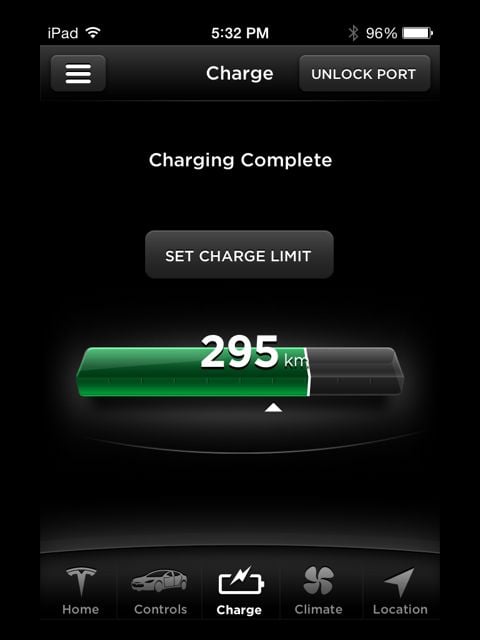
Peter_M That's odd. I see this on v1.1.1 of the app (on iPod Touch):
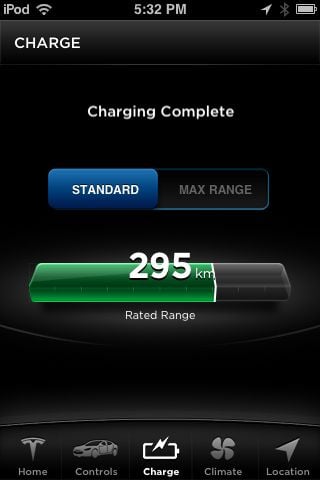
... and this on v2.0 (on iPad mini):
 �
�
Sep 11, 2014
Johan Just don't tell anyone what order they are in.�
Sep 11, 2014
liuping If it arrives in the evening, you may want to accept then instead of finding out in the morning the update it ready.
You may not be able to tell by here on TMC, but many of us are impatient and like to try the updates out as soon as possible.�
Sep 11, 2014
AndyM The Andriod phone app release notes do not include the "notifications" items available on the iOS app:
I hope this is just a documentation oversight, and the Android app has these notifications, too.
Android App official site:
https://play.google.com/store/apps/details?id=com.teslamotors.tesla&hl=en
iPhone app TMC discussion:
http://www.teslamotorsclub.com/showthread.php/35725-Tesla-Model-S-App-Updated-for-6-0-w-Keyless-Drive-Feature�
Sep 11, 2014
dirkhh The Android app doesn't appear to have therm. At least not that I could see.�
Sep 11, 2014
AnOutsider mine has updated so I can't go back obviously, but try under controls?�
Sep 11, 2014
apacheguy I would advise against it. What if your iPhone battery dies or your car is not within mobile coverage zones? Then what are you going to do?�
Sep 11, 2014
liuping Network access is need in the current implementation, but it does not need to be that way Tesla could make it work locally, via NFC or a local bluetooth network.
Running out of batteries is a different issue, but it's not hard to avoid, especially if you know you need you phone to start the car. Loosing a fob is probably more likely for me than running out of batteries.�
Sep 11, 2014
FlasherZ Nope. Wife's iphone notified of charge stop when I killed the circuit breaker, but Android didn't.�
Sep 11, 2014
SteveW25561 I just tried killing the breaker to my HPWC but received no notification on my iPhone 5s, running tesla app 2.0, car fw 5.12. Both car and iphone are on the same wifi. I was able to pop the charge port door from the app.�
Sep 11, 2014
bollar You need firmware 6.0.
- - - Updated - - -
I'm surprised that nobody with 2.0 & 6.0 has posted screenshots.
One of the more interesting things to me is that Supercharging notifications are ALWAYS on. Perhaps this will help congestion at some of the busier Superchargers.�
Sep 11, 2014
FlasherZ Here's one I posted with the 'start' functionality:
Phone App v2.0 (FW v6.0)
�
Sep 12, 2014
Mayhemm I'm sorry, but has FW6.0 been released?! I was expecting a dozen threads along the line of "OMGFW60FTW!!!!!!11111OMFG!!!!!" and an official Tesla blogpost when it was released.
Or are the beta testers just being more open about the fact that they are beta testers now?
Oh, and Android users are totally getting screwed on the mobile app front.�
Sep 12, 2014
bollar You only need one: Firmware 6.0�
Sep 12, 2014
Mayhemm Wow. That's so much more calm and sedate than I was expecting of this community.�
Sep 12, 2014
ken830 Android just got another update. From version 1.1 69 to 1.1 72. No change in "What's new" notes that I can see.�
Sep 12, 2014
Olen Apparently the latest release of the Android app fixes the login problem some users have reported.�
Sep 12, 2014
AnOutsider Oh trust me, there WERE a lot of threads. Lots of merging...�
Sep 12, 2014
TexasEV The charging notification settings in the iPhone app defaults to on for "charging interrupted" and off for "charging started" and "charging complete", except for superchargers always on as someone noted above. A good choice-- this is what most people would need, and if someone wants the other notifications they can enable them.�
Sep 12, 2014
gpetti I agree - I opened up the thread thinking it was more hypothesizing and navel gazing about when 6.0 might be coming and what features it might have etc. and the first poster was fairly matter of factly saying Just downloaded 6.0. Did not try any of the features, having trouble downloading pictures from the iPhone. I had to read several more posts to believe that it had been released - particularly after so many months of build up.�
Sep 12, 2014
jvonbokel I'd like to see a customizable notification for Supercharger use. Such as "notify me when I reach x miles of charge".�
Sep 12, 2014
TexasEV If you really need to be notified when you reach x miles of charge, instead of checking the app once in a while, you could set your charge slider to that percentage and it would give you a "charging complete" message. If you wanted to charge more after that, getting the extra miles as you walk back to the car, move the charging slider to 100% and start charging again.�
Sep 12, 2014
bollar I don't recall having a slider when supercharging. Am I forgetting something?�
Sep 12, 2014
islandbayy Firmware 6.0 Change Log and commentary as well as new Phone App Coverage. 2 Parts
The iPhone App integration
�
Sep 12, 2014
AlMc you will get a notification that 'charge is almost complete' when the charge level hits 80% of battery capacity at SCs (not home chargers)
Just to be perfectly clear: not 80% of what you set the charge level to....80% of the battery capacity..�
Sep 12, 2014
William13 Thanks.�
Sep 12, 2014
Mayhemm Unless he has an Android device, then he'd be hooped (still no charge slider on the phone app). :cursing:�
Sep 12, 2014
chickensevil Haha, your son... he must be thinking "DAD! I just want you to go for a DRIVE!!!"�
Sep 12, 2014
TexasEV The set charging limit is always available on the charging screen both in the car and the iPhone app. It's the same whether connected to supercharger or not.
- - - Updated - - -
Is this your experience? I haven't supercharged on version 6.0 yet, but that's not what the notification settings page of the iPhone app says.�
Sep 12, 2014
islandbayy should hear him giggle when i floor it!�
Sep 13, 2014
islandbayy Well, shall report the app is bugged. No charge complete notification today, or charge start or any other from the app, all applicable things have been turned on. will experiment further.�
Sep 13, 2014
AlMc Yes. This is my experience at the SC. Got the following messages during a max charge: wording may be slightly different as doing it from memory: charge started with time and miles when starting; charge almost complete when 80% of charge complete; final message with charge complete, time and mileage�
Sep 13, 2014
llngoc When i first heard about it, the iPhone start car sounded like a really good idea. But after some more thoughts and experience with the car, I would have to say that I will still use the key fob regardless if it is going through WAN nor the password hassle. And this will only be an emergency backup. The reason: I tried to use ChargePoint App to activate the charging station in an underground garage once and guess what, there was no cell signal in the garage so I cannot recharge the car since I hated those keychain cards and never have it with me. That was a minor annoyance since I did not need to be recharged badly but imagine you parked your car in a garage without bringing the fob with you and ended up stranded in an underground garage?�
Sep 13, 2014
Lump Sounds like I will still use the fob 99% of the time & iPhone start car will be used as a back up or when you are at the beach or something, entering a password is a pain compared to leaving the fob in your pocket or purse, I was hoping for Touch ID type of capability at least.�
Sep 13, 2014
TexasEV That's good, it may be subtle encouragement for people to move on when they get to 80% if they don't really need a full charge, instead of waiting for those last few electrons. Even better if the message said something like charging will be really slow now.�
Sep 13, 2014
simonog Yes,and it works.
- - - Updated - - -
Note that both your phone and the car need a good internet connection otherwise you cannot operate the car. With the fob, you can park up anywhere and restart.
- - - Updated - - -
I think it's a great feature: if I am going out later in the day, it saves my going to the car to check for a new update (as I would want to apply at once if I can). If I wait until I get tot the car to go somewhere I will always need to delay installation.�
Sep 13, 2014
ojee99 I find the option 'sign out' without asking for confirmation a bit rigid. (Not sure if that's the best word for it, but
This concerns the iPhone app.�
Sep 13, 2014
spentan 3rd party TouchID will be in iOS 8.0, which will be deployed OTA on Wednesday.
Does anyone that have iOS 8 beta wanna try if touchid is supported by the app yet?
This would be a really great feature for iPhone users.�
Sep 13, 2014
bollar It can't be. Apple hasn't released iOS 8 compatible apps in the App Store yet. There will have to be a new build to incorporate Touch ID.�
Sep 13, 2014
spentan Ah, my mistake, I forgot that the apps will be updated after 8.0�
Sep 13, 2014
GaryREM iOS 8 apps have been submitted since release of Golden Master on Sept 9 and are beginning to show up. Example is ABC News is claiming iOS 8 features.�
Sep 13, 2014
andrewket Agree that support for TouchID would give more "whizbang". Especially if you could make it mandatory. Two factor auth!�
Sep 14, 2014
Rheazombi As a Blackberry user....

(I'll probably get a Galaxy S5 soon, and Tesla apps are literally the only reason why, lol)�
Sep 14, 2014
AnOutsider I have nothing of value to add here other than my appreciation for the Dean gif�
Sep 14, 2014
Rheazombi  �
�
Sep 15, 2014
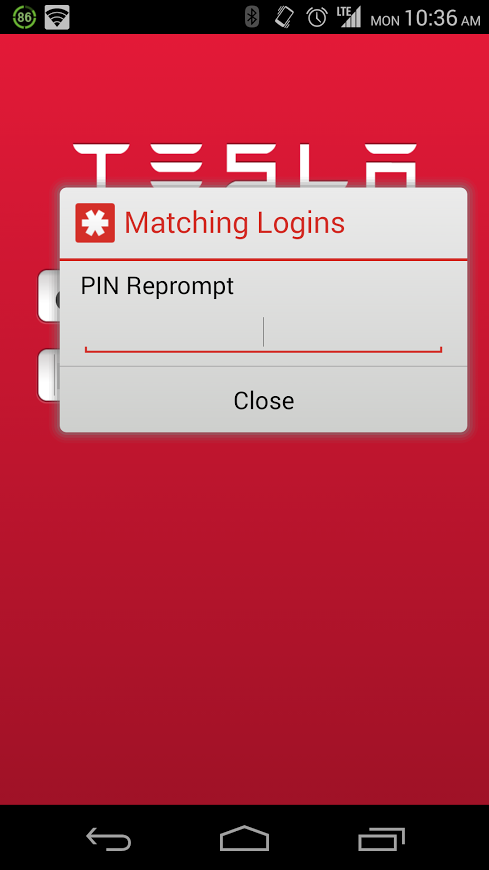
gbdesai If you have an Android device, LastPass can enter your password for you right into the app, you just need to use your LastPass Password Manager PIN.
It's pretty cool.
 �
�
Sep 16, 2014
bollar My first software update.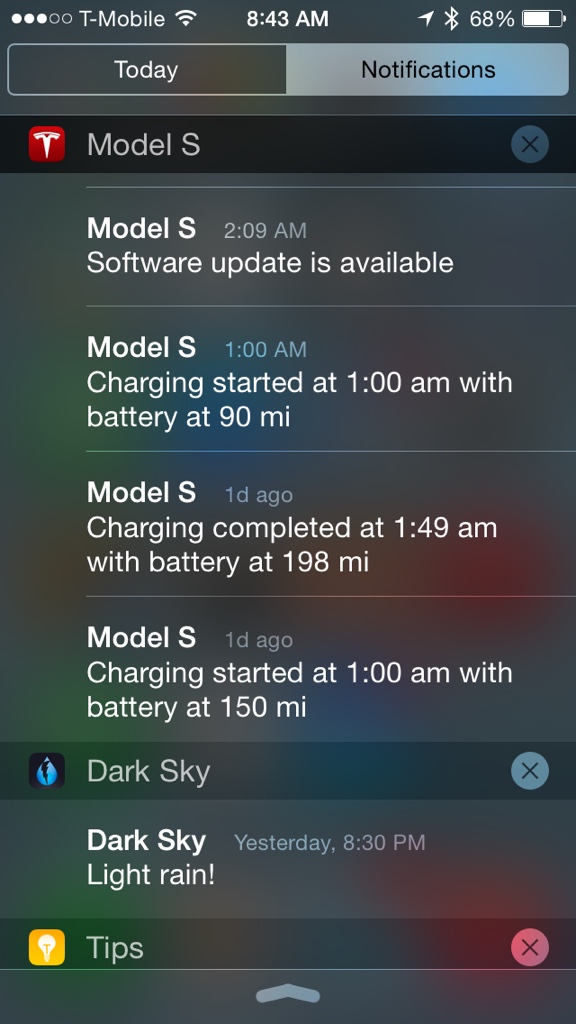 �
�
Sep 16, 2014
StephRob I'm having trouble with the Calendar app in my MS. My app is on (logged in), all the phone settings are set to the specified settings, and my car is recognizing my phone, but in the calendar app, for each day it says "No Events". I have plenty of events scheduled in my calendar. I use iCal on my iPhone. On the upper right hand corner of the touchscreen, it has my phone's name so I know it's sensing the phone. It's just not picking up any of the events in my calendar. Anyone know how to fix that? Thanks!�
Sep 16, 2014
GaryREM Do you have your gmail account configured in your Mail, Contact, Calendar settings and calendars enabled (not using a separate calendar app)?�
Sep 16, 2014
pgiralt I don't remember anyone mentioning this problem yet. I finally got 6.0 today and when I tried testing the notifications feature, it wasn't working. When I had started the app after the car had 6.0, I got prompted to allow calendar access and notifications which I confirmed, but notifications still weren't working. The Tesla app said that notifications were enabled, however when I would go to the notifications settings in the app an try to enable or disable a notification, it would just sit there and spin. If I went back to the main controls and then into notification settings again, it showed the change I made had taken, but still notifications were not working.
I noticed that the Tesla app was not showing up at all in Notification Center (neither in the permitted or denied apps section), so I tried force quitting the app and even rebooting my phone. Still didn't show up and still had the same spinning problem when I tried modifying one of the notification settings.
Finally I decided to delete the app from the phone (along with all settings) and re-download from the App Store. Once reinstalled, I logged back in and everything started work. I found it strange that I was not prompted to allow access to calendar or notifications after reinstalling, so even though it says all your settings are deleted when removing the app, apparently those pieces are remembered.
So moral of this story is if you're having issues with Notifications on the iOS app, delete the app and re-download.�
Sep 16, 2014
StephRob After several frustrating hours, I finally got it to work. On the recommendation of Tesla Service, I had the car "forget" the phone, then re-pair (several times); re-booted the car touchscreen/dash (twice); and powered the phone off and on. I really don't know what the issue was, but it finally worked like a charm.
I LOVE having my calendar up on the touchscreen. I keep track of my three boys' various sports practices and games, music lessons and appointments on my phone (as well as a few things for myself!) and now the daily schedule will be up on the screen for all to see each morning. Love it!�
Sep 19, 2014
tliving Hmm, I'm having the same issues, i'll give that a shot. Thanks for sharing it.�
Sep 20, 2014
flashflood In the release notes for the updated Tesla app, they talked about having an entirely new UI. Is it just me, or is the new app exactly the same as the old one, except for adding the start button?�
Sep 20, 2014
ZBB So... I don't have 6.0 yet, but I am using the 2.0 iOS app...
I the app doesn't have an option to configure notifications, nor did it ask me if it could send me notifications. It also doesn't show in the iOS Notificaton Center settings...
I'm guessing that only shows up after you connect and the app confirms a 6.x+ version on the car and then makes the notification request and tells iOS that it has notifications.
Can someone that received 6.0 after updating the app to 2.0 confirm this?�
Sep 20, 2014
ecarfan @flashflood: "An entirely new UI"? No. As you point out, there is now a "Start" button at the top right of the Controls screen, also if you tap the symbol at the upper left (the three horizontal lines) there are new choices.
I received V6 yesterday and had already updated my iPhone app. Once v6 installed I opened the app and only then did I see the new features. Turned on all notifications. Just started charging now. Haven't seen a notification on my phone charging had started. Like @EBB I am not clear on what sort of "notification" will be shown: text, email, voice of Elon emanating from the heavens, what?
--- UPDATE --
And I just received my first charge status notification on my iPhone. It was not a text or an email, it was a small text banner that popped up at the top of the phone scree saying charging had completed.
I went into my iPhone Settings and into Notifications. Scrolled way down the app list to find the Model S app. It was set to Allow Notifications, and Show In Notification Center, and play Sounds, and Show On Lock Screen.
So you need to go in and customize those settings to your personal preferences.�
Sep 20, 2014
Forty Creek Has anyone found a way to edit your car's name once it has been entered?�
Sep 20, 2014
tomas I got notification of software update.
- - - Updated - - -
Edit in car. Press T in middle top main screen and in popup tap name. Another popup will allow you to change.�
Sep 20, 2014
NOLA_Mike Correct on all of your assumptions. I had the APP a few days before getting 6.0 in car and nothing showed up until the car updated to 6.0.
Mike�
Sep 20, 2014
ecarfan I was referring to charging status notifications, not software update notifications.�
Sep 20, 2014
tomas Right, you can select what notifications you want in app menu. Including charging notifications. They work.�
Sep 21, 2014
Forty Creek Thanks for this. Appreciated.�
Sep 21, 2014
TexasEV When installed the app defaults to "charging interrupted" notification on. You can also choose to have "charging started" and "charging stopped" notifications. These choices are for regular charging. Supercharging notifications are always on (assuming you allow notifications in your iPhone settings).�

Không có nhận xét nào:
Đăng nhận xét