Mar 29, 2013
WSE51 My fuse blew, and I asked if the engineers knew why. I just got an email back from them referring me to this page, which is probably brand new
Temporary Charging Limitation | Tesla Motors
TEMPORARY CHARGING LIMITATION
Recommended Maximum Power (60A, 15kW)
Thank you for purchasing a High Power Wall Connector and twin-chargers for your Model S. This combination enables the fastest home charging possible. However, we recently found an issue with our High Power Wall Connector that causes us to recommend you limit charging to 60A or lower to prevent nuisance fuse trips. We know this partially defeats our efforts and yours to enable very fast charging, especially those of you who invested in a full 80A-capable home installation. We are very passionate about charging fast and enabling a great experience, so please accept our apologies for this problem. We are working as fast as possible to repair this and enable the full 80A charging you were promised using a Tesla High Power Wall Connector.
Is it safe?
Yes. This issue is does not compromise the unit's safety in any way.
Why is it limited?
The internal fuses in the Wall Connector are too sensitive to small disturbances on the utility voltage. These fuses may falsely trip when nothing has gone wrong with the connector or vehicle, much like a household outlet that trips while using a hair dryer. Should a fuse trip, the unit will shut off and the car will not complete its charge. As a result, we're recommending you limit charging from a Wall Connector to 60A to ensure that your charge completes as planned. The vehicle itself is still capable of charging at 80A without any problems and you can do this at any other high-powered infrastructure (including all Superchargers) without any concerns. This issue is limited to High Power Wall Connectors operating at over 60A of current.
When will it be fixed?
By or before June 2013, at no cost. We will work with you and/or your wall-connector installer to upgrade your wall connector as quickly as possible.
Again, we apologize for the inconvenience and are working as fast as we can to get your wall connector back to all that the original specification promised.�
Mar 29, 2013
FlasherZ Disappointing to say the least.
I call BS on their "disturbances on the utility voltage" excuse. The parts are fast-acting fuses, rated at 100A, max 300V. The fact they're blowing at < 80A means "defective parts".�
Mar 29, 2013
Doug_G Yeah, that doesn't sound terribly plausible.�
Mar 29, 2013
Jason S Good to know. Thanks!
Just got ours in, used briefly at 80A a few times but dialed it back to 60A because I figured 40A to one charger and 20A to the other OR 30A to each charger was a good middle point for efficiency based on guesses around the Roadster charger.�
Mar 29, 2013
DrComputer Glad my four year old Roadster HPC with the the Clipper Creek J1772 cable works perfectly at 70A on both my Model S and Roadster. Maybe Tesla shouldn't have tried to reinvent the wheel and just had Clipper Creek make their new HPWC.�
Mar 29, 2013
aviators99 Two questions:
Are they sending e-mail to everyone with the HPWC, or are we just supposed to find it on the website or TMC?
Should we be limiting it by dipswitch or on the center screen?�
Mar 29, 2013
Jason S Limiting by the screen is what I'm doing. My install is really stellar tho: less than 3 feet of high gauge copper wire from the 100A fuse in the fusebox.
I haven't seen an email about it. They really should email, I think.�
Mar 29, 2013
andrewket I would hope Tesla has a way of sending messages or alerts directly to the car. A pop up notice the next time you get in the car would reach everyone (well, everyone with connectivity,)�
Mar 29, 2013
FlasherZ Either will be sufficient. I'd recommend DIP switch myself.�
Mar 29, 2013
kendallpb That's a drag, but I don't have my HPWC yet anyway. If it comes before June-or-whenever, well, 60A is still 1.5 times the 40A I get now and, admittedly, more than I need. So I'll still be able to tell people "oh when I said it took me 2.5 hours to top off at night--nah, it takes less than 2 hours!" ;-) Then in June-ish, I'll be able to say "oh when I said it took less than 2 hours, I really meant it took a lot less--barely more than an hour!" Heh, they'll think my car is just becoming self-aware and improving itself over time. . . .
(Yes, it's late and I'm punchy....)�
Mar 29, 2013
pilotSteve I've had zero --no-- problems charging at 79A for the past two weeks. I love the 55 MPH charge rate!�
Mar 30, 2013
AnOutsider I got no notification of this, but thanks for sharing. I'll limit to 60, maybe even shoot for 70. As mentioned, its still faster, so no biggy.�
Mar 30, 2013
brianman I was told <= 70A until "the next firmware" when my first HPWC blew a fuse when the car was set to 80A while running 4.2 firmware. Now with 4.3 I guess I should leave it at the 70A cap (or drop it to 60A given the recommendation). Guess it's a good thing I didn't "misread" next(4.2) as "4.3" and jump to 80A setting after updating. :|�
Mar 31, 2013
yobigd20 Remember...problems like this are to be expected for the first year or so! Nobody's perfect. I'm happy about their communication on this, and happy about their commitment to working with us and "making things right."�
Mar 31, 2013
Daniel Scherer Can I ask? Why do you need to charge so fast at home? Do you run your batteries down that far each day? I can't bring myself to charge in ON-peak hours because of the rates. Just curious, I'm not being sarcastic.�
Mar 31, 2013
Al Sherman I would think only a few actually need to. I don't. It just seems like a convenience for the one or two times a year that I'd need it to avoid using the ICE.�
Mar 31, 2013
AnOutsider You don't NEED to, but it's of course nice. I drove to the aquarium yesterday and came home at around 5PM with ~20 miles on the dash.
Seeing the app tell me that it would be over 6 hours until I could go any significant distance inspired an internal sad face. 3 hours? More palatable.
I did take it out for a quick run about an hour later though.�
Mar 31, 2013
pilotSteve For me, its because the HPWC+MS85 almost completes the "game change" experience. Still no superchargers in the NW (yet) which will 100% complete the world shift.
But with the HPWC I charge at 55 (rated) miles per hour (79A/232V) so I know within four hours or so no matter how long a drive I just completed I'm fully charged again. It removes the vestiges of range anxiety and "spousal acceptance factor". Thats worth the cost to me!
ps. with all our hydro power in Oregon/Washington and a great electric co-op we are blessed with 8.5 cent per kWh electricity with no TOU. Sorry folks in CA but that too is part of the "game changer" for me.�
Mar 31, 2013
Doug_G That only makes sense if the car is the problem. Which actually makes sense, since the car is the thing that controls the power flow.�
Mar 31, 2013
kendallpb Personally, I don't need to right now, but there's some future-proofing in my decision to get twin chargers and the HPWC. Plus, two specific factors: (a) As with Al, I anticipate a couple of times a year when I may need it. (b) My other half is considering the Model X; if/when we have Tesla cars, faster charging would allow one of us to charge and then swap cables before bed so both cars are topped off. (We have different schedules--wildly different, right now--so this would work great for us, but even if we had identical schedules, it would work well.)�
Mar 31, 2013
bluetinc Yep, I don't always but usually once a week I go from home to Frederick (30 miles) to Baltimore (60 miles) and back again, total ~180. At highway speeds etc, that's most of a regular charge. Then home for an hour before heading downtown to DC to meet up with friends for activities/dinner (20-30 miles each way). All in all, yes, being able to charge at 20 kW/h takes the sacrifice out of it for me. Setting aside my solar system, this area doesn't have any real peak/off peak rates so when I charge is largely irrelevant to cost.
Peter
�
Mar 31, 2013
FlasherZ The car isn't the problem, unless it's drawing > 100A when it says it's only drawing 80A, but then we'd see some circuit breakers tripping too. The firmware could have the car do something differently so that too much current isn't drawn, I suppose.
The fuses they're using are extremely fast-acting fuses, but even then they should not be blowing under these circumstances.
If you have the need to charge at the highest rate prior to Tesla's official fix (likely another fuse supplier), you can obtain 2 class T 100A fuses type JJN (300V) and replace them.�
Mar 31, 2013
pilotSteve I can confirm that my PoCo checked the load at my meter feed and when my car showed 79A/232V that was EXACTLY what their test equipment shows was being drawn by the car.�
Mar 31, 2013
yobigd20 there is no 'on peak' vs 'off peak' rates in our area. so whether we charge at 2pm vs 2am it makes no difference.�
Mar 31, 2013
mcornwell Mods, perhaps this thread should be made a sticky for the sake of saving some folks from blowing fuses, who might not have received the word from Tesla?�
Mar 31, 2013
brianman They told me the logs indicated it was not a hardware problem with the vehicle. Note the underlining is mine.�
Apr 1, 2013
Arnold Panz What communication?! This announcement is buried somewhere in the Tesla website, not in a press release or blog post or anything. They know who have HPWCs and couldn't bother e-mailing those who have it (or sending a note on-screen)? I didn't see this until now and am glad I haven't blown the fuse yet because I've been charging at 80 amps. But I wouldn't have a clue without someone alerting me and these message boards, which I'm sure a lot of people with HPWCs don't read.
This is very poor to non-existent communication on Tesla's part, IMO. I don't mind the hiccup, but don't bury it so much that owners don't know about it!�
Apr 1, 2013
FlasherZ That only further supports my belief that it's a bad parts problem in the HPWC. Many owners are charging just fine with the HPWC at 80A. If you call and complain that yours has faulted, they send you new fuses and point at their web site post until they get a new fuse supplier tested.�
Apr 1, 2013
William13 My car had one of the internal chargers replaced last week after it succesfully charged at 80 amps. The problem for mine was in the car. The power has been clean. This issue (OP) stills allows charging at 80 amps but if the internal fuse is a problem then you may want to only do this if you have a back up plan.�
Apr 1, 2013
FlasherZ You likely had a different problem. This is very clearly a problem with HPWC's in that they blow one of the 100A fuses designed to protect the device from overcurrent.
I had another acquaintance of mine reach out with a blown fuse experience this weekend via another forum. He wasn't happy to hear that Tesla hadn't communicated this more widely, either.�
Apr 3, 2013
neroden Tesla's description is vague and non-technical, but from "trips while using a hair dryer" and "disturbances on the utility voltage" I wonder if it's actually some form of GFCI which is tripping, rather than a fuse. Even though they say "internal fuse".�
Apr 3, 2013
Arnold Panz FYI, I contacted Tesla about this to find out why there was no communication on it. I was told that this problem only related to a few people with HPWCs, and so they are limiting the e-mail with the link to the website to only those people who they know (or think) have this issue, which isn't the majority of current HPWC owners. They're working hard to figure out what the problem is, but unless Tesla contacts you directly on the touch screen in the car, this isn't a problem you need to concern yourself with.
Chalk this up to growing pains -- they know that their communications aren't ideal yet, and are working on the best way to go about communicating with customers so that the right people get the information they need, and others aren't given incorrect or misleading information. TMC certainly doesn't make their life any easier �
�
Apr 3, 2013
FlasherZ No, it's actually 2 current-limiting fuses (like the main fuses that used to protect most of our homes years ago) in a very small package. Class T, 300V (JJN), 100A. They're very visible when you open the HPWC.
They look like this:
Fuse, Class T, 100 A - Amazon.com�
Apr 3, 2013
ShortArc A little off topic. I bought a five pack from automationdirect.com, here:
TJN100
They seem to have pretty good prices (same Edison brand as is in my HPWC).�
Apr 3, 2013
mitch672 My Model S just updated to 4.3 2 days ago, I have a 75A OpenEVSE, I noticed today that the amperage setting had been lowered to 60A on the charging screen (Presumably by Tesla), as its normally set to 75A.. They think I have a HPWC
I also emailed them about buying a HPWC (long story), anyway they tell me after the backorders are filled, it will be listed on the Tesla web store, but it might not be until June or July, yikes.�
Apr 3, 2013
jweinstein Mitch,
What is the ideal state of charge to leave the vehicle in? I thought standard mode at 90% of the battery's capacity was best for maximizing the life of the battery pack?
Josh�
Apr 3, 2013
mitch672 I don't think we know, but why not leave it lower overnight, since I have the dual chargers, I can top it off at near 62 miles/hour, it also has closer to the full standard charge when I leave (because vampire losses haven't run it down yet). We do know that very high SOC should be avoided for long periods of time (one example a full range charge). It may not matter much, I'm probably being overly cautious/paranoid, but with the timer now, I can do this easily.�
Apr 4, 2013
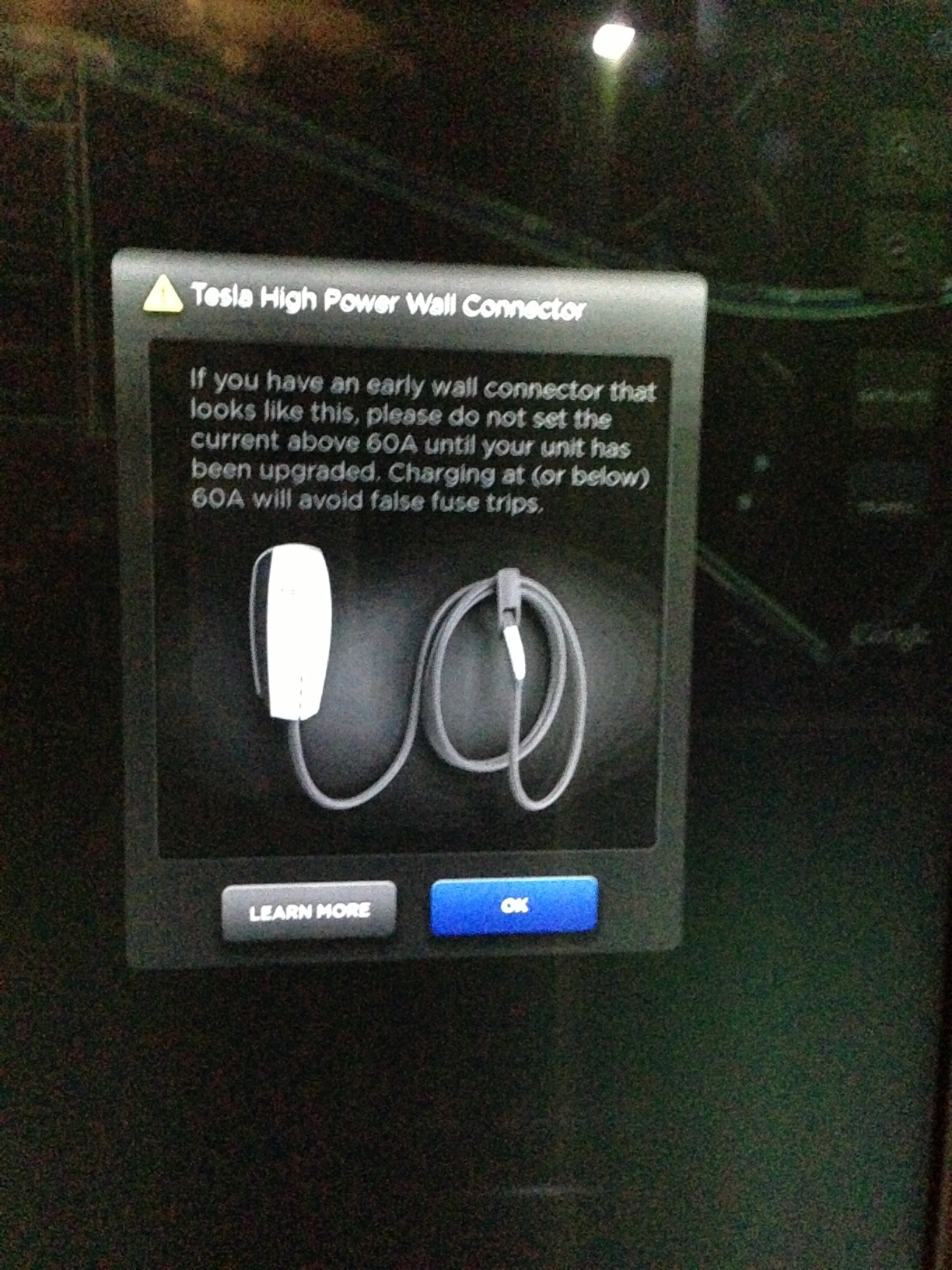
gsxrex I just got my update to 4.3 (had 4.2 since I picked up at the factory about a month ago). Set the scheduled charge. Once I plugged the HPWC in, I noticed that my charge rate was dialed back to 60A. Once I tried to increase it, I got a pop-up window with the notice, and a link to the website with the full text posted earlier in this thread.
 �
�
Apr 4, 2013
jweinstein I had the same exact thing happen to me as Arnold. I just got the 4.3 update today; however, I was able to override the 60A level and set it to 80A. After driving about and returning, the charge current reset to 60A.�
Apr 5, 2013
clmazin Interesting. "Early Wall Connector."
Are all current HPWCs "early"?�
Apr 5, 2013
Al Sherman Yeah. What does the "NOT EARLY" HPWC look like?
AND, assuming we have the "EARLY" HPWC should we limit the actual HPWC to 60 amps or set the HPWC up normally and limit the car (touchscreen) to 60 amps?�
Apr 5, 2013
locdog284 If I haven't gotten mine yet, will the HPWC that gets delivered to me (say in the next couple weeks) have this problem as well with the fuses? Or is it something that they have now fixed on the new HPWCs that are being shipped out?�
Apr 7, 2013
dashrb They have changed the HPWC once or twice. The rumor I heard was a UL listing issue related to semi-protected-from-the-climate installation locations (I'm thinking "carport").
The original picture of the HPWC on the website had a C-shaped hook attached to the lower portion of the HPWC, so the cable spooled directly beneath the HPWC. The "newer" picture (as shown in the screenshot above), has the hook-and-handle-cradle off to the right side (a separate piece from the HPWC), so the loop of cable is off to the right of the HPWC.
That said, the screenshot says "early" yet shows what I claim to be "newer", which means there may be an updated HPWC even newer yet. And the newest HPWC may be visually identical, in any case.
I don't have my HPWC yet, so I'm only semi-informed.�
Apr 8, 2013
AnOutsider OK, so mine went in today. Tried at 80A, breaker went in a couple minutes. Dialed back to 70 in software, 10 minutes or so. Went down to 60A and got about an hour before it once again tripped.
I pulled the panel off and set the switches to limit it to 80A line (so it would charge at 64A) then set the Model S to pull at 60A -- hopefully this will make it until morning.
Anyone else have issues with the line tripping even at 60? I didn't get a popup on my screen either (and I'm on 4.3)�
Apr 8, 2013
bluetinc Hey AO,
I haven't had any issues here. I don't think what you are seeing is the same as the notice though. The notice seems to be an issue where the HPWC blows the fuses internal to itself. If I read your description right it sounds like you house breaker is tripping. Any chance that your home breaker is just faulty? (I've seen plenty of these in RV parks and the like).
Peter
�
Apr 8, 2013
AnOutsider *sigh* just checked the app and it did it again.
Hmm, not sure. I do know that before this I had a Nema 14-50 on the same panel with no issue. I'll call the electrician back tomorrow.�
Apr 8, 2013
brianman When my fuses went the breaker was fine. For me, all symptoms pointed to an HPWC issue rather than a box, breaker, or wiring issue.�
Apr 13, 2013
JakeP Question on HPWC install, breakers and settings. About to install my HPWC in my 100A Subpanel in the garage, which currently houses my NEMA 14-50 on a 50A breaker. Since the subpanel comes off my main panel, which is a 200A service split into two separate 100A main breakers, I don't want to set the HPWC for a full 80A draw, as that would only leave 20A for the rest of the house (or half of it, anyway). Someday I will upgrade that main panel to a single 200A breaker, which will allow me to set the HPWC for potential maximum 80A draw. Because of the fuse issue and this limitation, I want to limit my draw to 60A.
So my question is this: can I install a 100A breaker in my subpanel and wire this to the HPWC, and then set the dip switches to 60A? I could then set the draw rate in the car to less than 60A, saving the 60A for when I need a faster charge, and ensuring I don't trip the split 100A main for the remaining 40A in half of the house. Or should I be matching the breaker to the dip switch setting, and only install a 60A breaker?
FlasherZ, I saw earlier that you said limiting the HPWC to 60A via the dip switches would be fine. Was that assuming the HPWC was wired to a 100A-breaker?
I don't want to introduce any safety issues here. I am fine living with a reduced breaker size for the HPWC, I could even live with a 50A for that matter. But I do have twin chargers and would love to be able to dial it up if the situation arises where I need a fast charge. What size breaker should I put this on in my subpanel? My electrician seemed to indicate that the 100A would be fine, especially if we could limit the HPWC or car as needed.�
Apr 13, 2013
UMD86 Good questions.....I'm not an electrician but I play one on TV. I think you will be fine leaving it at 80A. Remember the HPWC is not working continuously at 80A. It will probably only run around 3-4 hours at any given time so I think you are okay. The more amps you pull the less time it will be working. Also with the latest 4.3 update you can set the timer when there's less draw on the 100A breaker.
Until your last few lines I was thinking why have a HPWC if you're not going to utilize the max charging. You will find the HPWC a great charger even at 60A which is the limiter right now.
- - - Updated - - -
Yes the fuses in the HPWC are very sensitive and blow very easily. I read somewhere that Tesla will be picking up the cost when the "hardware" fix is available in June. I saw a youtube presentation from their head electrical engineer who was speaking to grad students at Stanford Univ. and was talking about the engineering of the batteries and the charging system. Wonder if he knew about this problem. This guy had impressive credentials but I guess no one is perfect.
- - - Updated - - -
Had my HPWC installed this week with a 100A breaker. Car is charging at 60A and no breakers are tripping.�
Apr 13, 2013
JakeP Thanks UMD86. Are your dip switches set for 100A breaker, and the car is set to draw 60A? The installation guide for the HPWC indicates that the dip switches should be set to match the breaker, but I am wondering if it is OK to set them *less* than the breaker rating.�
Apr 13, 2013
UMD86 My DIPS are set at 100A. Yes, the car is set (By Tesla) to pull a max of 60A for now.�
Apr 13, 2013
FlasherZ Since the device is rated for 100A, you can place it on a 100A breaker but use a lower draw via DIP switches without any issue whatsoever.�
Apr 13, 2013
mitch672 Just an FYI, the DIP switch is just setting the "pilot signal", which tells the car the maximum amperage available from the EVSE, so you can always set it lower than your breaker, but never set it higher than the breaker (since it could advertise more current than your circuit can support, most likely tripping your circuit breaker)
The "pilot signal" is a 1000Hz square wave, with different "duty cycles" that advertises the current available to the car, see the link below for a detailed explanation of the J-1772 pilot signal
http://code.google.com/p/open-evse/wiki/J1772Basics�
Apr 13, 2013
JakeP Thanks FlasherZ, I will install on a 100A breaker and set the DIP switches to 60A, to lower the risk of tripping the 100A breaker on my main panel, should that half of the house be simultaneously drawing more than 40A.
- - - Updated - - -
Thanks for the explanation Mitch672, understanding what the DIP switch setting is actually doing in the EVSE really helps here, and confirms what my electrician suspected.�
Apr 13, 2013
Doug_G One of our local Model S owners, who has more a more recent 4.3 than my car does, stopped by to charge at my office. We now have 80A available here*, but when we plugged in it showed 60A.
I leaned in and dialed it up to 79A (for some reason the S always seems to stop 1 amp short on J1772). It popped a message warning against using 80A on an HPWC. Okay, thanks, but this isn't an HPWC. When I closed the message it defaulted back to 60A again. Grrr! I dialed it up AGAIN and this time it didn't complain, and the current ramped up to 78A.
(*Yes, really. I'm beta testing a new J1772 cable that permits 80A operation.)�
Apr 13, 2013
mitch672 I only have an ITT 75A cable, which mfr is coming out with this, can you say?
Yes, the 4.3 firmware ALWAYS resets my 75A OpenEVSE back to 60A on each plug in, and I have to go to the screen and manually move it back to 75A (getting the warning each time), it's really annoying, they should not assume everyone charging at higher currents is using a HPWC, or they should only show the warning once per location.�
Apr 15, 2013
CaptDaveHowe I'm glad I saw this thread. I received my wall unit and the electrician is installing it this week. I had the house amperage upgraded to 300 amp service. I wonder if I should try 80 amps or dial back to 60 right away.�
Apr 15, 2013
AnOutsider Since the breaker issue was rectified, I've been charging at 80 with no issue. I never got the dial-it-down screen, nor did I ever get an email. I'm going to assume my HPWC is one of the newer, fixed ones.�
Apr 15, 2013
CaptDaveHowe See AnOutsiders message, I'll try the full 80 and see what happens. I do know that the electrician is tapping a 100 amp breaker line for the wall charger, leaving 200 amps for the house.�
Apr 15, 2013
brianman Did I miss an update? (A forum update, not a car update.)�
Apr 15, 2013
Jason S He had a separate issue with his fusebox breaker.
I don't know of a fix to the HPWCs at all. But I'll prolly just use 60A until I need the full 80A for some reason so it makes little difference until I can get a second Tesla (prolly Gen3).�
Apr 16, 2013
Al Sherman I still have a question about the current setup. Can I set up the HPWC dip switches for the 100 amp house breaker and set the car (if it doesn't do it automatically) for 60 amp charging? Is this ok so when TM announces that 80 amp charging is good to go I don't have to mess with the dip switches and I can just change the rate on the touchscreen?�
Apr 16, 2013
AnOutsider Brian, Jason is correct. Al, as I understand it, that's how you're supposed to do it. Iirc, messing with the switches is only for telling the unit what it can draw from the wall.�
Apr 16, 2013
FlasherZ You can do that, since Tesla built a temporary limiter in the car's software.�
Apr 16, 2013
Al Sherman
Thank you both as always.
Ironically, the electric guys are crawling all over the yard and garage as I type finally getting the HPWC installed. My car is still at the park awaiting transport.�
Apr 16, 2013
AnOutsider I upgraded from 4.3 to 4.4 today while at work (sorry Al), and I came home before an appointment and charged at 80A. No issues.
Come home this evening after a lot of running around, I come home and plug in. I get the screen for the first time and the car limits down to 60A. Wonder if it's triggered by something vs just the software? I know I had 4.3 before with no warnings.�
Apr 16, 2013
SFOTurtle I had warnings on 4.3 when first starting to charge at public 70A station. Was able to manually override to 70A, but got this warning twice while on 4.3.�
Apr 25, 2013
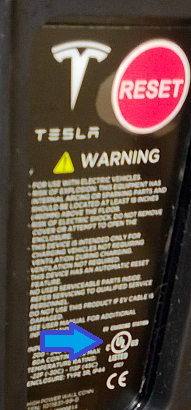
brianman Following up on something my electrical inspector mentioned today...
Is there anyone that has an installed HPWC without the UL labelling (see picture)?
 �
�
Apr 25, 2013
FlasherZ They didn't ship until they were UL listed, that was part of the delay. I don't think you'll find any that aren't listed.
That said, someone mentioned that the UMC doesn't have a symbol on it, but I tend to think they do indeed have it listed and the symbol's just not there. This is because NEC 625.13 requires that any 240V EVSE connected via plug-and-cord must be "part of a system identified and listed as suitable for the purpose".�
Apr 25, 2013
brianman My electrical inspector was under the (different) impression that some of the early ones were not UL listed (or at least not labelled as such). He specifically mentioned it in reference to the ones that were having trouble vs. the ones that weren't.�
Apr 25, 2013
FlasherZ Listing #FFWA.E351001, 12/11/2012. There may have been some early prototype examples, but as far as I know, all production shipments were listed. I can't find a listing for the UMC at all, perhaps he was thinking of that?�
Apr 25, 2013
brianman Nah, he was specifically talking about the HPWC. In part, because the HPWC installation was what he was coming to inspect.�
Apr 25, 2013
AllDigital Good to find this thread. I got the HPWC about a month ago. At 80A it was drawing enough to warm the conduit. The second day of charging I popped a breaker on my main (150A). The 100A on the sub panel was OK and there was no way I was drawing down another 50A on the sub.... But that would point to a faulty 100A breaker. So, I dialed down to 60A and all has been great. I now wonder if the overload was caused by something in the HPWC. Hmmmm.�
Apr 26, 2013
drees Hmm, how big is the wire feeding your HPWC?
I think it's more likely that your 150A breaker is faulty and tripped prematurely, not that the 100A breaker is faulty and didn't trip as designed. I'd bet that your service panel has never seen a constant 80A load before, not to mention whatever else your house was doing.
The HPWC itself does not draw any significant amount of power - all it does is close a contactor after the car is plugged in and tell the car how much current it can pull. Worst case it might pull 20W depending on the contactor. The overload can only be caused by the car.�
Apr 26, 2013
FlasherZ In theory, there could be a short in the HPWC, but it's highly unlikely.
The warmth from the HPWC is coming from the fact it's sealed and those fuses heat up pretty good @ 80A. If indoors, some vents up top in the HPWC would likely make 80A charging a non-issue.�
Apr 26, 2013
aviators99 My HPWC has never blown a fuse or anything, but before the update limited it to 60A, if I went to unplug it while it was still charging or just completed charging, I would burn my hand.�
Apr 26, 2013
FlasherZ The part connected to the car?
Or are you talking of the UMC and not the HPWC? UMC's have had a problem with melting lately.�
Apr 26, 2013
aviators99 The part connected to the car (the metal).�
Apr 27, 2013
FlasherZ sounds like a loose connection there, I'd get that looked at. My car-side connector is never hot, maybe slightly warm.�
Apr 28, 2013
Vger N.B.: This artificial limit on HPWC's also affects high power EVSE's in the field, such as Roadster HPC's and Sun Country Highway-installed CS-90's (Clipper Creek)!!
On a recent road trip we encountered the same 60A limit, and the need to click through the dialogs on-screen to get back to 70A charging. Actually, charging was limited to 69A and only drew 68A (off by one software error?).
You are NOT warned about the limit when you plug in, it is just imposed silently! This caused us wasted time at the first charge stop before we discovered the issue.�
Apr 28, 2013
Jason S Ran into this same thing with the Roadster charger at the Tesla store at Santana Row today. Didn't really need the extra 10A because we were stopping for a while, but I was a little surprised.�
Apr 29, 2013
pilotSteve I am still running 4.3 firmware and happily charging at 79A (55 mph) every night. No warnings appear and no problems of any kind. The cable from my HPWC is a bit warm but no more than the UMC at 40A. I am 100% happy with this setup and love the fast charge speed.
Following advice on this thread I did buy two spare fuses (just in case since I only have HPWC or 110V). Also my unit was installed by a trusted electrician who spent some time making sure all connections were torqued properly, etc. and that the 100A breaker was firmly placed in the breaker box.
Maybe just good luck but I don't understand what Tesla is concerned about. Maybe there are differences in software in the HPWC that is the "early" version? Mine was received and installed on March 2nd.�
Apr 29, 2013
aviators99 Where would the loose connection potentially be? If it's inside the HPWC plug, I guess there's no point in calling my electrician, right? I need to have Tesla look at it? Or are you saying it could be a loose connection somewhere else? I can tell you that it's the plug that is burning hot, and the wire for about 6" behind the plug. The rest of the cable is fine.�
Apr 29, 2013
drees Sounds like a bad crimp inside the plug. Tell Tesla and they should replace it.�
Apr 29, 2013
FlasherZ Because the HPWC uses the J1772 protocol, the car cannot tell the difference between the two. So to protect HPWC owners, the limitation is applied. It'll be fixed when Tesla publishes fixes to HPWC's.
- - - Updated - - -
If your handle that plugs into the car is getting extremely hot, you have a loose connection between the car and the Tesla connector (a/k/a "coupling means"). The electrician won't help you here, it's Tesla service.�
Jun 27, 2013
Psmolka Anyone having issues with the cables getting Really HOT when charging at 80amps?
even my 100amp breaker and the metal piping is gettin hotter ten what would seem normal.
tx!!�
Jun 27, 2013
Lloyd What voltages are you seeing?�
Jun 27, 2013
drees Why would voltage matter? The car should still pull the same amount of current...
Anyway - heat buildup under continuous loads is why circuits are de-rated by 20%. But still, things really shouldn't be getting hot... Breakers can definitely heat up over time under load, but as long as it doesn't trip it should be OK. Still a good idea to make sure that the lugs on the breaker are secure (turn off the power first!).�
Jun 27, 2013
PhilBa It's not about current, it's about power (aka Watts). To get watts, you multiply current times voltage. So, 30A at 204V delivers 6120 watts. 30A at 240V delivers 7200 watts or 17.6% more power. A watt hour is 1 watt delivered for 1 hour. In a battery it is a measure of how much power the battery can store. This is a simplistic description but it get's the general idea across. The more power through a conductor, the higher the temperature.�
Jun 28, 2013
bluetinc Hey PhilBa,
You are close, but that's not quite it. It's the resistance drop across the conductor or connector that yields a voltage drop. It's that voltage that then is multiplied times the current to figure out the power being generated in that wire or connector. That means in this case the voltage drop is not affected by the initial voltage being either 204V or 240V, the drop through the connector and/or the wire is only going to be related to the current.
Peter
�
Jun 28, 2013
PhilBa True but I was answering the question why voltage matters. You see it all the time - people don't understand that it's power into the car and power is the product of V and I.
As to why the cord heats up, I seriously doubt that it's the voltage drop but rather an incomplete connection. Less conducting contact area means higher resistance and thus more dissipation. I'd bet the heat in the cord is from conduction.�
Jun 28, 2013
FlasherZ To the question before us - yes, my cord gets fairly warm. It is a design choice -- the HPWC uses #6 wire rated at 105 degC insulation, which can carry up to 85 amps. Thicker wire would be harder to handle and store. Unless it's too hot to touch and becomes a safety issue for a contact burn, you shouldn't have to worry about the electrical safety.
Heat dissipation across a resistor is measured as power, but the V in P=IV is the voltage *drop* across a resistor, not the potential offered. So it doesn't matter whether it's 240V or 250V or 208V. As a result, the heat dissipated by a conductor varies with the square of the current (combine P=IV and V=IR and you get P=I^2*R). So the heat dissipation in the cable is 78% more with 80A over 60A.
If this were a DC circuit, the 25 ft of #6 used in the HPWC would dissipate 128 watts (2 conductors * (80A^2) * .01 ohms). AC introduces some complexity because of the reactive load of the battery chargers and such. Let's just say 100 watts of heat -- that's not insignificant.
- - - Updated - - -
As I mention above, the voltage supplied to the car does not matter here, because power dissipated is the voltage drop across a resistor, not the voltage supplied. A given length of wire will dissipate the same amount of heat by a current-controlled circuit, whether it's supplied at 5v, 50v, 500v, or 5 kV.�
Jun 28, 2013
Lloyd Yes, but he is getting heat at the breaker, along the conduit feeding the HPWC, and at the DC cord, and that should not be getting "hot" . Warm I understand.
I believe he should check the wiring and make sure that he has #3 minimum to feed the HPWC at full power with a 100 amp breaker, as the conduit should not be generating heat.�
Jun 28, 2013
drees I still don't see how that's relevant to the issue at hand unless you are measuring the difference in voltage/current at the car and the voltage at your main service breaker and thus measuring the amount of power being disappated between the car and main service breaker.�
Jun 28, 2013
PhilBa I seriously doubt that resistive dissipation in the cable is the culprit here.
I work with electronics a lot and frequently hear people say HOT when they mean WARM. The key question - what is the temperature. People will feel 120F and call that hot when it is likely to be within spec. Heat will conduct pretty far in heavy wires like #6 or larger so it's best to understand where it's coming from. I doubt the breaker itself is the cause.
I still think incomplete connection is the most likely culprit. Either not enough contact area or improperly torqued bolt. Though, if the cord is coiled up tightly, that could be a reason as well.�
Jun 28, 2013
FlasherZ When I charge at 80A, the entire length of the cord is getting consistently warm. I can confirm it is nothing loose.�
Jul 18, 2013
Al Sherman Sorry guys. I must have lost track.
Where do we stand now on 80 amp charging? I have the latest version of 4.5. Am I still limited to 60amps? If not, can I charge at 80 without getting new fuses? I would prefer not to blow the HPWC fuses. Was it strictly a firmware fix, or do I need the new fuses also?�
Jul 18, 2013
AmpedRealtor Bypass the fuses inside the HPWC - you already have it on a 100A breaker, the internal fuses are not really needed.�
Jul 18, 2013
jweinstein Should I be expecting new fuses to be sent to me from Tesla? Or, does this require outreach on my part to Ownership? Thanks for any/all guidance.�
Jul 18, 2013
bhuwan FW4.5 here, i charged at 80A for a while and it was fine.
THEN I charged at 80A on a really hot day, and after a while,everything **** the bed. Tesla replaced the fuses with the OLDER style - new ones not yet available.
In short; Don't charge at 80A unless you have the new style HPWC or fuses.�
Jul 19, 2013
brianman I don't recommend this. Why run things against manufacturer recommendation when you don't need to?
- - - Updated - - -
1. Wait for Tesla to retrofit your HPWC with new fuses. Contact them if you get impatient.
2. With 4.5, you have to click past the 60 prompt to use a higher value. In future firmware, this will become less annoying.
That's my understanding at least.�
Jul 19, 2013
cinergi Indeed, [email�protected] recently told me this behavior will be "fixed" in an upcoming software release. Until then, we have to manually override it every time.�
Jul 20, 2013
Al Sherman K. Thanks Bman. Not impatient at all just getting it all clear. The "wild" times in the 70's must be catching up to me.:smile: I don't even really need the 60 amps since I generally drive less than 30 miles a day. I just charge it to about 160 miles (65%?) pretty much finishes in less than 30 minutes for the most part.�
Jul 20, 2013
PhilBa Hmmm, I have my HPWC (new one with the 150A fuses) on an 80A breaker with the dip switches set to 80A. I've never manually adjusted the current and it always ramps up to 63 or 64 Amps (64 is the 80% continuous derating limit). I have firmware 1.33.51 (4.5). Never updated it, car was delivered 6/28. Perhaps it's a function of a KW limit as my voltage is running about 235 which works out to just a shade over 15KW at 64A.�
Jul 20, 2013
cinergi That makes no sense to me... I have mine set to 90 and the screen always drops the limit to 60. I can ramp it up to 72 manually after charging has started, but I have to do it every time. Mind answering a few questions?
1) While the car is unplugged in its normal parking spot, what's the charging screen say with respect to the set point (both the dial any any messages around it, e.g. whether it's a custom setting)?
2) Plug the car in -- does the above change at all?
3) Are you able to raise the limit (to 65) after charging has started? If you can, leave it at 65, unplug, and plug back in -- does it stay at 65? Return to 64 if applicable.
I wonder if there is a way the new HPC is able to signal the car ... does anyone else here have a new HPWC (not retrofitted) that can comment on > 60A charging behavior?�
Jul 21, 2013
PhilBa 1) 64A
2) no, stays the same
3) no, limited to 64A
Note that the actual charging current seems to waver between 63 and 64. Also, my voltage seems to waver between 234 and 235. This is why I wonder if the limit is watts, not amps (as 63*235 and 64*234 are both less than 15K).
An additional point, my HPWC was originally on a 50A breaker and set to 50A via dip switches. The car charged at 40A and showed a max of 40A on the screen. When I got my electrician to install the correct breaker (80A) and change the dip settings, the car immediately picked up the 64A setting. No one set it manually.
To confirm, my HPWC is a new one that came with the new fuses and was not retrofitted. If the new HPWC has different signaling firmware, they REALLY should have changed the part number.�
Jul 21, 2013
Doug_G Curiously, on the previous 4.5 the annoying 60A message went away. But I got the message the other day so it's back.
Or... they realized that 70A stations are okay and still bug you about 80A stations. That might explain what I'm seeing.�
Jul 21, 2013
Denarius I have 100 amp breaker on a new HPWC (not retrofit) and it gives me the warning and sets me to 60amps. My car came with 4.5 (1.33.48). I have yet to receive an update.�
Jul 21, 2013
Doug_G The car has no way of knowing that the HPWC is good or not. The HPWC uses the J1772 protocol, which doesn't facilitate that kind of messaging.�
Jul 21, 2013
Denarius Yea, my post was a response to Cinergi's question if any new HPWC had different behavior, I should have quoted the text.�
Jul 21, 2013
PhilBa An experiment - try setting the switches to 80A and see what happens. I do have slightly newer firmware (.51 vs .48).�
Jul 21, 2013
Steve Watkins My internal fuse also blew and I was told replacement fuses were forthcoming. That was about 6 weeks ago. Tesla sent me a replacement HPWC that is waiting for upgraded fuses.�
Jul 21, 2013
Denarius I will have to test this Tuesday if someone else hasn't already. I'm traveling to don't have access to my HPWC.�
Jul 22, 2013
andrewket I called the Rockville SC again today. They still don't have the new fuses. Very frustrating!
Sent from my iPhone using Tapatalk 2�
Jul 22, 2013
evmile I have the latest HPWC and it works fine at 80 A. Unfortunately you need to set it at 80 A each time you charge or it will default to 60 A. But that is still plenty fast enough for overnight use.�
Jul 22, 2013
PhilBa Sorry, a little bit of confusion. I was saying the test is to set the HPWC switches for an 80Amp breaker (to deliver 64A max to the car). That's my situation and it defaults to 64Amp. We know that setting it to a 100Amp breaker causes the default 60Amp behavior.�

Không có nhận xét nào:
Đăng nhận xét