Jan 2, 2015
Andyw2100 I am afraid to trust my P85Ds navigation system, based on some things I saw it attempt to do on Wednesday night.
I was picking up my car in Rochester, NY after having it OptiCoat Pro'd there, and was driving it back to Ithaca. I had entered my home address, mainly to have the navigation system help me get back to the NYS Thruway from the detailer's, as I basically knew how I wanted to go beyond that. But I left the navigation system on anyway, and it was messing up in a major way.
For starters, it was going to keep me on the Thruway for about thirty or thirty-five miles more than I needed to stay on the Thruway for. I didn't look at the rest of the directions, but I believe the only thing possible from there was that the system was going to take me home through Syracuse, NY. Take a look at a map, look at Rochester, Ithaca, and Syracuse, and see just how ridiculous that is!
I did, in fact, Exit the NYS Thruway where I wanted to, to be able to Take Route 89 south along Cayuga Lake, towards Ithaca. At this point the Nav system was fighting me for quite a while, and trying to insist that I travel around the other side of the lake. (I'm not sure how big a mistake that would have been, but it would have been a much smaller mistake than the previous one.)
Eventually it accepted Route 89 as an acceptable route. But here is where things get really crazy. Periodically it kept trying to get me to turn off of Route 89, which leads directly into Ithaca, and onto side roads that would be headed in different directions. This could not have had anything to do with traffic as it was between 7:00 and 8:00 PM, and there were basically almost no other cars on the road, and there just isn't ever traffic on these roads, and even if there was, there wouldn't be any reporting of it. We're not talking about the 405 in LA.
My concern is that if I wanted to rely on the car's navigation system in an area where I really did not know my way around, I don't think I could. I guess if I know I am close to a highway or something, and just want to rely on the car's system to help get me to the highway, that may be fine, but for anything important and with any distance involved I think I'm going to have to rely on Mapquest or Google Maps or something like that.
I had read in these forums that the Navigation system was not up to par with respect to lack of features. I knew you couldn't select from a choice of routes, or decide between optimizing for speed or lack of tolls, etc. And I also had read that the big screen sometimes flaked out, redrew things, would have people drive in circles, etc. , but that the dashboard navigation was OK. I don't think I had read that the system was actually unreliable with respect to crazy routing. I really hope this is something that gets corrected in a future software release. It would be nice to be able to rely on the car's built in navigation system.�
Jan 2, 2015
HankLloydRight While not perfect, I think your experience and small sample size are much more the exception than the rule.
I've driven about 12000 miles in my Model S so far, including round trips to Chicago, Dayton, Burlington, VT, Washington, DC and many other trips, and never really had a problem as you describe. Sure, it's done a few kooky things that I needed to override, but nothing really serious.
I'd give it a lot more time and experience (yours, not its) to see how good/bad it really is. Just don't follow it blindly.�
Jan 2, 2015
Johann Koeber I don't want to challenge your words. Just my observations after the latest navigation update. And yes, I agree with you that it needs a lot more work.
Although I am not always satisfied with the routes the navigation system suggests, it often took me to my destination in the minimum time. I have the traffic info on all the time. It avoids lineups even before they are announced on the radio. It prefers faster streets (Autobahns) even if means more miles. I wish I could somehow influence the tradeoff (sorry I can't). The navigation system seems aware of the actual speed driven on any part of the route. This is amazing. Other navigation systems just classify the kind of road you are using (Autobahn, secondary, inner city), but my model S is aware of the actual traffic speeds at this time. It will even reroute as the traffic density and speed changes.
In Germany I guess speeds vary a lot more than in the US. On the Autobahn we tend to go between 100 (62.5 mph) and 180 km/h (112.5 mph - will the US ever go metric?) depending on traffic (sometimes more than that). Other roads between towns are limited to 100 km/h. So Autobahns can really be up to twice as fast as secondary roads, traffic permitting. That is why I am so happy with the traffic aware routing delivered by Tesla.�
Jan 2, 2015
Doug_G Actually I've seen some weirdness with the V6 navigation. Last week I made the mistake of blindly following navigation instructions in an unfamiliar area. It took me down a mud road (I mean literally mud - I thought I was going to get stuck, and the car got totally covered in mud). Only once I realized what was happening did I realize it took me PAST my turn and took me on this dogleg just so it could bathe me in mud and make me drive a couple of extra kilometers. (No there wasn't any traffic indication and it was definitely a longer route - it had NO reason for doing that.)
After that I was in Toronto and noted it was diverting me out of my way. I assumed traffic but then I noticed that there only one tiny little bit of red at one intersection. I ignored the advice, which was a good thing because there wasn't any significant traffic on the direct route. It kept trying to divert me left and right.
On top of that, it kept predicting ridiculous arrival times, in one case an hour later than what I actually managed. I was even driving for efficiency, not for speed! It was as if it was expecting 50 kph speed limits on all roads except the 400 series highways (what Americans call freeways). Heck, it even tried to tell me to drive dozens of extra km at each end of my trip so I could take the 401. Utter nonsense!�
Jan 2, 2015
mibaro2 It is not perfect. But on my first trip to Chicago from Ontario, it got me there without a problem. I have been able to rely on it going to areas that I am not familiar with.
Generally, I find it always wants to take the quickest route (although not the case in your report).
I agree it needs some work.�
Jan 2, 2015
jerry33 It does seem to want to take the quickest route, and V6 appears to be a step back from V5. It's main problem is that there is no "avoid" or "use if possible" selections. That said, I use it a lot and the trick (which really applies to every Nav system I've used) is to know where you're going, at least generally, and ignore the unreasonable directions. Muting the sound helps a lot.�
Jan 2, 2015
Andyw2100 Perhaps it has more problems with rural, lesser traveled areas than it does with more urban areas or with more well-known areas.
I'll certainly continue trying to use it, but I think for any serious use in an area I really don't know I'll want to compare what the navigation system intends to do with what Google Maps or something else suggests first, and then also make sure that it sticks to the plan.�
Jan 2, 2015
Jaff Agree, rural areas are much more of a challenge for any of the NAV systems (stock or aftermarket) that I have used on any of the cars that I have owned...
�
Jan 2, 2015
Zythryn I do hope that anyone running into an odd issue brings it to Tesla's attention.
Telling us about it is all fine and good.
Telling Tesla about it can actually lead to improvements.�
Jan 2, 2015
Andyw2100 I'll be happy to tell Tesla about it. I hadn't planned to, because I thought it was generally understood that for now the navigation system was flaky, and needed to be improved. I was just trying to add to the knowledge-base here with respect to some extra-special flakyness. But I'll certainly edit what I wrote above accordingly, and send it along to ownership@, in hopes they do something positive with it. Thanks for suggesting that.�
Jan 2, 2015
MacLeodMX I have learned to take a minute or two to zoom out and review the route before setting off. It can be bat**** crazy sometimes, but random and often enough that I don't trust it any more. I hope they will partner with Garmin eventually.�
Jan 2, 2015
johnnyS Since we have had the software update where the navigation is suppose to take traffic into account, I have seen weird directions. Often I will select home or office just for help in finding a freeway ramp, once I am on the freeway I know where I am going. The navigation will direct me off the freeway, then back on at the next ramp or on side streets. Now when I am going somewhere unfamiliar, I check the route before I get in the car.�
Jan 2, 2015
jcaspar I have used the system for several long (500+ mile) trips and it generally does very well. It does come up with some funky routes to avoid traffic but in general, these routes, while not direct, are the fastest ways there. On our last long drive from Pismo Beach to Gilroy, there was some major construction with significant slow downs on the direct route. Waze suggested one bypass, Tesla another. I took the Waze one which was shorter but a mistake as it took us on a single lane highway that was packed and double the direct distance. Wish I had gone with the Tesla route on that one.
You can turn off the traffic adjustment which will give you the most direct route independent of traffic. The off and on the freeway is to avoid traffic and, while it may be faster, does seem a little strange.�
Jan 2, 2015
Liz G My Model S's nav has allowed me to tour some of the more remote parts of America that I would never have if I had simply consulted a map.
But with that said, I have learned that the flag is always in the right spot on the actual map. So when the nav does lead me astray, I simply revisit my youth and find my own route the old fashioned way.
Us early adopters must learn to make lemonade where we can.�
Jan 2, 2015
Bill D I've seen a few instances where the directions indicated on my instrument panel vastly differ from the directions indicated on my touchscreen. When this happens, I found the instrument panel directions seem to be correct so I defer to them. The erroneous touchscreen directions seem like they may be related to the most recent previous destination. Zooming in or out will cause my touchscreen to recompute and get in sync with the instrument panel.�
Jan 2, 2015
Cosmacelf It totally, completely sucks.
Oh sure, SOMETIMES, it will give you a good route. But many times it will not and ask you to do a bunch of weird things. It isn't as if the computer can't figure it out. Usually, when it's giving me a weird route that is an hour too long, when I go the way I know how to go, it'll eventually recalculate and chop a huge amount of time off the estimate.
A nav system that SOMETIMES works, doesn't work at all IMHO. I've gotten to the point of using my iPad running google maps instead for the actual route.�
Jan 2, 2015
caddieo It has been reliable for me so far but I did have one experience similar to the OP's. I was headed south on I-4 with the intent of shifting to the northbound FL Turnpike in order to access the Turkey Lake Oasis Supercharger. I turned Nav on so I could check the configuration of the I-4/Turnpike interchange rather than for directions and was surprised to see an outlined route directing me to the northern portion of the FL Turnpike from north Orlando so as to approach Turkey Lake from north - a much longer route as it used secondary state highways. Each time I went past a suggested exit, it would re-draw the roundabout route to the north Turnpike using the next available interchange and connecting roads. This continued until the only option left was to follow my intended route which it then outlined as desired. I do not think it was based on traffic conditions as it was well after rush hour and I-4 was running smoothly. I wonder if this happened because the supercharger pedestals are closer to the southbound ramps of the oasis than to the northbound ones.�
Jan 2, 2015
Zythryn Thank you!
We have 65,000 miles on ours. Navigation for us has been very good. Every once in a great while something slightly odd would come up.
If Tesla never hears of issues though, they can't fix them �
�
Jan 2, 2015
nwdiver I've actually had my dash map and 17" map disagree on a couple of occasions... anyone seen this?�
Jan 2, 2015
bollar Everyday. Dash map comes from 2.5 year old Navigon database and current Google maps on the main map. Given the massive changes in my area, they are often different.�
Jan 2, 2015
bluenation i thought the system was based on google maps?
my phone's google maps has been good to me.�
Jan 2, 2015
Cosmacelf The actual route shown seems to be Tesla's own software.�
Jan 3, 2015
RiverBrick Have you been able to download the map updates? They've been a big improvement over the obsolete maps.�
Jan 3, 2015
jerry33 However, I've had this on and off behaviour when there was no traffic on the freeway. I'm guessing that it erroneously chose the shortest distance--even though there was a stop light to be negotiated.
- - - Updated - - -
Only the 17" display is Google. The actual Nav system is Navigon. Tesla has integrated them so that you use Google to find a destination and then that destination is input to Navigon. Then Navigon draws the blue line on the 17" display. You can verify this by going too an area where there is no 3G service. The blue line will be there, but no underlying map.
Unfortunately, the integration is only partial so you can't use Google's "avoid" or change the route by moving the dots. It's too bad because those features would be really useful.�
Jan 3, 2015
bollar Sadly not. The car is connected to wifi at home and I have asked @service and the Service Cemter about it and both say that I'll get it when it's my turn.
In in any event, I use Waze, so it's no longer a crucial deal for me.
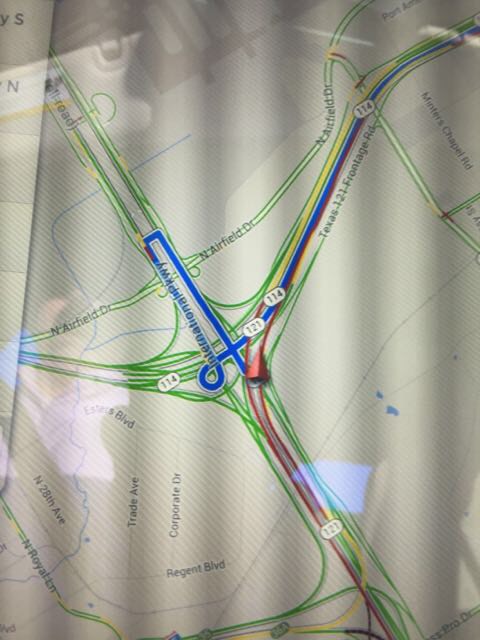
Here's what a typical drives looks like:
 �
�
Jan 3, 2015
bob_p The route provided by the NAV software should be viewed only as advice - and not necessarily the best route - especially when the NAV map may not be up to date. The new version 6 traffic-based routing can help - but again, should only be used as advice, because I sat for several hours in a traffic jam several months ago, when the routing could have avoided it if I'd turned off the freeway just a mile earlier...
And when the NAV and Google maps aren't consistent, the routing can be completely useless because you can see the road on the touchscreen, but the NAV software doesn't have that road and will keep trying to route you to the nearest road on the NAV map.�
Jan 3, 2015
Andyw2100 I wrote to Tesla and received the following response:
--
Thank you for contacting Tesla Motors Technical Support. I appreciate the detailed feedback you have shared with us regarding the navigation system. I can reassure you that our teams at Tesla Motors are aware of this, and we look forward to fixing these concerns in future firmware releases.
If you have any further concerns or questions, please feel free to reach us at [email�protected] or 877-79-TESLA
Regards,
--
So apparently they are aware of the problem. Even so, it probably wouldn't hurt if more people wrote, giving them examples of specific areas where the system malfunctions badly, and also to express concern, so that perhaps fixing the problems becomes a higher priority.�
Jan 3, 2015
jcaspar You can see what it is doing here. Trying to avoid that large section of red ahead. While not direct, it is probably faster based on the navigation algorithm it is using and may even be faster in real life given the amount of heavy traffic you would avoid. If you turn off the "use traffic" option in the app settings, you will get the more direct route thru the heavy traffic.
- - - Updated - - -
Yes, I have had this happen a few times.
�
Jan 3, 2015
Odenator Yup, the nav has also taken me down a mud road, blocked by a sand burm when a perfectly good highway was paralleling my route.
I have also had trouble driving through Vancouver BC with the nav routing me literally in a circle to my destination.�
Jan 3, 2015
RAW84 I just want to echo the sentiments that the navigation is horrendous.
I've turned the nav on whilst driving down a major city street. The nav kept trying to get me to take a right, so I could take some side streets parallel to this major street, then cross over the major street and travel some more side streets. Truly made no sense.
On another occasion, instead of telling me to take the on-ramp to the interstate highway which was coming up on the right, it wanted me to take a left a half mile down the road and ride some side street for a mile or so and then get on the highway at some other point.
I feel bad for anyone who needs to use nav daily.
They really should switch to Google, Google does it so well.�
Jan 3, 2015
bollar Not in this case. It happens every day here and numerous other places -- I just used this example since I was stopped and could safely take the picture. The road I was on doesn't exist on the Navigon side.�
Jan 3, 2015
ecarfan My wife and I use the Model S nav regularly. We find it pretty good, but not perfect. I would certainly not describe it as "horrendous". It is far better than the nav in the 2008 Prius and 2009 Porsche Cayman that we used to drive.
Yes the Model S nav could be better, no question. I would like to be able to drag the route around on the center display in the same way I can in Google Maps in a browser.�
Jan 3, 2015
mdlambert I totally agree. I was in Miami, and it routed me back to Naples on a 2 lane road (which was probably the shortest), but not on I75. I finally had to cancel the navigation, and use my iPhone/Google Maps, to route me to the interstate. The software lacks options such as route choices, fastest routing, toll roads, etc. Certainly not what one would expect for a $135,000 car.�
Jan 3, 2015
HankLloydRight It's bad in other cars too.
My 2010 BMW Z4 and my girlfriend's 2009 BMW 335i both had the "NJ Turnpike" problem that BMW refuses to acknowledge. The problem was that when driving down the NJTP (say to points south), the Nav would direct the driver to get off at every exit (through the tolls), and then loop around and get right back on. EVERY SINGLE EXIT. Luckily, being from New Jersey, I knew these routings were complete garbage, but I suspect it really tripped up A LOT of other people who don't know that road. It was as-if there was a complete road blockage at each exit, necessitating the exit/re-entry at each exit.�
Jan 3, 2015
Cosmacelf My wife's QX56 Infiniti nav works just fine without the crap routes I routinely see on my Model S. Also, while you have to pay for it, they do come out with yearly Nav updates. I've had exactly one nav update (which doesn't help with the poor route selection) in two years of owning my Model S.
I really do hope Tesla is aware of the severity of the nav problems and is working on a fix. But allocating engineers to work on calendar integration while the nav is shot with bugs isn't indicative of a company that is taking nav seriously.�
Jan 3, 2015
Andyw2100 I'd strongly suggest sending a quick note to [email�protected] or to [email�protected], which was the address they asked me to write to in the response they sent me, which I included upthread. I'd also suggest that others who have posted their specific examples of the navigation system malfunctioning in serious ways send that information in. It will probably take you just five to ten minutes to copy your post and modify it a little bit to work it into an appropriately formatted email message. The more people that write in expressing their concern over the problem, the greater the likelihood that Tesla will treat the problem as a high priority issue.
Thanks!�
Jan 3, 2015
castor I think Tesla software development is heavily understaffed, owners have been asking for basic features for ages, servers are going down regularly for the official and third party apps, several regressions are there for long time. I think until Tesla don't increment sales (call it production constrain) they will try to maximize profits instead increment engineering, until then I don't think we will see much of a change for now.
I bet the software upgrade to be released at end of January to increase efficiency on the D version will take many resources.�
Jan 4, 2015
bob_p It appears Tesla's software strategy continues to be focusing on delivering major new features (with basic functionality) and not in going back to previous features and expanding that functionality.
Instead of bringing media playback and navigation up to levels of functionality comparable to other vehicles (or smartphone apps), Tesla appear to continue to prioritize their resources for bringing out new features like "calendar" - again, with limited functionality.
At some point, Tesla should allocate at least a portion of their software resources to addressing the huge (and growing) backlog of requests to expand functionality of the already released features - items such as playlists or waypoints.
And the navigation software really needs a major overhaul. The architecture of using infrequently (and always guaranteed to be obsolete) maps for navigation routing and using up-to-date maps on the touchscreen display should be redone - and have all navigation driven by up-to-date maps - used by both the navigation and touchscreen display. For a car that can have high-speed WiFi connectivity, the concept of annually updated maps doesn't make sense.�
Jan 4, 2015
jerry33 Tesla purchases the Nav software from Navigon. Navigon updates yearly. That's not under Tesla's control. The Google maps used in the 17" display should be up to date.�
Jan 4, 2015
Andyw2100 I'm a little confused by this statement, as it applies to other things I've read here about which system works consistently well.
My understanding, from reading other posts on these forums, is that while the navigation systems, and the information displayed on the 17-inch display is often doing crazy things, and seems somewhat off-base, the directions on the dash are consistent and spot-on. I've been wondering where those would come from if one had a route set through the navigation system that was acting oddly. What I mean is, would the navigation system be giving one set of directions, while the dash was indicating another? That had been the question I was wondering about, but not asking. Now, seeing the above, I am even more confused. Because it sounds like the 17 inch display is Google maps, which is the same, functioning navigation that works just fine on our phones and computers, and that Navigon would be the app we see on the dash, although perhaps it is also responsible somehow for the routing.
Would anyone care to take a shot at explaining how these things interact, and where the big problems are introduced, and if, in fact, there is one aspect of the system that --CAN-- currently be safely relied on or not?
Thanks!
Edit: I just may have figured out a piece of this myself, though I could still use some help with it. Perhaps Google Maps is only supplying the actual maps for the 17 inch display, but none of the routing / navigational information. That would explain why it's not working as well as Google Maps on our phones and computers. Is that right?�
Jan 4, 2015
HankLloydRight My wild-ass guess with no inside information is this: The touchscreen takes the google-searched for location/destination address, and passes that back to the Navigon module. Navigon calculates the route, and then passes back to the touchscreen(Google) maps a set of waypoints to display the route on the touchscreen. I've never seen them differ, and if they do differ, I'd guess that that happens during a route re-calculation in Navigon before it has passed the waypoints to Google maps to draw. It does seem like a Rube Goldberg device patched together that just seems to work "good enough".
What really gets my goat is that NONE of the google maps are cached, and even when navigating the same area, or zooming in or out, it has to re-draw the map from the network. Come on Tesla, how about caching the maps for just ONE DAY? I know Google might have some TOS prohibiting that, but do something to fix it. Over 3G, it's painfully slow to watch the redraw for a map IT JUST DREW 30 seconds ago.�
Jan 4, 2015
jerry33 Correct. Google supplies the background maps and the location search, it then sends the destination information to Navigon. The blue travel line on the 17" display is done by Navigon, not Google. This is easily seen if you are out of 3G range (just drive through Kansas). The maps won't display but the blue line will still be there.�
Jan 4, 2015
PaulusdB Abandoning Navigon altogether is 100% under Tesla Motors' control.�
Jan 4, 2015
Andyw2100 Not necessarily sure I'd want this either, though.
I'm guessing it is Navigon supplying the quite cool information on the dashboard that shows stuff like the graphical depiction of the actual highway signs at various highway intersections, exits, etc., right? In the little I have used the system, I thought that had the potential to be really helpful, if it could be relied on.�
Jan 4, 2015
JohnQ As a point of reference, Navigon was purchased by Garmin at the end of 2011. I've had Navigon on my iDevices for a while; it has provided good navigation on mobile devices as well as on the Tesla. Note that Navigon does offer standard features like "avoid highways," "avoid toll roads" and others, it's just not implemented on the Tesla.
For those interested in really high quality, up-to-date maps, take a look at Open Street Map. It's incredibly un-user friendly for downloading to GPS devices but I much prefer it over Garmin maps (plus it's free) for bike riding.�
Jan 4, 2015
TexasEV I thought the onboard storage originally intended for music was being used to cache the Google maps.�
Jan 4, 2015
HankLloydRight Maybe, put I never see any cached maps. All I see is constant redraws and wait states for data download.
I can't believe the processor is that slow.�
Jan 4, 2015
bollar Not that it really matters, but Navigon makes updates available at least quarterly to their clients.
- - - Updated - - -
Yeah, Navigon is a great standalone product -- If Tesla stays with Navigon, I wish they would implement more of the standard Navigon features (and push updated maps to us on a much more regular basis).�
Jan 5, 2015
Newscutter Andyw2100 -- getting back to the original post-- I think the car was likely trying to keep you on the largest available road on or approximating your route. The initial routing probably kept you on the Thruway until Route 34 -- and then straight south into Ithaca. When you deviated "early" to stay on the west shore of Cayuga Lake, I'm guessing the side roads it kept suggesting were to get you onto Route 96, which is a larger road.
I've seen some strange routes here and there where I have a strong preference to stay OFF the larger roads, but I've also been bailed out a few times. One in particular:
When commuting I routinely used the navigation (on mute!) just to have an approx time of arrival at home/work-- and with my work scheduled in the calendar as a recurring event this is pretty painless to do... one tap I think. Anyway, coming home one night on I279 north of Pittsburgh, I noticed the map directions flicker out of the corner of my eye. They had clearly changed but it wasn't clear why. I normally would pull up the main map to the full center display but in the light fast moving traffic and curvy road I couldn't. As I approached the Camp Horne Rd exit, as far as I could see in the distance around the bend past the exit, the traffic remained light and fast moving. Grr... what to do?? I decided to trust the car despite no clear evidence. The car then directed me onto a smaller secondary road that parallels my usual route and crosses 279 and 79 a couple times in the process. Sure enough, the next glance I had of the highway it was completely stopped and all lanes jammed-- just PAST where I could see when I exited. Meanwhile I was cruising along enjoying the twisty road having barely slowed down from when I left my workplace. Eventually I came across a red light and could confirm on the main display that traffic was SCREWED on the highway. Wow. Each time I crossed the road on my seemingly meandering route, I looked down to see more frozen brake lights and headlights below me-- I assume an accident somewhere that happened AFTER I started my drive but before I exited the highway. In the end, I was home within 5 minutes of my normal arrival. I have no doubt that taking my normal route would have meant a delay of at least an hour, perhaps more.
So, it CAN work... and I've learned to trust the navigation more-- ESPECIALLY when I see it change the routing dynamically.�
Jan 5, 2015
Gizmotoy It does cache maps, but appears to do it for only the current zoom level. It (mostly) uses bitmaps instead of vectors, so when you zoom in/out it needs to re-download the maps. I say "mostly" because it appears they switched to vector-based street names since the names no longer go upside-down when in heading-up mode like they used to.
I can park in my cellular and wifi-free garage and scroll around the map where I've recently been as long as I don't change the zoom level.
The processor is pretty slow, which is why the rotation is choppy in heading-up, and the 3G cellular isn't exactly speedy either. So it's the combination of a lot of stuff.�
Jan 5, 2015
Bill D Your observation of map-cache at the current zoom level would explain the anomalies I've experienced including conflicting directions between the dash & touch screen. The touch screen directions also seem to be cached along with the maps. Changing the zoom level puts the touch screen in sync with the dash, which isn't cached.�
Jan 5, 2015
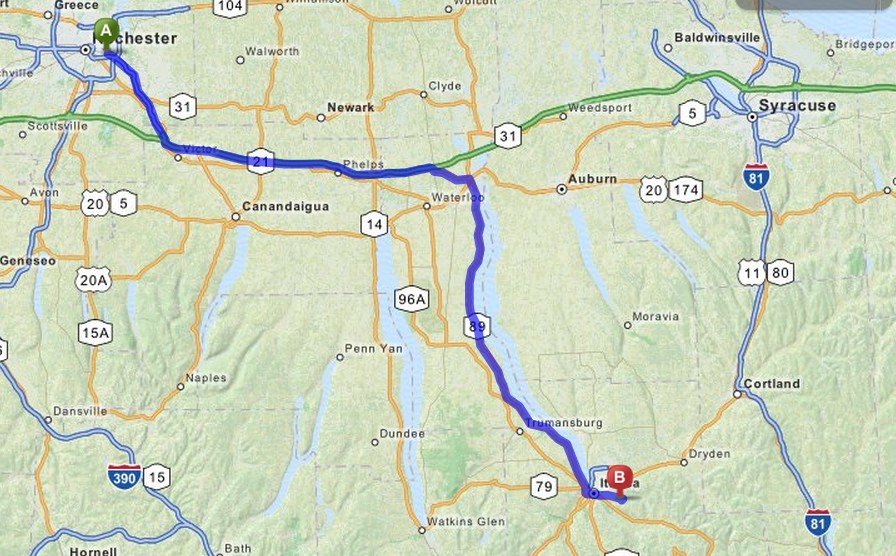
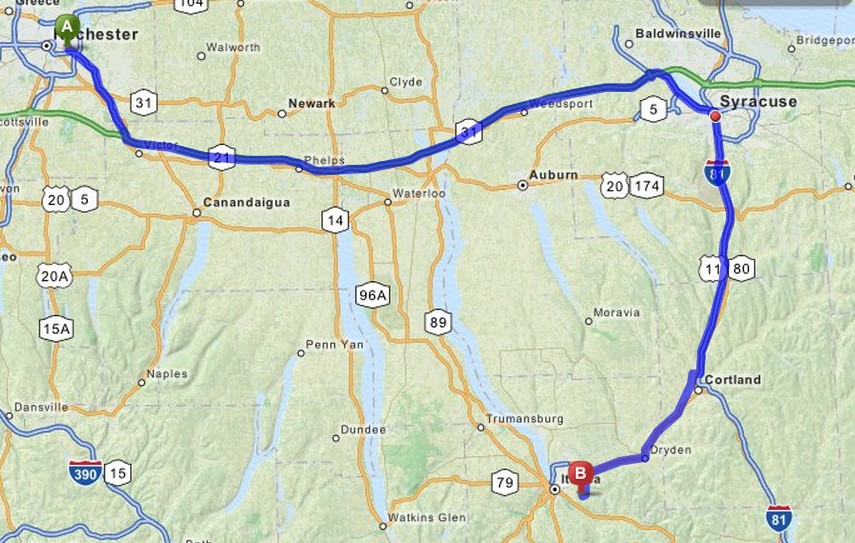
Andyw2100 I agree it was trying to keep me on bigger roads, but too much bigger, and it wanted to take me through Syracuse! I'm attaching Mapquest images of the route I wanted to take (and did take) and the route the navigation system would have had me take. (I'm partially guessing at parts of the navigation system route, but it definitely wanted me to stay on the Thruway through Syracuse. I'm giving it the benefit of the doubt, and taking the most direct route down to Ithaca from Syracuse. It could have had something more bizarre planned for me.)
 �
�
Jan 9, 2015
bhzmark Use waze�
Jan 9, 2015
Andyw2100 That's a really helpful, insightful post. Thanks so much.
I am well aware of other routing options, and mentioned some in my opening post. None of them, however, integrate with the car. Maybe it's just me, but in my mind getting the route right is kind of an important feature for a car's built-in navigation system. Do I think Tesla will eventually get it right? Absolutely! Do I think they have gotten it right yet? Absolutely not. Was my appreciation of the "Use Waze" post sarcastic? I'll leave that as an exercise for the reader.�
Jan 9, 2015
PaulusdB I currently use iPhone Waze in mij Tesla Model S P+ and am perfectly happy with it.
When the onboard nav will be as useful as Waze (or more useful), I'll stop doing that.
So, not in the near future, I fear.�
Jan 9, 2015
alexucf
The sad truth is that the tesla nav is... a bit whacky. Sometimes the map doesn't match the instructions, sometimes the instructions take me off the highway and immediately back on, sometimes they add a ton of distance (presumably to save battery?).
Whatever the reason, if we're really in need of directions we use our iPhone, not the car. Considering it's powered by google maps I have no idea how it's so strikingly inferior to the google maps app. If it's tesla trying to save us battery life, I wish they'd just give us the option to configure the 'mode' of it (shortest time vs. route vs. battery or something)�
Jan 9, 2015
RichardL I wonder if 6.1 improves any of these issues? Haven't seen any comments on that subject as everyone is rushing around using TACC :biggrin:�
Jan 11, 2015
bhzmark Exactly. Until any car implements waze in their on board navigation system I wldnt ever trouble myself with exploring or caring about their crappy nav system.
Everything else is much less useful compared to waze. because of the crowd sourced traffic (and speed trap and road closure etc.) info waze has a monopoly on the best nav info.
In short, use waze.
And use pro clip to hold your phone.�
Jan 11, 2015
RiverBrick Sorry to hear that. Perhaps you should tell them you can't access wi-fi from your parking spot, in case they can push the update in anyway at the Service Center.�
Jan 13, 2015
bollar I'm still having fun with navigation. I got my hopes up yesterday when I got this message:
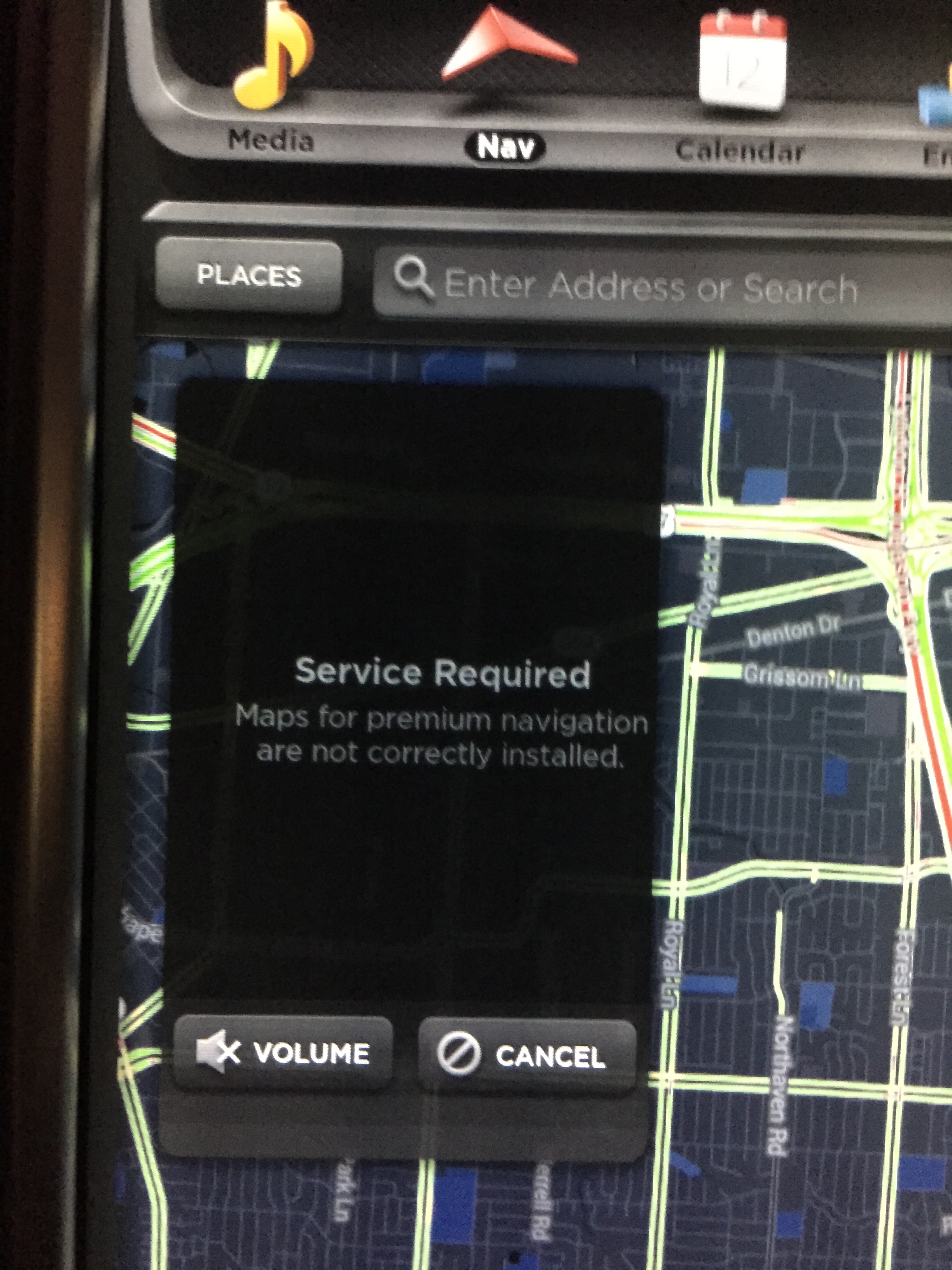
A reboot cleared the error, but I still get routing like this:
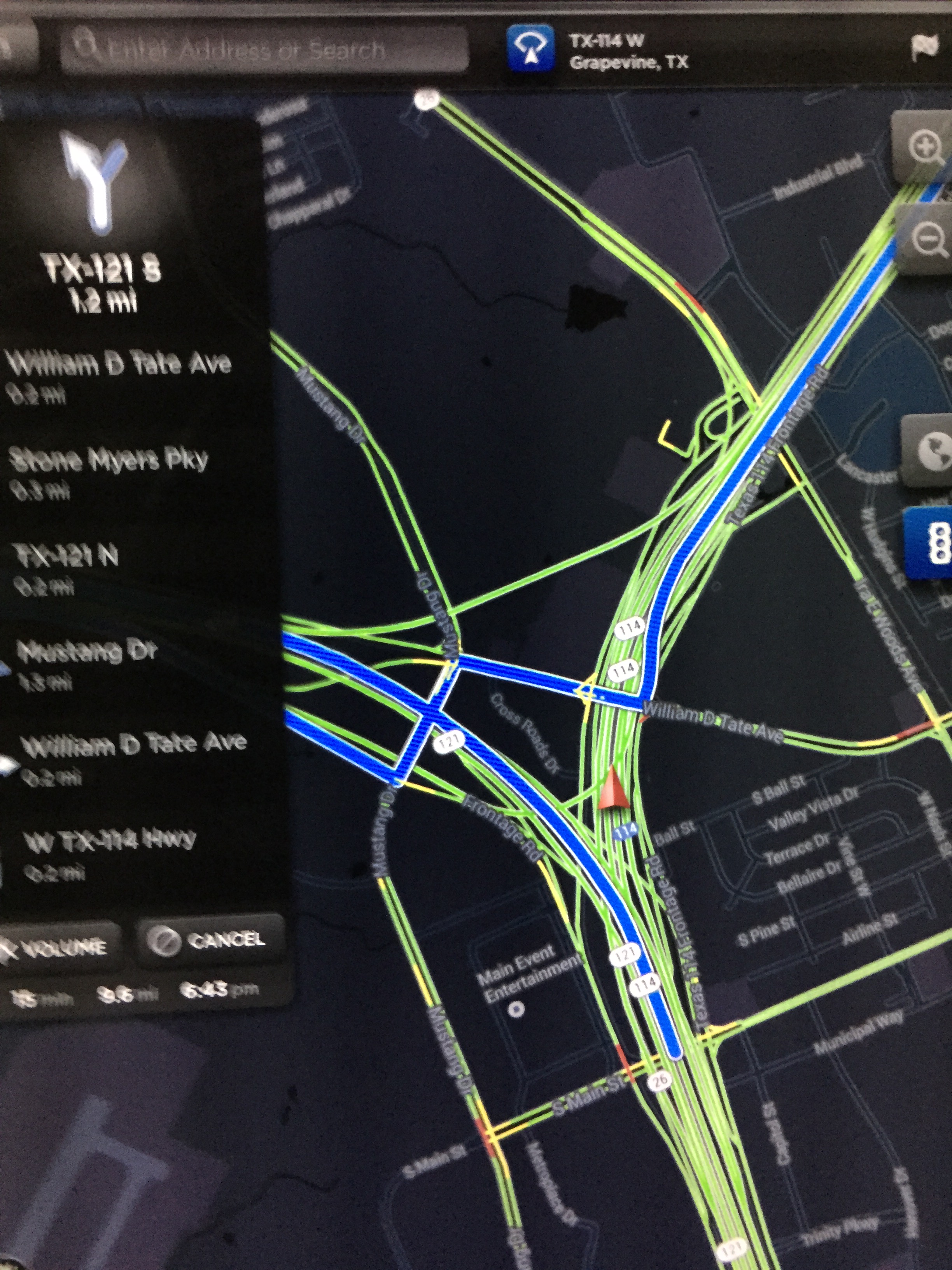
I contacted @service about both issues (again), but haven't heard back.�
Jan 14, 2015
bollar I got the update overnight, so I assume service was able to get an upload queued for me.
As you would expect, the experience is much improved, and all of new roads in this morning's drive were in the database.
On interesting thing is a traffic circle near my house that was completed in 2010 has been added. Previously I had assumed that it wasn't important enough to have in the database, but maybe my maps were a bit older than I thought.�
Jan 14, 2015
RiverBrick I'm glad you got the update. I agree that the experience is much improved. The system no longer directs people to take a ferry near me after hours when the ship is docked for the night. Further investigation is needed to see if they've simply updated the ferry's operating hours, or if the algorithm is now less likely to favor ferries. Obviously, it should give you a choice.�
Jan 15, 2015
neroden Andy: as another Ithacan, I can confirm that the navigation system is really terrible, at least for this area.
The maps (being Google Maps) are fine, though. Since I am better at navigating than any automated nav system I've ever seen, it just didn't bother me. I just pull up the maps, and make my own navigation plans.
Warning: the maps don't download properly in Canada. This caught me off guard. Carry paper maps for Canada.
P.S. 89, really? The fastest route is 96A.�
Jan 15, 2015
mrElbe The Nav calculation probably resulted in a few seconds faster routing via Syracuse and down Interstate 81 to Cortland. That is one of the problems of all Nav systems when one specifies fastest route.�
Jan 15, 2015
Andyw2100 I'm not worried about it in this area for myself, but rather for my wife, who is new to the area, and often relies on navigation, even when she should know how to get around. She won't be doing that in the Tesla, at least for now.
As for 89 vs. 96, going up I wanted the more scenic route. Mapquest actually recommends it over 96, so I can't imagine the time difference is great, though I've taken 96 as well. Coming back down was a no-brainer, as we were having New Year's Eve Dinner at Taughannock Farms Inn. I probably could have taken 96 and cut across somewhere, but 89 seemed simpler, and a more enjoyable route to take the brand new Tesla on.
Going all the way to Syracuse, and then coming down Route 81 is a pretty poor choice, any way you look at it!�
Jan 15, 2015
JohnQ Curious about your Canada comment ... I didn't have any problems there, can you explain your experience? Was it a roaming issue?�
Jan 15, 2015
RiverBrick Someone reported a couple of months ago that 3G in their US-spec Model S was working in Canada. I didn't follow the thread to learn if it was just for them, just for recent VINs, or for everybody.
- - - Updated - - -
Was your visit recent? Apparently, all North-American cars were given a US 3G plan, but only Canadians were given "roaming" in Canada.�
Jan 15, 2015
JohnQ End of Sept 2014. I had loaded my future destinations into nav ahead of time assuming that I would lose 3G service and have to rely on the onboard navigation without Google Maps. It did cut out for about 2-3 minutes then reloaded indicating I was roaming. I had full 3G service including browser. Other responses on another thread indicated similar experiences. Curious as to neroden's experience to see if it was a while ago, when US based vehicles didn't roam in Canada or very recent, in which case my experience might have been temporary.�
Jan 18, 2015
Woland I've used nav twice since I took delivery 10 days ago and both times it wanted to take me (according to its own prediction once I manually drove the optimal route, ignoring its recommendation) 14 minutes longer on a 38 minute trip from Woodinville to downtown Seattle. It wanted me to go on side streets a long ways to highway 405 (I'm as far from 405 as you can get in Woodinville, but quite close to highway 520) and then take highway 90 and take surface streets a long ways. I ignored it, went Avondale to 520 and got to my destination 14 minutes sooner than its running estimation (and constant requests for u-turns) for its suggested route. Had I not known better I would have wasted a lot of time and energy.�
Jan 20, 2015
Supercharged What it needs is waypoint driving and the ability to avoid toll roads etc.
I fail to understand why it can't do that now.
What I have to do now is navigate to destination B from starting point A, and then re program it to go to destination C from B.
A royal pain plus its not necessarily getting me to point C the fastest way because it thinks originally that i want to go to B as destination. I'm sure there are faster ways to get to C if waypoint navigation was there.
If you ask me, this should have been a priority two years ago!�
Jan 20, 2015
jerry33 At the very least it needs avoid toll roads.�
Jan 23, 2015
bhzmark Try waze. You will never go back to, or care about, any other nav system.�
Jan 23, 2015
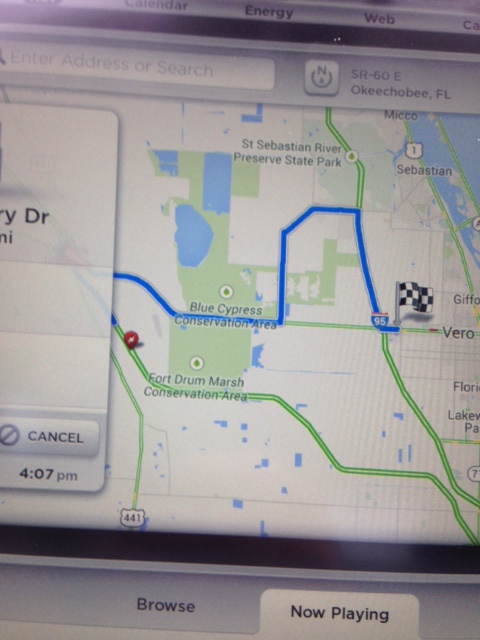
HankLloydRight Some more crazy routing in central Florida.
 �
�
Jan 24, 2015
Thedrifter5 Unhappy with Navigation
Love my model s. But the navigation system is terrible. The directions are wrong more often than they are right. Bizarre for a tech company. Anyone know if there's an upgrade or fix planned?�
Jan 24, 2015
NigelM You might want to be more specific what you're unhappy about. The navigon dash maps or the center screen or both? There is apparently a map update rolling out very slowly for the navigon system; the center screen uses Google Maps.�
Jan 24, 2015
Zythryn In my case it works great, I'm sorry you are experiencing trouble with it.
Have you told Tesla?
I guarantee you telling Tesla your concerns has a better chance of getting something accomplished more than telling us;-)
Specifics are good too, for telling us or Tesla.�
Jan 24, 2015
wayner My main issue is that it doesn't seem to take traffic into effect when predicting arrival time. It is always saying I will get there well before I do, unlike Waze which is almost always right.
We need third party Nav apps - like Waze.�
Jan 24, 2015
jerry33 I've found the ETA predictions to be within a few minutes on any substantial drive. I've never checked to see how it was on a drive of just a few miles.�
Jan 24, 2015
mackgoo Works excellent for me. I'm always using just to get the ETA and Battery remaining.�
Jan 24, 2015
wayner These are on my daily commutes where my actual time is generally 1.5-2 X the "no traffic" time. It shows traffic on the map but doesn't seem to properly account for it in the ETA. Maybe this is just a Canadian thing?�
Jan 24, 2015
Thedrifter5 The big issue is that destination information is often inaccurate. Sometimes by a few hundred feet. Sometimes by a few miles. But the display is also wanting. Compare to waze or even tomtom.�
Jan 24, 2015
TES-E I use navigation quite frequently and I have no problems with it. Love the new range estimation feature.�
Jan 24, 2015
Andyw2100 I had started a similar thread a couple of weeks ago. It's here:
Afraid to trust navigation system
Many people agree that there are significant issues with the current navigation system. Anyone experiencing these issues should write to Tesla at [email�protected]
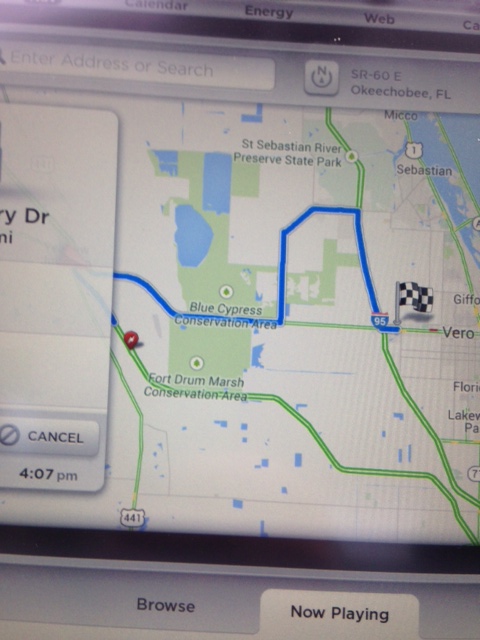
For anyone who doubts the navigation system makes mistakes, below is the most recent post in the other thread. (Be sure to look at the image if only a link to the image appears.):
Picture from other post, to make this easy:
 �
�
Jan 24, 2015
redox I don't trust it that much either as it sometimes gives me very weird routes...
It's a bit ironic that the "beat the traffic" wouldn't work as well as Waze, since Google did acquire Waze a while back I think, but I do experience the same thing (and end up pulling out Waze on my cell).
-- Greg�
Jan 24, 2015
tomanik The navigation system does seem to take traffic considerations into account. However my problem with it is it he opposite, as I'm often home >10 minutes faster than it first calculates, quite a bit off for a 30 minute drive. The unfortunate part about this is that it makes the alternate suggestions useless for me as they are often slower.�
Jan 24, 2015
Zythryn I don't think anyone doubts that navigation doesn't make any errors.
It is just that when people say a blanket statement like "navigation is terrible", other people that have found navigation to work well want to let people know this isn't a universal complaint.
Additionally, it is important to notify Tesla of any such errors, as you noted.�
Jan 24, 2015
jerry33 I can't say I've had any trouble with the destination other than the normal GPS errors that occur with any navigation system. The main problem is that you can't select avoid toll roads, so it's always trying to get you to take one. It's like Tesla gets a kickback (yes, I know they don't, but when it wants to route you to a toll road every two blocks, it sure seems like it).�
Jan 24, 2015
NigelM Noted, thanks. Threads merged.�
Jan 24, 2015
TES-E That looks exactly like Google maps knows that section of road exists, but the navigation software does not. They are not the same. I have seen the same thing happen when I used an old navigation system that was out of date. It wanted to route me in a round about manner, but since I knew the road existed, I used it anyway. Once I 'rejoined' the route, everything returned to normal.�
Jan 24, 2015
capt601 Don't forget the google map and Nav are two entirely different functions. You are showing the Google map view , which is not the navigation. And not necessarily what the navigation will do.
�
Jan 24, 2015
HankLloydRight Rt 60 which is the east/west road has been there for decades... It's not a new road. There was no traffic at all. There's no possible reason the Nav should have routed around that segment. What's interesting is that while driving the Nav would toggle between that route and the direct route, but then finally settled on the non-direct route until I got past the indicated turn off point.. Then it used the direct route for the remainder of the route... So it does know it's a valid road. I wish I knew *why* if chose to do the roundabout diversion.�
Jan 24, 2015
Cosmacelf Yes, behavior like that (which I've often encountered myself) makes me think that the Tesla routing software has bugs in it. While Tesla relies on Google maps, it is actual Tesla code that figures out the route to use.�
Jan 25, 2015
jerry33 That doesn't mean the Navigon software actually has it. The Denso (Toyota) system has these types of errors as well.�
Jan 25, 2015
HankLloydRight It did know about the road, since it did use it once I got past the indicated turn off point.�
Jan 25, 2015
mibaro2 Anytime I get a really bad navigation map, I log a bug fix to Tesla. I believe it takes a screenshot of my centre console at the time I report the bug. I'm not sure if this is better than sending an email to Tesla.�
Jan 25, 2015
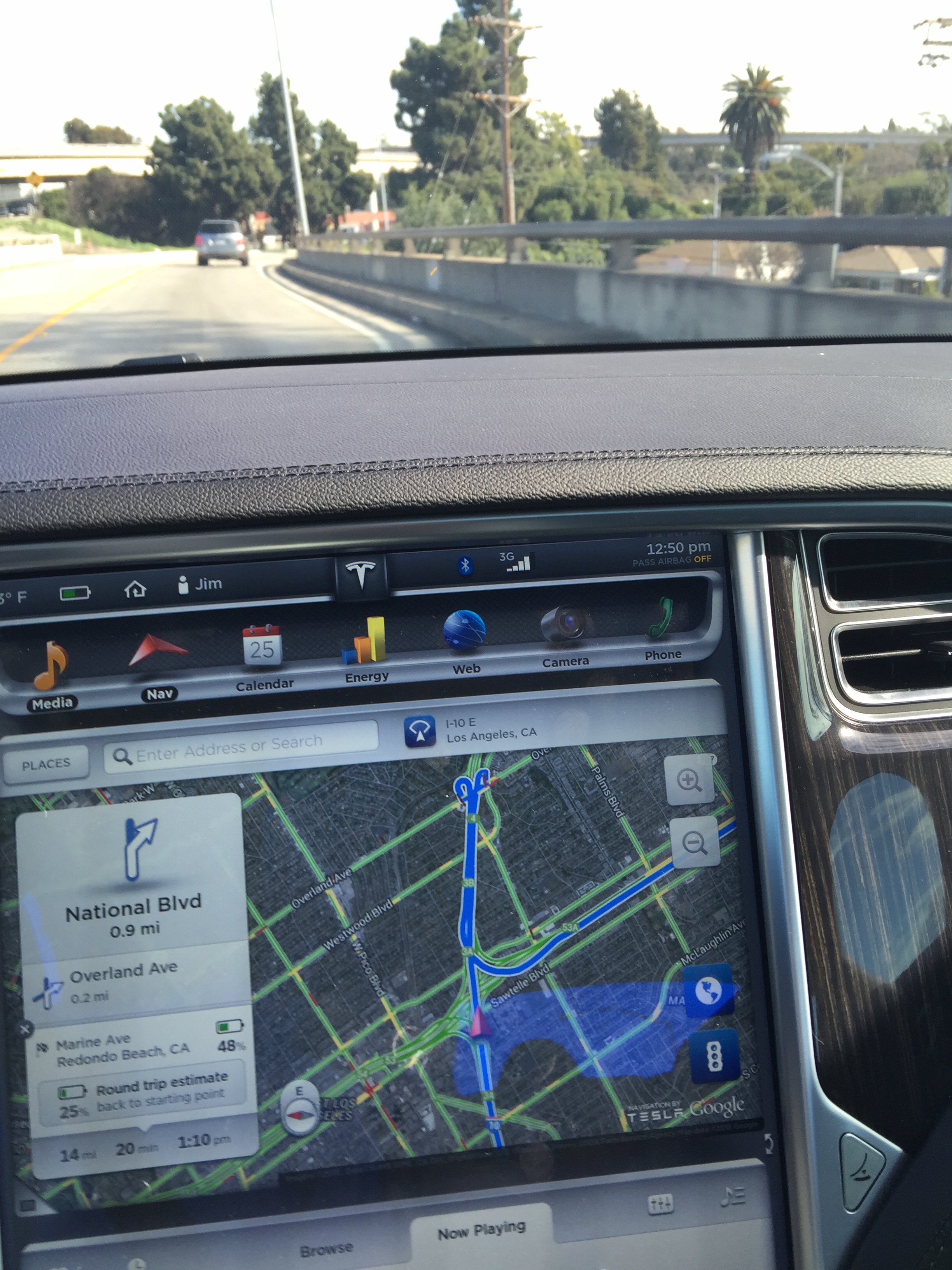
Lump I wasn't able to report the nav error thru the car so I will post it here, happened today in my car & last Thanksgiving a loaner that had the whiter looking map.
Traveling E on the I-10 to the 405 S there is a interchange but Tesla Nav doesn't know about it, first it wants you to exit the freeway at Centinela & take side streets then get back on the 405 S, this takes twice as long
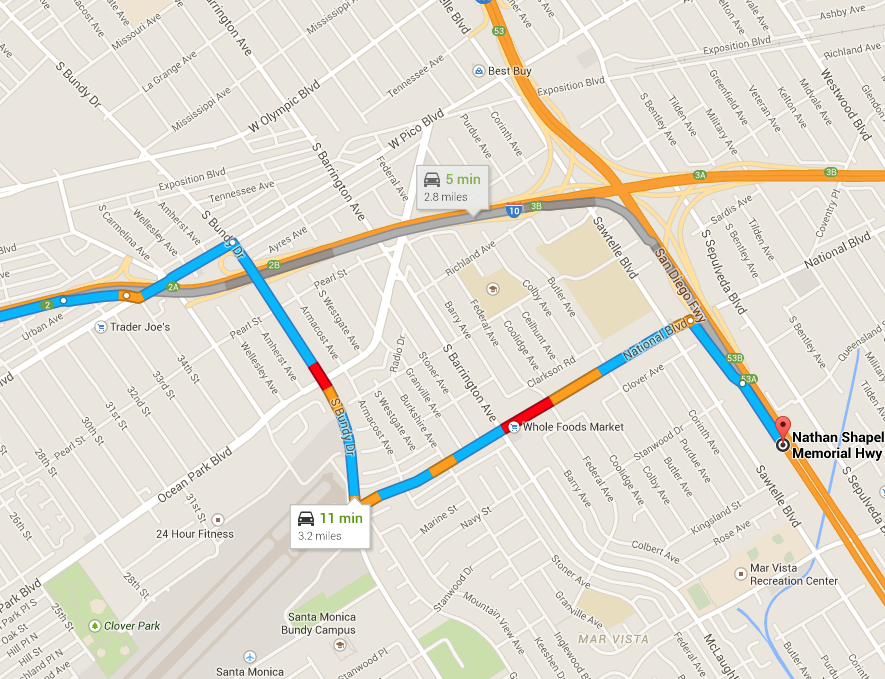
Obviously you don't exit so then it wants you to take this crazy route
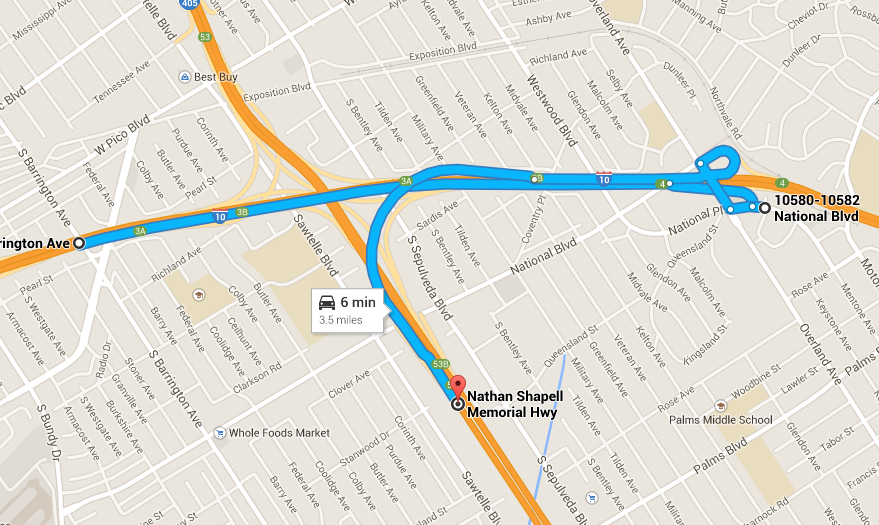
In this last pic I am already on the interchange but Nav just doesn't have it
 �
�
Jan 25, 2015
kabirakhtar another detail about the nav - voice guidance is typically late. she'll say "turn right on X street" right after i pass it. i've had waze running side by side with the nav, and obviously waze is much better in every way, including that it tells me to turn BEFORE i pass my turn.
6.2, anyone?�
Jan 28, 2015
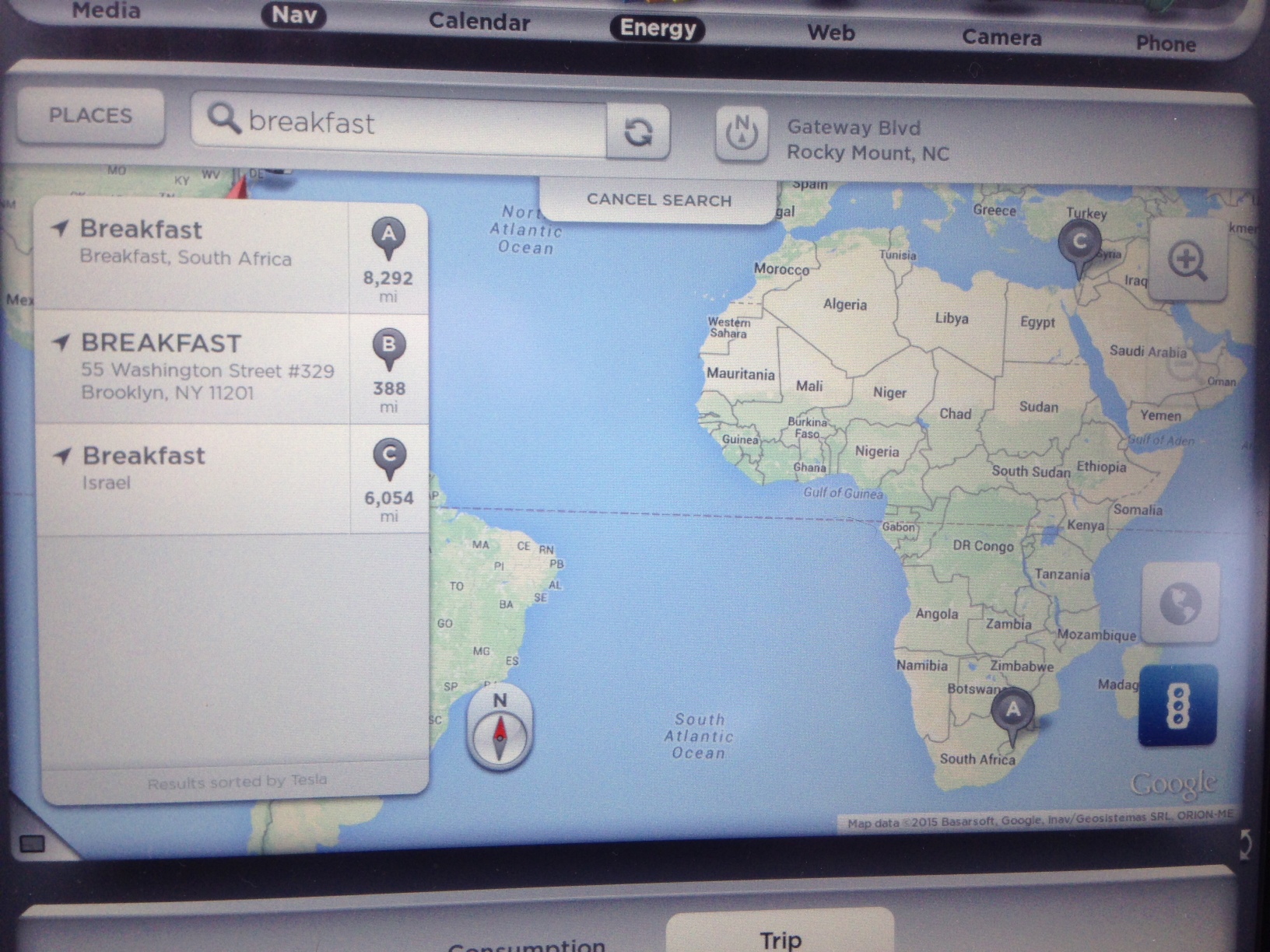
HankLloydRight So I was supercharging at Rocky Mount yesterday morning, and wanted to find some breakfast. So I typed in "breakfast' into the nav, and this is what I got. I think I'll need a range charge.
 �
�
Jan 28, 2015
Dborn You obviously annoyed her. So, she got back at you!! Now you have to wash her - in winter!!�
Jan 31, 2015
stevej119 I just returned last night on a 1600 mile round trip from Northern California to Tempe, AZ. At the last moment when leaving the Tejon Ranch SC just north of The Grapevine, I decided to route through the Atascadero SC instead of Harris Ranch. I made the mistake of using the Tesla navigation to get me there. It routed us over Highway 58 which is definitely not the route people drive to get to Atascadero. I'm actually glad we went that way because the scenery was incredible, but it would have been both scary and dangerous to cross over the mountain at night with the tight turns with no guardrails. Didn't see another vehicle of any kind for miles and miles and miles. It dropped us into a beautiful valley on the other side from which we saw an incredible view as the sun was setting. An hour later, though, and it would have just been a narrow, twisty, dangerous road in the dark.
I may be wrong, but I think the nav routing got worse since 6.1. From my house if I route a trip south down Highway 101 it now tells me to drive 50 miles on a twisty road to get to highway 101 rather than taking a route which may be a few miles longer, but much quicker.�
Jan 31, 2015
DCWitt This is a pic of nav when I was exiting Country Club Hills supercharger to go southbound on I 57. This is just one example of the MANY times Tesla nav has presented very convoluted directions. I think Tesla should just implement Waze and quit burning valuable time trying to reinvent navigation.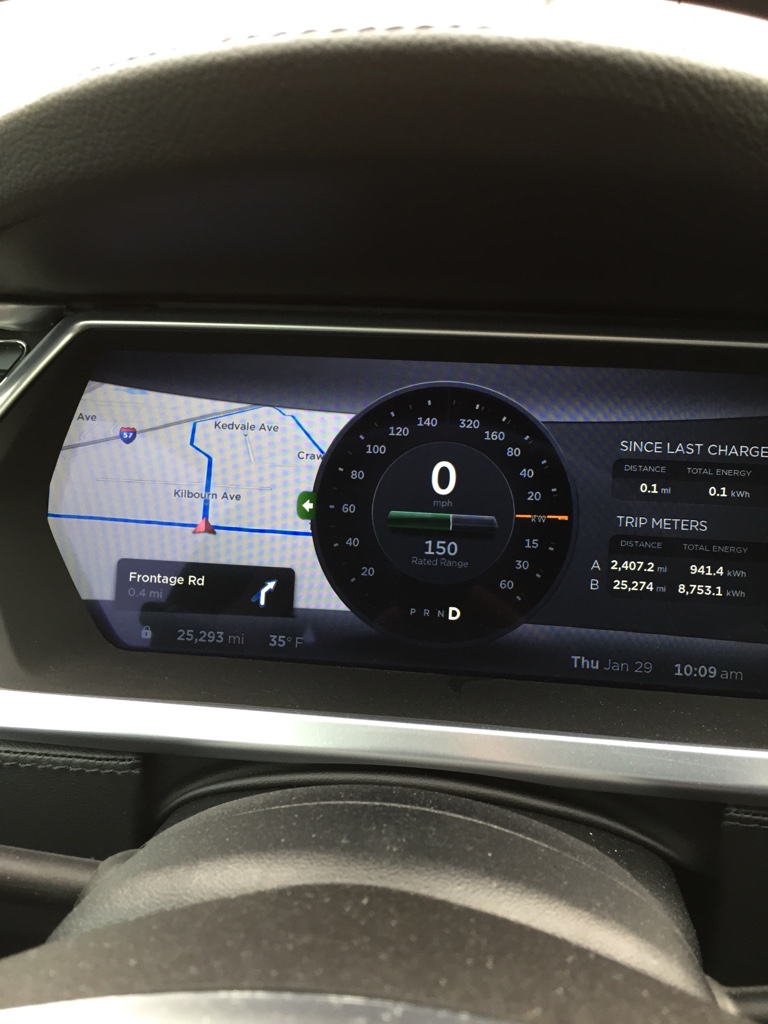 �
�
Jan 31, 2015
jerry33 The Nav system always seems to take freeways and toll roads whenever possible--even if it's out of the way. I guess those roads have a weighting of ten and all others have a rating of one.�
Jun 29, 2015
Larry Steve
I was coming home to the Bay Area last night from Pismo and the Nav routed me this way to avoid a lot of traffic. Incredible scenery! Would not have been fun in the dark however.
i did encounter a concerning glitch in the Nav on the way to Pismo. I left the Gilroy SC to get to Pismo with a stop to top off in Atascadero which is about 136 miles, Pismo is 166 miles. I left Gilroy with 200 miles. About halfway the system kept telling me to u turn and go back to Gilroy as it determined I didn't have enough range even tho I had plenty. I called Tesla thinking Atascadero might be down but nope it's a bug in the Nav where it over buffers your range then freaks out as it thinks you don't have enough. The other weird thing it did was show 139 miles to Atascadero and 139 miles to Pismo as it was freaked out over the buffer. If I didn't know better I could have looked at the Nav and just thought I had 139 miles to Pismo-I would have been stranded and pissed.
They need to fix it or do something else, too many complaints.�
Jun 30, 2015
dvroegop It is buggy to say the least. Unfortunately, since Google took over Waze (and Google hates Windows Phone) they stopped the WP support so no Waze for me anymore.
I have seen some strange behavior every now and then in the nav but I've learned to live with it.�

Không có nhận xét nào:
Đăng nhận xét