Jan 27, 2013
ChadS
First, a note for EV newcomers
The math below is just geeky fun. It is NOT an essential part of owning a plug-in vehicle; if you find it boring, ignore it. Driving electric really is simple. Here�s all you need to know to start using a plug-in without ever doing any range calculations or having to worry about hypermiling:
1. Buy a plug-in hybrid, like the Chevy Volt, Ford Fusion or C-Max, Fisker Karma, etc. They are still gas cars, so they drive just like a gas car on a trip. No thinking ever required.
- OR -
2. If you want to use even less gas, do less maintenance and save more money on a full battery-electric, look at the EPA range rating (not the higher marketing number. For example, Nissan often says the Leaf can go 100 miles. Tesla sometimes says the Model S can go over 300 miles. But the EPA ratings are 73 and 265). Now, subtract my magic-rule-of-thumb 1/3 to account for really bad weather or really high speeds (presumably you won�t do both at the same time). That leaves 49 miles for the Leaf, and 177 miles for the 85kWh Model S.
Those are numbers you can �count on� in your new car. Obviously you can do worse if you take it to the track or something, but as long as you aren�t trying to fail and really want to get somewhere, you will be able to go at least that far - and much farther once you get used to it. You can take the car on any trip of that length without worrying or doing math; so just make sure your next Model S charging stop is never more than 177 miles away. Math is only required if you want to go farther than that without stopping to charge.
After several (5-10) years the battery will lose some capacity, so we need to account for that too. Of course by then you�ll have lots more experience and will be comfortable taking the car on longer trips; but if you have a long commute and want to make sure the car you buy will ALWAYS work for you without ANY planning or charging, then take 70% of the number above. That puts the Leaf down to 34 miles, and the 85kWh Model S down to 124 miles. If you have to drive farther than that, don�t have another car for those long trips, don't want to rent, won�t ever be able to charge, and don�t want to buy a new battery, then you will be more interested in a plug-in hybrid.
?
Let the math begin
OK, now that we are only left with people that WANT to go through the math, here are some numbers for calculating how far you can get in your Model S. The more you understand the car, the farther (and more often) you can take it rather than your old gas car that you really don�t want to drive anymore.
Spoiler: you can skip all the math if you always plan charging stops within 2/3 of the EPA range of your car - unless you're racing up a mountain, you will make it (although it's always wise to plan an extra 20 mile buffer or so, just in case the charger is unusable!). For the 85kWh car, that's 177 miles. For 60kWh it's 139 miles, and for 40kWh it's 95.
The math is not complicated - it's just adding percentages together to see how it compares to rated range. At 100%, you should by definition expect the rated range and a 200-mile trip should be easy, leaving you with 65 miles left over. But if you add in, say extra speed and cold weather to get 133% of rated miles, that means your 200-mile trip will take 266 miles of rated miles - and you will likely not make it. Plan a charging stop.
When planning a trip in advance, I don't know what the weather is going to be and so I plan for the worst and never have charging points be more than 177 miles apart - the longest drive with no charging in my Death Valley trip was 175 miles, and even there I had a plan for a place to charge in the middle if things went bad. You can make assumptions and plan it closer than this, but in my experience that just adds stress. On the day of the trip, I know a lot more about conditions and so I can make adjustments - sometimes, for example, I take off from a charging stop before charging all the way because I know the buffer is much larger than it needs to be. Or sometimes I drive faster just because I know I have the extra range.
Range number origins
The Model S 85kWh is rated by the EPA to go 265 miles per charge. That rating comes from a complex test that includes city driving, speeding up and slowing down, etc. But when calculating range, most people are concerned about steady driving on the freeway. From Tesla�s numbers, 265 is roughly what you�d expect going 60mph on dry level ground with 19� wheels and a small amount of HVAC use (outside temps of, say, 55 or 90). 300 miles is what you�d expect going 55mph on dry level ground at 70 degrees with no HVAC.
The EPA number is a good number to use to compare vehicles. But it�s not a good number to use to tell how far you�re going to go on any specific trip. That�s why I wish EV battery indicators simply gave the % of the battery left, rather than a number of miles which is just the battery % multiplied by some factor that they don�t explain clearly and may not apply. It is true that new owners will find it confusing; but after a few weeks of using the car, it is much better information. New 85kWh Model S owners could simply be told to figure they�ll usually get 2 miles or so per percent of battery; perhaps up to 3 miles if they drive carefully in ideal conditions.
All of the numbers I'm going to use below assume you are taking a long trip. When you take short trips, initial HVAC load may be a much higher percentage. However, that is often balanced out by much lower speeds as well as the far greater unlikelihood of putting on more than 177 miles in the day. Short trips in a long-range car generally don't need calculations (people with short-range BEVs do these calculations more often; but it's not a big deal for them once they are used to the car because with short-range cars you typically make the same trips over and over, so you soon "know" if you can make it or not and can skip the calculations). Note that around-town consumption is often lower in BEVs because of the much lower speeds; but may well be higher in the Model S because of the much greater than average weight that needs to be accelerated from every stop, plus the awful temptation to take advantage of all the available acceleration.
Range calculators
Tesla�s range calculator is attractive and easy to use. It seems to be pretty accurate. It says that if you go 65mph on level dry ground with HVAC on at 32 degrees, you will get 218 miles. That�s using 118% of rated miles to go 5mph faster and use more HVAC. But what if you go even faster than 65? What if it�s colder than 32 degrees? What if there is rain or snow on the ground? What about elevation changes? I asked Tesla to add these items to their calculator long ago, but no word on when or if they will.
HERE is another calculator that takes elevation in to account, and allows a wider range of speeds to be entered. But it doesn�t account for weather or road conditions at all.
Somewhere on these forums I saw mention of yet another calculator that sounds interesting, but it is Mac-only and I don�t have a Mac so I have not been able to try it. (EFusco found it for me: it's HERE).
Update Mar 2013: a Model S owner (Cliff Hannel on these forums) has been building his own version HERE. Forum thread HERE. It is not finished yet, but it appears to consider all of the relevant factors (speed, temperature, elevation, etc) except road conditions. This would be a great web page to have saved in your car's web browser.
Real-world experience
Tesla's consumption documentation and the calculators were a great place to start. But I had to extrapolate some of the numbers, and add in some real-world EV experience for things they did not address. In addition to a Prius I turned in to a PHEV in 2008, and a Toyota RAV4-EV I bought in 2009, and a Tesla Roadster I bought in 2009, my wife and I have been keeping track of numbers on our Model S that we received in September. We now have 7,000 miles on the car, and recently returned from a 3,000 mile trip.
Do not take these numbers as gospel! They seem to work pretty well for me, but I have done a lot of strange and varied things to get them. Several of them are really just guesses. I look forward to hearing from people that have thoughts on refining the numbers. Try 'em out and see if they work for you.
Numbers from our trip are below, but first here are some factors that I consider when estimating range.
Speed
This is the largest factor that you have control of. (Acceleration could be a far greater factor if you did it a lot; but it is typically of very short duration on a road trip). If you are ever in trouble, slow down. But if you plan, hopefully you will never be in trouble as your next charging point will always be easily in range.
I sometimes slow down to be more efficient; especially if my next charging stop is a slow one - going slower can reduce your wait at the next charging station. But I always plan my charging stops to be close enough that I never have to slow down to make sure I will make it. Worries about "having to drive a BEV slow" and "sweating bullets about making the next charging point" are overblown - don't push the limits, and it will never be a problem.
45mph -26% 55 -8% 60 100% of rated range (at 70 degrees with miniscule HVAC) 65 +8% 75 +26%
Temperature
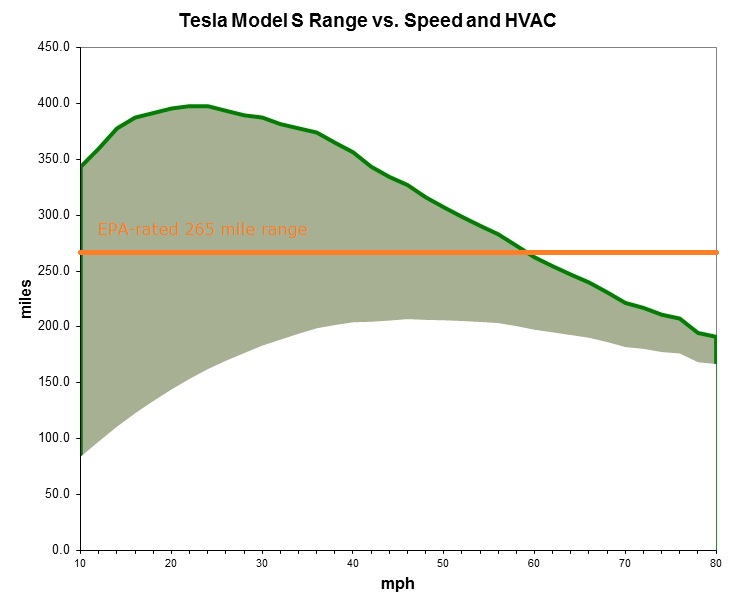
At full blast, HVAC pulls about 7.5kW. What % hit that is depends on how fast you are going. And of course you will not usually have it on full blast. AC takes less than heat (at 90 degrees Tesla says the range is the same as 70; Model S batteries must like it a little warmer than Roadster batteries). But at 60 � 75mph freeway speeds, 30% would probably be the upper end. It appears about 1/3 of this hit happens even with HVAC off, so that�s the portion to manage the batteries. Because the HVAC draw is time-based rather than mile-based, these percentages should be slightly higher for lower speeds and slightly lower for higher speeds, but I haven�t taken the time to do the adjustments here.
If you ever get in trouble (again, plan for the worst case and you shouldn't) and the weather is extreme, you can turn the HVAC off and that can save quite a bit. It can be very unpleasant however, especially if you have a spouse grumbling about it the whole time. Also note that you only save 2/3 of the numbers below by doing that, as the car will keep conditioning the batteries.
A couple of times (when my wife is not with me) I have turned down the heat to be more efficient; especially if my next charging stop is a slow one - using less heat can reduce your wait at the next charging station. But I always plan my charging stops to be close enough that I never have to turn off the heater just to make sure I will make it. Worries about "being unable to use heat" and "sweating bullets about making the next charging point" are overblown.
15 degrees F +25% 32 +13% 50 +7% 70 100% of rated range (HVAC on, but barely in use) 100 +7% 120 +13%
Update: Fleetcarma.com just released some data on how temperature affects the Leaf's range. Of course it's a different chemistry with no thermal management on the pack, so the numbers will be different, but it is still interesting. It too gets near-max range in 70 - 90 degree weather. 32 degrees seems to take off about 20%, and 15 degrees takes off about 30%. Those are bigger hits than on the Model S, but this was measured on the older Leaf that uses a resistive heater; the 2013 will have a heat pump. At -13 it took off about 40% (the cabin heater, which is not terribly strong, probably maxed out at around 15-20 degrees; but the pack heater kicks in at 14 degrees so greater draw continues). 100 degrees only seems to take off a percentage or two, but you can see the curve is getting sharper around there.
Elevation
Other EVs (Roadsters and RAV4-EV's) use 7 miles up and 4 miles down; but the Model S is heavier. Subtract 10 miles for every 1000� of elevation gain. Add 6 miles for every 1000� of elevation loss. There�s probably no getting around the numbers for elevation gain, but there could easily be variation in the numbers for elevation loss � it depends on how fast you are going, how gradual the loss is, how much regen and wind resistance affect your speed, etc. Gain and loss numbers could both be larger if you carry more weight in your car.
Note that these are the number of miles to add or subtract, so you have to divide by the length of the trip to get a percentage. Ideally you should count ALL of the ups and downs on the trips; although I generally just look at the net elevation change, and any major passes along the way.
Road conditions
Stuff on the road (could be sand, rocks, garbage, varying pavement quality, or what have you; but most often rain and snow) obviously slows the car down � just FEEL how your car slows down when you�re coasting on the freeway and hit a puddle. I know from experience that stuff on the road makes a difference, but these numbers are really just guesses. They do seem to roughly fit the data, though.
Clear and dry 100% of rated range Wet roadway +2% Standing water +10% Light snow +15% Heavy snow +25%
Cold-soak recovery
This is very speculative*. But a few people that have driven their cars to low levels in dropping temperatures have gotten warnings that the number of miles remaining may suddenly drop. And many people have reported that if you leave the car sit overnight without being plugged in, a lot of miles (say, 10 - 30) may disappear. A couple of people have further noticed that if you get in that cold car that has lost miles and drive it, some of the miles seem to �come back� - they use fewer rated miles than expected to get to their destination.
It is possible that to protect the batteries, in colder weather the car may hide a certain percentage of the battery�s remaining energy, or of its total energy capacity. (It is also possible that it lists a lower number of miles assuming lower efficiency or more pack warming; but I think that less likely and doesn�t fit anecdotal reports quite as well). As the car warms up, some of the hidden energy may reappear. But how much, and at what temperatures? I don�t have nearly enough data to say with any certainty; this only happened to me a couple of times on this trip. But a 49-mile trip after a cold soak ended up doing about 4 miles better than expected as temps rose from 29 to 33 (that trip started at 173 rated miles, after losing 10-15 from the night before). A 70-mile trip after a cold soak did about 18 miles better than expected as temps rose from 30 to 42 (starting at 126 rated miles after losing 24 from the night before).
Fortunately it looks like the recovery roughly counteracts any phantom losses during the night; if so this may not be a measurable factor (except when you do your math based on the lower cold-morning numbers; but in that case it improves your numbers, so no harm done).
*UPDATE: This is a little less speculative now. Consumer Reports ran in to this (losing 30 miles overnight), and Tesla confirmed that the car "readjusts" range in freezing weather, and that it will sneak back as the car warms up. They didn't give exact amounts or say at what temps; but for simplicity's sake (and because it matches my data and what I've heard from others) I will guess the car really only loses 4 miles overnight in cold weather. If you check in the morning and it's below freezing, you will appear to have lost an additional 10 - 20 miles perhaps depending on the temperature delta. Those miles will, I assume, all come back if you get well over freezing; but you might only get, say, half of them back if you're still close to freezing. I'm not really confident in those numbers, but they fit the data we have so far.
Wind
Wind can affect you just as much as speed; it�s wind resistance that causes the drag. However it can help as much as hinder, is difficult to measure from inside the car, usually is not strong enough to be a large factor, and even when it is strong it typically doesn�t last the whole trip. So I haven�t accounted for wind here; but it�s entirely possible that it is responsible for a large bit of the differences between my expected and actual energy use. Wind has never caused me to run out of power in an EV, but the only time I ever ran out of gas in an ICE was because of a serious headwind in South Dakota that affected my mpg much more than I expected (I think I normally got 30-35mpg, but got just over 20mpg on that trip and fell short of the city I was planning to buy gas in).
Miscellaneous
Random other factors that can affect performance.
An early version of the calculator gave a much smaller loss (roughly 2.5%) due to the 21� wheels. I am not sure why the number is so much larger now.
Headlights and other 12V loads are minuscule. I don�t bother to calculate them at all.
21" wheels instead of 19" wheels +6% Attaching pizza pans to your wheels -6.5% Rolling down the windows +4% Turning on headlights +0.25%
Applying it all to a real trip
Here are numbers from our 3,000 mile trip from Seattle to Death Valley in mid-Jan 2013. The first important number is 0; that's how much I spent on fuel for this trip. All of the chargers are free.
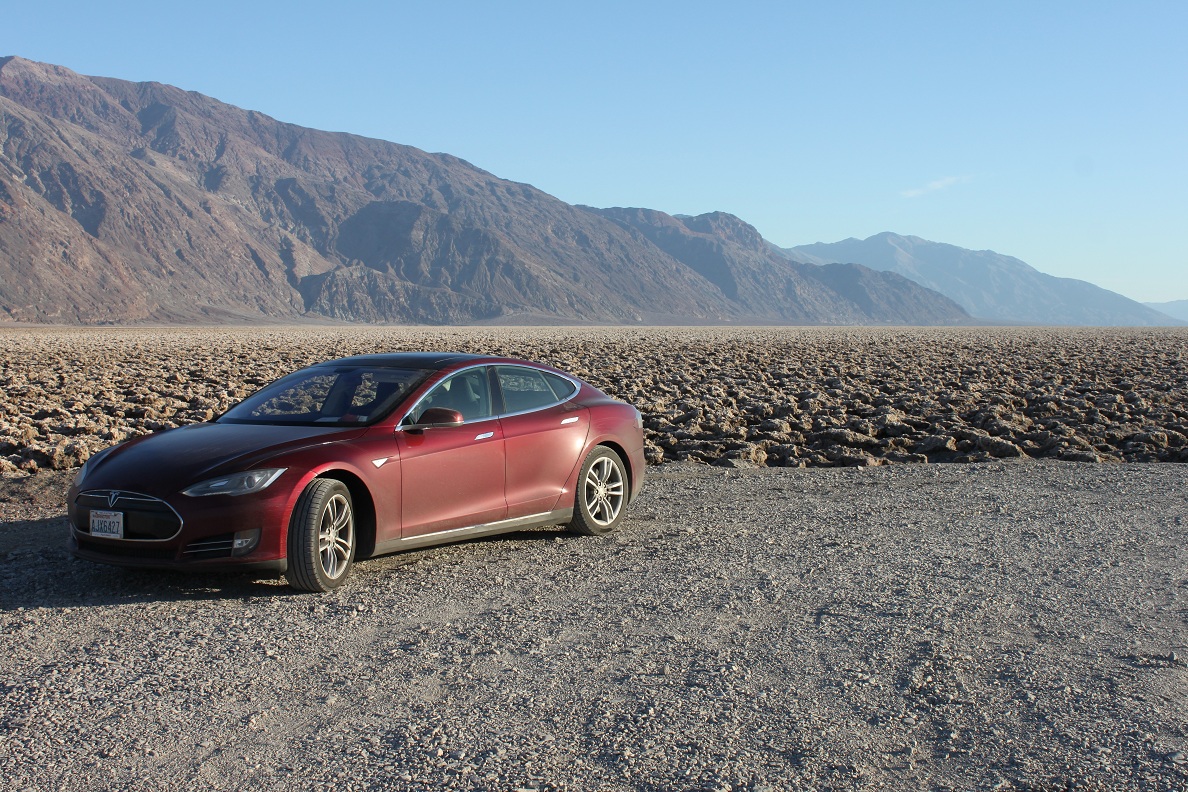
Our car in Death Valley:
This was not my first EV road trip; I've taken the Roadster on several long trips. My first trip, almost 3 years ago, was from Seattle to San Diego at a time when there were NO charging stations of any type North of San Francisco, and only a few L2 stations South of there. I was really excited to take the Model S as it is much larger, quieter, smoother, can use Superchargers when available, allows HVAC while charging, etc. Yet there is still room for improvement; for example, it still doesn't notify you when charging stops. That is a serious pain when you are charging at an L2 station for hours as you have to keep checking it to make sure a breaker didn't trip, or risk a several-hour delay to your journey (that has happened to me more than once, and is why I added OVMS to my Roadster).
Before the numbers, a mess of caveats:
Given all that sloppiness, I am pleased that the rated miles I consumed on each leg ended up within 6% of the miles I estimated. Though you should note that I did not pick the "road condition" or "cold-soak recovery" numbers until AFTER seeing all the other numbers, so by definition my guesses fit the data here, but I have no other reason to believe they are correct. (Road conditions only mattered for the first few legs; for most of the trip the roads were clear and dry. Cold-soak recovery only happened on the two legs after a night without charging).
- I did not account for wind
- I did not adjust HVAC consumption for speed
- We weren't exceptionally careful on writing down all the numbers exactly when we left and arrived
- We did not account for occasional heavy acceleration
- We did not even try to get precise measurements of water on the road, exactly how much time was spent at varying temperatures and speeds, etc
- I counted net elevation changes and major passes, but did not figure other hills
- I just added the percentages of the various factors to make the math easy. Their interaction is usually more complex; but my method probably overstates the hit, and so is safer.
- The car's Wh/mi readings did not seem to correlate well with the number of rated miles used. I find this surprising, and may start another thread to discuss that. For now I have those numbers grayed in the table so we can ignore them and just focus on the rated mile numbers, which are easier for most people to understand anyway.
No matter how much time you spend calculating, any number of things can still go wrong. You could hit very high winds, you could do the math wrong, the charging station could be blocked or broken...always leave as much buffer as you can. That's why Superchargers are 120 miles apart instead of 250 miles. You should do that with your charging stops too. It's less stressful, more pleasant, easier on the battery, and gives you options when bad things happen. If your charging stops are close enough together, you never have to do any math!
Our Roadster in Yosemite:
Trip leg Actual Distance Temperature Elevation change Road condition Speed % of rated miles expected to use % of rated miles actually used Rated miles used Wh/mi Redmond WA 50� to Centralia WA 200� 93 miles 37 - 43 F
+10%150' gain
+1%heavy rain
+10%63 - 70
+12%133% of rated 139% of rated 129 miles
Centralia WA 200� to Tigard OR 200� 100 40
+10%none lessening rain;
+6%70 w/traffic
+16%132% 137% 137
Tigard OR 200� to Eugene OR 500� 106 39 - 41
+10%300' gain
+2%Damp; sprinkles
+2%66
+9%123% 123% 130
Eugene OR 500� to Canyonville OR 800� 91 32 - 36
+12%300' gain
+2%Some rain/snow
+10%60 - 66
+6%130% 138% 126
Canyonville 800� OR to Yreka CA 2800� 124 27 - 34
+13%3200' gain
1200' loss
+16%Water, snow
+12%40 - 65 141% 145% 180
Yreka CA 2800� to Orland CA 300� 155 27 - 54
+10%1200' gain
3700' loss
-4%Mostly dry 55 - 70
+4%110% 104% 161
Orland CA 300� to Davis CA 300� 94 39 - 48
+10%none dry 70
+17%127% 122% 115
Davis CA 300� to Palo Alto CA 150� 109 48
+8%150' loss dry 65 with traffic
+8%116% 121% 132
Palo Alto CA 150� to Gilroy CA 300� 49 29 - 33
+13%
-8% cold soak150' gain
+2%dry 67
+12%119% 118% 58 (really 62 after cold soak)
Gilroy CA 300� to Coalinga CA 450� 113 38 - 48
+10%1000' gain
850' loss
+3%dry 55 - 74
+8%121% 126% 142
Coalinga CA 450� to Lebec CA 1100� 116 38 - 52
+8% temp650' gain
+4%dry 75
+26%138% 131% 152
Lebec CA 1100� to Barstow CA 2400� 152 37 - 52
+10%1900' gain
600' loss
+7%dry 55 - 70
+6%123% 124% 188
Barstow CA 2400� to Furnace Creek CA -200� 175 25 - 47
+12%1696 loss
1624 gain
700 loss
1709 gain
3234 lossdry 55 - 70
+8%120% (no net elevation effect!) 126% 220
Furnace Creek CA -200� to Barstow CA 2400� 175 52 - 64; little HVAC
+3%(reverse above)
+15%dry 55 - 70
+6%124% 121% 212
Barstow CA 2400� to Mojave CA 2800� 72 (with detour) 49 - 59; HVAC off
+5%400' gain
+4%dry 55 - 70 (more 70)
+10%119% 125% 90
Mojave CA 2800� to Lebec CA 1100� 70 30 - 42
+10%
-29% cold soak200' gain
1900' loss
-9%dry 55 - 65 72% 74% 52 (really 72 after cold-soak)
Lebec CA 1100� to Coalinga CA 450� 116 44 - 59
+6%650' loss
-2%dry 70 - 80
+26%130% 129% 150
Coalinga CA 450� to Gilroy CA 300� 112 60 - 68
+3%850' gain
1000 loss
+2%dry 55 - 85
+17%122% 123% 138
Gilroy CA 300� to Davis CA 300� 131 55 - 68
+4%none dry 55 - 75
+8%112% 114% 149
Davis CA 300� to Orland CA 300� 94 35 - 41
+11%none dry 70
+17%128% 134% 126
Orland CA 300� to Yreka CA 2800� 155 45 - 70; little HVAC
+3%3700' gain
1200' loss
+14%dry 65 - 70
+12%129% 129% 200
Yreka CA 2800� to Canyonville OR 800� 124 32 - 45
+11%1200' gain
3200' loss
-4%dry 60 - 70
+8%115% 115% 143
Canyonville OR 800� to Eugene OR 500� 91 28 - 30
+15%300' loss
-1%dry 68
+13%127% 127% 116
Eugene OR 500� to Tigard OR 200� 106 29 - 37
+12%300' loss
-1%dry 60 - 68
+10%121% 117% 124
Tigard OR 200� to Centralia WA 200� 100 36 - 41
+10%none dry 55 but mostly 74
+22%132% 128% 128
Centralia WA 200� to Redmond WA 50� 93 34 - 36
+11%150' loss dry 64 - 74
+15%126% 122% 113
 �
�
Jan 27, 2013
bonnie Wow, Chad. That's a LOT of great information in one post. Going to bookmark this and come back to it.
Thank you!�
Jan 28, 2013
AnOutsider I think those paragraphs needs emphasizing. It should be on a placard sold with every EV.�
Jan 28, 2013
jhs_7645 Wow� that is spot on with my experience so far (winter driving, 21", rain). I was just looking for reasons why 238 miles keep turning into 180.
Thank you SO MUCH for this incredible resource.
Update: Added to the FAQ:
4.2What's the real world range (for each battery capacity)?�
Jan 28, 2013
TurboFroggy Great info Chad! Can you elaborate on charging during this trip? What kind of connection, adapter, amps, what voltage you encountered and how long you charged?�
Jan 28, 2013
efusco If you're a mac user this app is also excellent for doing these calculations for you:
Main�
Jan 28, 2013
andrewket The 6% penalty for the 21"'s is why I wish Tesla offered a performance tire on a 19" wheel option, and didn't bundle the 21" with the P85. I would have been more than happy with 19" performance tires, especially if it saved a little $.�
Jan 28, 2013
SCW-Greg Chad, what can I say?! You're efforts here are epic, truly pioneering for us all. Thank you!�
Jan 28, 2013
tomanik Wow, fantastic post. Maybe someday the navigation system will incorporate these type of metrics to more accurately estimate range for trips.�
Jan 28, 2013
ChadS I agree. Believing an EV can really go X miles (where X is a huge number that the marketing department likes) has created quite a few angry customers. They key to enjoying any car is in having it match your expectations.
Plug In America has tried to get automakers to give out reasonable numbers, but you can imagine how well that has gone over. (Nissan did put out a nice chart that gave estimates for a variety of conditions, but that seems to have been quickly lost and everybody just associates "100 miles" with a Leaf, which is completely unreasonable).
When I get time, I hope to create another post about that end of things. I did keep data on that too.
Thanks! I added it to my list of range calculators in the original post.
That's definitely the holy grail. You type in your destination, and it incorporates all of these factors (well, the ones it can - it won't know how fast you'll drive, for instance) and tells you the likelihood of making it and how much buffer you'll have. Perhaps it could even suggest a speed. We have the technology to make this happen...I hope this sort of analysis will help lead to that sort of tool!�
Jan 28, 2013
giants2001 Can 60kWh Battery Make Chad's Trip?
First - Chad I hope you don't mind me playing around with some of your numbers. That was a fantastic writeup. What a fun road trip.
I am a complete newbie when it comes to BEVs. The Model S is my first BEV, heck, its my first car that cost more than 10K. I have never been much of a car person until I came across Tesla. First with the roadster, and then this. I placed my deposit almost 2 years ago and ultimately decided to order the 60kWh battery size because of affordability. I know that some might think, if you are going to spend this much money on car, why not spend the extra 10K to get the bigger battery. Well then I should get the performance, right? You see where I'm going with this. I knew the 60kWh would cover more than 95% of any drive I ever plan to take and I had to draw the line somewhere. ... but back to the topic at hand.
I decided to take Chad's road trip numbers and compare his expected vs. actual to get a better idea of how close his original estimates were. I also wanted to see if my 60kWh could make the same trip. I am leaving out all the variables including charging time, and really just looking at it from a numbers point of view.
The Take Away:
- You can see Chad really did his homework. Worst case was a -8% deviation from the expected vs actual rated miles to use. His numbers were exact on more than one occasion. Very impressive. If I do any long trips, I must take a couple hours to plan it out.
- Only 2 legs of the trip seem to be out of reach of the 60kWh battery size. and just barely.
- You are almost always going to drive over 60mph and therefore the Rated miles are always going to be greater than the Actual Distance. Another reason to always give yourself a buffer.
- No regrets on the 60kWh battery. The car is fantastic and should be sufficient for 99% of any trip I ever plan to take :biggrin:
% of rated miles expected to use % of rated miles actually used Chad's Calculation Deviation Actual Distance Rated miles used Rated Expected to use Can 60kWh Battery Make it ? 133% 139% -6% 93 129 123.69 yes 132% 137% -5% 100 137 132 yes 123% 123% 0% 106 130 130.38 yes 130% 138% -8% 91 126 118.3 yes 141% 145% -4% 124 180 174.84 yes (max charge recommended) 110% 104% 6% 155 161 170.5 yes 127% 122% 5% 94 115 119.38 yes 116% 121% -5% 109 132 126.44 yes 127% 118% 9% 49 58 62.23 yes 121% 126% -5% 113 142 136.73 yes 138% 131% 7% 116 152 160.08 yes 123% 124% -1% 152 188 186.96 yes (max charge required) 120% 126% -6% 175 220 210 Maybe (max charge required) 124% 121% 3% 175 212 217 Maybe (max charge required) 119% 125% -6% 72 90 85.68 yes 101% 74% Lost 24 miles the night before; 70 52 70.7 yes warmed up a lot during operation 27% 130% 129% 1% 116 150 150.8 yes 122% 123% -1% 112 138 136.64 yes 112% 114% -2% 131 149 146.72 yes 128% 134% -6% 94 126 120.32 yes 129% 129% 0% 155 200 199.95 yes (max charge required) 115% 115% 0% 124 143 142.6 yes 127% 127% 0% 91 116 115.57 yes 121% 117% 4% 106 124 128.26 yes 132% 128% 4% 100 128 132 yes 126% 122% 4% 93 113 117.18 yes �
Jan 29, 2013
kimbapooch Another data point
Thanks Chad, I just completed the first leg of essentially the same route down I-5 from Seattle (I'm recharging myself and the Model S at the Motel 6 near Oakland, OR). It's nice to see some real data on how the mountains south of Canyonville will affect my range tomorrow as I head into CA.
My car has an 85KWh pack, 19" wheels and a single charger. The road was wet and it was about 42 degrees F the whole way. By using very little heat and setting the cruise control to 50mph (VERY painful to do so) I managed to achieve an average of nearly EXACTLY the rated range of 265 mile (295Wh/mi) over the 344 miles I traveled today.
My takeaway for the day was how very badly we need superchargers in the Pacific Northwest. Give yourself LOTS of time for a cross country trip until we get them. It's painful to watch how long it takes to add back precious miles to that battery pack. I'm getting about 20 mi/hr at the L2 J-1772 stations and 26 mi/hr (due to the single charger) on the HPC at Tesla Service in Tigard (Thanks Jason!). A little less than I was expecting, probably due in part to the cold temp.
Looking forward to day two and crossing those mountain passes.�
Jan 29, 2013
mnx I believe the consensus is that the bulk of range advantage the 19's have is the all in the tire/tire compound. If you put a sticky set of performance tires on the 19's any range advantage would evaporate.�
Jan 29, 2013
ChadS Not at all; in fact I'm glad you did - I kind of wanted to address 60kWh cars but just didn't have the patience to keep running numbers.
It sounds like you are fully aware of this, but I want to highlight it again for anybody else out there either thinking about which pack to buy, or what trip to take their car on:
Remember that the numbers I presented above all measured the conditions I actually encountered - which were cold, but other than the first few legs were always dry. For planning purposes before the trip, I assumed very heavy cold rain everywhere to make sure I'd have a sufficient buffer if the weather was bad. You can use the above numbers to get a likely idea of what you will encounter, but I would not plan to be able to make it based on that. I would not plan any trip legs longer than 139 miles (2/3 of the 208-mile EPA rating) in a 60kWh car. Although it is possible that on the day of the trip if conditions were favorable, I may skip a charger if I think my usage will be low enough that I can make the next one. I'd still leave a good buffer though! You never know if you might encounter a sudden strong headwind.
Between Barstow and Furnace Creek, there is an RV park in Shoshone that has 50A service. If I had a 60kWh car, I would plan on stopping there. There are a couple of other legs in there (i.e. Yreka or Orland, 155 miles) that I would not try in a 60kWh car without an emergency plan. There is probably something available in Redding; or there is a KOA in Mt Shasta City.
By the way, for all of you thinking about a 60 kWh car and worried about the extra charging stops: note that while the 60kWh car can't take single legs as long as an 85kWh can, that does not mean it spends more time charging! You only charge long enough to replace what you used; if you stop more, you used less and so the charge stop is shorter. In fact, given that the 60kWh car's MPGe is 95 instead of 89 (it is unclear if the improvement is in consumption or charging overhead, but either means the same thing: shorter charging time) it is possible that the 60kWh may spend less time charging. This isn't always the case though - for example if two 17kW HPCs are 175 miles apart, the 85kWh car will do all charging at 17kWh, which the 60kWh car may have to spend some time at a 10kW campground in the middle.
Wow, you're brave to do that trip with a single charger. Having to wait for 20kW charging is bad enough. I guess my first Roadster trip (back in 2010 when there were no chargers, so I had to use campgrounds) only used 10kW charging; but I'd sure hate to do it again. More Superchargers would fix this. So would a CHAdeMO adapter; you are passing CHAdeMO chargers along the freeway every 25 to 40 miles in WA and OR. In fact there's one a few feet from where you are charging at the Motel 6. Then you could charge at 48kW instead of 10kW and lop off 75% of the hours you are waiting for a charge. C'mon Tesla, get that adapter finished!
(Say "hi" to the Motel 6 owners if they are there. They also own the Comfort Inn in Yreka, where I commonly charge at a Roadster HPC. On my last trip the timing didn't work out for me to stay at the hotel, and I felt guilty about using their free charger so I bought them a gift bag and took them for a ride).
Good luck on the trip!
-----------Edit--------------
Perhaps a way to sum everything up in to a very easy way to take a trip:
When planning a trip, never plan a leg without charging stops no farther than 2/3 of the EPA range of your car.
While on the trip, stopped at a charger, if you want to know when you can leave, wait until your car says you have at least 150% of the miles needed to get to the next charger (note that my worst-case leg used 145% of the rated miles; and I wasn't going fast). You may be able to leave sooner than that, but only if you know the conditions ahead of you and do the math above.�
Jan 29, 2013
kimbapooch Chad, not sure a second charger would have helped me since 70A J-1772 units seem to be very rare in the wild and the standard L2 units and RV Park 14-50R outlets max out at 10KW or less anyway. If I had the elusive Roadster adapter it would be a different story as there are several Roadster HPC's along this route.
Your point is VERY well taken regarding CHAdeMO. It's painful to park next to an unused station that has the power but not the interface to top me off in an hour or two. With Superchargers imminent I don't expect to see a CHAdeMO adapter for Model S anytime soon. Call me a pessimist.
One more point. I've seen it mentioned here before but I'll say it again. NEVER EVER EVER trust a public J-1772 L2 unit to do an overnight charge without checking it frequently!!! I'll be spending an extra 6 hrs here at the Motel 6 because my charge aborted at 2:37AM this morning after 4.5 hours without a problem (and less than an hour after I last checked it before turning in). I don't know if it was the car or the EVSE that caused the charge to stop, I restarted it without issue, but Tesla needs to supply some sort of notification mechanism (email/text/in app notification) for interrupted charges! This should be BASIC functionality as it has a HUGE impact on cross country travel. Oh well, I guess the Siskiyou summit will just have to wait a few more hours for me to tackle it. My apologies for the off-topic rant.�
Jan 29, 2013
ChadS Right, sorry - along I-5 in WA, OR and Northern CA you'd need the twin chargers AND an HPC adapter to charge above 10kW. Fortunately I had both for my trip.
I'm less pessimistic, because Tesla has to build one for other markets anyway, and they know that some states already have CHAdeMO chargers in places that Tesla NEVER plans to put Superchargers. Sure, there will be Superchargers on I-5 - but quite likely nowhere else in WA and OR, or example. But there are already dozens of CHAdeMO chargers in place. So I am pretty sure we will see an adapter...but I am very concerned about the availability date. Not having it has already cost me 18 hours or so of standing around, and I have more trips planned. This is exactly the sort of thing that keeps most of my friends from buying a Tesla (even though few of them would be likely to take a long trip in it).
I hear ya. After my first Roadster trip 3 years ago, I sent Tesla an email saying the car had worked very well, but I begged for ONE important change - a notification when charging stops for any reason. That cost me many hours on that trip. Tesla said that that feature was "being worked on". 3 years later, Tesla still doesn't offer it. You can add OVMS to a Roadster, but Model S owners are still out of luck. I hope and assume that Tesla's mobile app will have it...and that the mobile app will be released soon!�
Jan 29, 2013
kimbapooch Since my previous post the public J1772 L2 EVSE I'm using just aborted it's charge again. I realize this is a bit off topic but since I suspect folks reading this thread may be interested in cross country travels I'll post one last time.
The unit I'm on is an Aerovironment EVSE-RS+ Level II. It is on their network and part of the OUTSTANDING West Coast Green Highway initiative. It worked great when it worked except that I was in the rare position to observe (with some help from their customer service who checked their charge session logs) that it stopped charging TWICE after EXACTLY 4hrs and 35 minutes! While Aerovironment denies there being any sort of timer or limit in place, I doubt very much that the car is causing it (although I will be contacting ownership experience to let them know about this just in case). While this would not normally be an issue if you were topping off while grabbing a burger, it's a real buzzkill when you're charging overnight at a hotel expecting a full charge for your next day of travel.
The takeaway is NEVER trust a networked public L2 charger and if you're planning to charge overnight at the Motel 6 off I-5 near Oakland, OR be sure to set your alarm for 4hrs and 36 minutes after you start your charge because it will likely have shut off. No idea how other L2s in their network or in other networks behave but BEWARE. Happy travels!�
Jan 29, 2013
Kipernicus This is true, but sometimes it means the 60 spends that time charging on the road but the 85 spends that time charging at destination.�
Jan 29, 2013
dsm363 Great information. You should turn that into a blog post on TMC as well.�
Jan 29, 2013
neroden This is a suspiciously exact number; it looks to me like there's a software bug. Perhaps it's counting seconds and using a 14 bit field to keep track of how many have elapsed; that could do it.�
Jan 29, 2013
Born 2 Skydive Has any 85 kw Model S owners Max Charged their cars and got 300 mile range? So far I have Max Range Charged the car twice and only received 271 Rated.�
Jan 29, 2013
brianman Odd theory...�
Jan 29, 2013
dsm363 You would have to switch it to ideal to get around 300 miles.�
Jan 29, 2013
ChadS Somebody did - Zext, I believe. But he had his set to show Ideal miles, which I don't think all firmware versions allow. If you are set to use Rated miles, you should expect around 265 miles, so I assume that's what you are using.
Ideal miles: what Tesla says the car can do in "ideal" conditions: 55mph, 70 degrees, HVAC off, flat, dry and windless. The car should do over 300 miles under these conditions.
Rated miles: what the EPA says the car can do in "typical" conditions: 60mph, 65 degrees, HVAC on, but still flat, dry and windless. The car should do 265 miles under these conditions.
Projected miles: what you will get if you keep driving the same way you have averaged for the last X miles. This number can vary widely depending on speed, hills, etc. But on a flat highway with cruise set, it can be a pretty good guide.
What I'd like to see added as a display option:
Solid miles: 2/3 of the EPA number; so 177 miles. A range you can count on (as long as you are TRYING to get there, and don't spend the whole trip locked against the speed limiter).
Or even better:
Percentage of battery left. Except in extreme conditions you will get at least 2 miles per percentage. In perfect conditions you might get 3 miles per percentage.�
Jan 30, 2013
Zextraterrestrial yep. I had mine set to ideal for the first few weeks and saw 307-310 miles ideal for the 2 or 3 range charges I did then. Switched to rated currently I have seen 280 mi
I wish I knew about the 70A in Yreka. I might have sprung for the 2nd charger just for that + Oregon and Washington and maybe Canada eh. I didn't know there were so many higher A sources up there when I had to order my car ..me sad�
Jan 30, 2013
aviators99 Thanks for the numbers, Chad. Btw, here in South Florida, I've noted that the HVAC has cost less than you expect. On my two trips to Tampa and back, the impact was negligible, with it set to 70 degrees (about 10 below outside temperature), and the fan between 2-3 the whole time.�
Jan 30, 2013
ChadS If I understand you, that sounds about right, aviators. At 70 degrees and 60mph Tesla says HVAC is included in rated range. By 100 degrees AC should cost around 7%, but at 80 degrees I would think it would only be a percent or so (it's non-linear).�
Feb 3, 2013
Dianne&Doug Is this app just called MAIN? I'm in the app store, but the search yielded tons of sites...still scrolling through them.�
Feb 4, 2013
epley Excellent post! Did you charge at each of those intervals? How long did you stay at each location? And free charging--that's pretty awesome. Which site do you use to seek out the free chargers?
Thanks, again, neighbor!
David
- - - Updated - - -
The Chargepoint and Blink Network apps for iphone tell you if your charge has stopped, if you have been disconnected, etc. They can even be set up to text you. Sounds great, but there have been a couple of times that it told me the car was not charging when it was, so the technology isn't perfect.
�
Feb 4, 2013
Robert.Boston PlugShare is a good site for finding charging. You can search for free chargers only from the Settings menu, as well as filtering out unhelpful chargers (e.g. Avcon paddles).�
Feb 4, 2013
ChadS I did charge at each stop; I hope to find time to put up another post about charging this week (and I'll link to it from this thread).
When I go to new places, I typically look at recargo.com and plugshare.com to find charging stations. But when I drive from Seattle to California, I use THIS map that I created.�
Feb 12, 2013
ChadS I finally got the thread up that includes how long I charged at each stop. It includes some other information about planning road trips in general. The thread is HERE.�
May 24, 2013
mact3333 Camas, huh?....will be looking out for your car....
�
Jun 5, 2013
Larry Chanin Hi Chad,
Absolutely great posting!
Regarding your Range vs Speed and HVAC graph, I want to be clear that I'm interpreting it correctly.
The green line at the top is the Range vs Speed with no HVAC?
The green shaded portion of the graph shows the effect of HVAC and the bottom of the shaded area is the Range vs Speed with the HVAC on maximum?
Thanks.
Larry�
Jun 5, 2013
ChadS Yup!�
Jul 4, 2013
Puyallup Bill Effects of Elevation Change
Just a bit of trivia.
A couple of days ago in an effort to escape the heat, we decided on lunch at the Paradise Inn, Mt. Rainier National Park. (It was hot there, as well)
From Puyallup WA it is 65 miles with an elevation gain of a bit over 5,400 ft. No freeway driving, max speed 55 MPH, and, of course, much slower in the park. Climate control set at 68�F, OAT 75� to 85�.
Arrival at the Inn showed 67.4 actual miles and 99 rated miles used. On the return to Puyallup, actual miles were 66.6 and used 40 rated miles. So, for the up and down, 134 actual miles used 139 rated miles. Not bad, but I hasten to add that most of the climbing miles were at 35 MPH or less.�
Sep 24, 2013
Limo2soft On android there is also EV Range Calculator : EV Range Calculator - Android Apps on Google Play
It takes elevation and speed limits into account and allows to set a lower speed if you want to preserve your battery.�
Sep 30, 2013
tamman34 I plan to drive from Boston to Charlston, SC. Any advice will help. I am driving the 85 with 19". How has the experience with using other home chargers gone?�
Nov 24, 2013
Cottonwood Great information, geek to geek!
My experience on elevation is that its about 6-7 miles up and down in a Model S with me and a few bags. This has held true for me on many trips in the Colorado Rockies. Because of regen conversion losses, long, steep descents will not give everything back. The only time I don't get all of it back in my regular travels is on the west side of Wolf Creek Pass because there is a lot of regen there, typically 10 miles from the top of the pass into Pagosa. On other descents that are not so steep and there is less regen, I get everything back.
A year or so ago, I did a from basics, potential energy calculation that also came up with 6 miles per 1,000 feet. I think I posted that on TMC then. Here is a repeat:
- Potential Energy = m * g * h
- m = 2,100 kg, g = 9.81 m/s^2, h = 305 meters (1,000 feet)
- 1,000 feet up or down gives you 2,100 kg * 9.81 m/s^2 * 305 meters = 6,283,305 Joules
- Because 3,600 Joules are in 1 W-hr, that is 1,745 W-hrs
- Pick your number for Wh/mi, let's use 290 Wh/mi which is pretty close to how rated miles are decremented. 1,745 Wh/290 Wh/mi = 6.02 miles.
Thanks again for putting all of this together.�
Nov 24, 2013
ChadS Thanks for the numbers, Cotton. I hadn't done the math.
Before I ever had an EV, I saw a 1st-gen RAV4-EV owner online say to figure 6 miles per 1,000 feet for that car (and interestingly enough, I think he did the same math...I should try to find that). 6 or 7 were typically used for the Roadster. Those numbers seemed to work well for me with both of those cars. The Model S is significantly heavier, and somebody on these forums (I don't remember who) said that a Tesla employee said to use 10. So I have just used 10, and it's worked great for me and at least a couple of other owners. But I will try to take a closer look the next time I do a trip with elevation...the hard part is pulling out all the other factors (including how loaded the car is).
Due to motor and inverter inefficiencies, I would expect consumption to be higher than 6 miles/1k'. But only by about 20%.�
Nov 25, 2013
Cottonwood One direction batteries to potential energy should probably be closer to a 10% loss; a round trip battery to kinetic/potential back to battery or grid to battery to kinetic/potential is more like 20% loss. Anyway, 10-20% of 6 miles/1,000 feet pushes the number to about 7.
I find that if I use GPS altitude from my iPhone and watch as I go up and down mountains, the 6-7 miles per 1,000 feet tracks within a couple of miles on big ups and downs. My Pagosa to Boulder drive crosses the continental divide three times, Wolf Creek, Fremont, and the Eisenhower Tunnel, with Poncha Pass thrown in for good measure. I do that drive or the other way, once or twice a month and it gives me lots of chances to do the mental math as I drive. :wink:�
Jan 1, 2014
moseson Your math appears spot on, making me feel there's nothing wrong with my car. I drove from northern nj down to the south shore. Starting with 265 miles, I traveled 190 miles and had just 9 miles left. I wish I had read your post first, b/c I was worried the whole way down as my wide margin rapidly disappeared. Don't know about you all, but this math is quite disturbing, especially since there are no rapid chargers where I was traveling. My tesla was out of commission, charging for my trip back my whole time down at the shore�
Jan 2, 2014
deonb So I followed the "If you are ever in trouble, slow down" advise but realized after a while there is a bit of an issue with doing so blindly.
I was driving from Grants Pass to Eureka, and tried to conserve power by driving slowly. Part of the road is anyway slow (Redwoods), but for the rest I tried to stay at 50. But no matter how I drove I couldn't get the usage to drop below 400 wh/mi. When I eventually sped up to 60 the usage immediately fell to 360 wh/mi.
I believe the reason is that at the slower speed you spend proportionally more power to power the HVAC and heating the battery (it was 31 outside) than the power that you require to drive faster.
Does anybody else have a similar experience?�
Jan 2, 2014
ChadS If HVAC is on full blast, from the numbers I would expect ~45mph to be the most efficient speed - you'd use MORE power if you go slower than that. The curve down there is pretty shallow with 100% HVAC, so 50mph wouldn't look very different. See chart HERE.
The less HVAC you have, the deeper the curve and the further back it goes - with no HVAC (by which I mean moderate temps, since the car uses HVAC in cold weather even if you turn the cabin controls off), ~18mph should be the most efficient speed.
However, this is just going by the numbers. I haven't tried it in real life and compared wh/mi rates.�
Jan 3, 2014
dgr Plug In America Survey on batteries - Are You In?
New to this web talk stuff but was one of the first reservations for the Tesla Model S Reservation Confirmed 5/16/09.
This is part of an eMail that I received from Tom Saxton. Tom and his wife Cathy put up the Tesla Owner Map back in 2007. http://www.idleloop.com/tesla/index.php They are no longer continuing support of this site.
Plug In America also has a survey for the Leaf and RAV4-EV.
Tom's message below
"Instead of adding to our old map, I would like to encourage you and other Tesla owners to participate in the surveys I am now conducting via Plug In America. The data being collected by these surveys will have much more value to the owner community. Like our owner map, these surveys keep your personal contact information private. Unlike our owner map, the surveys allow full access to the data(except your name, email, and VIN number) so anyone can view, analyze, or integrate the data into other projects.
The Plug In America Tesla Roadster survey:
http://www.pluginamerica.org/surveys/batteries/tesla-roadster/survey.php
The Plug In America Tesla Model S survey:
http://www.pluginamerica.org/surveys/batteries/model-s/survey.php
A full overview of the surveys being conducted and results from related studies is here:
http://www.pluginamerica.org/surveys/batteries/
Thanks for participating!
--
Tom Saxton"
What do you think and are you going to post your information. It seems like the leaf and rav4 people are out numbering the Tesla owners.�
Jan 8, 2014
neroden I wish I could put proper numbers on it, but snow caked in the wheel wells is the single most significant reducer of range I've seen, driving my mileage up above 500 wh/mi consistently and above 600 wh/mi sometimes. It seems to be a first-order effect, dominant over all other effects on mileage.�
Jan 9, 2014
EchoDelta Maybe a wheel well defroster for the subzero package would be in order if that is the case?
Googled and some dude has patented the idea (eye roll): Patent US20080083719 - Fender well deicer (defroster) - Google Patents�
Jan 10, 2014
kcveins Major issues here in Chicago with the recent cold snap. On Monday, I left the garage with a good battery charge (rated 220 miles). Drove 20 miles in -15F weather, parked at one place, 1 hour later went to another office (12 miles), stayed there for 4 hours; came back to the first office for 6 hours and drove home. Total distance driven 65 miles, outdoor temp stayed more or less constant at -15F, partial snow packed roads, drove <40 mph, interior temp 68F (needed this to get the windows defrosted), butt warmer on low and ended up with 40 miles left. Now today, with 28F and good roads, lost only 5 rated miles more than distance driven.�
Jan 10, 2014
ChadS Thanks for the numbers. Something similar happened to me last winter (not as bad because it wasn't as cold here) and it can be disconcerting. The initial heating of the battery and cabin takes a LOT of power, so taking several short trips and letting the car cool down in between does terrible things to your wh/mi. But fortunately, if you have short enough legs and long enough stops that this is a big issue, your day's driving is typically in the 65-mile range rather than the 265-mile range.
Things (fortunately!) look quite different when you take a single trip.�
Jan 13, 2014
neroden Nice idea. I don't need it where I live (the roads get plowed really fast) but in Michigan it would have been a godsend.�
Feb 9, 2014
greencharge The omnipresent Chargepoint J stations did no more than 14miles per hr charging this snow season�
Feb 15, 2014
slipdrive Perhaps Version 6.0 will have some account of these factors in the Nav ? Especially between SC's.
Since majority of folks will just look at average miles, there could be some unfortunate and misplaced reliance on indicated range versus reality. Missing reality could really suck.�
Feb 20, 2014
Cottonwood Wind is a 4-Letter Word - Well at least when it's a headwind...
I originally posted this at Supercharger - Buckeye, AZ - Page 10 after rsanchez commented on almost running out of energy due to a headwind from Holbrook to Flagstaff, AZ. Monsoon made a recommendation that I post this where others might see it better, so here it is.
Weather Underground reports data from an amazing number of personal weather stations and presents it on their WunderMap. For example, near Flagstaff: WunderMap | Interactive Weather Map and Radar | Weather Underground
The best way to get to this is to open www.wunderground.com | Weather Underground, search for your city of interest, then open the WunderMap link on the lower right. You may have to play with parameters to get a view like mine below, but it is great info. Remember the little pointer is like the tail of an arrow, pointed from where the wind is coming; if it's pointed the way you are going, it's a headwind; if it's pointed the way you are leaving its a tailwind. In the picture below, there is a gentle head wind reported in Winslow if you are driving West. Little barbs are 5 kts of wind (like the one SE of Flagstaff below), big barbs are 10 kts each and flags are 50 kts each, all standard weather map stuff. If I am hypermiling somewhere, I will pull this up on the MS web browser to see what's ahead.
View attachment 43770�
Feb 20, 2014
jerry33 I use Weather Underground all the time. However, I use the Classic view.�
Feb 20, 2014
Cottonwood The WunderMap | Interactive Weather Map and Radar | Weather Underground can be a great visual for winds on a route.�
Feb 20, 2014
jerry33 Yes, I use the WunderMap all the time. The Classic view affects the appearance of the site, not the WunderMap.�
Feb 26, 2014
wycolo Lacking windsocks, flags or plastic shopping bags hooked on fences for visual indicators of headwinds, I look to keep the orange power usage line at or as near as possible to the FIRST MARKER. Then I know I'm not over-doing it. This can limit speed to 45 mph across the uphill 'flats' in the case of 30 to 45 mph westerlies. When you reach the mountain grade going up a drainage this wind dies down considerably.
--�
Apr 22, 2014
David99 Reading your post I was getting excited about the 'pizza pan' wheels. I tried to find some real world references on how much range it would actually gain. You put it 10% which seems rather high. I found this guy doing a before and after test and the difference was 3%.
Weather Spotters wheel cover how to - EcoModder
I guess the difference also depends a little on the driving speed and is more noticeable when going faster. But 3% isn't worth enough spending a lot of money on closed wheels or do some sort of mod.�
Apr 23, 2014
ChadS Chgd Up on these forums says he got 6.5% of his Tesla HERE. I mostly put that in as a joke/example, but must have misremembered the amount. I will fix the number in the original post and link to the source.�
Apr 25, 2014
hiroshiy Wow 6.5% is impressive if true!�
May 19, 2014
TonyWilliams Interesting thread, since over the past 18 months or so, the Supercharger network is booming, the CHAdeMO adaptor is near availability, and percentage wise, fewer people are buying EV's who would bother with calculating range.
With that said, I'll add some of my thoughts:
Longest Range Pointers
1) Drag - Wind resistance - high elevation and hot ambient temperatures thin the air, making it easier for any object to pass through the air. In the airplane business, we call this calculation "density altitude". Here's an easy to use online version: Density Altitude Calculator - English/Metric. The most "aerodynamic" vehicle will cut through the air with the least resistance.
2) Drag - Rolling resistance - drag from everything that rotates to move the car; tires, wheel bearings, u-joints or cv-joints, gears and bearings, gear lubricant. Generally, the hotter the lubricant, the lower its resistance; the higher the tire air pressure, the lower the tire resistance.
3) Gravity and Mass equals Weight - as long as there is gravity, it will take energy to accelerate mass and energy to propel mass at speed. Obviously, it also takes significantly more power to lift the mass away from the gravitational pull while driving uphill. Quite simply, lighter is better.
4) Ideal speed - every vehicle has a speed where the intersection of the power required to overcome drag and weight is the least. Heavy cars with high drag tires (but extremely aerodynamic) like a Tesla tend to be most ideal in the 20-25mph range and small, lower mass cars like LEAF and Spark EV are probably in the 10-15mph range. Obviously, anything that uses power that isn't being used to overcome drag and weight is a waste; the heater, a/c, etc.
5) Hot batteries store more energy - the hotter the better, however, this same heat tends to significantly shorten their life (Nissan LEAF in Phoenix) and in some cases (Boeing 787), make the battery fail. Obviously, the Tesla chemistry is closer to the B787 than the LEAF, so its batteries must not be allowed to get too warm.
That's it! Hit the ideal speed, at the lowest weight with the least drag and the most stored energy and that will give you longest range in your car.
- - - Updated - - -
ELEVATION GAIN
It's a straight forward calculation to determine the additional energy required to go up a hill, however down the hill is far more complicated.
One kilowatt hour = 2,655,224 pound feet of energy.
Driving your 4000 pound Electric vehicle up a 1000 foot elevation requires 4000 * 1000 = 4,000,000 foot pounds of energy divided by 2,655,224 equals 1.5kWh of energy to lift the car.
1.5kWh of energy at an economy of 4 miles per kWh (250 watts per mile) = 6 miles of range used to drive up 1000 feet for a Nissan LEAF type car.
For a 5000 pound Tesla Model S (just two occupants) equals 5 million foot pounds to go up 1000 feet.
5 million divided by 2,655,224 equals 1.883kWh of energy to lift the car.
1.833kWh of energy at an economy of 3 miles per kWh (333 watts per mile) = 5.5 miles of range used to raise the car 1000 feet.
*****************
METRIC
One kilowatt hour = 367.0978 meter kilograms of energy.
1.5kWh of energy is used to gain 300 meters at an economy of 6 km per kWh (167 watts per kWh) = 9 km of range used to raise the car 300 meters.
- - - Updated - - -
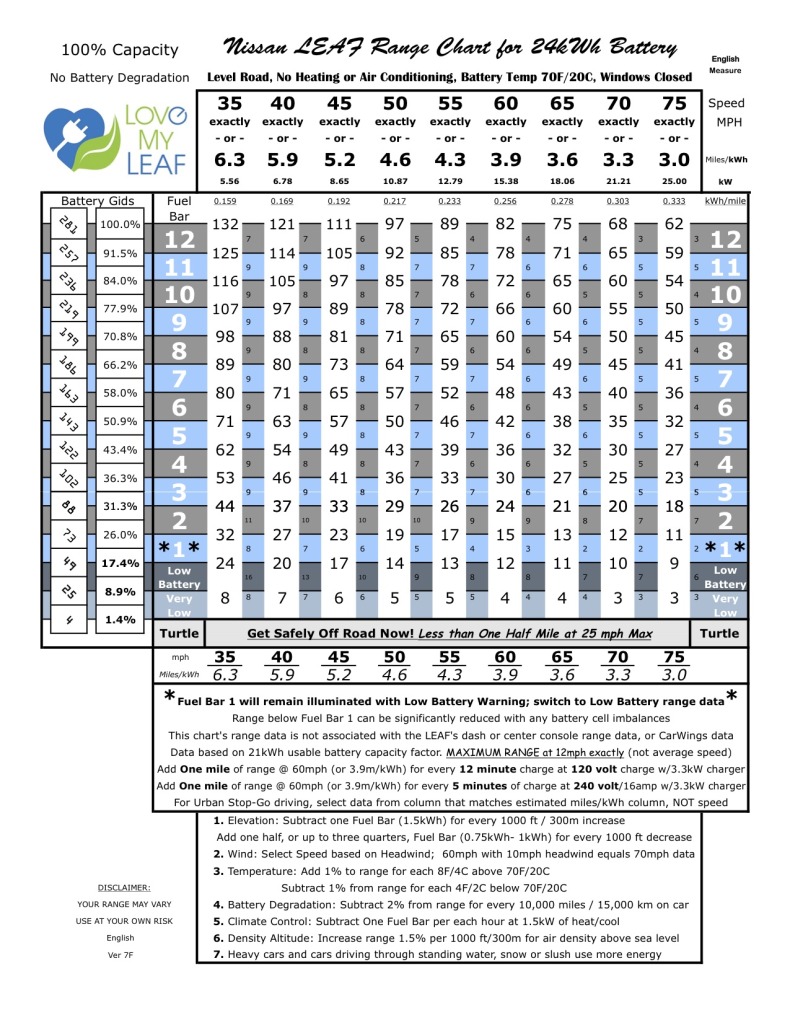
NISSAN LEAF RANGE CHART:
There have been apps produced (LEAF Energy for Apple, ?? for Android) based on this chart for the LEAF. It might offer some insight to help somebody with their Tesla:
- - - Updated - - -
Range Chart for Toyota Rav4 EV with Tesla drivetrain:
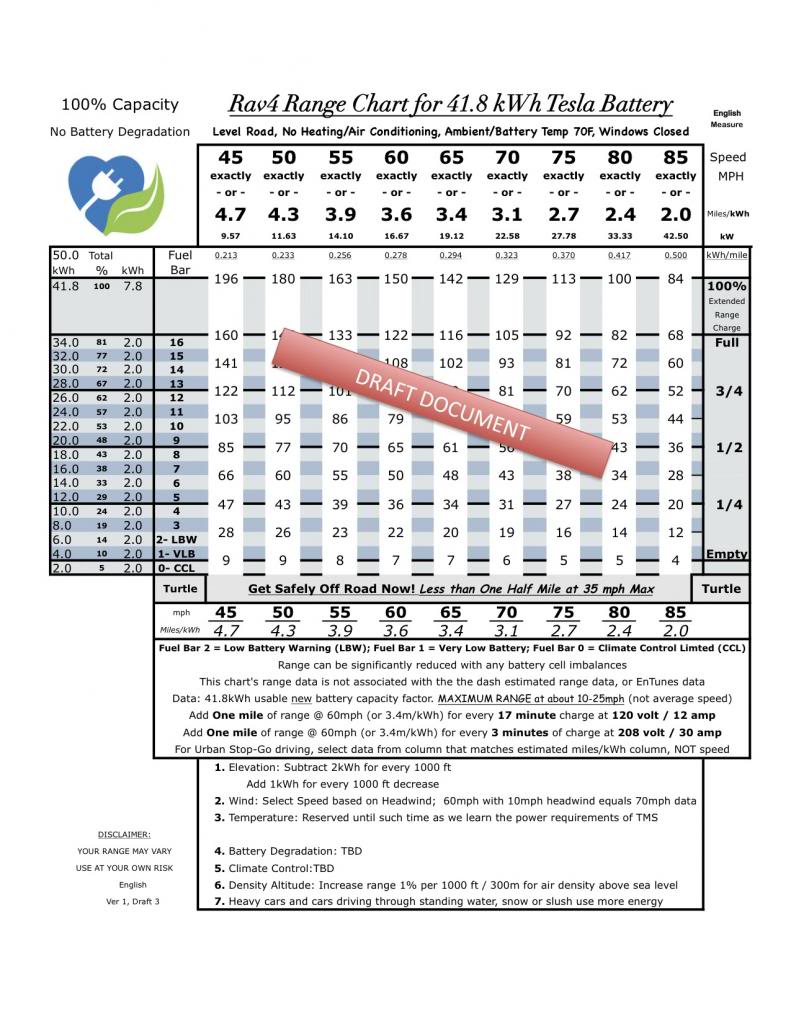
Miles Gained per Hour Charging @ 87.5% charger efficiency
70F Ambient temperature - hotter or colder will decrease miles gained
Amps/Volts -- Where ---- City Drive ----- 65mph
-------------------------- 2.7 miles/kWh -- 3.4 miles/kWh
-----------------------370 wattHours/mile - 295 wattHours/mile
12 / 120 ------- Any ------ 2.8 miles ------ 3.5 miles (supplied cable with car)
16 / 120 ------- Any ------ 3.8 miles ------ 4.7 miles (JESLA with NEMA 5-20)
12 / 240 ------ Home ----- 6.8 miles ------ 8.6 miles (EVSEupgrade.com mod)
16 / 208 ------ Public ----- 7.5 miles ------ 9.5 miles (2013 LEAF EVSEupgrade)
16 / 240 ------ Home ----- 8.9 miles ----- 11.2 miles (2013 LEAF EVSEupgrade)
20 / 208 ------ Public ----- 9.4 miles ----- 11.9 miles (2013 LEAF EVSEupgrade)
20 / 240 ------ Home ---- 11.0 miles ----- 13.9 miles (Clipper Creek LCS-25)
24 / 240 ------ Home ---- 13.6 miles ----- 17.7 miles (JESLA w/NEMA 14-30 or 10-30)
30 / 208 ------ Public ---- 14.8 miles ----- 18.7 miles (typical public J1772)
30 / 240 ------ Home ---- 17.1 miles ----- 21.6 miles (rare public J1772)
40 / 208 ------ Public ---- 18.5 miles ----- 23.4 miles (Tesla Roadster/Clipper Creek)
40 / 240 ------ Home ---- 22.7 miles ----- 28.5 miles (JESLA w/NEMA 14-50 or 6-50)�
May 22, 2014
wycolo Even without gravity too!!
--�
May 28, 2014
Eggplant Yeah, I was laser focused on that comment too. Stupid Higgs boson.�
Nov 16, 2014
ChadS HERE is a thread that discusses losses to due to roof-top box. Of course it varies by box and mounting system, but he got 15-22% reduction based on how fast he was going. Which happened to be very close to the reduction he got by going 20kmph faster. So slow down 20kmph if you have a rooftop box and you should be fine.�
Dec 18, 2014
David99 Cheapest way to increase range is to inflate the tires a little higher than recommended.
From the 'mythbuster' test:
Recommended pressure: 35 psi
tyres at 10psi = 3.7% increase in consumption
tyres at 30psi = 1.2% increase in consumption
tyres at 40psi = 6.2% decrease in consumption
tyres at 60psi = 7.6% decrease in consumption
According to many people that have done this for years reported that their thread wear on the tires is very even, so no worries about uneven tire wear.�
Jan 3, 2015
John Vig Chad, your original post in this thread is great..., THANK YOU, but, as Larry Chanin's question indicates, it could be even better if you labeled the graph and the tables. The first time I looked at the graph, it took me too a while to figure out what the green shaded area meant. It also took me a while to figure out what the column 2s were in the tables. For example, the +25% at 15 degrees F was not immediately obvious; +25% of what? I assume it means that, at 15 deg F, 25% more energy (or range) is consumed as compared to the energy (range) that would be consumed at 70 deg F, provided that the battery and cabin are fully warmed up at the start?
If the battery is at 15 deg F at the start, then, is it not true that the +25% becomes a lot higher? About what would the number be during the first few minutes of such a trip, and, how long would it take, say, at 65 mph, for the percentage to decrease to +25%? About how long would it take at a lower speed, say, at 45 mph, average?�
Jan 6, 2015
xy46 I am new to Tesla having picked up my P85D just over a week ago. I initially put 650 miles on it over four days of mainly highway driving. This week, it's been extremely cold here in Michigan (6-20 degrees), and my daily commute to work is just slightly over 1 mile each way. I have a HPWC in the garage, but due to a mix-up between the electric company and my electrician it isn't functional yet, so I am using a 110V/20 amp plug for charging overnight in an unheated garage. I have been searching the forums for the answers to the questions below, so I apologize if the answer to these questions have already been documented else where.
In the mornings, I preheat the car for approximately 20-30 minutes, then drive the one mile to work. Car sits outside and not plugged in for 8-10 hours. I preheat it again for 20-30 minutes and then drive it one mile back home. I have done this for the past two days. Energy usage graph image is below:
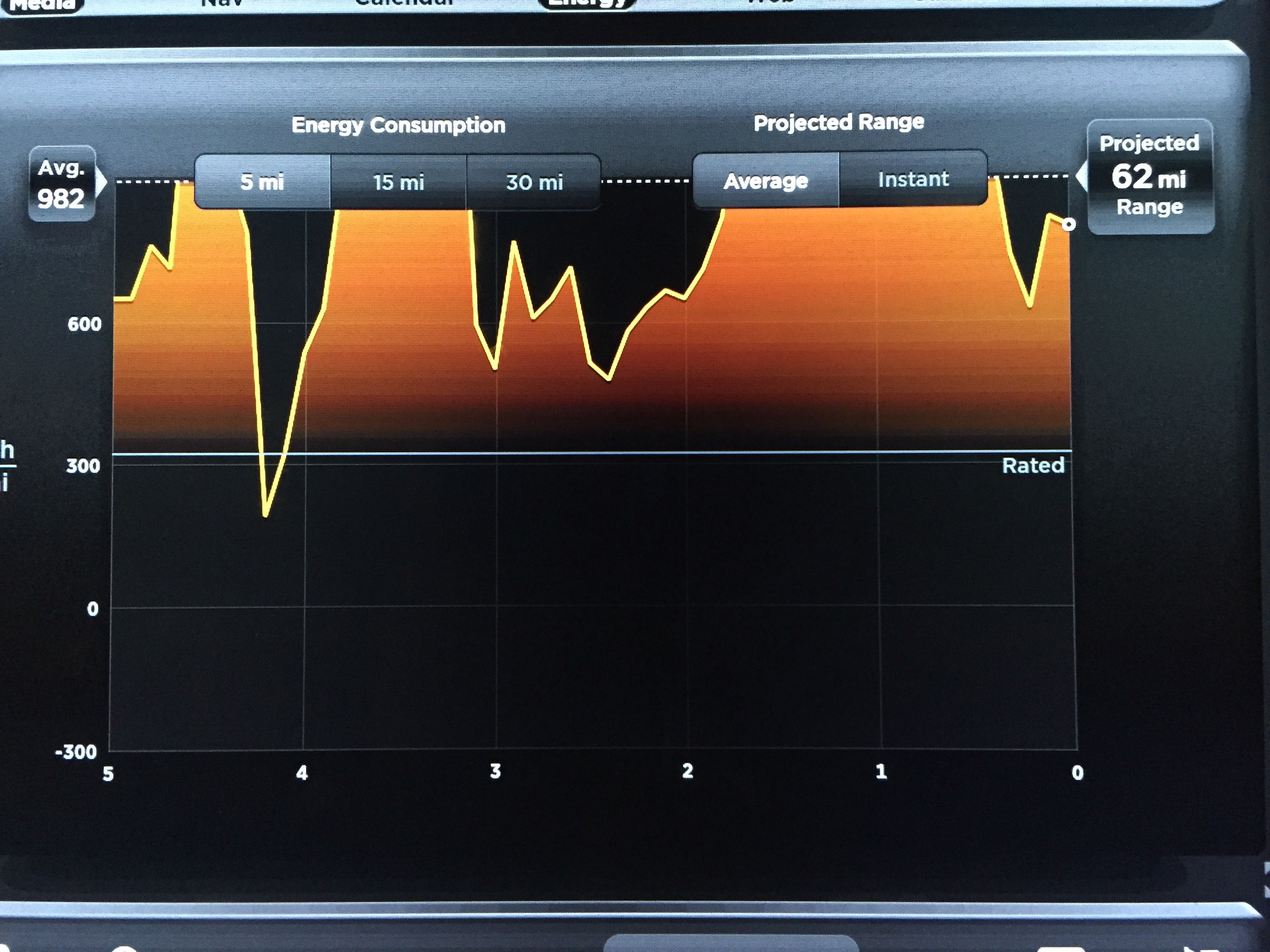
My commute yesterday morning is the energy use between the 5th and 4th mile hash mark, and my commute home last evening was between the 4th and 2nd hash mark (I ran a short errand on the way home which added the extra mile). This morning's commute to work is between the 2nd and 1st harsh mark obviously, and the drive home tonight between the 1st and 0 hash mark. As you can see, I am utilizing greater than 1,000 Wh/mi in what I assume is energy being used to further heat up the battery even after my 20-30 minutes of preheating.
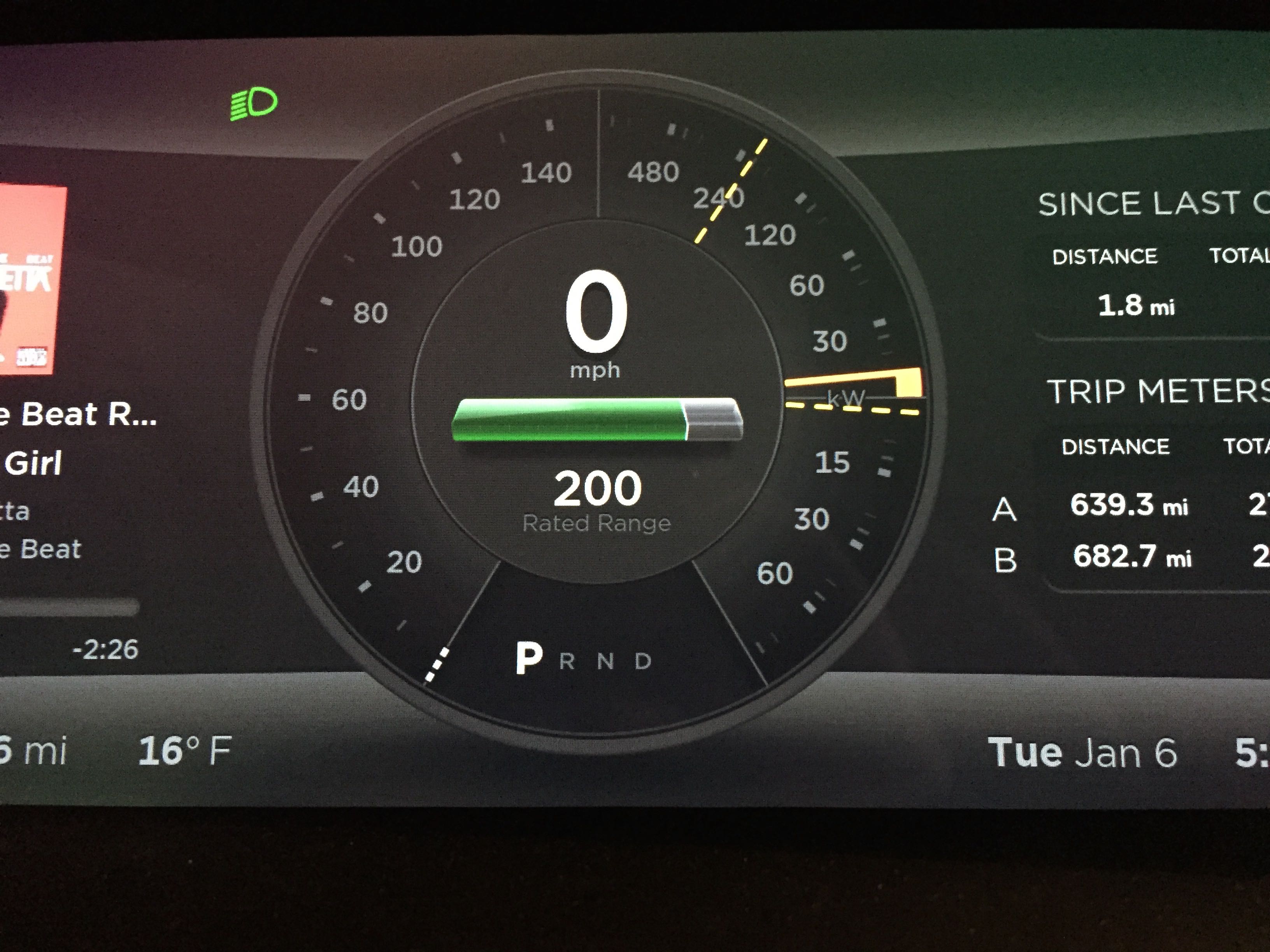
So my questions are: (1) Is it normal to use > 1,000 Wh/mi in warming up the battery? and (2) how long do I need to preheat in my garage to avoid this as it seems like I still get it even when preheating the car for 30 minutes? (3) Finally, I also notice that after turning on the car with the cold battery that my dash shows usage of approximately 10 kW of electricity while sitting still (see image below). Is this reflecting the energy currently being consumed to heat the battery?
Thanks for the help! By the way, I love my P85D!�
Jan 7, 2015
dsm363 xy46: That's probably normal since it gets cold soaked sitting outside for 10 hours. Are you still charging in the morning right before you take off? That should help keep pack warm. 30-60 min of preheating should help too so you are doing right thing there.
The main problem (nice problem actually) is you have such a short commute to work so pack doesn't have a lot of time to beat up.�
Jan 7, 2015
Zextraterrestrial pretty sure that 10kW is the heating power.
looks more like 6kW though. you might be able to see it change a little if turn on and off heater/AC�
Jan 7, 2015
xy46 Thanks for the advice dsm363 and Zextraterrestrial. Experimented tonight and indeed the power use slows slightly on the dash when I shut the heater off. Kind of cool that it shows you the real time use like that. I also preheated the cabin for 60 minutes and that seemed to help, too with power use while driving. It wasn't dramatically better but still better. Tonight I scheduled the battery charging so that it finishes just as I am leaving in the morning, so will see how much of a difference that makes. Since I am only currently using a slower 20 amp service, I wonder if it will really make that much of a difference. Is there a way to turn on the battery heater on ahead of time while it's still plugged in to power?�
Jan 7, 2015
stevezzzz Make sure the car's not in Range mode while plugged in: that defeats any battery preheating, though I'm pretty sure you need to be plugged into 220/240V to get any battery heating.�
Jan 7, 2015
xy46 I definitely have range mode off for that reason. I should have my 80 amp HPWC up and running within the week and am anxious to see if I will get better battery heating then. Sounds like from what you are saying that may be what's making the difference.�
Jan 8, 2015
Ugliest1 I'm guessing (ok, a very strong guess based on my car's behaviour) that your HPWC will make all the difference in the world. You'll still be using a fair amount of electricity anyway due to the cold-soaking but either timing your charge to start (overnight) so that it ends (at 70, 80, 90%, whatever you set) just before you need it in the morning will have the battery at operating temperature. That will take some guessing on start time (1am? 2am?) and depends on rated range left.
The other way to heat the battery, is charge normally on plugging in the night before, then using the smartphone app turn on cabin heating about 30 min before you want to leave. Cabin heating (with the HPWC) will also warm the battery. You may need to do that twice (i.e. cabin heat an hour before, then re-turn on again 30 min before) depending on how cold the car gets overnight. The beauty of the HPWC is, the car will take power from the wall, not the car battery when plugged in. At your office parking spot, pre-heating the cabin will pull from the battery (no choice there).
Sorry if you knew most of this already, thought this might help re your earlier questions. The cabin heating appears to run for about 30 minutes. YMMV.�
Jan 8, 2015
jerry33 That has apparently changed recently. It's now 15 minutes if you start it with the App.�
Jan 8, 2015
xy46 Thanks - this is really helpful. I have noticed that while preheating with the car plugged into my garage's 110v/20 amp outlet that the car has to take energy out of my battery as I assume the 110v/20 amp can't provide enough energy at that rate. I am glad to learn that once I get the HPWC active that it will be be more effective at preheating the battery while I simultaneously preheat the cabin. I assume that this preheating of the cabin works because it's using the heat pump to circulate heat to the battery as well as the cabin during the warming process. With the help everyone has provided me here, I scheduled my battery charging to complete as I was departing this morning. Additional I preheated the vehicle for two cycles of 30-minutes each just prior to departure. This all helped because when I left this morning for my 1 mile drive to work, I only averaged approximately 650 Wh/mi vs. >1,000 Wh/mi as I had been doing previously in the same temperatures.
I have read this elsewhere, but it appears that mine is staying on for the full 30 minutes.�
Feb 9, 2015
Robbo I have a 20 month old S85 and had a nail biter this weekend. Left Saturday morning with the car fully charged up in trip mode (stated 247 mile range) and drove it 105 miles at an avg 65 mph mostly highway trip. Weather was cold (mid-20s). When I arrived the car showed 102 miles of range left. Put the car in energy save mode and left it parked outside for about 37 hours with temperatures dropping into the low teens. Sunday night began the 68 mile trip to the nearest Supercharger. Temperatures were in the high teens and there was about 1/2 inch of snow on the ground. The range now showed 97 miles and the NAV showed a yellow drive slowly message. I put the car into range mode set the heat down in the mid-60s and got on my way. Given the bad weather, I had no problem driving slowly and set the cruise control at 50mph. The snow turned to freezing rain and my range started to converge down to my travel distance. By the time I hit the SC, my range was down to 6 miles. So 105+68 (distance) + 6 (remaining range) = 179 or spot on Chad's numbers.
Not a pleasant experience though-- in addition to having to deal with the lousy weather and driving conditions, the stress of worrying about running out of battery and getting stuck in a nasty storm at midnight on a Sunday was palpable (my jaw hurt from all the clenching). I have run this route a half dozen times before but never in weather this bad. Based on experience I had always figured on a 20% "loss" to range but this time pushed the loss ratio up to 33%. The funny/stupid thing is I could have stopped at the SC on the outbound trip and topped up for 15 minutes and not have had any stress at all.�
Feb 9, 2015
ecarfan I am amazed you only lost 5 miles of range over the 37 hour time the car was sitting unplugged in temps in the 10 to 20 F range. Or perhaps I am not reading your post correctly!
I assume the "drive slowly" message was due to the battery being very cold.�
Feb 9, 2015
hiroshiy Thanks for the info, Robbo! I always use 30% rule - if I want to to X miles (well, kilometers for us), I need 1.3x miles of Rated range (ours say Typical range), or charge up to a little over 1.3x miles. It seems our Typical is at 320wh/km, so I might be OK to have only 20% buffer.�
Feb 20, 2015
xytor When I was driving my Roadster big distances on the road trip, I found I could reliably use less miles than the "Ideal Miles" indicator by doing a few things:
1) Always using cruise control. This is important because it eliminates all the little accelerations that I -- as an imperfect human -- make while driving.
2) Set the cruise to 56 mph. I could probably get even more miles by driving slower, but I found it was a good compromise for the next point.
3) Follow a big truck. This one is tricky because I never want to follow too close due to debris causing windshield cracks. But even with 7-10 Roadster-lengths away from the truck, it helps. At 56 mph, there is usually at least one slow, steady truck driving this speed that I can get (not too close) behind.
4) This only works on flat-ish roads. Elevation gain obviously uses more ideal miles than actual.
Also, I often find that ideal miles go pretty quickly from the 210-170 range, about as fast or faster than actual miles traveled. Then, from 170 down, they slow down and I can get about 1.5 actual miles per ideal mile used.�
Jul 2, 2015
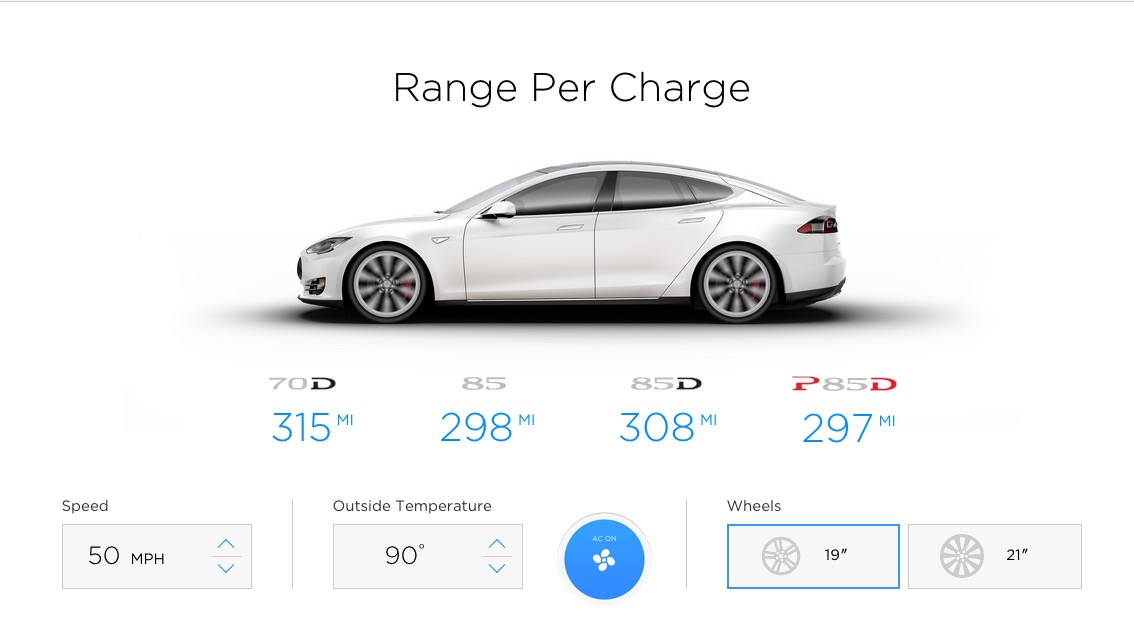
Hans (Amsterdam) Range of the 70D is not bad at all, especially when driving 50mph with 90 degrees Fahrenheit. Model S | Tesla Motors
 �
�
Jul 5, 2015
Macgaver The tesla range calculator ... Is it true ? Adding the A/C make the 70D have more range than all others ?!?
if true, the 70D A/C have something special. My guess, calculator error�
Jul 24, 2015
Matteo Hi. I created a calculator for energy consumption between two adjacent superchargers. For now it works only for USA. You select two superchargers, enter speed, temperature and some other details and it shows you energy consumption in kWh, rated range consumption and battery percentage consumption. Elevation is part of the calculation but you don't need to enter that because all elevation data for stations is already there. Also you don't need to enter distance. Also it differentiates between different car models when calculating weight etc. I made this as detailed as I could.
You can find the calculator here: Tesla Model S calculator for energy consumption between two superchargers - Google Sheets
The origin and destination supercharger need to be within the car's range. This doesn't do multi stop trip planning.
How it works:
It is quite complicated. 7 different consumptions are calculated in kWh. These are:
1 of 7: Rolling Resistance Energy Consumption (kWh)
2 of 7: Air Resistance Energy Consumption (kWh)
3 of 7: Additional consumption: Elevation (kWh)
4 of 7: Additional consumption: Climate Control (kWh)
5 of 7: Additional consumption: Tires (kWh)
6 of 7: Additional consumption: 21" wheels (kWh)
7 of 7: Additional consumption: Road surface (kWh)
The two main categories are #1 and #2. I want to give detailed formulas for both of these in case others decide to work on this subject in the future and they might find this useful. ^2 means squared. This is common excel language.
1 of 7: Rolling Resistance Energy Consumption (kWh) = C40*C41*MultiplierData!$R$3*C6*0.44704/1000*C21/C6
C40= Weight of occupants and cargo + pano roof + other hardware + car (kg)
C41= gravity (m/s^2) = 9.81
2 of 7: Air Resistance Energy Consumption (kWh) = C6*0.44704*(C21/C6)/1000*0.5*MultiplierData!$S$3*AVERAGE(C30,C31)*(C6*0.44704)^2)MultiplierData!$R$3 = Road friction coefficient = 0.0165 (I found this by comparing the calculator to actual data)?
C6= Speed (mph)
0.44704 = converts mph to m/s
/1000 = converts Wh to kWh
C21/C6 = Duration (h) = Distance (mi) / Speed (mph)
?
0.44704 = converts mph to m/sC6= Speed (mph)
?
/1000= converts Wh to kWhC21/C6 = Duration (h) = Distance (mi) / Speed (mph)
?
0.5 = This is part of the formula to calculate the force required to overcome drag. The formula is: 1/2 * air density * drag area * speed^2. In this formula the units are (kg/m^2), (m^2), (m/s^2).
MultiplierData!$S$3= Drag area for Model S = 0.576 m^2. Drag area numbers are available on this page: Automobile drag coefficient - Wikipedia, the free encyclopedia Don't multiply drag area by drag coefficient. It is already multiplied. Frontal area * drag coefficient = drag area
C30= Air density at origin (kg/m^2)
C31= Air density at destination (kg/m^2)
C6= Speed (mph)?
0.44704 = converts mph to m/s
Air density calculations are quite complex too. First you calculate Local atmospheric pressure from elevation. Then from Local atmospheric pressure and outside temperature you calculate air density. I can explain these in detail if anybody is interested. I want to add that all this information is available to anybody who wants to use it. Open the spreadsheet, click "File > make a copy". Then you will have your own version to play with. :wink:
The biggest factor that could mess up calculations is headwind. Currently headwind is not part of the calculation. When you open the calculator you will see many columns side by side. The reason for this is because this way you can compare consumption at different speeds or you can compare different Tesla models side by side or multiple people might use the calculator at the same time.
In the file there is a sheet called "Survey". If you drive from one supercharger to another, it would be great if you could fill this section. This would help fine tuning the multipliers. It asks simple questions like what was your rated range when you arrived at this supercharger etc. However I hope it is already fairly accurate. I did test it against some data I found here and there. I hope it is more accurate than EVtripplanner and I welcome any comparisons and comments.
?
You can find the calculator here: Tesla Model S calculator for energy consumption between two superchargers - Google Sheets
?
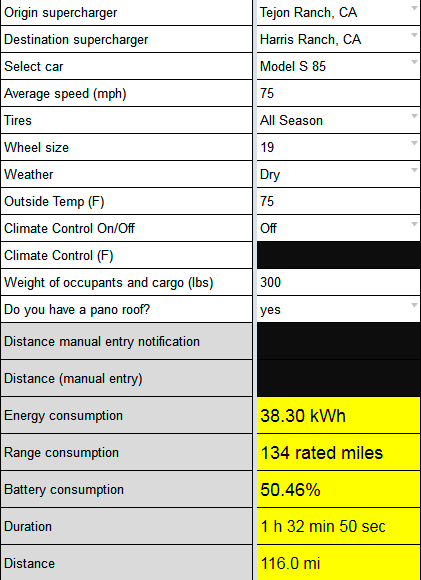
?�
Jul 25, 2015
jerry33 Thanks for doing this. I just got back from a 5300+ mile trip (DFW to Seattle), and didn't see it till I got back. 253 Wh/mi average.
Aren't these two the same?
1 of 7: Rolling Resistance Energy Consumption (kWh)
5 of 7: Additional consumption: Tires (kWh)�
Jul 25, 2015
Matteo Hi jerry33,
You are right. In the table 1,5,6,7 should all be a single category called Rolling Resistance Consumption (the table is just an example that shows when you select Gilroy, CA to Tejon Ranch, CA superchargers). I didn't merge those because it is easier this way to fine tune the calculator and hopefully it is easier to understand for the reader. But I could move 5,6,7 under 1 and make them sub categories. Then rename "Rolling Resistance Consumption" to "Basic Rolling Resistance Consumption". Then call the total of 1,5,6,7 "Rolling Resistance Consumption". I could do that. I need to think if this would be easier to understand for the reader.
Origin supercharger Gilroy, CA Destination supercharger Tejon Ranch, CA Select car Model S 85 / P85 / P85+ Average speed (mph) 65 Tires Performance Wheel size 21 Weather Rain Outside Temp (F) 72 Climate Control On/Off On Climate Control (F) 68 Weight of occupants and cargo (lbs) 300 Pano roof? yes Energy consumption 75.02 kWh Range consumption 262 rated miles Battery consumption 98.84% Duration 3 h 29 min 13 sec Distance 226.7 mi Remaining rated range 3 rated miles 1 of 7: Rolling Resistance Consumption (kWh) 38.85 kWh 2 of 7: Air Resistance Consumption (kWh) 28.76 kWh 3 of 7: Elevation consumption (kWh) 1.77 kWh 4 of 7: Climate control consumption (kWh) 0.28 kWh 5 of 7: Tires consumption (kWh) 0.70 kWh 6 of 7: 21" wheels consumption (kWh) 1.55 kWh 7 of 7: Road surface consumption (kWh) 3.11 kWh Total Consumption (kWh) 75.02 kWh
Right now "Rolling resistance consumption" shows what happens if you have 19" wheels and best tires and dry road. Instead if you have 21" wheels, wet road and performance tires, you get small additional penalties for each of these.�
Jul 25, 2015
Matteo OK. I changed it. There are now 4 categories. I made tire, wheel and road surface a sub category of rolling resistance. I also added Wh/mi number. Now it looks like this. If somebody uses this, it would be great if they could fill in the survey page and enter their actual rated range consumption. That would help fine tune the calculator.
Destination supercharger Tejon Ranch, CA Select car Model S 85 / P85 / P85+ Average speed (mph) 65 Tires Performance Wheel size 21 Weather Rain Outside Temp (F) 72 Climate Control On/Off On Climate Control (F) 68 Weight of occupants and cargo (lbs) 300 Pano roof? yes Efficiency 331 Wh/mi Energy consumption 75.02 kWh Range consumption 262 rated miles Battery consumption 98.84% Duration 3 h 29 min 13 sec Distance 226.7 mi Remaining rated range 3 rated miles 1.1. Basic Rolling Resistance Consumption (kWh) 38.85 kWh 1.2. Additional tires consumption (kWh) 0.70 kWh 1.3. Additional 21" wheels consumption (kWh) 1.55 kWh 1.4. Additional road surface consumption (kWh) 3.11 kWh 1 of 7: Total Rolling Resistance Consumption (kWh) 44.21 kWh 2 of 7: Air Resistance Consumption (kWh) 28.76 kWh 3 of 7: Elevation consumption (kWh) 1.77 kWh 4 of 7: Climate control consumption (kWh) 0.28 kWh Total Consumption (kWh) 75.02 kWh �
Feb 8, 2016
GoTslaGo Some real world numbers:
Started rated range 211 miles.
Temp around 70s, dry, no wind, minimal elevation changes, drove with TACC around 65-70 (varied due to traffic). Minimal HVAC use.
Picture one was first leg of the trip with 32 miles on the trip and 179 miles left (211 miles total).
Picture two was the entire trip with 65.3 miles on the trip and 146 miles left (211.3 miles total).
Maybe that HVAC is special!?:wink:
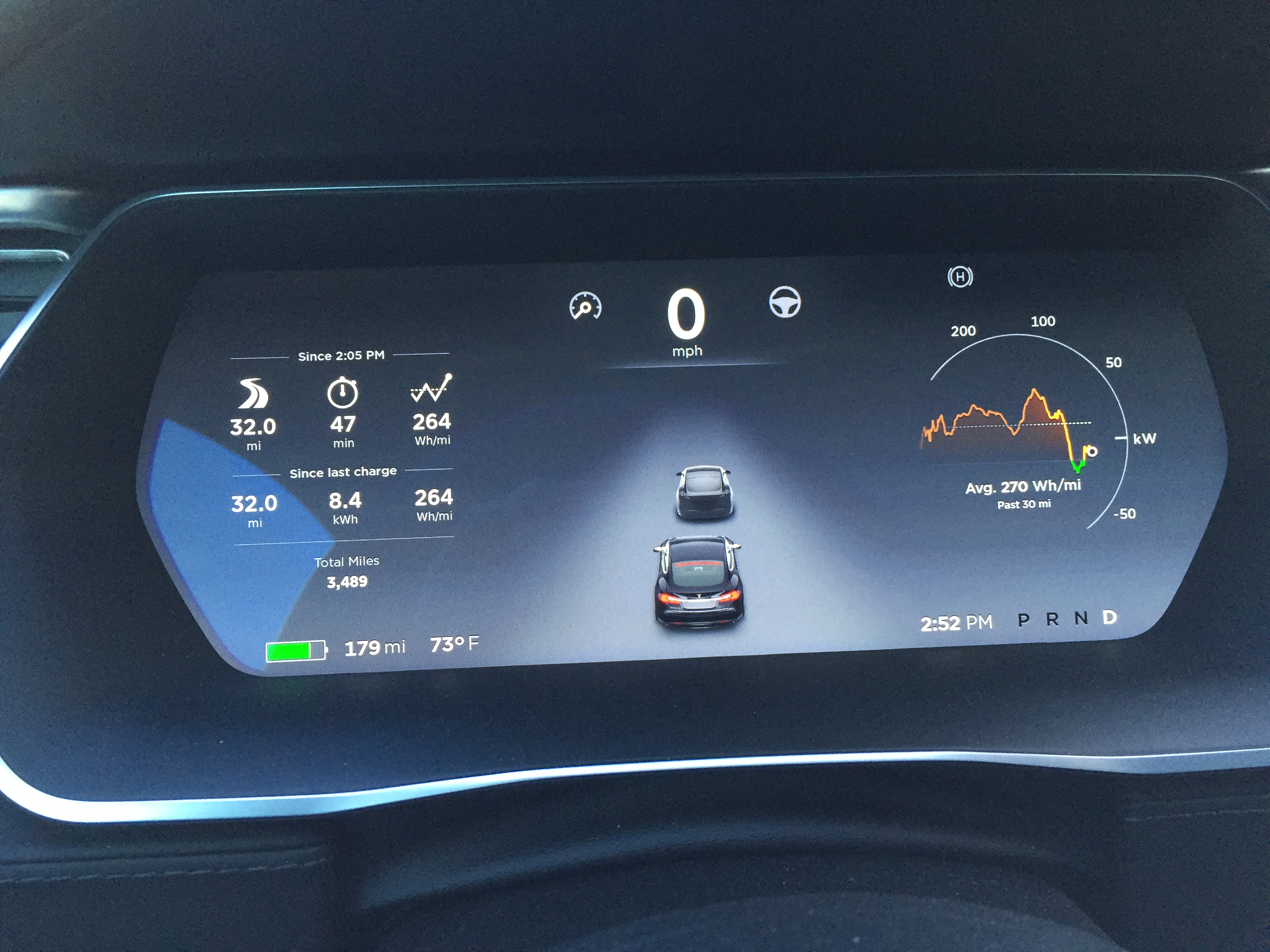
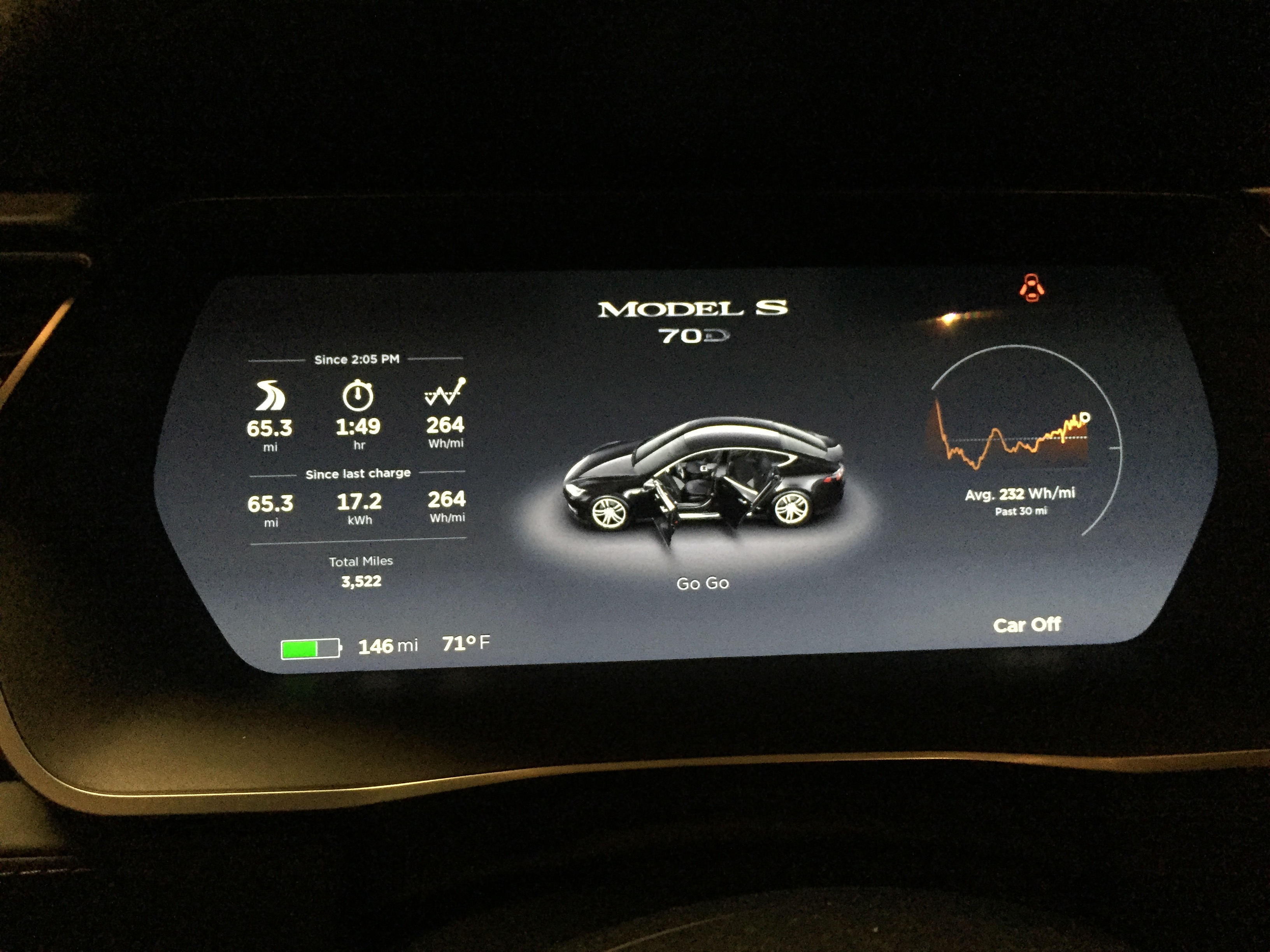 �
�
Mar 29, 2016
FlatSix911 Corrected Range chart ...
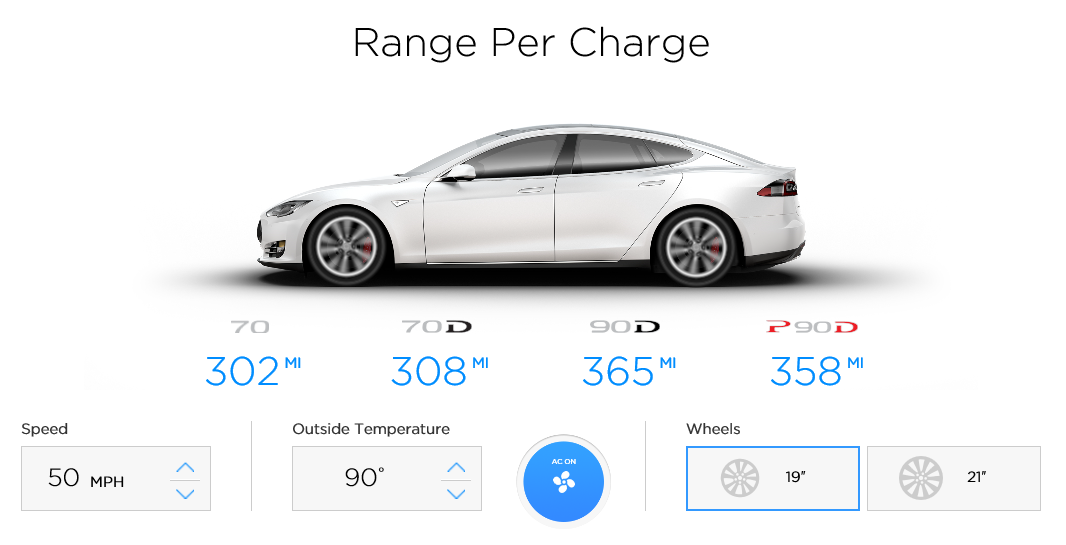 �
�
Apr 2, 2016
AWDtsla Why do the Tesla graphs show rolling resistance as a small linear growth value, vs drag being the largest and exponential growth, and your calculations have rolling resistance as the highest consumption?
i.e. http://c1cleantechnicacom.wpengine.netdna-cdn.com/files/2016/02/Whpermilevsspeed.jpg�
Apr 4, 2016
anna3 Great post overall! We are planning a roadtrip in our Model X this summer that will include a lot of elevation change and are trying to recreate your percent of rated number calculations for this factor. Based on your description, we've com up with the formula:
[((elevation gain'/1000')*10mi)-((elevation loss'/1000')*6mi)]/actual trip distance (i.e. map distance)
However, the % results aren't corresponding to yours. What are we doing wrong?�
Apr 4, 2016
ChadS Hi,
Most of my numbers are in % for the whole trip, but the elevation change numbers are absolute numbers that only apply to the hill in question. So rather than dividing by the trip distance and applying it as a percentage, you just add the number of miles "spend" on the mountain from the total.
So for a 135 mile trip at adding 12% for speed and 8% for wet roads and going over a 3,000' pass, you'd get numbers like:
135 * (100% + 12% + 8%) = 162, how much rated range you'd need if it was flat
162 + ((3 * 10) - (3 * 6)) = 174 miles of rated range required including going over the pass
Note that I wrote this post long before the trip calculator was in the car. It can't include everything (it doesn't know what headwinds are, for example) but it does include elevation changes, although it seems to underestimate energy used going up and underestimate energy re-gained coming down, so things might not look good as you approach the top of a hill but will improve back to where you expect them as you come down.�
Apr 4, 2016
FlatSix911 Looks like we should focus on Aerodynamics for best gains in range.
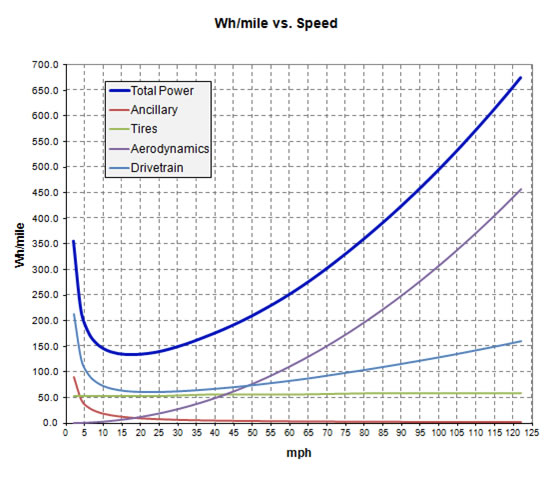 �
�
Apr 8, 2016
Novalis Same graph available for MX??�
Apr 21, 2016
MDMGSO47
I understand there are a number of factors that affect range. For those of us who are less mathematically inclined (or who are too lazy to do the math), what's a rough guess of the percentage of the range numbers predicted by Tesla that are achievable in the real world assuming normal freeway driving at moderate temperatures? 70%? 80%? 90%�
Apr 21, 2016
FlatSix911 Here is the range impact of the 22" wheels for the Model X on the Tesla configurator.... 10% - 15% equals 25 - 37.5 miles of range lost.
 �
�
Apr 21, 2016
AWDtsla 10-15% still with all-seasons??? Seems like maybe they should not have even offered that wheel design. The problem is likely that the most drag is caused by the outer edge of the wheel, the 22" just have way more of that.�
Apr 21, 2016
FlatSix911 I would suspect that the majority of the range decrease is due to increased mass of the 22 wheels ... approximately 40 lbs�
Apr 21, 2016
ChadS Numbers predicted by Tesla - you mean, the range-estimation tool on their website? (Probably, because that is what you are replying to). I haven't played with it for quite a while, but when I did the tool (outside of its limited parameters and things it left out) seemed to match real-life miles very well when conditions were good. Headwinds, elevation etc. were not counted; but if I didn't hit any, I got pretty much 100% of what they estimated. (In very poor weather I have gotten as little as 2/3 of what it predicts, though that is not common).
If you happen to mean the EPA numbers, those are a mixed-test number that aren't supposed to exactly match highway miles at any particular speed. But if I drive ~65 around here on a warm, windless day on flat road...yeah, I pretty much hit 100% then too.
You could also mean the trip tool in the car. That has some good points, like it's in the most useful place, it considers elevation, etc. But it's still the one I trust the least in some respects (it is still a very valuable tool; especially given its real-time status of how you are doing; you just have to leave a buffer). In addition to still not accounting for headwinds, and if it accounts for temperature I don't think it's too good (unless it's lost in one of the other problems), it also seems to do elevation wrong - I consistently under-perform its estimate going uphill, but overperform going downhill. That said, even if it's not the most accurate, I have sometimes overperformed its predictions in all sorts of weather. However, I have more often underperformed. Usually not by a whole lot though, unless I'm speeding and expect to.�
Apr 21, 2016
hiroshiy Agree with ChadS. Mine easily get more than 100% than EPA number at speeds 65mph with flat road no headwind no heaters.�
Apr 22, 2016
MDMGSO47 I live in Greensboro, North Carolina, where the weather is moderate for 8 months of the year. We have ordered a S70 to be delivered late May. My long distance travel in the Tesla will normally be about 180 miles one way (Asheville) or 200 miles round trip (Charlotte). The 200 mile one way trip has an elevation climb or drop (depending on the direction of travel) of 1,200 feet. We will be doing interstate driving with the heat or AC on depending on the weather.
The Tesla site says we can expect a range of 215 miles at 70 mph at 70 degrees (down to 195 at 32 degrees) with the AC or heat on. Are those estimates acheivable under normal circumstances? The margin is pretty small on both trips. In addition, there are no Superchargers and very few other type chargers in the 180 miles between Greensboro and Asheville. Is it reasonable to believe we will actually get a 200 mile range on the interstate?�
Apr 22, 2016
AWDtsla 3 of those factors are out of your control.
evtripplanner.com would tell you minus startup costs (i.e. cold/heat soak), if it wasn't down.�
Apr 22, 2016
ChadS On good days, you can definitely make it if you keep your speed down. But part of the problem is, like AWDTesla hints, that you can't predict the bad days - because a day that looks like a good day might have, say, surprise headwinds.
If it was a nice day and I was doing it once I might try the 200 mile trip. But I wouldn't do it on a regular basis (at least not in a 70) without a known place to stop along the way. Not all leave as much buffer as I do; but I want to make sure I never run out and in fact I don't even want to worry about whether or not I will make it while I am driving. If you do fall short, it usually won't be by much; so if there is a charger you can count on that is, say, 75-80% of the way you could use that only in emergencies, and you shouldn't have to be there too long.�
Apr 29, 2016
hiroshiy I think your rated range is 240 miles on full charge, correct? In summer, without heat and without significant headwind, you can do that trip without any problem as others noted. However in 32F you will get minus 20-30% less rated range:
20% 200 miles
30% 184 miles
So, if it's really cold like less than 32F, you won't reach 200 mile destination. If it's a bit warmer, you need to reduce the speed to 65 or 60 mph to achieve 200 mile trip. If I were you, if it's snowing I'd find a charge in between absolutely. If it's not, research emergency charging spots in advance, start with 60 mph with AC at comfortable setting. If you think it's cutting close, either you turn off your AC (if weather permits) or stop to charge. Once you are confident that you can reach destination you can speed up to 70 (but I don't recommend 75).�
May 9, 2016
f1tifosi Does anyone know if the new ('17) Model S front fascia has improved the vehicle's drag coefficient and thus contribute to a higher range? Range ratings have not changed on the website but is it a matter of time someone looks at the new cars efficiency in carving through wind?�
May 10, 2016
tagpats The Tesla website does not show it, but I've read that the refreshed 90 is 303 rated miles of range. None of the news articles I've read mention the 70, but if the new front is the reason for the increase then it seems reasonable that the 70 would also realize a slight gain as well.
Tesla�s updated Model S just broke an incredible barrier for EVs�
May 14, 2016
dweeks I have a 90D...took delivery a month ago. I accepted the car, and drove it home from the Scottsdale service center, and that night did a range charge, as I had a long trip the next day.
303 miles. But that was the first and last time I have seen 303. Most range charges now give me 297-298 miles.�
May 18, 2016
X Fan Longer trip to Asheville via Charlotte but North Charlotte supercharger would clearly be of benefit....�
May 18, 2016
ZBB The Model S configurator shows the refreshed 70 (Rwd, not D) with 234 miles of range. The pre-facelift was 230...�
Jun 5, 2016
Tony8489 I have had my S90D for 2 months and 4499 miles. ChadS' speed and altitude factors have been reasonably accurate for the 3 trips to Mammoth during that time, the last one coming home via Yosemite.
I looked at Matteo's online calculator but it has not been updated for the chargers opening in 2016. These include Burbank (surrogate for home, just 3 miles away), Mammoth, Fresno and Buttonwillow.�
Jul 26, 2016
Kensiko Really interesting thread. We had a similar summary on PriusChat of how to minimize consumptions, it's a bit different but the idea is the same.
What about tires guys? Do you all have recommended Tesla LRR tires ?�
Jul 27, 2016
DrManhattan This is not perfect math, but I did my first road trip in the 60S and my furthest Supercharger distance was 165 miles, and I had about 10 miles remaining. It was about 100 degrees out, and I drove 85mph most of the way. I feel if I keep it to 80 or below, I can do 180 miles no problem depending on elevation/weather of course.�
Jul 28, 2016
Kensiko Hey can you tell us the speed for supercharging a S60 with S75 battery ? What is the power draw when close to 100% ?�
Jul 28, 2016
DrManhattan There are already a few threads here about this. I don't know the exact answer but it's very good power draw up to 100%.
See this thread: Some exciting observations about the new Model S60 (software limited 75 kWh)�
Aug 28, 2016
ldgrmnmc I apologize that this has been probably answered multiple times, but with all other variables steady, will my S70D get better range on long interstate trip with or without extensive use of autopilot? Thanks�
Aug 28, 2016
mblakele If you try to beat AP on efficiency you probably can: you have better sensors and more computing power. But if you don't make any special effort, AP will probably be more efficient than you.�
Aug 28, 2016
jerry33 If you have enough practice, you can beat autopilot every time. The key is enough practice so that doing the efficient thing doesn't require much thinking on your part. All automated systems try to keep the same speed, so they use extra energy to do this. You can slow down and speed up when appropriate. This isn't a skill you learn in a week though.�
Aug 28, 2016
Kensiko Do you have driving tricks to get the best efficiency ? Ex staying around 20 kW ? Accelerating quickly or slowly ? I would need to check the rear motor efficiency curve for my S60.�
Aug 28, 2016
jerry33 The general rules I use are:
1. Keep some air in your tires and be sure they are properly aligned. Low air pressure really increases rolling resistance--even two or three psi are noticeable. (Not to mention that lower air pressure makes the wheels more susceptible to potholes and other impact damages.)
2. The slower you accelerate the more efficient you will be. Use the power metre to monitor your acceleration. Don't bother with the energy graph, it's too far behind real time to help. (The way the power metre has changed in 7.x for AP cars is just awful for this because the first marking is at 75 kW. If you are using 75 kW of power, I sincerely hope your eyes are on the road, not on the instrument cluster.)
3. The longer it takes to come to a stop, the more efficient you will be. Be light on the regeneration whenever possible. At stop signals, it's often possible to stop slow enough that the light turns green before you reach it. (Time spent waiting for the light to change does not get you to your destination any faster--although many drive as if it does.)
4. The higher the speed you cruise at, the more energy is wasted by just pushing air. Five mph makes a noticeable difference in energy usage but not in elapsed time.
Example: A 500 mile trip at 65 mph takes ~7:45, at 60 it's ~8:20. To each add thirty minutes for the extra time spent at lunch (while charging) and 1:15 for charging (Total charging time will be ~1:45). Convert to minutes it's 570 (9:30) vs. 605 (10:08) or ~6% difference in overall travel time. This is actually the worst case because by driving more efficiently, the non-lunch charging stops will be slightly shorter (I don't know how to accurately calculate that.) Bottom line is that either uses up about a day, so the extra speed doesn't buy you anything (other than maybe some range anxiety).
The plan on a trip is: Start with a range charge. Then at each non-meal stop charge only enough to get to the next charging stop plus a bit extra just in case. At meal stops charge for the entire time you're there. This method reduces the amount of charging time that you're doing nothing but waiting. Last year, driving from DFW to Seattle, most of our non-meal stops were 15 minutes or less and the car was usually ready by the time we got back from a pit stop. Note this is for travel in moderate or hot weather. Cold weather will increase the energy usage resulting in longer charging times.
Note that if you are going for shortest time, rather than for best efficiency, then drive as fast as you can between charging stops. (You can use EV Trip Planner to get some numbers for this.) I prefer to go for most efficiency because it's more relaxing which makes the trip more enjoyable.
5. Losing a few mph going uphill will make you more efficient.
6. Gaining a few mph going down hill will also make you more efficient, but watch it because there is a point at which you're just using the additional speed to push air rather than gaining distance from it. There is a point where the amount of energy you lose by pushing air is greater than the inefficiency of regeneration.
7. Sometimes it's possible to choose a route that is more efficient. This works best on a route you travel frequently as you can become more efficient as you get to know the route.
8. A route with fewer stops is almost always going to be more efficient than a route with multiple stops.
9. Road surface makes a difference (not that you can do much about it except choose a different, possibly smoother road).
10. You almost always get better efficiency on roads that you travel regularly rather than on unfamiliar roads.
11. On vacation trips, up the tire pressure to compensate for the extra load and speed.
12. On road trips, occasionally check the trip graph to see how you are doing compared to the estimate.�
Aug 29, 2016
Dennisj00 My dad taught me in the 60s to drive like I had an egg between the accelerator and my foot. Works pretty good with an EV. We've had 2 Leafs since 2011 and now with the model S, I'm getting 105-120% efficiency in Teslafi and still having fun driving it. Wife isn't, she treats her badly!
I've been really surprised and pleased that range isn't affected too differently between driving at 50, 60 or 70.�

Không có nhận xét nào:
Đăng nhận xét