Mar 5, 2015
majorlance Highlights of the script:
- This script is for anyone that uses playlists for listening- not genre, album, artist, etc. as there are multiple copies of a song on the flash drive.
- Syncs (selectively) multiple playlists from iTunes to a drive/folder of your choice (including USB flash drive)
- Adds and deletes files automatically to reflect your current iTunes playlist setup in iTunes playlist folder Tesla (can be changed in the script)
- Changes the song genre to reflect the iTunes playlist for the copied file. The iTunes file retains it's current genre setting
- Play your playlist by selecting Genre in the Media Player of the Tesla
- Automatically converts Apple Lossless files to flac (using XLD's command line interface)
Details:
I've assembled an AppleScript that will sync a folder of iTunes playlists to a USB flash drive or a folder on your Mac. (No windows versionas I've used AppleScript for this.) You define a folder in iTunes (the default is Tesla) and add any playlists to it that you would like to sync. The script will copy all of the songs to your destination drive/folder and rename the genre of the song to the playlist. Using the media player in the Tesla, you can then select genre which will reflect your playlists in iTunes. (The genre of the iTunes song is temporarily changed when the file is copied but then changed back to the original genre.) If you have Apple Lossless files, you'll need to install both XLD and the command line script xld (included with the package) and the script will automatically convert the files to the flac format, playable in the Tesla. (You may need to make the xld script executable to work.)
Instructions:
1- Copy the script to the location of your choice on your Mac.
2- Install XLD on your Mac and install the command line tool (in CLI) from http://sourceforge.net/projects/xld/files/latest/download
3- Install the xld CLI in your applications folder. You made need to make it executable using terminal and chmod. Open terminal, type cd /Applications, type sudo chmod 755 xld. Enter your system password and press enter.
4- Create a playlist folder in iTunes named Tesla and drag any playlists you'd like to sync to this folder. (You can change the default folder in the script if you'd like.)
5- Run the script (link below).
6- Choose your destination disk/folder.
7- Wait. If you have a lot of songs, it can take a long time. Hours. Particularly when copying to a USB flash drive.
8- Caution: the script does not check for adequate disk space. And since it makes multiple copies of the same file per playlist, it can use quite a bit of disk space. I'm not certain what would happen if a flash disk ran out of space.
Notes:
1- I'd initially choose a small playlist to test the setup. And sync to a folder on the desktop for testing. Better yet, make a copy of your iTunes folder, open the backup (using the Option key when clicking on iTunes and then select the backup). Note you'll have to change it back once done testing.
2- Although the initial sync can take a while, future syncs will go much more quickly when only small changes have been made. The script will add and delete files to your destination based on your current playlists in the "Tesla" folder in iTunes.
3- Your will end up with duplicate files on the destination drive/folder. Each song is copied from the playlist and the genre named to the playlist. This means that if a song appears in 5 synced playlists you'll have 5 copies of the song.
4- If you initially sync to a folder on your hard disk, you can copy the folder to the USB drive. Next time, sync to the flash drive directly. It's a little less error prone due to timeouts or slow USB drives.
5- The progress meter and counts are sometimes a bit wonky. They may or may not represent what is actually happening exactly... just sorta.
6- The script makes a temp playlist called ZZ-Temp (get it?) and copies all of the playlist files to it. This playlist is not deleted at script end so that you can use it as a proxy to see how many files there are. This can be compared to the destination folder. The playlist folder is deleted on the next run of the script and then re-created with the designated playlists in the Tesla folder.
7- I've had timeout errors that I can't diagnose (maybe Time Machine locking files, other apps, etc.). If the final dialogue box reports errors or their is a discrepancy between the ZZ-Temp playlist and the number of files in your destination folder, just run the script again. If it the issue is a timeout, usually second times a charm!
8- The only risk to your iTunes library is that the genre is changed momentarily when copying the file to the destination folder. If the script were to crash, there is a possibility that the iTunes song would be left with the playlist as genre vs. your original designation. In my month of use, I've seen this occasionally but now trap most errors when copying the songs.
9- You can save the script as an application bundle, which will allow it to run directly without opening up the script editor.
Please make certain that you have a backup of your iTunes folder when you first start using this script. I have tested it on my Mac and laptop which are running Yosemite and the latest iTunes 12.1.0.50 as of March 5, 2015. The progress bar may break in earlier versions of OS X... not certain as I can't test but it is a new feature.
So, this script works for me but note that I've cobbled it together and am *not* a programmer per se. There will be bugs and issues but in the end, this makes syncing a USB flash drive almost as easy as syncing an iPod. Which is nice...
Please provide any feedback or if there are any AppleScript gurus out there, suggestions on how to improve it.
Finally, many thanks and a shout out to Doug's iTunes Scripts (Doug's AppleScripts for iTunes - dougscripts.com) for both the inspiration, samples, snippets and general guidance for using AppleScript with iTunes. Highly recommended!
Download script from:
https://www.dropbox.com/s/pea6ympevcjmawm/Tesla%20iTunes%20Playlist%20Sync%20v1.scpt?dl=0�
Mar 5, 2015
majorlance I'm also working on a sync script that will copy all files from selected playlists to a USB drive but preserve the genre and eliminate any duplicates...
It will also convert Apple Lossless to flac.
Let me know if you're interested. I'd like to flush out any errors in the above script as the new one relies heavily on the code in the original.�
Mar 6, 2015
Gizmotoy When is XLD used? Is everything run through it, or only Apple Lossless files as they're converted to FLAC?�
Mar 6, 2015
Pollux Wow! I can't wait to try this out!
Thank you!!!
Alan�
Mar 6, 2015
majorlance XLD is only used for Apple Lossless files as they won't play in the Tesla. XLD will convert them to flac with no loss in quality. All other song files are copied in their native format as the Tesla supports all iTunes formats except Apple Lossless.�
Mar 6, 2015
Gizmotoy Right. I just didn't want to be re-encoding lossy formats. Looks like a neat tool, I'm going to give it a shot.�
Mar 6, 2015
majorlance You're welcome! Let me know if you have any issues or questions... It works well on my system and setup but that's a very limited user test!
Again, I'd suggest using a small playlist and consider copying your iTunes library as a test bed.
- - - Updated - - -
Agreed. The Tesla supports AIFF files (as does iTunes) but they are twice as large as either flac or Apple Lossless. The script will copy the AIFF files without modification, just like mp4, aac, mp3, etc.
You can look at the script and see the logic. I tried to document the various functions...
Please let me know how it goes!�
Mar 6, 2015
CHG-ON Thanks so much for this. It has been a constant frustration for me.�
Mar 7, 2015
ratio Wow - this is awesome! It worked perfectly for me. Thanks for posting!�
Mar 7, 2015
4SUPER9 This is really cool. I can't wait to try it.
Thank you.�
Mar 8, 2015
majorlance If you'd like a pre-compiled script that uses the defaults (basically the Tesla iTunes folder for playlists), use this link:
Dropbox - Tesla iTunes Playlist Sync v1.app.zip�
Mar 8, 2015
majorlance Just had a report that the script will only run with Yosemite... apparently the progress bar function limits it to Yosemite only. I'll post an updated script without the progress bar later this week.
As an aside, is there a way to edit my initial post to show updates and revisions? I don't see an option for it on the post...�
Mar 9, 2015
SW2Fiddler "Report" your last post (or this one) requesting the forum moderators to "make a wiki" out of your second (I think it's limited to that) post... makes it ever-update-able.
Thanks for the script work, can't wait to try it out once I cram a pile of CDs into iTunes in lossless!
Rick�
Mar 9, 2015
majorlance Thanks. The script will work with standard files also...�
Mar 9, 2015
SW2Fiddler Understood. But since I sprung for the Premium sound system...
No pano, no leather, no dual hovercraft submarine motors but we'll plush out on the Tunes with a little help from your script!�
Mar 10, 2015
Zythryn Awesome idea, thank you for sharing this!
I am completely inept when it comes to programming.
I have the script, and installed XLD and then moved the CLI folder to the applications folder. It seems to run.
I created a Playlist titled Tesla and copied a half dozen songs into it.
Ran the script, selected a test folder I had created on my desktop.
I am running Yosemite 10.10.2
When running the script though, I get:
Can�t get �class cFoP� "Tesla" of application "iTunes".
iTunes got an error: Can�t get folder playlist "Tesla". (-1728)
Is it possible this is because my iTunes library is on an external hard drive?�
Mar 10, 2015
majorlance You're almost there... First, unless you have Apple Lossless files in your iTunes library, you don't need XLD and skip to step 2.
1) If you do, you'll need to copy the xld (all lower case) script from the CLI folder to your Applications folder. (You also need to make it executable using terminal and chmod. Open terminal, type cd /Applications, type sudo chmod 755 xld. Enter your system password and press enter.)
My initial instructions are confusing... CLI stands for command line interface but it is also the name of the folder that has the script.
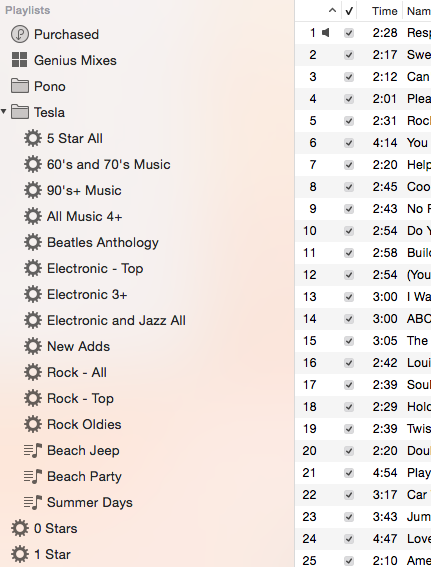
2) Create a Playlist Folder in iTunes (Under File->New->Playlist Folder) named Tesla (not a playlist). Next, add an existing playlist or two (or make a new one) to the folder. It should look like this the picture below (but with your playlists in it!).
It's step #2 that's causing the script to crash. I'll look into adding a little error handling there to provide a more gentle crash.
The script will copy your playlists to your destination and rename the genre's name to match your playlists. On the Tesla, insert your USB flash drive and then go to Genre and you'll see a listing of your playlists. Select one to play. Works well with the new shuffle function.
Post back here if you need more help. And thanks for checking it out!
 �
�
Mar 10, 2015
Zythryn DOH!
Your instructions were just fine, I just never used a Playlist Folder before.
Where my eyes saw "playlist folder" my brain registered "playlist".
It works wonderfully, thank you for creating, sharing, and patiently explaining it (twice)!�
Mar 10, 2015
majorlance For anyone not on Yosemite, I've gone through and commented out the "progress bar" script as it works only in Yosemite. Link is below...
Note that you won't have any indication that something is running other than the script editor will say "running" in the bottom of the screen. As I've mentioned before, it can take hours to do an initial sync and copy. Best to start with a clean USB flash drive. A faster machine and USB 3.0 USB drive will make a huge difference in the initial sync. But be patient. If if there are timeout errors, syncing again will take less time (moving fewer songs to the drive or folder). You can always select a folder on your computer (or add one) and then sync with the folder. After the sync, copy the folder to your USB flash drive...
I use a USB 3 flash drive and have a relatively new iMac. I sync almost 170 GB of songs and it takes less than five minutes to sync the entire flash drive (after the initial sync)... About as long as my iPhone takes...
Here's the link for anyone using Maverick's or less (OS X version 10.9 or lower). Let me know if you have any issues.
Dropbox - Tesla iTunes Playlist Sync v1.1 - OS X 10.9 (Mavericks) or less.scpt�
Mar 17, 2015
ra-san Wasn't sure whether to make a new thread, or add to here. Ironically this thread got started soon after I had just completed a basic command line version of a utility to sync my iTunes library to a USB drive for the car. While it worked, I wanted to make something a little more accessible, with my normal use case being something to the effect of, "start app, push 'do it' button. Go have a drink."
So I did. Make the app that is - though there may have been drinks too.
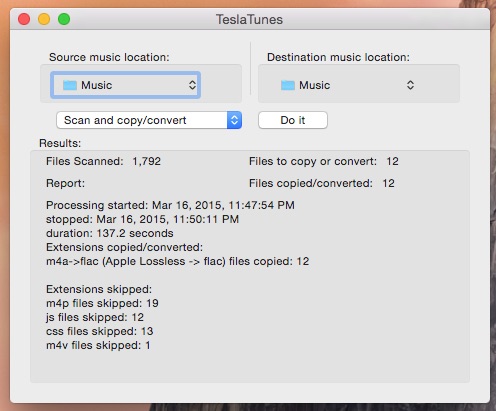
First off, at the moment it is a Mac only app. Sorry Windows and Linux folks. OS X is my usual system and it started as a personal utility, not as something aimed at what would hit the most potential users. I'll see what I can do about that based on time and interest, but want to get it more complete anyway before adding other platforms.
MajorLance's version still does things mine doesn't. I don't do any playlist level syncing yet. My focus was on scanning the whole library and copying over just any new files I'd added to the library since last time, while also doing the whole Apple Lossless to Flac routine automatically and transparently.
You can find it here (goes to github): Tesla Tunes.
Off the download latest link, there's a zipped up TeslaTunes.app file - you don't have to be a developer or anything to use it.
It doesn't, or at least shouldn't, require any extra downloads to run - just unzip it and throw the app wherever you want (you know, like Applications - but it's not picky).
It's basic, but I've found it useful. Should any of you also want to try it out, feel free. Leave feedback at the site, or here (in a new thread probably?) if you wish. I'm interested in how many people find individual playlists to be the best unit of transfer vs. how many just want the whole enchilada dealt with as easily as possible.
I appreciate MajorLance's work it looks genuinely useful and it was smart to target the functionality towards playlists. Aside from that, it prompted me to go ahead and get this out of the stages of works for me and into a (slightly) more useful for others state. I'm not sure which would be better or more useful to people in general, but it's awesome to have any choices at all vs. the more manual routes many of us were taking before.�
Mar 19, 2015
majorlance Nice. I will have to check it out.
I've always used playlists for my car playback but prior to the Tesla, would just dedicate an iPod classic to my library for my car. Basically, I could have my music by playlist, genre, song, etc. But I mostly used playlist like one would use a pandora station...
The script I wrote focuses on playlists. All works well but Applescript seems to be a little wonky with timeouts. My workaround (re-naming genre to a playlist) solves the lack of support for traditional m3u playlists but results in duplicated files. I'd really like to see tesla offer support for them then whole library syncing would work for users with large libraries *and* give many of us a classic playlist function.
Maybe be the mods can give us a sticky around music playback and we could post various workarounds...�
Mar 19, 2015
ra-san Yeah, lack of playlists on the car sucks. The folder workaround is a good one, given the limitations we're currently stuck with. Hopefully that'll change soon.
I'm actually kind of hoping that the whole Apple Lossless thing is fixed by 6.2. In the conference call he said better audio codec support, and Apple Lossless has been open source with sample code for a long time now (as I've pointed out to them in emails). Since he specifically said audio codec support, I'm think it's that, or more likely Bluetooth aptX support vs. something as huge as CarPlay or the Android equiv. though someday I do personally still hope for full CarPlay support.
On another note, and relevant to the aptX possibility, while the purist in me wants lossless libraries anywhere I can, I'm virtually certain at this point that the Bluetooth connection in the S supports AAC. Doesn't help Android folks out for the most part, but certainly does all the iPhone users. I've verified the part Tesla uses supports it, and based on communications with them personally, as well as past communications I've seen either here and/or the Tesla forums, I am pretty certain they utilize it. The only drawback, aside from the fact it's still compressed, is that far as I've seen once I start really digging into the details, I'm pretty sure the AAC (or whatever source) from the iPhone is decoded to lossless, then re-encoded as AAC again at a specific bitrate (it's in the spec - 256 maybe?) by the bluetooth stack in the phone rather than the phone just sending the AAC data direct from the song file. Still though, sounds a hell of a lot better than the baseline Bluetooth audio. I'm sure that much of it is just due to my aging ears
Regardless, I want my whole library available independent of cell connection, even if I choose to often just use my phone. And if most of my library is in lossless, and TB are cheap, seems silly not to keep it lossless for the car. Even if they start natively supporting Apple Lossless, which I hope they do, I'll still be needing a quick and easy way to keep a copy of my library in sync. I think ideally I'd want a tool that could, without a lot of setup each time, copy the whole library, and playlists, or any subset by playlist, to the removable storage used for the car with one click (once the initial selections are made first run).
In my program, I was thinking of adding a details view of operations in progress next, but more I think about it, the more I think playlist support is more important for actual functionality. While seeing lots of progress bars chugging along is reassuring, once it's no longer a novelty and you just want to hit it and forget it, the actual usefulness of having folders made for each playlist seems a lot more of a win. I hate the duplicated space�
Mar 19, 2015
gzerninplatz Majorlance - does your script also check for unplayable files (DRM, etc.)? I think those may cause the entire folder to be unplayable...Tesla can't process to add the files to its directory...�
Mar 21, 2015
majorlance No but I can add that. I'll look at it this weekend.�
Mar 21, 2015
majorlance ra-san,
I'm with you. It would be so easy for Tesla to support m3u playlist files. I have a Pono player and wrote another script that syncs an iTunes folder with multiple playlists to to the pono (which looks like a hard drive to the mac) and then re-creates the playlists as m3u files, which the pono recognizes. It is *much* faster than using their PonoWorld app and it keeps me from having to manage two applications.
I'll do some A/B testing between my iPhone and the flash drive. I have the Reus Systems upgrade in my car (new A pillar speakers and two 10" subs in the back). In my experience, the major difference in quality for bluetooth vs. direct (AAC, lossless, etc.) is at the low and high ends of the spectrum. I'll report back.
I'm also very curious as to the audio improvements that Elon mentioned. My thoughts were:
1) Improved bluetooth codec (most likely)
2) Replacement for the crappy Dolby feature
3) A multi-band spectrum equalizer (this would be easy)
4) Ability to create a larger sound space by setting speaker distance with a slight time delay (don't really know how to describe this but my Alpine aftermarket head unit has this. Once adjusted properly, really opened up the sound.)
5) Direct support for an iPhone/iPod through the USB ports (least likely)
BTW, I tried using hard links once to replicate a playlist on a flash drive but it didn't work. I can't remember how it failed but my plan was to create a master library and then copy links to another folder for a playlist like function.
As inspiration for my own script, initially I was copying a playlist to a folder and then randomizing the file name with "A Better Finder Renamer". Repeat again for next playlist. it would take a weekend and if I added more songs I'd have to start the process from scratch again.
Once shuffle came out, I gave up on this approach and went with renaming the genre to the playlist name. I did it manually at first which inspired me to write the Applescript program. (I don't know objective C...) Big driver for doing this was that the Tesla media player would load album art when playing back by genre and it doesn't (I don't think this has changed) display album art in folder mode. I really like Album Art!
What I don't like about my script is that it doesn't handle errors well. And background processes like time machine seem to interfere or hang it. Not certain why... I copy over 175 GB of data (about 3,700 original songs which expands to 13,000 when duplicated by playlist) so there is a lot to move around. But storage is cheap!
It will be interesting to see what Tesla delivers with 6.2. Maybe we could combine our approaches to come up with a flexible, bullet proof solution!�
Mar 21, 2015
majorlance ra-san,
Re-read your post and also did a quick A/B (not blind) test of my iPhone 6 via bluetooth vs. flash drive.
I think that you're saying the chipset will support Airplay (your AAC comment) and could be enabled. Is this correct?
As far as my own test went, I tried some old stuff, new stuff and 256 AAC vs. lossless. In all cases, I thought I heard more clarity and a little more low end bass with the flash drive. But it was close and may have had a little user bias as I knew what I was playing. I also confirmed that playing USB folders still does not have artwork or complete artist/album/song information from the ID3 tags embedded in the songs.
Also, I didn't listen or see the transcript. Just read a couple of articles so if he said codec, some of my original hopes may be out of line...
�
Mar 21, 2015
majorlance Updated script to filter out iTunes protected files. If your playlists have a protected file in them, the script will ignore it. User gzerninplatz reported that the Tesla media player was failing, most likely to the inclusion of the older iTunes protected songs. (I purged my library of those some time ago and didn't think to check!)
I've also added code to reset the "last modified" date of the song to be whatever it was before the script briefly changes the genre. So the song file will have the correct last mod date but iTunes doesn't automatically reload the song data. It will refresh it the next time the song is played, however.
Finally, I'm going to try and post all of this to github (sa-san was the inspiration for this). That way I won't have to post new links in this thread.
New download link:
Dropbox - Tesla iTunes Playlist Sync v1.2.scpt
Enjoy!�
Mar 21, 2015
gzerninplatz I got an error with this script....might want to wait till Lee has a chance to look at it again. It thought I had a Pono and halted...I don't.�
Mar 22, 2015
majorlance Fixed. Left a reference in for my testing... no Pono needed now!
The link above will includes the fix (use Tesla folder in iTunes to look for playlists).
Thanks.�
Mar 22, 2015
gzerninplatz HEARTFELT THANKS TO LEE (majorlance)!!! This thing is easy to run, and does a world of good for Tesla audio...
---------------------------
All working great now - this is SUCH a great thing, FAR better than just settling for bluetooth audio - I'm glad Tesla "forced" him into doing this script! I'd just purchased a 128GB iPhone 6 so that I'd be able to bring enough of my library to the car....but the sync'ed flash drive is far superior....better audio, and can just leave the phone in my pocket and not even run its battery down...and never a bluetooth pairing fart, ever...I'm rolling with 18,000+ tunes now, playlists intact (110GB on a 128GB flash drive)!!
Do take his advice and do your first run to a hard drive as destination to create the base file - I used an external disk drive, (I don't even have space on my internal drive for another copy of the large library). I then simply copied that file to the flash drive, whole process took about 5 hours. Now I reset the destination to the flash drive for follow-on sync and it only takes a few minutes to make the small changes needed each time...�
Mar 22, 2015
andrewket Running: Yosemite, iTunes library on external drive. XLD.app and xld (cli) installed in /Applications.
I'm running a test, with the source location the Music folder from the external drive, and the destination a test folder on the desktop. I have 4 playlists in the Tesla playlist folder in iTunes. I'm running scan, just to see what TeslaTunes would do, and it's scanning my entire music library and marking every song to copy or convert which is not that I wanted and not what I thought the script would do. Shouldn't it scan my entire library but only copy/convert songs that are included in the playlists within the tesla playlist folder?
Am I missing something? The first post says you can selectively copy playlists.
Edit: for experimentation, I allowed the process to run with "scan and copy/convert". It's essentially copying my entire iTunes library to the test folder, and it does not appear that it's converting. All the files still end in .m4a. Does it do the convert after the copy?
Edit edit: ok, I see now on the github page that the instructions there say "I'll add more descriptive messages for when something unexpected happens, and I may integrate in with iTunes enough to grab playlists and let you copy/convert them instead of a whole library directory, if that's desired (personally, I'm only interested in my entire library - don't make me choose a subset!)."
So that explains why it's copying the entire music library. But it still doesn't appear to be calling xld and converting to flac. The CLI script is in /Applications and is executable.
�
Mar 22, 2015
andrewket Anyone? Help?�
Mar 22, 2015
gzerninplatz andrewket - are you running ra-san's script or majorlance's? ra-san does not do playlists, majorlance does. look for the script link just a few posts above this one....from majorlance.�
Mar 22, 2015
ra-san Yup, that's right. His script sounds like the one you want. Mine doesn't require installing anything else or doing anything with playlists. It just copies every file the tesla can handle while also converting the apple lossless to flac for the destination directory. Xld isn't needed for mine. The flac conversion is built in. But if you only want a few playlists copied, it's definitely not for you and sounds like the AppleScript from major lance is what your after.
Also, seems like you may have been surprised my app wasn't converting all files to flac, independent of the playlist thing? I only convert apple lossless to flac. There's no point in converting other, lossy file formats into flac. They wouldn't sound better, and would only get bigger.�
Mar 23, 2015
majorlance Andrewket,
I was traveling yesterday (spring break trip to Breckenridge), I'll take a look tonight.
-----
Back from the slopes!
Read the other posts and all are correct, you'll need to download my script if you want the playlist function (basically selectively copying playlists in a Tesla playlist folder in iTunes and renaming the genre to the playlist name - giving you playlist functionality using genre in the Tesla media player).
Here's the link:
Dropbox - Tesla iTunes Playlist Sync v1.2.scpt
Let me know if it works for you.
---------
I plan on re-posting the script to github so that I don't have to do versioning from dropbox. I'll probably post to a new thread and then cross link to this one.�
Mar 24, 2015
Pollux Hi, @majorlance,
First let me say THANK YOU for this great tool! I have been using it to convert some music for my 10-year old son, who is loving having "his" USB drive full of "his" music.
I am embarrassed to admit that the success I am enjoying comes in spite of my inability to follow your directions. :-( I am able to download and use your script. But I believe I am failing to install xld correctly, and because of that failure, I think some of the music I'm specifying in my playlists is not actually being processed into the target folder. In fact, I suspect that all of the songs failing to be processed correctly are Apple Lossless, thus implicating my incorrect installation of xld.
I am following these directions:
When I download from source forge, I obtain the file xld.zip.
I then double-click on that file.
The result is a directory named "XLDOpusOutput.bundle".
Within that bundle, I see a directory named Contents, containing:
alan-mbpro:Contents alan$ ls -1R
Info.plist
MacOS
Resources
./MacOS:
XLDOpusOutput
./Resources:
English.lproj
Japanese.lproj
./Resources/English.lproj:
XLDOpusOutput.nib
./Resources/Japanese.lproj:
XLDOpusOutput.nib
What I don't see: any directory named CLI or any executable named xld.
So... well... I've tried copying the MacOS/XLDOpusOutput file (which is identified by file as a Mach-O universal binary, which sounds good to me) to ~/Applications/xld and making sure it is executable... but I don't think that that's working. When I run the script, I usually get a message saying that there were a bunch of files processed and some large number of failures.
I regret bothering you with my problem, but will be grateful for any advice you can supply.
Thanks,
Alan�
Mar 24, 2015
majorlance Pollux,
It's the command line xld (all lower case) that hasn't been installed correctly. My initial instructions were a little confusing as the folder where it is stored is call CLI (uppercase). Another user had a similar error and here is what I posted:
Copy the xld (all lower case) script from the CLI folder to your Applications folder. (You also need to make it executable using terminal and chmod. Open terminal, type cd /Applications, type sudo chmod 755 xld. Enter your system password and press enter.)
More detailed instructions below...
Here is the link to download XLD:
http://sourceforge.net/projects/xld/
When you download it, it should be a dmg file (just checked this and it is). If you double click on it (in downloads) you should see:
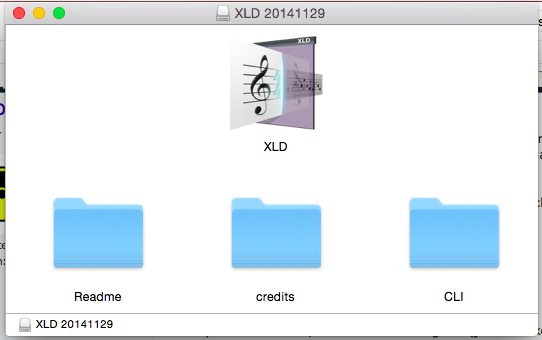
Drag the XLD (all uppercase) to your Applications directory
Next, double click on the CLI folder and you'll see this:
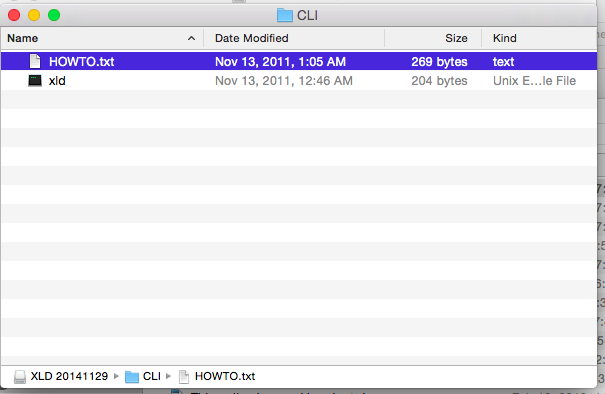
Drag the file xld (all lower case) to your Applications directory.
Next, open the terminal application (it should be in the Applications/Utilities folder. You'll need to change to the Applications directory and then use the sudo chmod 755 xld (all lower case) to make the script executable. It should look something like this (ignore the slim and lee!)
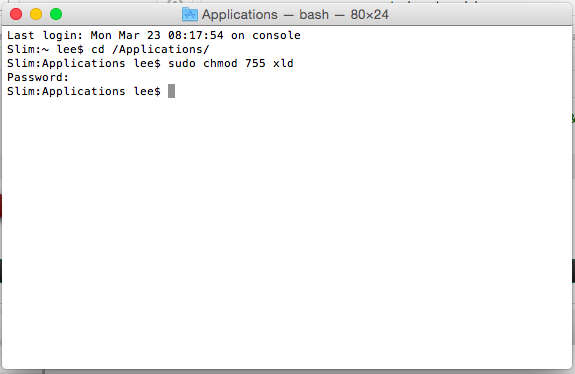
This step is required to make the command line xld executable from the script.
Now the Applescript sync should properly convert all of your Apple Lossless files to flac. Tip- If you have a large library that you're syncing to the flash drive, it may be easier and less error prone to sync them first to a folder on your hard drive and then copy the files to your flash drive.
Let me know if this helps!�
Mar 24, 2015
Pollux @majorlance,
Thank you for your patience with me and for such detailed instructions, accompanied by pictures!
I will try all this tomorrow.
Thanks,
Alan�
Mar 24, 2015
majorlance My pleasure. Good luck and let me know if it works for you.
Lee�
Mar 25, 2015
Pollux Hi, Lee,
I'm afraid I don't see the same thing you are seeing. When I click on your link,
http://sourceforge.net/projects/xld/
I get taken to that web page. There's a big green button near the top that says, "Download". In small print underneath Download is the phrase, "XLDOpusOutput-1.1.zip". What I download is automatically unzipped for me, and the result is that I see something called "XLDOpusOutput.bundle". Clicking on that yields a Terminal window, with the shell's current directory set to the top of the bundle.
If, on the other hand, I follow the source forge link to the XLD Web site, there I am able to find a link to download xld-20141129.dmg.
http://sourceforge.net/projects/xld/files/xld-20141129.dmg/download
Ahhhh! When I download *that*, I am able to follow the remainder of your instructions to the letter.
I just ran the script, and now have only a single track error rather than the 100+ I had before. And I can verify that my target folder has pretty much all the music I expect... well, I suspect that there's one track missing but I haven't compared the source playlists and the target folder to figure out which one.
Dunno why I get different results than you when clicking on the Source Forge download button, but all's well that end's well.
Thank you very much for the script and your help! I want you to know that my boy is *very* happy to have "his" music in the Tesla. Me, too!
Thanks again,
Alan�
Mar 25, 2015
SW2Fiddler
- Thanks once again to Lee, Reputation Point added, and others nudged to do the same. Until a better way is found to appreciate this work.
- It looks like XLD by itself will rip a CD to FLAC (if someone wants a USB of a few albums, wants the high quality, but is not worried about playlists)? Anyone use it stand-alone? I'd downloaded an "AudioConverterPro" for Mac but haven't even installed.
I do like my tunes, symphonies, dubs, hoedowns, barbershops, etc. and in the car is when I have a chance to enjoy music - but have so many CDs that it will be a project to do it all. With Lee's scripting effort to automate it, and a quiet mobile "listening lab" (Back Warmer Included) to play it in, I'm actually glad I haven't ripped my CD collection to iTunes yet.
Sometimes procrastination ROCKS!
Rick�
Mar 25, 2015
majorlance Sometimes re-running the sync will correct any errors. Time Machine seems to interfere with the sync operation, not certain why. And Applescript error trapping is not the most robust (nor are my programming skills
I'm glad it's working better!
- - - Updated - - -
Rick,
Thanks much! And I agree that the Tesla is the one place I can listen to whatever I want, and as loud (or soft) as I want... Nice.
Lee�
Mar 25, 2015
Pollux I think I figured out which track didn't sync error-free: The Beatles' 1 album, in the edition I purchased from iTunes, has an extra "track" that has some kind of value-add stuff in it. Rather than a type of "Purchased AAC audio file", it has a type of, "iTunes LP". I didn't really need it in my playlist anyway, so I just deleted it.
Life is good.
Thanks!
Alan�
Apr 13, 2015
ra-san I've released a new version of my utility. Latest can always be found at TeslaTunes Latest Release or linked from the project page at Tesla Tunes
Here are the release notes:
I'd like feedback from anyone that finds this useful, in particular anything that gets in the way of easier use and, given the limitations of the Model S in regards to playlists, whether the structure I do putting the playlists into individual folders and naming the playlist tracks to preserve order is useful vs. a longer mangled name and flat structure in combination with MajorLance's genre hack. I'm considering at least putting an option in to do the genre hack, but still think keeping the structure and naming as I'm doing them is more useful since it preserves playlist item order and keeps things more organized. Also, let me know if there are any playlist/track filenames that cause issues. I'm "sanitizing" the filenames, since they are created from track metadata and could contain illegal characters, but so far most everything I've come across actually works fine, including parenthesis, brackets, etc.
Reminder, I wrote this for my own use to get the job done, for me and my library. I've tested it more than I would a one-off script or something, but still minimally compared to what I would a commercial project. If it breaks, you get to keep both halves.
That said, I'd like to make it better and more useful, and certainly want to fix any problems, so let me know.�
Apr 13, 2015
SilverL Great release!�
Apr 14, 2015
Jeffgtx I'm having trouble figuring one thing out. If you don't use the genre hack for the playlists, how are they played in the tesla?�
Apr 14, 2015
ra-san You use the play by folder option in the S. This will let you play the playlist in order, or you can use shuffle with it.
As I understand it, the only functionality of the genre hack is because album art was, for some reason, not showing up as consistently from the play by folder choice. In my experience, album art is flaky regardless :/
Looking at adding the genre thing now though, as a checkbox option. I'll be pushing a new build soon regardless, because I discovered I had some library items named starting with an underscore, and the current release had code in it that skipped directories starting with a '.' or a '_'. I'm not sure what I was thinking when I did that, but I'm sure it made sense at the time�
Apr 14, 2015
ra-san Things went easier than I feared, and I think I now have the option "Set playlist items' genre to playlist name", aka the genre hack, implemented.
I did this while sitting in a waiting room, so can't test with my library at the moment, but should be able to later tonight. If things work well, I'll bundle up another release tonight.�
Apr 15, 2015
ra-san Release is up. Genre mapping is in.
Prior links to latest or project page TeslaTunes Latest Release or Tesla Tunes are still the way to get it.
Version is bumped to 1.1.0 since it (if you check the option) changes the behavior of the genre mapping. Also has some bug fixes, so if you grabbed a previous release, grab this one.
There's a new screen shot, but it's pretty much just an extra checkbox�
Apr 15, 2015
majorlance ra-san,
Great job. I plan on testing this weekend. The song names in my script consisted of a combination of playlist/artist/album/song/genre plus the unique identifier in iTunes. If anyone of those were changed in iTunes, the song would be replaced by the updated copy. I included the unique identifier to help when I de-duped songs using a third party app (in may case, Song Sergeant) which would sometimes replace a file with better audio quality but keep the original tags. This helped force a re-sync as the identifier changed. Only mention this as a method to force a new copy (you're application may have a different approach?).
I'd keep the folder/playlist setup as it really doesn't matter unless you're using folder view, in which case you'll want it.
Also glad to see the higher bit rate support. I think that songs from HDTracks.com or PonoWorld.com in higher sample rates and that have been remastered, do sound better than standard lossless files. And storage is cheap!�
Apr 15, 2015
Jeffgtx running the program now. will probably take all night, so hopefully my morning commute will be my first in over a year with my library.
i think the advantage of the genre/playlist swapping is that you don't have to go through all the artist folders to get to the playlist you want.
i'm pretty excited. thanks for driving each other to create a great solution.�
Apr 15, 2015
ra-san In mine, it's a simple existence check. I don't check modification dates or anything like that. I didn't figure the use case of getting better versions of songs you already have with the exact same name, album, etc. was something that ws very likely, vs. the mod date on the source being updated for some other unimportant reason, which would then mean I'd be doing unnecessary copies. Only way to force new copies is to delete or change the destination.
I'd be interested to know if "smarter" checking for whether or not to copy is something that would be useful for people. Same with deleting items no longer in the source but in the destination - I don't do that and specifically didn't want to in the case of my whole library copy. But for playlists I currently will delete items deleted from a playlist (figure that's probably a common use case). I don't currently delete whole playlists at the destination that are no longer in the source - I've mixed feelings about it. It's not hard to manually delete them, and didn't want to delete folders someone may have added manually
I kind of saw things, based on my usage pattern, as being you'd copy a bunch of stuff the first time you used it, then after that it'd mostly be quick updates to grab the new media you've acquired, and you'd probably just start it and (since all your selections from last time are reloaded) hit do it. Done. I didn't attempt to handle the cases of updating already existing media, or deleting media you don't want copied over any more. Figured it's unlikely to happen, and in the rare occasion it does, scrap the destination and redo it all overnight. That doesn't work if it's not rare though. Open to feedback.
I do kind of wonder what would be best to do next though. My thoughts right now are, in addition to any bug fixes that are needed:
* fix the playlist view look - some mismatched backgrounds and such, just cosmetic
* make it so you can click anywhere on the line to select the playlist
* autoupdate notification
* detail progress view, sort of like you can click the Safari or iTunes progress/disclosure button and pop up a list of operations and status
* playlist folder management, as in if you deselect a playlist, it'll remove it from the destination playlist folder - feature or misfeature? Looking for feedback.
< pause to regroup and consider what to change>
* windows version
* linux version
Not sure how useful a windows version will be (much less a linux version). How many people actually use apple lossless on windows and also own a Model S and care enough to bother with something like this. If you don't use Apple Lossless, not really sure what someone would really be looking for in a utility that doesn't already exist in one of the many available. For Linux, I'd expect even fewer use Apple Lossless (probably already do FLAC directly), installed base lower, and otherwise same comments as Windows applies.
Are there Windows users out there just pining for something specific in a util like this? If so, what?
- - - Updated - - -
You won't have to go through all the artist folders the way I do it now (and you should clean up the destination to match the new way, if you've ran the first couple versions). There's a playlist folder, and in it are the individual playlist folders (and only them - all music from the folder/library copy is under the Music folder). Inside each playlist folder is a flat directory structure, no subfolders, and each filename has a numeric start, with enough digits to make sure the sort order is maintained (1 digit if <10 items, 2 if <100, etc.). From that folder view you can play your "playlist" in order, or you can hit shuffle. There's no digging around further, from that view. I don't really see anything the genre thing adds except possibly better album art handling - but I know that can be a big thing to people.�
Apr 16, 2015
Jeffgtx pretty happy with the results. moved about 9000 files last night.
i was going to pop on here with a few questions, but i think you already answered them.
I was going to suggest having the genre hack remove the genres from songs that were not part of a playlist, but i see your folder solution takes care of that. i guess i might even stop using the genre hack then, but i'll have to think about that.
also, i am not sure how the tesla catalogs things, but will it find songs regardless of the file structure for the song view? the reason i ask is I am not sure if i am supposed to have a music folder and then the artist stuff in that folder or get rid of the music folder.
feedback on playlist management: if i unselect a playlist, i would want ti removed since it takes up space.
feature request: can the playlist select list show playlists int eh same order as itunes. it seemed random to me.
Again, very happy to have found a solution after a year of thinking i had to find a way to add bluetooth to my old ipod.
thanks again.
wouldnt the windows users benefit from the playlist structure? isnt that what this is really about? playlists? i had very few music files that couldnt be moved over because of format, but that it because msot of my library is not lossless.�
Apr 16, 2015
ny888 @majorlance - does this script preserve the order of the songs in each playlist?�
Apr 16, 2015
ra-san You don't need to (but can) have the Music folder if you are just using playlists. Can uncheck that top option altogether. I can see why someone would want to have a separate drive for playlists vs. the whole library since the S will go through all files on the drive, leading to showing duplicates (perhaps lots of copies of a song, if it's in the library plus multiple playlists) if you browse via the normal artists or songs type functionality.
Thanks for the feedback. RE: playlist order - yeah, not sure what's going on with that. I build the tree in the same order Apple's iTunes framework code gives me the info.
Prettying up that list, including fixing the ordering if possible and removing unexpected playlists generated behind the scenes by iTunes is on my todo list.
Glad it's looking useful to you. Probably right about the playlist part - but would expect non iTunes playlists to be more important.�
Apr 16, 2015
ny888 Running majorlance's applescript for the first time.
Created the Tesla playlist folder and 2 playlist within it. Only 8 songs total in my entire library just as a test. I'm getting this error after choosing destination folder:
error "Can�t get item 1 of {}." number -1728 from item 1 of {}�
Apr 16, 2015
majorlance ny888,
Sounds like a timeout error. Or you may not be running Yosemite which my script requires for progress reporting (I did post an alternative in this thread for pre-Yosemite users). Regardless, ra-sans application (also detailed within this thread) is a more robust Objective C application that he's recently updated to include pseudo playlist capabilities (as my script did) by changing the genre to the playlist name. I've been out of town since the update but it sounds like a winner. You should try it and see if you still have errors.
My initial goal was to automate a manual process that basically replicated syncing an iPod to iTunes within the limitations of the Tesla Media player (specifically it doesn't recognize playlists, go figure). The work-around was to change the genre to the playlist name.... instant playlist on the Tesla. The only downside to this approach is that you have multiple songs (one for each time it's in a playlist). My personal solution was to have another USB flash drive with just the songs in the "Tesla" playlist folder (I also wrote a script for this) that kept the genre and other song attributes intact... so you could play back by genre or artist, album, etc. Storage is cheap.
So... try out ra-san's app. From what he's posted, I think it will meet both needs. My personal preference is that it syncs (adds and deletes) the flash drive like your iPhone or iPod does (hint to ra-san
Regardless, we're much closer to having a "sync and forget it" solution for the Tesla.
Lee
(majorlance)�
Apr 16, 2015
ny888 I ran sa-sans's app and it looks like it worked. It was only 2 playlist and 8 songs and took a long time. Could it be because it's writing to USB as well as my files are on a NAS drive?�
Apr 16, 2015
ra-san What's a long time, in rough terms? Did you look at the USB afterwards and see all the files there, and only the files you expected?
For reference, when I run it on my library, which is on a NAS too, a few TB USB drive hanging off an Apple Time Capsule, and send it to my USB attached portable hard drive I use for the car, my scan rate for determining what to actually copy or convert is double digit tracks per second. The copy/convert rate is something like a song every half second to two seconds, depending on length and whether it is a copy or a conversion.
I did use an old 4GB flash USB fob for testing the other night and noticed it was probably 10 times slower than the normal drive I use in the car, so the speed of the USB device can make major differences. My laptop was a mid 2010 MacBook Pro, and doesn't even have usb3, so I expect things are much faster on a newer machine with a fast usb3 fob or drive.
If you aren't getting reasonable performance, try a known fast different USB drive to compare. If you see any errors or things that don't make sense, let me know.�
Apr 16, 2015
ny888 It took about 8 minutes. It might be the drive which is old or I just realized I plugged the drive into the keyboard port. I'll try again plugging in directly into the imac or a better flash drive . I did check that the files were on the drive.�
Apr 16, 2015
ra-san Hmm, yeah that's incredibly slow. Sounds like a really slow USB drive, but can check by seeing how long a copy of the same files to the drive takes using the finder.
The app shouldn't be much slower than dragging and dropping the file yourself. It has to be a little slower just because it has to look into each file to see if it is apple lossless, and has to do the convert if so. But that doesn't really take very long per file. If you find the app is more than twice as slow as just a raw copy of the same files, I'd like to know about it.�
Apr 17, 2015
Jeffgtx Ra-san,
seeing and interesting behavior that i dont think is intentional...
when i play a song through the tesla song/artist/genre selection buttons, song title, artist and album are displayed and eventually some odd cover art shows up.
if i play through the folder button, either going through music or playlists folder, the full filename will flash ("01-Song-Artist-etc) and then only the song title will show. no artist or album data.
is that expected?
Jeff�
Apr 17, 2015
ny888 Ra-San,
Tried a different USB flash drive and plugged directly into back of iMac and it was much faster. Scan happened in a blink but copy still took a minute for 8 songs.
Tried playing the stick at the dealership in 2 different cars (comparing standard vs. premium sound system) and it worked in both. Played using genre and album art was inconsistent. Sometimes showed, sometimes didn't. I didn't get random art though like Jeffgtx.
Michael�
Apr 17, 2015
ra-san I noticed the just the song title only display in folder mode a couple days ago too. I can't remember if it had always been like that with manually copied media, not converted by my app. I'm going to test with some files untouched by the app.
If that's just the way the S works, I guess that could be a good reason to use the genre mapping. Pretty lame though. If it happens just with flac files I converted, then maybe I can fix it (though I did compare my flac conversion vs. other flac files from other sources and they looked right). For the non apple lossless to flac files, it's just a file copy so if it happens with them, must be the way the S works
- - - Updated - - -
So just tried a fresh fob untouched by my app, and yeah - seems to just be the way the folder functionality works. Kind of annoying. Really hope for better media player functionality soon, and real playlist support (and frankly, for CarPlay and Android car whatever equiv)
Guess maybe I will use the genre mapping too, that way I can play them in playlist order if I use play by folder, and can play them with more info showing for the common cases of me just hitting shuffle anyway.
Glad things were faster and you got to hear the audio in the vehicle.
What was the source audio format? Unfortunately album art is outside of what we can do anything about. The car looks for it in its own way, whether it is in the file metadata or not (I don't remove it from copied files, and do recreate it and put it in the flac file, for apple lossless conversions).�
Apr 17, 2015
Jeffgtx well that's just plain silly for it to handle the same filename two different ways. i've never used a usb stick in the car before, so i assuemd it was something the way the playlist folder data was moved. sorry for the false alarm.
thanks for troubleshooting it.�
Apr 17, 2015
majorlance All of what you're seeing is standard Tesla media player behavior.
1) In folder mode no album art is available.
2) When playing via genre, song, artist, etc. album art is pulled from the internet, not the embedded artwork in a song file. The Tesla media player seems to pull from album title first, artist second. You can get some really weird results but the cleaner the tags are the more likely Tesla will find the right artwork.
3) If you have a slow/old USB drive or connection the initial copy (not even syncing) can take hours. Agree with ra-san that you should see around 6 mb for a USB 2.0 and much faster for a USB 3.0 flash drive (assuming your Mac supports 3,0). Future syncs (ra-sans app or my script) will be much faster and much closer to what you'd see syncing an iPod or iPhone to iTunes.
4) For me, playlists are the way to go. And the genre change (to rename genre to playlist) make it so simple. If you want, buy a second USB (in my case) low profile flash drive (64 GB on Amazon for $33) and copy just you're favorite songs without changing the genre. I posted a script that would do this and I believe ra-sans script will do this too). Then you have the best of both worlds. If you need an extra USB charging port, buy a $24 12v USB adapter with two USB ports for the 12v adapter. Problem solved...
What we really need is the Tesla media player to support m3u playlists (like 99.99% of all the cars and media players) and all of this will be just a distant memory! Or, add Apple Carplay support (sorry Android user) and we'll have even more...
My two cents!�
Apr 17, 2015
ny888 They are mp3's.�
Apr 25, 2015
ra-san Updated to handle removing playlists that aren't selected any more from the destination playlist folder. Also added autoupdating (you choose whether to check or not, standard mac behavior - uses Sparkle, same as a bazillion other apps).�
May 16, 2015
ra-san Added a couple more requested options. If you have the version mentioned in the last post, should offer to auto update. Otherwise available from the links previously posted.�
May 19, 2015
dashrb btw, flash drives have some form of a FAT filesystem (specific version of FAT depends on the size of the memory), and FAT doesn't support hard links (or soft links either). You're forced to have separate copies of the file.
Thanks for the utility!
- - - Updated - - -
Hello ra-san,
I'm getting a crash when I scan my library (I can scan one playlist successfully). The relevant-looking section looks like this:
Application Specific Information:
*** Terminating app due to uncaught exception 'NSInvalidArgumentException', reason: '*** -[NSCountedSet addObject:]: attempt to insert nil'
abort() called
terminating with uncaught exception of type NSException
Application Specific Backtrace 1:
0 CoreFoundation 0x00007fff8447503c __exceptionPreprocess + 172
1 libobjc.A.dylib 0x00007fff8585a76e objc_exception_throw + 43
2 CoreFoundation 0x00007fff84474eed +[NSException raise:format:] + 205
3 Foundation 0x00007fff8cb6ad7f -[NSCountedSet addObject:] + 81
4 TeslaTunes 0x000000010f9efaac -[CopyConvertDirs processFileURL:toDestination
5 TeslaTunes 0x000000010f9f1531 -[CopyConvertDirs processOpsWithPlaylistSelections:andSourceDirectoryURL:toDestinationDirectoryURL
6 TeslaTunes 0x000000010f9edf8d __85-[CopyConvertDirs startOperationOnDir:withPlaylistSelections:andSourceDir:toDestDir:]_block_invoke + 74
....
The crash occurs when I select "copy whole library/folder" (and choose my music folder; about 4200 songs), with every other checkbox OFF.
Is there a way to turn on logging to see which file is at fault?�
May 20, 2015
ra-san I suspect there is a file with no extension, and I overlooked that particular case when I was logging the extensions skipped. I fixed it on my system, and am testing. Will push it if I think it's solved. In the meantime, if it's just a stray file, you can move it, or you can use playlists instead of the folder copy (presuming all the playlists files have extensions). Will try to have a fix out on Wednesday.
Update: I tried to recreate it, but couldn't. I'd thought I'd tested that case before and handled it ok - in some of the sample screenshots that's why it shows the " files skipped: <some number>" in the extensions skipped list, because no extension was getting reported to me as an empty field vs. a non-existent one (which probably sounds odd, but makes a difference to the part that crashed).
Regardless though I don't at the moment see where else it would be, and there's was a potential issue there so I "fixed" it (hard to say fixed though, when you can't see the problem).
I also enabled a log message for skipping a file with an unknown or empty extension. I had it turned off in the interest of not adding too much cruft to logs, and I haven't added an "enable verbose logging" setting or anything yet (probably should). You can see the log messages in the Console app.
Here's the updated app. https://github.com/tattwamasi/TeslaTunes/releases/download/1.2.2/TeslaTunes_1.2.2.zip
I'm really not sure this is the issue for you, so would appreciate you letting me know after you have a chance to try the update. You can PM me, use the issues feature on the project page, or whatever. I did already add an issue for it in the issue tracker: crash when scanning library�
Jun 20, 2015
ny888 ra-san - I'm using your app to transfer music to usb. When I test drove the car, the playlist order was preserved. I just picked up my car and it's in Alphabetical Artist order, is there a setting I'm missing?�
Jun 20, 2015
ra-san Sounds like you are just not in the same play mode on the model S that you remember. If you play by folder, it will arrange the songs in directory order, and since I name them to preserve playlist order, that's what they'll be in. If you play by artist or anything else, the S is sorting alphabetically based on the tags you are looking at.�
Jun 20, 2015
ny888 I'm sure you're right but the car is at the detailer right now so I don't have access to it, what exactly do I need to do to play by folder. I picked on USB, Genre, and the Playlist "genre" name
Figured out the Play By Folder. What's really strange is playing by genre with the same playlist shows songs missing. The same 2 playlist doesn't have the same songs !�
Jun 26, 2015
Koryin I've got a windows version of this if anyone is interested...�
Aug 23, 2015
perkiset Fell in love again.
I had always heard the Bluetooth was limited or compressed, didn't know the extent.
Ran MajorLance's routine to put about 5K songs on a stick and WOW. So impressed. Thanks for the great script, it worked like a champ and, incredibly, made my UHF black S85 rocket ship EVEN BETTER.
Thanks man, well done.�
Aug 23, 2015
dsm363 I couldn't get the script to work on a Mac.�
Aug 23, 2015
perkiset What happened? What error did you get?�
Aug 23, 2015
omarsultan Just stumbled into this thread - thanks for taking the time to write and update this app.�
Aug 23, 2015
dsm363 I'll have to run it again. I had a 'Tesla' playlist. It ran through a bunch of text but nothing was copied over.�
Sep 3, 2015
Captain John Just a note of thanks for all the hard work it took to make this task simple and painless. Kudos!�
Sep 12, 2015
sethgodin This is fabulous. Thanks for the generous contribution. Going to try it now...�
Sep 12, 2015
sethgodin Major Lance, seeing "Unknown Object Type"
Went through all the steps, several times (thanks for clarifying what CLI means and where the folder is)
Successfully got the Sudo command to work as seen in your screenshot
Installed the script
When I run the script, though, I get the error "Unknown Object Type"
Thanks for your help...
seth
�
Sep 28, 2015
rjt65 thanks major lance and Ra San, running ra Sans program now. Copying 17,286 files and playlists from my iTunes library. soon hope to hear my songs in my way. thanks again too you both. I love slacker, but sometimes you need to listen to an album or playlist in the order it is meant to be.�
Sep 29, 2015
rjt65 Ra-San: Seems to have worked I won't have time to properly check it until after work tonight. But I seemed to stop copying at S (Not T's to Z). Is there a way to just scan and add missing folders? I just popped in the min i usb this morning so songs appeared but were still loading and I had to exit to go to work.
I think I may delete and start from scratch as i have a nested old music folder embedded within iTunes Music folder (when they moved xml lib file i had major repairs and this seemed to work so I left a nested subfolder with some duplicates and the missing music). Think I will try to flatten into proper format on my mac pro and than re-run the program and see if it all shows up than.
Thanks again... I am eagerly awaiting having access to my iTunes playlists and music.
thanks again�
Sep 29, 2015
msnow Thank you Ra-San!!!�
Sep 29, 2015
rjt65 Ra-San I have an issue:
i wiped my usb and flattened out my nested music folder. I scan it picks up about 60K files but will not convert any?
thanks for any help�
Oct 7, 2015
rjt65 Bump ;-)
�
Jan 20, 2016
Mike Maloney Thanks Ra San! Just discovered your program a few days ago. I was getting tired of doing the Apple lossless to FLAC conversions by hand. Your program is great!�
Jun 17, 2016
rjt65 love the program missed listening to my albums in proper order versus slacker. one issue lot my songs seem duplicated in the tesla but on the usb i see only one song listed.. any thoughts?�
Jun 17, 2016
BertL Did you duplicate tracks into multiple folders on your USB stick, e.g. because you put multiple playlists into different folders, and one or more of those playlists duplicate some number of tracks? I suspect so. If you are then playing by the folder tab only, you will only have duplicates if you put duplicates into that specific folder, BUT if you use some of the other tabs in MS Media Player, they only look across all folders and will see the dupes and show them on the non-folder tabs.
If that does not makes sense, please be a lot more specific as to how you've built and organized your USB stick, and what tabs you are using to playback in your MS. While much of the info is up-thread, THIS page on my personal website may also be of some assistance.�
Jun 25, 2016
goneskiian I don't seem to be getting my AIFF files converted and copied. Here is a screenshot from the Teslatunes app...�
Jun 26, 2016
BertL This free app isn't (intended to be) a full-blown format converter. From my reading the TeslaTunes ReadMe and GitHub introduction, as well as the example image showing all AIF were skipped, the app appears to be oriented to dealing with FLAC, MP3 and AAC.
If you need TeslaTunes to provide some of the tagging benefits to circumvent MS (and I assume MX from your sig) Media Player problems, I suggest you:
Good luck.
- Use another utility to first convert your AIF tracks (and any other that were skipped) to a format that TeslaTunes will accept (FLAC would be a good choice for your AIFF tracks), placing those converted files into a temporary directory
- Then point Tesla Tunes at that temporary set of files as input, so it can take care of the very unique title and tagging changes other utilities are not designed for
�
Jun 26, 2016
goneskiian Thanks. I'd forgotten that AIFF isn't actually Apple Lossless.�
Jun 29, 2016
goneskiian And as it turns out. AIFF is a compatible formet with the Tesla audio system. Fortunately I didn't spend the time converting all my AIFF to FLAC. At least I'll have a little more room on my USB for future purchases!�
Jun 29, 2016
tonyj01 I wonder why, after another year, this has not been addressed nor solved within the Tesla firmware. Using Spotify does not replace being able to listen and control playlists which many of us have curated over many years.
I have an iPod with bluetooth but the car will only allow one device to be connected, [therefore phone disconnects] and I feel it is essential to be able to control the playlist from the touchscreen, and to be looking at one's phone or iPod when driving.
A USB stick will play music, as we all know, though the car, so what small piece of software is missing from the car to allow it to recognise the output from, for example, an iPod.
Tony
Manchester
England�
Jun 29, 2016
tonyj01 Yes I am interested. I will PM you.
Tony.�
Jun 29, 2016
Soundchasr Windows? Yes!�
Jun 29, 2016
Infinite My travels force me to drive a lot of economic rental cars and almost always I can plug my iPhone in a USB socket and play music right away without loss of quality over BT. The speakers on those cars do suck but that is not the point here. The point is what prevents Tesla from making this work? If cost was a constraint they can surely absorb that in the UHFS package cost.�
Jun 30, 2016
BertL Folks: We're going further off-topic here, as this thread is oriented to @majorlance's Applescript to assist with syncing tunes to a USB stick. I'd suggest there are better threads to discuss:
TeslaTunes: Easy iTunes playlist syncing for Tesla USB flash drive
Infotainment Issues, lack of features and wishlist:
- Tesla Priorities: Refine Autopilot or Fix Everything Else?
- Tesla's Software To-Do List
- Model S Software/Firmware wishlist
- Music skipping with UHFS with USB, flac
- ...and oh, so many more
�
Jun 30, 2016
tinm Two questions:
1) Is this still limited to Yosemite or will it now with in more recent versions of the OS, like 10.11.3?
2) Will this work with SD card / USB hybrids? (I recall long long ago on TMC people were raving about this particular tiny USB stick that was actually like a 32GB or 64GB SD card... no idea where that thread is post TMC-redo)�
Jun 30, 2016
msnow If you're talking about Tesla Tunes it works for me with El Capitan. Don't know about #2 but @BertL probably would.�
Jun 30, 2016
BertL #1: Assuming you're asking about @majorlance's Applescript, IDK as I switched over to TeslaTunes because of some of it's additional features that help me workaround Media Player deficiencies. If @majorlance does not see your question, you may want to message with him directly.
#2: I rummaged through my collection of old SD cards and sticks and no longer have one of the USB SDHC readers to give it a try for you. They look to be ~$7 on Amazon if you have some old SDHC or similar "mini" cards sitting around and want to try it yourself. Unless you have those cards already, and your goal is maximizing storage with minimal form factor, I instead suggest you check out one of the SanDisk Ultrafits -- IDK of anything smaller on the market today for a USB device -- they range from $7-$29 for 16-128GB and are USB 3.0 to speed up getting your music onto the stick from your computer. I have one of the 128GB versions and it works well in my MS.�
Jul 1, 2016
Infinite @ra-san - Thank you so much for the app. It worked perfectly to transfer my entire library on to a 128GB low profile stick. Did that transfer a couple of days back and tested it on our X yesterday evening when we picked her up from the factory. Was worried about the lack of iPhone integration but your app has solved the problem.
One Question - If I add more songs to my existing playlists will your app just sync those new songs or will it have to rewrite the whole folder>�
Jul 1, 2016
tinm My S is nearly 3 years old but today I went and bought a SanDisk 64GB USB drive, and then came here to get the link to download TeslaTunes, which is now underway copying a gazillion MP3s over to the drive. Prolly take until Sunday at the rate it's goin'.
But just wanted to add to the chorus of THANK YOUS for making TeslaTunes available. It's great!
p.s. One possible bug: I selected as "Destination Music Location" the name of the USB drive itself, then selected all the playlists etc and clicked "Do it." It failed. So I created a folder on the USB drive called "Music," made that the Destination, then tried "Do it" again -- it worked, and is currently purring away.�
Jul 1, 2016
msnow Sunday is a good estimate.�
Jul 1, 2016
BertL I suggest we all post future items related to TeslaTunes here: Easy iTunes playlist syncing for Tesla USB flash drive . This is the wrong thread for TeslaTunes topics. This thread is for a somewhat similar, but very different AppleScript application.�
Jul 1, 2016
tinm yikes! sorry! my bad
(I blame the TMC forum software... hard to find things!)�
Jul 1, 2016
Soundchasr Which works on Windows?�
Jul 1, 2016
BertL Neither.�
Jul 1, 2016
Soundchasr Ugh!�

Không có nhận xét nào:
Đăng nhận xét