Mar 20, 2014
lucasrecargo Hi everyone,
We recently redesigned PlugShare.com specifically for the Model S browser. To give it a whirl, just open the page in your car. Please let us know what you think.
Lucas�
Mar 20, 2014
HHHH Awesome! Thanks�
Mar 20, 2014
tom66 I assume this detect's the Model S browser and changes as appropriate?�
Mar 20, 2014
MichaelS What is the future of the Recargo app? Is it still worthwhile to post updates?
One of the features I really liked about the Recargo app is the news. Nothing has been added now for weeks.
Thanks�
Mar 20, 2014
TexasEV Haven't tried it in the car yet, but here's two suggestions to make Plugshare more Tesla-friendly:
1. Change "dryer outlet" to NEMA 14-50. I suggested this many months ago. I think that's what you mean, but a NEMA 14-50 isn't a dryer outlet. Dryers use 14-30. Or if you really mean "dryer outlet", then keep it and add NEMA 14-50 as a category.
2. Identify J1772 as "high-amp J1772" if they're 40A or greater.�
Mar 20, 2014
notailpipe2112 I just recently did a trip from Toronto to NYC last week and we used Plugshare the whole way down, and the whole way back. We were pleasantly surprised to see that Plugshare had been updated for Tesla, as we tend to use it quite a bit. The optimized view for the Tesla is perfect, and it made it really easy to both find places, and then provide reviews on them after. As I see it, the strength of Plugshare is in the reviews and making it easier to review will mean greater adoption. I always looks to see if someone has recently posted on a charger, the specifics of what they said and if there are pictures. A recent use with a good review and a photo makes me way more likely to use a charger. On the flipside, we also posted lots of negative reviews on our trip for chargers that didn't work, or we not quite set up, as I think that really helps the community too. For example, all of downtown Rochester has a series of parking garages with many chargers, all of which are on Plugshare showing as working...but none of which actually happen to work yet. I suspect they'll be enabled any day, but we had to adjust our plans to use a Plugshare at a private home instead of a public one. This is the good part about Plugshare because it worked either way, as it was so easy to find ourselves a new option. Nice work!�
Mar 20, 2014
MikeC I don't understand why the Recargo and Plugshare databases and apps haven't been consolidated yet.�
Mar 20, 2014
lucasrecargo Mike: The databases have been consolidated. Recargo user and station data has been fully merged into the PlugShare database. If you notice discrepancies, please let us know.
To speak more broadly, we're obviously pushing forward exclusively with the PlugShare brand for our station finding products. There's been a lot of miscommunication on our part regarding the future of Recargo, and we're working hard to do a better job at this in the future.
- - - Updated - - -
Michael, if you're using iOS I suggest you check out our new PluginCars app for news.
Tom, yes.�
Mar 20, 2014
MichaelS No, I'm using Android. I guess news in Plugshare for Android will be coming in the future.�
Mar 20, 2014
GSP Great suggestions. I am sure they will be added to PlugShare at some point. I hope that point comes soon.
GSP�
Mar 20, 2014
Ugliest1 I agree with #1 however I think it would be much more helpful for Plugshare to add a field to show the charger make and actual amp rating (i.e., 20A, 30A, 40A, 60A, 90A, 100A) right by the plug type, not just some unknown number >40. I know that could cause a bit of confusion since the amp ratings are the breaker limits (I think), actual delivered amps is 20% less. I think the make is important because there are more popping up all the time, and some (e.g. AddENERGIE, SemaCharge) require their own specific RFID cards. Only about half (my WAG) of the stations on Plugshare have the charger make or brand listed.
So, my signature notwithstanding, that really is my $.02.�
Mar 20, 2014
MikeC Great, glad to hear it. Thanks for your efforts!�
Mar 20, 2014
TexasEV Just tried it in the Model S. I see the Tesla version does have NEMA 14-50 listed as an option, and is included in the default settings (along with Supercharger, HPWC, and J1772). Actually the web version on Safari now says "Nema 14-50" rather than "dryer outlet". Maybe I was looking at an old page earlier today, or is it different for Mac vs. PC?
Filtering on "hotel only" is a great addition.
How do I get the map to show my current location? On my Mac there is a popup to allow use of current location, and an arrow to click next to the search box, neither of which appears on my Tesla browser.�
Mar 20, 2014
VolkerP The Model S doesn't notify the browser of its location. Yet.�
Mar 20, 2014
TexasEV Agree this would be useful information in the description of the charging station, but I was talking about filtering by high amp J1772, not just J1772, to narrow down how many pins to click on. If there are 20 J1772 showing on a page, and 5 of them are 40A or greater, you would only have to click on those 5 to see the details you're interested in. (And I meant greater than or equal to 40A in my post, not greater than 40A).�
Mar 20, 2014
djp Agreed 100%. It would be extremely useful to filter for high amp L2 stations. On a road trip those are the only ones I'm interested in, but they get lost in the noise of 30A stations.�
Mar 20, 2014
Ugliest1 Ahhh, now I see TexasEV, yes, agree with that too.�
Mar 21, 2014
islandbayy PlugShare's Tesla Browser compatibility Update
PlugShare.com has increased the "functionality" of the site to work more smoothly with the ModelS, and has Tesla Friendly charging options already selected (Supercharger, HPWC's 14-50's and J1772's)
�
Mar 21, 2014
gg_got_a_tesla Tried it out yesterday in my MS. Very nice work! The map appears to render smoothly and looks better in some ways (fonts?) than the native Google Maps!�
Mar 21, 2014
TexasEV Combine this with the "Plugshare now optimized for model S" thread started by the Recargo rep yesterday?�
Mar 21, 2014
notailpipe2112 A possible request that I had suggested on another thread was for Plugshare to not just list amps, but also volts. As an example from one of my recent long roadtrips, we used a lot of Sun Country chargers that tend to be listed as 'CS90/80 amps'. If a charger is 80 amps/240 volts, you can actually get 80 km/hour charge with a twin charger. However, most industrial-type installs of Sun Country chargers tend to only be 200-ish volts, so it mean you can only get about 69 km/hour. That said, there are actually some examples of 80 amp Sun Country chargers that are either residential, or near-residential-type, than have proper 240 volts. For example there is a 'car cafe' restaurant/coffee shop in Trois-Riviers, PQ that has the 80/240 combo, which gave us the full 80 km/hour. I mostly mention it because if you are doing a longer road trip, the difference between 80 km/hour and 69 km/hour charge rate is huge. So, it would be great to know volts as a general rule.�
Mar 21, 2014
Doug_G Yes, this is by far the most important issue. One of the reasons I don't use PlugShare. (The other is the percentage of stations that are employee-only or simply don't exist.)�
Mar 21, 2014
Robert.Boston Whilst I agree, it's a reasonable working assumption in the US that all chargers at commercial locations will be nominal 208 V, because larger business tend to have three-phase service, rather than the one-phase most of us have in our homes. The standard configuration for three-phase service is a wye-configuration off the transformer, which results in voltage of 120*sqrt(3)=208 V between any two legs.�
Mar 21, 2014
Ugliest1 Doug_S, what do you use instead of PlugShare?
Btw, when I was getting our chargers installed in my condo, the electrician mentioned it's not just that businesses happen to have 208V by choice, the electrical code requires 3-phase, thus 208V.�
Mar 21, 2014
FlasherZ In the US, the electrical code doesn't *require* 3-phase, it's just a practical necessity for the size and scope of electrical service that comes to a particular building. Apartment complexes, condos, and commercial facilities are the most likely to have 208Y/120V offered. It would be odd if the CEC required it, but I can't say that it doesn't.�
Mar 21, 2014
mknox I'm interested in that too. I have found PlugShare to be way and by far the best and most accurate (nothing's 100% perfect), but wonder if I'm missing something.�
Mar 25, 2014
neroden Yep. Before my ill-fated road trip, I had to do a lot of preplanning to find the high-amp stations, they're lost amidst the 30 amps (and 20 amps!) on plugshare.
Ideally both amps and volts would be listed, but I know that's a lot to ask people to note...�
Mar 25, 2014
mnx Since it doesn't have this much needed functionality yet, whenever i charge at a station listed on plug share I always leave a comment stating what I received for volts and amps.�
Mar 25, 2014
AEdennis How about allowing us to check in AND give an estimate of how long we'll be using the spot (like the App).�
Mar 25, 2014
drees You can also edit the description, too, so your comment doesn't get lost as it gets older. At least note if it's 208 vs 240V and it's max pilot signal...�
Mar 26, 2014
MDK Your "Yet" was Prescient. The new 5.9 Firmware does: http://www.teslamotorsclub.com/showthread.php/29024-Firmware-5-9/page12?p=614327&viewfull=1#post614327�
Mar 26, 2014
scaesare Had a chance to check out the new web design for the S browser... nicely done!�
Mar 26, 2014
gnychis Also just tried it out, great job. This is *so* much better and actually usable.�
Mar 26, 2014
shawnbush12 This does not include the teslamotorsclub charger locations. I added my home and office since they are part of the club's locations but no integrated into Plugshare.�
Mar 26, 2014
gnychis I didn't know we had such a thing. Where is this?�
Mar 26, 2014
Larry Chanin Shawn,
Yes, the Florida Tesla Enthusiasts Club Charging Network is a private network.
Most of our members are not comfortable with sharing their home charging sources with strangers. However, a few members have also joined the PlugShare network.
Larry
- - - Updated - - -
Florida Tesla Enthusiasts is a club comprised of permanent and part-time Florida residents who are also Tesla enthusiasts. Click on the link in my signature for more information.
Some of our members have joined a private network in which they have agreed to share their home and/or business charging sources with other participating traveling members. Currently we have 59 locations spread across Florida.
The information concerning this network is secured on TMC in a thread on our private discussion group.
Participating traveling members can access this information on their Model S browser or on a smartphone.
Larry�
Mar 26, 2014
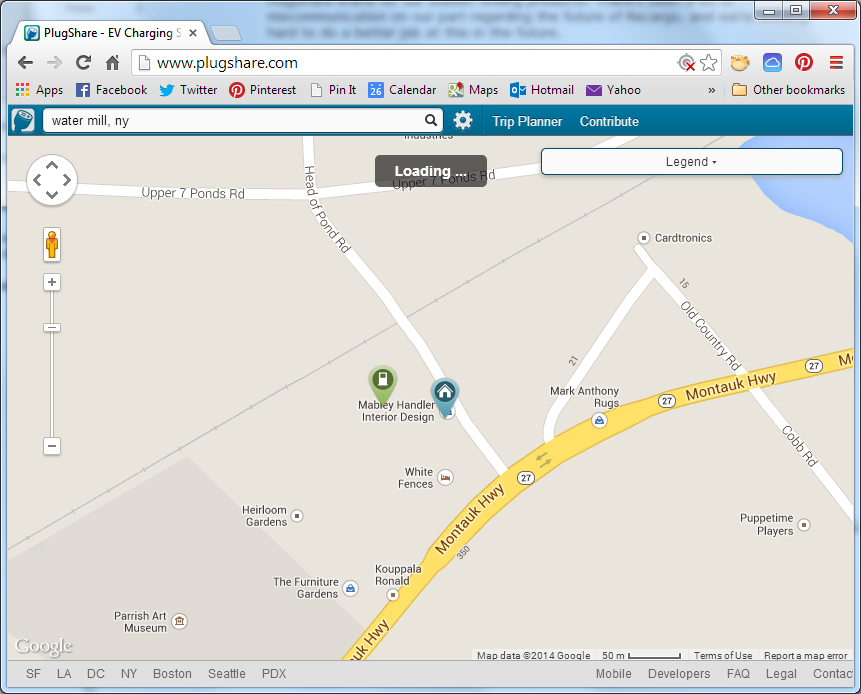
TheAustin Hi Lucas...I have my Tesla HPWC and Nema 14-50 listed on PlugShare and Recargo, and they are still showing up as two separate locations...Would you call that a discrepancy? Should they have been consolidated into one location? Let me know what you think, thanks
 �
�
Mar 26, 2014
pgiralt I don't know if this is a new 5.9 feature because I hadn't tried the new PlugShare site on 5.8, but I was very pleasantly surprised to see the browser tell me that the web site wanted to use my location and wanted to know if it was okay. After allowing it, now the PlugShare site knows my exact location, so it looks like the built-in browser is now supporting some sort of location sharing. I tried going to maps.google.com and Waze to see if those worked and they didn't, so I wonder if the PlugShare folks know something others don't about getting location from a Model S. All I know is that it most definitely works! This is a great job on the part of PlugShare.
One thing to note when you are bookmarking the site, don't bookmark the initial login page (welcome.html). Just bookmark tesla.plugshare.com so that it doesn't ask you to log in every time you go back to the site from your bookmark.�
Mar 28, 2014
David99 I think it's very useful. I started to add the Voltage and max Ampere to the comment when I do a check-in at the charger. If everyone does it, Plugshare can put it in the official description. Otherwise they have no way of knowing really.�
Mar 28, 2014
Mark Petersen Now we just need them to add support for the European chargers
It is really annoying that we are missing all the charger
Can you please add support for the following connectors
Tesla Supercharger Type 2
CCE Red 16a
CCE Red 32a (different size connector than 16a)
CCE Blue 32a�
Mar 29, 2014
hcsharp I've been sending suggestions to Plugshare for 3 years, and many others for longer than that, asking them to allow users to post more details such as amps and volts, especially amps, and allow filtering for these things. We've been largely ignored, especially the first few years. They've made small improvements but still have only one type of J1772 and nowhere to enter amps. Pretty lame.�
Mar 29, 2014
scottf200 You can just go here to test in your PC browser too for a feel it seems (and since I don't have a car yet):
tesla[dot]plugshare[dot]com
PlugShare - EV Charging Station Map - Find the nearest location to charge your electric car!�
Mar 29, 2014
Half Dollar Bill Lucas,
I've got my home charger listed on plugshare but I'm also getting my extended family to add charging resources to make it easier for me to visit. I wouldn't mind listing their addresses as well, with their permission obviously, but I don't really want to create new accounts for them just to show their location. Can you add multiple/alternate "home" locations to your features? I could see this coming in handy for people with second/vacation homes as well.
Nice job on the redesign.�
Mar 29, 2014
dasRad I've been able to edit the "Description" on the few chargers that I've used to include the power, voltage/current. You can view that information when you click on the charger icon without having to dig through the comments. It would indeed be useful if a user could filter by charger power. That would probably require a separate field within the information popup.�
Mar 29, 2014
hcsharp That's just it - they need separate fields in the setup if it's going to be filtered. That's what many of us have been asking for for years. It took a long time just to get them to have a separate charger type for HPWC. Before they did that we recommended they have 2 types - Roadster HPC and MS HPWC. Of course they didn't pay attention and just had one HPC type at first. Eventually they fixed it but you would think simple things like this would be obvious right from the start.�
Mar 29, 2014
Mayhemm We definitely need a way to filter by maximum charger amperage, but voltage could be more difficult to implement since it can vary wildly based on the service load at any given time (unless the facility has its own dedicated power).�
Mar 29, 2014
ZBB Nice job on the Tesla friendly site for plugshare.
i was playing with it yesterday -- looks like search isn't working. It loaded maps in San Francisco by default (I don't have 10.9 yet...), but would not go to Phoenix after trying an address search, city only search or zip code search... Finally just zoomed out and moved the map manually...
perhaps it needs a default zip code to load?�
Mar 29, 2014
drees For voltage in the USA, it's really either 208V or 240V.�
Mar 30, 2014
Mayhemm Yes, I know. However, the voltage can vary depending on service load. (ie: a 208V system with no load shows 208V, but put a load on it and it can drop to 200V or even 196V). Similar thing can occur with a 240V system since they are often shared.
This is a minor change but it can still swing charge rate by a few mph.�
Mar 30, 2014
ljwobker I think the only meaningful difference is whether it's 208/240 (also called "high line") voltage or just "low line" residential split-phase 120v.�
Mar 30, 2014
TexasEV No, the meaningful difference in charge rate we're discussing is the difference between 208V and 240V. It can add up to quite a difference in range over several hours charging, especially if the 208 is really 200 or less. 120v outlets don't even enter into this discussion.�
Mar 30, 2014
Mark Petersen I think that they shoul add a kw field as then you get the value that actually mean something
208v 70a = 14.5kw
208v 50a = 10.4kw
208v 30a = 6.2kw
240v 70a = 16.8kw
240v 50a = 12kw
240v 30a = 7.2kw
Sure a 208 connection may only give 200 but that is only 0.5kw not enuf for me to select a different charger but if the charger down the road is a higher amp or 240v I might want to move the car�
Mar 31, 2014
Mayhemm I would get behind this.
And maybe add some kind of kW slider bar to the search criteria, so only units delivering more than the specified power level are shown on the map.�
Apr 1, 2014
tomsax In my role at Plug In America, in January, I attended a National Institute of Standards and Technology (NIST) workgroup that is drafting a proposal to the National Weights and Measure committee for the regulations that will regulate EV charging equipment, the same way the sale of everything that can be weighed or measured, from gasoline to bananas, is regulated.
They are moving toward requiring that all EV charging stations installed after a certain date be labeled with the power level available in kW. It would be nice for PlugShare (and all of the other charging map vendors) to get ahead of that and start allowing us to enter that data. Only Tesla owners get easy access to volts and amps while charging, but we could contribute a lot of data. There's even talk of OVMS collecting that data automatically (with owner permission and control).
By the way, I've seen J1772 stations deliver everywhere from 250V to 187V, that's a big swing in charge rate even at the same current level. It would be a big step forward to have them labeled with current limit and either 240V or 208V service.�
Apr 1, 2014
TexasEV Tom, this would be great information to have. What were the thoughts about who should be responsible for providing the label? I don't think it could be the manufacturer, as they wouldn't know whether a unit that could operate on either is connected to a 208V or 240V circuit, or if the circuit voltage is within tolerance.�
Apr 1, 2014
Mayhemm I'd be happy to throw on a sticky note with the info after I charge, for anyone who comes after... :biggrin:�
Apr 2, 2014
mknox Most electrical products are rated in Volts and Amps (Power = Volts x Amps). Since EVSE are typically installed on either 208 or 240 volt circuits in North America, they would have to post two nominal values. My electric water heater has two power ratings on it for this very reason, although most electric heating devices (dryers, stoves) utilize elements that are voltage specific.
To make matters more confusing, Power will drop if the voltage drops, and typically you will not see "nominal" 208 or 240 volts at the EVSE utilization point.�
Apr 2, 2014
tomsax You're right, it's not something that's known at the time of manufacture.
The proposal isn't done, but it would likely involve a testing procedure done at the time of installation by putting on a load at the current limit (think multiple space heaters, or a Model S) and measuring power output from the station. Then, just like gas pumps and grocery store scales, if a consumer files a complaint about a station underperforming, it could be tested with a standard procedure to determine if there's any monkey business going on.
This stuff is going to matter a lot when EVs aren't the oddballs, but a majority of the cars on the road, and public charging is as common and normal as gas stations and grocery stores.
It would also help if all automakers showed the volts/amps or power to the driver, then every car charging session would be an inspection test and no one would ever get away with putting up a 200V/15A station and claiming it's 240V/30A, but that's outside of NIST's mission.�
Apr 2, 2014
qwk I suspect that this will work itself out over time. What I mean is that once Tesla comes out with more vehicles, Tesla's standard will make everything else obsolete. There is no way in hell I'm going to ever buy an EV that I have to hunt for charging stations, pray that they work when I get there, and pay whatever they ask. The public(except for the die hards) isn't going to do this either, so cars like the currently manufactured Leaf's are either going to be "in town" vehicles, or become obsolete.�
Apr 2, 2014
TexasEV I thought Leafs always were "in town" vehicles�
May 2, 2014
dsm363 Plugshare app lists the two plugs as
Tesla (Roadster)
and Tesla (Model S)
Since the Model X and I assume Model E will all
Use same 'Model S' connector I thought Plugshare should update that term to at least include Model X. What is the official name of the new Tesla plug (I thought it was simply the Tesla connector)?
They should also add a Tesla Supercharger designation.�
May 3, 2014
ZBB You may need to update your Plugshare app... All versions of Plugshare I use (iOS app, web, Tesla-optimized web) include options for Supercharger, Model S HPWC and Roadster HPWC (which should be just "HPC"). I'm sure at some point they'll change the label to include the Model X and E...
Here's the list of "compatible outlets" from the Tesla-optimized web version of Plugshare:
Model S High Power Wall Connector
SuperCharger
CHAdeMO Quick Charge
Nema 14-50
120v Wall Outlet
J1772 EV Plug
Roadster HPWC
Europlug
Type 2
Type 3
Wall Outlet�
May 3, 2014
dsm363 Thanks. I have 3.8.3 and always update my iOS apps when notified. Maybe there is a different version.�
May 3, 2014
RiverBrick A bit off-topic, but where you live do people with NEMA 14-30 and the like end up checking Nema 14-50, because it's the "closest" choice?�
May 3, 2014
dsm363 If you discover that I think you can edit the entry and at least write a note or comment. Can also report that as incorrect information.�
May 3, 2014
ZBB I suspect that's because Plugshare used to label it as "Dryer Outlet" -- which is a 14-30. They really should list the various NEMA options. Unfortunately, that leads to garbage data (not good in a crowdsourced app...)
- - - Updated - - -
I'm also on 3.8.3... Use the Gear in the lower right to select what types of chargers are displayed... Supercharger is one of the options...�
May 3, 2014
dsm363 Thanks. See it now and it is on. When I click 'edit station' it isn't listed as an option to add though.�
May 3, 2014
ZBB I'm pretty sure Tesla coordinates with Plugshare on getting the Superchargers added...�
May 4, 2014
hcsharp Tesla calls it Tesla II or TSLA 2. The part that you plug into your car is called a "connector" and the inlet in your car is technically a plug but it would be confusing if people called it that so it's called an inlet. Taken together, the inlet and connector are called a "coupler."�
May 22, 2014
JordinRecargo Thank you for such great feedback. It is always great to hear what users specifically like about a new feature.�
May 22, 2014
Ugliest1 Also thanks for adding the entry screen for peak volts and peak amps on the iOS screen. Not sure where that info would display if one is browsing from the web though. But I haven't thoroughly delved into it.�
May 22, 2014
dsm363 Could you make individual fields for each so when you click on the station it appears with the information? I see a blank field for 'additional information including amps' but having defined numerical fields would allow you to maybe sort for J1772 stations greater than 40A for example. Thanks.�
May 26, 2014
tomsax Actually, Tesla renamed the HPC to HPWC before the Model S came out, some time around October, 2010. So, PlugShare has it right, although most Roadster owners call it an HPC because that's the term most of us learned originally.�
May 26, 2014
dsm363 I was told Tesla would be renaming HPWC to 'Wall Connector' now.�
May 27, 2014
jacobp Great site. I was wondering if there was a way to change the map orientation from "North Up" to "Direction Up" as in the Tesla nav system?�
May 27, 2014
RiverBrick Great site, but some reason the settings keep resetting to NOT show "Model S High Power Wall Connector."
I just launched the Tesla specific site in Firefox and the site also defaulted to not displaying the S HPWC.�
May 27, 2014
tbleakne Hotel and Food filters
I have tried Plugshare on my Model S several times, but even with full 5 bars of connectivity the display is far too slow for me to use,
so I use Plugshare App on my iPad exclusively. This App now has filters for hotels and food locations, which are valuable to me. However I keep finding Plugshare locations at motel/hotels that are not on the filter. How does one flag a site with either food or lodging ?
Over the past few years in my LEAF I have charged at 50+ public locations, and only one or two were 240V. It just is extremely rare in commercial world, but I imagine bed and breakfasts might have 240V.�
May 28, 2014
JordinRecargo Thank you for these suggestions. We appreciate feedback from our users and always trying to improve PlugShare. I will pass these along to our developers.
- - - Updated - - -
We are not integrated into the Tesla Nav system. That is something you would have to contact Tesla about. We hope to be integrated in the Nav system someday!
- - - Updated - - -
I will ask our developers to look into this. If you have any other questions or issues please send us an e-mail to [email�protected]
- - - Updated - - -
Under the check-in option you can now add volts and amps.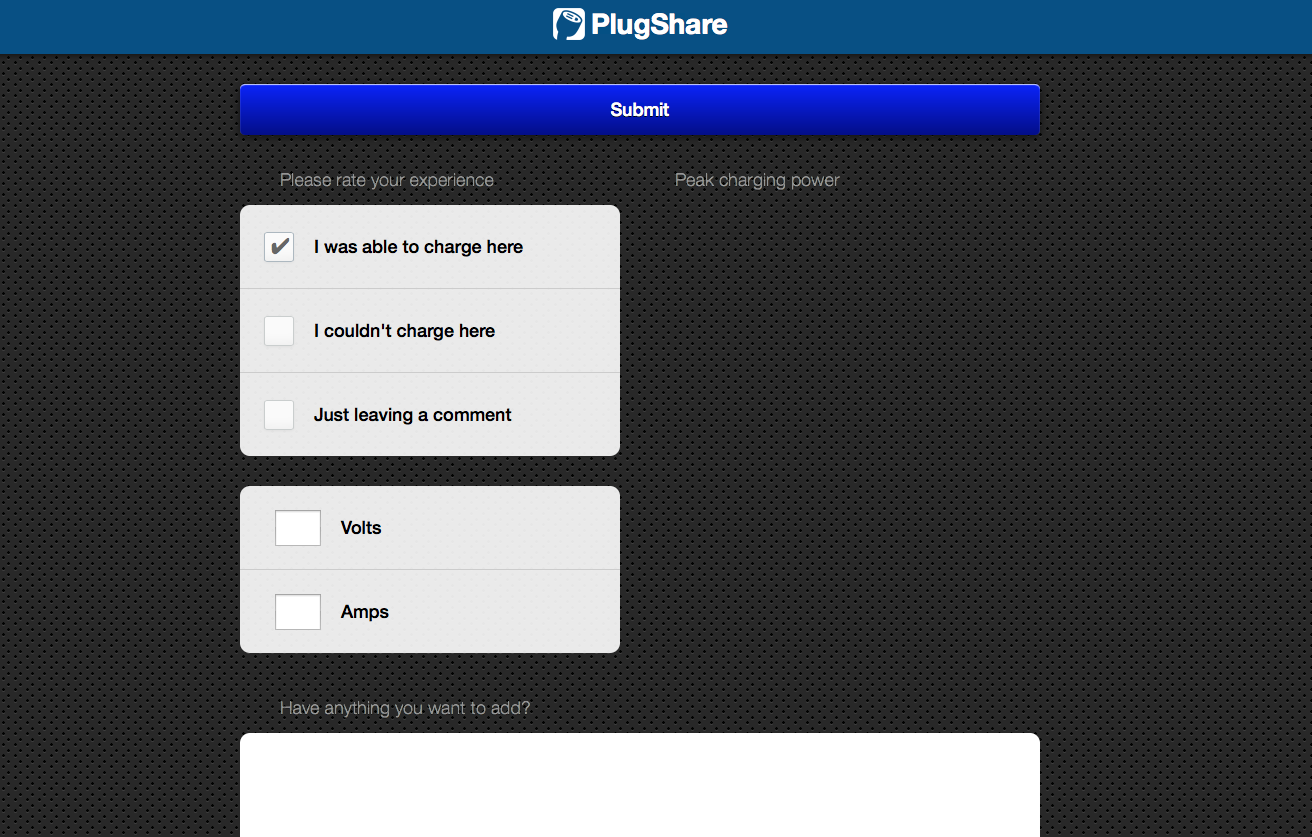 �
�
May 28, 2014
dsm363 Thanks for adding that.
Do you think maybe it could calculate the kW? Then you could set a filter field for something like
J1772 and >=10kW�
May 28, 2014
JordinRecargo Thank you for mentioning that. The beauty of PlugShare is that it partly a crowdsourced app. By editing station descriptions and updating with the correct information it really helps out the rest of the Tesla and EV community.�
May 28, 2014
hcsharp But that info only ends up in the description. While that's better than nothing, there's still no way to filter for stations above a specified charge rate like dsm363 suggested (and myself and multiple other people in this thread). For example we're traveling to Montreal next month. There's a couple of 70/80A chargers there and 50 or more 30A chargers. It's just not realistic to click on each one of 50 and read the comments to find the 2 that will make our trip worthwhile.
BTW, thank you for monitoring this thread and considering our comments. I've been sending suggestions to PlugShare for years and it seems like they just go to a black hole. I realize you come from Recargo which has a better reputation for responsiveness.�
May 29, 2014
JordinRecargo If amperage is added in the description you will be able to read it as soon as you click on a station icon and you will not have to scroll through comments. We realize that there is a lot of valuable information left within comments that we need to implement a better tracking system for. I will pass your suggestion for filtering by amperage along.
Recargo and PlugShare have merged. Recargo is still the parent company, but PlugShare is now the official source for locating charging stations and connecting with other members of the Tesla and EV communities. We are a start-up that is rapidly growing. There are many improvements, updates, and changes coming to PlugShare in the next few months. If you ever have any issues/feedback send an e-mail to [email�protected] and I will either respond or pass it along to someone who can better help you.�
May 29, 2014
David99 While I love Plugshare on my phone, I avoid using it in my Tesla. It's so slow and laggy. It's super quick and responsive on my phone, but in the car it's just unusable. The pop up of a selected station has no scroll bar. I often can't read the full description or directions and there is no way to scroll down. It really needs to be integrated into the car's navigation system and have options like 'find stations on my route'.�
May 29, 2014
JordinRecargo We would love to have PlugShare integrated into the Nav system. So far, at this time, Tesla does not have any applications integrated. However, our Tesla optimized browser will navigate when opened. Unfortunately, we do not have any control over slow load time. Send Tesla and Elon some feedback about the need for PlugShare Nav integration.
I will pass your suggestion along about implementing a route planner that allows you to save chargers along your route.�
May 29, 2014
dsm363 Thanks Jordin. Plugshare is a great resource so thanks for looking into being able to filter by kW on the mobile app.�
May 29, 2014
hcsharp In comments or description, it's not much different. Even if the amperage were always in the description, there's just no way anyone can be expected to click on 50+ icons to find the 2 that are 70/80A. There's no way to even keep track of which icons you already clicked on.
Thank you for impressing upon your developers that filtering for amperage (kW is better) is critically important. Feel free to give them our real-life example of our trip to Montreal where we had to give up on PlugShare and use another app.
I hope I'm not discouraging you with my feedback. I know you're working hard on new features. I'm only trying to help so I can actually use the site.�
May 30, 2014
dasRad I've been editing descriptions so that they start with, for example:
6kW charger (29A at 206V)...
but, yes, being able to filter by power (kW) would be much better.�
May 30, 2014
tomsax Jordin,
Having to click on a station to see if it's better than the zillions of 30A stations doesn't help. We need to be able to filter.
Pop quiz: where are the 70A charging stations in the Seattle area? There's one close to I-5, not at a Tesla Motors location, but PlugShare is basically useless for finding it, even though it's listed.
Now find all of them along I-5 from BC to Northern California. There are quite a few.
There are thousands of 30A stations, and they are fine for overnight charging, but Roadster and Model S owners need to be able to find the high-amp L2 stations for charging between driving segments.�
May 30, 2014
JordinRecargo Not at all, we want your feedback good and bad, helps us to improve our product in the future. I will stress that filtering by kWh is the most important need based off feedback from the Tesla community. I can not give you an eta on when this will be implemented, but just know we are working on making these changes and improvements. Thanks!�
May 30, 2014
tomsax To be clear, this is not just a Tesla issue. Anyone with with 6.6 kW charger cares because 208V/30A is not delivering enough power to charge at their maximum rate. This includes thousands of Leaf owners. I had this discussion with Nick Wild in April.�
May 30, 2014
JordinRecargo I understand this is an issue outside of just Tesla drivers. I gather feedback from all EV drivers. This forum is for the Tesla community and I am gaining feedback on what to implement for our tesla optimized system. Some of these suggestions, of course, do carry over to all areas of PlugShare: Android, iOS, and web.�
May 30, 2014
TexasEV 208V*30A=6.24kW. Is that 5% difference in charging rate compared to 6.6kW something that a Leaf owner would notice?�
May 30, 2014
tomsax I believe the 6.6 kW is the output level of the on-board charger. The 3.3 kW charger draws more than 3.3 kW, about 3.6 kW in my experience. I assume the same is true for the 6.6 kW, although I haven't measured it.
Many charging stations on 208V nominal circuit deliver less. 200V is pretty typical. I've seen as low as 187V. The Blink network has derated their stations to 24A. 200V/24A is 4.8 kW. If a 6.6 kW charger draws 7 kW, then charging at 200V/24A is down 42% from maximum charge rate.
The problem for Leaf owners is that the station voltage and current limit aren't visible, so they really need this info from the charging station map. Many probably don't even realize they are being ripped off at low-power stations.
There are regulations in the works to make it mandatory to label stations with their maximum power output. Having the charging station maps get ahead of this would be a big help to the broad EV community.
- - - Updated - - -
When you say "Tesla optimized" do you mean the special Model S version of the web site? Don't forget about Roadster owners! Please don't assume that Tesla equals Model S.�
May 30, 2014
drees The 13+ LEAF with the 6.6 kW onboard charger pulls less than 30A on 240V, around 27-28A I believe. It's actually rated at 6.0 kW DC output. The 3.3 kW charger on the '11-12 will pull 3.8 kW on 240V (16A). I think it will pull a few more amps on 208V, but not more than 18? I don't know how the '13+ 3.3kW LEAF behaves, but it's probably similar.
So Nissan actually used the output rating for some reason the 3.3 kW charger and the input rating for the 6.6 kW charger.�
May 30, 2014
TEG In some LEAF owner/forum meetings with Nissan engineers I directly asked for such a readout to be shown in the car. Years have elapsed and still nothing, so I don't think they see the general need.
I recall seeing somewhere that the car "knows" these values, just doesn't display it to the user.�
May 30, 2014
tomsax Yeah, Plug In America folks made a bunch of suggestions, including that one, before the Leaf was even released. Nissan thought the GOM was all drivers needed. They have added a percent SOC display. Maybe we'll get the rest eventually.
The car does indeed know these sorts of values. You can get pack volts and amps (in and out) from Gary Giddings' SOC meter. I'm not sure if volts/amps in from the station are on the bus, but I'd be pretty surprised if they aren't. They are just cleverly hidden from the driver.�
May 30, 2014
drees AC voltage is available, but only pilot signal current is available as far as I am aware.�
May 30, 2014
JordinRecargo Of course I do not assume that Tesla equals Model S. This is a thread about how 'PlugShare is now optimized for the Model S'. So, when I refer to Tesla in this thread I am referring to Model S drivers that can use our new optimized system.�
May 31, 2014
Mark Petersen Hi Jordin
Can you please add a option to create charging providers
Where we can put information on :
contact (phone, e-mail, website, address )
Pricing (list pricing options)
payment (member cars, credit card, phone,...)
Charging group (if member cars can be used on other networks)
And then make it possible to link charging station with providers
So we can select which provider we want to show on the map
Also can you please add some of the European connectors, as they are very common
CCE RED 16a (11Kw)
CCE BLUE 32a (7Kw)�
Jun 3, 2014
JordinRecargo There are a lot of features within our app and website that may not be in the Tesla optimized version. Plugincars.com has guides about charging station networks with contact information provided. Right now in the Tesla optimized browser you are unable to add new stations. However, you can still add new stations through the mobile app, PlugShare.com, or send an e-mail to [email�protected] with any updates or suggestions.
Right now at the bottom of plugshare.com, you can click on charging networks to filter out the map. We are slowly integrating features between all of our different apps.
Best,
Jordin�
Jun 8, 2014
tsla168 downloaded pluginshare, and signed up for an account. I drive a model-S so what's of interest to me are those non-superchargers that i can use to complete a trip. like others posted before, the charge rate has to be posted to for the app to be useful. For example I see a lot of private home charging stations at "120V".. if it means just a regular outlet offering 3 miles per hour of charge it's basically useless. Cost of charge would be helpful too
Thanks�
Jun 10, 2014
David99 One slightly annoying aspect is that the Plugshare website keeps asking me to log in almost on a daily basis. I don't know if it's the Tesla browser or the website. Either way, it's really annoying to always get thrown to the sign up screen.�
Jun 11, 2014
DJ Frustration +1. Can't stand that prompt as well. Either enable a way to save a login or don't require it to see stations. It's embarrassing.�
Jun 11, 2014
invisik +1 Gotta be able to stay logged in, takes a while to type in everything on the touch screen each time.
-m
�
Jun 13, 2014
JordinRecargo PlugShare should be able to save your log in, it stores in cookies, so if it is prompting you to log in again every time, the car itself might have lost the saved cookie for your log in.
Everyone that is having log in issues could you please send an email to [email�protected] with your username and account info? Also provide any details like was your log in saved and then the next time you turned the car back off and on you had to log in again? Any specifics you can provide will be very helpful.
Thanks!!
Jordin�
Jun 13, 2014
drees FWIW, it'd be nice if the regular web site did that, too (or at least presented that as an option).�
Jun 14, 2014
hcsharp It saves my login. Not sure what I'm doing different from those of you who have to log in every time.�
Jun 14, 2014
drees I just tested it. Fire up browser, go to PlugShare - EV Charging Station Map - Find a place to charge your car!, log in, restart browser, go to PlugShare - EV Charging Station Map - Find a place to charge your car! again and have to log in again.
Looking at the request logs, it appears that the client side code simply sends your email address and encoded password with each request as a cookie once you've successfully logged in.�
Jun 24, 2014
JordinRecargo This issue should be fixed now. Please send an email to [email�protected] if you are still have issues with your log in being saved. Thanks!�
Jun 24, 2014
invisik My login saves now on my desktop browser (IE10). Thanks for fixing that!
-m�
Jun 25, 2014
drees Yep, works great, and even saves your last used filter settings, too. �
�
Jun 27, 2014
JordinRecargo Awesome, glad we were able to get a fix out! Now we are trying to gauge user demand. PLEASE send us an email (if you don't feel comfortable posting your email address here) to [email�protected] if you would like to see our optimized browser integrated into your car's navigation system. We want to keep track of users email address to send any future updates and have proof for Telsa that this nav integration is in high demand.
THANK YOU EVERYONE!�
Jul 3, 2014
DFibRL8R I have noticed there are some chargers that show up in the tesla.plugshare site but not the regular plugshare site. For example, in Poughkeepsie, NY, there are chargers at a Frito Lay and also a Residence Inn/Mariott that show on the Tesla site but not the regular one. This makes it hard to search an area of interest if you are required to cross check multiple sources to find chargers.�
Jul 3, 2014
JordinRecargo Both of these station are access restricted, meaning that no public charging is permitted . Frito-Lay | New Paltz, NY | Electric Car Charging Station | PlugShare Residence Inn | Poughkeepsie, NY | Electric Car Charging Station | PlugShare
On the regular PlugShare site in order to see Restricted Access stations, you need to have the 'Show Restricted Locations" filter box checked under settings.�
Jul 4, 2014
DFibRL8R Ok that clears it up, thanks. I am told by the folks at EV connect who manage the Marriott charger that it is actually public, requiring an EV connect account to activate the charger and not restricted to hotel guts. I plan to use the charger in the next 2 wks and will update plugshare if accurate.�
Aug 5, 2014
qwk How in the world do you view the comments on each site? When I click on anything in the popup, it just disappears. Other than just getting a location, and phone number of sites, Plugshare is not very easy to use.�
Aug 22, 2014
bish A big shout out to Hector(aka Crasher4life) for listing his Nema 14-50 on Plugshare. Without it, my vacation with my family at Ocean City would not have been possible. It is generous people like him that will make the EV movement work until society sees the light and starts building the necessary infrastructure.
Thanks again!!!!�
May 6, 2015
Lump Noticed the App & browser now provide chargers on routes in trip planner, here is a writeup
PlugShare App Adds Charger-Aware Route-Planning for Electric Car Owners - Transport Evolved�
May 6, 2015
Mayhemm And Android gets the shaft once again...�
May 6, 2015
RiverBrick For some reason, the tesla.plugshare.com site still defaults to NOT showing HPWC and CHAdeMO stations. You have to go into settings to fix this everytime you reboot and revisit the site.�

Không có nhận xét nào:
Đăng nhận xét