Sep 26, 2013
duBois Hi,
I'm experiencing problems when connecting my MS Wifi to our home network. BGN network, SSID visible, european, WPA/WPA2 personal password. AES+TKIP.
Even with all security off (open network) the MS will not connect to it.
Any clues or tips?�
Sep 26, 2013
Crispix Can the car connect to other wifi networks? Make sure the car wifi at least works.
If so, I'd suggest messing with the band settings, turn off B and just try G, for example. You might be able to try different channels on the wifi access point. Maybe the car is too far from the access point?�
Sep 26, 2013
roundy I have the same issue. Unable to connect to my 802.11N home network. I've tried forcing 802.11g and turning security off, but nothing works. The car will see all the local networks (except for 5.0ghz N networks) and recognize that some require a password. But after I enter the password, the connection will fail and I get the message to "Check the password."�
Sep 27, 2013
duBois No, the access point is near. My laptop is able to access our wireless network (from within the MS).�
Sep 27, 2013
andrewket Try changing your password to exactly 8 characters long and don't use any non alpha numeric characters. I've seen a similar problem before and that was the solution.
The fact that it doesn't connect without encryption shoots a hole in this theory, but it's worth a try.�
Sep 27, 2013
steve841 Others who reported issues fixed it by rebooting the MCU .... (17" display)�
Sep 27, 2013
NielsChr just a guess - your wifi router typical uses a fixed channel for your wifi, try change this channel to a different - offen this helps in situations like yours.
some equipent does not like specific channels - so changing to another could help compability.�
Sep 27, 2013
duBois Update; all of the above won't get the connection working. Will try above tips with a single B or G band. Keep them tips coming... �
�
Sep 29, 2013
nolngrgrsngslde If you have a smart phone that allows wifi tethering, you may want to see if it connects with it. Also, how is the bluetooth, does it work?�
Sep 30, 2013
duBois Bluetooth works flawless, also the MS does connect to a wifi tethered iphone. just not to my WiFi home network... It does connect to other Wifi networks belonging to my company's .�
Sep 30, 2013
ACDriveMotor Seems like you might want a new WiFi AP.�
Oct 1, 2013
andrewket Is your home AP running the latest firmware? What brand/model?
A�
Oct 12, 2013
Akikiki You also can search Google for NetStumbler. Its a wifi security (reveal) tool. Version .9 ran only on Win XP. don't know about more recent version.
It will tell you about wifi routers running in your neighborhood. Once you see what channel and what SSID they are running on, you can move your AP to a different channel.
This way your change your AP to use completely different.
The explanation of your problem sounds a lot like you are competing head on with others running on the same channel.
Highly unlikely but, someone might be copying your SSID. If they are, they are messing with you. Even though you have a different password, your system is being stepped on.�
Oct 26, 2013
EU#536 I have the exact same problem. Have you found a solution? I would be happy to know. I have tried all of the above, nothing works. The signal in my garage is good.�
Nov 13, 2013
Andy Black Hi,
I've had the same issue. What I had to do to get things working was allow 802.11b on my access point (Apple Airport). I have a feeling the NIC in the car is only 802.11b. It's made by a company called Parrot but that's all I've been able to figure out. If I figure out the model, I'll post it.
-- Andy�
Nov 13, 2013
irishstoutaz I have not been able to get it connected to our home network but did connect successfully at a hotel we stayed at this past weekend.�
Nov 13, 2013
RandyS Here's the issue I had...
On my wireless access point during the setup process, I typed in a "passphrase" and in turn the access point generated a hexadecimal "key" from that passphrase.
Once set up, for every laptop or device I have connected to my wireless network in the past, I have used the hexadecimal "key" as the password on the laptop when connecting to the wireless network.
In the case of the Tesla, it would not connect in this fashion, but as soon as I typed in the entire original "passphrase" then it connected right away...�
Nov 16, 2013
mitch672 Just received and installed 5.8 (had 4.5)
I have multiple Wifi routers in range, and I can't get the Model S to join.
Tried rebooting the center screen, didn't make a difference.
Is there any trick to getting the car to connect?
Mitch�
Nov 16, 2013
dirkhh Not really. Can your car see the access points? What does it do when you try to connect? We need a little more data to help.�
Nov 16, 2013
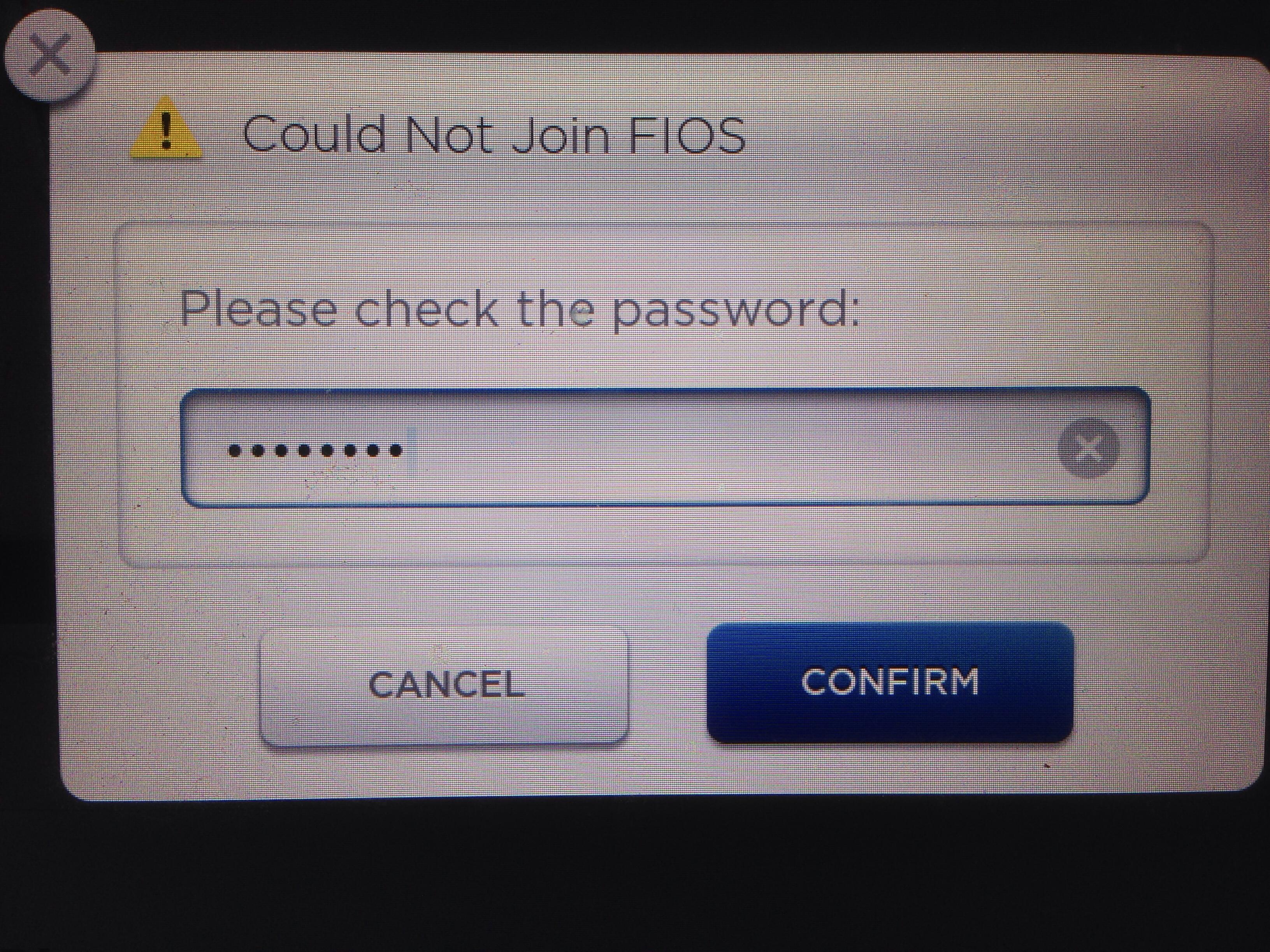
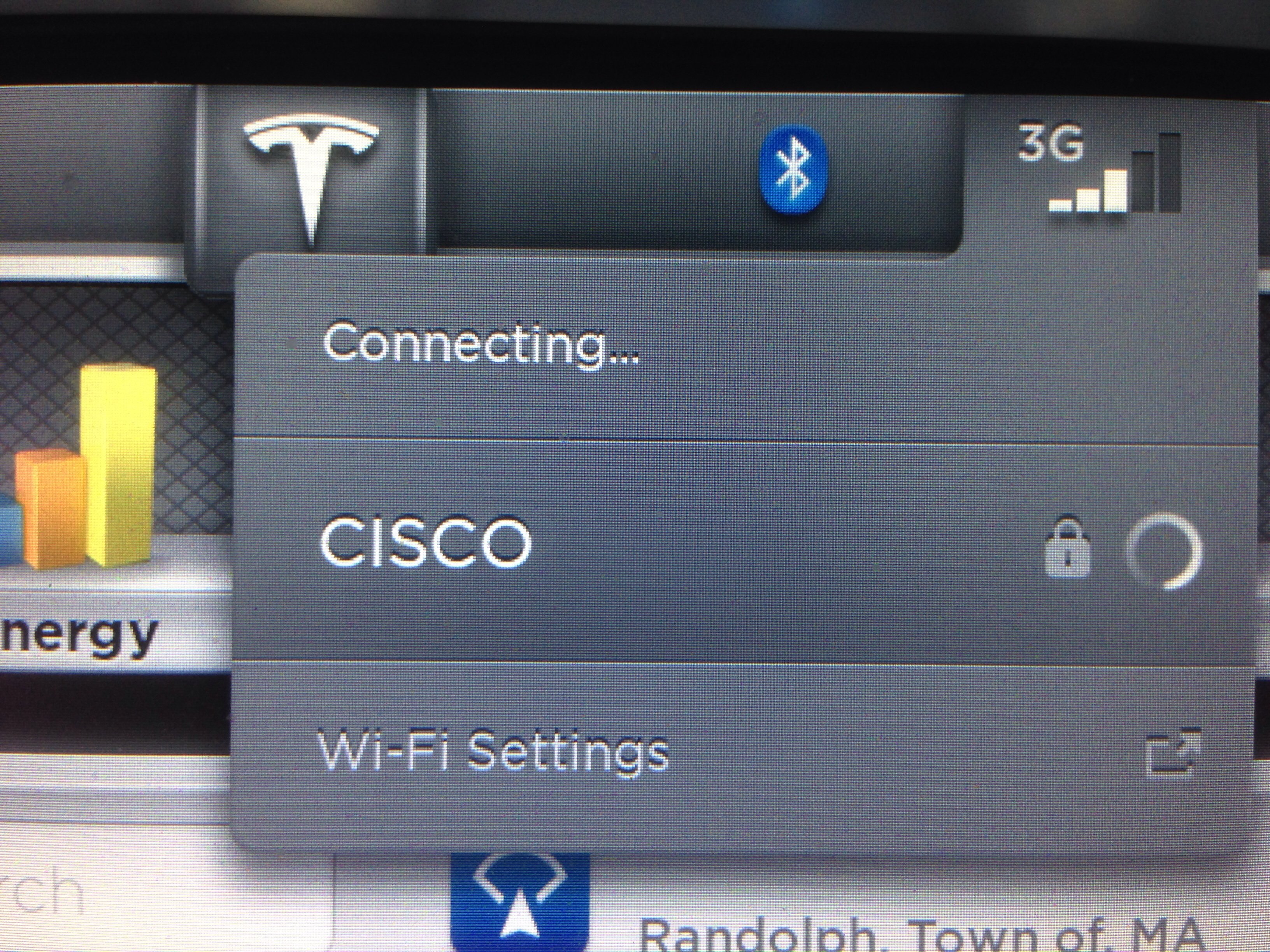
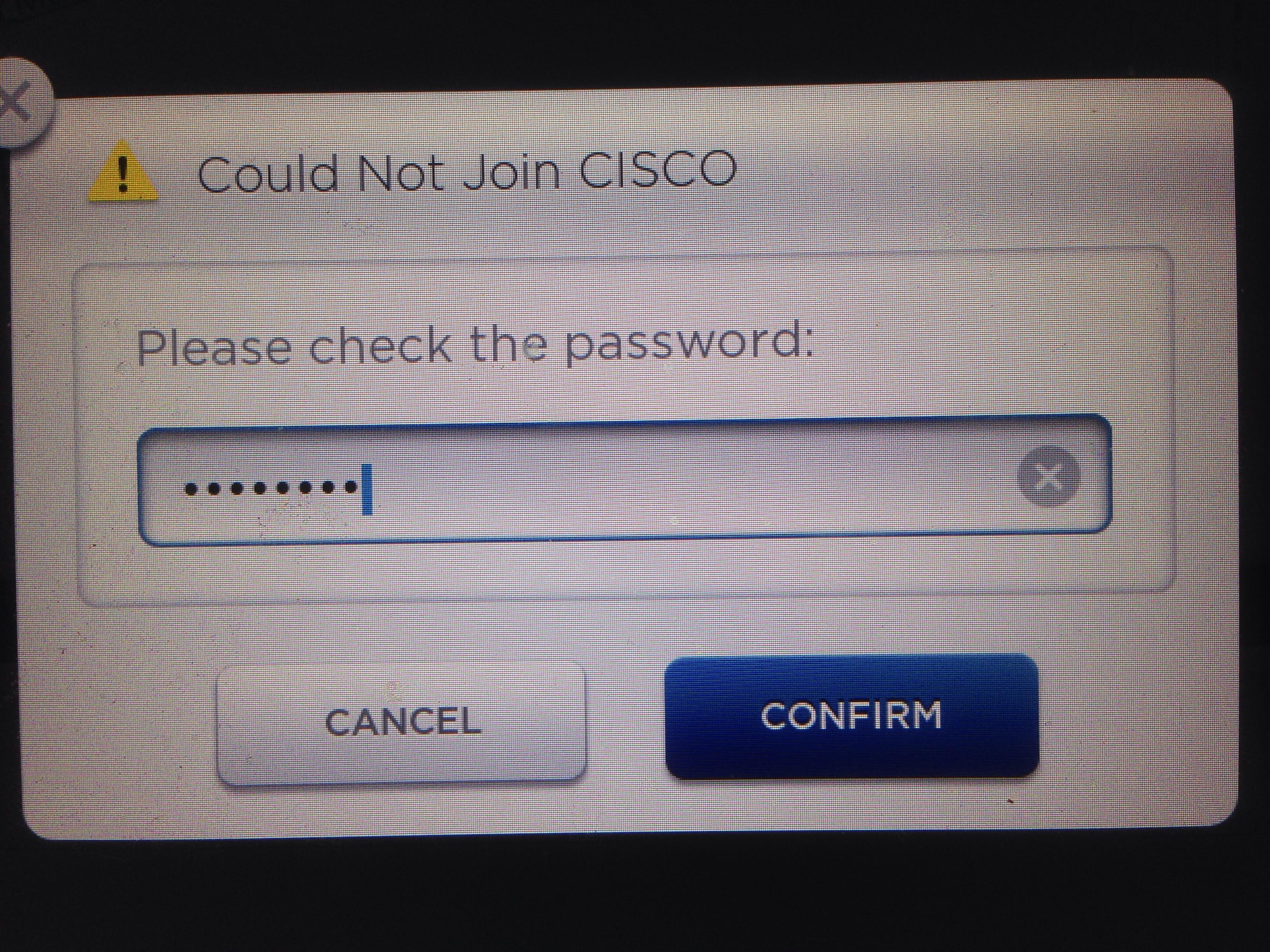
mitch672 Yes, it sees both access points. States it can't join "network name"
Please check the password. I have multiple iPhones and iPads joined with the same password..
 �
�
Nov 16, 2013
dirkhh Does your password contain any special characters, anything that might have gone wrong when typing it in?
I had my car connect to three different WPA protected networks without a problem, but apparently mistyped my passwords a few times as I got the same error. Going slow and deliberate finally did the trick.�
Nov 16, 2013
Todd Burch Another possibility to check for those having trouble connecting to their wireless router:
Mine was set to broadcast purely in 802.11x (not sure which of the g, n, etc. varieties it was). I had trouble connecting. I changed the router settings to broadcast in 802.11 g, n, etc. and connected right away.�
Nov 16, 2013
brianman My psychic powers tell me you have special characters (characters other than letters, digits, hyphen, period, comma) in your password.�
Nov 16, 2013
mitch672 Your physic powers are way off. Only letters and numbers.
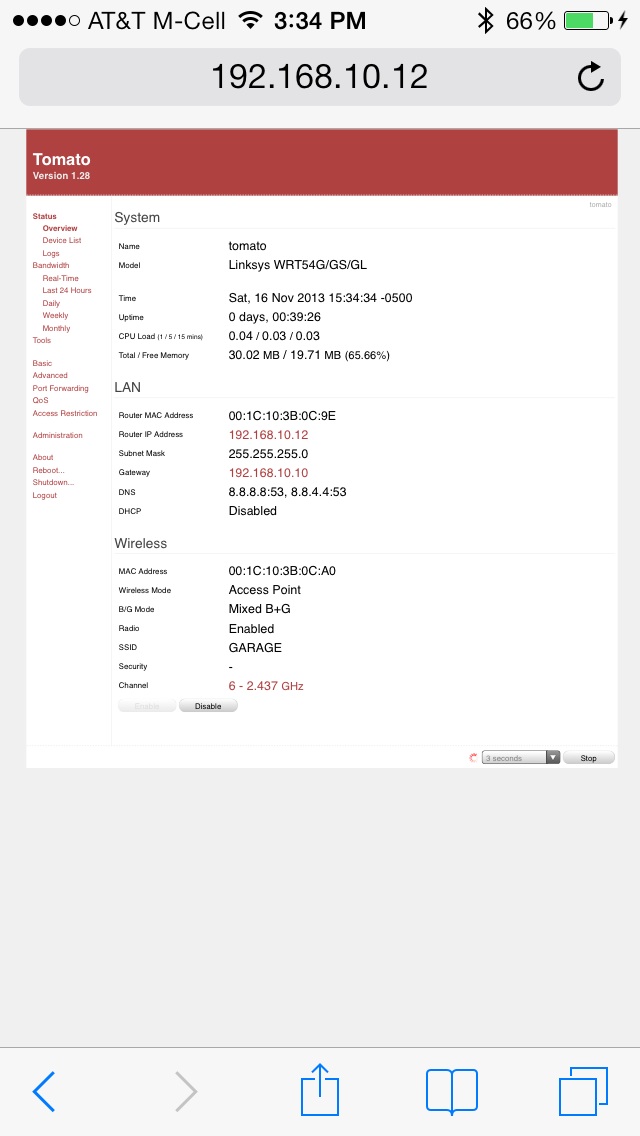
I have an old Linksys WRT54G running "tomato" I just pulled out and setup in the garage (yes, I already had a wire for this)
I've now tried "no security" (basically an unsecured access point), still won't join. Tried "B" only, "G" only , no dice.
Ran a scan of wifi networks in the area (tomato can do that), tried channels with nothing else on them , or very weak other access points, no luck. There are serious issues with Teslas WiFi implementation, as you can see, I am not new to WiFi networking or LANs
BTW, the iPhone I'm using joins all of these access points with no issues, including GARAGE I just setup
 �
�
Nov 16, 2013
mknox I went directly from 4.5 to 5.8 this morning. For some reason, it will NOT recognize my home WiFi password. Tried 5 or 6 times. It also re-set all of my settings to Metric for some reason.�
Nov 16, 2013
mknox Yikes! I have a complex password on my WiFi setup with many, many devices configured and working on it. Looks like I'll be turning on the "Guest" network for the car...�
Nov 16, 2013
roblab Well, MY wifi insists that I push the reset / connect button on the wifi while the car is trying to connect. As the car is in a separate garage, it usually entails yells and hollerings. "OK, I pushed connect." "OK. What button do I push?" "The one in the middle!" "Which one?" "Wait. It failed. Let me restart it." "What?"
The trick is getting my wife and me to connect.�
Nov 16, 2013
mitch672 I think this is a more serious issue, perhaps some of the lower VIN cars have hardware issues with the WiFi, as mine is a lower numbered VIN, and I can't even get it to join an "Open" (no password) access point 15' behind the car. This wifi hardware is being activated and used for the first time, would not surprise me to discover some of it is defective.
Update: called Tesla Watertown service (Matt), he's not aware of any issues yet, but will try and get an update. I might take a drive up there and see if I can connect to Teslas wifi (profile is built in). Also he suggested a reboot of the center console, that was the first thing I did after getting the update..�
Nov 16, 2013
brianman It's a guess to troubleshoot. Don't assume I'm right here, please. Sorry if that wasn't clear.
- - - Updated - - -
I think there are some videos online for that.�
Nov 16, 2013
mknox I tried "one last time" before switching on a Guest account and it connected! I guess 5.8 does take "special" characters!�
Nov 16, 2013
NigelM
Discussion on that here- Air-Suspension-no-longer-lowers-at-highway-speeds-(FW-update-v5-8)�
Nov 16, 2013
yobigd20 I didn't have any wifi issues. Connected to my home network first try.
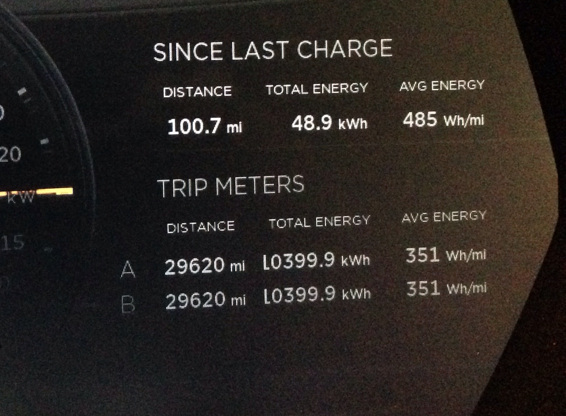
Looks like they also fixed the weird digit styling once you cross over the 10kWh usage.
Old style:
New style:
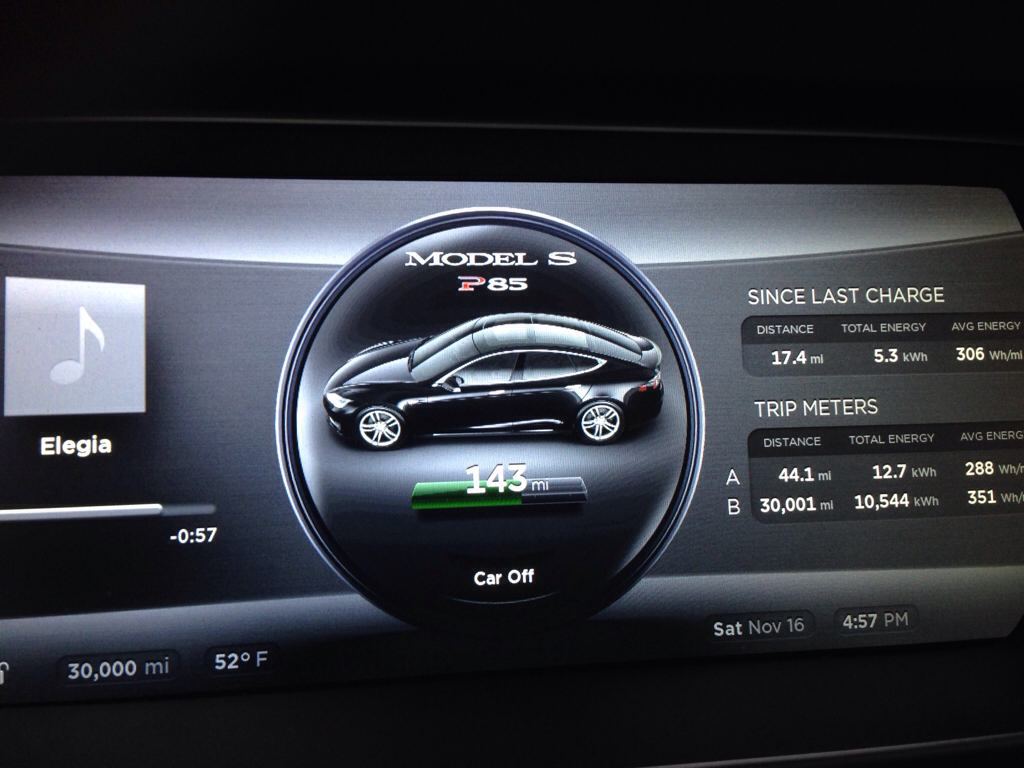
Also notice the difference between the odometer and the trip meter. Apparently the car thinks it went on a trip 1 mile further than the car actually went. lol�
Nov 16, 2013
mitch672 Mine is absolutely broken. It will not even join an open wifi network 15' behind the car
Something is wrong with my Model S WiFi hardware.�
Nov 16, 2013
tezzla I had to reconnect to wifi about 20 times to get it to connect. I also rebooted the big screen once.�
Nov 16, 2013
mitch672 I called Tesla in Freemont, they are going to "check the logs" and see if they can figure out why my car won't connect via WiFi, 3 different access points/networks, even tried "no security" (open), wouldn't even connect to that one. Done multiple reboots of the screens already as well.�
Nov 16, 2013
dsmith2189 I have been trying unsuccessfully for the last week (since I got 5.6) to connect to ANY WiFi network I can find. I was upgraded to v5.8 this morning and have been trying all day with no success.
I've reset my wireless router, even upgraded it's firmware and still can not connect.
I ensured that my vehicles MAC address is in the allowed MAC address table and can not connect.
I eventually disabled MAC filtering and still can not connect.
I've connected all my other WiFi capable devices (at the same time) with no problem. (Password is Upper/lower case and numbers, no special characters)
I've driven around the neighborhood (mixed commercial and hi rise residential buildings) I can see many open networks but can not connect.
I've even tried to connect to my BlackVue dashcam WiFi connection to see the camera's menu with no success. (I figured this wouldn't work anyway, but had to try)
I guess I might take the long drive to the local SC to see if I can connect to them, at least if it doesn't work I will be there already..
It can't be that my router is made by this "Linksys/Cisco" company that no one has ever heard of... Maybe I should go with a company that has experience with network communications...:biggrin:�
Nov 16, 2013
brianman You went through way more effort than I normally would. I say normally because I went through a similar torment with my wifi at home w/r/t to my dashcam. My theory all along was that my router was suck -- and I was right -- such that after replacing my router everything immediately got sane, stable, and fast.
In your case, reading the tea leaves I'm guessing it's worth a trip to the service center to put your in-car wifi device through some diagnostics. Bummer, but that sounds like the likely culprit.�
Nov 16, 2013
dsmith2189 I'm an IT guy, so I am probably used to banging my head against the wall trying to get things to work. in the end it is usually something simple.
My router is only about a year old, but there was a new revision right after I bought it. I would just hate buying a new router to find out that it was not the problem.
On the other hand I live in a high rise and need to move my car to the top floor of our parking structure and park in someone else's spot to even see my router. (cable company is installing a WiFi hot spot near my parking spot in the future, but I could not connect to their other WiFi hot spots, so not promising there either)�
Nov 16, 2013
mitch672 dsmith2189, it's entirely possible that some of us have a hardware issue with the WiFi on the Model S, this is the first time it's actually been usable. I called Tesla and they are going to check my vehicle logs, to see if they can discover the issue. I'm like you, I have multiple routers at home, and I've tried just about everything, it just does not work. I'm wondering how they tested the WiFi hardware, if there was no software support prior to the 5.X releases.�
Nov 16, 2013
dsmith2189 Well, I made some progress.
I was able to get my car to connect with my phones WiFi connection. trade one 3G/4G connection for another. I guess that's progress, at least I could connect to something.
Now I have taken brianman's advice and purchased a Netgear router to replace my Linksys E4200. If that doesn't work I'll contact ownership and see if they have any advice.
in the mean time... more testing. possibly start a hardware compatibility list wIki somewhere.�
Nov 16, 2013
dmckinstry I guess a lot of us got 5.8 today. Upgraded from 4.5. I have two routers (one Netgear the other D-Link) and managed to get the Model S connected to the Netgear, but had no luck with the D-Link. After a variety of different attempts (password changes, etc.) my son found that I had a time zone error in my D-Link setup. After correcting that, I connected with the second router without any trouble. Just FYI in case any others of you may have a time zone error. I've had no trouble connecting any other of my devices to the D-Link in the past.�
Nov 16, 2013
dsmith2189 I finally managed to connect to my router. I guess my Linksys router was just too old to connect.
I purchased a "NETGEAR Nighthawk AC1900 Smart WiFi Router Model R7000".
My normal parking spot is still out of range but if I move my car up one floor (closer), I can connect.�
Nov 16, 2013
brianman I think you misread me. That wasn't my advice.
This was my advice:
- - - Updated - - -
But while we're on the subject...
I bought this and the ASUS PCE-AC68 when going through my dashcam wifi issues. They seem to be mates for life. I had such good luck with the pairing that I bought a second PCE-AC68 as well.
Last I checked I was getting something like 20MB/s (~160 Mbps) transfer from the garage (wifi) to machines upstairs (wired), and rock steady Remote Desktop to the garage box while doing it.�
Nov 17, 2013
dsmith2189 Yes, Exactly. the tea leaves revealed that I HAD to get a new router...
fwiw the Netgear, Linksys and Asus were right next to each other on the shelf it was a coin flip to decide which one to get. good thing I had a 3 sided coin.:biggrin:�
Nov 17, 2013
LuckyLuke Could it be channel related? I couldn't connect from car while my iPhone (from within the car) worked fine, I logged in my router and changed the wifi channel from auto to a fixed channel (can't remember the number) and tried to connect from car and it worked right away.�
Nov 17, 2013
mitch672 I've tried Chanel's 1, 6 and 11 now, doesn't make a difference, still won't connect.
My work iPhone has tethering enabled on the data plan, when I enabled the hotspot, it can connect, but it takes it a long time to.
We need better specs on what they are compatible with, I've now tried 3 routers (FIOS provided, an older Linksys WRT54G with Tomato firmware, and a professional grade CISCO Airnet 1040), it has to be some parameter that's off.�
Nov 17, 2013
Chrigel It seems that my iPhone 5S ATT USA with 7.04 does not AUTOMATICALLY connect to the WIFI Hotspot on my Tesla once I am on the road. It works fine when I open the iphone, settings, personal hotspot.
Is this just me or everybody? Very annoying but once it's connect to LTE it's much faster than before (of course).
Any advise is appreciated.�
Nov 17, 2013
captain_zap The car does not create a Wi-fi hot spot. This function is not provided. it is a client only when connected to another device, such as an access point or a phone in tether mode.�
Nov 17, 2013
mitch672 Add to the list Netgear WNDR 3800 also not working, this is only a year or two old.
Tesla: we need guidance on the WiFi, and why experienced IT people with multiple routers and access points can't get the Model S to join any of them.�
Nov 17, 2013
AC1K WiFi Woes...
here are the issues
Does not support WPA-Enterprise/WPA2-Enterprise (My house is running the WPA2-ENT)
Does not support 802.1x
Does not support Radius (Some companies use this w/ WPA2-ENT so forget about connecting at work)
Does not support 40MHz only width, if you are having issues, set your AP to 20/40MHz or auto, took me a while to figure this out, every single device in my house supports 40MHz only, now my AP has crippled speeds
Does not support 5GHz anything (unfortunate since 2.4GHz is so crowded nothing works reliable on this spectrum)
RSSI is worse than my galaxy note 2 (they couldn't of put a bigger antenna in?)�
Nov 17, 2013
Andy Black Hi,
I've spent most of the weekend fooling around getting logged in and was finally successful doing the following:
1. Moved the access point closer to the car or upped the power on the access point. I could see the network but it wouldn't connect until I moved it closer. It wasn't very far away to begin with. I'm convinced the antenna in the car sucks.
2. Set the access point to allow 802.11b traffic. From what I can tell the NIC in the car doesn't support g or n.
3. Set encryption on the access point to WPA (not WPA2) and allow both TKIP and AES.
It's been pretty frustrating and I've gotten zip in the way of info from my local service center.
Hope that helps.
Andy�
Nov 17, 2013
AC1K i posted in another thread but those of you that have problems
change your AP to 20 AND 40 MHz channel width, the Tesla DOES NOT support 40MHz
change the protocol to Auto (instead of N only, so it connects with B G or N)
WPA2-Personal works fine, DO NOT use WPA/TKIP its vulnerable to attacks, WEP is useless, even a 128bit key can be broken in less than 5 minutes
EDIT:
here is how i set mine up
The primary 2.4GHz settings as as follows (5GHz is not supported)
allow B/G and N
have both 20MHz and 40MHz available (this will crippled your wifi speed but some connectivity is better than none)
the channel depends on where you are, choose the least congested channel, my AP automatically changes the channel when needed
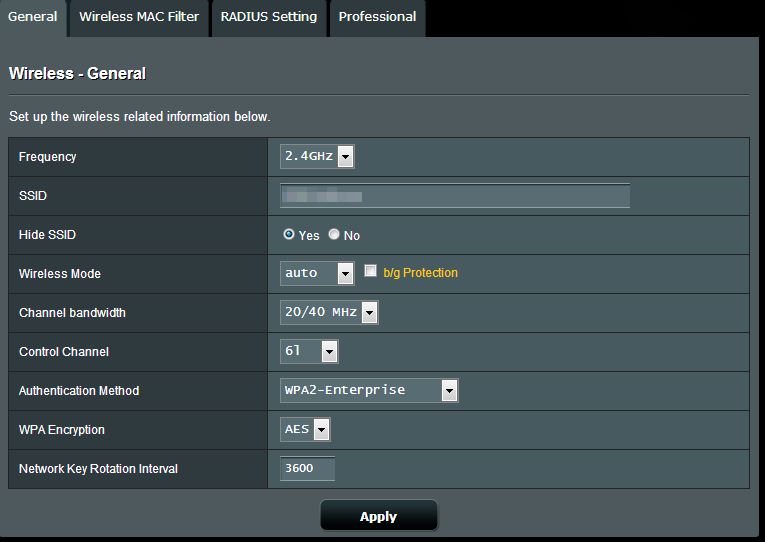
i made a guest connection specifically for the tesla since WPA2-Enterprise is not supported
WPA2-Personal | AES
simple password at least 8 char
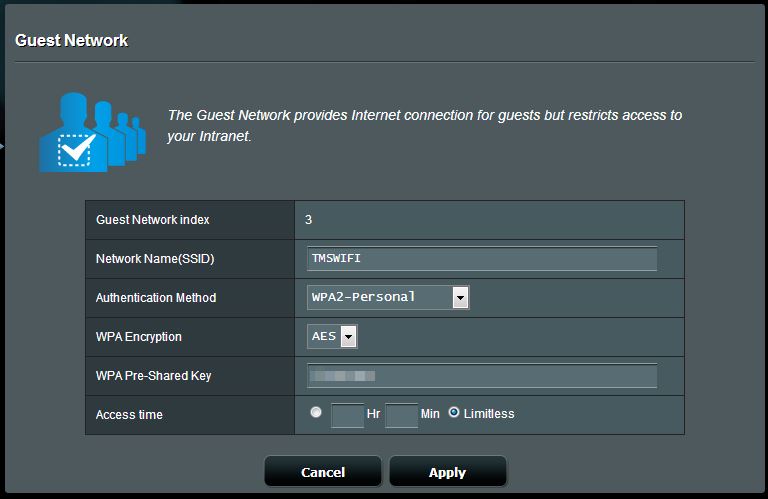
if you are wondering if the car has a good enough signal strength, just make sure your smartphone can connect from within the car, if it can and you can surf the internet, the car will be able too as well.�
Nov 17, 2013
Andy Black Sorry.
Also forgot to mention that when connecting, I didn't select my WiFi network from the drop down list you get when tapping the 3G icon.
I selected "WiFi settings" at the bottom of that list (or whatever it's called) and added my network manually so I could specify connecting with WPA rather than WEP or WPA2.
--Andy�
Nov 17, 2013
brianman @AC1K
I understand why your separate thread post was moved to here (and it probably makes sense) so let's not try to fight that.
But...
What you were building was pretty compelling as a start for a "Model S Wifi Compatibility" wiki. Can you start that wiki page?
Thanks!�
Nov 17, 2013
Klaus Data point: After the 5.8 (.24) update this afternoon (from 4.5), I was able to join my home WiFi without issues. This is with only 1 WiFi signal strength bar, the car outside the front of the house, the AE in a 2nd floor room at the back. It connected slowly but error-free.
I'm connecting to an Airport Extreme (non dual-band) using WPA2 Personal, 802.11n (802.11b/g compatible) with complex password including special characters.
I conclude that quite a few of the limitations stated above in the thread do not apply universally. I need to have 802.11 b/g compatible on for my iPad 2 anyway. The AE is several years old, but updated to the latest firmware. YMMV.�
Nov 17, 2013
J in MN I setup a guest network on my Apple Time Capsule today due to the issue with entering long passwords. Well, it appears that as soon as the car goes to sleep, or drops the wifi connection, the Time Capsule crashes. Happened twice. More testing next weekend.�
Nov 18, 2013
mitch672 Well, I tried 2 different wifi routers in "access point" mode, within 3' of the Model S tonight. It still will not join, I am beyond frustrated. Old Linksys WRT54G running "Tomato", and a Netgear WNDR 3800 as well.�
Nov 18, 2013
Lloyd I bought an Asus RT-AC66R Dual -band Wireless AC1750 Gigabit router, that is closest to my garage. It connected immediately to the 2.4 portion of this unit. This unit is only several months old. I have not been able to connect to the weaker signal of the Guest network of my office which a CISCO WAP about 5 years old. I was also not able to connect to a weaker signal Netger access point about 1.5 years old. Hope this helps.�
Nov 18, 2013
mitch672 I have 2 Verizon FIOS routers (ActionTech), several old Linksys WRT54G routers, the Netgear WNDR 3800.
Everything else I have can connect just fine, I really don't see a need to spend $182 on yet another router.
Tesla needs to research why the Model S can't connect to multiple older routers, while iPads, iPhones, have zero issues connecting, or they need to fix the firmware in the Model S, as the car shouldn't have an issue connecting to a router 3' to the right of the passenger door.
Amazon.com: ASUS RT-AC66U Dual-Band Wireless-AC1750 Gigabit Router: Computers Accessories�
Nov 19, 2013
mitch672 I have discovered the "problem/bug" in Teslas WiFi implementation, and why so many of us are having issues.
It turns out that the WiFi access point you connect to MUST supply the DCHP address to the Model S, or the car refuses to connect.
I have a large house, and my main FIOS router runs DHCP, while the other WiFi routers run in "access point" mode, just passing the traffic along to the main DHCP server.. Apparently Teslas bug is, they won't accept the DHCP IP address from a different MAC address than the WiFi access point being connected to.
This morning, I enabled DHCP on the Netgear router in the garage, and just connected the WAN port to my LAN, letting the Netgear provide DHCP for WiFi devices connected to it, the Model S connected within 5-10 seconds with all bars being lit up (the router is 3' away from the passengers door)
I'll email or call ownership and try to explain the bug to them, I'll need to talk to someone who understands networking though, to be able to write up the issue correctly.�
Nov 19, 2013
Chipper EXCELLENT!!! Good work Mitch!�
Nov 19, 2013
lczand I was just updated to version 5.8. I have been having the same problem that others have described regarding wi-fi. I can tether the car to my phone, but can't connect to wi-fi. I tried re-booting the screen, but it had no effect. Called Tesla in Fremont and they say they don't know of any issues. Perhaps they should read all the posts.�
Nov 19, 2013
AC1K
i don't think this is true, my setup is like this
Tesla Model S > Asus RT-AC66U (AP ONLY! WiFi to GigE) > Windows Server 2008R2 (DHCP/DNS/RADIUS) > Linksys WRT54GL (DDWRT, no internal network services running) Gateway/Firewall > Shaw Cable Internet
i was only able to get the model S to connect after i changed my wifi to 20/40MHz comptibility, and to allow legacy devices (B and G) instead of only N�
Nov 19, 2013
mitch672 I'm not using a windows server. (Currently) for DHCP, it's running on the FIOS ActionTech router. That is my environment...
Windows DHCP is a lot more advanced than what's running in the router. The only thing I changed between working and not working was setting the Netgear up to hand out IP addresses via it's internal DHCP server, rather than being given out by the FIOS ActionTech WiFi router.. The clue was, the car was once able to connect to the ActionTech, but it is too far away for a reliable connection.
They probably have a low level bug not accepting the DHCP offering from some types of different MAC addresses, perhaps it works fine with Windows DHCP, but not with the DHCP running in the FIOS ActionTech. Also, I was able to see the "lease" for the Model S in the DHCP scope on the FIOS ActionTech wifi router, but the Model S was not accepting it, the reason has not been determined, it was either too slow in responding, or they have a MAC address issue accepting the offered IP in some cases.
FYI, the Netgear has been set for 20/40 since day 1, also B/G/N on 2.4Ghz as well. The only thing that's fixed it was having the router handout DHCP to the Model S
QED�
Nov 19, 2013
scaesare With 5.6 I connected to my router (running DD-WRT) configured as an access point forwarding DHCP requests to my Windows 2008 Server.
My reception seems a bit spotty, and I haven't yet addressed that and connected again with 5.8, but non-router-supplied DHC wasn't an obstacle for me in connecting via WiFi.�
Nov 19, 2013
Klaus This doesn't match my experience. My MS60 5.8 (.24) connects to the AirPort Extreme upstairs that's set up as an access point while the AirPort Extreme dual band downstairs with its WiFi turned off does the routing and handing out DHCP.�
Nov 19, 2013
NigelM Normal router signal (from my Verizon FIOS) in my garage was 1 bar, so I plugged in an old Linksys Wireless Ranger Extender (RE1000) and now have maximum signal strength. The bridge is set on automatic DCHP, works perfectly.�
Nov 19, 2013
mitch672 I just posted the solution that worked for me... If you beat your head against the wall long enough, something will work... In my case, enabling the local wifi access point to supply DHCP is what solved my issue. I'd suggest if anyone has issues, give that as try. Like I said, I did see the MAC address of the Model S in the main routers DHCP lease list, but the car was not accepting it or connecting... The solution that worked for me was to connect the WAN port to my LAN, and have the Netgear wifi router in the garage give out it's own IPs. (Different subnet of courses), to wireless devices connecting to it.�
Nov 19, 2013
scaesare And your experience is certainly appreciated, however you stated it as if it was categorically THE issue, and that one "MUST" configure such settings to be successful:
As several of us have responded, your assertion that you "MUST" do so isn't the case. It's certainly a helpful data point, however.�
Nov 19, 2013
brianman Nice work on the researching, and thanks for passing along the info to Tesla.�
Nov 19, 2013
shady How long are people finding it takes to join the Wifi network when you drive in range (drive into garage).
I have no cell service near my house, so when I get close, maps and internet radio all stop working.
Last night was the first time I drove into my garage since setting up the wifi. I expected it to join immediately, but there was no music, no map refresh .....
After getting impatient (probably after 40 seconds!!) I clicked on the network symbol (which was still showing 0 bars 3g) and the Searching Networks Circle was busy doing its thing (circling!), however, it had already found my WiFi network, but didn't automatically connect. In the end, I just selected the network and it joined straight away. I'm assuming it would have joined eventually, but what's the holdup?�
Nov 19, 2013
NigelM Mine joins the network in the 2-3 seconds I pulled into my garage and looked at the icon on center screen. Checked it a couple of times.�
Nov 19, 2013
qwk Just got 5.8 today from 4.5, and the car cannot even find my network, let alone connect to it. This is about 20 feet from the router. Tesla must use one POS antenna, as I have connected dozens of devices up to 100 yards away with no problems. The worst part is there is no 3g Att service within 50 miles of here.�
Nov 19, 2013
AC1K so apparently my WiFi/SoC came from here.......
PARROT
174 quai de jemmapes
PARIS 7510
FRANCE
[TH="bgcolor: #B9C9FE"]Prefix[/TH][TH="bgcolor: #B9C9FE"]Vendor[/TH] 9003B7 PARROT �
Nov 19, 2013
mitch672 Just wanted to report that I have a 7-8 year old Linksys WRT54G running "tomato" firmware now working just fine with the Model S.
The solution was the same one that worked for the newer Netgear WNDR 3800, which is to allow the router itself to run DHCP, and have the router connected to my LAN via it's WAN port.
BTW, once I pull into my garage, as soon as I put the Model S into "Park", it drops the 3G connection and is instantly connected to the WiFi router.
Mitch�
Nov 21, 2013
TexasEV My car also connects to Wi-Fi within a few seconds of pulling into the garage, and shows a full strength signal, but when I get in the car the next morning and it goes through its wake-up routine, it shows 3G not Wi-Fi. Is this normal behavior?�
Nov 21, 2013
mitch672 Not sure what "normal" is yet, last night pulling into the garage, I had to hit the 3G icon to get the WiFi to connect, sometimes it will connect by itself, sometimes you have to prod it. So far, in the morning when I get in the car the WiFi shows connected... Until 1 day it won't�
Nov 21, 2013
Lump Mine doing the same, I have a service appointment today & will ask them about it but I doubt they will have the solution.�
Nov 21, 2013
AC1K
if you have deep sleep enabled (power saving) wifi turns off,�
Nov 21, 2013
Lump When I was on 5.0 car would sleep & never had that wifi message every morning, since updating to 5.8 seeing the wifi screen is getting old.�
Nov 21, 2013
CantaMia Ron I am trying to connect to Motorola Zoom Table and before 5.8 it would
connect some times . I keep trying to see if it will connect.�
Nov 21, 2013
TexasEV That seems counterproductive if their goal is to push out updates over Wi-Fi and the updates are sent overnight while the car is sleeping.�
Nov 21, 2013
hans The updates are pulled by the car. When the car wakes up it checks if there is a new update waiting, if there is, it can pull in down from Tesla via Wi-Fi. If the car is connecting with 3G Tesla can decide to defer the download to another time when the car connects over a WiFi Link.�
Nov 21, 2013
NigelM or Tesla can wake up the car by sending a 3G signal. I think....�
Nov 24, 2013
dirkhh Definitely - that's how our REST calls can keep the car awake :-(�
Nov 24, 2013
Lyon's Dad It has been a while since I opened my wifi server and of course the Tesla would not connect. The server was set to 802.11n only. When I changed the setting to allow it to connect on the other protocols too, the Model S connected and has each time I return home since. Andy, I suspect you are right that the car connects on "b" only. As a result it runs slower than it might optimally, but faster than over the cell telephone network. My very unscientific tests suggest the web browser is now much faster...�
Nov 24, 2013
NigelM Mod Note: some posts went here - Model-S-REST-API�
Nov 27, 2013
hans Had some fun with my SSIDs while I was debugging my WiFi connection issues.
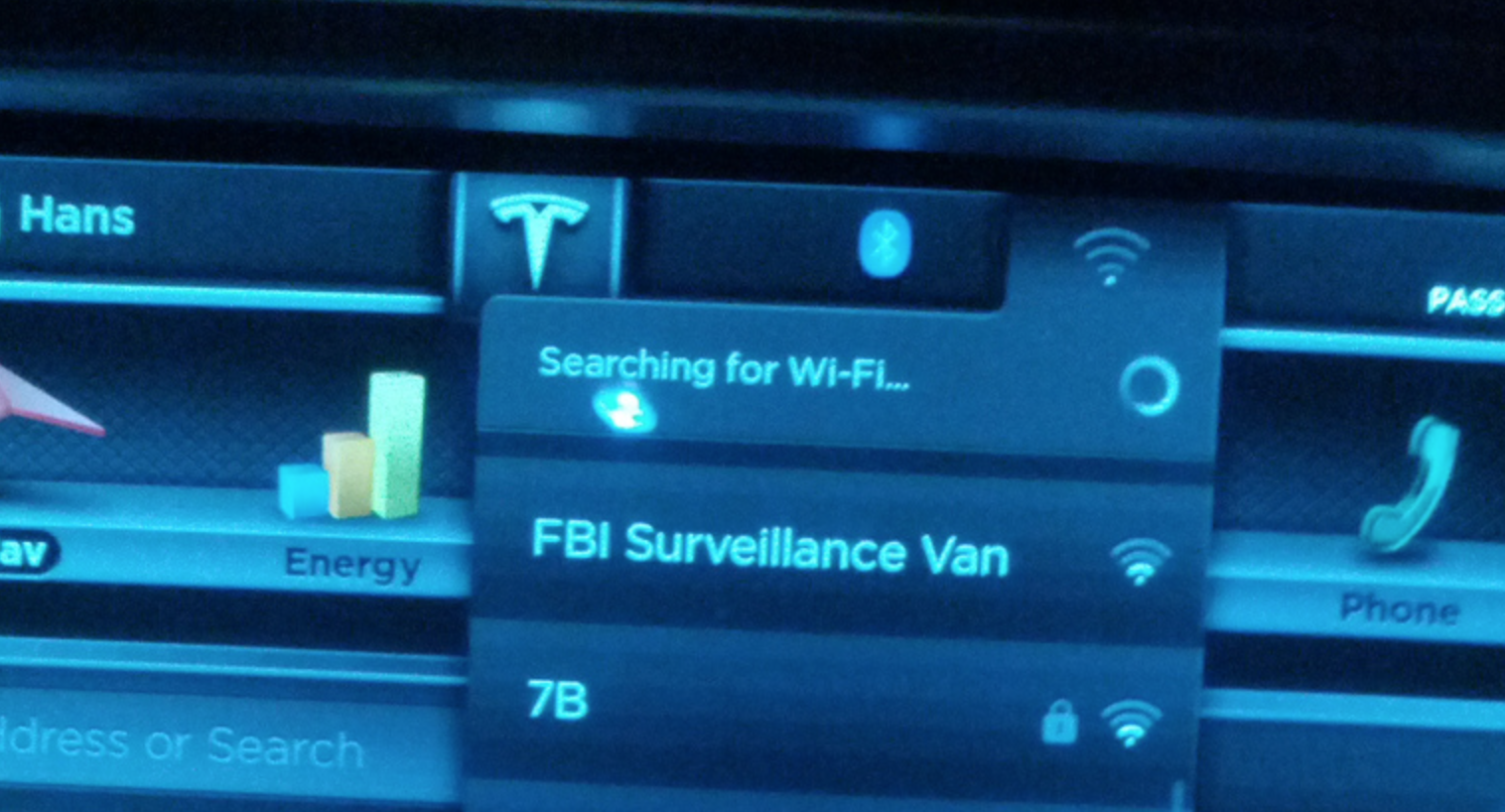
I did manage to get the car to connect to my Apple Airport Extreme (4th Generation) but only when configured in Bridge mode to my Comcast cable Internet and not when configured for PPPoE on my AT&T DSL internet. No idea what the difference is.�
Nov 29, 2013
Lloyd Has anyone found that Tethering is not truly available as advertised as when you put it in drive the car automatically reverts to 3G?
Edit.................
I found when connected to a stationary source, it reverts to 3G when in drive. If connected to a mobile source then it stays connected after putting the car in drive.�
Nov 29, 2013
scaesare No. I have a mobile hotspot and it will happily use that via WiFi regardless of if it is in Park or Drive.�
Nov 29, 2013
MichaelS Many thanks to everyone for the tips.
My car would connect, then disconnect after a couple of minutes. Then when I would try to reconnect I would get an error saying password was incorrect. I rebooted the center console and it would connect then disconnect again.
I changed the security from WPA to WPA2 AES + TKIP and it seems to stay connected now. I have a very old WRT54GL router.�
Dec 10, 2013
jdb Good to see this thread. I also have not been able to get Model S connected to house WiFi, even though recognizes signal, will not accept password. And iPhone connection works fine. I have not bothered with it once realized after many attempts it would not accept password (very simple 9 letters) to connect. Have 12,000 mile service scheduled at Dania Beach SC next week (mine is Signature model) and thought maybe they could help out. Question-what is advantage of connecting with house WiFi? Did not have it for 12 months and didn't miss it.�
Dec 10, 2013
stopcrazypp Usually faster than cellular connection and useful if you are in a poor coverage area. It's going to matter more when Tesla starts charging for data (rather than picking up the tab right now).�
Dec 12, 2013
andrewket The antenna for wifi on the MS must not be very good or is located in a terrible position. Less than 30ft away from an access point and I get one bar on the MS. The AP shows the MS at 20% signal (shows percentages and not dBm). My iPhone and other devices, while sitting in the MS, are at 90%.�
Dec 13, 2013
Andrew I'm a +1 on the unable-to-connect to WiFi party. My iPhone can connect to our network while I'm sitting in the car, and the car sees the network just fine... but it won't connect after I enter the password.
My network setup is very straightforward - have Cable internet, with a using a Linksys WRT-54GL with Tomato firmware as my router (which does the DHCP). Tried enabling B+G mode, tried WPA2 Personal AES, WPA2 Personal TKIP, WPA2 Personal TKIP+AES, and even WPA Personal. Tried switching channels. Added larger antennae. Increased signal strength... No love.
My password has upper/lower case letters, and symbols like & ...but others have said that symbols are okay. The car will also tether to my phone, so I know the WiFi in the car does work.
Has anyone with the Tomato firmware figured out the trick? Thanks!�
Feb 17, 2014
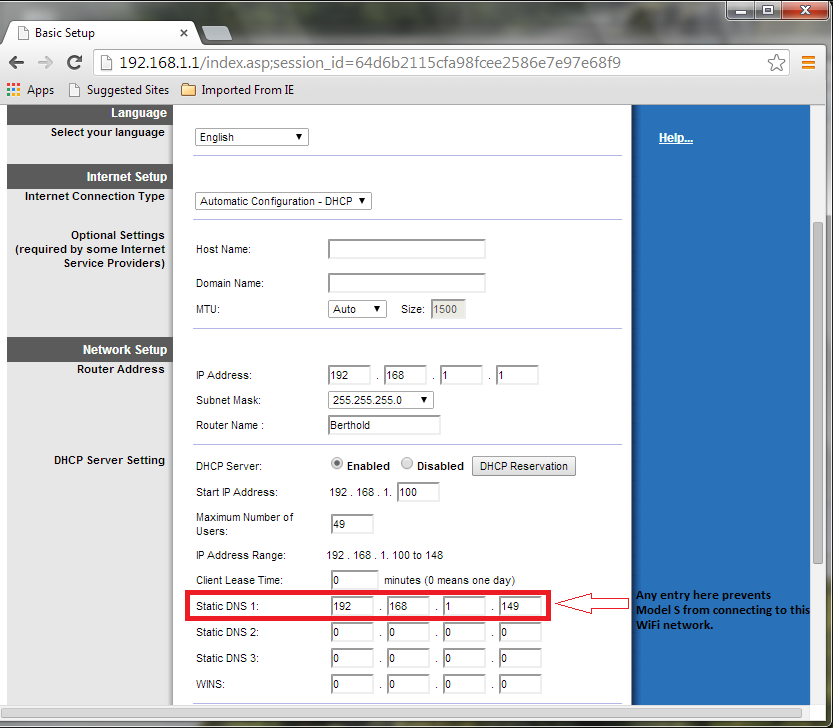
Rodbert Static DNS causes WiFi connectivity problem
Using a Linksys E1200, Model S would recognize my home network, but not accept the password (all other devices - iPhone, iPad, TiVo, home computer, security camera system, WiFi thermostat - connected fine). Here's what finally worked for me: In my router configuration, I had reserved a static DNS (erroneously thinking I was reserving a static DHCP address for my home security camera system). Once I removed the static DNS setting, it connected fine.
 �
�
Feb 18, 2014
woof Welcome Rodbert!
Setting a static DNS entry to an IP address that is not a DNS server will block all connected devices from looking up domain names. That would prevent the car from resolving teslamotors.com (or whatever domain name Tesla uses to verify connectivity). Not surprising it doesn't work.�
Feb 18, 2014
hans Try a valid DNS server like 8.8.8.8 or 8.8.4.4 (Google DNS)�
Feb 20, 2014
Atlantian I had the same problem with the car not accepting my password. I was running 802.11 N with WPA2-PSK security mode along with AES encryption. To resolve the issue I just changed to using 802.11 B/G/N wireless mode. No other settings were changed. Btw, I use a EnGenius ECB350 AP/Bridge.�
Feb 26, 2014
John Donovan I wonder if this is something you network experts know about...
I can connect my WiFi at home no problem, but on campus the wireless network they want me to use requires both a user name *and* password. Of the Tesla only prompts me for the password.
Here is some information on their wireless network connections:
Connecting to UO Secure wireless network | UO Information Technology�
Sep 2, 2014
Cottonwood Wimpy WiFi
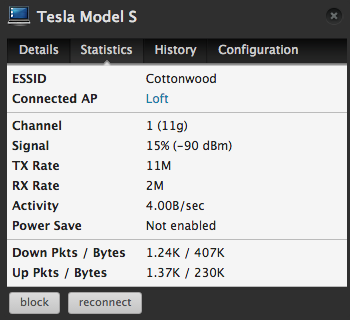
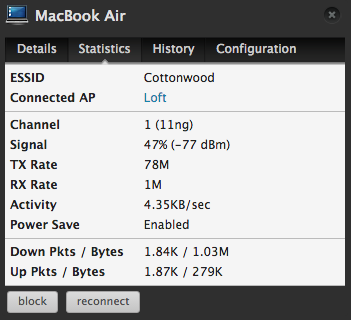
I did a little test today comparing my Apple MacBook Air sitting in my lap in the drivers seat of the MS to the MS WiFi. I just upgraded my home WiFi network to the Ubiquiti UniFi system. With that, I can measure the Tx Power of the WiFi clients at the Access Point. I have an access point about 25 feet from the MS, one floor up through a wood joist floor.
Below are snapshots of the signal quality from both the MacBook and the MS. The signal strength from the MS is 13 dB weaker than the MacBook; that is 20 times less power from the MS, which is pretty wimpy!!! I did the test with the MacBook in the car to be fair. When I tried again with the MacBook outside of the car, the MacBook signal strength went up another 3 dB or another 2x in signal strength. Tesla really needs to pay more attention to the WiFi implementation of the MS.
On top of that, the MS is using the older, slower Wireless-G standard, rather than the current Wireless-N standard.
 �
�
Sep 3, 2014
ruby110 @Cottonwood: I've only seen the MS connect at g but someone else said he is connecting using n only. So I am puzzled.�
Sep 3, 2014
Cottonwood My access point offers N and G. My MS only connects with G, but then again, I am VIN 0037. What is your approximate VIN? Maybe they have updated the WiFi controller in more recent production.
It would be nice if they improved WiFi RF performance, also. I have a workable (but weak) WiFi connection with the access point only 25 feet away. If Tesla really wants to save on Cellular Data costs by using customer WiFi, then they should work on this!�
Sep 3, 2014
ruby110 @Cottonwood: My VIN is 437xx and I can only connect to my Apple Airport devices with g but I think AmpedRealtor said his router is set to n only. I don't know which brand or even if I remembered correctly that it was AR.
edit: found this in the other Tesla forum.
AmpedRealtor | AUGUST 29, 2014
I've found that my Asus router's automatic channel and channel width selection causes the Model S not to connect. My router is set up as N-only, so no b/g, and car connects on 2.4 GHz band. Try setting a fixed channel and channel width, that may be all you need. Also make sure you are running a 2.4 GHz network, the car won't connect at 5 GHz.�
Sep 15, 2014
MindBender No single-quotes in WiFi passwords allowed
This weekend I finally took to time to figure out why my Tesla cannot connect to my Apple Time Capsule. I changed the password a few times, leaving out some of the safety features I put in. I isolated the problem to the use of single-quotes in the password (or passphrase). Removing them allowed me to connect to my home WiFi, albeit with a less secure password (and a whole forum knowing I use single-quotes in passwords ;-) ).
In computer environments single-quotes are special characters, and need to be escaped if used like normal characters. I suspect this isn't implemented (properly), making it likely there are other characters causing problems in WiFi passwords. Other examples are \, <, >, |, " and `.
I have changed back my password to secure version, because having my Tesla connected to my home network doesn't offer any features worth lowering my password security. My Tesla is the first WiFi toy not handling my secure WiFi password correctly, and I do have a lot of WiFi enabled toys.�
Sep 16, 2014
digitaltim @MindBender - How about enabling the "guest" network on your Time Capsule and connect your Tesla to that SSID? My guest network is wide open - no close neighbors to worry about borrowing my bandwidth and it makes it easy for people visiting the house to get on WiFi but logically segmented away from our devices.�
Sep 16, 2014
MindBender Hm, good suggestion; I haven't thought about that. But I wonder if that will actually shield my intranet from guest access, because I'm not using my Time Capsule as a router, just as an access point. But it's worth a try, even with lots of neighbours around.�
Sep 17, 2014
Chuck Lusin I just installed an old EnGenius ENS202 AP, 5 feet above the cars, and now I can get all the WIFI bars. Even still the AP shows a -50 dBm reading, at 5 feet!
I went with Security Mode: WPA2-PSK, encryption: AES, Wireless mode: 802.11 B/G/N Mixed, Channel TH Mode: 20/40 MHz, Channel / Frequency: Auto.�
Sep 19, 2014
Chuck Lusin So I get the WIFI AP in the installed garage two days ago, and bam, the 6.0 update this morning!�
Sep 22, 2014
CRinATL I'm seven months late to this, but in case it will help anyone, there are several ways for a WiFi network to be authenticated.
Broadly speaking (with out diving into the technical weeds) you can have:
- No password / No authentication
- This means anyone can connect.
- A password
- This means someone needs the password to use the network.
- A external authentication server, usually a corporate or campus network security system.
- This means you need a username and password to use the network.
The Model S should support all three, but the third is by far the rarest of the three when you look at all WiFi use as whole. However, since I am still waiting for a VIN assignment, I am a few weeks or more away from being able to test it. :wink:
If you want more of the details let me know or have a look at Wired Equivalent Privacy - Wikipedia, the free encyclopedia and Wi-Fi Protected Access - Wikipedia, the free encyclopedia.�
Sep 27, 2014
BHUtopia For what it's worth, I'm adding my experience: My Apple Airport Extreme is in my home office and S is in the garage 25 feet away. That's as the crow flies which passes through 2 walls and some kitchen appliances. My laptop had no problem with signal in the garage so I knew it was not a dead spot. I got no connection to the S until I moved the Airport out into the hallway which was then about 12 feet from the S and only passing through the garage wall. Achieving all bars required the Airport to be in the garage. So I set up an Airport Express in the living room which sits just on the other side of the garage wall. Using the Express as a network extension, I was able to achieve all bars in the S inside the garage. It really seems to be an issue of the antenna in the S. Don't know what Tesla can do about that now. BTW, my car was built in April 2013 so maybe improvements have been made to the antenna by now.�
Nov 10, 2014
JohnMc Cottonwood,
Question. I have been fighting the wifi linkup on my "S vin 227xx" all weekend. I also have a Ubiquity UniFi. I put the access point about 10 ft from the car and get a 2-3/3 bars signal. Tried auto channel and fixed channel 6 with HT20 and HT40 b,g,n. Tried both wpa1 and wpa2 and open w/o encryption. Tried auto, aes & tkip encryption. All these variations work on my iphones, ipad and HP laptop w/o any problem - but not on the "S". Also have 2nd wifi linksys AP with wireless G and all devices work fine with it also - but not the S. No joy with any setup. Password is all lowercase with 1 digit. Think password length could be an issue? Any suggestions?
Thanks�
Nov 10, 2014
Cottonwood Sorry, I am not sure how to help.
I have a password over 12 characters in length, all my UniFi Access points in auto-channel mode, and it worked the first time. Because the base UniFi AP is less than $70, and I already had hardwire EtherNet in the garage for monitoring my Solar System, I just put an access point in the garage 15 feet from the car. The MS is pretty deaf when it comes to WiFi, so a close Access Point is important.
A note on versions: I am running UniFi Access Point firmware 3.2.1.2601, UniFi Controller 3.2.1, under MacOS 10.10 and my MS is an early Sig running 6.0.�
Dec 4, 2014
Lerxt Does anyone have an update on this? I am struggling to connect my new Model S to my home network. I have a new Asus router with 2 bars of signal and all bands and standards on. My Model S has firmware version 6 and it won't connect to the network as it won't connect when the ( simple ) passcode is entered.�
Dec 4, 2014
Robert.Boston Did you see this note upthread? It may be that you have to disable certain features on the Asus router.�
Dec 4, 2014
Lerxt Thanks for the response.
I have:
set my channel bandwidth to 40MHz ( from 20/40MHz )
set a fixed control channel
my wireless mode on the 2.4GHz network is auto ( fixed options are legacy, and N only)
password is 8 numbers and letters with one capital
I also set up a guest network on the 2,4 band and set an eight digit numerical password.
It won't connect to either...�
Dec 4, 2014
rtz Maybe more specialized equipment is needed? http://3gstore.com/�
Dec 13, 2014
HansBe Just got my MS today - and was struggling with setting up my wireless access as well. As i have been a system engineer for years - i was quite used to these kind of troubleshootings. Nothing helped though.
Read this entire tread in the forums - and tried the setting on my wifi accesspoint to allow b+g+n networks to connect.
That was the only change - and now the car connects to the wifi - albeit with a very low signal (my cellphone has full signal strength to my wireless network from within the car!).
My accesspoint is not running a DHCP service - that is handled by my windows server - didnt change that.
Hope this might help you as well - good luck�
May 23, 2015
rdevillers Thanks!
I just picked up my Model S and could not connect the wi-fi. I found your post and - sure enough - I was also using a single quote in my 802.11G Wi-Fi password. I removed it. I am not too concerned about wi-fi security. No one lives close by so I would notice someone trying to poach my signal.
Anyway - thanks for taking the time to post this. You saved me a lot of frustration!�

Không có nhận xét nào:
Đăng nhận xét