May 1, 2014
TrevorSStone Today I have released an updated version of my Chrome Extension that allows you all the functionality of the phone application in an easy to use chrome extension. The images are all handcoded by me, so they are a little rough around the edges. If you know svg, feel free to help clean them up and submit on github.
It can be found HERE. If you have already downloaded it, it should update automatically.
Whats new:
Updated the libraries, so it should be slimmer and faster.
Custom made images.
Half the filesize.
As always, it is open source on github.
I am also sure Tesla would love me to remind you, don't use this application and it isn't endorsed at all by Tesla Motors.
Mods, I made a new thread because the last was about trying to ask for help. No more help is needed and I would like this thread to focus on user's experiences and bug reports. Thanks.
If you enjoy the extension consider donating by buying the Chrome App version HERE, donating to my [email�protected] paypal, or sending some bitcoins to 1LACFxXK3kC5XqQgZFi9ZFHmgv9Wxaiqfp.
Thanks for the support!
Check out the article about this extension at Teslarati!
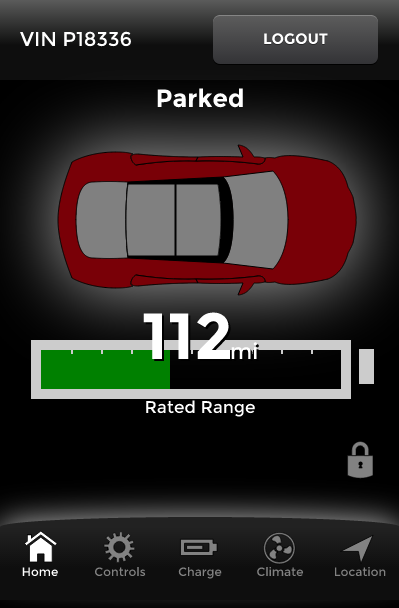
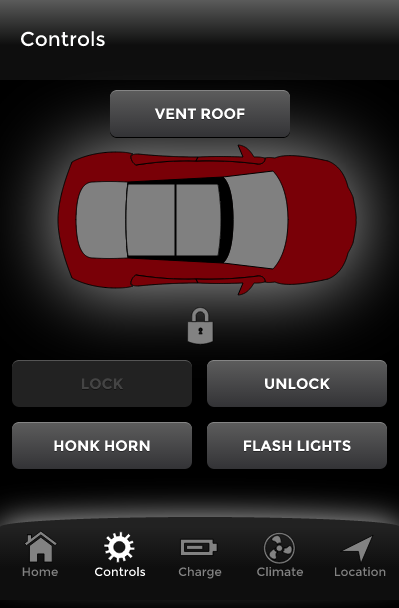
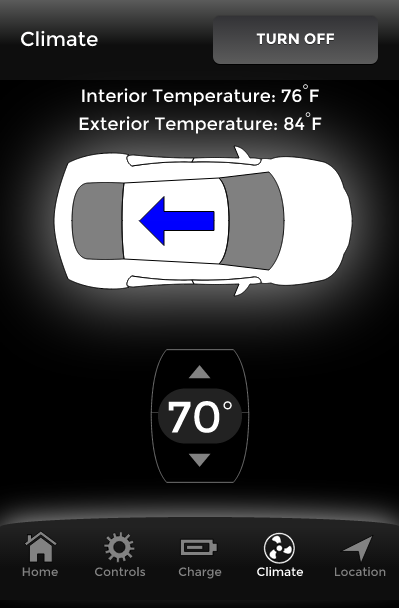
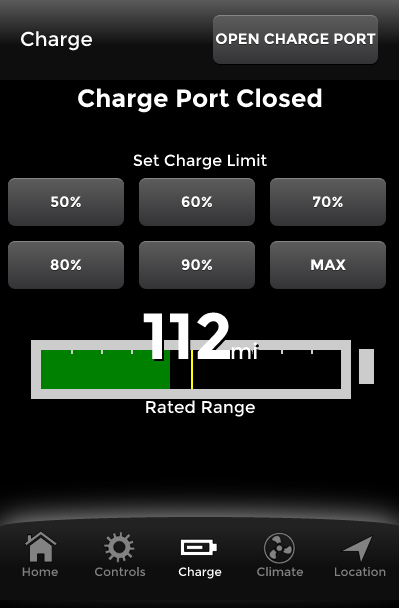 �
�
May 1, 2014
AnOutsider awesome work!�
May 1, 2014
Newscutter This looks really cool -- and easily installed on corporate firewalled computers (yay!).
Does the location tab work too?? No screenshots of that--- and I can't try it because I'm still lacking a car (but I'm also "Sourcing Parts").
�
May 1, 2014
adrockmcamiked VERY well done. Thanks!�
May 1, 2014
Muzzman1 Awesome!! Works/Looks great! Thanks!�
May 1, 2014
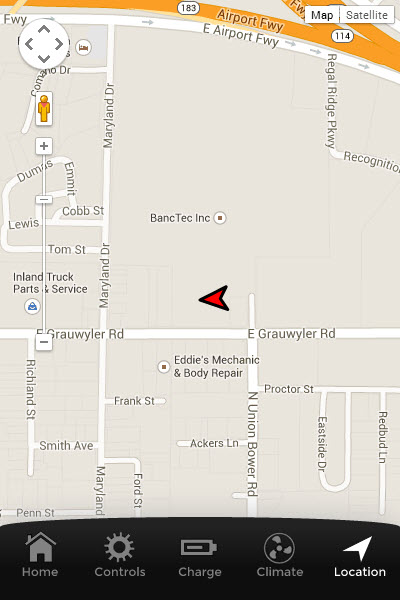
TrevorSStone Yes location shows a google map with the current location of the car and the way it is facing. I didn't put a screenshot because I didn't want to have my personal location on it. I could have done a mock location, but I was in a hurry. I will add a screenshot tomorrow to the chrome app page.
Thanks everyone for the kind words. I know the images are still pretty rough, but I did what I could.�
May 1, 2014
felixtb great job!
I do not know what your previous graphics looked like.....if any? only saw and used the placeholder version. liked it and like this version even better of course!
I did some graphics for OVMS project for the TESLA roadster. if you like the idea of those we could look at getting some more 3D feel to your graphics. I am however on a MAC and will have to check if PS outputs svg but I'm pretty sure it does. the github bit you would have to do yourself since that's not one of my strong points. PM me if you are interested
felixtb�
May 1, 2014
castor Pretty nice job Trevor, like it.�
May 2, 2014
Alain13 Nice job! Thanks Trevor!�
May 2, 2014
EdA Thanks, it is most awesome!�
May 2, 2014
ibcs Great visual improvement. Thank you for your time.�
May 2, 2014
mknox Very nice although mine didn't update automatically. A quick remove and re-install got me going!�
May 2, 2014
efusco This is really fantastic. I use Chrome almost exclusively and the ability to access this even when my phone isn't handy is a great feature. I like the simplicity and emulation of the app. Great work.�
May 2, 2014
bradhs Great job! I'm looking forward to the day I can decouple this from the actual Chrome web app. Have you thought out incorporating an icon (optionally of course) that resides in the Mac Menu Dock (or Windows task icon area)? Google Hangouts does that, it would be amazing to quickly access it there.
Another feature could be to show the SOC in % or miles on the menu dock.�
May 2, 2014
pete8314 It sure does. Great work Trevor.
 �
�
May 2, 2014
jpasqua Looks great. Looking forward to trying it!�
May 2, 2014
Gizmotoy PS can output as SVG if your project contains only vector graphics (SVG = scalable vector graphics). Edit: I will note it's not entirely straightforward. Lots of help searchable via Google, though.
Extension looks great, though. It feels unusual to poke at a white car, but functionally everything seems great. It's nice to have desktop access when I'm away from VisibleTesla.�
May 2, 2014
Dart I don't even have a VIN yet, but I installed the extension. Thank you very much (in advance)!�
May 2, 2014
TrevorSStone The car should match your car color on every screen except the climate screen. Is that not correct for you? If so there is a bug. The car is white on the climate screen just for ease of the climate arrow showing up, but I was considering making that screen match the car color as well.�
May 2, 2014
Gizmotoy I see. Mine's white everywhere. Actual color is MC Red.�
May 2, 2014
TrevorSStone Can you do me a favor and go to this link in the browser that you are running the extension on, and send it to me in a PM? It has your full VIN so you might not want to post it here. Anyone else that has their car not showing the right color do the same please. https://portal.vn.teslamotors.com/vehicles/�
May 2, 2014
TrevorSStone Ok, a new version has been pushed out. It will be V 1.1.2 and should fix people not having the right color or roof options. Let me know if there are any new bugs or if it did not fix this issue. Thanks! Will take about 60 mins for the update to go live due to chrome's servers. If you want to update manually, go into the chrome settings->extensions and click the update extensions button.�
May 3, 2014
Earthdog Wow, this is GREAT!!!!�
May 3, 2014
dirkhh Is source available?
This might get people to help (and avoid questions about privacy and security)�
May 3, 2014
pete8314
That fixed it, except for the climate screen where the car is still white.
Edit, well I just read up thread that that's deliberate, but, for consistency my personal opinion would be that the color should run through all the screens. Still awesome though!�
May 3, 2014
TrevorSStone Yes, reread at the first post. It has been open source since I first released it (before I created the images). It is written in Dart (big mistake in retrospect), so I doubt many people will contribute to the actual code base.�
May 6, 2014
rewski Very useful Chrome App! Thanks for creating for the community.�
May 6, 2014
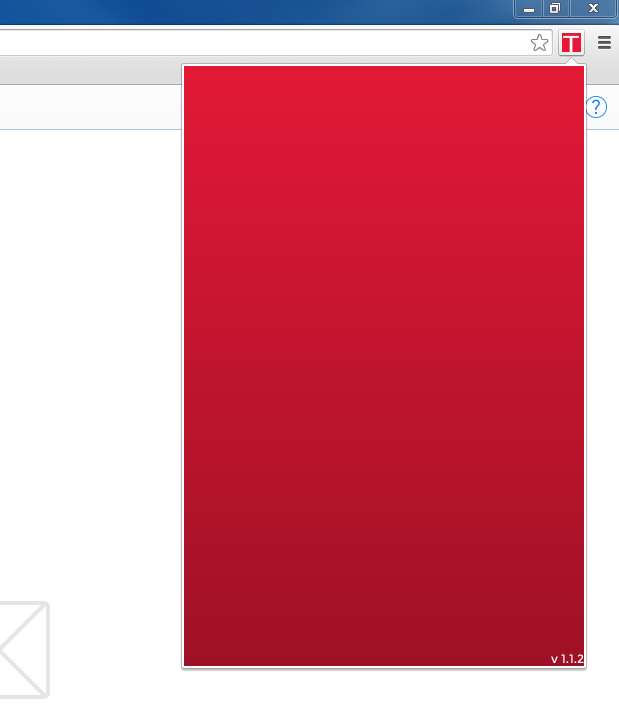
pebell I had not installed a previous version, but I followed the link posted earlier and installed it in my Chrome browser. I now have a red button with a white "T" next to the URL location bar. When I click on it, a red window opens that says "v 1.1.2" in the right lower corner.... and nothing else. There is nothing to click on,, nothing to fill in, just a red rectangle. Anyone else experience this?
 �
�
May 6, 2014
rewski That also happened to me this morning. I deleted, reinstalled then put the actual portal web address in the URL bar and took me to a screen in the main browser with a login text button. I hit that and it seemed like it did nothing but when I clicked back on the Tesla extension icon the login fields were available.
Adam
�
May 6, 2014
TrevorSStone Hey, I'm sorry your first experience with the extension wasn't a great one. That screen is essentially a loading screen. It used to show the Tesla logo until I got worried about potential copyright/trademark issues, so I removed it and forgot to put something there in the new release. If anyone has any ideas let me know. It seems that Tesla's servers are having a hiccup this morning that is causing the calls to lag, making this screen show much much longer than it normally does (.5s). In the background, the extension is asking Tesla if you're logged in. If this request takes a long time, it seems more like the extension is frozen. This is a UX issue with the extension right now. Hopfully everything will go back to normal soon, and in the meantime I will think of something to put on this screen to improve the experience.�
May 6, 2014
AnOutsider How about just a CSS loader? Plenty of sites out there to generate one for free�
May 8, 2014
TrevorSStone I just uploaded a new version 1.1.3. Included is the new angular library which helps performance, a new splash/loading screen for a little clarity/self-promotion (you will only see the loading animation if it is taking over a few seconds to load), and the climate car matching your car color.
Please let me know of any bugs so I can fix them ASAP! Thanks!
Also, I am curious about the community's thought on something. I have considered forking this project and making a standalone chrome app, but the extension has already taken more time than I anticipated and the fork will probably have bugs (due to it being able to run for a while, compared to the extension only running for ~30s max. I am curious how people would react if I released the App for ~$5 in the Chrome App store. The extension will always remain free, and the functionality will continue to be the same. The only difference is the app will be able to stay open and live outside of the main browser window. Thoughts?�
May 8, 2014
pete8314 I'd pay for it, lease I could do for your time anyway, but, I use it every day, for me it's faster that cranking up the app on the phone.�
May 9, 2014
bradhs Yes, I will pay $5. And if you are serious about doing it, I'll send you more money to do the work via PayPal. My request is to have a Tesla icon on the Mac Menu Bar that I can click on. (Similar to Hangouts.) That would be PERFECT. Oh, and the ability to switch between two accounts. (I plan on buying another Tesla soon and want to be able to switch between them.)
�
May 9, 2014
ThosEM Just discovered this, and it is great! Now we can even count on getting the temp of the car without starting the climate system!
Thanks so much for your efforts! We needed something for web browser use.�
May 12, 2014
TrevorSStone Hey guys, thanks for the support. A couple things:
First: Late last night I launched version 1.1.4. I forgot to update the version number in the app, so it will still say 1.1.3. I reworked the code to work better for porting it to an app, and the main thing is that the login/main pages are merged. Visually, this will look the same to you, but functionality wise there are two differences. First, the filesize was cut in half, and the transition between pages is smoother. Second, because of a minor bug, if you log out, it will close the window. Just reopen it and it will prompt you to log back in. The app should be a little smoother, but otherwise it should be functionally the same. Please let me know of any bugs.
Second, my hope is to have the Chrome App version out this week. It will cost $5, but be basically exactly the same as the extension except the ability to run in it's own window. It is quite nice when it needs to wake your car up from sleep, so you can do other things at the same time. Unfortunately, I am new at making Chrome Apps (and the documentation is hard to search for), so there is a minor issue with the locations page. Instead of being an interactive map, right now it only will show a static image of the car location. This is less than optimal, but the main extension will still work like normal. I think the location page isn't the most important, so I am willing to publish it as is for now.
Third, I want to be clear with something with the Chrome App. It will always have equivalent functionality with the extension. I do not want to force people to buy the app, nor do I care if you find a way to pirate it. This takes up a good amount of my time, but I am doing it because I enjoy it and hope other people find use in it as well.
(Mods, if this isn't ok let me know and I will remove it)
Because it was asked for, my paypal account is [email�protected] if you donated something I would be extremely grateful, but don't feel pressured to at all. As I said, I do this for my own enjoyment, so no one owes me anything. Also, as silly as it sounds, sending money through paypal will not purchase the Chrome App, so if you want to give me $5, you should wait and buy the Chrome App instead.
Also, here is a Bitcoin Address. I have never really used it, and think it might be cool, so that is another way to contribute: 1LACFxXK3kC5XqQgZFi9ZFHmgv9Wxaiqfp
Sorry for the wall of text, and thanks again for the support!
PS: @bradhs: Ability to switch between vehicles is going to be my next task. I always knew I needed to do it, but no one has asked so I never bothered! Also, there is a strange thing with putting something in the system tray like hangouts does. That seems to be something extensions do, not Chrome Apps (the distinction is kind of strange). I might be able to add it into the extension, but it seems like a lot of work for relatively little payout IMO. The Chrome app will give you a direct shortcut to launch it similar to any other application on the computer. On Mac is there a way to add shortcuts to the system tray?�
May 12, 2014
bradhs Hi Trevor, thanks for working on this! I sent you $20 via PayPal.�
May 14, 2014
TrevorSStone Thank you so much. It means a lot to me that you're enjoying and using it.
I have updated the application to 1.1.5. This is a change to the icon and images used in chrome. It is a minor polish, but I am still no graphics designer.
In other news I have launched the Chrome app. As stated in my previous post, it is $5. https://chrome.google.com/webstore/detail/tesla-model-s-control-app/jokpahcncpbeilaldehfkcpmdmchakfd?hl=en&gl=US
Please let me know if you have any issues or questions. If you download the Chrome App, I would recommend not running it for extended periods of time because it will not let your car sleep. Wanting to turn your AC on and monitor your car's temperature as it lowers to see if it has reached a comfortable temperature over the next ~15 minutes would be a good use case. Watching your car charge for 2 hours probably isn't. The requests can sometimes desync over long periods of time, so if you have any issues just restart the application. Consider this more of a Beta release as far as the application is concerned.
Thanks!�
May 14, 2014
efusco Bought the app...not sure I need or want it, but I want to reward your effort and contribution here. Thanks.�
May 14, 2014
bradhs You're welcome! I bought the app, looks good. Do you plan to get an icon on the menu bar that I can click on whenever I want to open the app? This looks good though.
�
May 15, 2014
pete8314 Thanks Trevor, I bought it too, it'll get more use than the phone app!
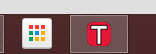
@bradhs, this is what I see on my menu(tool) bar, do you not see the same when the app is minimised?
I'm using Windows 8.1, not sure if that makes a difference.�
May 15, 2014
TrevorSStone Thanks everyone that has downloaded. I really appreciate it.
I made an update last night/today to both the extension and the chrome app. Now the extension ignores the browser zoom level. This hurts accessibility, but it allows users that have a default zoom of over 100% to be able to use the extension without needing to have a scroll bar. If this has negatively affected the way you use the extension, please let me know so I can figure out a different solution.
For this solution though, I took some time and refactored all of the CSS that used pixels, and changed everything to ems and percentages. What this means is that the app can now scale to any size easily. Now, once your app updates to 1.1.6, you will be able to resize the window. I wrote some code that keeps the aspect ratio correct, but it seems to be maybe a little buggy. Let me know your experience with it. If it seems to be rendering wrong, just exit and reopen the app, or try resizing the window again.
In regards to the Mac OS X menu bar, I am going to look into it in the next couple of days. I know you could pin the app to your dock, but I am not sure the ease of adding it to the menu bar. If you want help adding it to your dock I could make a small guide.�
May 16, 2014
orangem Love your work. Way faster access than Tesla official app.�
May 18, 2014
dlt Menu bar app would require native c# application written with Xcode, I think. It could also feature customized items shown on menu bar, like amount on charging time remaining, inside temp etc.
See this for example: Netatmo Menu Bar app for OSX | BrickyBox (it's an app for a wireless weather station)�
May 19, 2014
TrevorSStone EDIT: This is only applicable for owners of the Chrome App version
@bradhs and others: I've looked into the menu bar (system tray) and official chrome support is kind of flaky at the moment.
If I understand it correctly you would like a persistent shortcut here:

So, right now Chrome's support for an icon here is unofficial at best. There is a hacky way to implement this, but it would change the structure of the extension and be a pretty large amount of work. At this point in time, I don't think it would be worth the work to implement it officially.
The alternative in my opinion would be to add an icon to the dock.

First, go to the chrome apps page in chrome. Mine is located on the new tab screen right below the back button. I have seen this in other places on different installs/OSs so you might need to look for it.
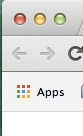
On that page, find the Model S application and right click on it. Select create shortcut. This should open a finder window with all of your chrome apps. Just drag and drop the Model S application to the dock and it will be pinned there.
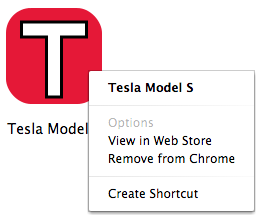
An alternative I found to add to the menu bar is a program called Butler. http://manytricks.com/butler/. I downloaded the free trial and was able to get the shortcut working pretty easily. I am not sure what the duration or stipulations of the free trial are, nor can I vouch for the software as a whole. It is just a potential alternative to add a shortcut to the menu bar.
So yea, at the moment I am of the opinion that the time it would take to implement a hacky solution would be better spent on my next project. If I see official support/documentation for the system tray I will add it ASAP.
I will also be pushing out a new version soon that will fix some minor text issues when the trunk or frunk are open. Thanks guys!�
May 22, 2014
agw Hi Trevor, great work!
A couple of notes I did not see in the previous pages..
1) The extension shows v 1.1.7 but your last reference was to 1.1.6
2) The interior and exterior temperature showed once for me but now they do not unless I turn on the climate control.
3) Any chance that you could first show a screen showing that the car is asleep before waking it up?
Keep up the good work!�
May 23, 2014
TrevorSStone Hey.
1) I don't really feel comfortable bumping the thread for every minor changelog. If other people have posted in-between I feel better about it, but otherwise I would only do it for a major version (basically anything with extra functionality). The main change between 1.1.6 and 7 is that when I reorganized the app to be able to resize, I forgot to reposition the trunk and frunk notifications. Now they should render in the correct location if either are open.
2) This is actually an issue with Tesla's implementation. It stops sending temperature information after a bit once the climate control has been turned off. It is a strange decision by them, but for now developers just need to work around it. I suppose there could be a hacky fix of toggling the climate on the extension/app load, but I wouldn't feel comfortable doing that. I suppose a message to convey this to users wouldn't be a bad idea though.
3) The connecting to the car screen is essentially this. When you see the loading animation it means that the car is asleep, or something is wrong with your internet. Once again this could probably have some better text, something like "waking up your car".
Thanks for the suggestions.
Also, the website Teslarati wrote an article about the extension. Check it out!�
May 23, 2014
pete8314 I'm not sure about this. Yesterday I was getting temperature from my car all day long - last drive was 9pm the previous evening, so that means that the temp was persistent for at least 22hrs (it didn't stop, but that's when I drove it next). I'm looking now and it's still displaying, but I've also seen times when it's blank until I cycle the climate, but then it seems to stick indefinitely, at least for as long as my PC is powered.�
May 24, 2014
zwede I like the extension, much easier than getting my phone. I sent some $$$ via paypal to you.�
May 28, 2014
TrevorSStone Thank you so much. It honestly makes my day anytime someone donates. I'm happy to see people are finding the extension useful.
@pete8314, you're right. Sometimes the temp value continues to report. I guess my main point is that I have little control over it. Cycling the AC always seems to restart the reporting, so it is something to keep in mind. As mentioned previously, I will put some message suggesting this to the user.�
May 28, 2014
_thierrY Very nice job Trevor!
Just a small cosmetic comment : in metric unit, we don't use "kph". We instead use : "km/h".�
Jun 3, 2014
TrevorSStone Thanks for the heads up. I will release a small update soon to change this.�
Jun 3, 2014
Paul Carter How about your waiting-spin icon after login also show here to while waiting for the login page?�
Jun 3, 2014
TrevorSStone Haha yep, this is actually what I've already implemented�
Jun 11, 2014
theheff Well done, man. Been using the plugin for weeks and just bought the app. Thanks!�
Jun 11, 2014
David99 Awesome! I love it!�
Sep 1, 2014
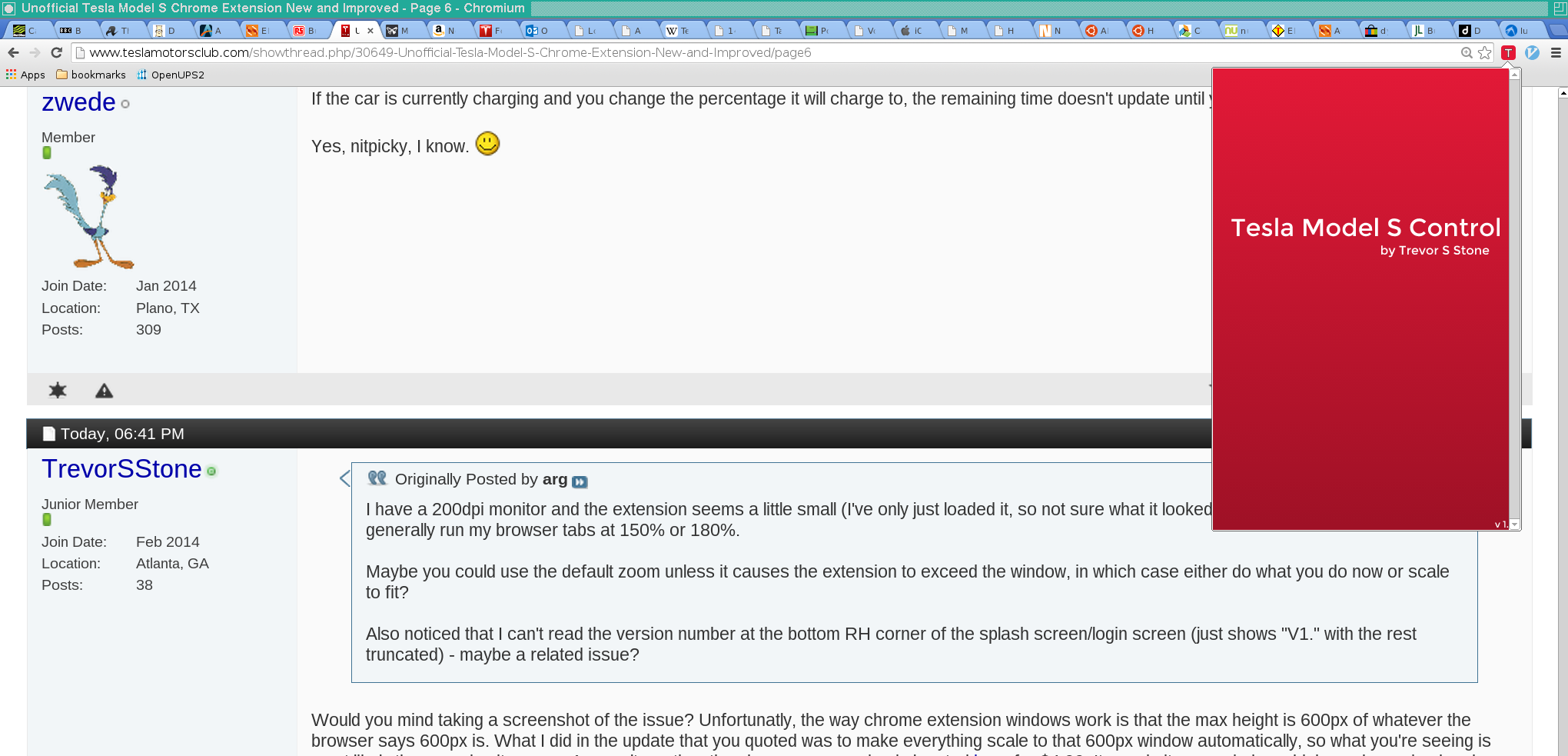
arg I have a 200dpi monitor and the extension seems a little small (I've only just loaded it, so not sure what it looked like in the previous version). I generally run my browser tabs at 150% or 180%.
Maybe you could use the default zoom unless it causes the extension to exceed the window, in which case either do what you do now or scale to fit?
Also noticed that I can't read the version number at the bottom RH corner of the splash screen/login screen (just shows "V1." with the rest truncated) - maybe a related issue?�
Sep 2, 2014
zwede If the car is currently charging and you change the percentage it will charge to, the remaining time doesn't update until you close the app and start it again.
Yes, nitpicky, I know.�
Sep 2, 2014
TrevorSStone Would you mind taking a screenshot of the issue? Unfortunatly, the way chrome extension windows work is that the max height is 600px of whatever the browser says 600px is. What I did in the update that you quoted was to make everything scale to that 600px window automatically, so what you're seeing is most likely the max size it can go. As an alternative, the chrome app version is located here for $4.99. It runs in its own window which can be resized and scales appropriately. If you don't feel like paying, you can also try and compile the chrome app version from the github page with a little tweaking.
Sorry I don't have a better work around. If you post a screenshot and there is a bug I will fix it ASAP, but otherwise I think it is a fault of Chrome and not the extension.
- - - Updated - - -
This is a strange bug, but my guess is that it is more on Tesla's end than mine. Essentially the way the extension/app works with their API is you have to make the request for the action, so in this case you say "Tesla, tell my car to charge to X%". Tesla just replies with "OK" or "No". If you want the updated data, you have to ask "Hey Tesla, let me know the current charge status now". What I do is wait a few seconds after making the request for action, but sometimes the state on their server is a little bizarre when shifting between states. My guess is that if you kept the app/extension open it would fix itself on the auto refresh in the next 5 minutes. I might be wrong and if it is occuring every time please take a few screenshots and I will take a deeper look.
Also a few other updates. The library I use, Angulardart, has had a few updates since the last release (a while ago). I am planning on updating the library which is supposed to increase performance in the next week or so, but functionally not much will change. Personally when I run the extension I don't see rendering issues, but this might help slower machines out. It will affect both the app and the extension.
I also have a new project I have been working on that I could use some Alpha/Beta testers for. I'm not at that point yet, but if you might be interested please send me a PM. I don't have an ETA on it.
Finally, thanks to everyone still using the extension/app. There are over 1200 combined users between the App and the extension which feels great. On initial launch I remember thinking I would be happy if 50 people ended up using it, so it feels amazing to have those expectations blown out of the water.�
Sep 2, 2014
arg Here's a screenshot. The window does indeed look to be 600 hardware pixels high, and doesn't change size when I adjust the window scaling, so maybe there's nothing you can do. Not a big deal - I was just responding to post about scaling.
The truncation of the version number is presumably a bug however (albeit trivial!).
 �
�
Sep 2, 2014
EdA 33 tabs, my hero!�
Sep 3, 2014
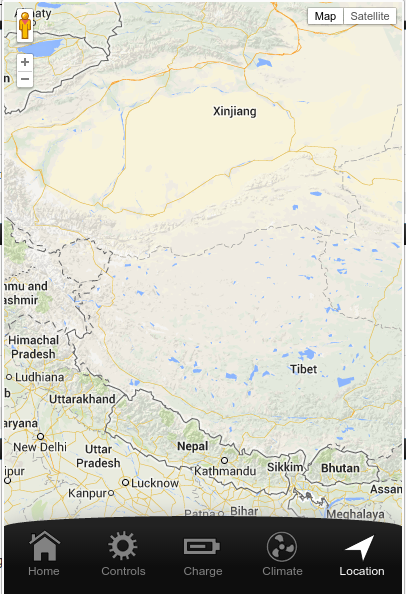
zwede Having a weird problem with the chrome app.
For some reason my car teleported to western China on both the phone and chrome app. I rebooted the main screen in the car, and after that the car is back in Texas in both the phone app as well as visibletesla. But in the chrome app the car is still in China.
 �
�
Sep 4, 2014
TrevorSStone Yea that scrollbar shouldn't be there. Can you let me know the version number of Chromium you're on, the distro, and what window manager you're using. I will try and replicate it as close as possible to figure out the problem. I have noticed on more recent builds of chrome the font I am using isn't rendering correctly (I think I am embedding it wrong). It might have something to do with that.
That's really strange zwede. First is this the extension or the chrome app? I think it's the extension because the map is interactive (the extension you open in the bar up top, the app you open from the app drawer). If so, could you test three things for me.
1. When the extension has loaded and you open the location page, if it is wrong, can you right click on the location icon on the bottom, and click inspect element. This will open up the developer tools for chrome (with the side effect of keeping the extension open as long as you don't change tabs). Wait a little over five minutes (you don't need to actively watch it) and then let me know if the map moves to the location of your car.
2. Open up your phone app, wait for it to load, go to the location page on it, then open the extension on the computer. Is it in the right location now?
3. If the map shows China, but the red arrow for your car isn't there, can you try zooming out on the map and seeing where the arrow is? I assume it will be in TX, but the map isn't centering correctly.
Don't feel obligated to do either of these, but it would help me diagnose the issue. The strange thing is that the app shows the arrow where the car is and should center on it, but your map of china has no car shown.
Sorry about the problem, it seems like it is starting on Tesla's end, but if it is working now everywhere else it should work on my extension too. If none of that helps, I might need to ask you to send me a PM with some extra info (would have gps coords, so wouldn't want you posting here)�
Sep 4, 2014
arg My Chromium is Version 35.0.1916.153 (274914)
OS is FreeBSD
Window manager is twm (yes, I'm a dinosaur).
This really isn't a big deal, so I'm happy to do anything needed to help you debug, but equally if you say this is a whacky platform that isn't worth putting your effort into, that would be perfectly reasonable.�
Sep 4, 2014
pete8314 Was going to say the same thing�
Sep 4, 2014
zwede Yes, this is the extension.
Map has not changed after 6 minutes. Still in China.
Nope, still China (phone app showed correct location).
There's no red arrow in Texas either. I have not been able to find the red arrow anywhere on the map. I zoomed out until the entire world was visible, and there was no red arrow.
No problem. Whatever you need. I'm a SW dev too, I know how important it is to have sane test input.�
Sep 4, 2014
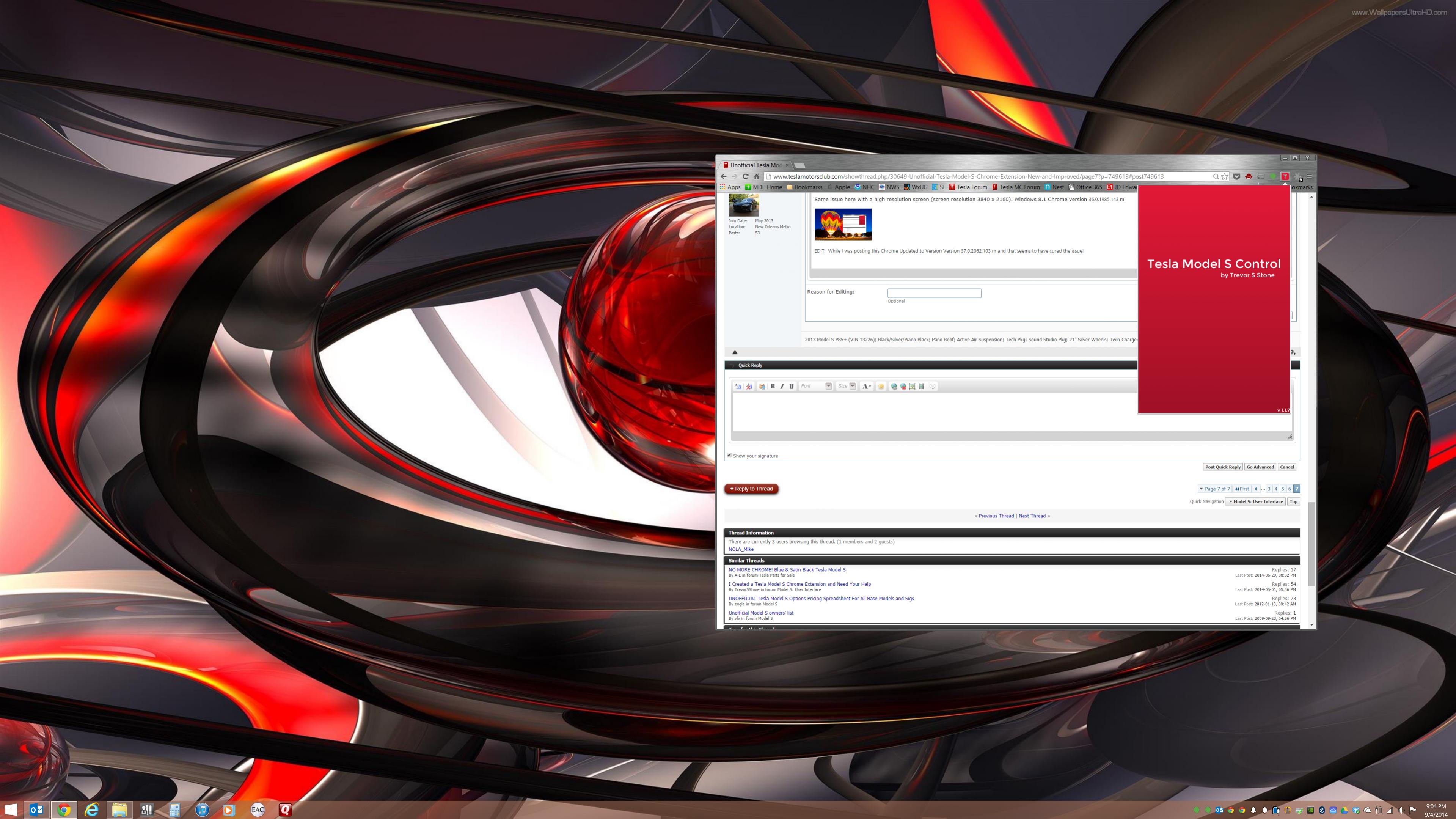
NOLA_Mike Same issue here with a high resolution screen (screen resolution 3840 x 2160). Windows 8.1 Chrome version 36.0.1985.143 m
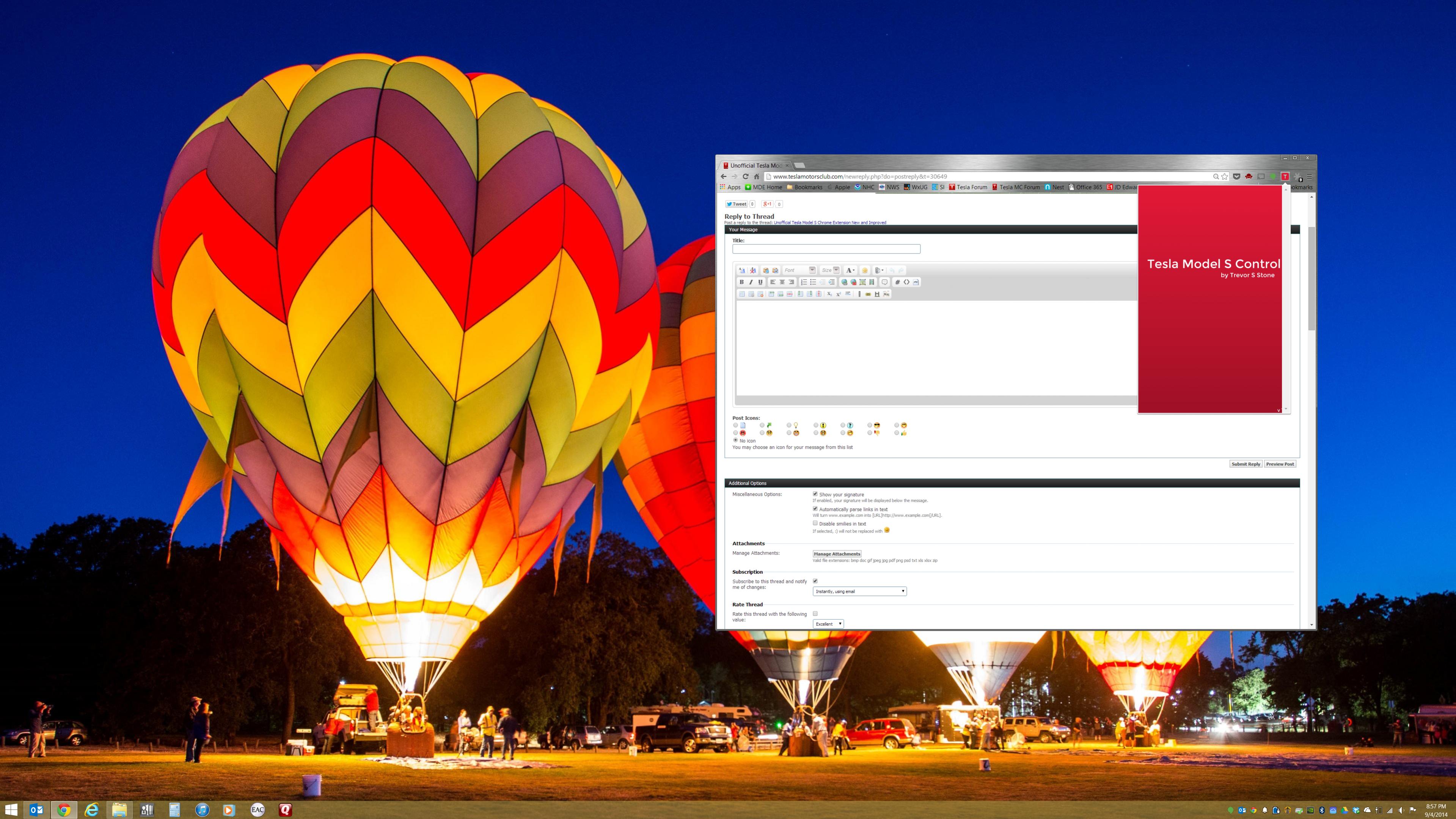
EDIT: While I was posting this Chrome Updated to Version Version 37.0.2062.103 m and that seems to have cured the issue!
 �
�
Sep 5, 2014
arg You know Chrome lets you have multiple windows, each with its own set of tabs? :biggrin:�
Sep 10, 2014
pete8314 Yeah, but think of the resources! It's a bad habit I have, not as bad as my wife that'll happily run multiple windows with tabs so small you can barely click on them, plus nearly all of Adobe's Creative Suite. Concurrently.�
Dec 10, 2014
playernjag How do we change between multiple Teslas on the same account?�
Dec 10, 2014
Notacarguy I am not accusing anyone of anything so please don't misunderstand what I am about to write. My concern is that this is an app, written by someone I don't know that requires me to type in my Tesla log in information which gives access to my car. Is no one else concerned by this?
Or maybe I don't understand how the Google App store works. Does Google verify that Apps sold there can't collect personal information?
Again, to Trevor, this is in no way meant to insult you.�
Dec 11, 2014
Andyw2100 Should I be able to login to the extension (just to look around) before access to my car is enabled?
I'm pretty sure earlier in this thread someone mentioned having installed the extension before he or she had the car, and I did not see a follow-up that said anything about having done so accomplished nothing. I had installed the Tesla app a while ago, and while it let me login to My Tesla, it immediately pointed out that I had no vehicle that it could connect to. When I try to log in to my Tesla through the Chrome Extension, on the other hand, I just get an error message that "Login Failed." Is that what I should be seeing, since my car is not built yet? Or should I be able to successfully log in and then just not be able to actually do anything, but still be able to see what options will be available once my car is connected?
Thanks.�
Dec 28, 2014
Haggy I can't see Tesla complaining over the use of their logo since it's used all over the place by others, including this forum. If they don't like it, the worst they could do is sue you, but they wouldn't. Not only would it look bad for them to sue a customer for helping other customers, it would also be impossible for them to show damages. Nobody could use the app without buying a car from them, and they aren't in competition selling apps. It might be hard to convince anybody that anybody bought their car in order to use their app, even though it's within the realm of possibility. But it would be even more absurd for them to say that somebody didn't buy their car because you made the app.
The app isn't hurting them. It's helping them. It's putting less pressure on them to come up with something because owners are less likely to bother them about it. And hopefully it's shaming them into getting their act together. As much as you love doing this, I suspect you wouldn't mind at all if Tesla came along with something that did all this and far more so you didn't have to. I just don't see it happening any time soon.�
Dec 28, 2014
bonnie Careful, please. It is a trademarked logo and you need permission to use it. Just because someone might not sue you is no reason to do it anyway. (Props to Trevor for doing the right thing.) You can't possibly know where licensing agreements are in place with Tesla and where not - so I wouldn't assume when I see the logo that the person using it isn't in full legal compliance, unless I knew that for a fact.�
Dec 28, 2014
Andyw2100 Isn't this basically dead (or dying) at least for now, anyway, due to the server change or whatever it is that Tesla is doing / has done to shut down access to third-party apps like this one and Visible Tesla? I came to the party too late, it would seem, as I am unable to log in with this extension or with Visible Tesla. My understanding is that unless Tesla decides to open things up, these third-party apps won't have access. Am I misinformed?�
Dec 29, 2014
pete8314 Not sure....I still have access, but I've been using the app since Trevor released it, maybe it's different if you've not previously signed in.�
Dec 29, 2014
Andyw2100 I think it may be more a question of which server your account is set up on. New accounts (for new owners) are probably set up on the new, more locked down servers. Old accounts may be being moved over or something, so some old accounts may still be fine. I think it may be something like that, but I'm not certain. Thanks for letting me know that it's still working for you.�
Dec 29, 2014
hans The problem is that most of the existing tools are written by owner/developers with accounts that still work. This makes it hard to debug or find out how to make it work for the people on the new servers.�
Dec 29, 2014
Gizmotoy People in the VT thread seem to be indicating that it's the actual login process that's denying access. Once you've logged in and gotten your token (cookie/whatever they use for authentication), you're good until it expires. Those with older vehicles that signed out and have attempted to sign back in have found themselves locked out.�
Dec 29, 2014
hans Yes. However I can still login and get new tokens and cookies using my own apps so the block on new logins from third party apps seems to be selective and not universal.�
Jan 1, 2015
LetsGoFast I have not been able to log on using any of the third party apps, including this one.�
Jan 1, 2015
Thorben I cannot login from the chrome app. I have no problem using the official Tesla app. When I login Chrome app, it just wait and after maybe a minute it closes. If I type a wrong password it will tell me, so it does something.
Any suggestions?
Thank You
Thorben
Denmark�
Jan 4, 2015
TrevorSStone Hey guys, sorry I haven't been responding. I haven't been getting emails about updates to this thread. Thanks for using the Chrome extension, but yes, similar to Visible Tesla, the changes to the servers have made this unreliable, especially for new vehicles. I have no issues with my account, but have had a few reports elsewhere of it failing. I do not feel comfortable implementing the new API due to a required private key from Tesla's apps (it isn't difficult to obtain, but it is in much murkier legality and I don't feel comfortable using it). The moment Tesla ever releases official support for 3rd party access, I will update this extension to support it, and add a few of the features I never got around to. Until then my work on the project has officially stopped. It is all open source at TrevorSStone/TeslaExtension · GitHub so if someone feels inclined to fork it, please do. The images, though terrible, are available as well for any use. Just credit it back to me please.
I'm pretty saddened about the migration to the new servers with no news about official support for devs. I have been working on a new Model S API related project that I was really excited to be releasing soon, but it too is now on hold for the foreseeable future. I appreciate the community's support, and hope to be able to provide more projects in the future. If you have any questions please don't hesitate to ask, or email me at [email�protected]. Unrelated, but I am also beginning to look for new consulting or full-time software development opportunities. If you or someone you know may be interested, please email me.
Once again thanks for all the support! (And a special thanks to everyone that donated. It means so much to me that you felt the extension was worth giving money for)
PS: To the post I just read about the security of the extension, there is no 3rd party server in between the requests to and from Tesla's servers in this implementation. All data is directly from your computer to Tesla. This can be verified in the public source code, and also through the network inspection tools in the browser.�
Jan 4, 2015
pete8314 Thanks Trevor. Tesla don't really help 3rd-party developers at all, I think it's a shame, as in doing so they could separate themselves from all the other manufacturers. It's not as if they're storming ahead with their own app developments, and one of the main keys to the iPhone's early success was the rampant developer community.�
Mar 13, 2015
slartybartfarst Many thanks for the grate extension unfortunaly the latest version now does not work on my chrome pixal it wont let me sign in, any ideas?�
Apr 9, 2015
sosinc3 Only shows one car
First thank you for your hard work on this app. It works great for me. However, there is one functionality that I have on the official Tesla phone app which is missing here. I happen to have two Tesla Model S cars attached to my account. With the phone app, I am able to switch between the cars and control what you can control. With your Chrome extension, I don't seem to be able to do that. It will only connect to my 1st car (the one I originally purchased).
Thanks again for your hard work. I wish Tesla or someone else would add many more functions to the app like being able to turn the rear camera on, being able to roll the windows up/down, being able to turn the seat warmers on/off, the rear window defroster, etc.�
Apr 9, 2015
hans Complain to Tesla on this one. You would have your wish granted in less than 24 hours if Tesla would just publish the third party developer APIs for the car, like they said there were going to do.�
Apr 10, 2015
dirkhh Like they said they were going to do 16 months ago!!!?�
Jun 23, 2015
BrutusB OK Trevor I am having some trouble with it. I enter my login information and nothing happens. Is there a set-up step I missed? I am behind a corporate firewall, but earlier posts suggest this should not be a problem. Any ideas?�
Jun 23, 2015
Todd Burch Just found this thread...and I'm having the same issue.�
Jun 23, 2015
Andyw2100 I'm pretty sure it doesn't work for accounts that have been changed to the new servers.�
Jan 15, 2016
aidanruff Well, unfortunately, I installed the extension into Chrome and when I click on it it just says "Tesla Model S Control" and "loading" with some swirling dots. The options section is greyed out and I can't see how to enter my Tesla login to control my Model S. Great concept, though. Any ideas what might be wrong?�
Jan 15, 2016
EdA See the previous message: "I'm pretty sure it doesn't work for accounts that have been changed to the new servers."
It had been working for me and since sometime last year...nada...�
Jun 24, 2016
JohnnyG The issue that aidanruff, myself, and others are seeing, is not related to the accounts, because the extension doesn't ever get to the point where we would enter in our user account credentials. The extension is simply failing to load.�

Không có nhận xét nào:
Đăng nhận xét