Nov 15, 2012
steve841 My S was delivered the other day and my DS spent time helping me set everything up. My garage door refused to comply even though it was "visible" to the car.
Dropped a call t'o Tesla which got referred to another departmentBut, being that I am obsessive compulsive and refuse to cave in to technology, here's what I did.
Put the car in the garage and deleted the failed homelink setting .... rebooted the center console. Repeated the programming. BAM it worked!!
My guess is that ... having the car so close to the opener was the key along with the two front doors being open.
Hopefully, this saves someone some frustration!
Feel free to chime in other suggestions.�
Nov 15, 2012
jerry33 Homelink isn't the world's most easy to use system. Typically you have to use both the instructions of the car and the instructions of the garage opener in various combinations to get it to work. However, once working it seems to hold it's settings just fine.�
Nov 15, 2012
kevincwelch Is there any age limit to one's garage door opener that may make it incompatible with home link?
Sent via Tapatalk...cool.�
Nov 15, 2012
dsm363 My parents got their Model S and had a lot of trouble with it but the 30 minutes of attempting to get it to work with the door going and down burned out the garage door motor. I guess if it doesn't work right away, try getting it to link up outside the range of the garage door or give the motor a rest between attempts.�
Nov 18, 2012
goyogi Mine linked up quite easily. The issue I have is the length of time the homelink sends the signal. Normally I would tap the button on the remote but the homelink sends the signal for several seconds. 10? It seems that if the signal is good and not disrupted between the homelink and the receiver then it works fine but if it is interrupted the garage door has fits and stops and starts closing and is a pain. So I have to be in the right spot and wait for it to open or close all the way.�
Nov 18, 2012
brianman The instructions say hold it down so you get a nice clean signal. The car seems to then play a long signal which confuses my garage. I plan to retrain it with short signal to see if that fixes it.�
Nov 18, 2012
NigelM Shouldn't be.
Along with the other helpful hints, here's mine: Try setting it as a two person job; by having one of outside the car with the remote and pressing the "learn" button and one of inside the car it took all of 20secs and worked flawlessly.�
Dec 11, 2012
PRJIM Any other tips? I still can't get it to link with my chamberlain remote control..�
Dec 11, 2012
pilotSteve try a fresh battery in the remote transmitter. Might put out a stronger signal that is easier to 'learn'.�
Dec 11, 2012
PRJIM I finally got it to work by purchasing a Liftmaster remote control from Home Depot. I paired this controller with my garage door and had the Model S learn from the Liftmaster opener. My Model S does not seem to like Chamberlain remote transmitters.
The great thing about the Model S is that you do not need a ladder to hit the learn button on the remote receiver. All you have to do is park the Model S underneath the remote receiver and open up the Panoramic roof.�
Dec 12, 2012
FlasherZ That's rather odd, considering Chamberlain makes LiftMasters too, and their 3-button remotes are identical (at least mine are -- the Security+ 315 MHz openers are, except the brand name silk-screening). The model S learned my Chamberlain and LiftMaster remotes without a problem.�
Dec 12, 2012
strider PRJIM, what Model S code version do you have? We have the latest (as of Sunday, 12/9) and homelink was dead simple. I left the car in the garage and just followed the instructions on the screen. Worked like a charm on our Chamberlain LiftMaster.�
Dec 12, 2012
PRJIM v4 The Chamberlain branded remote can be operated via dip switches or rolling codes. The new Liftmaster remote control did not have these dip switches. My guess is that the Model S does not like older style remotes?�
Dec 20, 2012
Hobiemon Sometimes there is a learn button on the opener itself that must be pressed first and gives you time to get down off he step ladder to program. Also in Canada there are different instructions for Homelink. My Lexus came with a separate sheet for Canada. Also if he garage door seems to burn out try unplugging for a few minutes and let the motor protection reset. It's there to save the motor when setting up your garage opener with all the opening and closing. Hope this helps at least a few of your problems.�
Dec 21, 2012
tezco Yes. Mine is an Overhead Door model from 1973. Two frequency remote ("unlock" botton and then an operate" button). Called Homelink -- not compatible. Will need to install a new controller if I want Homelink.�
Dec 22, 2012
pilotSteve Feature enhancement for Homelink: I wish we could specify the distance (radius?) away from the garage door that the button appears. The button for my garage, for example, only auto presents about 10' in front of the door and I have to wait or manually activate the homelink button (sigh) so I can open the door as I drive toward my house (about 100'). The homelink function works perfectly, I would just like to specify how far away the button shows up.
Having said that, Tesla is the only car that I know of that (due to its touch interface vs. hard buttons) is geo aware and presents the correct opener button when near that garage. Its a VERY cool feature that I hope will only get better in future software rev.�
Dec 22, 2012
dsm363 Same issue here. Geo aware Homelink only activates a few feet in front of the garage door.�
Dec 22, 2012
jerry33 Homelink for the Prius works the same way. 10-20' is about the maximum.�
Dec 23, 2012
pilotSteve To be clear, Homelink works for me from 75' or more away no problem. My BMW had roughly the same range, perhaps a bit more. My request is for the button to present when xx feet away from door so I can touch it and open. Now to open far enough away I need to touch 'H' then touch the door.�
Dec 23, 2012
dsm363 Same here. The range is really good but icon doesn't turn green and auto present the button until 10 feet.�
Dec 23, 2012
brianman @dsm363 - Workaround: How 'bout retrain your homelink about 40ft away from your garage door? Thus it would present around 50ft away.�
Dec 23, 2012
William3 The Homelink on my Model S has terrible range. I've got to be no more than 20" from the garage door, and even then I have to press the "button" about ten times before it opens. My other car, with the same garage door, works from about 75 feet.�
Dec 24, 2012
steve841 FWIW for you folks having range issues.... try this:
Go to the opener and locate the antennae, try repositioning it to different angles. You'll be shocked to find out how much it affects range.
It should be nothing more than about an 8" wire hanging around the back.
May not be the same for all openers, but its been pretty consistent over the years of openers.�
Dec 24, 2012
byt Finally paired my car with Homelink, my issue was the opener remote itself!! Go figure... :-/�
Dec 24, 2012
jerry33 Pairing Homelink has more to do with art than science.�
Dec 24, 2012
Zas Took me several tries to get it working...but it finally did !
i really like how it remembers your location and auto presents itself on your screen when you approach your door..smart !
CDN Sig # 151 VIN 2113�
Dec 24, 2012
mcornwell Does anyone who backs into their garage have a problem with the door not opening? I assume the xmitter is in the front of the car since that's where you put the remote during training.�
Dec 24, 2012
colinb I haven't had any luck with my Craftsman garage door opener. I have two transmitters and neither worked placing them in front of the bumper - even with the car in the garage. I'm wondering if I have to get a universal Homelink adapter kit to replace the out-of-box one.�
Dec 24, 2012
dsm363 I don't back in but when I pull away (do a three point turn in order to pull straight out due to very narrow driveway near the street) and I am more than 15 feet away it won't work. I have to back up a little until it works.�
Dec 24, 2012
steve841 Try rebooting center screen. Then try the home link process over again...�
Dec 24, 2012
byt I kinda back in and to the side to enter my garage, I paired it that way and so it opens that way.�
Dec 25, 2012
steve841 Im getting around 75-100 ft for my gate and around the same for the garage.
Again, if you have an antenna hanging off the back of the operator, try changing directions like the old analog TV days .... it really helped mine (MS and with previous vehicles).�
Dec 25, 2012
TXjak There is a range extender kit put out by Chamberlain. Might work for any opener using the same frequencies. It splices to the existing antenna wire.�
Dec 25, 2012
montgom626 My Audi A8 homelink always sucked when it came to range. It was so bad, I used a separate control unit. Never touched the homelink again.�
Dec 25, 2012
pilotSteve well, that could work although the pairing seems to be more delicate (range sensitive? plus need to touch the button on the GD as you pair). Using the power of mathematics a programmer could simulate any given offset distance�
Dec 25, 2012
aceofwands Anyone experience any difficulty pairing with the garage door opener?
Mine failed despite saying all steps were complete. The car shut
down - no computer, no dash, no going anywhere - then mysteriously
rebooted itself a couple of hours later.
Remote does not work and the service team is scratching their heads.
Any thoughts out there?�
Dec 25, 2012
jerry33 Pairing with Homelink is more of an art than a science. Regardless of car type, you typically have to use a combination of the garage door opener instructions, the car instructions, and several tries to get it to work. Of course, some lucky folks have it work on the first try--I'm not among them. The good news is that once you've figured out the correct combination for your particular car/garage opener pair, it will work the first time the next time you have to pair them up.
Not really. WAG is a problem with one of the chips in the car (e.g. memory). But there could easily be other reasons.�
Dec 25, 2012
strider +1 to this. You can also add some length to the antenna. I had some of this: 1555 that my dad gave me and simply cut about 2 feet of it. I then stripped some of the insulation off of the end of the antenna wire (purple wire in pic below) and the wire I had and twisted the ends together. Ran the new wire up and tied it around the support. Range is MUCH better now. I was having poor range from all sources - Jeep, Roadster, and Model S homelink, even the remotes that came w/ the opener wouldn't work very well.
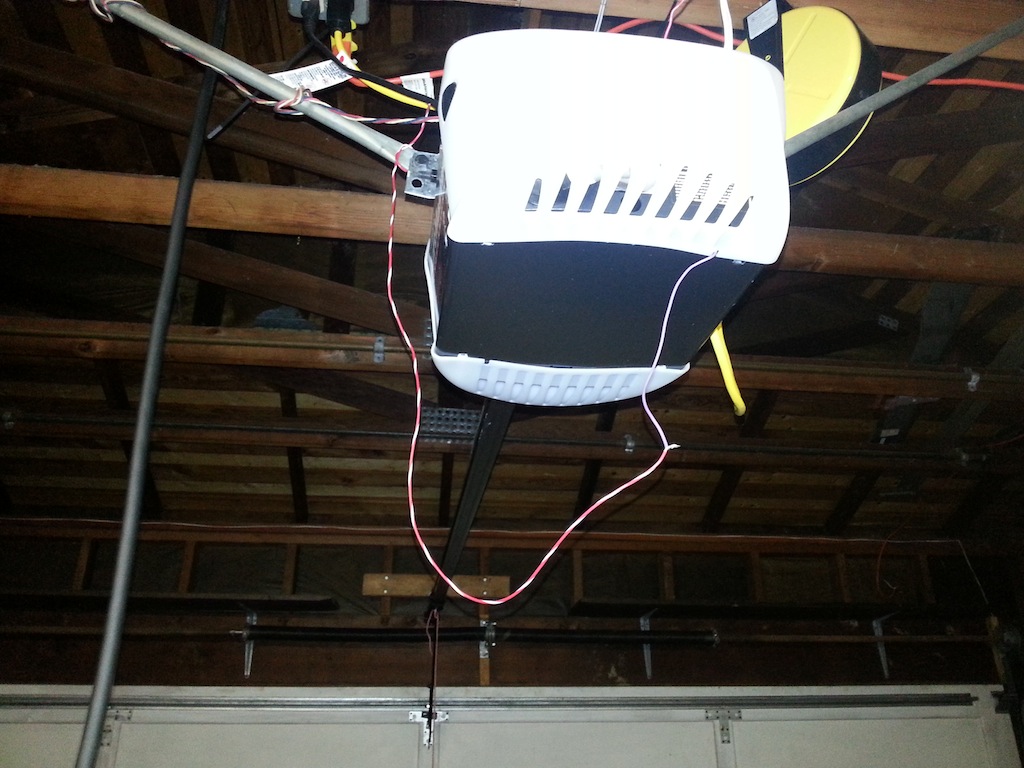 �
�
Dec 30, 2012
DrTaras Has anyone yet tried this and confirmed?
Sounds logical for the Geo-Present�
Jan 5, 2013
contaygious I'm having new issues with my home link all the sudden with 4.1. I have to point the front of the car to the garage to open it. This is problematic because I can't close the door when I drive out. I could open and close the door no problem with my other cars and even down the street it worked fine forwards or backwards so it's definitely the tesla. Any ideas?�
Jan 8, 2013
fizzazle HOMELINK issues
Not sure if anyone else was having a hard time with their homelink setup.
If you are not having luck with the homelink....open up your frunk and place the garage/gate opener in the frunk and hold down the button.
When i did this, the headlights flashed almost immediately.
Apparently the sensor is inside the frunk and sometimes the signal doesn't penetrate through the bumper from the outside. (the on screen instructions tell you to point the garage door opener directly at the bumper).
Hope that helps!�
Jan 8, 2013
efusco Nice tip!
Evan, Via Tapatalk�
Jan 9, 2013
DrTaras Thank you for the tip.
And here's a tip for you...
Join us in our local community
TESLA LA Club
We have an event on 1/26/13!�
Jan 10, 2013
napabill Bingo! And placing the remote on the floor of the Frunk helps. Hovering it didn't seem to do the trick for me.
Thanks!�
Jan 10, 2013
dailydriver Great tip - it works!�
Jan 12, 2013
ssinghal Just echoing others' comments that this does work. After getting some bizarre advice from Tesla's call centre and then the user manual, which seems to differ between the US and Canada... followed the advice to put the garage remote on the floor of the frank. I had to fiddle a bit til I realized it was supposed to be on the bumper side of the frunk, dead centre, and as you said, the lights blinked immediately. Amazing how sensitive it is to location.
My range seems to be about 80 feet for opening and closing, and 50 feet for the homelink proximity popup.�
Jan 12, 2013
Darren My Homelink menu keeps appearing and disappearing, it's so annoying. Even after I tap on the Homelink icon. It stays open for like 5 seconds and disappears. It always disappears as I'm about to press the garage button, and I end up pressing on the Navigation app. ARGH!!!!!!!!!�
Jan 13, 2013
cinergi I had jumping homelink, too. I have reason to believe the GPS location of my car was jumping around (don't ask me how I know). A reboot cleared it up.�
Jan 13, 2013
DrTaras Wait, don't you have a Roadster? It is a software button :redface:�
Jan 14, 2013
DrTaras I originally programmed my Roadster to operate 2 garage doors, but when I found out the convenience of not needing to go to a sub-menu, I deprogrammed one of them.�
Jan 15, 2013
FlasherZ I found that by parking just 30 feet away from the door, I cured my Hopping Homelink problem. My driveway essentially encircles my garage, so it would pop up, then disappear, then pop up, then disappear, then pop up again. By parking next to the third garage door and reprogramming, rather than the first door, I solved the problem and it only pops up once.�
Jan 15, 2013
steve841 Well, I for one suggest they add 100ft to the geo fence and/or offer the ability to turn the feature off.
Im in the position of having a garage door and a gate 150ft apart and the homelink pops up, disappears and is otherwise a chore as a result.....�
Jan 15, 2013
Darren +1
That's my situation. I have a gate that leads to my garages 300ft away. Not only does the Homelink menu hop around, the color of the garage buttons changes constantly from green to grey and vise-versa as i'm driving between the gate and garage. I'm just using my old-school garage opener now�
Jan 15, 2013
Lloyd I have the same gate sequence and have found it to work perfectly, no issues whatsoever. The menu comes up right before each gate. I believe that when you do your programming the car must be fully booted up for a few minutes to allow the GPS to locate your position in detail, and the car must be physically in the position that you want your menu to appear.�
Jan 27, 2013
RedSoxDoc Was horribly frustrated by programing the homelink. Thanks to this thread I finally got it to work! Opening the frunk was the key but it wasn't that simple. I started with it in the floor of the frunk and it didn't work. Then while keeping the button on the remote pressed I slowly moved it up to where the light is, then over the top edge by the latch. This is where it worked immediately. Hold it within 1-2" of the car. This was after many many tries using the directions on the display screen. Thanks for the help!�
Jan 28, 2013
mcornwell After using Homelink for a little more than a month, I've found it's pretty much useless for me.
I back into my garage, so for a great majority of the time, whether I'm pulling in or out, the nose of the car is pointed towards the street, and the signal doesn't get to my garage, and I need to grab my old remote (and roll down the window) and press the button.
I don't know if a firmware update can increase the signal strength, but if so, it would be much appreciated!�
Jan 28, 2013
ElSupreme I also back in but have not had any problems. And weirdly I only use the Homelink to open and close my garage. The wired physical button hasn't worked for 6 months and I am too lazy to fix it. My house is on the right (when coming home) so I typically pull past the driveway, then back in. My Homelink works from the street, I press it when I change from D -> R. I am maybe 50' from my garage at that point.
And the location awareness has picked up on that location and auto-dropdowns the menu when I am there. I originally programmed my Homelink sitting directly under the opener. I couldn't get a 'learn' from anywhere else.
Granted I have the garage door antennas pulled out and dangling tackily in my garage for better reception.�
Jan 28, 2013
JakeP I think I need to delete and reprogram my Homelink after 4.2, to see if it improves this behavior: When arriving home, I approach my garage door from above (driveway slopes down to garage), head-in from 90 degrees, maybe 30 feet away, and Homelink has no problem opening the door with one press of the button. When leaving, I back straight out, and must close the door at close range (nose maybe 5 feet from the door), before turning 90 degrees to head up the driveway. When closing the door during departures, Homelink starts closing the door, but stops after six inches of progress, forcing me to press the button multiple times before it "takes", and fully closes the door. I have tried pressing and holding, pressing multiple times quickly, etc.
Has anyone else experienced this stop-and-start behavior? I did all my programming from outside a closed Frunk, at close range. I may try again with new batteries in the old remote, from inside the Frunk as described in this thread.�
Jan 28, 2013
JakeP I deleted my two Homelinks, and relearned from within the trunk on 4.2...garage door now opens consistently with a single press, no more stutter-stop and multiple presses!�
Feb 7, 2013
Sousaphil Is anyone else having troubles getting a LiftMaster set up on firmware 4.2? I'm not sure what else to try!�
Feb 7, 2013
markb1 I wish the homelink menu that pops up when I approach my house was bigger target. I have to spend too much time with my eyes on the screen to hit the button.�
Feb 7, 2013
tdubb I don't have an issue with the programming, what I struggle with is the incredibly weak signal! If my garage door is open it works every time, if it is closed even if I am inches away fro the garage door it won't work. Anybody experiencing that too?�
Feb 7, 2013
rlpm Have you tried putting the existing clicker in the frunk (toward the nose cone) for the learning step? Several posts have said that got the headlights to blink confirming the code had been learned.�
Feb 7, 2013
lolachampcar Ok, followed the instructions and beat my head against the concrete driveway outside my garage for ten minutes trying to get the bleep'i't'bleep thing to program. Head hurts.
Read forum posts, open trunk with car in garage...... Done in 15 seconds.
Thanks All!�
Feb 7, 2013
Sousaphil I'll give it a shot tonight. Thanks, I was putting it further in the frunk than was appropriate.�
Feb 7, 2013
jhs_7645 Another one goes in the FAQ: 5.3 Why won't my Homelink remote pair?�
Feb 8, 2013
Sousaphil Thanks for the great tips, all. I placed the remote exactly as rlpm said above, and it worked very quickly.
Cheers!�
Feb 8, 2013
rlpm Glad to help! It's really the other great members of this forum from whom I've learned so much that you should be thanking! And my wife for putting up with me incessantly reading this forum & TM's.
I anxiously await a delivery button, giant wire transfer, and my very own frunk in which to program HomeLink devices��
Feb 9, 2013
jjaeger I'm impressed - and think it's time to update the owners manual / on-screen instructions to Frunk location. Had no issue programming my LiftMaster but no matter how many different ways i tried to get my iDrive set-up, was not successful. Gave up on that (it's an alternate door for the garage anyways) but on a whim decided to try the frunk location set-up today. Wham bam and completed on the first go. Now both doors are available to me.�
Feb 10, 2013
dsmith2189 Yes, my Homelink seems to program but when I press the saved profile to open the gate it does not work.
my building's garage uses liftmaster and have to pull out my FOB every time I enter.
We have three gates to the condo garage and they seem to program but do not activate the gate.
Also when driving on the up/down ramps above the gates my Homelink menu pops up.
Going down (each floor of the parking garage has 2 levels)...
Floor 4 ramp, popup, Floor 4A ramp, popup dissapears, Floor 3 ramp, popup, Floor 3A ramp, popup dissapears, Floor 2 ramp, popup, Floor 2A ramp, popup dissapears, Floor 1 ramp, popup.
and repeat for going up.
I have emailed [email�protected] to request they add the altitude to the GPS position programmed into the Homelink profile.
Even if I can't open the gate, at least I won't have the menu pop up reminding me of that on every floor.�
Mar 9, 2013
LuckyLuke My garage door opener works on 433 MHz band, will the Tesla homelink system work on my garage door?�
Jun 17, 2013
vbsdan Finally got Homelink working. As a last resort I found the owner's manual for the opener. When the car says to push the learn button on the opener you actually have to push the learn button twice. The opener is a LiftMaster 8360. BTW I could never get the car to learn the original remote that came with the opener. The opener uses HomeLink version 4, which is not compatible with Homelink in the Roadster, so a couple of years ago I had to get a repeater to be able to use Homelink in the Roadster. I was able to get the Model S to recognize the repeater's remote. From talking with the folks at Tesla it all should have worked with the original remote, but no dice. Anyway, it's working! On a side note, I had a little rattle in the Model S that I was having a hard time locating. Finally realized that it was one of the plastic buttons in the garage door opener. Yeah, the car is really THAT quiet.�
Jun 20, 2013
dwegmull Here are a couple of tips:
- I do agree that the menu item for the garage door opener is too small, how ever, I found that I can improve the odds of hitting it on the first try by putting my fingers on the top of the dashboard and taping the screen with my thumb.
- If you own an old opener that is still mechanically sound but does not support Homelink, you can use this receiver: Enables to use the SOMMER transmitter with openers from other manufacturers. and transmitter: The small size 2-button transmitter works with the SOMMER garage door openers.. The receiver needs a source of 24V (a low voltage landscape lighting transformer will do the trick) and can be wired in parallel with the wall mounted button of the existing opener.�
Jul 25, 2013
spleen I'm still having issues with using HomeLink when the car is backed up. The HomeLink works 90% of the time when the car is facing the garage door but less than 5% of the time when the car is being backed up to the garage, even when the rear of the car is nearly touching the garage door. Tesla Service has indicated that the HomeLink transmitter is directional and that to use it, you should have the car facing the garage door which seems a somewhat unsatisfactory answer. The problem exists with both a Raynor as well as a Liftmaster garage door opener which makes me think that it's the HomeLink transmitter in the car rather than the garage door openers.
I have tried extending the receiver wire by hooking up extra wire to it and looping it over and under the garage door opener but somewhat doubtful if it made much difference. If it's a design limitation of the current system, then it might not be able to be fixed but what I wonder is if our transmitter is somehow deficient and performance might be improved by a swapout of the transmitter module. Any thoughts from other people using the HomeLink system on the Modell S?�
Jul 26, 2013
jerry33 FWIW, I first stop when going past the driveway and press the Homelink button (I found if you don't stop, the door opens up a few inches and then stops). Then pull past the driveway and back in. This won't work if your driveway is long. If try the Homelink with the car already backed in, the success rate it low although pressing it multiple times usually works.�
Jul 26, 2013
spleen hmmm, that's a thought, using the forward facing transmitter when driving past the driveway to trigger the garage door opener and then backing in. Will give it a try the next time. That'll probably work at one location where the driveway is short but may not work well at the 2nd location where it's longer. Will have to give it a try and see how it goes, thanks for the suggestion.�
Mar 7, 2014
Daro346 Great tip
Thanks! I tried and tried to link homelink to my garage door opener with no avail. Once i opened the frunk, it worked quickly.
great tip... Tesla should update their instructions
dave�
Mar 7, 2014
JakeP I had to install a new receiver on my Tesla garage bay, and string the antenna wire outside the garage door. The Homelink could close the door, but just could not penetrate the 2" windowless garage door to open it. I don't know if I have a weak transmitter or what...but it works fine now!�
Mar 7, 2014
MarkR It took a while to get the programming right, but it's now reliable.
My frustration is that, given the small size and the location of the touchscreen, the old remote control on the visor was easier! I've noted elsewhere, the size of the button has to be larger and the location should be placed so its easy to press by feel/muscle memory without having to look for the location.�
Mar 8, 2014
jerry33 If the bezel around the display had notches, it would be easy to locate the buttons by feel.�
Aug 14, 2016
katrinka Our gate opens intermittently. The Tesla technician cannot figure out what is wrong. After reading the threads maybe placing the remote in the frunk might work. I am going to try it out. If the gate has been left open and I drive up to it it will sometimes close when I start to drive through it, having to backup quickly as to not get hit. The garage opens most of the time but not all. This is so frustrating.�
Aug 14, 2016
katrinka Our gate opens intermittently. The Tesla technician cannot figure out what is wrong. After reading the threads maybe placing the remote in the frunk might work. I am going to try it out. If the gate has been left open and I drive up to it it will sometimes close when I start to drive through it, having to backup quickly as to not get hit. The garage opens most of the time but not all. This is so frustrating.�

Không có nhận xét nào:
Đăng nhận xét