Nov 16, 2012
Rumbles Dashboard Clock / Stocks / Weather / News
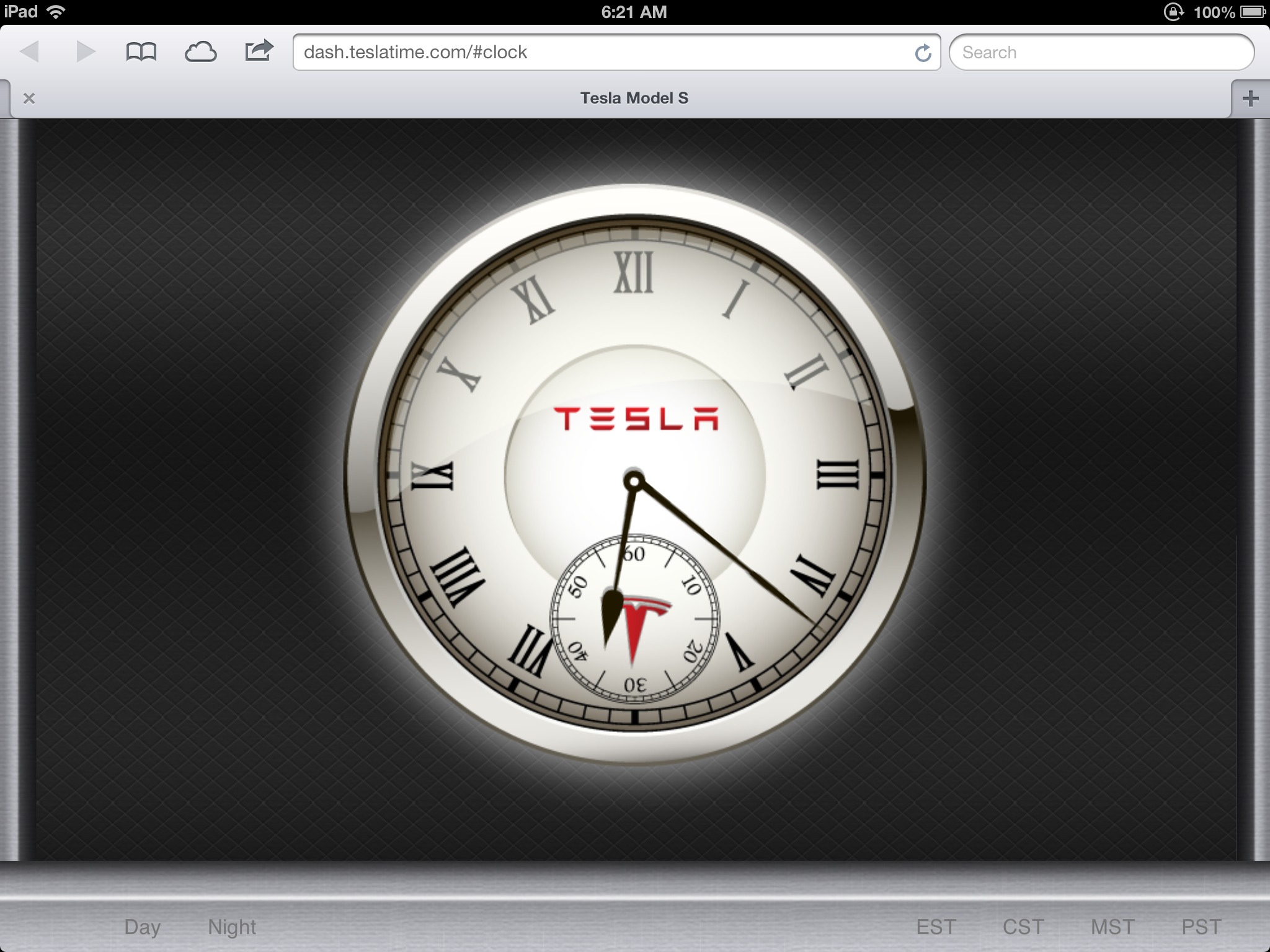
TeslaTime provides a large clock display for your dashboard. Styled to look like a first-party component of the display.
To use:
1. Using the car browser visit dash.time4tesla.com
2. Click on your timezone at the bottom.
3. Click Add to Favorites Button
Enjoy.
ps: Feedback most welcome.�
Nov 16, 2012
ElSupreme Seems pretty cool. I am not a web programmer so I don't know if you can even solve this problem. If you repeatedly change time zones you accelerate the clock. A few seconds per click.
When I refresh the clock it goes back to the correct time.
Tested on Chrome on a WinXP box (I hate my work laptop!).�
Nov 16, 2012
AnOutsider I don't have my S yet, but this is very cool rumbles. Well-designed.�
Nov 16, 2012
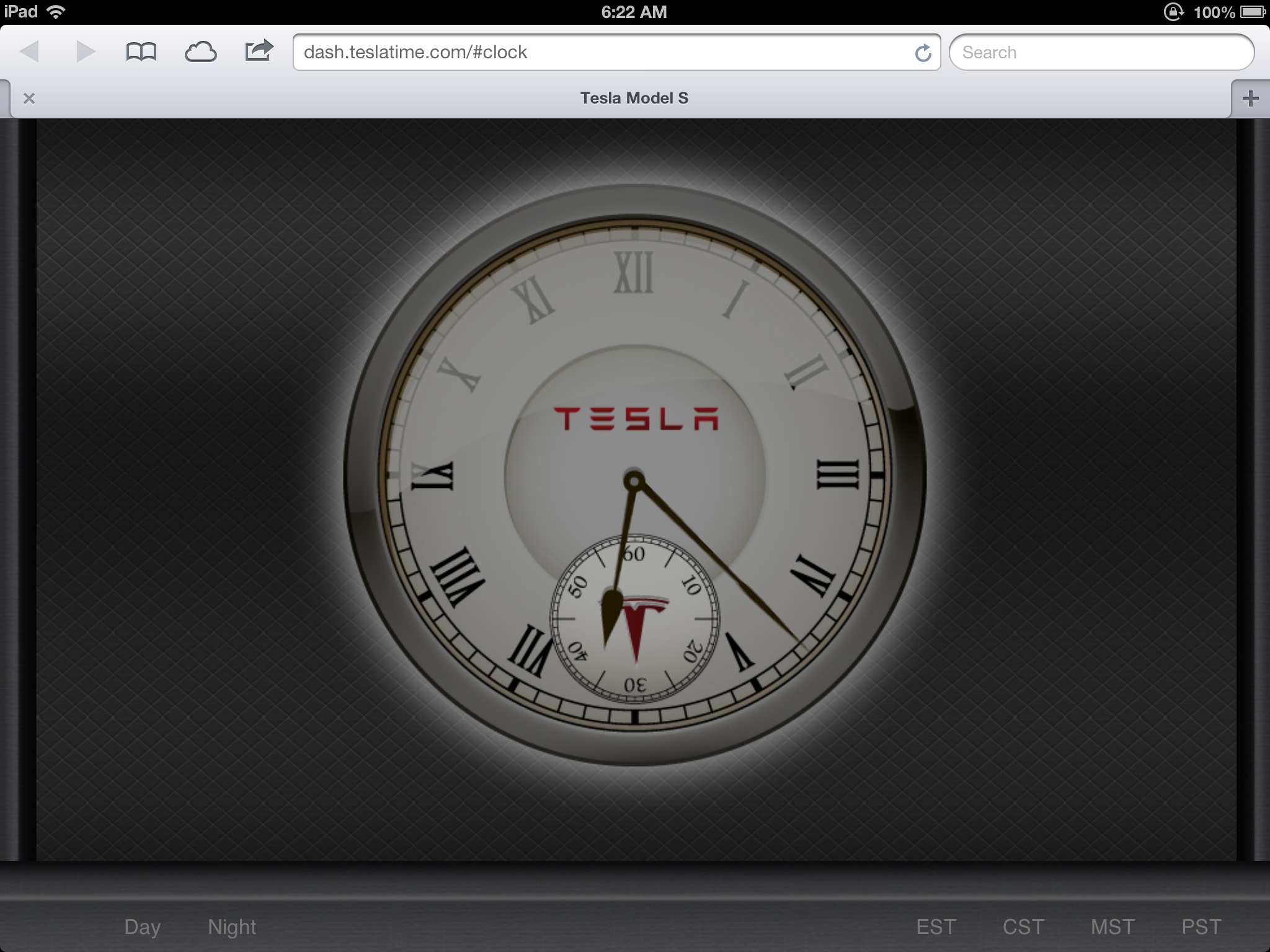
gg_got_a_tesla Very nice and classy! Thanks! Looks very good on my iPad that's a stand-in for now for a certain 17" screen.
 �
�
Nov 16, 2012
SCW-Greg Cool. Very nice clock!
But... as a brand guy, it's never a good idea to have/allow your logo to be anything other than right-side up. Diminishes the stature. Kind of like flying the flag upside-down... a no no.�
Nov 16, 2012
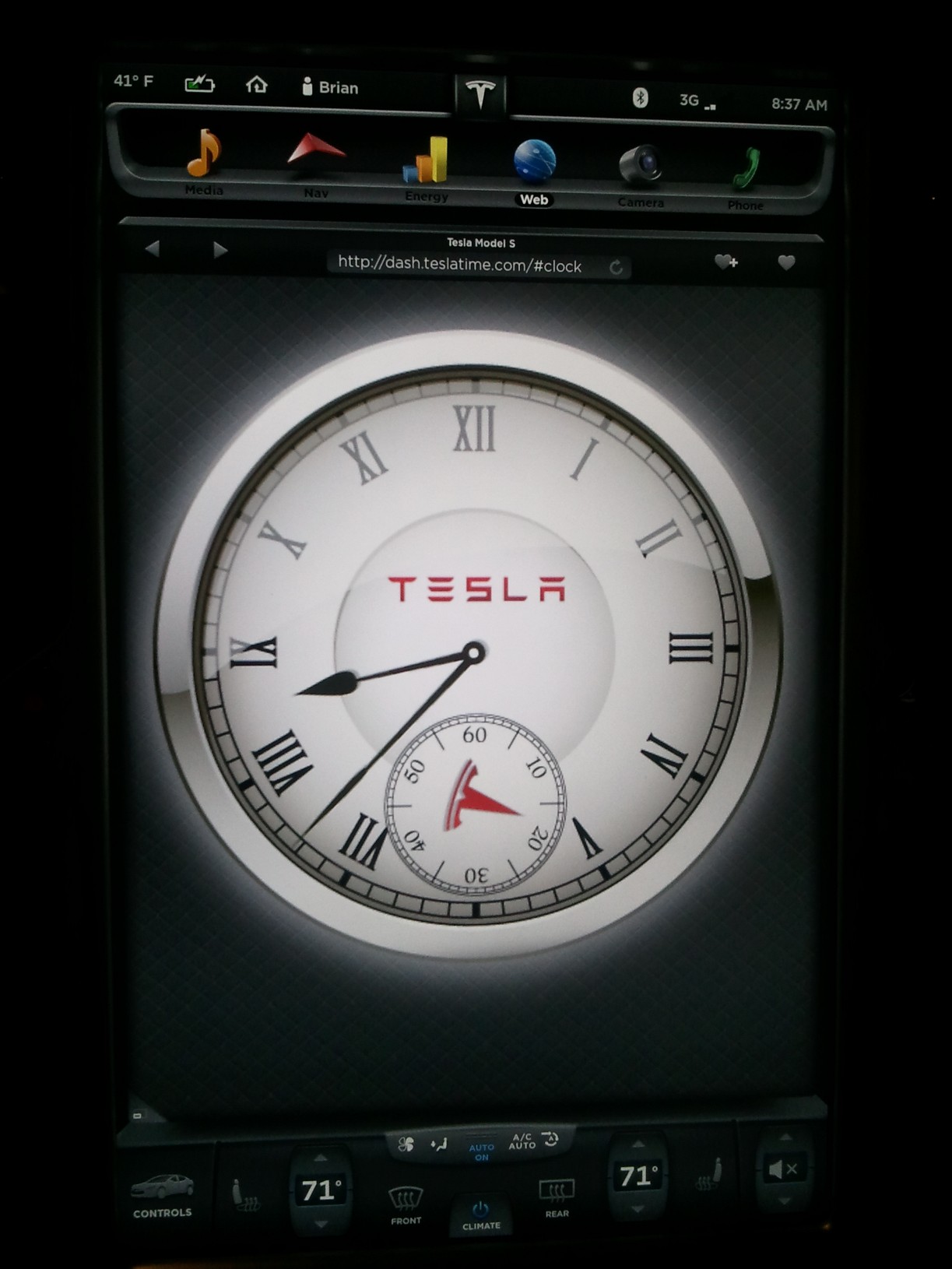
brianman It took forever to zoom and get it reasonably centered, but... here's a better picture for ya.
 �
�
Nov 16, 2012
Bearman Looks great, nice work �
�
Nov 16, 2012
stevezzzz +1 for both�
Nov 16, 2012
dpodoll Would like to see Hawaii time zone�
Nov 16, 2012
Todd Burch Rumbles: Awesome! I guess you claim the prize for the first "custom app" for the Model S! Looks great! Too bad I don't have a Model S to view it in...
How does it look if the browser view is split in half?�
Nov 16, 2012
StephRob That's very cool! Thank you! I'll definitely use it in my car.�
Nov 16, 2012
Rumbles All - Thank you for the feedback. It was a fun side project. It has made me wonder what other types of information would be well suited to presentation in this area. Ideas welcome. Note: the most obvious set of data, location is unavailable to the browser.
ElSupreme - Known bug, not sure how to prevent. Clicking reload fixes it.
SCW-Greg - I hear you but I hope Tesla doesn't agree / care deeply.
Brianman - Thank you for the up-close picture.
dpodoll - HST now included (as well as AST).
Todd Burch - Works in half-screen just fine... indeed it is optimized for that.�
Nov 16, 2012
TEG IMHO, the "killer app" will be the best charge station finder.
Perhaps something along the lines of "Plug-Share" integrated with the GPS...
Some services can tell you if a particular station is in use or not.
Having access to pictures of the site and specific details about the charging type (connector, amperage, etc.) would be great.
Being able to upload your own photos and add entries to a shared database would be great too.
It would be nice if it could show you a circle on the map with projected range so you could see which stations are reachable with your current amount of charge.
Is Tesla already doing this, or are we waiting for a 3rd party to come forward?�
Nov 16, 2012
richkae I have a similar problem, when I accelerate extremely hard, the clock seems to lose time.
My drive takes 30 minutes, but only 27 minutes passed on the Tesla web clock.
Possibly related, objects in the rear view mirror get a red hue.�
Nov 16, 2012
doug +1 for the relativistic Doppler effect.�
Nov 16, 2012
jerry33 There needs to be an NTP app.�
Nov 16, 2012
Cottonwood Now if the car just gave you access to the lat/long of the car, or its auto-dim decision, you could do the day/night decision automagicly.�
Nov 16, 2012
Robert.Boston And time zone....�
Nov 16, 2012
brianman I tried some web surfing. Apparently geolocation API is indeed not supported in the browser (yet?).�
Nov 17, 2012
jcstp I added this
Dashboard chargingstations app available (openchargemap)�
Nov 17, 2012
NigelM Tried the clock, neat! Thanks Rumbles.
Question: entered the URL yesterday afternoon and when I returned to the car a few hours later the clock had advanced only 30 minutes. It happened both times I parked the car last night. Reasons? I would have expected it to stop completely.�
Nov 17, 2012
jerry33 The clock obviously uses CPU cycles to count the seconds, and presumably when the car is off the CPU rate slows way down to conserve energy (it's my thought that the various pumps are what is causing the vampire load, not the CPUs). Only NTP (or an onboard atomic clock) will fix this problem.�
Nov 17, 2012
DrComputer I loaded the clock on the demo car at the Topanga Plaza grand opening last night. Every Tesla employee thought it was really cool and they all took out their smart phones and wrote down the URL so they could load it in all of the cars (I bookmarked it for them in this car).�
Nov 17, 2012
Rumbles DrComputer - Thank you for doing that. Great to hear it is finding an audience. Cheers.�
Nov 18, 2012
JoshG Excellent! That's consistent with Einstein's theories. Nice to know... :tongue:�
Nov 18, 2012
Johann Koeber I know somebody in Europe loves the clock. Great job. Kept me thinking about Apple having to pay millions to the owner of the Swiss train clock for copying their design.
Why not let us choose whatever timezone we want/need ? That should fix it for us europeans, but also asians, australians - and anybody else who loves the clock.�
Nov 18, 2012
richkae I actually think that it is quite possible that Petr Beckmann's theories make relativity unnecessary, but it's still fun to think that the Tesla can approach light speed and slow time.�
Nov 18, 2012
markwj Or, does the display computer sleep/suspend after N minutes of inactivity?�
Nov 18, 2012
brianman If the SDK exposes the clock information this gets a whole lot simpler.�
Nov 18, 2012
jerry33 In an earlier post is was stated that it loses time while driving, my thought is that it's the clock cycle that's reduced. No way of telling without more information though.�
Nov 20, 2012
Rumbles Dashboard Clock Update
- Full timezone support
- Night mode improved
- Better accuracy & longevity
Enjoy!�
Nov 20, 2012
robaross Tis great, but the minute hand is not quite synchronized with the seconds hand (at least in Google Chrome).�
Nov 20, 2012
Bifff67 Great App! Thanks very much. So how many hits are you getting? Can you see the IP's? I wonder if the cars are grouped in a recognizable set of IPs.�
Nov 20, 2012
Brian H Looks good on desktop too, but is now only correct after refresh; time freezes at that point. Previously second and minute hand advanced, but not the hour hand.�
Nov 27, 2012
Rumbles New Release.
The clock should now behave reliably.
[Its reluctance to keep time was due to confusion about the necessary url to use (an anchor of #clock was expected). It is now done automatically.]
Thanks for your support.
Enjoy.�
Nov 27, 2012
DaveVa Thank you!�
Jan 6, 2013
Rumbles Dashboard Clock - New & Improved
Hi guys,
Dashboard Clock, the first dashboard application for the Model S, has been updated with new functionality and improved compatibility with the 4.1 Tesla Software release. With this release, you now have:
o Analog Clock
This handsome clock was the genesis for the whole project. Like the site, the clock is designed to compliment the aesthetics of the model S interior.
o Stock Quotes
Track up to dozens of individual equities or indexes for at-a-glance updates.
o US Weather
A quick check of the weather in any US location is a tap away.
o @TeslaMotors News
Keep you finger on the Tesla community by monitoring the TeslaMotors twitter traffic.
o Be our Guest
Each module is configurable and settings can be preserved without the need to create an account or log into the site. Simply use the favorites feature of your browser and your settings will survive even when you computer restarts.
o New Site
Reflecting the expanded role of the application, the site has a new address: dash.time4tesla.com. Come visit and let us know when you think here or on Twitter at @time4tesla.
Cheers,
Rumbles�
Jan 6, 2013
Ravarju Great app! Is there a way to base the app's info on your gps location? Would be great for trips accross time zones.�
Jan 6, 2013
Rumbles @ravarju - thanks for the feedback. Unfortunately, the browser does not yet support access to your gps location. When it does, we'll be able to provide many more exciting features.�
Jan 6, 2013
Rumbles Folks,
Please take a look at the latest version now at
dash.time4tesla.com
(And the announcement post on this forum.) There have been a number of enhancements including stocks, news and weather. And, most importantly, better support for the fact that cookies are lost when the displays shut down.
Enjoy,
Rumbles�
Jan 6, 2013
bonnie Permission from Tesla to use their logo/branding?�
Jan 6, 2013
AnOutsider Oh man, this update is pretty awesome... Thanks!�
Jan 7, 2013
bbmertz Thanks for creating such a great app! I look forward to future enhancements, including a Top US News feature on the News tab. (@Rumbles, you might want to correct the typo in post #37 above, since the URL is actually dash.time4tesla.com)
Mods, I suggest making this thread a sticky, since I think that most Tesla owners would want to add this app to their Favorites on the MS web browser.�
Jan 7, 2013
kevincwelch Very nicely done!�
Jan 7, 2013
capt601 Very well done. Just hopefully tesla allows cookies to be saved in the future. As it presently is not the most user friendly having to enter stocks, weather location, etc.. In each time you get in car�
Jan 7, 2013
AnOutsider Bookmark after you add?�
Jan 8, 2013
capt601 Did that. Or do your need to do that for each page of this site. Ie. one for stocks, one for weather, one for time? I think when the car shuts down after the 2 hours, it loses cookies and will not save the changes.�
Jan 8, 2013
JoshG love it! Great job.
The cookies problem with Tesla's browser is a major annoyance and it means that this app doesnt remember your timezone, stocks, etc.
So is there any way that this awesome dashboard webapp page can have URL modifiers or parameters that specify timezone, stocks, and weather city?
Something like
If the code can be modified to take a URL like that, then we can get around waiting for Tesla to support cookies after screen shutdown.HTML:http://dash.time4tesla.com/?timezone=USPacific?WeatherCity=95070?Stocks=AAPL+GOOG+NFLX+TSLA+AMZN
If that URL functioned properly, bookmarking it will save all your parameters. Not ideal, I know, but at least it would function properly.
Thanks, by the way... the design and layout are GREAT!�
Jan 8, 2013
Robert.Boston Beautiful app -- thanks. Could it switch from day/night mode automatically? It does, after all, know the time.�
Jan 13, 2013
Rumbles All - Yours setting are now truly saved. You'll need to make a new bookmark (aka favorite) because we now provide and unique id for you when you go to dashtime4tesla.com. No logging in is required, just favorite the address with the s=xxxxx ending.�
Jan 13, 2013
TheAustin Yay, thanks! Also...What happened to the TeslaTime URL...I liked that one better (There's something about the 4 that always jumps out at me, in a distracting way).
�
Jan 14, 2013
brianman Feature request: Keep your OP current w/r/t the URL. Thanks.�
Jan 14, 2013
Rumbles @brianman - can you expand on that? I am not sure I understand...�
Jan 14, 2013
Brian H Edit the OP (Original Post) to update the URL for your latest version, each time you change it.�
Jan 14, 2013
Rumbles @TheAustin - dash.teslatime.com now works as well. Cheers, Rumbles�
Jan 14, 2013
brianman Step one of the OP (original post) of this thread lists "dash.teslatime.com" as the URL in step 1. I was under the impression that the current/updated URL is something else. I was suggesting that each time the URL is updated that the original post be updated to match. Keeps lazy people like me from having to search through the thread to find the latest URL to use.�
Jan 14, 2013
Rumbles @brianman - ah... didn't get the OP abbreviation. Now done.�
Jan 14, 2013
efxjim I find it hard to press the little buttons on the bottom (middle of screen) of the window. If driving my hand bounces around. Is it possible to put them on the right of the screen so I can stabilize my hand on the side of the screen before selecting a button?�
Jan 15, 2013
Rumbles @efxjim - The target is actually much bigger than it appears. Try tapping higher on the link... the whole gray area (even the part that seems to recede) is active...�
Jan 15, 2013
efxjim Good to know.�
Jan 27, 2013
Rumbles Time4Tesla Dashboard App Update
Hi folks,
A quick heads up that dash.time4tesla.com has been updated:
1. The weather app now includes a radar map (US)
2. The stocks app now provides links to detailed charts et al from Google.
Enjoy,
Rumbles�
Jan 27, 2013
SCW-Greg Do you plan on offering perhaps half a dozen different skins? Or make an SDK on graphic sizes so that others may submit new ones to you? That would be cool. You know me... I'd change that second hand.�
Jan 27, 2013
jbherman This is great and continues to get better! Thanks!�
Jan 27, 2013
SuperCoug I'm excited to see this app but it appears to be down at the moment. I'm getting an error at dash.time4tesla.com Is that what everybody else is seeing?�
Jan 27, 2013
ibcs Love the new radar option. Whoever is responsible for the website rocks!�
Jan 27, 2013
Rumbles @SuperCoug - Sorry for the troubles. You should be all set now.
@ibcs - Glad you are enjoying it. What are we missing?
Cheers,
Rumbles�
Jan 27, 2013
ibcs An automatic refresh for the stock page. Don't know if it's possible, but when driving during the day I like to keep track of Tesla and Solar City via your web site.�
Jan 27, 2013
JoshG I'm loving it as well. While I guess the Tesla News page is interesting to some, do you have plans for a "real" news page? Maybe rename your current news to "Tesla News" and set up another "News" page with headlines from a few top sources?�
Jan 28, 2013
Rumbles @ibcs - Good suggestion. I have been wrestling with having things update automatically and be potentially distracting rather than asking the user to update. Any thoughts? In the meantime, you can just touch 'stocks' again to have it update...
@JoshG � Understood. What would be your top three news sources?�
Jan 28, 2013
jbherman How about the Duke Chronicle, Duke Basketball Report, etc. (Just a little Chapel Hill dig :tongue
CNN would be my news outlet of choice (I'd say MSNBC, but I don't want to give away my politics...guess I just did!).�
Jan 28, 2013
napabill I's go with
NPR News (News: U.S. and World News Headlines : NPR)
Wall Street Journal�
Jan 28, 2013
JoshG I like NYtimes, WSJ, and USAToday.
But since you're unlikely to please everyone, maybe in phase two make it configurable?�
Feb 4, 2013
bbmertz @Rumbles, I shared your dashboard website with several MS owners at a local high school EV event last weekend. They thought it was very cool and immediately added it to their screen favorites.
Regarding news sites, I vote for USA Today. Thanks again for your work on this!�
Feb 6, 2013
SSher Looks great on the half browser window. I use it all the time. Also, check out the flux capacitor:
http://www.gumbas.com/flux2�
Feb 14, 2013
jvwinden Doe anyone know when it will be possible to get access to some kind of API/Toolkit to develop custom apps which can be lanched on the dashboard itself?
- - - Updated - - -
Doe anyone know when it will be possible to get access to some kind of API/Toolkit to develop custom apps which can be lanched on the dashboard itself?�
Feb 14, 2013
brianman This was announced previously (in 2011, IIRC) but I haven't heard anything about it from Tesla since deliveries began.�
Feb 16, 2013
jerry33 What i recall is that at the time it was stated it would be at least a year after deliveries start before this would be enabled. I'd start the first year count at the start of the 400 cars-per-week-deliveries rather than at the time the very first were delivered to customers.�
Feb 16, 2013
William13 I doubt that the API toolkit will ever be released. Too much room for mischief. Just look at the trouble from NYT article by someone who wanted to cause controversy. The sim card or API toolkit would likely allow easy hacking and make the car a 4700 pound weapon.�
Feb 16, 2013
brianman I've always assumed their intent was not to allow the API to interact with driving mechanics of the vehicle (such as acceleration, regen, or braking) but rather to allow for media, charging station info, etc. Right on the "hm" line for me is stuff like panaromic roof positioning.�
Mar 20, 2013
TXjak Anyone noticed a problem with the clock since the time change? The time4tesla clock is one hour behind in my Model S. The time displayed at the top of the screen is correct.�
Mar 20, 2013
ZBB I just tried this out... Nice!
But I found a bug. The "America/Phoenix" time zone setting just refers to regular Mountain time. Doesn't take into account that Arizona does not use Daylight Saving Time. The rest of the Mountain time zone is now on MDT -- but AZ stays on MST (ie same time as CA)...�
Mar 23, 2013
Elshout You are demonstrating the effects of Einstein's Theory of Relativity.�
Apr 4, 2013
boerlin Hi Rumbles
Is it possible that you don't limit the weather forecast for US only? We are getting hopefully soon our MS here over the atlantic ocean (Europe) and would love to use your app.
Beside I love your design (simple and clear).
Stevie�
Apr 4, 2013
mknox Yep. Now that I have my Model S I find my watch is a bit out by the time I get to work :tongue:
- - - Updated - - -
...Canada would be nice, too.�
Apr 22, 2013
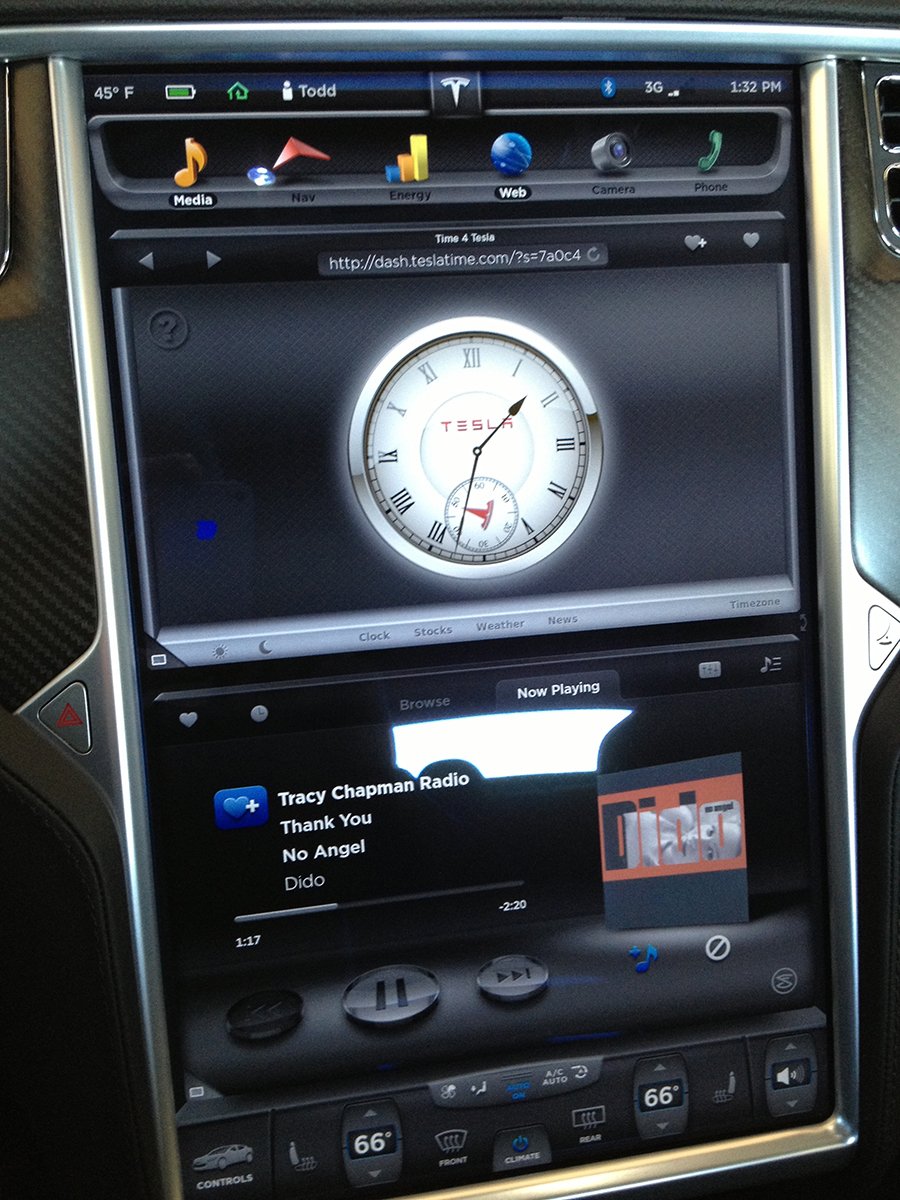
ToddRLockwood Elegant.
 �
�
Apr 23, 2013
TheAustin The TeslaTime site is an hour behind...The Time4Tesla site is displaying the correct time. Unfortunately for me, I have all of my favorites set in the TelsaTime version!
Knock-knock, Rumbles...Any chance you can fix that? Thanks in advance�
Apr 23, 2013
kevincwelch Hmmm. Dido... :wink:�
Apr 25, 2013
Aussie I really like this, what a great idea. What would be even better is a flip clock design which would look much nicer in the context of a modern car. This is not an Oldsmobile after all.�
May 16, 2013
dyoreo Great clock.... Thanks!!�
May 16, 2013
RNG Really like the both the clock and the weather. My preference in the elegant Tesla S is the purity and elegance of the analog clock.
Especially since the digital time in both locations on the Tesla displays are a distraction to the driver (at least me) since they can barely be seen.
Creative, well designed! Kudos!�
Jun 28, 2013
Akikiki Rumbles, We could surely us a monthly or weekly option calendar on time4tesla.com It would be great if we could post events to it, but at the very least, just being able to bring up the view of the current month and advance forward a month or too, would be a real bonus. I really don't like having to reach over and do this on my iphone in the car, because we are not permitted to hold or use an electronic device in our hands while driving in Hawaii. Request you give this your consideration as the next add on to time4tesla.com
thanks�
Jun 28, 2013
Ven Rala I love the simple and elegant design. I also really like the weather and stocks(to keep track of TSLA of course). I think it is perfect just the way it is. Once you add a lot of extras the beauty of the simplicity is gone. Great job on the site!�
Dec 14, 2013
robaross After last update my background changed from carbon fiber to silver. Any way to change it back?�
Jan 11, 2014
nhajjar Tesla Model S browser pixel dimensions
Love your clock.
Here's a question. I am designing a simple slideshow app for the 17" monitor and am having a devil of a time figuring out the precise pixel dimensions of the "browsable" portion of the screen in full mode (ie, with the browser active on the top and bottom, minus the right hand slider and url entry area, and minus the top and bottom nav bars.) I figure you must have calculated it somewhere on the road to creating your clock.
Any help (or anyone else!) can provide will be greatly appreciated.
Norman�
Jan 12, 2014
brianman Screen: 1200x1920
Browser: 1160x1370
Touchscreen manufacturer and resoution�
Aug 15, 2014
Larry93428 Rumbles, Thank you for the clock and display.
Looks great, well done!
Thanks again,
~Larry in Lancaster, Ca�

Không có nhận xét nào:
Đăng nhận xét